Augmented reality has spent years trapped between science‑fiction promises and clunky demos, which is why many people still associate it with gimmicks rather than daily usefulness. But quietly, AR has crossed an important threshold: it now solves small, frequent problems on devices people already wear or carry. That shift—from spectacle to utility—is why AR suddenly matters.
If you own a smartwatch, use a smartphone camera, or rely on navigation apps, you’re likely using AR already, even if you don’t label it that way. Instead of bulky headsets and empty virtual worlds, today’s AR appears as subtle overlays, spatial guidance, and contextual information layered onto the real world. This article focuses on those grounded, practical uses that exist right now, not hypothetical futures.
What follows is a tour through how AR is being deployed today across wearables, phones, and emerging smart glasses, with clear benefits and honest limitations. The goal is to help you recognize where AR genuinely improves daily life, where it still struggles, and why this moment feels different from past hype cycles.
AR stopped waiting for perfect hardware
Earlier generations of AR depended on headsets that were expensive, uncomfortable, and socially awkward to wear outside controlled environments. Battery life, heat management, limited fields of view, and weak software ecosystems kept AR stuck in demos rather than daily routines. The technology worked, but not well enough to justify friction.
🏆 #1 Best Overall
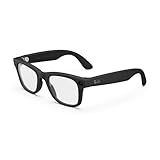
- #1 SELLING AI GLASSES - Tap into iconic style for men and women, and advanced technology with the newest generation of Ray-Ban Meta glasses. Capture photos and videos, listen to music, make hands-free calls or ask Meta AI questions on-the-go.
- UP TO 8 HOURS OF BATTERY LIFE - On a full charge, these smart AI glasses can last 2x longer than previous generations, up to 8 hours with moderate use. Plus, each pair comes with a charging case that provides up to 48 hours of charging on-the-go.
- 3K ULTRA HD: RECORD SHARP VIDEOS WITH RICH DETAIL - Capture photos and videos hands-free with an ultra-wide 12 MP camera. With improved 3K ultra HD video resolution you can record sharp, vibrant memories while staying in the moment.
- LISTEN WITH OPEN-EAR AUDIO — Listen to music and more with discreet open-ear speakers that deliver rich, quality audio without blocking out conversations or the ambient noises around you.
- ASK YOUR GLASSES ANYTHING WITH META AI - Chat with Meta AI to get suggestions, answers and reminders straight from your smart AI glasses.
Today’s AR piggybacks on mature hardware: smartphones with depth sensors, smartwatches with always-on displays, and lighter smart glasses designed for short, frequent interactions. Even modest processors can handle spatial mapping when the experience is tightly focused, which is why navigation arrows, object labels, and measurement tools now feel instant rather than experimental. AR no longer needs to be immersive to be useful.
This shift mirrors what happened with early smartwatches. The breakthrough wasn’t flashy apps, but small, reliable functions like notifications, fitness tracking, and glanceable data that fit naturally into daily wear.
Wearables turned AR into a glanceable experience
The most successful AR experiences today respect attention, battery life, and comfort. On wearables, that means information appears briefly, solves a problem, and disappears without demanding prolonged focus. Smart glasses offering turn-by-turn arrows or smartwatch-based AR navigation cues exemplify this approach.
Unlike phones, wearables benefit from proximity and persistence. A smartwatch that vibrates and shows directional prompts reduces the need to constantly look down at a screen, while smart glasses can overlay information without occupying your hands. These experiences are not cinematic, but they are genuinely helpful.
Comfort and usability still matter. Lightweight frames, balanced weight distribution, and enough battery life to last a full day are what make AR viable outside controlled demos. When those basics are met, AR stops feeling like a novelty and starts behaving like infrastructure.
Software finally caught up with real-world behavior
Modern AR software is designed around short sessions and imperfect conditions. Developers now assume users are walking, multitasking, or dealing with glare, motion, and interruptions. That realism has dramatically improved reliability.
Instead of persistent virtual worlds, most consumer AR today is task-based: previewing furniture placement, identifying landmarks, guiding workouts, or assisting repairs. These use cases work because they require minimal calibration and tolerate errors without breaking the experience. If tracking slips briefly, the task still gets done.
This pragmatic approach mirrors successful smartwatch apps, where accuracy, speed, and clarity matter more than visual complexity. AR’s usefulness is now measured by whether it saves time or reduces friction, not whether it looks impressive.
AR became invisible—and that’s the point
The most important sign that AR matters now is that it’s fading into the background. When AR works well, users stop thinking about the technology and focus on the outcome: finding a location, fixing a problem, or understanding their surroundings faster. That invisibility is a feature, not a failure.
We’re no longer waiting for a single device to define augmented reality. Instead, AR is spreading across watches, phones, cars, and early smart glasses, each handling what they do best. This fragmented but practical ecosystem is why AR adoption is finally sticking.
The next sections break down where this is happening in the real world today, showing exactly how AR is being used—and why those uses are worth paying attention to now, not years from now.
Navigation & Wayfinding: AR Directions on Phones, Dashboards, and Smart Glasses
Navigation is where augmented reality quietly crossed from “interesting demo” to everyday utility. Finding your way through a city, a complex building, or even a parking garage is a universal problem, and AR solves it by anchoring directions to the real world instead of abstract maps.
This is also a use case that fits perfectly with the “invisible AR” idea from the previous section. When navigation works well, you stop thinking about AR entirely and just follow where it tells you to go.
AR walking directions on smartphones
The most widespread AR navigation today lives on phones, not headsets. Google Maps Live View, Apple Maps’ AR walking directions, and similar tools use the phone’s camera to overlay arrows, street names, and destination markers directly onto what you’re seeing.
Instead of interpreting a blue dot on a map, you get large, anchored arrows pointing down the correct street or toward the right building entrance. This is especially useful in dense urban areas where GPS drift and tall buildings make traditional navigation confusing.
These systems rely on a mix of GPS, visual landmarks, and motion sensors, which is why they tend to work best in well-mapped city centers. They are not perfect, but even brief AR cues at the start of a walk can dramatically reduce wrong turns and backtracking.
Smartwatch navigation as a low-friction companion
Smartwatches don’t usually display full AR visuals, but they play a critical supporting role in AR-assisted navigation. Devices like the Apple Watch, Samsung Galaxy Watch, and Garmin’s outdoor watches provide haptic turn-by-turn guidance that pairs naturally with phone-based AR.
A vibration on the wrist replaces constant screen-checking, which matters for safety and comfort during walking or cycling. Battery life also holds up better here, since the watch is only handling directions and feedback rather than camera processing.
This mirrors how good watch design prioritizes wearability over spectacle. Lightweight cases, balanced straps, and clear haptics make navigation guidance something you feel rather than stare at, which fits seamlessly into daily movement.
AR navigation inside cars and on dashboards
AR has also started appearing in vehicles, where navigation errors are costly and distracting. Head-up displays from brands like BMW, Mercedes-Benz, and Hyundai project arrows, lane guidance, and distance markers directly onto the windshield.
Instead of glancing down at a screen, drivers see guidance aligned with the road itself. This reduces cognitive load and shortens the time your eyes are off traffic, which is why automakers are investing heavily here.
The limitation is cost and availability. These systems are currently tied to higher-end trims or newer models, but as display hardware becomes cheaper, AR-assisted navigation is likely to spread quickly across mainstream vehicles.
Early smart glasses: promising, but still transitional
Smart glasses represent the most intuitive form of AR navigation, but also the most constrained. Devices like Ray-Ban Meta Smart Glasses and other early consumer models can deliver audio cues or simple visual prompts, but full visual navigation overlays remain limited.
Battery life, brightness, and field of view are the main bottlenecks. Lightweight frames are comfortable for all-day wear, but they restrict how much information can be displayed without causing fatigue or distraction.
Still, even basic guidance like “turn left in 20 meters” delivered in your line of sight or through directional audio hints at what’s coming. As displays improve and power efficiency increases, navigation is likely to be one of the first features that truly justifies wearing smart glasses daily.
Indoor wayfinding: malls, airports, and campuses
One of the most practical AR navigation uses happens indoors, where GPS fails entirely. Airports, hospitals, shopping centers, and university campuses are using AR wayfinding apps to guide visitors through complex spaces.
By recognizing visual markers or using indoor mapping data, these apps overlay arrows on hallways, floors, and signage. This reduces reliance on static maps and human staff, while lowering frustration for first-time visitors.
The experience is often time-limited and task-specific, which plays to AR’s strengths. You open the app, get where you need to go, and close it, without needing perfect tracking or persistent visuals.
Why AR navigation works when other AR ideas struggle
Navigation succeeds because it solves a real problem with minimal friction. You don’t need to learn new gestures, customize environments, or tolerate long setup times.
It also respects attention. AR directions appear only when needed, then disappear, aligning with how people already use watches, phones, and cars. That restraint is why this category has scaled faster than more ambitious AR visions.
As hardware improves, AR navigation won’t suddenly look futuristic. It will just get quieter, faster, and harder to notice, which is exactly why it’s already one of the most successful real-world uses of augmented reality today.
Fitness, Training & Sports Coaching: Real-Time AR Feedback for Better Performance
If navigation works because AR stays out of the way until it’s needed, fitness is where AR earns its keep by being constantly present but quietly helpful. Training is already data-heavy, and AR’s role isn’t to add more numbers, but to surface the right feedback at the exact moment it can change your movement.
This is where smartwatches, phones, and emerging smart glasses converge. The goal isn’t spectacle, but better form, pacing, and consistency without breaking focus or forcing you to check a screen mid-workout.
Form correction during strength and bodyweight training
One of the most mature AR fitness uses today is real-time form feedback during strength training. Using a phone camera, tablet, or headset, apps track joint angles and movement patterns, then overlay visual guides showing depth, alignment, and range of motion.
Instead of reviewing a video after your set, you see corrections as you move. A squat might show a virtual depth line, or shoulder alignment cues that turn red when your form breaks down.
This is especially valuable for home training, where mirrors and in-person coaching aren’t always available. It’s not perfect, but it meaningfully reduces common errors like shallow reps, knee collapse, or rounded backs.
Smart glasses for heads-up workout metrics
Smart glasses take a different approach by minimizing distraction rather than analyzing movement. Products like Vuzix and enterprise-focused headsets, along with early consumer experiments, display basic workout metrics in your peripheral vision.
For runners and cyclists, this can mean pace, heart rate zones, lap splits, or cadence without glancing at a watch. That may sound minor, but maintaining posture and awareness during high-intensity sessions matters.
Battery life and brightness still limit how much data makes sense on-glass. Most current implementations stick to a few high-contrast metrics, which aligns well with how athletes already rely on glanceable watch displays.
AR pacing and race strategy for runners and cyclists
Pacing is one area where AR offers a genuine performance edge. Instead of chasing numbers, athletes can follow a virtual pacer line or speed marker anchored to their environment.
Some apps project a ghost runner or target zone that adjusts based on terrain and fatigue data from wearables. Cyclists can see power or effort targets aligned with climbs and descents in real time.
This shifts training from reactive to proactive. You don’t analyze what went wrong after the session, you adjust during it, when it still matters.
Team sports and skills training overlays
In team sports and skill-based training, AR is already being used to visualize positioning, timing, and decision-making. Football, basketball, and soccer academies use AR drills that overlay ideal movement paths, spacing zones, or reaction cues.
A quarterback can see virtual receivers’ routes. A basketball player can practice shot timing with release indicators and defensive pressure simulations.
These systems are often tablet- or headset-based rather than wearable, but the principle is the same. AR compresses learning by making abstract coaching instructions immediately visible.
Recovery, rehab, and injury prevention
Outside of performance, AR is increasingly used in physical therapy and guided recovery. Rehab exercises benefit from precise movement, and AR helps ensure patients stay within safe ranges.
Rank #2
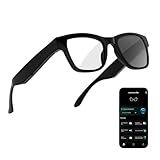
- 3-in-1 AI Glasses: Enjoy ① AI Voice Assistant (Powered by ChatGPT, Gemini & Deepseek), ② Stylish Photochromic Lenses Glasses, and ③ Bluetooth Open-Back Headphones, all in one.
- Free Talk Translation: Automatically detects and translates over 160 languages in real-time, allowing seamless work and translation without touching your phone or glasses.
- Voice, Video & Photo Translation: Supports over 98% of global languages, offering fast and accurate translations—ideal for international travel, business meetings, or cross-cultural communication.
- AI Meeting Assistant: Converts recordings from smart glasses into text and generates mind maps, making it easier to capture and organize meeting insights.
- Long Battery Life, Bluetooth 5.4 & Eye Protection: Up to 10 hours of music and 8 hours of talk time, with easy Type-C charging. Bluetooth 5.4 ensures stronger, stable connections, while photochromic lenses block UV rays and blue light, protecting your eyes in any environment.
Visual cues can show how far to lift a limb or when to slow down. For wearables, this pairs well with smartwatch sensors tracking heart rate variability, mobility trends, and session consistency.
The result is better adherence and fewer setbacks. Patients feel more confident performing exercises at home, reducing the need for constant in-person supervision.
Where AR fitness still falls short
Despite real progress, AR fitness isn’t magic. Camera-based tracking struggles in low light or crowded spaces, and smart glasses still face comfort and battery trade-offs during long sessions.
There’s also the risk of cognitive overload. Too many visual cues can distract rather than help, especially during complex or high-speed movements.
The best systems today are intentionally restrained. They surface one or two critical insights, then get out of the way.
Why AR fitness is already practical today
Fitness works as an AR use case because it fits naturally into how people already train. Sessions are time-bound, goal-oriented, and repeatable, which makes setup friction acceptable.
Most importantly, the feedback is actionable. When AR tells you to slow down, adjust your stance, or hold pace, you can immediately feel the difference.
Like navigation, AR in fitness doesn’t need to look futuristic to be effective. It just needs to be accurate, comfortable, and reliable, and in many gyms, homes, and training fields today, it already is.
Retail Try‑Before‑You‑Buy: AR Shopping for Watches, Fashion, Furniture, and More
Just as AR improves fitness by turning abstract advice into immediate visual feedback, it’s doing something similar in retail. Shopping decisions often fail at the imagination step, and AR removes that guesswork by showing products in context, on your body or in your space, before money changes hands.
This isn’t experimental lab tech. It’s already embedded in smartphone apps, web browsers, and increasingly in wearable ecosystems that people use daily.
Watches on the wrist, not on a white background
Watches are one of the hardest products to judge online because dimensions, lug shape, and case thickness rarely translate from spec sheets. AR try-on tools now let you see a watch scaled correctly on your wrist using your phone camera, accounting for case diameter, lug-to-lug length, and strap width.
Apple’s Watch Studio is the most mainstream example, allowing buyers to preview case sizes, finishes, and bands on their own arm. For smartwatches, this helps answer practical questions about comfort, wrist coverage, and how a larger case might affect daily wear or typing on a laptop.
Luxury and enthusiast-focused platforms are starting to follow. Some retailers and marketplaces are experimenting with AR previews that show bracelet taper, case height, and how polished versus brushed surfaces catch light in real environments, not studio lighting.
Why AR matters specifically for watch buying
A watch’s real-world wearability depends on more than movement quality or brand prestige. Thickness affects cuff fit, lug curvature affects comfort, and dial size can feel very different depending on wrist shape and strap choice.
AR doesn’t replace handling a watch in person, but it dramatically narrows the field. Buyers are less likely to order a 42mm case expecting subtlety or underestimate how a blocky smartwatch might feel during all-day wear.
This is especially valuable for buyers comparing mechanical watches to smartwatches, where trade-offs include weight, sensor bumps, battery size, and how the watch sits during workouts or sleep tracking.
Fashion and accessories: fit, proportion, and confidence
Beyond watches, AR is now common for eyewear, sneakers, hats, and jewelry. Glasses brands use face-tracking to show frame width, bridge fit, and lens size relative to facial features, reducing returns caused by poor fit or discomfort.
Sneaker and apparel brands use AR to preview colorways and silhouettes on the body, even if fabric drape and texture still require imagination. For wearables, this often extends to showing how earbuds sit in the ear or how fitness bands wrap around different wrist sizes.
The psychological effect matters too. Seeing an item on yourself increases purchase confidence, especially for higher-priced or style-driven products where hesitation often kills the sale.
Furniture and the leap from product to environment
Furniture was one of the first AR retail success stories, and it remains one of the clearest demonstrations of AR’s value. Apps like IKEA Place let users drop true-to-scale sofas, tables, or shelving into a room, checking proportions, clearance, and color compatibility instantly.
This reduces not only returns but also decision fatigue. Buyers can quickly eliminate options that block walkways, overpower a space, or clash with existing décor.
The same principle is now expanding into home office gear, lighting, and even fitness equipment, where knowing how something fits into a real room matters more than marketing photos.
Where AR retail still struggles
AR try-ons depend heavily on camera quality, lighting, and accurate scaling. Wrist-based AR can misjudge proportions if the camera angle is off, and reflective materials like polished steel or sapphire don’t always render realistically.
There’s also a data gap. Many watch brands still lack precise 3D models that capture case curvature, bezel height, and bracelet articulation accurately enough for convincing previews.
Finally, AR can’t convey tactile elements. Weight, clasp feel, bezel action, and strap stiffness remain unknowns until the product is worn in real life.
Why AR shopping works right now
Retail AR succeeds because it fits naturally into how people already shop. It runs on devices they own, takes seconds to use, and answers specific, practical questions.
Like AR in fitness, the best retail experiences are restrained. They focus on scale, fit, and context, then step aside.
For watches, wearables, and everyday products, AR doesn’t promise perfection. It simply reduces uncertainty, and in modern online retail, that alone is a meaningful upgrade.
Smart Maintenance & Repair: Hands‑Free AR Guidance for Technicians and DIY Users
If AR shopping reduces uncertainty before you buy, AR maintenance reduces uncertainty after something breaks. Instead of guessing, scrolling through PDFs, or pausing mid-task to watch a video, augmented reality can now place instructions directly onto the object you’re repairing.
This is one of the least flashy but most immediately useful applications of AR today. It’s already deployed in factories, service centers, and increasingly in homes, powered by smart glasses, phones, and even companion smartwatch controls.
What AR maintenance looks like in the real world
In practice, AR maintenance overlays step-by-step guidance onto real equipment. A technician looking at an industrial motor, HVAC unit, or server rack can see highlighted components, arrows pointing to fasteners, torque values floating next to bolts, and warnings if a step is skipped.
Platforms like PTC Vuforia, Microsoft Dynamics 365 Guides, and Scope AR are already used by manufacturers, airlines, and utilities. These systems don’t replace expertise, but they dramatically reduce errors, onboarding time, and reliance on memory under pressure.
The key advantage is hands-free operation. With smart glasses like HoloLens, Magic Leap, or emerging lightweight AR wearables, instructions stay visible while both hands remain on the task.
Why smart glasses matter more than phones here
Phone-based AR can work for basic guidance, but maintenance is where wearables start to justify themselves. Holding a phone while handling tools is awkward, unsafe, and often impractical.
Smart glasses keep the field of view clear while still allowing voice commands, gesture controls, or smartwatch inputs to advance steps. Battery life matters more than raw performance here, and many enterprise AR glasses prioritize multi-hour runtime, balanced weight, and durable frames over flashy visuals.
Comfort is also critical. Devices used for maintenance are typically worn for entire shifts, so weight distribution, heat management, and stable fit matter far more than display resolution.
Remote expert assistance in real time
One of the most valuable AR maintenance features is remote collaboration. A junior technician can stream their view to a remote expert, who then draws annotations directly into the technician’s field of vision.
Instead of saying “the second cable from the left,” the expert can circle the exact connector, mark the correct orientation, or flag a dangerous component. This is already used in medical equipment servicing, wind turbine maintenance, and automotive diagnostics.
For companies, this reduces travel costs and downtime. For technicians, it shortens the gap between training and competence without increasing risk.
AR repair is quietly entering the home
While enterprise use leads the way, consumer-facing AR repair is no longer hypothetical. Apps from appliance manufacturers now guide users through filter replacements, basic fault checks, and part identification using phone cameras.
Some electronics brands are experimenting with AR-assisted teardowns that show screw locations, cable routing, and reassembly order. For DIY users, this reduces the fear of opening a device and making a mistake that can’t be undone.
Wearables play a supporting role here. Smartwatches can act as remote controls for AR instructions, display step confirmations, timers, or safety alerts, and reduce the need to interact with a phone mid-repair.
Implications for watch and wearable servicing
AR has clear potential in watch maintenance, even if it’s still niche. Mechanical movements involve layered components, tight tolerances, and strict assembly order, all areas where visual guidance can help trainees and hobbyists.
In professional settings, AR could overlay exploded views of a movement, lubrication points, torque values for casebacks, or gasket placement reminders. For smartwatches, AR guidance already helps with battery replacements, screen removal, and water-seal checks.
This won’t replace skilled watchmakers or certified service centers. But it can lower the barrier for basic servicing, strap changes, bracelet sizing, and diagnostics, especially for modern watches designed with modular components.
Current limitations and why they matter
AR maintenance systems rely heavily on accurate object recognition and well-prepared 3D models. If the system misidentifies a part or lags during tracking, trust breaks down quickly.
Rank #3

- 【AI Real-Time Translation & ChatGPT Assistant】AI glasses break language barriers instantly with AI real-time translation. The built-in ChatGPT voice assistant helps you communicate, learn, and handle travel or business conversations smoothly—ideal for conferences, overseas trips, and daily use.
- 【4K Video Recording & Photo Capture 】Smart glasses with camera let you capture your world from a first-person view with the built-in 4K camera. Take photos and record videos hands-free anytime—perfect for travel moments, vlogging, outdoor adventures, and work documentation.
- 【Bluetooth Music & Hands-Free Calls 】Camera glasses provide Bluetooth music and crystal-clear hands-free calls with an open-ear design. Stay aware of your surroundings while listening—comfortable for long wear and safer for commuting, cycling, and outdoor use.
- 【IP65 Waterproof & Long Battery Life】 Recording glasses are designed for daily wear with IP65 waterproof protection against sweat, rain, and dust. The built-in 290mAh battery provides reliable performance for workdays and travel—no anxiety when you’re on the go.
- 【Smart App Control & Object Recognition】Smart glasses connect to the companion app for easy setup, file management, and feature control. They support AI object recognition to help identify items and improve your daily efficiency—perfect for travel exploration and a smart lifestyle.
There’s also a setup cost. Creating AR instruction sets requires time, structured workflows, and precise documentation, which many smaller manufacturers still lack.
For consumers, device compatibility and comfort remain hurdles. Not everyone owns smart glasses, and phone-based AR still struggles in low light, tight spaces, or reflective environments like polished metal and glass.
Why AR maintenance works today, not someday
Unlike many AR concepts, maintenance doesn’t depend on novelty or immersion. It succeeds because it answers immediate questions: what part is this, what comes next, and what happens if I do it wrong.
It fits naturally into existing workflows, saves time, and reduces costly mistakes. Whether it’s a factory technician, a field engineer, or a careful DIY user at home, AR maintenance is already proving its value quietly, efficiently, and without hype.
As AR hardware becomes lighter, more affordable, and better integrated with everyday wearables, this use case won’t feel futuristic at all. It will simply feel like the obvious way to fix things.
Healthcare & Wellness: AR in Surgery, Physical Therapy, and At‑Home Care
That same logic of visual guidance and error reduction carries directly into healthcare. When the cost of a mistake is measured in recovery time, complications, or long-term mobility, AR’s ability to place instructions and data exactly where they’re needed becomes more than convenient.
Unlike speculative medical holograms, today’s healthcare AR focuses on narrow, high-impact tasks. It augments existing tools, works alongside clinicians and patients, and increasingly connects to familiar wearables like smartwatches and fitness trackers.
AR-assisted surgery and clinical procedures
In operating rooms, AR is already being used as a surgical navigation layer rather than a replacement for screens or expertise. Systems like Augmedics’ xvision or Medivis SurgicalAR allow surgeons wearing smart glasses to see CT or MRI data aligned directly onto a patient’s body during spinal or orthopedic procedures.
This reduces the need to look away at wall-mounted monitors, helping maintain focus and spatial awareness. The value isn’t cinematic visuals but precision, with some systems showing improved accuracy in screw placement and reduced procedure time.
Hardware matters here. Headsets must balance battery life, weight, and thermal comfort during long surgeries, often favoring tethered or externally powered designs over all-day portability. Adoption is steady but cautious, driven by regulatory approval, hospital budgets, and surgeon training time rather than hype cycles.
Physical therapy with real-time visual feedback
Outside the operating room, AR is finding a practical role in physical therapy and rehabilitation. Camera-based AR apps on phones or tablets can overlay movement guides, posture corrections, and range-of-motion targets while a patient performs exercises at home.
Platforms like XRHealth and similar rehab-focused tools turn a living room into a guided therapy space, with visual cues showing whether a knee bend is too shallow or a shoulder rotation is misaligned. This is especially valuable for recovery programs that depend on repetition and proper form, where small mistakes can slow progress.
Smartwatches complement this well. Motion sensors, heart rate tracking, and exercise duration data from devices like Apple Watch or Wear OS watches feed into AR-guided sessions, adding objective metrics without requiring extra equipment. Battery life and comfort matter more than display quality here, since the watch is worn daily and often during low-impact but extended sessions.
At-home care and chronic condition management
For everyday healthcare, AR is quietly improving how people manage chronic conditions and routine care at home. AR overlays can guide insulin injection sites, inhaler technique, wound dressing changes, or even proper placement of wearable medical sensors.
Instead of reading dense instructions or watching generic videos, users see guidance mapped directly onto their own body or device. This reduces errors and lowers anxiety, particularly for older users or those newly diagnosed.
Phone-based AR dominates this space because it avoids the cost and comfort issues of smart glasses. It also integrates more easily with existing health platforms, syncing data with smartwatch health metrics, medication reminders, and clinician dashboards.
Wellness, mental health, and guided routines
AR’s role in wellness is less clinical but still grounded in real use. Guided breathing exercises, posture correction for desk workers, and mindfulness routines increasingly use subtle AR elements rather than full immersion.
For example, visual breathing guides anchored to a room or gentle posture outlines during yoga sessions provide cues without blocking awareness of surroundings. This approach works well with lightweight wearables, where the watch tracks heart rate variability or stress indicators while AR handles instruction.
Comfort and approachability are key. Users are more likely to stick with wellness routines when the technology feels assistive rather than intrusive, and today’s AR succeeds when it stays in the background.
Limitations, trust, and why adoption is still uneven
Healthcare demands reliability, and AR systems are only as good as their tracking accuracy and calibration. Misaligned visuals or latency aren’t just annoying here, they can undermine trust quickly.
There are also real barriers to scale. Clinical AR requires regulatory approval, secure data handling, and staff training, while consumer health AR depends on phone compatibility, camera quality, and lighting conditions.
Even so, the direction is clear. Just as AR maintenance works because it answers practical questions at the right moment, healthcare AR succeeds when it supports real tasks without asking users to change how they live, recover, or care for themselves.
Education & Skill Learning: Interactive AR Lessons Beyond the Classroom
Many of the same qualities that make AR effective in healthcare translate directly into learning. Clear visual guidance, context-aware prompts, and the ability to learn by doing rather than watching are reshaping how skills are taught outside traditional classrooms.
Instead of static diagrams or passive videos, AR places instruction directly into the learner’s environment. This shift matters most where spatial understanding, timing, or hands-on repetition are critical.
Hands-on learning for practical skills
One of the most mature uses of AR today is teaching practical, physical skills. From basic electrical work and mechanical assembly to cooking techniques and DIY repairs, AR overlays step-by-step guidance directly onto the object being worked on.
Phone-based AR apps can label components, highlight the next tool to use, or warn when a step is skipped. Paired with a smartwatch, the experience becomes more fluid, with wrist-based timers, vibration cues, or progress checkpoints reducing the need to constantly look back at the screen.
Language learning and contextual memory
Language learning is another area where AR has quietly moved from novelty to usefulness. Instead of flashcards, learners can point a phone at real-world objects and see translations, pronunciation guides, and usage examples anchored in place.
This spatial association improves recall, especially for beginners. Smartwatches complement this by handling reminders, daily practice streaks, and quick pronunciation checks, keeping sessions short enough to fit into everyday routines.
Professional training without dedicated facilities
AR is increasingly used for job training where access to equipment, instructors, or safe practice environments is limited. Retail staff learn store layouts and product placement, warehouse workers practice picking routes, and technicians rehearse procedures before touching real machinery.
These systems often run on standard smartphones for cost and comfort reasons. Wearables handle authentication, task timing, and performance metrics, while AR handles the visual instruction, keeping training scalable without heavy infrastructure.
STEM education that makes abstract concepts tangible
In science and engineering education, AR helps bridge the gap between theory and intuition. Students can visualize magnetic fields, molecular structures, or mechanical forces layered over physical models or everyday objects.
This is particularly effective at home, where learners lack lab access. A phone provides the visualization, while a smartwatch tracks session length, focus time, or even stress responses during problem-solving, offering educators insight without invasive monitoring.
Creative skills and guided practice
AR is also finding a role in creative learning, from drawing and painting to music and design. Overlays can guide proportions, perspective, or finger placement, letting beginners practice without constant instructor feedback.
Because these sessions are often long, comfort matters. Lightweight phone-based AR avoids the fatigue associated with headsets, and wearables quietly track posture, breaks, and hand movement consistency to encourage healthier practice habits.
Limitations and why AR won’t replace teachers
Despite its strengths, AR is not a substitute for good instruction or mentorship. Tracking errors, poor lighting, or cluttered environments can break immersion, and not every subject benefits from visual overlays.
The most successful deployments treat AR as an assistant, not a replacement. When it supports real-world practice, integrates smoothly with wearables, and respects attention rather than demanding it, AR becomes a practical learning tool that fits into daily life rather than trying to reinvent it.
Manufacturing & Industrial Workflows: AR Improving Accuracy, Speed, and Safety
The same principle that makes AR effective in hands-on learning carries directly into industrial work: visual guidance layered onto real environments reduces cognitive load. Instead of flipping between manuals, tablets, and machinery, workers see instructions exactly where they’re needed.
In factories, warehouses, and field service environments, this shift isn’t experimental. AR is already embedded into daily workflows, often paired with rugged smartphones, tablets, or lightweight smart glasses, while wearables quietly handle tracking, timing, and authentication.
Assembly guidance that reduces errors without slowing workers down
On modern assembly lines, AR overlays show step-by-step instructions aligned to real components. Fasteners glow when they’re next in sequence, torque values appear at the exact bolt location, and warnings pop up if a step is skipped.
This approach is especially valuable for high-mix, low-volume manufacturing, where workers frequently switch between products. Instead of retraining or memorizing variations, AR adapts instantly, improving accuracy without sacrificing speed.
Smartwatches play a supporting role here. They track task duration, vibration alerts for missed steps, and even micro-break timing, all without requiring workers to touch a screen with gloved or dirty hands.
Maintenance and repair with fewer surprises
Industrial maintenance is one of AR’s most mature real-world use cases. When a technician looks at a machine, AR can highlight access panels, internal components, and service points that are otherwise hidden or poorly labeled.
This is particularly impactful for aging equipment where documentation is incomplete or outdated. AR overlays reference live sensor data, past repair history, and known failure points, reducing guesswork and unnecessary disassembly.
Wearables add practical value by logging time-on-task, heart rate during physically demanding repairs, and exposure to high-noise or high-heat environments. Battery life matters here, which is why many deployments favor smartwatches that last a full shift rather than power-hungry headsets.
Remote expert assistance without travel delays
When a problem exceeds local expertise, AR enables remote experts to see exactly what the on-site worker sees. Using a phone or glasses camera, the expert can draw annotations, highlight components, or guide hand placement in real time.
This reduces downtime dramatically, especially in industries like energy, manufacturing, and logistics where delays are expensive. It also minimizes travel, which lowers costs and reduces the strain on specialized technicians.
Rank #4
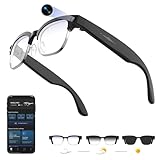
- 【8MPW Camera & 1080P Video and Audio】:These camera glasses feature an 800W camera that outputs sharp 20MP photos and smooth 1080P 30fps videos. Ultra-Clear Video + Powerful Anti-Shake tech+ Built-in dual microphones, you can capture crystal-clear video and audio together -sharply restoring details, perfect for vlogging, travel, and everyday moments
- 【Real-time AI translation Smart Glasses with Camera】:Instantly translate multiple major languages, breaking down language barriers in an instant—no phone required. Ideal for office settings, travel, academic exchanges, international conferences, watching foreign videos, and more
- 【Voice Assistant Recognition and Announcement】:Powered by industry-leading AI large models such as Doubao AI and OpenAI's GPT-4.0. AI voice wake-up lets you ask questions, recognize objects, and get answers on the go. Automatically recognizes objects, menus, landmarks, plants, and more, quickly analyzing the results and announcing them in real time. It instantly becomes your mobile encyclopedia on the go
- 【Bluetooth 5.3 Connection and Automatic Sync to Phone】:Equipped with a low-power BT5.3 chip and Wi-Fi dual transmission technology, offering ultra-low power and high-speed transmission. Captured images and videos are transferred to your phone in real time, eliminating manual export and eliminating storage worries
- 【290mAh Ultra-Long Battery Life】:Ultra-light at 42g, it's made of a durable, skin-friendly material, as light as a feather. Lenses are removable. Its simple, versatile design makes it a comfortable and comfortable wearer. 290mAh ultra-long battery life, 12 hours of music playback and 2 hours of photo or video recording, making it a perfect travel companion
Smartwatches help manage these sessions discreetly. Haptic alerts notify workers of incoming guidance, while quick glances confirm session status or safety warnings without breaking focus on the task.
Quality control that catches issues earlier
AR is increasingly used for inspection and quality assurance. Overlays compare assembled products against digital twins, flagging deviations in alignment, spacing, or component placement that the human eye might miss.
This is not about replacing inspectors but augmenting them. AR acts as a second set of eyes, improving consistency across shifts and reducing rework before products leave the line.
Wearables contribute by tracking inspection cadence and fatigue indicators. If error rates climb during long shifts, supervisors can adjust staffing or breaks based on real data rather than assumptions.
Warehouse operations and logistics optimization
In warehouses, AR guides workers along optimized picking routes, highlighting shelves, bins, and quantities in real time. This reduces navigation errors and cuts down on training time for seasonal or temporary staff.
Unlike traditional handheld scanners, AR keeps workers’ eyes up and hands free. This improves both speed and situational awareness, which directly impacts safety in busy environments.
Smartwatches are often preferred over phones for confirmations and alerts. A quick wrist tap to confirm a pick or receive a reroute instruction is faster and less disruptive, especially when workers are carrying loads.
Safety training and real-time hazard awareness
Safety is one of AR’s most compelling industrial benefits. Overlays can mark restricted zones, moving equipment paths, or high-voltage areas that aren’t obvious in the physical environment.
During training, workers can rehearse emergency procedures in the real workspace without real danger. This builds muscle memory that traditional videos or manuals struggle to achieve.
Wearables add a continuous safety layer. They monitor fatigue, excessive exertion, or exposure duration, and can trigger alerts if conditions become unsafe, even when AR visuals aren’t actively in use.
Why most deployments still favor phones and wearables over full headsets
Despite the appeal of smart glasses, many industrial AR systems still rely on smartphones or tablets. Cost, comfort, battery life, and durability remain limiting factors for all-day headset use.
Phones offer familiar software, easier maintenance, and better upgrade cycles. When paired with a smartwatch for hands-free alerts, authentication, and tracking, they strike a practical balance between capability and wearability.
This hybrid approach also lowers adoption friction. Workers are more willing to use tools that resemble everyday devices rather than specialized equipment that feels intrusive or fatiguing.
Current limitations and what holds AR back on the factory floor
AR is not immune to real-world constraints. Poor lighting, reflective surfaces, and cramped spaces can degrade tracking accuracy and break immersion at critical moments.
There’s also a learning curve in designing good AR instructions. Overloading workers with visual cues can slow them down or increase errors, especially in fast-paced environments.
Successful implementations are conservative by design. They introduce AR where it clearly adds value, integrate wearables for passive data collection, and respect the reality that industrial work prioritizes reliability over novelty.
Tourism, Museums & Cultural Experiences: AR Bringing Places and History to Life
If industrial AR prioritizes reliability over spectacle, tourism flips that equation without abandoning practicality. Here, AR succeeds when it adds context exactly where curiosity already exists, using devices people carry all day rather than asking them to wear specialized hardware.
For travelers and museum visitors, AR is less about immersion and more about augmentation. It turns passive sightseeing into layered discovery, often delivered through smartphones, earbuds, and increasingly, smartwatches that quietly support the experience.
AR city guides and historical overlays
One of the most mature AR use cases today is location-based storytelling. Pointing a phone at a landmark can reveal how a site looked centuries ago, overlay battle movements, architectural phases, or long-lost structures directly onto the modern view.
Cities like Rome, London, and Kyoto already deploy AR walking tours that synchronize GPS, compass data, and camera input. The experience works well because it respects pacing, allowing users to pause, explore, or skip without breaking the flow of travel.
Smartwatches play a supporting role here. Haptic navigation cues, glanceable directions, and vibration alerts reduce the need to constantly look at a phone, which matters in crowded streets or unfamiliar environments.
Museums using AR to replace static placards
Museums are increasingly turning to AR to solve an old problem: limited physical space for information. Instead of dense wall text, visitors can scan an artifact to reveal layered explanations, animated reconstructions, or curator commentary.
This approach works particularly well for objects that no longer function or exist in fragments. Ancient machinery, musical instruments, and damaged sculptures can be digitally restored without altering or endangering the original piece.
From a usability standpoint, museums favor phone-based AR because it avoids hygiene concerns and hardware maintenance. Battery life is predictable, devices are familiar, and visitors can choose how deeply they engage without being overwhelmed.
Wearables enhancing accessibility and personalization
AR in cultural spaces isn’t just visual. Wearables add quiet, personalized layers that improve accessibility and comfort, especially for longer visits.
Smartwatches can deliver timed prompts, translations, or audio cues synced to location, helping visitors with visual impairments or language barriers. For families or guided groups, watches also make it easier to stay coordinated without constant verbal check-ins.
Comfort matters more than novelty in these settings. Lightweight wearables with all-day battery life and water resistance fit naturally into travel routines, unlike headsets that feel conspicuous or tiring after an hour.
Outdoor heritage sites and reconstructed environments
AR shines at ruins, archaeological sites, and heritage locations where little remains above ground. Instead of relying on imagination, visitors can see buildings, crowds, and landscapes reconstructed at full scale through their screens.
This is already in use at ancient city sites, castles, and historical battlefields. The technology doesn’t try to replace the physical environment but anchors digital reconstructions to precise real-world coordinates.
Environmental challenges still exist. Bright sunlight, uneven terrain, and inconsistent connectivity can disrupt the experience, which is why most deployments offer offline modes and conservative visual layering.
Why smart glasses remain rare in tourism
Despite frequent demos, smart glasses have not become standard issue for tourists or museums. Comfort, battery life, and social acceptability remain unresolved, especially for multi-hour use.
Phones and wearables win by being optional and familiar. Visitors can dip in and out of AR without committing to a device that changes how they move, interact, or appear to others.
As with industrial AR, success here comes from restraint. The best tourism AR tools prioritize clarity, context, and choice, proving that augmented reality doesn’t need to dominate the experience to meaningfully enhance it.
Gaming, Social Media & Entertainment: The AR Experiences People Actually Use
After travel and culture, augmented reality’s most familiar role is also its most revealing. When AR works in games and entertainment, it’s because it fits into habits people already enjoy, filling spare moments rather than demanding dedicated time or specialized hardware.
Here, phones and wearables matter more than headsets. The AR people use daily is lightweight, optional, and easy to ignore when it stops being fun.
Location-based AR games that blend into daily routines
The clearest proof of real-world AR adoption remains Pokémon GO and similar location-based games. Nearly a decade after launch, it still turns parks, sidewalks, and city centers into playable spaces using nothing more than a smartphone camera and GPS.
What made it stick wasn’t the visuals, which are relatively simple by today’s standards, but the way it respected daily movement. Walking to work, running errands, or exercising became game inputs rather than distractions from real life.
Smartwatches quietly enhanced this experience. Apple Watch and Wear OS integrations offered haptic alerts, step tracking, and quick interactions without forcing players to hold their phones constantly, improving comfort and battery efficiency during longer sessions.
AR lenses and filters as everyday communication tools
On social platforms, AR is less about spectacle and more about expression. Snapchat, Instagram, and TikTok filters use face tracking and environmental awareness to alter photos and videos in ways that feel playful rather than technical.
These tools run constantly in the background, adjusting to lighting, movement, and camera angle without user input. For most people, AR here isn’t perceived as a technology at all, just part of how digital communication looks now.
Wearables play a subtle supporting role. Smartwatches act as remote triggers, notifications, and content previews, letting users capture moments quickly without breaking social flow or fumbling with a phone.
Live events and shared AR moments
Concerts, sports arenas, and festivals increasingly use AR to layer information or visual effects onto live experiences. This can mean animated visuals synced to music, real-time stats during games, or interactive fan moments tied to specific seats or locations.
These experiences are usually time-limited and intentionally restrained. Overlays appear briefly, then disappear, ensuring attention returns to the real event rather than the screen.
Battery life and device heat remain practical constraints. Phones handle short bursts well, while watches help manage notifications, tickets, and timing cues without draining primary devices during long events.
Casual AR games that prioritize accessibility over immersion
Beyond blockbuster titles, many casual AR games succeed precisely because they avoid complexity. Simple puzzle games, tabletop-style overlays, and camera-based mini-games work in short sessions and adapt to imperfect environments.
These experiences tolerate uneven lighting, cluttered rooms, and interrupted play. That flexibility is essential for real-world use, especially when AR competes with notifications, conversations, and movement.
💰 Best Value

- #1 SELLING AI GLASSES - Move effortlessly through life with Ray-Ban Meta glasses. Capture photos and videos, listen to music, make hands-free calls or ask Meta AI* questions on-the-go. Ray-Ban Meta glasses deliver a slim, comfortable fit for both men and women.
- CAPTURE WHAT YOU SEE AND HEAR HANDS-FREE - Capture exactly what you see and hear with an ultra-wide 12 MP camera and a five-mic system. Livestream it on Facebook and Instagram.
- LISTEN WITH OPEN-EAR AUDIO — Listen to music and more with discreet open-ear speakers that deliver rich, quality audio without blocking conversations or the ambient noises around you.
- GET REAL-TIME ANSWERS FROM META AI — The Meta AI* built into Ray-Ban Meta’s wearable technology helps you flow through your day. When activated, it can analyze your surroundings and provide context-rich suggestions - all from your smart AI glasses.
- CALL AND MESSAGE HANDS-FREE — Take calls, text friends or join work meetings via bluetooth straight from your glasses.
Wearables again improve usability by handling timers, scores, or subtle feedback. A quick vibration or glanceable stat can replace constant visual attention, making AR feel less intrusive.
Why entertainment AR works where other categories struggle
Gaming and social media succeed with AR because the stakes are low. If tracking fails or visuals glitch, the consequence is minor, not dangerous or expensive.
This tolerance allows developers to experiment while users remain forgiving. It also explains why phones and watches dominate here, offering acceptable performance without asking people to change how they dress, move, or interact socially.
In entertainment, AR doesn’t need to be perfect. It just needs to be fun, optional, and easy to leave behind, which is exactly why this is where augmented reality already feels normal rather than futuristic.
The Role of Wearables: How Smart Glasses, Watches, and Phones Enable AR Today
What makes today’s AR feel usable rather than experimental is not a single breakthrough device, but how phones, watches, and emerging smart glasses work together. Each handles a different part of the experience, spreading the workload so AR fits into daily routines instead of demanding full attention.
This layered approach explains why AR adoption has quietly grown even without mainstream smart glasses. Most people already carry the core hardware, and wearables smooth out the friction that would otherwise make AR exhausting or impractical.
Smartphones as the AR engine most people already own
For now, the smartphone remains the primary AR display and processing hub. Modern phones combine high-resolution cameras, depth sensors, IMUs, and powerful GPUs, allowing AR apps to map environments, track objects, and render overlays in real time.
Crucially, phones are designed for short, intentional interactions. AR on a phone works best in bursts: scanning a room to place furniture, pointing at a landmark for information, or using navigation arrows for a few blocks before returning the device to a pocket.
Thermal limits and battery drain are real constraints. Sustained AR sessions can heat up even flagship phones, which is why most successful apps design for moments rather than marathons.
Smartwatches as the quiet control layer
Smartwatches rarely render AR visuals, but they play a critical supporting role. By handling alerts, haptics, confirmations, and timing, watches reduce how often users need to look through a camera view.
In navigation-based AR, a watch can provide directional taps, distance updates, or arrival cues while the phone handles visual overlays. This division preserves battery life and improves safety, especially when walking or cycling.
Comfort matters here. Lightweight cases, breathable straps, and reliable haptics make a watch wearable all day, which is essential if it’s acting as a persistent AR companion rather than a novelty.
Smart glasses: limited today, but already useful
Current smart glasses sit somewhere between notification tools and early AR displays. Devices like Ray-Ban Meta Smart Glasses focus on audio, cameras, and contextual awareness rather than full visual overlays.
That restraint is intentional. By avoiding complex graphics, these glasses achieve better battery life, lighter frames, and social acceptability, all of which are prerequisites for daily wear.
Even without true holographic visuals, they already support AR-adjacent use cases like real-time translation through audio, hands-free photo capture, and contextual prompts delivered discreetly.
Why no single device can do everything yet
True all-day AR glasses remain constrained by physics. High-resolution displays, wide fields of view, and continuous environment mapping all compete for power and generate heat.
Splitting AR tasks across devices is currently more realistic than waiting for a single perfect form factor. Phones handle visuals and processing, watches manage feedback and timing, and glasses provide hands-free context when needed.
This ecosystem approach mirrors how smartwatches succeeded by complementing phones rather than replacing them.
Software platforms make or break wearable AR
Hardware matters, but software integration determines whether AR feels helpful or clumsy. Platforms like ARKit and ARCore allow developers to build once and deploy across millions of devices with consistent behavior.
On the wearable side, tight OS-level integration enables quick handoffs. A navigation session can start on a phone, continue with watch-based haptics, and end with voice guidance through earbuds or glasses.
When this handoff is seamless, AR fades into the background and becomes part of the workflow instead of the focus.
Comfort, battery life, and social acceptance are the real bottlenecks
No AR experience succeeds if the device is uncomfortable, dies midday, or draws unwanted attention. These factors matter more than raw processing power for mainstream adoption.
Smartwatches succeed here because they are already normalized, durable, and designed for all-day wear. Phones succeed because users accept pulling them out briefly, then putting them away.
Smart glasses still face the steepest challenge, not because the technology doesn’t work, but because they must balance optics, weight, style, and battery life in a way people accept in public.
Why AR feels incremental instead of revolutionary
The most effective AR today doesn’t announce itself. It nudges, overlays, and assists, then disappears before becoming distracting.
Wearables enable this subtlety by distributing attention across devices. Instead of demanding constant visual focus, AR can whisper through haptics, audio, or quick glances.
That restraint is not a limitation; it’s why AR is already useful now. By fitting into existing wearable habits, augmented reality becomes less about spectacle and more about quietly improving everyday tasks.
Current Limitations and What Comes Next: Battery Life, Comfort, and the Road Ahead
If AR already works in subtle, practical ways today, the obvious question is why it hasn’t gone further. The answer isn’t missing features or lack of imagination; it’s the unglamorous realities of power, comfort, and everyday wearability.
These constraints shape what AR looks like right now and explain why it shows up as quick glances, haptic taps, and short interactions rather than constant visual overlays.
Battery life remains the hard ceiling
Augmented reality is computationally expensive, especially when it involves cameras, sensors, and real-time spatial mapping. Even on smartphones, sustained AR use drains batteries quickly, which is why most AR sessions are designed to last seconds or minutes, not hours.
Wearables amplify this challenge. A smartwatch with a compact battery already balances display brightness, sensors, wireless radios, and health tracking, so AR-related features must be extremely efficient to avoid cutting all-day battery life short.
This is also why today’s smart glasses prioritize notifications, navigation cues, and lightweight overlays rather than full 3D worlds. Until battery density improves meaningfully, AR will continue to favor brief, high-value moments over continuous immersion.
Comfort and fit matter more than specs
AR hardware lives on the body, which makes ergonomics as important as processors or displays. A smartwatch that’s too thick, too heavy, or poorly balanced becomes fatiguing, especially when worn 12 to 16 hours a day.
The same rule applies even more strongly to glasses. Weight distribution, heat buildup, nose pressure, and hinge design all determine whether a device feels invisible or irritating after an hour.
Manufacturers have learned from watchmaking and eyewear design here. Materials like lightweight aluminum, titanium, resin, and well-finished plastics matter because they directly affect long-term comfort, not just durability or aesthetics.
Social acceptance is still a quiet limiter
Even when AR works technically, it has to work socially. People are comfortable glancing at a watch, pulling out a phone, or wearing earbuds, but glasses with visible cameras still raise questions in public spaces.
This is why current AR implementations often hide in plain sight. Haptics on a watch, audio prompts through earbuds, or subtle phone overlays avoid the feeling of being watched or recorded.
As designs become less conspicuous and more fashion-aware, this barrier will likely fade. Until then, the most successful AR products are the ones that don’t demand attention from bystanders.
Why progress looks slow but steady
From the outside, AR can feel like it’s stuck in a holding pattern. In reality, it’s following the same adoption curve that smartwatches did a decade ago, improving quietly in battery efficiency, comfort, and software reliability.
Each generation shaves off weight, extends runtime, and tightens integration with phones and watches. These incremental gains don’t make headlines, but they compound into devices people actually want to wear daily.
The shift from standalone AR hardware to an ecosystem of phone, watch, audio, and optional glasses is a sign of maturity, not hesitation.
What the next few years realistically look like
In the near term, expect AR to remain fragmented across devices, with each one doing a small part of the job well. Watches will continue handling timing, alerts, and haptics, phones will remain the primary visual canvas, and glasses will focus on hands-free context rather than full immersion.
Battery life will improve gradually rather than dramatically, driven by more efficient chips and displays instead of breakthrough chemistry. Comfort will improve faster, thanks to better industrial design and lessons borrowed from traditional watch and eyewear craftsmanship.
Most importantly, AR will keep becoming less visible. The best experiences won’t announce themselves as augmented reality at all; they’ll simply feel like your devices are better at anticipating what you need.
The bigger picture for everyday users
Augmented reality today is not about escaping the real world but about navigating it more smoothly. It helps you get somewhere on time, fix something correctly, learn faster, or make better decisions with less friction.
The limitations are real, but they are also why AR is already useful. By respecting battery life, comfort, and social norms, today’s AR fits into daily routines instead of trying to replace them.
That quiet integration is the real milestone. AR doesn’t need to be futuristic to matter; it just needs to keep solving small problems well, and it’s already doing that in more places than most people realize.