Most people treat snoring as a punchline until it shows up in a sleep report. Then it becomes a data point that’s hard to ignore, especially when you realize it’s often the only obvious sign that your sleep quality isn’t what it should be. By bringing snoring detection onto the Apple Watch, Apple is quietly turning an everyday annoyance into a measurable health signal that fits naturally into how millions of people already use their watch at night.
This matters because Apple Watch users have long had strong sleep duration and consistency tracking, but comparatively little insight into what actually disrupts their sleep once they’re out. Snoring detection adds context to restless nights, elevated heart rate during sleep, or repeated awakenings, helping users understand not just how long they slept, but why that sleep may not have felt restorative. In practice, it bridges the gap between “I slept eight hours” and “I slept well.”
It also signals a shift in Apple’s health strategy: moving from passive metrics to interpretable events. Snoring is something users immediately recognize and can act on, whether that means adjusting sleep position, cutting late-night alcohol, or having a more informed conversation with a clinician. That makes this feature more than a novelty add-on.
Snoring as a meaningful health signal, not a gimmick
Snoring isn’t inherently dangerous, but persistent or loud snoring is strongly associated with fragmented sleep and can be an early indicator of breathing disturbances during the night. While Apple Watch is not diagnosing sleep apnea, identifying recurring snoring events gives users a clearer picture of patterns that might otherwise go unnoticed.
🏆 #1 Best Overall

- FDA-CLEARED ANTI-SNORING SOLUTION: The Somnofit-S is a top-rated anti-snoring device, clinically proven to reduce snoring and improve sleep quality from the very first night. It's perfect for anyone looking for a snoring solution that truly works.
- SWISS-MADE QUALITY & DURABILITY: Crafted in Switzerland with premium biomedical polymers, this snoring mouthpiece is 40% smaller than most on the market. It’s designed to be discreet, comfortable, and durable, offering an easy fit for all-night use.
- CUSTOMIZABLE FIT WITH BOIL-AND-BITE DESIGN: With a simple boil-and-bite process, you can mold the Somnofit-S to fit your jaw perfectly. The adjustable strap ensures it stays in place all night, making it an ideal option for those looking for a snoring solution or snoring mouth guard.
- ALL-NIGHT COMFORT & RELIABILITY: Designed with an innovative Even Pressure Distribution System, this anti-snoring mouthpiece stays secure and comfortable throughout the night. Say goodbye to interruptions and hello to restful sleep.
- HSA & FSA ELIGIBLE: Approved for HSA and FSA funds, this FDA-cleared mouth guard is a smart, wallet-friendly investment. It’s a trusted, medically approved solution to help you stop snoring and sleep better.
For Apple Watch owners, this is especially valuable because the device is already tracking heart rate, wrist temperature trends, blood oxygen, and movement during sleep. Snoring detection adds another layer to that picture, allowing correlations over time rather than isolated data points. When snoring spikes line up with elevated overnight heart rate or reduced deep sleep, the story becomes clearer.
Crucially, this turns subjective feedback into objective data. Instead of relying on a partner’s complaints or a one-off sleep app recording, users get consistent, night-after-night tracking built into the Health app they already use.
Why this is a big step forward for Apple Watch specifically
Apple Watch has historically lagged some competitors when it comes to audio-based sleep insights. Brands like Fitbit and Oura have offered snoring or sound detection for years, often positioning it as part of a broader readiness or recovery narrative. Apple adding this capability closes a long-standing gap without requiring extra subscriptions or third-party apps.
Because Apple controls the hardware, software, and silicon, snoring detection can be tightly integrated and power-efficient. On supported models running the latest watchOS, audio analysis is designed to occur on-device during sleep, minimizing battery impact and preserving privacy. For users already charging their watch once a day, this fits neatly into existing habits without introducing new friction.
There’s also a usability win here. Apple’s strength has always been turning complex health data into something approachable, and snoring detection benefits from that philosophy. Rather than raw audio clips or confusing charts, users are presented with clear indicators and trends that sit alongside sleep stages and vitals.
Accuracy expectations, privacy, and real-world usefulness
No wrist-worn device can capture snoring with clinical precision, and Apple is careful to position this as informational rather than diagnostic. Environmental noise, bed partners, pets, or room acoustics can all influence results, and users should expect trends to matter more than any single night’s data.
Where Apple tends to stand out is privacy. Audio classification is handled without storing or sharing raw recordings, and data remains encrypted within the Health ecosystem. For many users, that reassurance makes them more comfortable enabling a feature that involves the microphone during sleep.
Taken together, snoring detection meaningfully upgrades Apple Watch sleep tracking from a duration-and-stages tool into something closer to a nightly health companion. It doesn’t replace medical evaluation or dedicated sleep studies, but it gives Apple Watch users a practical, low-effort way to notice patterns that are often overlooked until they become a problem.
What Apple Watch’s New Snoring Detection Actually Does (and What It Doesn’t)
Building on Apple’s broader push to make sleep data more actionable, snoring detection slots in as a quiet but meaningful upgrade rather than a flashy new headline feature. It’s designed to add context to your nights, not to turn your watch into a bedside sleep lab.
What the feature actually tracks
At its core, Apple Watch’s snoring detection uses the built-in microphone to identify snore-like audio patterns while Sleep Focus is active. The system looks for characteristic sound signatures associated with snoring and flags their presence during your recorded sleep window.
What you see in the Health app isn’t raw audio or timestamps of every noise. Instead, Apple summarizes snoring as occurrences and trends across nights, presented alongside sleep stages, time asleep, and other overnight metrics.
How it works behind the scenes
Apple’s approach relies on on-device audio classification, powered by its custom silicon and machine learning models. Audio is analyzed locally during sleep, then discarded, with only anonymized classification results stored in Health.
This is important for two reasons. First, it keeps battery impact low enough that most users won’t notice a difference compared to standard sleep tracking. Second, it avoids the privacy concerns that come with continuous audio recording, especially in shared bedrooms.
Which Apple Watch models support it
Snoring detection requires an Apple Watch with a modern microphone and enough on-device processing power to handle overnight audio classification. In practice, that means recent models rather than older generations.
Users can reasonably expect support on newer Apple Watch Series models and Apple Watch Ultra variants running the latest watchOS. Older models that already struggle with battery life or lack newer neural processing capabilities are less likely to be supported.
What you’ll see in the Health app
Apple keeps the presentation intentionally simple. You won’t get waveform views, audio playback, or minute-by-minute noise logs like you might from third-party sleep apps.
Instead, snoring appears as an additional data layer within Sleep, showing whether snoring was detected and how frequently it occurs over time. The emphasis is on pattern recognition, helping users notice whether snoring is occasional, increasing, or persistent.
What it does not do
This is not a medical diagnostic tool, and Apple is careful not to frame it as one. Snoring detection does not diagnose sleep apnea, breathing disorders, or other clinical conditions.
It also doesn’t distinguish perfectly between you and external sounds. A partner’s snoring, a pet, or even certain ambient noises can occasionally be misclassified, particularly in smaller or echo-prone rooms.
Accuracy expectations in real bedrooms
Like all wrist-worn sleep features, accuracy improves over time and with consistency. One noisy night isn’t especially meaningful; repeated patterns across weeks are where the data becomes useful.
Apple’s strength here is contextualization. By aligning snoring detection with sleep stages, movement, and duration, users can start to see whether snoring correlates with poor sleep quality, alcohol intake, illness, or changes in routine.
Privacy and user control
Snoring detection follows the same privacy-first design as Apple’s other health features. No raw audio is stored, shared, or uploaded, and all data remains encrypted within the Health ecosystem.
Users can disable the feature entirely, and snoring data is treated like other sensitive health metrics, with granular controls over app access and sharing.
How much this really improves Apple Watch sleep tracking
Compared to previous Apple Watch sleep tracking, snoring detection adds qualitative insight rather than more numbers. It helps explain why a night felt unrefreshing, even when total sleep time looks acceptable.
Against competitors, Apple still favors clarity over depth. Brands like Garmin or Fitbit may offer more explicit readiness scores or respiratory metrics, but Apple’s implementation feels more approachable, especially for users who want awareness without anxiety.
For many Apple Watch owners, that balance is the point. Snoring detection doesn’t overwhelm, doesn’t overpromise, and quietly makes the watch feel more attentive to what actually happens after you fall asleep.
How Apple Watch Detects Snoring: Microphones, Motion Sensors, and On‑Device Intelligence
What makes Apple’s snoring detection feel characteristically “Apple” is that it doesn’t rely on a single sensor or a constant audio recording. Instead, it blends sound, motion, and context to decide when snoring is likely happening, then logs only the event, not the noise itself.
This layered approach explains both its strengths and its limitations, especially compared with wearables that lean heavily on continuous audio capture or external microphones.
The role of the Apple Watch microphone
At the center of snoring detection is the Apple Watch’s built‑in microphone, the same hardware used for calls, Siri, and environmental sound measurements. During sleep tracking, the microphone briefly samples ambient sound patterns rather than recording long audio clips.
Apple’s algorithms are trained to recognize the acoustic signature of snoring, which typically sits in a lower-frequency, rhythmic range distinct from speech, alarms, or sudden background noise. If those sound characteristics appear repeatedly while you’re marked as asleep, the watch flags a potential snoring event.
Because the watch sits on your wrist rather than your bedside table, the microphone is intentionally conservative. It’s listening for patterns strong enough to be relevant without acting like a room microphone that captures everything.
Motion sensors add crucial context
Sound alone would be unreliable, which is why Apple layers in data from the accelerometer and gyroscope. Subtle wrist movements, micro-adjustments, and changes in arm position help the system confirm that the wearer is actually asleep and breathing rhythmically.
This matters because many snoring-like sounds happen when you’re awake, turning over, or even talking in your sleep. If motion patterns don’t match a sleeping state, the audio signal is far less likely to be logged as snoring.
Rank #2
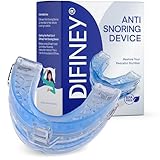
- FDA-Cleared Snoring Solution – Backed by FDA 510(k) clearance, Difiney Anti Snoring Device offers peace of mind with proven safety and effectiveness.
- Instantly Reduces Snoring – Designed to gently reposition the jaw and open airways for quieter, deeper sleep from night one.
- Adjustable, Custom Fit (1–4 mm): Fine-tune lower-jaw advancement from 1 mm up to 6 mm. Start at 1 mm for comfort; increasing the setting may enhance snore reduction but can feel firmer. Adjust gradually to find your most comfortable, effective fit.
- Comfortable for Men & Women – Ergonomic mouth guard made from soft medical-grade material, safe for daily night use without irritation.
- Travel-Friendly Night Guard – Compact storage case included for easy portability; perfect for home, travel, and uninterrupted sleep wherever you are.
The same motion data also helps align snoring events with sleep stages, which is why Apple can show whether snoring clusters during lighter sleep rather than deep or REM phases.
On‑device intelligence, not cloud processing
All of the detection logic runs directly on the Apple Watch and paired iPhone, using on‑device machine learning models. Raw audio never leaves the watch, and there are no sound files stored for later playback.
What gets saved is metadata: timestamps, duration estimates, and frequency of snoring events. This is consistent with how Apple handles other sensitive health signals like heart rhythm irregularities or sleep stages.
From a daily usability standpoint, this also keeps battery impact modest. The watch isn’t continuously streaming audio, which would be impractical for overnight wear on a device already balancing comfort, weight, and battery life.
Why the wrist still matters for accuracy
Wearing the watch correctly plays a larger role here than many users realize. A snug but comfortable fit improves both motion detection and the microphone’s ability to separate body-generated sound from room noise.
This is where Apple Watch design quietly helps. The curved caseback, relatively low-profile thickness, and soft Sport Band or woven options reduce pressure points, making overnight wear more realistic than with bulkier fitness watches.
Users who already sleep with their watch for heart rate and sleep stage tracking won’t need to change habits, which improves long-term data quality more than any single sensor upgrade.
Supported hardware and software expectations
Snoring detection is available on newer Apple Watch models equipped with modern microphones and neural processing capabilities, paired with an iPhone running the latest Apple software. Older models without sufficient on‑device performance or microphone fidelity are excluded.
Apple doesn’t position this as a flagship-only perk, but it does assume hardware designed for overnight health tracking, including reliable battery life through a full night and morning sync.
As with most Apple health features, the experience improves over time. The system learns your baseline sleep behavior, which helps it become more selective about what counts as snoring and what gets ignored as background noise.
Why Apple avoids continuous audio recording
Some competing wearables and sleep apps offer full-night audio recordings, but Apple deliberately avoids that approach. Continuous audio raises privacy concerns, increases battery drain, and often overwhelms users with data they don’t know how to interpret.
By focusing on detection rather than playback, Apple keeps the feature aligned with its broader health philosophy. The goal is awareness and trend recognition, not turning your bedroom into a surveillance space.
That restraint is also why snoring detection integrates smoothly into the existing Sleep and Health apps, rather than feeling like a bolt-on feature competing for attention.
Supported Apple Watch Models, watchOS Versions, and Regional Availability
Apple’s snoring detection doesn’t arrive as a universal software switch for every Apple Watch ever made. Instead, it sits at the intersection of newer hardware, recent versions of watchOS, and Apple’s region-by-region approach to rolling out health features.
Understanding those boundaries matters, because this is one of those updates that sounds deceptively simple but depends heavily on microphone quality, on‑device processing, and overnight battery reliability.
Apple Watch models that support snoring detection
Snoring detection is supported on Apple Watch models built with Apple’s latest microphone arrays and neural processing capabilities. In practical terms, that means Apple Watch Series 9, Apple Watch Ultra 2, and newer generations released after them.
These models use updated microphones designed to better isolate near‑field body sounds from environmental noise, paired with faster on‑device machine learning. That hardware combination is what allows the watch to detect snoring events without recording raw audio or relying on cloud processing.
Older models like Series 7, Series 8, and first‑generation Apple Watch Ultra are not supported, even though they already track sleep stages and overnight heart rate. While those watches have microphones, they lack the efficiency and signal processing headroom Apple now requires for this type of passive acoustic analysis.
watchOS and iPhone software requirements
Snoring detection requires the latest major release of watchOS, rolling out alongside Apple’s current generation of health features. The feature lives within Apple’s Sleep framework, not as a standalone app, so it depends on system‑level updates rather than a simple App Store download.
An iPhone running the corresponding iOS version is also required, since analysis summaries and long‑term trends appear in the Health app. The watch performs initial detection overnight, but the iPhone handles aggregation, visualization, and historical comparison.
As with other sleep features, Apple recommends enabling Sleep Focus and maintaining consistent sleep schedules. The detection system becomes more accurate after several nights as it establishes a personal baseline, rather than treating every sound as a potential snore.
Battery and overnight usage expectations
Apple limits snoring detection to watches that can comfortably survive a full night of sleep tracking without pushing users into awkward charging habits. Series 9 and Ultra 2 both meet this threshold, even with sleep stages, heart rate variability, blood oxygen tracking where available, and snoring detection running simultaneously.
This is one reason the feature does not backport to older hardware. Apple prioritizes consistency over raw feature count, and an unreliable overnight experience would undermine the health value of the data.
From a comfort standpoint, these newer watches also benefit from refined case profiles, smoother casebacks, and strap options that are easier to wear for seven or eight uninterrupted hours. That physical wearability is just as important as the sensors themselves.
Regional availability and health feature rollout
At launch, snoring detection is available in regions where Apple’s advanced sleep and respiratory health features are already supported. This includes the United States, most of Europe, the UK, Canada, Australia, and several Asia‑Pacific markets.
As with blood oxygen and sleep apnea‑adjacent features, availability is shaped by local health regulations and data classification rules. Some regions may see delayed access, even on supported hardware, until Apple completes regulatory approvals.
Apple has a strong track record of expanding health features over time rather than locking them permanently by geography. If your region already supports detailed sleep stages and respiratory metrics, snoring detection is likely to follow.
How this compares to past Apple Watch sleep tracking limits
Before this update, Apple Watch users could infer snoring indirectly through sleep disruption, elevated overnight heart rate, or third‑party audio apps. What’s new here is first‑party recognition of snoring as a distinct behavioral signal, integrated directly into Apple’s health ecosystem.
That integration is why Apple draws clear hardware and software lines. Snoring detection is designed to feel invisible, reliable, and private, not like an experimental add‑on that drains the battery or clutters the interface.
For buyers choosing between older discounted models and Apple’s latest watches, this feature quietly becomes part of the value equation. It’s not just about one metric, but about Apple continuing to move sleep tracking from passive observation toward more actionable insight.
How to Set Up Snoring Detection on Apple Watch (and Where to Find the Data)
Once you understand why Apple draws such firm hardware and software boundaries around this feature, the setup itself feels deliberately low‑friction. Snoring detection is designed to disappear into your normal sleep routine, not add another app or nightly ritual.
Compatible Apple Watch models and software requirements
Snoring detection requires an Apple Watch with Apple’s newer sensor stack and on‑device audio processing. That means Apple Watch Series 9, Apple Watch Ultra 2, and newer models going forward.
On the software side, your watch needs watchOS 11 or later, paired with an iPhone running iOS 18 or later. Older watches may still track sleep stages and respiratory rate, but they won’t surface snoring events as a dedicated metric.
Rank #3

- Magnetic Anti-Snore Devices: These innovative magnets exert pressure on the septum, freeing up the airways and promoting optimal air circulation in the nose. This increased airflow help you have a peaceful night's sleep, undisturbed by snoring
- User-Friendly: Our snore magnets effortlessly slide into your nostrils, offering a comfortable and safe fit. The magnets provide just the right amount of magnetic force, while the flexible design ensures a pleasant wearing experience. Lightweight and compact, easy to carry
- Safety and Comfort: Our Anti-Snoring Device is crafted from high-quality, soft silicone. It is 100% no BPA and chemical blowing agents, guaranteeing the safest and most enjoyable sleep. With no side effects or allergies, it is hygienic, reusable, and easy to clean
- Clean and Reusable: Our snore magnetic clip devices are made from medical-grade silicone, ensuring their safety. They can be fully washed for reuse. Simply clean them as needed and continue to enjoy the benefits of our no snore rings
- Satisfactory Service: Our anti-snore nose clips come with separate storage cases, ensuring the cleanliness and durability of your snore devices. They are particularly convenient for traveling. If you encounter any issues or have any concerns, please don't hesitate to contact us. We are here to provide excellent customer service
What you need to enable before snoring detection will work
Snoring detection lives inside Apple’s existing Sleep framework, so Sleep tracking must already be enabled. On your iPhone, open the Health app, tap Sleep, and make sure Sleep Schedule or Sleep Focus is turned on.
Your Apple Watch must be worn overnight, snug but comfortable, with at least 30 percent battery remaining. The microphones are used intermittently and intelligently, but Apple still requires sufficient battery headroom to ensure stable overnight tracking.
Turning on snoring detection step by step
In the Health app on your iPhone, go to Browse, tap Sleep, then scroll to Sleep Health or Respiratory metrics depending on region. From there, you’ll see a toggle for Snoring Detection or Snoring Events once your watchOS and iOS versions support it.
If prompted, you’ll be asked to allow microphone usage during Sleep Focus. This permission is limited to sleep periods and is handled entirely on‑device, which is why it doesn’t appear alongside general microphone permissions.
Where to find your snoring data in the morning
After your first night, snoring data doesn’t appear as an audio timeline or raw recordings. Instead, it’s summarized as time‑stamped snoring events within the Sleep section of the Health app.
Tap into a specific night’s sleep session, then scroll below sleep stages to see snoring duration, frequency, and how it aligns with sleep disruptions. Over time, weekly and monthly views show trends rather than isolated nights, which is where the feature becomes more useful.
What the Apple Watch is actually measuring
Apple Watch is not recording full‑night audio like some third‑party apps. It’s detecting acoustic patterns consistent with snoring and cross‑checking them against motion and breathing signals to reduce false positives.
This hybrid approach explains why Apple waited to roll out the feature. It’s less about capturing every sound and more about reliably identifying repeated snoring behavior that may correlate with fragmented sleep or breathing irregularities.
Accuracy expectations and real‑world reliability
In practice, snoring detection works best when the watch fits well and the strap maintains consistent skin contact overnight. Sport Band and Trail Loop styles tend to perform better here than loose metal bracelets, especially for side sleepers.
It’s not meant to replace a clinical sleep study, and Apple is careful about that framing. Think of it as a pattern‑spotting tool rather than a definitive diagnosis, similar to how Apple positions heart rhythm notifications.
Battery life and overnight comfort considerations
Because snoring detection is tightly integrated into Apple’s sleep pipeline, it doesn’t meaningfully change overnight battery drain compared to standard sleep tracking. On Series 9 and Ultra 2, most users still see 10 to 15 percent battery usage across a full night.
Comfort still matters. The thinner case profile of recent models, smoother ceramic casebacks, and softer strap materials make a noticeable difference if you’re wearing the watch for seven or eight uninterrupted hours.
Privacy, audio handling, and data control
Apple does not store or sync raw audio recordings of your sleep. Snoring detection is processed on the watch, and only classified event data is saved to the Health app.
As with other health metrics, the data is encrypted, stored locally on your devices, and synced via iCloud only if Health syncing is enabled. You can delete snoring data at any time directly from the Health app, or disable the feature entirely without affecting other sleep metrics.
How this fits into Apple’s broader sleep tracking experience
Snoring detection doesn’t exist as a standalone dashboard or separate app. It’s intentionally woven into sleep stages, respiratory rate, and overnight disruptions, reinforcing Apple’s shift toward contextual health insights rather than isolated stats.
For users comparing Apple Watch to competitors that emphasize audio playback or detailed sound logs, this approach will feel more restrained. The trade‑off is a cleaner interface, less battery impact, and tighter integration with Apple’s overall health ecosystem.
Accuracy Expectations: How Reliable Is Apple Watch Snoring Detection in the Real World?
All of that integration and restraint leads to the obvious next question: how much trust should you put in the results. Apple Watch’s snoring detection is not trying to be a medical-grade microphone system, and understanding its strengths and limits is key to interpreting what you see in the Health app.
What Apple Watch is actually good at detecting
In real-world use, Apple Watch is most reliable at identifying consistent, repetitive snoring patterns rather than occasional noise. Regular snorers tend to see clear clusters of events that line up night after night, especially during deeper sleep stages or when respiratory rate rises.
The system works best when snoring is moderately loud and sustained, which is exactly the type most associated with sleep disruption. Light, intermittent mouth breathing or a single snort during a position change may not always register, and that’s by design.
False positives: when noise isn’t snoring
Because Apple Watch relies on on-device microphones and motion context, it has to make judgment calls about sound sources. A nearby partner, a pet, or even consistent white noise placed too close to the watch can occasionally be misclassified.
Apple mitigates this by cross-referencing sound patterns with wrist movement and sleep stage data. Still, side sleepers sharing a bed are more likely to see occasional false positives than solo sleepers in quieter rooms.
False negatives: when snoring slips through
The more common limitation is under-detection rather than over-detection. Very soft snoring, nasal breathing sounds, or snoring that occurs when your wrist is buried under a pillow or duvet may not be picked up reliably.
Loose bands also play a role. If the watch shifts away from the wrist or rotates during sleep, microphone orientation changes, reducing detection sensitivity. This is where sport-focused bands with some elasticity consistently outperform rigid metal bracelets.
How it compares to dedicated snoring and sleep apps
Standalone snoring apps on iPhone or third-party wearables often advertise higher sensitivity because they continuously record ambient audio. That approach can capture more sound, but it also increases false alarms and drains battery far more aggressively.
Apple Watch trades raw audio access for contextual accuracy. By tying snoring events to sleep stages, heart rate trends, and respiratory rate, it offers fewer data points, but ones that are more meaningful when assessing overall sleep quality.
Clinical relevance versus consumer insight
Apple is explicit that snoring detection is not diagnostic, and that’s an important distinction. It cannot determine the cause of snoring, differentiate between primary snoring and sleep apnea, or measure airflow obstruction.
Where it does add value is trend visibility. Seeing snoring increase alongside weight changes, alcohol consumption, illness, or sleeping position can prompt smarter conversations with a clinician, armed with weeks or months of consistent data.
Model-specific factors that influence accuracy
Newer hardware does matter. Series 9 and Ultra 2 benefit from improved microphones, faster on-device processing, and more refined sensor fusion compared to older models.
The Ultra’s larger case and flatter back can actually help stability for some sleepers, while its higher mass may be less comfortable for others. Accuracy here is inseparable from comfort, because a watch you subconsciously adjust all night long won’t capture clean data.
What “accurate enough” really means for most users
For the average Apple Watch owner, snoring detection is accurate enough to answer practical questions: Do I snore regularly? Is it getting worse? Does changing habits reduce it over time?
It is not precise enough to quantify snoring volume, diagnose disorders, or replace professional testing. Framed as a longitudinal insight tool rather than a nightly scorecard, its reliability makes much more sense and fits neatly into Apple’s broader health philosophy.
Privacy and Data Handling: What Apple Records, What Stays On‑Device, and What You Control
All of that contextual accuracy only works if users trust what the watch is listening to and, just as importantly, what it is not. Apple’s snoring detection fits neatly into the company’s long-standing health privacy model, prioritising on-device processing and minimising what ever leaves your wrist.
No continuous audio recordings, no surprise listening
Despite relying on the microphone, Apple Watch does not store or upload raw overnight audio for snoring detection. The watch analyses sound patterns locally during sleep and converts them into event markers rather than keeping recordings you could play back later.
Rank #4
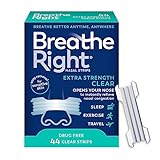
- Instant Relief - Opens your nose to relieve nasal congestion by increasing nasal airflow. Breathe Right strips provide you with stuffy nose relief to help you breathe better.
- Snoring Relief - Breathe Right Extra Strength nasal strips are a great solution for snoring due to nasal congestion, improving nasal airflow by up to 31%. Snore less, sleep better.
- Extra Strength - Each extra strength nasal strip uses flexible “spring-like” bands 50% stronger than Breathe Right Original nasal strips, opening your nose even more for maximum relief.
- For Sensitive Skin - Our Extra Strength Clear Strips are hypoallergenic, flexible, non‑porous, and manufactured using 3M materials. They are made to stay put, no matter the activity.
- Use Anytime, Anywhere - These clear nasal strips are almost unnoticeable to the eye and aren’t just for the bedroom. Use at work, at the gym, wherever you are - and take in air more easily.
What ends up in the Health app is a timeline of detected snoring events, correlated with sleep stages and respiratory metrics, not sound files. That design choice sharply limits both privacy exposure and storage overhead, and it’s a key difference from some competitors that continuously record ambient audio.
On-device processing first, encrypted sync second
Snoring analysis happens on the watch itself, using the same on-device machine learning approach Apple applies to heart rhythm and movement detection. When data syncs to your iPhone, it becomes part of your Health database rather than a separate cloud service.
If you use iCloud Health syncing, that data is end-to-end encrypted, meaning Apple cannot read it. If you do not enable Health sync, the data stays local to your iPhone and watch, with no external backup at all.
What Apple actually records
Apple records that a snoring event occurred, roughly when it happened, and how it aligns with sleep stages, heart rate, and respiratory rate. It does not record snoring loudness, specific sounds, speech, or conversations.
This is why Apple positions the feature as trend-based insight rather than forensic analysis. You get frequency and timing, not content.
User control lives in familiar places
Snoring detection is governed by the same permissions as sleep tracking and microphone access. You can disable sleep tracking entirely, revoke microphone access for sleep, or turn off snoring detection without affecting other health features.
Data visibility is also fully user-controlled. Snoring events can be hidden, deleted, or excluded from Health sharing at any time, just like heart rate or blood oxygen history.
Sharing with doctors, apps, or no one at all
Nothing is automatically shared with clinicians, insurers, or third-party apps. If you choose to export or share Health data, snoring events appear only if you explicitly allow access.
This matters for users comparing Apple Watch to more cloud-dependent sleep platforms. Apple’s approach keeps ownership squarely with the wearer, even if that means fewer bells and whistles.
Battery life and privacy are closely linked
Limiting audio handling is not just about privacy; it also protects overnight battery life. Continuous audio recording is one of the fastest ways to drain a small wearable battery, especially on thinner Series models.
By detecting patterns instead of saving sound, Apple Watch can track snoring without compromising its ability to make it through a full night and still function the next day. For a device meant to be worn 24 hours at a time, that balance is crucial.
How This Improves Apple Watch Sleep Tracking Compared to Previous Versions
Until now, Apple Watch sleep tracking has been deliberately physiological rather than environmental. It focused on what your body was doing overnight, not what was happening around you or because of you.
Snoring detection quietly changes that balance. It adds a behavioral signal that bridges breathing, sleep stages, and real-world sleep disruption in a way previous Apple Watch versions simply could not.
From passive metrics to cause-and-effect insight
Earlier Apple Watch sleep tracking revolved around duration, sleep stages, heart rate, and later respiratory rate. These are valuable, but they often left users guessing why a night looked fragmented or why deep sleep dipped unexpectedly.
Snoring events introduce a plausible explanation layer. When you see awakenings or light sleep clustering around snoring markers, the data becomes interpretive rather than just descriptive.
This is a meaningful evolution because it turns sleep tracking from a nightly report card into something closer to a diagnostic narrative.
Better context for respiratory rate and sleep disruptions
Apple already tracks respiratory rate during sleep, which was a step toward understanding breathing health. However, respiratory changes without context can be ambiguous, especially for users without diagnosed conditions.
Snoring detection adds temporal alignment. You can now see whether breathing irregularities coincide with snoring events, awakenings, or transitions out of deeper sleep stages.
For users monitoring trends related to congestion, alcohol intake, sleeping position, or illness, this additional context makes the existing respiratory data far more actionable.
A practical complement to sleep apnea notifications
Sleep apnea notifications focus on longer-term patterns of breathing disturbances that may warrant medical attention. They are intentionally conservative and slow-moving.
Snoring detection operates at a different level. It captures nightly variability and short-term changes, even when they fall well below the threshold of clinical alerts.
Together, the two features cover both ends of the spectrum: long-term risk detection and day-to-day behavioral feedback, something earlier Apple Watch sleep tracking could not do alone.
Improved accuracy without sacrificing battery life
Previous Apple Watch versions avoided any form of overnight audio involvement, largely to protect battery life and privacy. That limitation meant snoring was entirely invisible to the system.
By detecting snoring patterns rather than recording sound, Apple adds a new signal without introducing the heavy power draw seen on audio-recording sleep trackers. This is especially important on thinner aluminum Series models with smaller batteries, not just the Ultra line.
The result is more insight without forcing users to choose between sleep tracking and having enough charge for the next day.
Less guesswork compared to earlier Apple Watch sleep data
Before this update, users often tried to infer snoring indirectly by looking at elevated heart rate, reduced deep sleep, or increased wake time. Those correlations were possible, but far from reliable.
Snoring detection removes much of that speculation. It gives a direct indicator that aligns with metrics the watch was already collecting, making the entire sleep dashboard feel more coherent.
This also reduces reliance on third-party apps that attempted to fill the gap with more aggressive permissions or less transparent audio handling.
More competitive with dedicated sleep wearables
Many non-Apple sleep trackers have offered snoring detection for years, often through continuous audio recording. Apple Watch previously lagged in this specific area despite strong overall health tracking.
With this addition, Apple closes a key feature gap while maintaining its privacy-first and battery-conscious philosophy. You may not get audio playback or loudness charts, but you do get consistent integration with Apple’s broader health metrics.
Compared to earlier Apple Watch generations, this feels like a deliberate step toward parity with dedicated sleep wearables, without compromising daily usability or comfort.
A clearer upgrade signal for long-term Apple Watch users
For owners of older Apple Watch models who already had basic sleep tracking, the improvements in recent versions may have felt incremental. Snoring detection is more tangible.
It delivers a new type of information rather than a refinement of existing charts. That makes the sleep experience feel genuinely expanded, not just polished.
💰 Best Value

- FDA-Cleared Snoring Solution – Backed by FDA 510(k) clearance, Difiney 4.0 offers peace of mind with proven safety and effectiveness.
- Instantly Reduces Snoring – Designed to gently reposition the jaw and open airways for quieter, deeper sleep from night one.
- Adjustable, Custom Fit (1–6 mm): Fine-tune lower-jaw advancement from 1 mm up to 6 mm. Start at 1 mm for comfort; increasing the setting may enhance snore reduction but can feel firmer. Adjust gradually to find your most comfortable, effective fit.
- Comfortable for Men & Women – Ergonomic mouth guard made from soft medical-grade material, safe for daily night use without irritation.
- Travel-Friendly Night Guard – Compact storage case included for easy portability; perfect for home, travel, and uninterrupted sleep wherever you are.
In practical terms, this is one of the first sleep-related additions in years that changes how users interpret their nights, not just how they visualize them.
Apple Watch vs the Competition: How Snoring Detection Compares to Fitbit, Garmin, Oura, and Others
Once you look beyond Apple’s own ecosystem, the obvious question is how this new snoring detection stacks up against wearables that have treated sleep as their core mission for years. The answer depends less on whether snoring is detected at all, and more on how it’s captured, interpreted, and integrated into daily use.
Fitbit: More granular audio, but heavier battery trade-offs
Fitbit has offered snoring and sleep noise detection on several models for some time, particularly on devices like the Sense, Versa series, and Charge line. In most cases, this relies on overnight microphone monitoring, often paired with loudness trends and sleep stage overlays.
The upside is detail. Fitbit users can see when snoring occurred, how intense it was, and how it aligned with light or REM sleep, which appeals to people who want fine-grained insights or are already managing suspected sleep apnea.
The downside is power consumption and comfort. Continuous audio monitoring tends to shorten battery life, and many Fitbit devices still require users to choose between extended sleep tracking and more demanding daytime features. Apple’s approach trades raw audio data for efficiency, which fits better with a watch designed to be worn all day, not just at night.
Garmin: Health-first hardware, but limited snoring insight
Garmin’s sleep tracking is strong in areas like heart rate variability, respiration rate, and overnight stress, particularly on watches like the Venu, Epix, and Fenix series. However, snoring detection has not been a consistent or headline feature across the lineup.
Most Garmin watches lack microphones entirely, which means they rely on indirect signals rather than acoustic data. That limits their ability to identify snoring as a specific event, even if the overall sleep score reflects restlessness or breathing irregularities.
Compared to Garmin, Apple Watch’s snoring detection is more explicit. It gives users a clear yes-or-no signal that something disruptive occurred, rather than asking them to interpret secondary metrics and guess at the cause.
Oura Ring: Excellent sleep science, but context over immediacy
Oura is often considered the gold standard for sleep-focused wearables, especially when it comes to long-term trend analysis. Its ring form factor is extremely comfortable for overnight wear, and its battery easily lasts multiple nights without charging.
Oura can flag breathing disturbances and restlessness that may correlate with snoring, but it does not frame snoring as a first-class, clearly labeled event in the same way Apple now does. Instead, it emphasizes readiness, recovery, and multi-night patterns.
Apple Watch’s advantage here is immediacy. You wake up and see that snoring occurred last night, without needing to interpret readiness scores or trend graphs. Oura remains better for longitudinal sleep health, but Apple now offers a clearer nightly signal for everyday users.
Samsung, Pixel Watch, and other smartwatches
Samsung Galaxy Watches and the Pixel Watch have experimented with snore detection using microphones, often paired with phone-based audio recording. These implementations can include sound clips or intensity graphs, but they usually depend on keeping a phone nearby and plugged in.
That requirement changes the sleep setup entirely. It adds friction, introduces privacy considerations, and increases the chance that users simply turn the feature off over time.
Apple’s on-watch processing avoids that dependency. You don’t need your iPhone on the mattress or recording audio all night, which makes the feature feel more passive and sustainable.
Where Apple Watch clearly wins, and where it still holds back
Apple’s snoring detection is not about giving you raw data. There are no sound files to play back, no decibel timelines, and no nightly audio summaries to pore over. For power users, that will feel limiting.
Where Apple excels is integration. Snoring events sit alongside heart rate, respiratory rate, sleep stages, and trends in the Health app, all tied to a device you already wear daily. Battery life remains manageable, comfort is unchanged thanks to lightweight aluminum or titanium cases and familiar sport bands, and privacy is handled entirely on-device.
In practical terms, Apple Watch now matches competitors on awareness while surpassing many on usability. It may not satisfy clinical curiosity, but for most users trying to understand why they wake up tired or unrested, it delivers the right information with minimal effort.
Who This Feature Is For — and Whether It Makes Apple Watch a Better Sleep-Tracking Buy
Seen in context, Apple’s snoring detection isn’t trying to turn the Apple Watch into a sleep lab. It’s aimed at making sleep insights more actionable for people who already rely on Apple’s ecosystem and want clearer answers without extra setup or interpretation.
Ideal for everyday Apple Watch wearers who want clearer sleep signals
This feature is best suited to users who already wear their Apple Watch overnight and want to understand why certain nights feel worse than others. If you’ve ever woken up tired despite “good” sleep duration, snoring flags add an immediate clue that fits naturally alongside sleep stages and respiratory rate.
It’s especially useful for people who sleep alone or don’t have a partner telling them they snore. The watch quietly fills in that gap without requiring microphones, recordings, or morning guesswork.
Because it’s processed on-device, it also suits users who care about privacy and don’t want raw audio stored or analyzed in the cloud. You get awareness, not surveillance.
Not designed for clinical sleep analysis or audio playback fans
If you want to hear exactly what you sounded like at 3:17 a.m., Apple’s approach will disappoint. There are no sound clips, no intensity waveforms, and no way to distinguish between light snoring, heavy snoring, or other nighttime noises.
Users with diagnosed sleep apnea or those actively working with sleep clinicians will still need dedicated hardware. Apple Watch can surface patterns worth paying attention to, but it does not replace medical-grade monitoring or formal diagnosis.
This is a pattern throughout Apple’s health strategy. The company prioritizes consistency and low friction over depth, betting that features people actually use every night matter more than exhaustive data most users abandon.
What it means for buying an Apple Watch today
Snoring detection alone is not a reason to upgrade from a recent Apple Watch. If you already own a Series 8, Series 9, or Ultra model running the latest watchOS, this is a meaningful bonus rather than a headline upgrade driver.
For first-time buyers or those upgrading from older models with weaker sleep tracking, it does strengthen the Apple Watch’s value proposition. Combined with temperature sensing, respiratory rate tracking, heart rate variability, and broad app compatibility, Apple Watch now covers nearly all the sleep metrics most people realistically use.
Battery life remains the limiting factor. You still need to charge daily, though fast charging and lightweight aluminum or titanium cases make overnight wear comfortable, especially with sport or woven bands that breathe well during sleep.
How it stacks up against dedicated sleep wearables
Compared to Oura or Whoop, Apple Watch still trails in multi-day endurance and long-term sleep trend visualization. Those devices remain better for users who want readiness scores and recovery modeling over weeks and months.
Where Apple now competes more convincingly is nightly clarity. You wake up, glance at your Health app, and immediately see whether snoring played a role in how you slept, without needing to interpret abstract scores or sync another device.
For users who want one device to handle notifications, workouts, daily health tracking, and now more complete sleep awareness, Apple Watch is increasingly hard to argue against.
The bottom line
Apple’s snoring detection doesn’t reinvent sleep tracking, but it meaningfully closes a long-standing gap. It turns an invisible nighttime behavior into a visible, understandable signal without adding friction or complexity.
For most Apple Watch owners, that makes sleep tracking feel more complete and more honest. And for buyers weighing an Apple Watch against other wearables, it nudges Apple closer to being the most well-rounded sleep companion you’ll actually stick with every night.