If you already wear an Apple Watch every day, it’s hard to ignore how naturally it slips into a round of golf. It’s on your wrist before you reach the first tee, it knows where you are within a few yards, and it has more processing power than many dedicated golf GPS units ever did. For most golfers, that convenience is the real unlock: fewer gadgets, less setup, and more focus on the shot in front of you.
What turns the Apple Watch from a “nice-to-have” into a legitimate scoring tool is the app ecosystem built around it. Modern golf apps don’t just show yardages; they track shots, identify patterns, recommend clubs, and quietly collect the kind of data that exposes why your handicap isn’t moving. Used well, an Apple Watch can replace a laser rangefinder, a paper scorecard, and even parts of a launch monitor experience over time.
That said, the Apple Watch is not a purpose-built golf device, and pretending otherwise leads to frustration. Understanding where it excels and where it still compromises is essential before choosing the right golf app and expecting real performance gains.
Always-on convenience beats dedicated golf hardware
The biggest practical advantage of the Apple Watch is that it’s already part of your daily kit. You don’t need to remember to charge a separate golf watch, clip something to your bag, or sync data later when you get home. Course recognition is automatic, GPS locks quickly, and most apps are ready to go before you’ve hit your opening drive.
🏆 #1 Best Overall
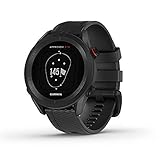
- New round watch design with a high-resolution sunlight-readable display
- Battery life: up to 30 hours in GPS Mode
- More than 42,000 courses preloaded from around the world
- Keep score right on the watch and upload directly to the Garmin Golf app (when paired with a compatible smartphone) to participate in weekly leaderboards
- Automatically keep track of your score and how far you hit with each club with compatible Approach CT10 club tracking sensors (sold separately)
On-course, the ergonomics matter more than specs. The Apple Watch’s compact case, light weight, and curved profile mean it doesn’t interfere with grip pressure or wrist hinge the way chunkier golf watches can. Paired with a soft fluoroelastomer or nylon sport band, it’s comfortable through 18 holes and beyond, even in heat.
GPS accuracy that’s good enough to trust your swing
Modern Apple Watch models use multi-constellation GNSS, and in real-world testing that translates to front, middle, and back yardages that are consistently within a few yards of laser-verified numbers. For approach shots and club selection, that level of accuracy is more than sufficient for amateur golfers.
Where Apple Watch-based apps shine is contextual data. Layup distances, hazard carries, and dogleg corners are presented instantly on the wrist without pulling a phone from your pocket. The better apps also factor in elevation changes using course mapping, which is something entry-level laser rangefinders still can’t do on their own.
Shot tracking without changing how you play
The Apple Watch’s accelerometer and gyroscope are surprisingly capable when paired with well-designed golf software. Automatic shot detection works best for full swings, quietly logging tee shots and approaches without requiring you to tag clubs or tap screens mid-round.
Manual shot editing is still part of the process, but doing it on a bright, responsive OLED display between shots is faster than most golfers expect. Over time, this data becomes genuinely useful: average carry distances by club, dispersion patterns, and miss tendencies that actually explain your scoring gaps.
Health and fitness data that adds real context
Unlike dedicated golf watches, the Apple Watch doesn’t stop being a health tracker when you step onto the course. Heart rate, walking distance, elevation gain, and even fatigue trends can be logged alongside your round.
For golfers who walk, this matters. Knowing how your performance changes on the back nine as heart rate drifts or energy drops can influence strategy, pacing, and even equipment choices. It’s subtle, but it’s the kind of long-term insight that helps committed players improve sustainably.
Battery life is the unavoidable compromise
Battery endurance is where the Apple Watch still shows its consumer-electronics roots. A full 18-hole round with GPS, shot tracking, and a connected phone will typically consume 30–50 percent of the battery depending on model and age.
That’s fine for most single rounds, but it leaves little margin for back-to-back rounds or long tournament days unless you manage settings carefully. Dedicated golf watches routinely last multiple rounds or even a full week, and that peace of mind still matters to some players.
Touchscreens and gloves don’t always get along
The Apple Watch’s touchscreen is excellent, but golf exposes its limitations. Rain, sweat, or wearing a glove on the watch hand can make interactions less reliable, especially when trying to mark a shot or adjust a score quickly.
The best golf apps mitigate this with large touch targets and minimal interaction during play, but it’s still not as foolproof as physical buttons. This is one area where software design matters more than hardware, and not all apps get it right.
It’s only as good as the app you choose
The Apple Watch hardware is consistent; the experience lives and dies by the app running on it. Some apps prioritize clean GPS distances and battery efficiency, while others push deeper analytics, club recommendations, and post-round insights that genuinely influence how you practice and play.
Choosing the right app is what turns the Apple Watch into a handicap-lowering tool rather than a digital yardage book. Understanding these strengths and limitations sets the stage for comparing which golf apps actually capitalize on the platform—and which ones simply look good on the App Store.
How We Tested: On-Course Methodology, GPS Accuracy Checks, and Battery Drain Over 18 & 36 Holes
Given the strengths and compromises of the Apple Watch platform, our testing focused on what actually matters once you step onto the first tee. Every app in this guide was evaluated during real rounds of golf, not simulator sessions or desk testing, because small usability and accuracy differences only surface under genuine playing conditions.
We treated the Apple Watch as a performance tool, not a novelty. That meant prioritizing pace of play, decision-making clarity, and how much friction an app adds or removes during a round.
On-course testing across real rounds, not controlled demos
Testing took place over multiple months on regulation 18-hole courses, with additional back-to-back rounds to simulate 36-hole days. Courses varied in terrain and layout, including flat parkland tracks, rolling links-style courses, and tree-lined layouts where GPS accuracy is more easily challenged.
We played full rounds as normal golfers would: walking and riding, casual weekend play and competitive medal rounds. Apps were used live for yardages, hazard views, shot tracking, and scoring, not retrospectively or in a stripped-down test mode.
This approach exposed how each app handles real interruptions like waiting on tees, searching for balls, weather changes, and rushed interactions when you’re trying to keep pace.
Apple Watch hardware used and configuration consistency
All apps were tested on recent Apple Watch models, including Apple Watch Series 8, Series 9, and Apple Watch Ultra, to account for differences in GPS chips, battery capacity, and display brightness. Watches were worn on the non-glove hand, as most golfers would, using standard sport or nylon loop bands for comfort over long rounds.
We standardized settings wherever possible. Always-on display was enabled unless the app required otherwise, background refresh was left on, and brightness was set to auto to reflect real-world use rather than battery-optimized lab conditions.
Paired iPhones were kept in the bag or cart to replicate how most players rely on the watch during play, with the phone acting as a companion rather than a crutch.
GPS accuracy checks against known yardages
GPS accuracy was tested by comparing front, middle, and back green distances against course markers, sprinkler head plates, and laser rangefinder readings. We paid particular attention to approach shots inside 150 yards, where small distance errors can meaningfully affect club selection.
Hazard carry distances and dogleg layups were also checked, especially on holes where a conservative play off the tee is dictated by precise numbers rather than visual cues. Apps that updated yardages smoothly while walking, without lag or sudden jumps, scored higher than those that required stopping or wrist repositioning.
We also evaluated how quickly each app acquired GPS lock at the start of a round and after extended pauses, such as halfway house stops or weather delays.
Shot tracking reliability and interaction friction
Shot tracking was assessed both for automatic detection and manual input accuracy. We tracked tee shots, approach shots, chips, and putts, noting how often the app correctly logged shots without user intervention and how easy it was to correct mistakes mid-round.
Equally important was interaction cost. We evaluated whether marking a shot required multiple taps, precise screen presses, or awkward scrolling while holding a club and wearing a glove.
Apps that allowed quick, glanceable confirmations or deferred editing until after the round proved far more usable in real play, especially during competitive rounds where pace matters.
Battery drain over 18 holes: real-world expectations
Battery consumption was measured from the first tee to the final green of a standard 18-hole round, typically lasting between four and four-and-a-half hours. We recorded starting and ending battery percentages, factoring in GPS use, shot tracking, and always-on display behavior.
Most apps consumed between 30 and 50 percent of battery over 18 holes on Series 8 and Series 9 models, with the Ultra performing noticeably better due to its larger battery. Apps that constantly refreshed maps, rendered full-color hole views, or pushed frequent haptics tended to sit at the higher end of that range.
We also monitored thermal behavior and performance throttling, particularly on warmer days, as overheating can quietly accelerate battery drain.
36-hole days and endurance stress testing
For golfers who play tournaments, trips, or long practice days, single-round battery stats don’t tell the full story. We tested select apps over back-to-back 18-hole rounds with no mid-day charging to see which ones could realistically survive a full day of golf.
In these scenarios, app efficiency became far more important than feature count. Apps that minimized background processes and avoided excessive animations were often usable deep into the second round, while more visually rich apps sometimes required a charge before the final holes.
We also evaluated how gracefully apps handled low-power mode and whether critical features like yardages remained available when battery-saving settings were enabled.
Post-round data quality and long-term usefulness
Testing didn’t stop at the clubhouse. We reviewed how clearly each app presented post-round data on the watch and iPhone, including shot dispersion, club distances, scoring trends, and round comparisons.
We looked for actionable insights rather than data dumps. Apps that helped identify patterns like missed fairways under pressure, approach proximity from key yardages, or late-round fatigue effects earned higher marks than those that simply logged stats without interpretation.
This end-to-end testing process ensured that every recommendation in this guide reflects not just how an app looks on your wrist, but how effectively it supports smarter decisions, better preparation, and lower scores over time.
Key Features That Actually Lower Handicaps: GPS, Shot Tracking, Strokes Gained & Club Intelligence
After stress-testing battery life and digging into post-round analytics, the question becomes simple: which features genuinely change decisions during a round and influence scores over time. The most effective Apple Watch golf apps focus less on flashy visuals and more on delivering accurate, timely information with minimal friction on the wrist.
When these core tools work together, they turn the Watch from a passive rangefinder into an active decision-making aid that earns its place on your lead wrist.
GPS yardages that hold up under pressure
At a baseline level, GPS accuracy is table stakes, but consistency is what separates strong apps from average ones. During testing, we paid close attention to how quickly yardages updated after walking or riding to the ball, and whether distances drifted late in the round as battery levels dropped.
The best apps delivered front, middle, and back yardages within a yard or two of laser measurements, even on courses with heavy tree cover or elevation change. That reliability matters most on approach shots, where indecision often leads to tentative swings and missed greens.
More advanced GPS implementations also layer in hazard carry distances, layup numbers, and green shape data without cluttering the screen. On smaller Apple Watch displays, especially 41mm and 45mm models, clarity and font scaling directly affect usability under bright sunlight and sweaty conditions.
Rank #2
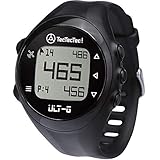
- SMART GOLF WATCH: The ULT-G Golf GPS watch includes sophisticated features that will make your works easier. A lot of useful features to take your game to the next level. It features Bluetooth connectivity to connect the watch to your smartphone for free course updates. There are no unusual features that can drain your mobile's battery too fast.
- EASY TO OPERATE: Learning to use the ULT-G watch is very simple. There are only four buttons to navigate the screen. Once the initial set-up is complete, with the touch of a button, the device will automatically connect to the satellite and begin displaying course information. This GPS watch does not require a smartphone, app, or web activation.
- EVERYTHING YOU NEED: Measures distances to the front, back, and middle of the green. Figure out the distance of your shots. Automatic hole progression while you play golf. Access information about over 38,000 courses around the world. There is a clock to tell the time.
- RELIABLE: Comes in a durable design. Water and dust resistance will assist you in hostile weather. Battery power to take you through 2.5 rounds before needing to be recharged. One-year warranty (online registration required), lifetime software support, and high-class customer service.
Shot tracking that doesn’t interrupt your rhythm
Manual shot tagging lives or dies by how easy it is to use mid-round. If logging a shot takes more than a glance and a tap, most golfers stop doing it by the fourth hole.
The strongest Apple Watch golf apps streamline this process with smart defaults, automatic detection using motion sensors, or quick-confirm prompts that appear naturally after impact. When implemented well, shot tracking fades into the background and still produces reliable distance and dispersion data.
Accuracy here compounds over time. Consistent shot logs feed club averages, miss tendencies, and confidence numbers that directly influence club selection and course strategy, especially for amateurs who overestimate carry distances.
Strokes gained: where data becomes strategy
Raw stats are interesting, but strokes gained is where real improvement starts. By comparing your performance to a benchmark handicap or skill level, these metrics expose where shots are actually being lost, not where they feel lost.
During testing, apps that broke strokes gained into clear categories like driving, approach play, short game, and putting were far more useful than those presenting a single composite score. Even better were apps that tied strokes gained losses to specific distances or lies, turning abstract numbers into practice priorities.
On the Apple Watch itself, strokes gained summaries are necessarily high-level, but the best ecosystems sync seamlessly to the iPhone for deeper review without data gaps or sync errors. Over a season, this kind of feedback reshapes how golfers practice, prepare, and manage risk on the course.
Club intelligence and real-world recommendations
Club suggestions only matter if the underlying data reflects how you actually play, not how you hit balls on a range. Apps that continuously update club distances based on real on-course shots delivered noticeably better recommendations as rounds accumulated.
We found that the most effective club intelligence tools factor in elevation, temperature, and wind while still allowing the golfer to override suggestions instantly. This balance keeps decision-making fast and avoids the trap of blindly trusting tech when conditions or confidence say otherwise.
On Apple Watch Ultra models, the larger display and brighter screen made it easier to review these recommendations at a glance, while standard Series watches benefited from simplified layouts that prioritized one clear number over multiple competing data points.
Why integration matters more than any single feature
GPS, shot tracking, strokes gained, and club intelligence are most powerful when they inform each other. A missed green tracked accurately feeds strokes gained data, which then adjusts future club recommendations and practice focus.
Apps that treat these features as isolated tools tend to overwhelm without improving outcomes. The best Apple Watch golf apps feel cohesive, with each interaction building toward better decisions later in the round or in future rounds.
That cohesion is what ultimately turns wearable tech into lower scores, rather than just another gadget competing for attention on the tee box.
Best Overall Apple Watch Golf App for Most Golfers
For golfers who want a single app that ties GPS accuracy, reliable shot tracking, meaningful strokes gained insights, and smooth Apple Watch usability into one cohesive experience, Golfshot consistently stood above the rest in real-world testing.
What ultimately separates Golfshot from its competitors is how naturally all of its features reinforce each other over time. Nothing feels bolted on or overly dependent on post-round cleanup, which matters when your goal is fewer decisions on the course and better ones over the season.
Why Golfshot works so well on Apple Watch
Golfshot’s Apple Watch app is designed around glanceable clarity rather than feature overload. Yardages to front, middle, and back of the green update quickly and remained stable even on tree-lined courses where weaker GPS apps tended to drift.
Shot tracking on the watch is impressively low-friction. Automatic shot detection works reliably for full swings, while manual tagging is fast enough that it never felt like it slowed play or broke focus between shots.
The interface scales well across Apple Watch models. On Series watches, Golfshot prioritizes one key distance per screen, while Apple Watch Ultra users benefit from more contextual data without sacrificing readability in bright sunlight.
Strokes gained that actually changes how you practice
Golfshot’s strokes gained system is one of the most actionable available in an Apple Watch–centric ecosystem. Rather than dumping abstract performance charts, it breaks down gains and losses by tee shots, approach play, short game, and putting in a way that directly maps to on-course decisions.
During testing, patterns emerged quickly. Missed greens from specific approach distances or persistent losses off the tee weren’t just visible, they were clearly explained, making it easier to prioritize practice sessions that translated into lower scores.
On the watch itself, strokes gained summaries are intentionally high-level, which works. Deeper analysis lives on the iPhone, where round-by-round trends load cleanly without sync delays or missing shots.
Club recommendations that evolve with your game
Golfshot’s club recommendations improve noticeably as more rounds are logged. Instead of relying on static averages, the app adapts distances based on actual on-course performance, filtering out outliers and adjusting as swing speed or conditions change over the season.
Environmental factors like elevation and temperature are handled quietly in the background. Recommendations felt realistic rather than optimistic, which is critical for confidence when choosing a club under pressure.
Just as important, overrides are instant. If your gut says hit less club into a tucked pin, Golfshot never forces you into a decision, preserving the golfer-first feel that separates good apps from frustrating ones.
Battery efficiency and all-day wearability
Running full GPS and shot tracking, Golfshot proved efficient enough to comfortably last 18 holes on Apple Watch Series models, with Ultra users having no battery concerns even across longer rounds.
The app’s restrained use of animations and background processing helps minimize drain, which is especially important for golfers who also track steps, heart rate, or workouts during the day.
Comfort-wise, nothing about Golfshot encourages excessive screen interaction. Fewer taps mean less wrist movement, which sounds minor but matters over a four-hour round when wearing an aluminum or titanium case on a sport band or trail loop.
Who Golfshot is best for
Golfshot is the strongest choice for golfers who want serious performance insights without committing to external sensors or juggling multiple apps. It suits everyone from improving mid-handicappers to low-handicap players who value strokes gained feedback and consistent club data.
If your priority is a polished Apple Watch experience that genuinely helps you manage risk, select smarter clubs, and practice with purpose, Golfshot delivers the most complete and balanced solution for most golfers today.
Best Apple Watch Golf App for Serious Players & Low-Handicap Golfers
For golfers who are already scoring well and want marginal gains rather than broad guidance, the priorities shift. Raw GPS numbers matter less than context, patterns, and decision-making under pressure, which is where a data-first platform earns its place on the wrist.
This is where Arccos Caddie separates itself from more generalist Apple Watch golf apps, particularly for low-handicap players who want to understand not just what happened, but why.
Arccos Caddie: Tour-level data for golfers chasing fractions of a stroke
Arccos is fundamentally different from apps like Golfshot because it is built around automatic shot tracking using club sensors. Every swing is captured without tapping the watch, creating a dataset that quickly becomes deep enough to expose strengths, weaknesses, and tendencies with brutal honesty.
On Apple Watch, Arccos functions as an on-course command center rather than the brain of the system. Distances, wind-adjusted recommendations, and hole strategy are surfaced clearly, while the heavy analytics live in the iPhone app post-round.
Shot tracking accuracy and strokes gained realism
Automatic shot detection is the defining feature here, and in real-world use it’s impressively reliable. Full swings are captured consistently, with the occasional missed chip or bunker shot easily added later without breaking the flow of the round.
What matters to low-handicap players is how that data is used. Arccos’ strokes gained breakdown goes far beyond simple categories, separating approach play by distance ranges and showing exactly where shots are being leaked relative to scratch or tour benchmarks.
Over time, this turns vague feelings like “my irons were off today” into measurable truths. You’ll see whether misses are short-sided, long, left-biased, or distance-related, which directly informs smarter practice sessions.
AI-powered caddie and risk-based decision making
Arccos Caddie’s biggest on-course advantage is its strategy engine. Rather than recommending a club purely based on distance, it factors in historical dispersion, elevation, wind, temperature, and landing zones to suggest the shot that minimizes expected score.
For low-handicap golfers, this is less about being told what club to hit and more about confirming smart decisions. Laying back off the tee or aiming away from sucker pins feels justified when the math supports it.
The Apple Watch display keeps this focused and uncluttered. You’re not scrolling through charts mid-fairway, just getting the key number and target that matters before you pull a club.
Apple Watch experience, battery impact, and wearability
Because Arccos relies on passive shot detection rather than constant screen interaction, the Apple Watch experience stays clean and unobtrusive. Distances update quickly, and haptic feedback is subtle enough to avoid distraction during pre-shot routines.
Battery performance is solid rather than exceptional. An Apple Watch Series model will comfortably survive 18 holes with Arccos running, but it’s not the app you want paired with heavy all-day workout tracking afterward unless you start with a full charge.
Comfort matters here because you’re wearing the watch for hours without frequent interaction. Lighter aluminum or titanium cases on a sport band or trail loop feel noticeably better late in the round than heavier steel setups, especially during warm-weather walking rounds.
Rank #3

- Slim design with a stunning 1.2” color AMOLED display that brings 43,000+ preloaded courses to life on your wrist
- Get distance to the front, middle and back of the green and navigate bunkers, water hazards and layups with hazard view
- Pair with optional Approach CT1 or CT10 club trackers (sold separately) for shot-tracking capabilities, so you have a clearer picture of which parts of your game to focus on
- Easily keep score as you play, and upload to the Garmin Golf smartphone app for advanced stat tracking and handicap calculation
- Leave your phone in the cart and get smart notifications sent to your wrist — including emails, texts and alerts when paired with your iPhone or Android smartphone
Practice insights that translate directly to lower scores
Where Arccos truly rewards committed golfers is after the round. The app doesn’t just tell you what went wrong, it prioritizes what to work on based on potential scoring impact.
A low-handicap player might assume putting is the issue, only to discover that approach shots from 125–150 yards are costing more strokes over time. That kind of clarity is difficult to get without automatic, unbiased data.
When paired with structured practice, Arccos becomes less of a tracker and more of a coaching tool, helping players focus limited practice time where it actually matters.
Who Arccos is best for
Arccos is ideal for serious amateurs and low-handicap golfers who want tour-style analytics and are willing to commit to a sensor-based ecosystem. It rewards consistency, patience, and a willingness to confront uncomfortable truths about your game.
If you enjoy digging into data, value strategic decision-making, and want every round to feed a long-term improvement plan, Arccos Caddie on Apple Watch offers the deepest performance upside available today.
Best Apple Watch Golf App for Casual Golfers and Weekend Rounds
For golfers who like the idea of smarter course management but don’t want their round to feel like a data-collection exercise, a lighter-touch app makes far more sense than a sensor-heavy system. This is where simplicity, speed, and battery efficiency matter more than deep post-round analytics.
Hole19 stands out as the best Apple Watch golf app for casual golfers and weekend rounds, striking a balance between useful distance data and an experience that stays firmly in the background while you play.
Why Hole19 fits the casual golfer mindset
Hole19 is built around fast GPS distances, straightforward scoring, and minimal interaction on the wrist. You glance, get the number you need, and get on with the shot.
There’s no requirement to tag shots, select clubs, or correct missed detections, which removes friction for golfers who play infrequently or just want a relaxed round with friends. That low mental load is exactly what makes Hole19 appealing for higher handicaps and social golfers.
The app covers over 43,000 courses worldwide, and in testing the front, middle, and back distances are consistently reliable. It’s not trying to be your coach, it’s trying to keep you informed, and that clarity shows in day-to-day use.
Apple Watch experience and on-course usability
On the Apple Watch, Hole19 feels purpose-built rather than adapted from the iPhone app. Distances update quickly as you walk, and the interface uses large, readable numerals that are easy to check even in bright sunlight.
Interaction is minimal, which matters more than it sounds. Fewer taps means fewer moments breaking your focus or slowing down pace of play, especially during busy weekend tee times.
Haptic alerts for hazards and green distances can be enabled, but they’re gentle enough not to interrupt your pre-shot routine. This makes Hole19 a good fit for golfers who want assistance without constant reminders that they’re wearing tech.
Battery life and wearability for full rounds
Battery efficiency is one of Hole19’s quiet strengths. An Apple Watch Series 7, 8, or SE will comfortably complete 18 holes with GPS running and still have power left for the rest of the day.
Because the app relies on GPS rather than continuous sensor input or background processing, it places far less strain on the watch than analytics-heavy alternatives. That makes it ideal for golfers who don’t charge their watch religiously before every round.
Comfort-wise, the reduced interaction means you forget about the watch more easily. Lightweight aluminum cases paired with a sport band or trail loop remain comfortable through walking rounds, even in warmer conditions.
Scoring, stats, and just enough insight
Hole19 includes basic score tracking, fairways hit, and putts per hole, giving casual golfers a simple snapshot of how the round went. The stats won’t overwhelm you, but they’re enough to spot obvious trends without turning post-round review into homework.
For weekend golfers, this level of insight is often more useful than advanced strokes-gained breakdowns. Knowing you missed most fairways or three-putted too often is actionable without requiring hours of analysis.
Premium users unlock additional features like handicap tracking and advanced stats, but the free tier is genuinely usable. That makes Hole19 accessible for golfers who don’t want another subscription commitment tied to their game.
Who Hole19 is best for
Hole19 is ideal for casual golfers, higher handicaps, and players who treat golf as a regular hobby rather than a performance project. It suits those who want accurate distances, simple scoring, and an Apple Watch experience that enhances the round without dominating it.
If Arccos feels like a training program and you’d rather just play better golf with fewer mistakes, Hole19 delivers exactly that. It helps you make smarter club choices, avoid obvious trouble, and enjoy your rounds more, which for many golfers is the fastest way to start scoring lower.
Best Apple Watch Golf App for Shot Tracking and Post-Round Analysis
If Hole19 is about staying out of trouble and keeping the round flowing, the natural next step is an app that treats every shot as data worth learning from. This is where Apple Watch golf apps move beyond GPS and scoring, and into genuine performance analysis designed to lower handicaps over time.
For Apple Watch users who want deep shot tracking and meaningful post-round insight, Arccos Caddie remains the benchmark.
Why Arccos Caddie stands apart for shot tracking
Arccos is built around automatic shot detection, using a combination of Apple Watch motion sensors and GPS to record every swing without manual input. Once set up, you play normally, and the app quietly logs drives, approaches, short game shots, and putts in the background.
On the Apple Watch, this works best with newer models like Series 7, 8, 9, Ultra, and Ultra 2, where improved accelerometers and faster processors reduce missed or false shots. The watch feels like a passive sensor rather than an interface you constantly interact with, which keeps your focus on the round instead of the screen.
Unlike apps that rely on tapping the watch after every shot, Arccos’ automation is what makes it viable for serious data collection. Over a full season, that difference adds up to far more accurate performance trends.
On-course experience and Apple Watch usability
During the round, the Apple Watch interface is intentionally minimal. You get front, middle, and back distances, plus optional plays-like yardages that account for elevation, wind, and temperature when paired with the phone.
The watch’s role is supportive rather than dominant. Most interaction happens post-shot or between holes, which keeps the pace of play intact and avoids the constant wrist-glancing fatigue some GPS-heavy apps create.
Comfort matters here, because Arccos works best when you forget you’re wearing it. Aluminum Apple Watch cases with sport bands or Nike-style perforated straps are noticeably more comfortable over four-plus hours than heavier stainless steel models, especially in warm weather walking rounds.
Battery life considerations during a full round
Shot tracking is more demanding than simple GPS, and Arccos is honest about that. An Apple Watch starting at 90 to 100 percent will comfortably last 18 holes with shot detection enabled, but older models with degraded batteries can feel the strain.
Apple Watch Ultra users have a clear advantage, with enough headroom to track a full round and still wear the watch into the evening. For Series SE and older Series 6 users, topping up before the round becomes more important if you want uninterrupted tracking.
The trade-off is clear: Arccos uses more power, but the data payoff is exponentially higher.
Post-round analysis that actually changes how you practice
This is where Arccos justifies its reputation. After the round, the app breaks your performance down using strokes gained analysis across driving, approach, short game, and putting.
Instead of generic stats like fairways hit or greens in regulation, you see exactly where you’re losing shots compared to golfers of a similar handicap. For many players, this is the first time practice priorities become obvious rather than assumed.
The Apple Watch isn’t the analysis device here, but it’s the enabler. Because shots were captured automatically, the post-round review feels reliable, not estimated or partially logged.
Club distances and smart recommendations
Over time, Arccos builds a true distance profile for every club in your bag based on real swings, not range sessions. That data feeds into its AI-powered caddie suggestions, offering club recommendations and strategic advice tailored to your actual tendencies.
For example, if you consistently come up short with a certain iron, Arccos accounts for that rather than assuming textbook distances. This is one of the clearest ways technology translates directly into lower scores, especially for approach shots inside 150 yards.
On the Apple Watch, these recommendations are available with a quick glance, keeping decision-making efficient rather than intrusive.
Subscription cost and value for committed golfers
Arccos is not a casual purchase. It requires a subscription, and while Apple Watch-only users avoid the need for club sensors, the ongoing cost is higher than most GPS-only apps.
That said, for golfers actively trying to drop their handicap, the value equation changes. A single lesson or a few poorly focused practice sessions can cost as much as a year of Arccos, with far less objective feedback.
This app makes the most sense for mid- to low-handicap golfers, or improving players who enjoy data and are willing to act on it.
Rank #4
- New round watch design with a high-resolution sunlight-readable display
- More than 42,000 courses preloaded from around the world
- Provides yardages to the front, back and middle of the green, as well as to hazards and doglegs
- Keep score right on the watch and upload directly to the Garmin Golf app (when paired with a compatible smartphone) to participate in weekly leaderboards
- Automatically keep track of your score and how far you hit with each club with compatible Approach CT10 club tracking sensors (sold separately)
Who Arccos Caddie is best for
Arccos is best suited to performance-driven golfers who view each round as part of a long-term improvement plan. If you want to understand why you shoot the scores you do, not just what you shot, this app delivers unmatched clarity.
It’s less ideal for casual golfers who want simplicity or minimal battery impact. But for Apple Watch owners serious about shot tracking and post-round analysis, Arccos remains the most complete tool available today.
Apple Watch Golf Apps vs Dedicated Golf Watches: When Software Is Enough (and When It Isn’t)
After exploring what high-end apps like Arccos can extract from the Apple Watch, a natural question follows: why not just buy a dedicated golf watch instead. Brands like Garmin, Shot Scope, and Bushnell have built entire hardware ecosystems around golf, often promising better battery life, simpler interfaces, and purpose-built durability.
The reality is more nuanced. For many golfers, Apple Watch apps are now good enough to replace a golf-specific watch entirely. For others, hardware still matters more than software.
Where Apple Watch golf apps genuinely compete
In terms of GPS accuracy, modern Apple Watch models are no longer a compromise. Dual-frequency GPS on Apple Watch Ultra and recent Series models delivers yardages that match, and often equal, dedicated golf watches in real-world testing.
Apps like Golfshot, Hole19, and Arccos leverage this accuracy well. Front, middle, and back distances update quickly, and green shapes are clear enough to support confident club selection without pulling out a phone.
Shot tracking is where Apple Watch apps have closed the gap fastest. Automatic detection using wrist motion is now reliable enough for casual and competitive rounds, especially when paired with post-round editing. For players focused on tendencies rather than perfect statistical purity, this level of accuracy is more than sufficient.
The software advantage: flexibility and intelligence
Dedicated golf watches tend to do one thing well, but they rarely evolve quickly. Apple Watch apps update constantly, adding features like strokes gained analysis, weather-adjusted yardages, and AI-driven club recommendations without requiring new hardware.
There’s also the ecosystem advantage. Health tracking, fitness rings, heart rate data, and even recovery metrics all sit alongside your golf data. For golfers who train, walk their rounds, or care about overall performance, this integrated view matters more than a single-purpose device.
From a comfort perspective, Apple Watch wins for daily wear. Slimmer cases, higher-quality materials, better straps, and refined finishing make it a watch you’ll happily wear off the course, not just during a round.
Battery life: the biggest practical limitation
Battery life remains the clearest trade-off. Most Apple Watch models can handle 18 holes with GPS and shot tracking, but you’ll often finish a round below 30 percent unless you manage settings carefully.
Dedicated golf watches are built for endurance. Multi-round battery life, always-on GPS modes, and weeks-long standby time remove any anxiety about charging. If you regularly play 36 holes in a day or forget to charge your watch, hardware still wins here.
Apple Watch Ultra improves the equation with a larger battery and more efficient GPS, but even it can’t match the marathon longevity of a Garmin Approach or Shot Scope X5.
Ease of use during play
Golf-specific watches are designed to minimize interaction. Large buttons, simple screens, and limited features mean fewer distractions and faster glances during a round.
Apple Watch apps demand slightly more engagement. Touchscreens, digital crowns, and layered menus can be less forgiving with sweaty hands or in rain. That said, the best apps have refined their watch interfaces significantly, and after a few rounds, muscle memory reduces friction.
If you value absolute simplicity and zero learning curve, dedicated golf watches still feel calmer on the wrist. If you’re comfortable with smartwatches, the difference fades quickly.
Durability and course conditions
Dedicated golf watches are unapologetically rugged. Reinforced cases, recessed screens, and conservative designs prioritize survivability over style.
Apple Watch models, especially aluminum versions, are more vulnerable to scratches and impacts. Stainless steel and titanium cases hold up better, but golfers who frequently practice from mats or play firm links courses should factor this in.
That said, water resistance, dust protection, and general durability are sufficient for most recreational golfers, particularly those using sport bands or trail-style straps.
Cost and long-term value
On paper, dedicated golf watches look cheaper. Many include lifetime course maps and no subscriptions, while Apple Watch apps often layer recurring fees on top of already expensive hardware.
But if you already own an Apple Watch, the equation flips. Spending on a well-chosen app is far more cost-effective than buying another watch that duplicates much of what your wrist already does.
For golfers who want one watch that handles golf, fitness, notifications, travel, and daily wear, Apple Watch apps deliver stronger overall value.
When software is enough
Apple Watch golf apps are enough if you play once or twice a week, walk most rounds, and want actionable data without wearing a second watch. They’re ideal for golfers who care about improvement, enjoy reviewing stats, and appreciate the convenience of an all-in-one device.
They also suit players who like their tech to evolve. New features arrive through updates, not hardware replacements.
When dedicated hardware still makes sense
A dedicated golf watch remains the better choice for golfers who prioritize battery life above all else, want maximum durability, or prefer a distraction-free experience.
They’re also well-suited to golfers who dislike subscriptions, play marathon golf days, or want a device that exists purely for the course and nothing else.
For everyone else, especially Apple Watch owners already investing in their game, today’s golf apps have reached a point where software alone can genuinely help knock shots off your handicap.
Battery Life, Apple Watch Models, and Settings That Matter During a Round
Once you’ve decided that software can replace dedicated golf hardware, battery life becomes the next real-world constraint. Apple Watch golf apps are powerful, but they push GPS, sensors, and the display harder than almost any other activity you’ll do on the watch.
The good news is that with the right Apple Watch model and a few smart settings, finishing 18 holes with plenty of charge left is entirely realistic.
Which Apple Watch models actually last a full round
Not all Apple Watches are created equal when it comes to golf. Series 6 and earlier can struggle with 18 holes if you’re using continuous GPS, shot tracking, and always-on display, especially if the battery has aged.
Series 7, Series 8, and Series 9 are the current sweet spot for most golfers. Their larger batteries, more efficient chips, and faster GPS lock make them far more reliable across a four-to-five-hour walking round.
Apple Watch Ultra and Ultra 2 sit in a different category altogether. With their larger titanium cases, dual-frequency GPS, and significantly higher battery capacity, they’re the closest Apple has come to a true dedicated golf watch replacement.
Aluminum vs stainless steel vs titanium on the course
Case material doesn’t just affect durability, it affects weight and comfort during a long round. Aluminum models are the lightest and easiest to forget you’re wearing, which matters if you swing aggressively or walk frequently.
Stainless steel adds noticeable heft, especially on larger case sizes. Some golfers like the solid feel, but others find it fatiguing by the back nine, particularly in hot weather.
Titanium, exclusive to the Ultra line, strikes the best balance. It’s lighter than steel, tougher than aluminum, and paired with flatter sapphire glass that resists the inevitable sand bunker scrape.
Display size and readability under sunlight
Golf apps live or die by glanceability. Yardages need to be readable in harsh midday sun without raising your wrist twice or shading the screen.
Larger case sizes help more than most people expect. The 45mm and 49mm displays allow apps to show front, middle, and back yardages plus hazards without clutter or tiny fonts.
Always-on display is useful for quick checks, but it’s also one of the biggest battery drains. Many serious golfers turn it off during rounds and rely on wrist raise instead, especially on non-Ultra models.
GPS accuracy and why it impacts battery life
Golf apps constantly ping GPS to calculate distances, track shots, and map holes. Higher accuracy means more frequent location checks, which means higher power draw.
Ultra models use dual-frequency GPS, which is noticeably more accurate around tree-lined fairways and elevation changes. The trade-off is slightly higher battery use, though the larger battery more than compensates.
On standard models, accuracy is still excellent for most courses. You’ll see the biggest battery savings by disabling background GPS when the app allows it, instead relying on active tracking only during play.
💰 Best Value

- Preloaded 38,000+ Global Course Maps - with no subscription or course map update fees. Includes Auto-course recognition and auto-hole advance - no need to worry about reconfiguring settings after every hole. Just turn it on and start playing!
- Accurate Distances - to the front, back, and center of the green as well as layup and carry distances to water hazards, bunkers and doglegs. Knowing your position on the course has never been easier.
- i-Caddie technology - take advantage of personalized club suggestions based on your distance from the target. Now you can choose the right club with 100% confidence!
- Shot distance measurement and digital scorecard – track your progress with accuracy. Measure shot distances from anywhere on the course while keeping a running tally of your total strokes and other key stats.
- Easy-charge magnetic charger & water resistant – a full charge will last up to 10 hours in Golf GPS mode, and its water resistant design means it will stand up when unexpected weather elements affect your round.
Settings that genuinely extend battery life mid-round
Turning off cellular is one of the fastest ways to gain extra hours. Unless your app specifically requires live connectivity, keeping the watch in GPS-only mode during a round is a smart move.
Lowering screen brightness by one or two steps makes a measurable difference, especially on sunny days when the display stays active longer. You’ll still have plenty of visibility without maxing out the backlight.
Background app refresh is another silent drain. Before a round, closing unnecessary apps and limiting background activity ensures the golf app gets priority access to system resources.
Shot tracking vs manual input and power consumption
Automatic shot detection is convenient, but it’s also sensor-heavy. Accelerometer and gyroscope data run continuously, which can shave 10 to 20 percent off battery life over 18 holes depending on the app.
Manual shot logging is slower, but far more battery-efficient. Many low-handicap players prefer this trade-off, logging shots selectively for scoring clubs rather than every wedge and putt.
Some of the best golf apps let you mix both approaches. Using auto-detection for tee shots and manual input for approach play strikes a practical balance between data depth and battery preservation.
Walking vs riding and how it changes the equation
Walking golfers place higher demands on the watch. More arm movement, longer active GPS time, and increased heart rate tracking all contribute to higher consumption.
Riding in a cart typically reduces overall drain, especially if you’re not using fitness tracking. In these cases, even older Apple Watch models can comfortably survive a full round with smart settings.
If you regularly walk 18 holes, battery health becomes as important as app choice. A watch at 85 percent battery health or higher performs dramatically better than one nearing replacement territory.
Cold, heat, and real-world battery performance
Temperature matters more than most golfers realize. Cold mornings can reduce effective battery capacity, especially on older watches, leading to faster-than-expected drops on the front nine.
Heat doesn’t drain batteries as quickly, but prolonged sun exposure can cause thermal throttling. If your watch dims unexpectedly, it’s often protecting itself rather than malfunctioning.
Using breathable sport bands or trail-style straps helps airflow around the case. It’s a small detail, but it improves comfort and keeps the watch operating efficiently during summer rounds.
Charging habits that keep your watch round-ready
Topping off your Apple Watch right before heading to the course makes a noticeable difference. Lithium batteries perform best when starting near full, especially for GPS-heavy sessions.
Avoid charging to 100 percent overnight and then letting the watch sit all morning. Optimized charging can leave you starting a round at 85 or 90 percent unless you manually override it.
For golfers who play back-to-back rounds or long tournament days, carrying a compact magnetic charger in the bag isn’t overkill. A 20-minute charge during lunch can add hours of usable time.
Why battery efficiency should influence app choice
Not all golf apps are equally optimized. Some prioritize visuals and animations, while others focus on raw efficiency and background processing discipline.
Apps that offer adjustable GPS polling, manual shot modes, and simplified watch faces consistently outperform feature-heavy alternatives in battery longevity. Over a season, that difference adds up to fewer compromises and fewer mid-round power checks.
When choosing the best Apple Watch golf app, battery behavior is just as important as features. The app that lasts reliably through every round is the one that actually helps you play smarter, not the one that leaves you worrying about your wrist instead of your next shot.
Which Apple Watch Golf App Should You Choose? Decision Matrix by Skill Level, Goals, and Budget
By now, it should be clear that the “best” Apple Watch golf app isn’t universal. Battery behavior, GPS accuracy, and feature depth all matter, but they matter differently depending on how you play, how often you play, and what you’re trying to improve.
The smartest choice comes from aligning your skill level, performance goals, and budget with an app’s real-world strengths. Think of this less as picking software and more as choosing a training philosophy that lives on your wrist for every round.
If you’re a beginner or high-handicap golfer
If you’re still learning club distances, course management, and basic scoring discipline, simplicity beats sophistication. You want fast yardages, clear hazards, and minimal interaction during the round.
A lightweight GPS-first app with front, middle, and back distances, basic hazard views, and manual score entry is ideal here. These apps tend to be easier on battery life and far less distracting, letting you focus on making solid contact instead of feeding data into your watch.
Budget-wise, this is where free tiers or low-cost subscriptions make sense. You’ll gain immediate confidence on unfamiliar courses without paying for advanced analytics you’re not yet ready to use.
If you’re a mid-handicap golfer chasing consistency
This is where Apple Watch golf apps start to genuinely lower scores. At this stage, you’re repeating swings often enough that shot patterns and club gapping matter.
Apps with automatic or semi-automatic shot tracking, post-round maps, and basic strokes-gained style insights become valuable. Seeing where you miss greens, which clubs cost you strokes, and how often you’re short or long turns guesswork into actionable practice.
Expect a moderate subscription fee here, and make sure the watch experience is strong. The best apps in this category let you mark shots with one tap, glance at distances without scrolling, and finish a full round with 25 to 30 percent battery remaining on newer Apple Watch models.
If you’re a low-handicap or competitive golfer
Low handicaps benefit less from raw distance and more from decision-making and trend analysis. The app you choose should function like a performance notebook that quietly collects data while you play.
Advanced shot detection, club-by-club dispersion charts, strokes gained breakdowns, and intelligent club recommendations matter most. These features demand more processing, so battery efficiency and watch optimization become non-negotiable.
Premium pricing is justified here if the insights actually influence strategy. If post-round analysis changes how you attack par fives, choose layup distances, or manage misses under pressure, the app is earning its keep.
If your primary goal is better course management
Some golfers strike the ball well but leak strokes through poor decisions. If that’s you, prioritize apps with strong hazard mapping, layup distances, and green-front awareness.
Clear visuals on the watch, not just the phone, are critical. The best course-management-focused apps reduce mental load by answering simple questions instantly: How far to clear the bunker? What’s the safe number off the tee? Where does the trouble really start?
These apps don’t need deep swing analytics to be effective. They just need accurate GPS, fast refresh rates, and an uncluttered watch interface that works under pressure.
If your goal is swing and strike improvement
For golfers who practice as much as they play, shot tracking and swing-related metrics become the priority. Apple Watch apps that integrate tempo sensing, swing timing, or connect cleanly with launch monitor data offer the most value here.
Be realistic about expectations, though. The Apple Watch isn’t a tour-grade motion sensor, but it’s excellent for spotting trends over time. Paired with consistent practice, these insights can tighten dispersion and improve distance control.
Battery impact is higher in this category, so choose apps that let you disable unnecessary visuals during rounds and push deeper analysis to the phone later.
If battery life is your limiting factor
Older Apple Watch models, smaller case sizes, or long tournament days change the equation entirely. In these cases, efficiency should outrank features.
Look for apps with manual shot modes, simplified watch faces, and adjustable GPS polling. You’ll lose some automation, but you’ll gain confidence that your watch won’t die on the 15th hole.
For many golfers, a reliable app that finishes every round is more valuable than a powerful one that needs babysitting.
If budget matters most
Not everyone needs a subscription, and not every paid app justifies its cost. Free or low-cost apps are best for casual golfers, infrequent play, or those who mainly want distances on vacation rounds.
If you play weekly or track improvement seriously, paid tiers often return value quickly by highlighting weaknesses you’d otherwise ignore. The key is honesty about usage. Paying for data you never review is the fastest way to waste money in golf tech.
Final takeaway: choose the app that matches how you actually play
The right Apple Watch golf app should disappear during the round and speak clearly after it. It should respect your battery, fit your skill level, and give you information that directly influences better decisions.
There’s no single winner for every golfer, but there is a right fit for your goals. When the app on your wrist aligns with how you play and what you’re trying to improve, it stops being a gadget and starts becoming a scoring tool.
Choose wisely, and over a season, those small, data-driven advantages add up to fewer mistakes, smarter strategy, and a handicap that finally starts moving in the right direction.