The Galaxy Watch 3 sits in an unusual but still relevant place in 2026. It’s no longer Samsung’s newest platform darling, yet thousands of people continue to wear it daily because the hardware holds up: a slim stainless steel case, physical rotating bezel that’s still unmatched for one‑handed control, comfortable curved lugs, and battery life that remains predictable with normal use. What determines whether the watch still feels modern—or quietly frustrating—is not the spec sheet, but the apps you choose to run on it.
Out of the box, the Galaxy Watch 3 covers the basics well, but default apps only take you so far. Tizen OS was always designed around efficiency and glanceable interactions, and the right third‑party apps unlock workflows Samsung never fully addressed, from better offline music handling to more serious fitness tools and genuinely useful utilities. With thoughtful app choices, the Watch 3 still feels purposeful rather than obsolete.
This section explains why apps remain the single biggest factor in extending the Galaxy Watch 3’s usefulness in 2026, what Tizen does differently from Wear OS, and how to think strategically about app selection before we move into the best recommendations by category.
Tizen OS in 2026: Stable, Efficient, and Quietly Frozen
Tizen on the Galaxy Watch 3 is effectively in a long-term maintenance phase. Major feature updates have ended, but stability is excellent, animations remain smooth on the Exynos 9110 chipset, and battery drain is more predictable than many early Wear OS watches. In daily wear, that translates into fewer surprises, fewer background processes, and a watch that behaves consistently week after week.
🏆 #1 Best Overall

- Galaxy Watch3 combines powerful technology with a premium, customizable design so you can manage the day-today from your wrist, beautifully.
- Keep an eye on wellness with advanced health monitoring, and go for days without charging.
- Keep an eye on your fitness and health with SpO2, VO2 max, and heart-rate monitoring. Help is just a tap away if you stumble. And track your cycle in an easy and discreet way. *This device and related software are not intended for use in the diagnosis of disease or other conditions, or in the cure, mitigation, treatment or prevention of disease. SPO2, VO2 max and running coach features not available at the time of launch, will become available during Q3. Features will require a software update.
- Galaxy Watch3 combines style—two sizes, three colors, 50,000-plus watch faces and premium leather bands—with military-grade durability and water resistance.
- Spend your time moving while Galaxy Watch3 tracks seven popular activities automatically. Get more out of each movement thanks to a built-in run coaching.
The trade-off is ecosystem momentum. New apps are rare, but the best Tizen apps were built specifically for circular displays, bezel navigation, and limited power budgets. That focus often makes them feel more refined than their early Wear OS equivalents, especially for quick interactions like starting a workout, controlling music, or checking navigation cues mid-walk.
Why the Right Apps Matter More on Older Hardware
On newer Galaxy Watches, raw performance and deep Google integration can brute-force mediocre software. The Galaxy Watch 3 doesn’t have that luxury. Its smaller RAM pool and older processor reward apps that are lightweight, well-optimized, and respectful of battery life.
Well-chosen apps can actually improve real-world endurance, reduce reliance on your phone, and make the watch more comfortable to live with. Poorly optimized ones, on the other hand, can cause background drain, delayed notifications, or sluggish wake times, which is why curation matters far more here than on current-generation models.
Still Excellent at What Matters Day to Day
With the right app lineup, the Galaxy Watch 3 remains strong in core use cases. Fitness tracking is reliable thanks to accurate heart rate sensors, built-in GPS that still locks quickly, and a lightweight design that doesn’t bounce during runs. Productivity and utilities shine when apps respect Tizen’s strengths, offering fast toggles, offline access, and bezel-friendly navigation instead of bloated menus.
Customization also plays a larger role than many expect. Watch faces and small utility apps can dramatically change how often you interact with the watch, whether that’s surfacing calendar data, controlling smart home devices, or making the rotating bezel feel relevant rather than nostalgic.
Setting Expectations Before Choosing Apps
Apps won’t turn the Galaxy Watch 3 into a Wear OS watch, and that’s not the goal. Some modern services are missing, voice assistants are limited compared to newer models, and cross-platform integrations can feel dated. The upside is a calmer, more focused experience that favors reliability over novelty.
The recommendations that follow are chosen with this reality in mind. Each app earns its place by being dependable, efficient, and genuinely useful on the Galaxy Watch 3 specifically—not just because it exists in the Galaxy Store, but because it still makes sense to install in 2026.
Best Fitness & Workout Apps: Going Beyond Samsung Health
Samsung Health remains the backbone of fitness tracking on the Galaxy Watch 3, and for many users it’s more than sufficient. Where third‑party apps earn their keep is in specialization: better GPS controls, cleaner workout screens, niche sports support, or tighter integration with external platforms you already use.
Because the Watch 3’s hardware favors efficiency over brute force, the best fitness apps here are the ones that respect battery limits, use the rotating bezel intelligently, and don’t rely on constant phone hand‑holding once a workout starts.
Strava: Best for Runners and Cyclists Who Share Their Data
Strava’s Tizen app is lean, familiar, and purpose-built for endurance sports. On the Galaxy Watch 3 it handles outdoor runs and rides cleanly, using the watch’s GPS and heart rate sensor without burying you in metrics mid‑workout.
In real-world use, GPS lock is quick and tracking accuracy is comparable to Samsung Health, with only a slight hit to battery life on longer sessions. A one-hour run typically consumes around 10–12 percent, which is reasonable for a watch of this generation.
Where Strava shines is post‑workout. Syncing to your Strava account happens automatically through the phone app, letting you analyze segments, elevation, and pace trends without exporting files. The downside is limited on‑watch customization compared to Samsung Health, and no native strength or indoor workout modes.
Run4Gear: Best for Serious Runners Who Want Control
Run4Gear is a favorite among long‑time Tizen users for good reason. It offers granular control over data screens, audio cues, auto‑laps, and GPS behavior, all without overwhelming the Galaxy Watch 3’s modest processor.
The interface is functional rather than pretty, but it’s optimized for the rotating bezel and remains responsive even during long runs. Battery consumption is predictable and efficient, making it a solid choice for half‑marathon training or extended outdoor sessions.
This app is clearly runner‑first. There’s no cycling, gym, or cross‑training support, and setup takes a bit more time than mainstream apps. If running is your primary sport, though, it delivers a level of precision Samsung Health still doesn’t fully match.
Gear Tracker: Best for Outdoor Sports and GPS Accuracy
For hiking, trail running, cycling, and even kayaking, Gear Tracker is one of the most powerful GPS apps ever built for Tizen. It records routes with impressive accuracy and supports offline maps, a rare feature on the Galaxy Watch 3.
The app makes excellent use of the watch’s physical bezel for zooming and panning, which feels intuitive even with sweaty hands or gloves. During hikes, the lightweight stainless steel case of the Watch 3 stays comfortable, and the app’s dark UI helps preserve battery on longer outings.
Gear Tracker does demand more from the battery than simpler fitness apps, especially with maps enabled. It’s not something you’ll run all day without planning, but for deliberate outdoor sessions it offers capabilities that Samsung Health simply doesn’t attempt.
MapMyRun: Best for Simple, Familiar Training Plans
MapMyRun’s Tizen implementation is straightforward and approachable, especially for users already in the Under Armour ecosystem. It covers running and walking basics well, with clear pace, distance, and time displays that are easy to read on the Watch 3’s 1.4‑inch screen.
GPS performance is solid, though not quite as configurable as Run4Gear or Gear Tracker. Battery drain is moderate, making it suitable for daily training runs rather than ultra‑long sessions.
Its main limitation is depth. Advanced metrics, interval customization, and broader sport support are minimal, and long‑term analysis is best handled in the phone app. Still, for casual to intermediate runners who want consistency across devices, it remains a dependable option.
Swimming and Indoor Training: Where Options Are Thinner
Samsung Health still dominates for swimming and indoor workouts on the Galaxy Watch 3. The watch’s water resistance, light weight, and secure strap options make it comfortable in the pool, and third‑party alternatives on Tizen are limited and often poorly maintained.
Some niche apps exist for interval timers or simple rep counting, but most lack the polish, sensor integration, or battery efficiency needed for daily use. In these cases, Samsung Health paired with customized workout screens often delivers the best experience.
Choosing the Right Fitness App for Your Watch 3
The key to extending the Galaxy Watch 3’s fitness capabilities isn’t replacing Samsung Health entirely. It’s supplementing it with one or two focused apps that align with how you actually train.
Runners benefit most from Run4Gear or Strava. Outdoor enthusiasts get real value from Gear Tracker’s mapping and GPS tools. Casual users who want simplicity and familiarity will feel at home with MapMyRun. Installed selectively, these apps expand what the Watch 3 can do without compromising comfort, responsiveness, or all‑day wearability.
Best Health, Sleep & Wellness Apps for Daily Monitoring
After dialing in fitness tracking, most Galaxy Watch 3 owners quickly realize that day‑to‑day health insights matter just as much as workouts. This is where the Watch 3 still holds up well, thanks to reliable sensors, comfortable all‑day wear, and a handful of Tizen apps that complement Samsung Health rather than competing with it.
The key difference here is continuity. These apps run quietly in the background, prioritize battery stability on the Watch 3’s aging but efficient hardware, and surface trends that are genuinely useful over weeks and months.
Samsung Health: The Foundation You Build Everything On
Samsung Health remains the backbone of health tracking on the Galaxy Watch 3, and no third‑party app integrates as deeply with the watch’s sensors. Heart rate, stress, sleep stages, SpO2, activity minutes, and body composition trends are all presented in a clean, readable format that works well on the Watch 3’s rotating bezel and AMOLED display.
In daily use, it’s dependable rather than flashy. Continuous heart rate tracking is accurate enough for wellness monitoring, sleep detection is automatic, and stress readings correlate reasonably well with subjective fatigue, especially when worn overnight with a soft silicone or fabric strap.
Battery impact is modest if you avoid constant GPS and leave background sync intervals at default settings. While newer Galaxy Watches offer improved algorithms and skin temperature tracking, the Watch 3 paired with Samsung Health still delivers a complete baseline experience that feels cohesive and well optimized.
Samsung Health Monitor: ECG and Blood Pressure for Supported Regions
For users in supported countries, Samsung Health Monitor unlocks ECG and blood pressure tracking, which remains one of the Galaxy Watch 3’s most distinctive features. ECG readings are quick, consistent, and easy to perform thanks to the stainless steel case acting as a stable electrode contact point.
Blood pressure tracking requires periodic calibration with a traditional cuff, and accuracy depends heavily on consistent calibration habits. It’s not a medical replacement, but it’s useful for spotting trends over time, particularly for users managing hypertension or cardiovascular awareness.
This app runs on demand rather than continuously, so it has minimal impact on battery life. The limitation is availability, as regional restrictions still apply, and functionality varies depending on firmware and phone compatibility.
Sleep Cycle: Best Third‑Party Sleep Tracking Alternative
Sleep Cycle is one of the few third‑party sleep apps on Tizen that feels mature and thoughtfully designed. It focuses less on raw data and more on patterns, offering sleep quality scores, gentle smart alarms, and long‑term trend analysis that complements Samsung Health nicely.
On the Galaxy Watch 3, Sleep Cycle is light enough to run overnight without significant battery drain, provided you disable unnecessary background services. The watch’s slim profile and curved caseback make it comfortable for side sleepers, which improves data consistency.
Its main drawback is limited sensor access compared to Samsung Health, meaning sleep stage depth is less detailed. Still, for users who value smart alarms and behavioral insights over granular metrics, it’s a strong addition.
Calm: Guided Relaxation That Fits Short Watch Sessions
Calm’s Tizen app is intentionally minimal, but that works in its favor on a smaller screen. Short breathing exercises, guided relaxation sessions, and stress‑reduction prompts are easy to access during quick breaks or before sleep.
Audio playback is stable over Bluetooth, and the Watch 3’s speaker is adequate for spoken guidance in quiet environments. Paired with the watch’s stress readings, Calm becomes more actionable, helping users respond to elevated stress rather than just observe it.
This isn’t a replacement for the full phone app experience, but for quick interventions throughout the day, it fits naturally into the Watch 3’s daily rhythm.
Rank #2

- Galaxy Watch3 combines powerful technology with a premium, customizable design so you can manage the day-today from your wrist, beautifully.
- Keep an eye on wellness with advanced health monitoring, and go for days without charging.
- Keep an eye on your fitness and health with SpO2, VO2 max, and heart-rate monitoring. Help is just a tap away if you stumble. And track your cycle in an easy and discreet way. *This device and related software are not intended for use in the diagnosis of disease or other conditions, or in the cure, mitigation, treatment or prevention of disease. SPO2, VO2 max and running coach features not available at the time of launch, will become available during Q3. Features will require a software update.
- Galaxy Watch3 combines style—two sizes, three colors, 50,000-plus watch faces and premium leather bands—with military-grade durability and water resistance.
- Spend your time moving while Galaxy Watch3 tracks seven popular activities automatically. Get more out of each movement thanks to a built-in run coaching.
Water Drink Reminder: Simple Hydration Tracking That Actually Sticks
Hydration tracking is one of those habits that works best when it’s frictionless, and Water Drink Reminder delivers exactly that. Timely nudges, quick input via the bezel, and clear daily goals make it easy to stay consistent without interrupting your workflow.
The app is lightweight and has negligible impact on battery life, making it suitable for all‑day wear. It pairs well with the Watch 3’s comfortable case size and balanced weight, especially for users who rarely take the watch off during work hours.
While Samsung Health includes basic hydration tracking, this app’s reminders are more persistent and customizable, which makes a real difference for users trying to build better habits.
Stress Tracker & Breathing Apps: Useful in Short Bursts
Several smaller stress and breathing apps on Tizen focus on guided breathing, mindfulness timers, and quick relaxation cues. When used alongside Samsung Health’s stress detection, they help turn passive data into active responses.
These apps are best used sparingly, as continuous background monitoring can add unnecessary battery drain. In short sessions, however, they integrate well with the Watch 3’s responsive touch controls and smooth haptic feedback.
The takeaway is selectivity. One well‑chosen breathing or mindfulness app adds value, while installing too many creates redundancy without improving insights.
Who These Apps Are Best For
For most Galaxy Watch 3 owners, Samsung Health should remain the central hub, with one or two carefully chosen wellness apps layered on top. Sleep Cycle adds perspective to overnight data, Calm supports mental well‑being during the day, and hydration or breathing apps reinforce habits that the watch quietly encourages.
Used this way, the Watch 3 still feels relevant as a daily health companion. It may lack some of the advanced sensors of newer models, but with the right apps installed, it delivers consistent, comfortable, and genuinely useful wellness monitoring that fits naturally into everyday life.
Best Navigation, Maps & Outdoor Utility Apps
Once health and wellness are dialed in, navigation is the next area where the Galaxy Watch 3 quietly proves its value. While it lacks the ultra‑wideband sensors and dual‑frequency GPS found in newer models, its built‑in GPS, rotating bezel, and always‑on display still make it a capable companion for city navigation and light outdoor use.
The key is choosing apps that respect the Watch 3’s hardware limits. Well‑optimized Tizen apps can deliver reliable turn guidance, route awareness, and situational utilities without turning battery life into a liability.
Here WeGo: Best Turn‑by‑Turn Navigation App
Here WeGo remains the most complete standalone navigation experience available on Tizen. It provides clear turn‑by‑turn directions, distance countdowns, and haptic alerts that work particularly well with the Watch 3’s vibration motor and bezel-based scrolling.
In daily use, it excels for walking navigation and short urban drives when paired to your phone. The watch screen shows just enough information to stay oriented without constantly pulling your phone out, which is where the 1.2‑inch Super AMOLED display feels perfectly sized rather than cramped.
Battery impact is reasonable for point‑to‑point trips but noticeable during long sessions, especially with the display active. For commutes, travel days, or exploring unfamiliar neighborhoods, it strikes the best balance between usability and efficiency on the Watch 3.
Samsung Maps (via Phone Mirroring): Most Reliable for Casual Use
While not a full native watch app in the traditional sense, Samsung’s map mirroring through the Galaxy Wearable ecosystem remains surprisingly effective. Notifications deliver upcoming turns, distance prompts, and directional arrows directly to the watch face.
This approach works well for users who prioritize battery longevity and reliability over deep interaction. The Watch 3’s slim case and curved lugs keep it comfortable during long walks, and quick glances at your wrist are often all that’s needed.
The limitation is interaction. You can’t browse routes or pan maps on the watch itself, but as a passive navigation companion, it integrates seamlessly with the rest of the Samsung ecosystem.
Komoot: Best for Hiking, Cycling, and Outdoor Routes
Komoot is the standout choice for Galaxy Watch 3 owners who spend time outdoors. It’s optimized for trail navigation, elevation awareness, and activity-based routing, making it ideal for hiking, gravel cycling, and long walks beyond city streets.
On the Watch 3, Komoot focuses on essentials: route guidance, distance remaining, and upcoming turns. The rotating bezel is particularly useful here, allowing you to check details even with gloves or sweaty hands.
GPS accuracy is solid in open environments, though dense forests and urban canyons expose the limits of the older chipset. Battery life is best managed by syncing routes in advance and keeping sessions under a few hours, which aligns well with the Watch 3’s comfort and weight for extended wear.
Outdoor Altimeter & Barometer Apps: Niche but Useful
Several altimeter and barometer utilities on Tizen tap into the Watch 3’s built‑in sensors to provide elevation, air pressure, and basic weather trend data. These apps appeal most to hikers, runners, and travelers moving through changing terrain.
In practice, they’re better used as reference tools rather than precision instruments. Readings stabilize after calibration and are useful for understanding elevation gain or anticipating weather shifts, especially when combined with Samsung Health activity tracking.
Battery drain is minimal since these apps are typically checked briefly rather than run continuously. For users who enjoy contextual outdoor data without wearing a bulky sports watch, they add quiet but meaningful utility.
Compass Navigation: Simple Directional Awareness
Compass apps on the Galaxy Watch 3 are basic but effective. They leverage the watch’s sensors to provide heading information, which is useful in unfamiliar areas, during trail navigation, or when aligning routes without GPS.
The Watch 3’s sapphire-coated display resists scratches well during outdoor use, and quick bezel adjustments make compass readings easy to interpret. Accuracy improves after calibration, which takes only a few seconds.
These apps are not substitutes for full navigation, but as lightweight tools, they complement more data-heavy apps while barely touching battery life.
Who These Apps Are Best For
Galaxy Watch 3 owners who walk, commute, travel, or explore casually will benefit most from Here WeGo or Samsung’s mirrored navigation approach. They keep directions accessible without demanding constant attention or heavy interaction.
Outdoor enthusiasts should look to Komoot paired with selective sensor-based utilities like altimeter or compass apps. Used thoughtfully, these tools extend the Watch 3’s relevance well beyond fitness tracking, turning it into a capable navigation aid that remains comfortable, legible, and dependable throughout the day.
Best Music, Podcasts & Audio Control Apps
After navigation and outdoor tools, audio control is where the Galaxy Watch 3 settles into everyday life. Whether you’re walking, commuting, or training, quick access to music and podcasts keeps the phone in your pocket and preserves the watch’s role as a glanceable companion rather than a distraction.
The Watch 3’s speaker is serviceable for brief prompts, but most real-world use happens over Bluetooth earbuds. Tizen’s audio stack is stable, and the rotating bezel remains one of the most intuitive ways to scrub tracks, adjust volume, or skip content without smudging the display.
Samsung Music: The Most Seamless Offline Playback
Samsung Music remains the most reliable option for users who want music stored directly on the Galaxy Watch 3. You can transfer playlists from your phone and play them offline over Bluetooth headphones, which is ideal for runs, gym sessions, or travel without carrying a phone.
On the 45mm Watch 3, the larger screen makes album art and track lists easy to navigate, while the physical bezel allows precise volume control even with sweaty fingers. Battery impact is predictable and moderate, with offline playback consuming less power than streaming.
This app is best for users with personal MP3 libraries or those who prioritize simplicity and stability over streaming integrations.
Spotify: Streaming Convenience with Notable Limits
Spotify’s Tizen app is popular but more limited than its Wear OS counterpart. On the Galaxy Watch 3, it primarily functions as a remote control for your phone’s Spotify app, with support for browsing playlists, skipping tracks, and adjusting volume.
Offline playback directly from the watch is not supported on this model, which means phone-free workouts still require local files via Samsung Music. That said, responsiveness is solid, and connection stability is good when paired with a Samsung phone.
For users already embedded in Spotify’s ecosystem, the Watch 3 app works best as a companion controller rather than a standalone music source.
Poddy and Podcast Players: Lightweight Listening Control
Dedicated podcast apps on Tizen are fewer than on Wear OS, but Poddy stands out for basic playback control and subscription management. It mirrors playback from your phone and provides skip, pause, and speed controls optimized for short interactions.
Text-heavy screens can feel cramped on the Watch 3’s display, especially on the 41mm variant, but the bezel helps move quickly through episode lists. Battery usage remains minimal since audio processing stays on the phone.
These apps suit podcast listeners who value convenience and quick access rather than deep discovery or offline downloads.
Native Media Controller: The Unsung Daily Essential
Samsung’s built-in media controller quietly does most of the heavy lifting for audio on the Galaxy Watch 3. It works universally across apps like YouTube Music, Audible, Pocket Casts, and even video players, offering consistent controls without needing separate watch apps.
Rank #3
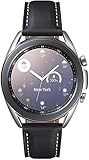
- STYLE YOU CAN COUNT ON: Galaxy Watch3 combines style—two sizes, two finishes, three colors and, 50,000 plus¹ watch faces-with military-grade durability² and water resistance³.
- LEAVE YOUR PHONE BEHND: Galaxy Watch3 gives you the freedom to call, text, stream music and get notifications via Bluetooth connectivity.
- HOLISTIC HEALTH MONITORING: Use your Galaxy watch to record ECG for 30 seconds similar to a standard single-lead ECG. ⁴(All ECG functionality requires compatible Galaxy smartphone. ⁴) The ECG Monitor app will also check the recording for signs of Atrial Fibrillation— a common form of irregular heart rhythm. ⁴You can share the PDF report of your ECG recording with your health care provider using the Samsung Health Monitor app on your compatible Galaxy phone.
- BATTERY BUILT FOR ENDURANCE: The Galaxy Watch3’s long-lasting battery can go for more than a day ⁵on a single charge, and you can always get a quick boost from your compatible Galaxy phone with Wireless Power Share⁶.
- STRONGER INSIGHTS. NEXT-LEVEL FITNESS: Spend your time moving while Galaxy Watch3 tracks seven popular activities automatically. Get more out of each movement thanks to built-in run coaching⁷.
In daily use, this becomes one of the most frequently accessed tools, especially during commutes or desk work. The haptic feedback combined with bezel input feels precise and satisfying, reinforcing why Samsung’s hardware design still holds up years later.
If you only install one audio-related tool, this is the one that will see the most real-world use.
Who These Apps Are Best For
Runners, gym users, and anyone who trains without their phone will benefit most from Samsung Music paired with Bluetooth earbuds. It leverages the Watch 3’s onboard storage and keeps battery drain manageable during workouts.
Commuters and office users are better served by Spotify and the native media controller, where quick track changes and volume adjustments matter more than offline playback. Podcast listeners should temper expectations but will still find basic control apps perfectly adequate for daily listening.
While newer Galaxy Watch models offer deeper streaming integration, the Galaxy Watch 3 remains a capable audio companion. Used within its limits, these apps reinforce its strength as a comfortable, well-balanced smartwatch that fits naturally into everyday routines.
Best Productivity, Notes & Smart Notifications Apps
After media controls, productivity is where the Galaxy Watch 3 quietly proves its long-term value. The combination of a rotating bezel, reliable haptics, and a screen that favors glanceable information makes it especially good at reminders, notifications, and lightweight task handling rather than heavy input.
This is also the category where Tizen’s maturity shows. While it lacks the sheer volume of Wear OS apps, the ones that matter are well-optimized for short interactions and don’t punish battery life during all-day wear.
Samsung Reminders: The Default That Still Sets the Bar
Samsung Reminders comes preinstalled, but it deserves deliberate attention because it integrates more cleanly with the Galaxy Watch 3 than most third-party options. Syncing happens through your Samsung account, and reminders created on your phone appear on the watch almost instantly.
On the watch itself, interaction is frictionless. The bezel scrolls through upcoming tasks smoothly, haptic nudges are subtle but noticeable, and voice input via Bixby works surprisingly well for quick “remind me later” entries.
Battery impact is negligible, and the app respects the Watch 3’s always-on display behavior without clutter. For users already in Samsung’s ecosystem, this is the most reliable way to manage daily to-dos without thinking about the software at all.
Google Keep (Tizen): Best for Cross-Platform Notes
Google Keep remains one of the few genuinely useful note-taking apps available on Tizen. It’s best thought of as a reference tool rather than a writing environment, but for grocery lists, meeting points, or short checklists, it works well.
Notes sync cleanly from Android phones, and the watch interface prioritizes readability. On the 45mm Galaxy Watch 3, text is comfortably legible at a glance, while the 41mm model benefits more from bezel scrolling to avoid cramped screens.
There’s no deep editing or drawing support on the watch, but that’s not a weakness in real-world use. Keep shines for quick recall, and its low background activity means it doesn’t quietly drain battery over the day.
Todoist: Structured Task Management on Your Wrist
For users who live by task lists, Todoist offers the most structured productivity experience on the Galaxy Watch 3. It supports projects, priorities, and due dates, all distilled into a simplified watch-friendly interface.
Interaction is mostly read-and-check rather than create-and-edit, which aligns well with the Watch 3’s strengths. Tasks can be marked complete with a single tap, and overdue items surface prominently without overwhelming notifications.
Compared to Wear OS versions, functionality is trimmed, but performance is stable and sync reliability is excellent. For professionals who already use Todoist on desktop and phone, the watch app acts as a focused extension rather than a compromised companion.
Voice Recorder: Surprisingly Useful for Quick Capture
Samsung’s built-in Voice Recorder is easy to overlook, but it’s one of the most practical productivity tools on the Watch 3. One tap launches recording, and audio quality is more than adequate for memos, reminders, or impromptu ideas.
Recordings sync back to your phone automatically, where they can be renamed or archived. The physical comfort of the watch, especially on the stainless steel models with balanced weight, makes holding your wrist near your mouth feel natural rather than awkward.
Battery impact is modest for short recordings, though long sessions will noticeably eat into daily endurance. Used sparingly, it’s a reliable fallback when typing or speaking to your phone isn’t convenient.
Smart Notifications: Where the Galaxy Watch 3 Still Excels
Smart notifications are arguably the Galaxy Watch 3’s strongest productivity feature, even without installing additional apps. Notifications arrive promptly, are grouped intelligently, and can be navigated quickly using the bezel instead of swipes.
Quick replies, emoji responses, and voice dictation cover most scenarios without needing to pull out your phone. On messaging apps like WhatsApp or Telegram, this turns the watch into a genuine triage tool rather than a distraction.
The Watch 3’s display size and resolution strike a good balance for notifications. Text-heavy alerts can feel dense on the 41mm version, but readability remains acceptable, especially with Samsung’s clean typography and strong contrast.
Outlook & Email Clients: Useful but Best Used Selectively
Microsoft Outlook is available on Tizen and works reliably for checking emails and calendar events. It’s most effective as a notification viewer rather than a full email client, allowing you to quickly assess importance before responding later on your phone.
Calendar integration is smooth, and meeting reminders feel timely without being intrusive. The stainless steel case and comfortable strap options make it easy to wear the watch throughout long workdays without fatigue.
Typing responses on the watch isn’t practical, and even voice replies can feel slow compared to phone handling. Used sparingly, Outlook adds value; relied on heavily, it highlights the Galaxy Watch 3’s input limitations.
Who These Apps Are Best For
Office workers, students, and anyone managing structured days will benefit most from Samsung Reminders, Todoist, and smart notifications. These apps align with the Watch 3’s design philosophy of quick interactions and minimal friction.
Users juggling multiple devices or platforms should lean toward Google Keep for its cross-device consistency. Voice Recorder suits creatives and professionals who need fast idea capture without breaking flow.
While newer Galaxy Watch models offer richer input options and deeper app ecosystems, the Galaxy Watch 3 remains a capable productivity companion. When paired with the right apps, it handles daily organization gracefully without demanding constant attention or compromising comfort.
Best Watch Faces & Customisation Apps (Style vs Battery Life)
After productivity and notifications, watch faces are where the Galaxy Watch 3 starts to feel personal. The rotating bezel, circular Super AMOLED display, and classic stainless steel case beg for faces that respect traditional watch design while taking advantage of digital flexibility.
This is also where trade-offs become real. Some faces look stunning but quietly drain battery through frequent updates, animations, or aggressive always-on display behavior, while others prioritize longevity at the expense of flair.
Samsung Stock & Premium Faces: The Safest Long-Term Choice
Samsung’s built-in watch faces remain the gold standard for balance. Faces like Premium Analog, Classic, Dashboard, and My Style are tightly optimized for Tizen and scale well across both the 41mm and 45mm Watch 3 cases.
Animations are restrained, complications update predictably, and always-on display modes are thoughtfully dimmed. In real-world use, these faces consistently deliver the best battery life, often extending the Watch 3 comfortably into a second day with moderate use.
For owners who appreciate traditional watchmaking cues, the analog faces in particular pair beautifully with the polished stainless steel case and leather straps. They preserve the Watch 3’s “real watch first, smartwatch second” character.
Facer: Maximum Variety, Moderate Battery Cost
Facer remains one of the most popular third-party platforms on Tizen, offering thousands of user-created and branded watch faces. Styles range from minimalist Bauhaus designs to highly technical chronograph layouts and playful digital dashboards.
The downside is consistency. Some Facer faces are well optimized and sip power, while others refresh data aggressively, use layered animations, or keep pixels active unnecessarily, which can noticeably reduce battery life over a full day.
Facer works best for users who like to rotate faces frequently rather than settling on one daily driver. It’s ideal for weekends, casual wear, or visual experimentation, but less suited for users prioritizing endurance.
WatchMaker: Deep Customisation for Tinkerers
WatchMaker appeals to users who want granular control over their watch face design. You can adjust complications, scripts, refresh rates, and visual elements far beyond what Samsung’s native tools allow.
On the Galaxy Watch 3, this flexibility comes with responsibility. Poorly configured faces can cause higher idle drain, especially if second hands, weather updates, or step counters refresh continuously.
For technically curious users willing to fine-tune settings, WatchMaker can be surprisingly efficient. When configured conservatively, it can rival Facer in battery performance while offering far more creative freedom.
Rank #4

- This Galaxy Watch3 model supports LTE mobile networks, so you can leave your smartphone where it is and still be connected. With LTE data, you can stream, text, use the built-in microphone to make calls and more. You can do all this manually or using voice commands through the Bixby digital assistant. Check with your service provider to ensure compatibility with your network and additional LTE data fees may be required.
- If you want to step out of the gym or your living room and experience the outdoors, the Galaxy Watch3 can withstand the elements and keep you on track right. It achieved MIL-STD-810G rating for shock, temperature, dust, and altitude resistance, and is IP68 with up to 50 meters (5 ATM) of water resistance. When you're away, built-in GPS tracking records your route and helps you get back from a hike or jogging.
- The built-in battery has enough power for up to 43 hours. You can recharge it via the included wireless USB charging pad, or if you have a Galaxy smartphone with PowerShare, you can get power right from your smartphone.
- The Galaxy Watch3 can detect your stress level and provide you with soothing breathing guides to help you relax.
Minimal & Battery-Focused Faces: Function Over Flash
Several independent developers offer minimalist Tizen watch faces focused on clarity and efficiency. These typically feature static backgrounds, limited complications, and subdued always-on modes that reduce AMOLED pixel usage.
On the Watch 3, minimalist faces shine on the smaller 41mm model where visual clutter can impact readability. They also pair well with fitness tracking days when battery preservation matters more than aesthetics.
These faces don’t attract attention, but they reinforce what the Watch 3 does best: remaining comfortable, legible, and reliable from morning to night without charging anxiety.
Always-On Display Considerations: Where Battery Is Won or Lost
The Galaxy Watch 3’s always-on display is elegant but not free. Faces that redesign themselves specifically for AOD, rather than dimming the full active face, consume noticeably less power.
Samsung’s native faces handle this best, while third-party faces vary widely. If AOD is enabled full-time, choosing a face with a purpose-built low-refresh AOD mode can mean the difference between ending the day at 40 percent or scrambling for a charger.
Users who disable AOD altogether gain flexibility. Without it, even visually rich faces become more practical, especially on the larger 45mm display where readability remains strong with wrist-raise alone.
Matching Face Style to Strap and Case Finish
The Watch 3’s polished stainless steel case benefits from thoughtful pairing. Classic analog faces complement leather straps and metal bracelets, reinforcing the watch’s dress-watch DNA.
Sportier digital faces feel more at home with silicone or fabric straps, particularly during workouts or casual wear. The ability to swap faces instantly often removes the need to own multiple physical watches, one of the Watch 3’s enduring strengths.
This flexibility is where customisation apps add real value, allowing the same hardware to shift personalities throughout the week without compromising comfort or fit.
Who Should Prioritise Which Type of Face
Users who care about battery life, reliability, and a refined aesthetic should start and often stay with Samsung’s stock faces. They’re tuned for the hardware and age gracefully with daily wear.
Style-focused users and collectors of digital art will enjoy Facer’s vast library, accepting battery trade-offs as part of the experience. Power users and experimenters will find WatchMaker rewarding, provided they’re willing to manage settings carefully.
On a watch like the Galaxy Watch 3, customisation isn’t about excess. It’s about choosing faces that respect the hardware, complement the design, and fit how you actually wear the watch day to day.
Best Utilities & Everyday Tools You’ll Actually Use
Once you’ve dialed in a watch face that suits your style and battery habits, the next layer of usefulness comes from small utilities that quietly earn their place on your wrist. On the Galaxy Watch 3, the best tools aren’t flashy; they’re the ones that save a phone pull, shave seconds off daily tasks, and feel native to Tizen rather than bolted on.
These apps take advantage of the Watch 3’s rotating bezel, AMOLED clarity, and solid haptic feedback, turning quick interactions into something genuinely convenient instead of fiddly.
Samsung Pay – Still One of the Watch 3’s Killer Features
Samsung Pay remains one of the most practical everyday apps on the Galaxy Watch 3, especially on LTE or phone-free errands. The rotating bezel makes card selection fast, and authentication is reliable without feeling intrusive.
Unlike many newer Wear OS watches, the Watch 3 also supports MST in some regions, meaning it can work with older card terminals that don’t accept NFC. Battery impact is minimal unless you’re paying dozens of times a day, and the stainless steel case feels purpose-built for this kind of premium interaction.
Calculator+ – Surprisingly Handy on a Rotating Bezel
Calculator+ sounds basic, but it’s one of those apps you don’t appreciate until it’s there. Tipping at restaurants, splitting bills, or quick unit conversions are all easier when the interface is optimized for circular input and bezel scrolling.
The large digits are easy to read on both the 41mm and 45mm displays, and haptic feedback confirms inputs without needing to stare at the screen. It’s lightweight, fast to launch, and has virtually no battery cost.
My Notes in Gear – Quick Thoughts Without Pulling Your Phone
For reminders, grocery items, or fleeting ideas, My Notes in Gear fills a gap Samsung never fully addressed with its stock apps. Voice dictation works well in quiet environments, and short typed notes are manageable thanks to predictive input.
Notes sync back to your phone, making this more than just a temporary scratchpad. It’s especially useful if you wear the Watch 3 at home or in the office where grabbing a phone feels unnecessary.
SmartThings – The Watch as a Remote Control
If your home already runs on SmartThings, the Galaxy Watch 3 becomes a genuinely useful control surface. Lighting scenes, plugs, and basic automations are all accessible with a few bezel turns.
The interface is simple rather than flashy, but that works in its favor on a small screen. Battery impact is negligible unless you leave the app open, and it reinforces the Watch 3’s role as an extension of the Samsung ecosystem rather than a standalone gadget.
Voice Recorder – Reliable, Clear, and Well Optimized
Samsung’s built-in Voice Recorder is easy to overlook, but it’s one of the most dependable tools on the watch. Audio quality is clear enough for meetings, quick interviews, or personal notes, even without raising your wrist to your mouth.
Recordings sync back to your phone automatically, and the app handles background noise better than most third-party alternatives. It’s a quiet example of Samsung’s hardware-software tuning paying off.
Find My Phone – Small App, Big Peace of Mind
Find My Phone does exactly one thing, and it does it well. The loud, persistent ring cuts through couch cushions and backpacks, and it works instantly as long as the watch and phone are connected.
It’s the kind of app you rarely open but never want to uninstall. On a daily-wear watch like the Galaxy Watch 3, that kind of reliability matters more than novelty.
Camera Controller – Better Than You’d Expect
Samsung’s Camera Controller turns the Watch 3 into a live viewfinder and remote shutter for Galaxy phones. Framing shots, starting video, or triggering group photos becomes genuinely practical, not just a gimmick.
The AMOLED screen is bright enough outdoors to compose a shot, and the rotating bezel makes switching modes intuitive. It’s particularly useful for tripod shots or quick selfies where timing matters.
Battery Monitor – Know When to Charge, Not Guess
While Samsung’s system indicators are decent, dedicated battery monitor apps offer clearer projections and usage breakdowns. Seeing estimated remaining hours based on current usage helps you decide whether to enable AOD or start power saving.
For a watch that can still deliver a full day and then some when managed well, this kind of insight extends usability without compromising features. It’s a quiet companion app that rewards attentive owners.
Alarm and Timer Utilities – Faster Than Your Phone
Third-party alarm and timer apps expand on Samsung’s defaults with multiple presets, better vibration patterns, and clearer labeling. They’re ideal for cooking, workouts, or medication reminders when your phone isn’t nearby.
The Watch 3’s haptics are strong enough to wake you or alert you discreetly, and bezel-based adjustments make last-second changes easy. These tools highlight how well the hardware still supports quick, glanceable tasks.
In daily use, these utilities reinforce why the Galaxy Watch 3 remains relevant despite its age. When apps respect the circular display, the bezel, and battery limits, the watch fades into your routine in the best possible way.
Apps That Don’t Age Well: Limitations of Tizen on the Galaxy Watch 3
All of the apps above work because they play to the Watch 3’s strengths: fast interactions, light background usage, and tight integration with Samsung’s own services. Where the experience starts to fray is with apps that depend on long-term platform support, frequent updates, or deep third‑party integrations.
This isn’t a hardware problem. The Galaxy Watch 3 still feels excellent on the wrist, with its slim stainless steel case, physical bezel, and balanced weight making it one of Samsung’s most comfortable designs. The issue is Tizen itself, and how the ecosystem has aged since Samsung’s pivot to Wear OS.
Third-Party Fitness Platforms Lose Momentum
Many popular fitness services technically still support the Galaxy Watch 3, but often in a reduced or stagnant form. Apps like Strava, MyFitnessPal, and Komoot haven’t meaningfully evolved on Tizen in years, even as their Wear OS and Apple Watch counterparts gain features.
In practice, this means fewer metrics on-watch, delayed syncs, or reliance on Samsung Health as a middleman. If you’re serious about training analytics or cross-platform data consistency, the Watch 3 starts to feel like a compromise rather than a first-choice tool.
Music and Streaming Apps Feel Frozen in Time
Offline music playback remains a bright spot thanks to Spotify’s Tizen app, but that’s more the exception than the rule. Other streaming services either never arrived on Tizen or quietly stopped being maintained, leaving gaps that can’t be filled.
Even Spotify’s app, while reliable, lacks some of the refinements found on newer Galaxy Watch models. Playlist management is basic, downloads can be finicky, and background syncing is slower, which matters on a watch with limited storage and a battery designed for day-long, not multi-day, endurance.
💰 Best Value
![SAMSUNG Galaxy FIT 3 [2024] 1.6' AMOLED Display | 14 Days Battery Life | 100+ Watchfaces | 100+ Exercise Modes | International Model - (Black)](https://m.media-amazon.com/images/I/41nTjvUQRPL._SL160_.jpg)
- Vibrant 1.6” AMOLED Display – Large, high-res screen with smooth touch for easy navigation
- 5ATM & IP68 Water Resistance – Swim-ready and dust-resistant for active lifestyles
- Up to 14 Days Battery Life – Powerful 208mAh battery for long-lasting performance
- 101+ Workout Modes with Auto Detection – Automatically tracks common workouts for seamless fitness tracking. Advanced Health Tracking – Includes sleep coaching, SpO2, heart rate, and snore detection
- International Model No Warranty in the US. Compatible with Android and iOS devices. Samsung Pay - Not Supported.
Navigation and Maps Are Serviceable, Not Competitive
Basic navigation apps still function, but they feel dated compared to modern smartwatch mapping experiences. Turn-by-turn directions work, but offline maps, rerouting intelligence, and rich point-of-interest data are limited.
On a watch with a gorgeous AMOLED display and a bezel perfect for zooming, this is a missed opportunity. For occasional walking directions it’s fine, but anyone expecting a true wrist-based navigation companion will quickly run into Tizen’s ceiling.
Productivity Apps Struggle With Background Tasks
Task managers, note apps, and calendar extensions exist, but most are simplified shells of their phone counterparts. Background refresh limits and aging APIs mean reminders can lag and sync reliability varies depending on phone connection.
The Watch 3 excels at quick interactions, not persistent workflows. Apps that assume constant background access or real-time cloud syncing often feel unreliable, which undermines trust in tools meant to reduce friction.
Smart Home and IoT Apps Fade Out
Several smart home apps that once supported Tizen have been quietly abandoned. You may still find older versions in the Galaxy Store, but compatibility with newer devices and services is hit or miss.
Samsung SmartThings remains the most dependable option, but even it offers fewer on-watch controls than on newer Galaxy Watches. If your daily routine relies heavily on wrist-based home control, the Watch 3 feels increasingly limited.
Watch Faces and Customization Hit a Wall
There’s no shortage of watch faces, but many third-party developers have stopped updating their Tizen designs. This shows up as broken complications, missing weather data, or faces that drain battery faster than they should.
The hardware still shines here. The rotating bezel makes complications genuinely usable, and the display resolution holds up well. It’s the lack of ongoing optimization that makes some faces feel poorly matched to daily wear in 2026.
Why This Matters for Long-Term Ownership
The Galaxy Watch 3 is still a joy to wear, with build quality and ergonomics that rival far newer models. But apps that rely on ecosystem momentum simply don’t age as gracefully on Tizen.
For users who value reliability over novelty, this may not be a dealbreaker. If your needs center on health tracking, notifications, timers, music downloads, and Samsung’s core apps, the Watch 3 remains dependable. The limitation is choice, not usability, and that distinction is key when deciding which apps are still worth installing today.
Final Recommendations: Essential App Setup for Different Types of Galaxy Watch 3 Users
With Tizen’s app ecosystem no longer expanding, the smartest way to approach the Galaxy Watch 3 in 2026 is to be intentional. Instead of chasing novelty, focus on a compact set of apps that respect the hardware, work within background limits, and feel trustworthy day after day.
Below are practical, real-world setups based on how people actually use the Watch 3. Each bundle prioritizes reliability, battery life, and comfort over features that look good on a store page but frustrate on the wrist.
The Everyday Wearer: Reliable, Low-Maintenance Essentials
If your watch is primarily a daily companion, the default Samsung apps remain the backbone. Samsung Health, Samsung Pay, the built-in alarm, timer, and calendar deliver consistent performance with minimal battery impact.
Add Spotify if you want music control or offline playlists for walks and commutes. On the Watch 3, offline downloads still work reliably, and bezel navigation makes volume and track control far easier than touch alone.
This setup keeps the watch feeling light, responsive, and comfortable across long days. It also avoids apps that rely on constant syncing, which is where Tizen’s age shows most clearly.
The Fitness-Focused User: Structured Workouts Without Overreach
For fitness tracking, Samsung Health should remain your primary app. Heart rate accuracy, GPS tracking, and automatic workout detection still hold up well, especially for walking, running, cycling, and gym sessions.
If you rely on third-party platforms, Strava integration is still usable via phone sync, though it’s best treated as a post-workout upload tool rather than a live training hub. Expect delays, but not data loss, which is an important distinction.
Avoid stacking multiple fitness apps. Running Samsung Health alongside another tracker drains battery faster and adds little value on this hardware.
The Minimalist Athlete: Battery First, Data Second
Some users care less about metrics and more about consistency. For this group, disable auto-detection for niche activities and stick to manual workout starts for runs or rides.
Pair this with basic sleep tracking and daily step goals. The Watch 3’s lightweight case, curved lugs, and balanced weight distribution make it comfortable overnight, even on smaller wrists.
This approach preserves battery life and keeps the watch feeling like a tool, not a science project.
The Productivity-Oriented User: Quick Glances, Not Workflows
The Galaxy Watch 3 works best as a notification filter, not a task manager. Stick with Samsung’s native calendar and reminder apps, which handle quick glances and simple alerts well.
Email and note-taking apps are best left on the phone. On-watch versions tend to suffer from sync delays and limited interaction, which breaks trust when timing matters.
Use the watch to stay aware, not to act extensively. That mindset aligns perfectly with the rotating bezel and short interaction design.
The Commuter and Traveler: Directional Support, Not Full Navigation
If you need occasional navigation, apps like HERE WeGo can still be useful where supported, especially for walking directions and simple route checks. Treat these as reference tools rather than turn-by-turn replacements for your phone.
Music playback, transit notifications, and vibration alerts remain the Watch 3’s strongest commuter features. Combined with Bluetooth headphones, the watch can reduce how often you reach for your phone.
Battery impact is manageable as long as GPS-heavy apps aren’t left running in the background.
The Smart Home User: Keep Expectations Realistic
SmartThings is the only smart home app worth installing for most users. It handles basic controls like lights or scenes, but functionality is narrower than on newer Galaxy Watches.
Use it for quick toggles rather than full automation management. If smart home control is central to your routine, the Watch 3 will feel more like a convenience than a command center.
The Watch Enthusiast: Faces, Comfort, and Daily Wearability
Stick to well-reviewed Samsung-developed watch faces or older third-party faces with a proven track record. Faces with too many complications often drain battery and break when data sources fail.
The Watch 3’s Super AMOLED display, stainless steel case, and tactile bezel still deliver a premium wrist presence. Paired with a breathable strap, it remains comfortable for all-day wear and sleep tracking.
Customization should enhance legibility and efficiency, not chase visual complexity.
The “Set It and Forget It” Owner: Maximum Stability Setup
For users who want zero friction, install as few apps as possible. Samsung Health, Spotify, Samsung Pay, and SmartThings cover nearly every practical scenario the Watch 3 handles well.
Disable unused notifications, limit background permissions, and avoid experimental apps. This keeps performance smooth and extends battery life, which is increasingly valuable on aging hardware.
In this configuration, the Watch 3 feels mature rather than outdated.
Final Takeaway: Build Around Strengths, Not What’s Missing
The Galaxy Watch 3 is no longer about exploring an expanding app ecosystem. Its value lies in polished hardware, excellent ergonomics, and a core set of apps that still work exactly as expected.
By choosing apps that respect Tizen’s limits, you get a watch that remains dependable, comfortable, and genuinely enjoyable to wear. The goal isn’t to replicate newer Galaxy Watches, but to extract the most value from one of Samsung’s best-designed smartwatches.
When set up thoughtfully, the Galaxy Watch 3 still earns its place on the wrist.