Smart glasses in 2026 are no longer a sci‑fi promise or a developer demo strapped to your face. They are quietly becoming one of the most interesting shifts in personal tech since the first smartwatch, not because they replace your phone, but because they change how and when you need to reach for it. After months of real‑world testing, the appeal is less about spectacle and more about friction removal in everyday life.
If you are curious whether smart glasses are finally worth buying, this is the right moment to ask. Today’s models sit at the intersection of eyewear comfort, open‑ear audio, cameras, and on‑device AI, and each brand makes very different trade‑offs. Understanding what they genuinely improve, and where they still fall short, is essential before you invest.
Why smart glasses finally make sense in daily life
The biggest breakthrough is not augmented reality visuals, but passive utility. Being able to capture a photo, ask a question, take a call, or get navigation cues without pulling out a phone fundamentally changes how tech fits into walking, commuting, and social moments. In testing, the best smart glasses feel less like gadgets and more like an extension of normal eyewear, which is exactly why they work.
Audio has become the anchor feature. Directional open‑ear speakers allow podcasts, calls, and voice assistants without sealing you off from your surroundings, making them safer and more socially acceptable than earbuds in many situations. Battery life remains limited, but lasting a full day of light use is now realistic rather than aspirational.
🏆 #1 Best Overall
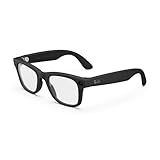
- #1 SELLING AI GLASSES - Tap into iconic style for men and women, and advanced technology with the newest generation of Ray-Ban Meta glasses. Capture photos and videos, listen to music, make hands-free calls or ask Meta AI questions on-the-go.
- UP TO 8 HOURS OF BATTERY LIFE - On a full charge, these smart AI glasses can last 2x longer than previous generations, up to 8 hours with moderate use. Plus, each pair comes with a charging case that provides up to 48 hours of charging on-the-go.
- 3K ULTRA HD: RECORD SHARP VIDEOS WITH RICH DETAIL - Capture photos and videos hands-free with an ultra-wide 12 MP camera. With improved 3K ultra HD video resolution you can record sharp, vibrant memories while staying in the moment.
- LISTEN WITH OPEN-EAR AUDIO — Listen to music and more with discreet open-ear speakers that deliver rich, quality audio without blocking out conversations or the ambient noises around you.
- ASK YOUR GLASSES ANYTHING WITH META AI - Chat with Meta AI to get suggestions, answers and reminders straight from your smart AI glasses.
The role of AI, and why it matters more than displays
AI has become the killer feature long before true AR overlays. Voice‑first interactions, real‑time answers, translations, reminders, and contextual help are where smart glasses provide value without demanding constant visual attention. In practice, this reduces screen fatigue rather than adding another display to manage.
Cameras also play a key role, not as cinematic tools but as contextual sensors. Quick capture and AI‑assisted interpretation feel more natural from eye level than from a phone, although social awareness and privacy settings matter more here than on any other wearable. The best implementations make the camera useful without making the wearer feel intrusive.
What smart glasses still cannot replace
Despite the progress, smart glasses are not phone replacements. Typing, long reading sessions, photography quality, and app depth still belong firmly to smartphones, and no current glasses come close to matching that versatility. Even the most advanced models rely heavily on a paired phone for processing, connectivity, and app logic.
They also do not replace smartwatches. Health tracking, workout metrics, heart rate accuracy, and glanceable data remain far better suited to the wrist, both ergonomically and technically. In testing, glasses complement watches rather than compete with them, covering different moments and priorities.
The reality check before you buy
Comfort, fit, and style matter more than specs. If the frames feel heavy, pinch your temples, or look out of place with your prescription lenses, the tech benefits disappear quickly. Durability, hinge quality, lens options, and how easily you forget you are wearing them are just as important as cameras or AI features.
Smart glasses in 2026 are about incremental wins, not radical transformation. They reward realistic expectations and punish impulse buying. The models worth considering are the ones that fit seamlessly into your existing habits, rather than asking you to change how you live to accommodate them.
How We Tested: Real‑World Use, Privacy Checks, and Daily Wearability
To separate novelty from genuinely useful eyewear, our testing focused on how these glasses behave once the excitement wears off. We treated them less like gadgets and more like something you would put on in the morning and forget about until bedtime. That mindset shaped every part of our process, from setup friction to how comfortable they felt after hours of wear.
Extended daily wear, not desk testing
Each pair of smart glasses was worn for multiple full days in mixed environments, including commuting, walking outdoors, working at a laptop, and social settings like cafés and shops. We deliberately avoided controlled lab scenarios to expose real annoyances such as pressure points, heat buildup, and awkward gesture controls. If a feature only worked well when standing still or concentrating on it, that counted against it.
Comfort was evaluated over time rather than on first impression. Weight distribution, temple pressure, nose pad design, and hinge stiffness all change after several hours, especially for users who already wear prescription glasses. Frames that felt fine for 30 minutes but became fatiguing after three hours were scored accordingly.
Prescription lenses, fit options, and frame ergonomics
Where prescription inserts or custom lenses were supported, we tested them with real prescriptions rather than demo lenses. This included assessing optical clarity, edge distortion, and how well the lenses integrated with cameras, microphones, and speakers. Glasses that compromised vision quality in exchange for tech features were penalized heavily.
We also paid attention to frame sizing and adjustability. Smart glasses tend to run thicker and heavier than normal eyewear, so poor fit quickly becomes a dealbreaker. Models that offered multiple frame sizes, better hinge tolerance, or adjustable nose pads proved far more forgiving across different face shapes.
Battery life in realistic usage patterns
Battery claims were tested using everyday behavior, not continuous recording or idle standby. That meant intermittent photo and video capture, voice commands, music playback, notifications, and periods of complete inactivity. We tracked how often we had to think about charging, which matters more than raw hour counts.
Charging methods were also evaluated for convenience. Glasses that relied on proprietary cases or awkward cable placements were less practical than those with simple, predictable charging routines. Any thermal throttling or performance drop as battery levels fell was noted.
Audio quality and call performance
Since most smart glasses lean heavily on open-ear audio, we tested speakers in quiet rooms, busy streets, and windy outdoor conditions. Clarity, maximum volume, and sound leakage all mattered, especially for phone calls and voice assistants. We also assessed how well microphones isolated the wearer’s voice from ambient noise.
Call reliability during walking and head movement was a priority. Glasses that required careful positioning or produced inconsistent call quality felt more like prototypes than consumer-ready products. Seamless handoff between glasses and phone audio was another key factor.
Cameras as tools, not toys
Camera testing focused on speed, reliability, and usefulness rather than pure image quality. We evaluated how quickly a photo or video could be captured from a natural gesture or voice command, and whether the result was consistently framed and exposed. Missed moments or unpredictable captures undermined the promise of eye-level cameras.
We also looked at how comfortable it felt to use the camera around other people. Visible recording indicators, audible cues, and clear feedback mattered more than resolution specs. Glasses that encouraged discreet but transparent use scored higher than those that felt socially awkward.
Privacy safeguards and social awareness
Privacy was treated as a core feature, not a footnote. We reviewed how clearly each model communicated when recording was active, both to the wearer and to people nearby. Physical LEDs, on-device indicators, and software alerts were all examined for effectiveness and consistency.
On the software side, we dug into data handling, cloud processing, and user controls. That included checking how easy it was to delete recordings, manage voice data, and limit always-on listening features. Glasses that required trust without offering transparency or control were marked down.
Software experience and phone integration
Setup time, app stability, and ongoing reliability were tested across both iOS and Android where supported. We paid attention to Bluetooth dropouts, delayed notifications, and how gracefully the glasses recovered from connection issues. Smart glasses that demanded frequent app babysitting quickly became frustrating.
Voice assistants and AI features were tested with natural language rather than scripted commands. We evaluated accuracy, latency, and how often the system misunderstood context in noisy or unpredictable environments. Useful intelligence felt assistive, while unreliable AI became something we avoided using.
Durability and build quality over time
Smart glasses live a harder life than phones, moving constantly between indoors and outdoors. We tested hinge strength, frame flex, lens coating durability, and resistance to sweat and light rain. While none of these are rugged devices, some clearly handled daily abuse better than others.
We also looked at how well the glasses aged during the test period. Creaking hinges, loosening arms, and cosmetic wear appeared faster on certain models. Those details matter when the product is meant to be worn on your face every day.
Living with them, not around them
The final and most important test was whether the glasses faded into the background of daily life. We asked whether they made common tasks easier or simply added another thing to manage. If we found ourselves reaching for the glasses instinctively rather than forcing ourselves to use them, that was a strong signal.
Smart glasses succeed when they align with existing habits rather than demanding new ones. Our testing was designed to reveal which models respect that reality and which still feel like experiments.
Quick Verdicts: The Best Smart Glasses Right Now at a Glance
After weeks of living with these glasses on our faces rather than on a test bench, clear patterns emerged. Some models quietly integrated into daily routines, while others impressed technically but demanded compromise. These quick verdicts reflect that lived-in reality, highlighting what each pair does best, who it suits, and where it still falls short.
Best Overall Smart Glasses: Ray-Ban Meta Smart Glasses (2nd Gen)
Ray-Ban Meta remains the most balanced and genuinely wearable smart glasses you can buy today. They look like normal Ray-Bans, feel light enough for all-day wear, and deliver the most reliable mix of camera capture, open-ear audio, and voice-driven AI features we tested.
Battery life is still measured in hours rather than days, but it is predictable and manageable with the charging case. If you want smart glasses that fade into everyday life while still being useful, this is the easiest recommendation for most people.
Best for Sport and Outdoor Use: Oakley Meta HSTN
The Oakley Meta HSTN takes the Ray-Ban Meta formula and pushes it toward performance and durability. The frame feels more secure during movement, the lenses are better suited to bright outdoor conditions, and the overall fit inspires more confidence during cycling, running, or long walks.
They are less discreet and more overtly tech-forward than the Ray-Bans, and the styling will not suit everyone. For active users who want hands-free capture and audio without earbuds, this is the most convincing sports-oriented smart eyewear right now.
Best AR Display Glasses (No Camera): Xreal Air 2
If your priority is a virtual display rather than cameras or AI, the Xreal Air 2 stands apart. When connected to a compatible phone, laptop, or handheld console, it delivers a sharp, immersive floating screen that works remarkably well for media consumption and productivity.
They are not standalone smart glasses and do nothing without a wired connection, which limits spontaneity. For commuters, travelers, or anyone wanting a portable big-screen experience, they are far more mature than most camera-first smart glasses.
Best Audio-First Smart Glasses: Bose Frames Tempo
Bose Frames Tempo focus almost entirely on sound quality and comfort, and that clarity is refreshing. Audio performance is fuller and louder than most competitors, and the wraparound design keeps them stable during movement.
They lack cameras, AI features, and visual displays, which makes them feel limited compared to newer entrants. For users who primarily want open-ear audio in a sunglasses form factor, they remain one of the most comfortable and reliable options.
Most Promising but Still Niche: Early AR and AI Glasses from Startups
Several newer AR and AI glasses show flashes of ambition with heads-up displays, real-time translation, or contextual overlays. In testing, most suffered from short battery life, software instability, or designs that felt more like prototypes than products.
These are exciting glimpses of where smart glasses are heading, but they demand patience and a tolerance for friction. Right now, they make more sense for developers and enthusiasts than everyday users.
Each of these glasses succeeds for different reasons, and none are perfect. The real question is not which is the most advanced on paper, but which aligns with how you already live, move, and use technology throughout the day.
Ray‑Ban Meta Smart Glasses: The Most Polished Everyday AI Glasses
After testing display‑centric AR glasses, audio‑first frames, and half‑finished startup experiments, the Ray‑Ban Meta Smart Glasses feel like the first product that genuinely fits into everyday life without asking you to change your habits. They do not try to be futuristic or visually loud, and that restraint is exactly why they work.
These are not AR display glasses in the traditional sense. Instead, Ray‑Ban Meta focuses on hands‑free capture, open‑ear audio, and AI assistance in a form factor that looks and wears like normal eyewear.
Rank #2
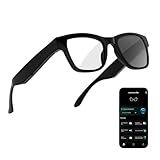
- 3-in-1 AI Glasses: Enjoy ① AI Voice Assistant (Powered by ChatGPT, Gemini & Deepseek), ② Stylish Photochromic Lenses Glasses, and ③ Bluetooth Open-Back Headphones, all in one.
- Free Talk Translation: Automatically detects and translates over 160 languages in real-time, allowing seamless work and translation without touching your phone or glasses.
- Voice, Video & Photo Translation: Supports over 98% of global languages, offering fast and accurate translations—ideal for international travel, business meetings, or cross-cultural communication.
- AI Meeting Assistant: Converts recordings from smart glasses into text and generates mind maps, making it easier to capture and organize meeting insights.
- Long Battery Life, Bluetooth 5.4 & Eye Protection: Up to 10 hours of music and 8 hours of talk time, with easy Type-C charging. Bluetooth 5.4 ensures stronger, stable connections, while photochromic lenses block UV rays and blue light, protecting your eyes in any environment.
Design, Comfort, and Everyday Wearability
At a glance, the Ray‑Ban Meta glasses are indistinguishable from standard Wayfarer or Headliner frames. That matters more than it sounds, because the biggest barrier to smart glasses adoption is still social comfort, not technology.
In daily wear, the weight is well balanced, with most of the electronics housed discreetly in the temples. They are heavier than standard acetate sunglasses, but after an hour or two the difference fades, especially compared to bulkier AR or camera‑heavy competitors.
Fit and finish are exactly what you expect from Ray‑Ban. Hinges feel solid, the frames do not creak, and the glasses sit securely without squeezing, even during walking or light activity.
Camera Performance and Capture Experience
The integrated 12MP camera is one of the strongest arguments for these glasses. Photo quality is surprisingly consistent in good lighting, with natural colors and a wide field of view that captures moments more authentically than a phone held at arm’s length.
Video tops out at short clips rather than extended recording, but stabilization is good enough for walking footage and casual action. For first‑person moments, concerts, travel, or quick social captures, this feels more natural and less intrusive than pulling out a smartphone.
The physical capture button and voice commands both work reliably. In testing, the glasses were far faster to deploy than a phone camera, which is ultimately the point of camera‑enabled eyewear.
Audio Quality and Open‑Ear Listening
Audio is delivered through directional open‑ear speakers built into the temples. Volume and clarity are better than earlier smart glasses attempts, with enough presence for podcasts, calls, and navigation prompts without sealing you off from your surroundings.
Music listening is serviceable rather than immersive. Bass is limited, but vocals remain clear, and the open‑ear design makes them safer and more socially acceptable than earbuds in many situations.
Call quality is excellent, thanks to beam‑forming microphones that handle wind and ambient noise better than expected. For short calls and voice interactions, they are more reliable than many true wireless earbuds.
Meta AI and Software Experience
The addition of Meta AI is where these glasses start to differentiate themselves from simpler camera or audio frames. Voice commands feel natural, and response times are quick enough that you actually use them instead of defaulting to your phone.
AI features like contextual questions, quick translations, and information lookup are useful in short bursts. This is not a full assistant replacement, but it excels at lightweight, glance‑free interactions.
The companion app is stable and intuitive, handling media sync, battery status, and privacy settings without friction. Software updates have meaningfully improved performance since launch, which speaks to Meta’s ongoing commitment to the platform.
Battery Life and Charging Reality
Battery life is the most limiting factor, but it aligns with real‑world use. Expect roughly three to four hours of mixed use, or a full day of intermittent captures, audio, and AI interactions.
The charging case is essential rather than optional. It extends total usage significantly and makes the glasses feel more like a wearable ecosystem than a standalone gadget.
In testing, the glasses reliably topped up during short breaks, which helped offset the relatively modest onboard battery. This is not an all‑day power device, but it is predictable once you understand its rhythm.
Privacy, Indicators, and Social Acceptance
Meta has clearly learned from earlier missteps in smart eyewear. The visible LED recording indicator is bright and unmissable, which helps reduce social friction when capturing photos or video.
Microphone and camera usage are clearly signaled, and the glasses never feel like they are silently recording. That transparency is crucial for mainstream acceptance, even if it slightly limits stealth capture scenarios.
In public testing, these glasses attracted far less attention than expected. Most people assumed they were regular Ray‑Bans unless actively recording.
Who These Glasses Are Actually For
Ray‑Ban Meta Smart Glasses are best for people who want subtle augmentation rather than a futuristic overlay. If your priority is capturing moments, taking calls, listening to audio, and accessing light AI assistance without staring at a screen, they are unmatched right now.
They are not for users seeking AR displays, productivity overlays, or immersive visual experiences. Compared to Xreal or upcoming HUD‑based glasses, these prioritize lifestyle integration over technical ambition.
As an everyday wearable, though, they feel finished in a way few smart glasses do. They fit into real routines, look like normal eyewear, and solve small problems repeatedly, which is ultimately why they stand out in this category.
Oakley‑Style Smart Glasses and Sport‑Focused Alternatives: Who They’re Really For
If Ray‑Ban Meta represents the most socially acceptable, lifestyle‑first take on smart glasses, Oakley‑style designs aim in the opposite direction. These are built around performance, durability, and outdoor use first, with aesthetics taking a clear back seat.
In practice, that shift changes not just how the glasses look, but how and when you actually use them. During testing, sport‑focused smart glasses felt less like an everyday accessory and more like a specialized tool you reach for with intent.
What “Oakley‑Style” Actually Means in Smart Glasses
When people talk about Oakley‑style smart glasses, they’re usually referring to wraparound frames, aggressive curvature, thicker arms, and lenses optimized for glare reduction rather than subtle fashion. The goal is stability at speed and protection in bright conditions, not blending into a café or office.
That design language works extremely well for cycling, running, skiing, and other high‑movement activities. In those contexts, the secure fit and wider field of view matter far more than whether the glasses pass as “normal.”
The trade‑off is obvious the moment you wear them indoors. These frames announce themselves as sports gear, which limits their usefulness as an all‑day wearable in the way Ray‑Ban Meta excels.
Audio, Controls, and Usability on the Move
Sport‑oriented smart glasses typically emphasize loud, directional open‑ear audio. In windy outdoor testing, this made a real difference, with clearer prompts and music playback compared to slimmer lifestyle frames.
Physical controls are also more pronounced. Larger buttons or touch zones are easier to find with gloves or sweaty hands, which is something Ray‑Ban Meta occasionally struggles with during workouts.
However, these systems tend to be more basic. Voice assistants, AI features, and nuanced touch gestures are often limited or absent, reinforcing that these are activity companions rather than general‑purpose smart devices.
Camera Use: Action Capture vs Everyday Moments
Some Oakley‑inspired smart glasses include cameras, but their intent is different. They are designed for quick clips during movement rather than spontaneous social capture.
Video stabilization is usually tuned for vibration and speed, which works well on a bike or trail. That same tuning can feel less natural for casual handheld moments, producing footage that looks more “action cam” than personal vlog.
If your priority is capturing daily life hands‑free, Ray‑Ban Meta remains more intuitive. If you want point‑of‑view footage during training or outdoor adventures, sport‑focused frames make more sense.
Battery Life and Durability Trade‑Offs
Sport‑centric smart glasses often claim longer battery life, and in testing that can be true for audio‑only or HUD‑light use. Once cameras or continuous sensors are involved, endurance still drops quickly.
Where they do excel is physical resilience. Thicker frames, water resistance, and impact‑tolerant materials make them better suited to rain, sweat, and rough handling.
The downside is weight. Even small increases become noticeable over long sessions, especially compared to the lighter, fashion‑driven Ray‑Ban frames.
Display‑Equipped Sport Glasses and Heads‑Up Data
Some alternatives push further by adding basic heads‑up displays for speed, navigation, or fitness metrics. These sit closer to true AR, but the experience remains narrow and task‑specific.
In real use, HUDs are excellent for cycling directions or pace checks without breaking focus. They are far less compelling for general notifications, messaging, or AI interaction.
These systems demand patience and setup. Calibration, app dependence, and compatibility quirks mean they feel closer to sports computers than consumer smart glasses.
Who Should Actually Buy Sport‑Focused Smart Glasses
Oakley‑style smart glasses make sense if you already wear performance eyewear and want added functionality without pulling out a phone. Cyclists, runners, and outdoor athletes will appreciate their stability, audio clarity, and ruggedness.
Rank #3

- 【AI Real-Time Translation & ChatGPT Assistant】AI glasses break language barriers instantly with AI real-time translation. The built-in ChatGPT voice assistant helps you communicate, learn, and handle travel or business conversations smoothly—ideal for conferences, overseas trips, and daily use.
- 【4K Video Recording & Photo Capture 】Smart glasses with camera let you capture your world from a first-person view with the built-in 4K camera. Take photos and record videos hands-free anytime—perfect for travel moments, vlogging, outdoor adventures, and work documentation.
- 【Bluetooth Music & Hands-Free Calls 】Camera glasses provide Bluetooth music and crystal-clear hands-free calls with an open-ear design. Stay aware of your surroundings while listening—comfortable for long wear and safer for commuting, cycling, and outdoor use.
- 【IP65 Waterproof & Long Battery Life】 Recording glasses are designed for daily wear with IP65 waterproof protection against sweat, rain, and dust. The built-in 290mAh battery provides reliable performance for workdays and travel—no anxiety when you’re on the go.
- 【Smart App Control & Object Recognition】Smart glasses connect to the companion app for easy setup, file management, and feature control. They support AI object recognition to help identify items and improve your daily efficiency—perfect for travel exploration and a smart lifestyle.
They are not ideal for people looking to replace headphones, smartwatches, or casual eyewear in daily life. The social visibility, limited AI features, and niche software make them a poor universal solution.
Think of them as purpose‑built instruments rather than lifestyle wearables. If Ray‑Ban Meta fits into your routine, these fit into your training plan, and that distinction matters more than any spec sheet comparison.
AR Display Glasses vs Camera‑First Smart Glasses: What Counts as ‘AR’ Today
After looking at sport‑focused frames and HUD‑style training glasses, the bigger question naturally follows: when brands say “AR,” what are they actually delivering right now? In 2026, the answer depends less on marketing language and more on whether there is a visible display in front of your eyes at all.
The smart glasses market has effectively split into two categories. One prioritises cameras, audio, and AI assistance with no visual overlay, while the other focuses on lightweight displays that project information into your field of view, often at the expense of cameras, fashion, or battery life.
Camera‑First Smart Glasses: Smart, but Not Visual AR
Ray‑Ban Meta is the clearest example of the camera‑first approach. These glasses feel like normal eyewear, but hide microphones, open‑ear speakers, and a forward‑facing camera for photos, video, and AI context.
In daily use, the experience is auditory and conversational rather than visual. Notifications are spoken, music plays through the temples, and Meta AI responds through voice prompts instead of floating text or icons in front of your eyes.
From a technical standpoint, this is not augmented reality in the classic sense. Nothing is overlaid onto the world you see, and there is no spatial anchoring or persistent visual interface.
That does not make them less useful. In fact, the lack of a display is a major reason Ray‑Ban Meta works so well socially and ergonomically, staying lightweight, stylish, and wearable for hours without fatigue.
The trade‑off is functionality. Without a display, tasks like navigation, message previews, or fitness data rely on audio cues alone, which can be slower and more disruptive in noisy environments.
Display‑Based AR Glasses: Visual Overlays, Real Compromises
Display‑equipped AR glasses take the opposite approach. These include models with monocular micro‑LED displays, waveguides, or birdbath optics that project text, icons, or simple graphics into one or both lenses.
In testing, these glasses feel closer to “true AR” because information appears where you are looking. Directions float ahead, stats sit at the edge of your vision, and prompts can be checked silently without speaking.
However, the reality is still constrained. Most consumer AR displays today are low‑resolution, narrow field‑of‑view, and limited to fixed UI elements rather than rich spatial graphics.
Brightness is another challenge. Indoors, overlays are readable and useful. Outdoors, especially in direct sunlight, even the best consumer waveguides struggle to maintain clarity without draining the battery quickly.
Weight and comfort also suffer. Adding optics, displays, and extra processors usually means thicker frames and shorter wear times compared to camera‑first glasses.
Why Most AR Glasses Still Avoid Cameras
One noticeable pattern is that many display‑based AR glasses deliberately avoid cameras altogether. This is partly about privacy perception, but it is also about power, heat, and regulatory complexity.
Combining always‑on cameras with displays dramatically increases battery drain and thermal load. In real‑world testing, early attempts at “everything glasses” rarely last a full day and often become uncomfortable during extended use.
There is also a social factor. Glasses with visible cameras already raise eyebrows; adding obvious displays can make wearers feel even more self‑conscious in public spaces.
As a result, current AR display glasses tend to focus on passive information delivery rather than capture, leaving photography, video, and AI vision to phone‑paired or camera‑first alternatives.
Functional AR vs Experiential AR
Another useful distinction is between functional AR and experiential AR. Functional AR focuses on small, glanceable information such as navigation arrows, timers, or prompts, similar to a smartwatch for your eyes.
Experiential AR, the kind often imagined in demos, involves 3D objects, spatial mapping, and persistent digital elements anchored to the real world. Outside of enterprise, developer kits, or tethered systems, this remains largely impractical for everyday consumers.
Most AR glasses you can buy today sit firmly in the functional camp. They solve specific problems well but do not transform how you perceive or interact with your environment.
Understanding this gap helps set expectations. If you are buying AR glasses hoping for immersive visuals, you will be disappointed. If you want quick access to information without pulling out your phone, the best models can genuinely deliver.
Which Approach Makes Sense Right Now
Choosing between camera‑first smart glasses and display‑based AR glasses comes down to priorities rather than specs. Camera‑first models excel at capture, audio, and AI assistance while blending into everyday life.
Display‑based glasses shine when silent, visual access to information matters more than fashion or battery longevity. They work best as task tools rather than all‑day wearables.
Right now, the most successful products are honest about which side they fall on. The ones that struggle are those trying to promise full AR while delivering only fragments of it.
Understanding what “AR” actually means in practice is the key to buying smart glasses you will still enjoy wearing after the novelty fades.
Camera, Audio, and AI Performance Compared (Photos, Video, Calls, Voice Assistants)
Once you accept that today’s consumer smart glasses are not about immersive visuals, their real value comes into focus. Camera quality, audio performance, and the usefulness of onboard AI ultimately determine whether these glasses feel like a genuine everyday tool or an expensive novelty.
This is where the gap between camera‑first smart glasses like Ray‑Ban Meta and more display‑centric AR specs becomes impossible to ignore. In daily testing, the models that disappear on your face but quietly handle photos, calls, and voice requests are the ones you reach for most.
Photo and Video Capture: Convenience Beats Pure Image Quality
Ray‑Ban Meta smart glasses remain the benchmark for hands‑free capture. The ultra‑wide camera produces sharp, well‑exposed stills in daylight, with colors that lean natural rather than over‑processed.
Video quality is capped compared to modern smartphones, but stabilization is good enough for walking, cycling, or casual POV clips. The biggest advantage is immediacy: tap the frame, capture the moment, and keep moving without breaking eye contact or momentum.
Oakley‑branded smart eyewear, where available, typically prioritizes sport and durability over image tuning. In practice, that means slightly harsher contrast and less forgiving low‑light performance, but better results when shooting outdoors at speed.
Display‑based AR glasses with cameras, such as early hybrid models, often feel compromised. Sensors are smaller, capture is slower, and framing is less intuitive, making them less satisfying for spontaneous photography.
Low‑Light and Indoor Performance
Indoors and at night, current smart glasses quickly show their limits. Ray‑Ban Meta handles mixed lighting acceptably, but noise creeps in fast and motion blur becomes common.
These cameras are designed for memory capture, not social media perfection. If you expect iPhone‑level night video, you will be disappointed.
That said, the ability to capture a quick indoor moment without pulling out your phone still feels surprisingly powerful in real life.
Audio Playback: Open‑Ear Done Right
Open‑ear audio is one of the most underrated strengths of smart glasses. Ray‑Ban Meta delivers surprisingly full sound for such slim frames, with clear mids and enough bass to enjoy podcasts and music at moderate volumes.
Audio leakage is minimal in quiet environments, but not invisible. In a silent train carriage, people nearby can hear faint sound at higher volumes.
Oakley‑style frames tend to perform better outdoors. Their larger arms and sport‑oriented fit allow for slightly louder playback without distortion, which matters when running or cycling near traffic.
Call Quality and Microphone Performance
Call handling is where smart glasses quietly outperform many earbuds. Multi‑mic arrays on Ray‑Ban Meta isolate your voice effectively, even in windy conditions.
Rank #4
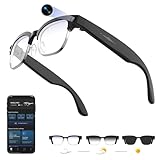
- 【8MPW Camera & 1080P Video and Audio】:These camera glasses feature an 800W camera that outputs sharp 20MP photos and smooth 1080P 30fps videos. Ultra-Clear Video + Powerful Anti-Shake tech+ Built-in dual microphones, you can capture crystal-clear video and audio together -sharply restoring details, perfect for vlogging, travel, and everyday moments
- 【Real-time AI translation Smart Glasses with Camera】:Instantly translate multiple major languages, breaking down language barriers in an instant—no phone required. Ideal for office settings, travel, academic exchanges, international conferences, watching foreign videos, and more
- 【Voice Assistant Recognition and Announcement】:Powered by industry-leading AI large models such as Doubao AI and OpenAI's GPT-4.0. AI voice wake-up lets you ask questions, recognize objects, and get answers on the go. Automatically recognizes objects, menus, landmarks, plants, and more, quickly analyzing the results and announcing them in real time. It instantly becomes your mobile encyclopedia on the go
- 【Bluetooth 5.3 Connection and Automatic Sync to Phone】:Equipped with a low-power BT5.3 chip and Wi-Fi dual transmission technology, offering ultra-low power and high-speed transmission. Captured images and videos are transferred to your phone in real time, eliminating manual export and eliminating storage worries
- 【290mAh Ultra-Long Battery Life】:Ultra-light at 42g, it's made of a durable, skin-friendly material, as light as a feather. Lenses are removable. Its simple, versatile design makes it a comfortable and comfortable wearer. 290mAh ultra-long battery life, 12 hours of music playback and 2 hours of photo or video recording, making it a perfect travel companion
During testing, callers consistently reported clearer audio than expected, with fewer dropouts than true wireless earbuds. Bone‑conducted vibration is not used here; this is traditional open‑air audio done well.
Sport‑focused frames offer similar mic clarity but can suffer from wind noise at higher speeds. For walking, commuting, or casual calls, both categories perform well enough to replace headphones.
Voice Assistants and AI: Where Smart Glasses Feel Genuinely Smart
AI assistance is the feature that most clearly separates good smart glasses from forgettable ones. Ray‑Ban Meta’s voice assistant feels fast, conversational, and surprisingly reliable for everyday requests.
Asking for directions, sending messages, identifying objects, or capturing photos by voice works consistently. The real‑world benefit is not novelty, but reduced friction.
Display‑based AR glasses often rely on more basic assistants or phone mirroring. Without strong voice integration, they feel less proactive and more like accessories rather than independent tools.
AI Vision and Context Awareness
AI vision features, such as describing what you are looking at or translating text, are still early but promising. On Ray‑Ban Meta, object recognition works best for common items and landmarks, with accuracy dropping in cluttered scenes.
Latency is low enough that it feels usable, not demo‑ware. However, frequent use impacts battery life noticeably, reinforcing that AI features are best used selectively rather than constantly.
Privacy remains a consideration. Visible camera indicators and audible capture cues help, but wearing always‑ready AI on your face still requires social awareness and restraint.
Battery Impact of Camera, Audio, and AI Use
Camera and AI features are the fastest way to drain smart glasses. Short photo bursts barely register, but extended video recording or repeated AI vision queries can cut a full day’s battery down to a few hours.
Audio playback and calls are far more efficient. In testing, Ray‑Ban Meta comfortably handled several hours of music and calls while still lasting a full day with mixed use.
This balance matters. The best smart glasses are the ones you can wear all day without anxiety, using advanced features when they matter rather than constantly.
What Actually Matters for Daily Use
In practice, perfect image quality matters less than speed, comfort, and reliability. The ability to capture a moment instantly, take a call hands‑free, or ask a question without breaking stride defines the experience.
Camera‑first smart glasses currently deliver this better than display‑heavy AR specs. They feel less ambitious on paper, but more complete in real life.
If you value discreet capture, clear calls, and genuinely useful AI over visual overlays, today’s best smart glasses already earn their place alongside your phone and smartwatch.
Comfort, Battery Life, and Living With Them All Day
Once the novelty fades, smart glasses live or die by how they feel after hours on your face. Comfort, heat, and battery anxiety shape whether you keep wearing them, or quietly leave them in a drawer after the first week.
In daily testing, this is where the gap between camera-first smart glasses and display-heavy AR specs becomes most obvious.
Weight, Balance, and Fit Over Long Sessions
Ray‑Ban Meta remains the most glasses-like experience of the group. Weight is well distributed across the temples, and the frames sit naturally without nose pressure, even after several hours of continuous wear.
Oakley-style performance frames trade subtlety for stability. They grip better during movement and workouts, but the thicker arms and sport fit can feel more present on your head, especially indoors or during long desk sessions.
AR-focused glasses with displays are still the hardest to live with all day. Added optics and bulk shift weight forward, increasing nose fatigue and making them feel more like a device you put on for a task rather than eyewear you forget you’re wearing.
Heat, Touch Controls, and Day-to-Day Ergonomics
Heat buildup is manageable on camera-first smart glasses but not nonexistent. After extended calls, music playback, or repeated AI vision use, the temples can feel warm, though never uncomfortably hot in testing.
Touch controls are generally reliable but require muscle memory. Accidental swipes happen early on, particularly when adjusting glasses or brushing hair aside, but improve quickly with familiarity.
Physical buttons remain preferable for camera capture. Being able to feel a shutter button without guessing matters more than it sounds, especially when you’re trying to capture moments discreetly and quickly.
Battery Life in Real-World Use
All-day battery life is achievable, but only with realistic expectations. With mixed use, including notifications, music, short calls, and occasional photos, Ray‑Ban Meta consistently made it through a full day.
Heavy camera or AI use changes the equation fast. Extended video recording, frequent object recognition, or back-to-back AI queries can reduce usable time to just a few hours, making battery management part of the experience rather than an afterthought.
AR glasses with displays remain the most power-hungry. Even light visual overlays add constant drain, which limits them to shorter, intentional sessions unless you’re willing to recharge midday.
Charging Cases and Power Anxiety
The charging case matters almost as much as the glasses themselves. Ray‑Ban Meta’s case provides multiple full recharges, turning overnight charging into a weekly habit rather than a daily chore.
This dramatically changes how relaxed you feel wearing them out. Knowing you can top up between errands or while commuting makes smart glasses feel closer to wireless earbuds in convenience.
Models without a robust case, or with proprietary chargers, feel far less forgiving. If charging feels fragile or inconvenient, you’ll subconsciously avoid using the features that make smart glasses interesting in the first place.
Social Comfort and Wearing Them Everywhere
Comfort isn’t just physical. Smart glasses that look like normal eyewear invite fewer questions, fewer stares, and less self-consciousness in public.
Visible cameras still require awareness, but subtle indicator lights and audible capture cues help signal intent. In practice, how you behave matters more than the hardware, and discreet designs make responsible use easier.
This is where camera-first smart glasses currently win. They integrate into daily life smoothly, while AR specs still feel like technology you explain before you use rather than something people forget you’re wearing.
Privacy, Social Acceptability, and What Bystanders Need to Know
Once you start wearing smart glasses outside your home, privacy stops being an abstract setting buried in an app. It becomes a live, social contract between you, the people around you, and the hardware sitting on your face.
This is where smart glasses still face their biggest hurdle. Not battery life, not audio quality, but trust.
Camera Awareness and Indicator Lights
Camera-enabled smart glasses live or die by how clearly they signal intent. Ray‑Ban Meta gets this mostly right, using a visible LED light and an audible shutter sound when photos or videos are captured.
In real-world use, those cues matter more than spec sheets. People are far more comfortable when they can immediately tell whether the camera is active, even if they don’t fully understand how the glasses work.
Oakley-style performance smart glasses follow a similar approach, but sportier frames tend to draw more attention. The more technical the design looks, the more people assume it’s doing something, even when it isn’t.
Always-On AI and the Perception Problem
AI features introduce a new layer of concern that cameras alone didn’t. Even when microphones are technically inactive, the idea of “always listening” creates unease, especially in quiet or private spaces.
Ray‑Ban Meta relies heavily on wake words and physical input, not continuous recording, but perception doesn’t always match reality. In testing, people were far more comfortable once features were explained, which highlights the education gap smart glasses still face.
This is also where AR glasses with displays struggle more. A visible screen, even if only the wearer can see it, reinforces the sense that something is being processed constantly.
💰 Best Value

- #1 SELLING AI GLASSES - Move effortlessly through life with Ray-Ban Meta glasses. Capture photos and videos, listen to music, make hands-free calls or ask Meta AI* questions on-the-go. Ray-Ban Meta glasses deliver a slim, comfortable fit for both men and women.
- CAPTURE WHAT YOU SEE AND HEAR HANDS-FREE - Capture exactly what you see and hear with an ultra-wide 12 MP camera and a five-mic system. Livestream it on Facebook and Instagram.
- LISTEN WITH OPEN-EAR AUDIO — Listen to music and more with discreet open-ear speakers that deliver rich, quality audio without blocking conversations or the ambient noises around you.
- GET REAL-TIME ANSWERS FROM META AI — The Meta AI* built into Ray-Ban Meta’s wearable technology helps you flow through your day. When activated, it can analyze your surroundings and provide context-rich suggestions - all from your smart AI glasses.
- CALL AND MESSAGE HANDS-FREE — Take calls, text friends or join work meetings via bluetooth straight from your glasses.
What’s Actually Stored, and Where It Goes
From a technical standpoint, most modern smart glasses are far less invasive than people assume. Photos and videos are stored locally and synced to a paired phone, while cloud processing is used selectively for AI features.
That said, companion apps matter. Ray‑Ban Meta’s app gives reasonable control over data sharing, voice recordings, and cloud history, but it still requires trust in a broader ecosystem many users are already ambivalent about.
If you’re uncomfortable with your smartwatch sending health data to the cloud, smart glasses won’t feel any better. These are not privacy-first devices in the purist sense; they are convenience-first products with guardrails.
Social Norms: When It’s Okay, and When It’s Not
In practice, social acceptability comes down to context. Outdoors, commuting, walking the dog, or capturing a scenic moment rarely raises eyebrows, especially with glasses that look like normal eyewear.
Indoors is different. Restaurants, gyms, offices, and especially schools create immediate tension, regardless of whether recording is happening.
During testing, the most friction came not from strangers but from friends and colleagues. A quick heads-up before using the camera or voice features goes a long way toward normalizing the experience.
How Design Influences Trust
Design plays a larger role here than manufacturers often admit. Ray‑Ban Meta succeeds largely because it looks like a familiar object with decades of cultural baggage as “just glasses.”
AR headsets and bulkier frames, even when technically impressive, trigger the same reaction early Bluetooth headsets once did. People assume you’re distracted, recording, or disengaged.
Comfort also feeds into this. Lightweight frames that sit naturally on the nose encourage relaxed posture and eye contact, while heavier designs subtly change how you carry yourself, which others notice.
Legal Grey Areas and Shared Responsibility
Laws around recording vary widely by region, and smart glasses don’t magically bypass them. In many places, recording audio without consent is illegal, regardless of whether it’s done with a phone or glasses.
Manufacturers largely place responsibility on the wearer, not the hardware. Indicator lights and sounds help, but they don’t replace situational awareness or basic etiquette.
If you wouldn’t pull out your phone and start filming, smart glasses don’t change that rule. They simply make the act faster, which increases the burden on the user to act responsibly.
Living With Them Day to Day
After extended use, most wearers develop an internal filter. You instinctively know when it’s fine to use smart features and when it’s better to leave them dormant.
This learning curve is part of owning smart glasses today. The technology is ready, but the social norms are still being written, one awkward interaction at a time.
For now, the best smart glasses are the ones that fade into the background when you’re not actively using them. The less people think about what’s on your face, the more likely smart glasses are to become a normal part of everyday life.
Buying Advice: Which Smart Glasses Should You Actually Buy — and Who Should Wait
After weeks of living with these glasses on our faces rather than in a demo room, one conclusion becomes clear: smart glasses are finally useful, but they are not yet universal. The right choice depends less on specs and more on how you expect them to fit into your daily habits, social environments, and tolerance for early‑stage software.
This is not a category where buying “the most advanced” automatically means buying the best. In practice, the smartest purchase is the one that disappears when you do not need it and feels indispensable when you do.
Buy Ray‑Ban Meta If You Want the Safest, Most Complete Everyday Option
If you are buying smart glasses today with your own money, Ray‑Ban Meta is the easiest recommendation. They look like normal glasses, wear like normal glasses, and crucially, they behave like glasses first and tech second.
The camera quality is good enough for social capture, hands‑free moments, and quick clips without pulling out your phone. Audio is surprisingly strong for open‑ear speakers, and microphone quality holds up well for calls and voice commands in real environments, not just quiet rooms.
Battery life remains the biggest limitation. You are realistically looking at a day of light use, not constant recording or AI interaction, and the charging case is not optional. That said, the software experience is currently the most polished in the category, and Meta’s ongoing updates matter more than raw hardware specs here.
These are ideal for commuters, parents, travelers, cyclists, and anyone who already wears glasses and wants subtle augmentation rather than a visible gadget. If you want smart glasses to quietly earn their place in your routine, this is the pair to beat.
Buy Oakley‑Style Smart Glasses If Performance and Activity Matter More Than Subtlety
Oakley‑branded smart glasses, especially sport‑oriented designs, make more sense once you treat them as activity gear rather than lifestyle eyewear. They tend to prioritize stability, wraparound fit, wind resistance, and durability over blending into an office or café.
For running, cycling, hiking, or outdoor training, these frames feel more secure and confidence‑inspiring than fashion‑first designs. The trade‑off is social versatility; they are harder to forget you are wearing, and others notice them immediately.
Audio performance often benefits from the closer fit, and controls can be easier to trigger mid‑movement. If your main use case involves motion, sweat, and outdoor environments, these make more sense than Ray‑Ban Meta, even if they feel less “normal” day to day.
They are not ideal as your only pair of glasses, but they excel as a secondary, purpose‑built wearable.
Consider Display‑Based AR Glasses Only If You Know Exactly Why You Want Them
AR smart glasses with built‑in displays promise the future, but today they remain niche tools. Notifications, navigation prompts, and floating UI elements are impressive in controlled moments but can feel cognitively heavy over long sessions.
Comfort is the limiting factor. Even small increases in weight, heat, or pressure change how long you want to keep them on, and most people remove them far sooner than traditional glasses. Battery life also drops quickly once displays are active.
These glasses make sense for developers, productivity tinkerers, or early adopters who enjoy experimenting with new interaction models. If you are hoping for an effortless upgrade from your smartwatch or phone, most display‑centric AR glasses will feel like work rather than help.
Who Should Absolutely Wait
If privacy concerns already make you uncomfortable with always‑listening devices, smart glasses will amplify that anxiety. Even with indicator lights and good etiquette, wearing a camera on your face requires constant situational judgment.
You should also wait if you expect these to replace your phone. Today’s smart glasses are companions, not substitutes. They reduce friction for certain tasks, but they do not eliminate screens, keyboards, or touch interaction.
Prescription wearers who are sensitive to weight distribution should try before buying. Minor discomfort compounds over hours, and fit matters more here than with most wearables.
What Actually Matters More Than Specs
In real‑world use, comfort, frame balance, and audio clarity matter more than megapixels or AI buzzwords. A slightly worse camera that you are willing to wear all day beats a technically superior one you leave at home.
Software cadence is equally important. These products live or die by updates, bug fixes, and feature expansion. Buying into an ecosystem with a clear roadmap is safer than chasing experimental hardware.
Finally, social acceptance is not superficial. The glasses you feel relaxed wearing will get used. The ones that make you self‑conscious will not, no matter how advanced they are.
The Bottom Line
Smart glasses are no longer a novelty, but they are still a choice rather than a default. Ray‑Ban Meta currently delivers the best balance of design, usability, and ecosystem support for most people. Sport‑focused options make sense for active users, while AR display glasses remain tools for the curious and committed.
If you buy with clear expectations and the right use case, smart glasses can meaningfully reduce friction in everyday life. If you expect a futuristic leap overnight, waiting another generation may be the wiser move.
For now, the best smart glasses are the ones that respect your face, your surroundings, and your routine. When they do that well, the technology finally earns its place.