For runners and gym-goers in 2026, “music on your watch” sounds simple, but in practice it covers several very different experiences. Some watches truly replace your phone, letting you head out with nothing but earbuds and GPS, while others quietly rely on preloaded files, subscriptions, or even a nearby handset. The difference matters when you are mid-interval, deep into a long run, or traveling without reliable data.
This section is about clearing the fog. You will learn what offline playback really means today, which platforms genuinely support phone-free listening, how subscriptions and LTE factor in, and why battery life and storage still shape the experience. By the end, you should know exactly what to expect before choosing a watch that promises Spotify, Apple Music, or MP3 support.
The key thing to understand is that not all “music watches” are created equal, and the logo on the box rarely tells the whole story.
Offline playback vs true streaming: the core distinction
In 2026, nearly every serious music-capable smartwatch relies on offline playback for workouts. This means playlists, albums, or podcasts are downloaded to the watch’s internal storage ahead of time, then played back over Bluetooth to your headphones with no phone or data connection required.
🏆 #1 Best Overall

- GPS running smartwatch with music advanced training features, Lens Material:Corning Gorilla Glass 3, Bezel Material: fiber-reinforced polymer, Strap material:silicone
- Battery life: up to 7 days in smartwatch mode and 6 hours in GPS mode with music
- Evaluates your current training status to indicate if you’re undertraining or overdoing it; Offers additional performance monitoring features
- Get free adaptive training plans from Garmin coach, or create your own custom workouts on our Garmin connect online fitness community
- Provides advanced running dynamics, including ground contact time balance, stride length, vertical ratio and more (When used with Running Dynamics Pod or HRM Run or HRM Tri monitors (sold separately))
True live streaming, where the watch pulls music in real time over cellular, exists mostly in theory and edge cases. Even LTE-enabled watches like Apple Watch Cellular or select Wear OS models default to offline files during workouts because streaming drains batteries rapidly and can introduce dropouts once GPS, heart rate, and motion sensors are active. For runners, offline playback is still the only reliable way to get uninterrupted audio from start to finish.
Subscriptions: where the fine print really matters
Spotify, Apple Music, YouTube Music, and Deezer all technically support watch-based playback, but only under specific conditions. Spotify offline playback on watches requires a paid Premium subscription, whether you are on Apple Watch, Wear OS, or compatible Garmin models. Free Spotify accounts can browse and control music, but cannot download tracks to the watch itself.
Apple Music is tightly integrated with Apple Watch and does not require a separate tier beyond a standard Apple Music subscription. This gives Apple users a smoother experience, with automatic syncing, smart playlists, and better handling of large libraries. Android users are more dependent on Spotify or YouTube Music, and support varies dramatically by watch brand and operating system.
Storage limits and what they mean in real runs
Most smartwatches with music offer between 4GB and 32GB of usable storage, but that headline number is misleading. System files, apps, and cached data eat into that space quickly. On many running watches, expect room for roughly 500 to 1,000 songs, or a handful of long podcast series.
Garmin’s music-capable Forerunner and Fenix models typically allocate a fixed portion of storage for audio, which is enough for training but not endless variety. Apple Watch models offer more flexibility and higher ceilings, but heavy app users will still need to manage space. If you rotate playlists often or listen to long-form podcasts, storage management becomes part of ownership.
Phone-free reality: what actually works mid-run
A true phone-free experience depends on more than just music files. Pairing Bluetooth headphones must be stable, track controls need to work with sweaty fingers, and the interface has to be usable while moving. Touchscreens alone can be frustrating during intervals or winter runs, which is why physical buttons on many running watches remain valuable.
Apple Watch excels in app polish and headphone compatibility, especially with AirPods, but battery life during long GPS runs with music is still a constraint. Garmin and Coros watches trade slick interfaces for reliability, longer battery life, and tactile controls that work in rain or gloves. Wear OS sits somewhere in the middle, improving rapidly but still inconsistent across brands.
Battery trade-offs: music is still expensive
Playing music locally adds a significant load on the battery, especially when combined with GPS and optical heart rate tracking. Expect battery life to drop by 20 to 40 percent compared to silent runs, depending on volume, codec, and headphone efficiency.
This is where watch size and design matter. Larger cases with bigger batteries, like Garmin’s Fenix line or Apple Watch Ultra, handle music better over long sessions. Slimmer lifestyle watches can manage shorter runs or gym workouts comfortably but may struggle with marathon-length training if music is always on.
MP3s, local files, and the quiet advantage of old-school syncing
Despite the dominance of streaming services, MP3 and local file support remains quietly valuable. Garmin, some Wear OS watches, and even select budget models allow you to drag and drop audio files without relying on a subscription at all.
For runners who own their music, listen to audiobooks, or want total independence from streaming platforms, this approach is simple and reliable. It lacks discovery and curation features, but it never locks you out if a subscription lapses or a service changes its terms.
Ecosystem lock-in is the real decision
By 2026, choosing a watch for music is less about raw capability and more about ecosystem alignment. Apple Watch is unmatched for Apple Music users and overall polish. Garmin dominates for endurance athletes who value battery life, physical controls, and training depth with dependable offline Spotify. Wear OS offers flexibility for Android users but demands careful model selection.
Understanding these trade-offs now makes the rest of this guide easier, because every watch recommendation that follows builds on how it handles music when your phone stays at home.
Quick Comparison Table: Best Music-Enabled Running & Smartwatches at a Glance
With ecosystem lock‑in, battery trade‑offs, and offline support already framed, the fastest way to narrow your options is to see how the leading watches compare side by side. The table below focuses specifically on music playback without a phone, alongside the running and daily‑wear factors that matter once you’re actually training.
This is not a spec dump. Every entry reflects real‑world behavior: how easy it is to get music onto the watch, how reliably it plays during GPS workouts, and how much battery you realistically give up when music is always on.
Music-focused smartwatch and running watch comparison
| Watch | Music support (offline) | Storage | Battery with GPS + music | Controls & comfort | Best for |
|---|---|---|---|---|---|
| Apple Watch Ultra 2 | Apple Music, Spotify, Podcasts, audiobooks, local sync via iPhone | 64 GB total (shared) | 8–10 hours | Large crown + side button, flat sapphire, titanium case, secure straps | iPhone users who want premium build, loud LTE-free music, and strong daily smartwatch features |
| Apple Watch Series 9 | Apple Music, Spotify, Podcasts, local sync | 64 GB total (shared) | 6–8 hours | Lightweight aluminum or steel, digital crown, excellent wrist comfort | Casual to serious runners in the Apple ecosystem who don’t need ultra battery life |
| Garmin Forerunner 965 | Spotify, Amazon Music, Deezer, MP3 files | 32 GB | 8–9 hours | Five physical buttons, AMOLED display, lightweight polymer case | Performance-focused runners who want music without sacrificing training depth |
| Garmin Fenix 7 Pro Sapphire Solar | Spotify, Amazon Music, Deezer, MP3 files | 32 GB | 10–14 hours | Metal bezel, sapphire glass, tactile buttons, heavier but extremely stable | Ultra runners, trail athletes, and anyone prioritizing battery and durability |
| Garmin Venu Sq 2 Music | Spotify, Amazon Music, Deezer, MP3 files | 4 GB | 5–6 hours | Compact case, touch-first interface, lightweight silicone strap | Budget-conscious runners who still want true offline music |
| Samsung Galaxy Watch 6 | Spotify, YouTube Music, local MP3 via Wear OS | 16 GB total (shared) | 5–7 hours | Rotating bezel (Classic), AMOLED display, slim and comfortable | Android users wanting smartwatch features first, running second |
| Google Pixel Watch 2 | Spotify, YouTube Music, local files | 32 GB total (shared) | 4–6 hours | Small domed case, touch-heavy controls, very light on wrist | Android users who value design and Fitbit integration over endurance |
| Coros Pace 3 | MP3 files only | 4 GB | 8–10 hours | Digital dial + buttons, featherweight nylon strap, no touchscreen reliance | Runners who own their music and want maximum battery per dollar |
How to read this table without overthinking it
If Apple Music or Apple Podcasts are non‑negotiable, the decision is already made. Apple Watch handles syncing, playlists, and Bluetooth reliability better than any alternative, with the Ultra models simply stretching battery life far enough for longer sessions.
If battery life and physical controls matter more than app polish, Garmin remains the safest choice. Spotify offline works consistently, MP3 support is still there when subscriptions fail you, and buttons make mid‑run control reliable in rain, cold, or sweat-heavy sessions.
Wear OS watches reward Android users who want flexibility, but they demand compromise. Music works, offline playback is possible, and the displays are excellent, yet battery life with GPS and music remains the limiting factor for serious training blocks.
The rest of this guide breaks each of these watches down in detail, but this table should already point you toward the ecosystem and watch category that fits how you actually run with music, not how the spec sheet looks on paper.
Best Overall Smartwatch with Music for Runners (Apple Watch Ecosystem Deep Dive)
After stepping back from the comparison table, one ecosystem stands out when music is not an optional extra but a core part of every run. For runners already living inside Apple’s ecosystem, the Apple Watch remains the most complete blend of music reliability, fitness tracking, and day‑to‑day smartwatch polish.
This is not about raw battery life or ultra-distance credibility. It is about frictionless music, stable Bluetooth, and a watch that behaves the same way on a recovery jog, a gym session, and a commute home.
Why Apple Watch Still Wins for Music-First Runners
Apple Watch handles music better than any competitor because Apple controls the entire chain. Apple Music, Apple Podcasts, iCloud syncing, Bluetooth stack, and AirPods integration are all designed to work together with minimal user input.
Offline playback is genuinely offline. Playlists sync in the background while the watch charges, podcast episodes auto-download, and Bluetooth connections rarely drop mid-run, even in dense urban areas where Wear OS watches often struggle.
Spotify support exists and works well, but Apple Music remains the smoothest experience by a wide margin. There are no third-party workarounds, file conversions, or storage guesswork once you are inside Apple’s services.
Apple Watch Series 9: The Sweet Spot for Most Runners
The Apple Watch Series 9 is the default recommendation for most runners who want music without a phone. It balances size, comfort, and capability better than any other Apple Watch model.
The 41 mm and 45 mm aluminum cases are light on the wrist, with rounded edges and excellent strap compatibility for sport bands, nylon loops, and third‑party running straps. Even during longer sessions, the watch disappears in a way heavier smartwatches do not.
Storage sits at 64 GB total, with a meaningful chunk available for music, podcasts, and apps. In real-world terms, that is dozens of playlists or hundreds of podcast episodes without ever worrying about space.
Music Playback and Controls While Running
Apple’s Now Playing screen remains the most runner-friendly interface in the smartwatch world. Large touch targets, a digital crown for volume control, and consistent behavior across apps make mid-run adjustments painless.
With AirPods or Beats headphones, pairing is instant and reconnection after pauses is automatic. Even third-party Bluetooth earbuds behave more reliably on Apple Watch than on Wear OS alternatives.
Voice control via Siri works surprisingly well for music changes mid-run, especially when wearing earbuds with physical buttons. Asking for a playlist, skipping tracks, or adjusting volume avoids touching the screen entirely.
Battery Reality with GPS and Music
Battery life is where expectations need to be set honestly. With GPS and offline music playback, the Series 9 delivers roughly 6 to 7 hours of continuous activity tracking.
That covers daily training, long runs up to marathon distance, and most gym sessions without anxiety. It does not cover ultras, back‑to‑back long days, or multi-day adventures without charging.
Fast charging softens the limitation. A short top-up while showering or driving to the trailhead can restore enough battery for another session.
Apple Watch Ultra 2: When Music Meets Endurance
For runners who love Apple’s software but need more battery headroom, the Apple Watch Ultra 2 exists for a reason. It is not subtle, but it is purpose-built.
The 49 mm titanium case is large but balanced, with a flat sapphire display that resists glare and impact. Physical buttons, including the customizable Action Button, make music and workout control easier with gloves, sweat, or cold hands.
With GPS and music playback, the Ultra 2 stretches into the 10 to 12 hour range depending on settings. That finally puts Apple Watch into territory suitable for ultramarathons, long trail runs, and extended hike-run days with music the entire time.
Fitness Tracking and Running Data Quality
Apple’s running metrics have matured significantly. Cadence, stride length, ground contact time, and heart rate accuracy are now competitive with dedicated running watches.
Structured workouts, pace alerts, and interval support are strong, especially when paired with third‑party apps like WorkoutDoors or TrainingPeaks integrations. Music playback remains stable even when workouts become complex.
Where Apple still lags behind Garmin is in long-term training load analysis and recovery guidance. Apple excels at session execution, not multi-week coaching narratives.
Cellular Models: Music Without Downloads
One advantage unique to Apple Watch is cellular streaming. With an LTE model, Apple Music and Apple Podcasts can stream directly without preloading content.
For runners who forget to sync playlists or like changing music on the fly, this is genuinely useful. It does consume more battery and depends on signal quality, but it removes the planning step entirely.
Spotify streaming over cellular works as well, though battery drain is higher than offline playback.
Comfort, Durability, and Daily Wear
Apple Watch remains one of the most comfortable devices to wear all day. Rounded casebacks, excellent strap ergonomics, and balanced weight distribution matter when a watch stays on your wrist from morning run to evening sleep tracking.
Rank #2

- Designed with a bright, colorful AMOLED display, get a more complete picture of your health, thanks to battery life of up to 11 days in smartwatch mode
- Body Battery energy monitoring helps you understand when you’re charged up or need to rest, with even more personalized insights based on sleep, naps, stress levels, workouts and more (data presented is intended to be a close estimation of metrics tracked)
- Get a sleep score and personalized sleep coaching for how much sleep you need — and get tips on how to improve plus key metrics such as HRV status to better understand your health (data presented is intended to be a close estimation of metrics tracked)
- Find new ways to keep your body moving with more than 30 built-in indoor and GPS sports apps, including walking, running, cycling, HIIT, swimming, golf and more
- Wheelchair mode tracks pushes — rather than steps — and includes push and handcycle activities with preloaded workouts for strength, cardio, HIIT, Pilates and yoga, challenges specific to wheelchair users and more (data presented is intended to be a close estimation of metrics tracked)
Water resistance is more than adequate for sweat-heavy sessions, rain, and pool swimming. Aluminum models show cosmetic wear over time, while stainless steel and titanium options age better at higher cost.
This is still a smartwatch first, which means notifications, payments, navigation, and music coexist without friction.
Who Should Choose Apple Watch for Music-Driven Running
Apple Watch is the right choice if Apple Music or Apple Podcasts are non-negotiable, if you value music reliability over ultra-long battery life, and if you want one device that handles training, recovery, and everyday life without compromise.
It is less ideal for runners who prioritize physical buttons above all else, routinely train beyond 8 to 10 hours, or want deep endurance-focused analytics without third-party apps.
Within its ecosystem, however, no watch handles music more gracefully. For most runners who want to leave their phone at home and still trust their soundtrack, Apple Watch remains the benchmark.
Best Running Watches with Spotify & Offline Music (Garmin, Polar, COROS Explained)
If Apple Watch is the benchmark for frictionless music inside a smartwatch ecosystem, the dedicated running watch brands approach the problem very differently. Garmin, Polar, and COROS prioritize battery life, physical controls, and training depth first, then layer music on top where it makes sense.
The trade-off is clear from the outset. You gain dramatically longer battery life and better endurance metrics, but music support is more selective, more manual, and often tied to specific services or models.
Garmin: The Most Complete Offline Music Platform for Runners
Garmin is the clear leader among running watch brands when it comes to offline music support. Select “Music” editions across the Forerunner, Fenix, Epix, Venu, and Vivoactive lines allow you to store music directly on the watch and pair Bluetooth headphones for phone-free runs.
Spotify, Amazon Music, and Deezer are natively supported for offline playback, but a paid subscription is required for playlist syncing. Podcasts from these services can also be downloaded, which is a major advantage for long aerobic runs and treadmill sessions.
Garmin Music Storage, Syncing, and Limits
Most Garmin music-capable watches offer roughly 4 to 8 GB of usable storage, translating to about 500 to 2,000 songs depending on file quality. Syncing happens over Wi‑Fi while charging, and initial downloads can be slow, especially with large playlists.
Garmin also supports MP3, AAC, and some WAV files via direct file transfer from a computer. This is useful for runners who own their music or want to avoid subscription lock-in entirely.
Battery Impact and Real-World Garmin Use
Offline music playback does reduce battery life, but Garmin handles it better than most. A Forerunner 255 Music or 265 will typically deliver 6 to 8 hours of GPS plus music, while a Fenix or Epix can stretch well beyond that depending on GPS mode.
Physical buttons make music control reliable in rain, gloves, or high-sweat conditions. For runners who train by feel and cadence rather than touchscreens, this matters more than it sounds.
Which Garmin Models Make the Most Sense for Music
Forerunner Music models strike the best balance for most runners, combining lightweight comfort with strong training metrics and reliable music. Fenix and Epix models add premium materials, sapphire glass, and mapping, but are heavier and significantly more expensive.
Venu and Vivoactive lean more toward lifestyle and AMOLED displays, with slightly shallower training tools but excellent daily wear comfort. All support offline music, but not all feel equally “runner-first.”
Polar: No Native Spotify, But Simple Offline Audio Still Exists
Polar takes a much more conservative approach to music. There is no native Spotify, Amazon Music, or Deezer app, and no direct playlist syncing from streaming services.
Some Polar watches support basic music controls for a connected phone, but that defeats the purpose for runners who want to leave their phone behind. As of now, Polar does not offer true offline music storage in the same way Garmin does.
Who Polar Still Works For
Polar’s strength remains training load, recovery metrics, and heart rate accuracy rather than entertainment. If music is a secondary concern and you already carry a phone or run without audio most days, Polar’s ecosystem still makes sense.
For runners who consider music non-negotiable during phone-free runs, Polar is difficult to recommend at the moment.
COROS: Endurance First, Music a Distant Second
COROS watches are built around extreme battery life, lightweight designs, and simple, durable hardware. Music support exists, but it is intentionally minimal.
COROS allows MP3 file storage and offline playback on select models like the Apex 2 Pro and Vertix series. There is no Spotify, no streaming integration, and no podcast syncing beyond manual file transfers.
COROS Music Storage and Usability
Music files are transferred via a computer, and storage capacity is modest compared to Garmin. Playback is stable once loaded, but managing files feels old-school and time-consuming.
Controls rely on the digital dial and buttons, which work well during runs. Audio quality is fine, but the experience is clearly designed as a bonus feature, not a core selling point.
Why Some Runners Still Choose COROS for Music Runs
For ultrarunners and mountain athletes, battery life often outweighs convenience. Being able to carry a few hours of MP3s without sacrificing a multi-day GPS battery can be appealing in very specific use cases.
For most runners who rely on playlists or podcasts, COROS feels restrictive compared to Garmin or Apple.
Choosing Between Garmin, Polar, and COROS for Music
If Spotify or offline streaming playlists are central to your training routine, Garmin is the only serious option among dedicated running watches. It offers the best balance of music support, battery life, and endurance-focused analytics.
If music is optional or occasional, Polar and COROS remain excellent training tools, but they demand compromises. Understanding whether music is a core requirement or a nice-to-have will quickly narrow the field.
The key difference is philosophy. Garmin treats music as part of the running experience, while Polar and COROS treat it as peripheral. For phone-free running with a reliable soundtrack, that distinction matters every single mile.
Best Android-Compatible Smartwatches with Music (Wear OS, YouTube Music, Spotify)
After dedicated running watches, the conversation naturally shifts toward Wear OS. These watches prioritize smart features and ecosystem integration first, with fitness and music playing a very different role than on Garmin or COROS.
Wear OS watches excel at streaming-native music experiences. If your priority is Spotify or YouTube Music playlists synced wirelessly, managed directly on the watch, and paired with true wireless earbuds, this is where Android users get the smoothest experience.
How Music Works on Wear OS Watches
Wear OS supports Spotify and YouTube Music with offline downloads on the watch itself. Both services require a paid subscription, and downloads happen over Wi‑Fi while charging.
Apple Music is not supported on Wear OS in any meaningful offline way. There are workarounds using third-party apps, but for phone-free running, Apple Music users should not be looking at Wear OS.
Most Wear OS watches include around 16–32GB of internal storage, shared with apps and system files. Realistically, that leaves space for several hundred songs or multiple podcast series, more than enough for training blocks or long runs.
Google Pixel Watch 2: Cleanest Wear OS Music Experience
The Pixel Watch 2 offers the most streamlined Wear OS experience, especially for users already embedded in Google’s ecosystem. YouTube Music feels native, responsive, and tightly integrated with Google accounts.
At 41mm with a slim aluminum case and curved glass, it is comfortable for smaller wrists and shorter runs. During longer sessions, the smooth caseback and flexible bands help reduce pressure points, though runners with larger wrists may find it visually small.
Battery life is the main limitation. With GPS and offline music playback, expect roughly 5–7 hours of running time, which is fine for daily training but not ideal for marathon day unless fully charged just before the start.
Running and Fitness Trade-Offs on Pixel Watch
GPS accuracy is good, and heart rate tracking is among the best in the smartwatch category thanks to Fitbit’s sensor algorithms. However, training metrics remain surface-level compared to Garmin, with limited pacing tools and no native structured workout depth.
This is a watch for runners who value music, notifications, and lifestyle features as much as their training data. If music is the motivation that gets you out the door, Pixel Watch delivers it with minimal friction.
Samsung Galaxy Watch 6 and Watch 6 Classic: Feature-Rich and Flexible
Samsung’s Galaxy Watch 6 lineup is the most versatile Wear OS option for Android users. Spotify offline works reliably, and YouTube Music performs well, especially on Wi‑Fi-equipped models.
The Watch 6 comes in multiple sizes, while the Classic adds a stainless steel case and rotating bezel. For runners, the lighter aluminum Watch 6 is usually the better choice, particularly during sweaty summer training.
Storage sits at 16GB, with enough room for music and apps without aggressive micromanagement. Controls via touch and physical buttons are usable mid-run, though not as glove-friendly as Garmin’s buttons.
Battery Life and Music Impact on Galaxy Watch
With GPS and offline music playback, battery life typically lands between 6–8 hours. That’s slightly better than Pixel Watch but still far from endurance-watch territory.
Samsung’s health tracking is strong for daily activity, sleep, and general wellness. Running metrics are solid but lack advanced pacing tools, race prediction, or deep recovery insights that serious runners may expect.
Rank #3

- Built with a slim design and an always-on, full-color display that’s light on the wrist and easy to read even in direct sunlight — with available sizes of 46 mm and 41 mm
- Forerunner 255 Music provides up to 14 days of battery life in smartwatch mode and up to 30 hours in GPS mode for a full picture of your health — from sleep to training
- Download up to 500 songs to your watch, including playlists from Spotify, Amazon Music or Deezer (subscription required), and connect with your wireless headphones for phone-free listening
- Morning report summarizes your sleep, HRV status and daily workout suggestion in one place as soon as you wake up (This device is intended to give an estimate of your activity and metrics)
- Get ready for your next race with training tips, personalized daily suggested workouts and completion time predictions based on course details, weather and performance
For gym users, casual runners, and those who want one watch to do everything reasonably well, the Galaxy Watch 6 strikes a practical balance.
TicWatch Pro 5: Battery First, Smartwatch Second
Mobvoi’s TicWatch Pro 5 stands out for battery life. Its dual-layer display allows a low-power mode that dramatically extends runtime, even with GPS use.
Offline Spotify works, though the software experience is less polished than Google or Samsung. YouTube Music support exists, but app responsiveness can vary, especially during syncs.
The watch is larger and heavier, with a more rugged aesthetic. For runners who prioritize longer battery life without abandoning Wear OS entirely, it is one of the few viable options.
LTE Models: Music Without Downloads
Some Wear OS watches offer LTE variants, allowing streaming music without pre-downloading playlists. In practice, this works best in urban environments with stable signal and comes at a significant battery cost.
Streaming over LTE during runs can cut battery life nearly in half. For most runners, offline downloads remain the smarter and more reliable option.
LTE is best viewed as a backup feature, not a primary music solution for training.
Who Should Choose Wear OS for Music Runs
Wear OS is ideal for Android users who want the easiest possible Spotify or YouTube Music experience on their wrist. Playlist management is simple, syncing is wireless, and the overall experience feels modern and app-driven.
These watches are best suited to short and medium-length runs, gym sessions, treadmill workouts, and daily fitness tracking. They are not built for ultra distances or multi-day adventures.
If your runs are under two hours and music or podcasts are non-negotiable, Wear OS delivers unmatched convenience. If battery life and training depth matter more than app ecosystems, dedicated running watches still hold the edge.
MP3 and Local File Playback: Which Watches Still Support Your Own Music Library?
After looking at streaming-first platforms like Wear OS, it is worth stepping back and asking a simpler question: what if you already own your music? For runners with curated MP3 libraries, ripped CDs, DJ mixes, audiobooks, or niche podcasts that never make it to Spotify, local file playback is still one of the most reliable ways to run phone-free.
Local music avoids subscriptions, avoids syncing bugs, and avoids surprise playlist removals. It also tends to be far more battery-efficient, which matters once runs stretch beyond an hour or two.
Garmin: Still the Gold Standard for Offline MP3 Playback
Garmin remains the most consistent and runner-friendly platform for local music playback. Music-capable models allow you to drag and drop MP3, M4A, AAC, and in some cases FLAC files directly from a computer using Garmin Express.
Watches like the Forerunner 255 Music, Forerunner 265, Forerunner 955, Forerunner 965, Fenix 7 Pro, Epix Pro, and Venu 3 all support onboard music storage without requiring any streaming service at all. Storage typically ranges from around 4 GB on mid-range models to 32 GB on premium Fenix and Epix variants, enough for thousands of tracks.
From a real-world running perspective, Garmin’s music player is basic but extremely stable. Bluetooth headphone connections are reliable, playback controls are easy to access mid-run, and battery drain is modest compared to streaming, often adding only a 5–10 percent hit per hour of GPS use.
Comfort and wearability matter here too. Lighter models like the Forerunner 255 Music or 265 disappear on the wrist during long runs, while the Fenix and Epix lines trade extra weight and metal construction for durability, sapphire glass options, and much longer battery life.
Apple Watch: MP3 Support Exists, But It Is Not the Point
Apple Watches technically support local file playback, but the process is far less intuitive than Garmin’s. MP3s must be imported into Apple Music on a Mac or PC, synced through the Apple ecosystem, and then transferred to the watch via the iPhone.
This works reliably once set up, but it is clearly designed as a legacy option rather than a primary use case. Apple’s software strongly nudges users toward Apple Music subscriptions, cloud libraries, and streaming-based workflows.
Storage is generous on paper, often 32 GB or more, but managing space is opaque. Battery life during GPS runs with local music is solid for short and medium runs, though Apple Watch models still struggle to match dedicated running watches beyond the two-hour mark.
For iPhone users who occasionally want a few albums or podcasts stored locally, Apple Watch gets the job done. For runners who manage large MP3 libraries or frequently swap playlists, it feels unnecessarily restrictive.
Wear OS: Local Files Are Possible, but Increasingly Awkward
Wear OS has quietly moved away from local music as a core feature. While it is still possible to load MP3 files using third-party apps like NavMusic or via manual file transfer, the experience is inconsistent across devices.
Some watches limit background playback reliability, others struggle with Bluetooth stability, and software updates can break apps without warning. Storage is usually sufficient, often 16–32 GB, but file management tools are clunky compared to Garmin or Apple.
From a usability standpoint, Wear OS watches are clearly optimized for streaming services. Local playback feels like a workaround rather than a supported feature, making it hard to recommend for runners who depend on their own music library.
Polar, COROS, and Suunto: A Mixed and Narrowing Field
Outside of Garmin, support for MP3 playback among performance-focused brands is shrinking. Polar has largely exited the onboard music space entirely, focusing instead on training metrics, recovery, and simplicity.
COROS does not support music playback at all, choosing battery life and training depth over lifestyle features. For ultrarunners and mountaineers, this trade-off makes sense, but it removes any phone-free music option.
Suunto reintroduced limited music controls on some models, but true onboard MP3 storage is not a core feature. These watches assume you will carry a phone or train without music.
Why Local MP3 Still Matters for Serious Runners
Local file playback remains the most predictable music solution for long runs, trail running, and races. There are no sync failures, no expired downloads, and no surprise software restrictions the night before an event.
Battery life is another key advantage. Playing MP3s stored on the watch consistently uses less power than streaming or LTE, especially when combined with GPS tracking and optical heart rate monitoring.
For runners who train early, travel often, or race in areas with poor connectivity, MP3 support is not a nostalgic extra. It is a practical, performance-oriented feature that still separates true running watches from general-purpose smartwatches.
Who Should Prioritize MP3 Playback in 2026
Runners with large personal music collections, audiobooks, or long-form podcasts will find Garmin’s music watches the most flexible and dependable option. They offer the cleanest file transfer, the least battery penalty, and the most stable playback during hard efforts.
Apple Watch users who live entirely within the Apple ecosystem can make local playback work, but should expect more friction and less control. Wear OS users are better served by streaming unless they are willing to tinker.
If running without a phone is the goal, and music is non-negotiable, local MP3 support remains one of the clearest dividing lines between lifestyle smartwatches and purpose-built running tools.
Battery Life vs Music Playback: Real-World Trade-Offs for Training, Long Runs, and Marathons
Once music moves from a “nice-to-have” to a core training requirement, battery life stops being an abstract spec and becomes a limiting factor. The moment you add GPS tracking, optical heart rate, Bluetooth headphones, and music playback, every watch behaves very differently than its marketing numbers suggest.
This is where purpose-built running watches and lifestyle smartwatches begin to diverge sharply. The differences are not subtle once you leave short workouts and start stacking long runs, back-to-back training days, or race conditions.
Why Music Multiplies Battery Drain
Music playback stresses several systems at once: local storage access, continuous Bluetooth transmission, and often more frequent CPU wake cycles. When combined with multi-band GPS and wrist-based heart rate, battery consumption accelerates quickly.
Streaming music is the most demanding scenario. Even without LTE, pulling cached files from Spotify or Apple Music still taxes the operating system more than simple MP3 playback, especially on watches built around smartphone-class chipsets.
LTE-based streaming pushes this further. Apple Watch cellular models and LTE-enabled Wear OS watches can burn through 50 percent of their battery in under an hour when GPS, LTE, and streaming audio run simultaneously.
Apple Watch: Powerful, Polished, and Battery-Limited
Apple Watch handles music better than any other smartwatch from a software perspective. Apple Music, Spotify, Podcasts, and third-party apps all integrate cleanly, with reliable offline playback if content is pre-downloaded.
The trade-off is endurance. With GPS and offline music, most Apple Watch models realistically deliver 5 to 7 hours of continuous activity tracking, less if you use always-on display or higher GPS accuracy modes.
For marathoners near the back of the pack, this becomes risky. Even with low power mode enabled, finishing a full race with music and full data recording can be tight, particularly on older models or smaller case sizes.
Wear OS Watches: Streaming Convenience, Endurance Compromises
Wear OS watches from Samsung, Google, and others lean heavily toward streaming-first music experiences. Spotify offline playback exists, but storage limits and sync reliability vary by manufacturer and firmware version.
Battery life during runs with music typically lands between Apple Watch and Garmin, closer to Apple when using LTE or advanced displays. Expect roughly 4 to 6 hours of GPS plus music on most current models.
These watches excel for gym sessions, short runs, and daily wear, but they remain a questionable choice for long-distance runners who want consistent music without charging anxiety.
Rank #4
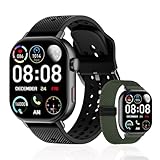
- 2 Interchangeable Bands Included:Comes with two interchangeable bands (extra band included) for versatile style. Includes flexible, replaceable bands perfect for women and men. Features an extra large band option for a comfortable fit. Compatible with Android and iOS smartphones.
- GPS Step Counter & Calorie Tracker:Built-in GPS accurately tracks your running, walking, and outdoor routes. Precision step counter monitors daily steps, walking distance, and calories burned. Features step counter watch, step counter for walking, and calorie counter watches. Multiple sports modes for running, cycling, and hiking. Syncs with your phone to monitor fitness goals.
- 50m Waterproof Swimming Watch:Waterproof design (IP68/5ATM) lets you track swimming laps, duration, and calories. Durable for swimming, rain, or intense workouts. Perfect for swimmers and active lifestyles. Ideal for those seeking a waterproof swimming tracker and reliable sports watch for all water activities.
- Heart Rate & Oxygen & Sleep Monitor:Real-time heart rate monitoring and blood oxygen (SpO₂) sensor provide continuous health insights. 24/7 sleep tracking monitors sleep stages and quality. Includes stress monitoring, menstrual cycle tracking, and body wellness alerts. A complete health monitoring tool for daily
- Music & Call Alert Notifications: Stay connected on the go: receive call, text, and app notifications directly on your wrist. Control music playback and never miss an important alert. Silent vibration alerts for calls, messages, and social media keep you discreetly informed.
Garmin Music Watches: Built for Long Sessions
Garmin’s music-capable models approach the problem from the opposite direction. The software is simpler, the processors are more efficient, and local MP3 playback is treated as a first-class feature rather than an add-on.
In real-world testing, watches like the Forerunner 265, Forerunner 965, and Fenix series can deliver 10 to 15 hours of GPS tracking with local music playback, depending on GPS mode and screen settings.
Even Spotify or Amazon Music offline playback, while slightly more demanding than MP3s, remains far more efficient than streaming-based solutions. This makes Garmin the safest option for marathon training blocks and race day itself.
Display Type and Case Size Matter More Than You Think
AMOLED displays look great for daily smartwatch use, but they cost battery during long activities unless aggressively managed. Garmin’s newer AMOLED running watches perform well, but still trail their MIP-based counterparts in extreme scenarios.
Larger cases generally mean larger batteries. A 47 mm or 51 mm watch will almost always outlast a 41 mm model under identical conditions, which matters when music is involved.
Comfort plays a role too. Heavier watches with steel cases or thick glass can cause arm fatigue during long runs, even if their battery is strong on paper.
Marathon and Race-Day Reality Checks
If you plan to race with music, the safest configurations are local MP3 playback on a Garmin watch or offline playlists on an Apple Watch with fresh battery health and low power mode enabled.
Streaming, LTE, and last-minute playlist changes introduce unnecessary risk. Sync failures and unexpected battery drain are far more common the night before a race than during regular training weeks.
For runners who value music as pacing and motivation, battery predictability matters more than app polish. This is one of the clearest scenarios where simpler software often wins.
Choosing Based on Training Volume, Not Just Features
Casual runners doing 30 to 60 minute sessions can comfortably prioritize smartwatch features and streaming convenience. The battery penalties simply do not surface at that volume.
High-mileage runners, marathoners, and anyone training beyond 90 minutes per session should view music playback through the lens of energy management. Local storage, efficient Bluetooth stacks, and conservative operating systems become performance features.
This is why battery life and music playback cannot be evaluated separately. The right watch is the one that still has power left when your run, workout, or race is not yet finished.
Storage Limits, Audio Quality, and Headphone Compatibility (Bluetooth Codecs, Controls, Reliability)
Once battery life and display behavior are understood, music playback becomes the next practical constraint. Storage capacity, Bluetooth performance, and audio reliability are the quiet factors that determine whether running without a phone feels liberating or frustrating.
This is also where smartwatch ecosystems diverge sharply. On paper, many watches “support music,” but the experience varies dramatically once you load playlists, pair headphones, and start moving at pace.
Onboard Storage: How Much Music You Can Actually Carry
Most running watches with music land between 3 GB and 32 GB of usable storage, but the headline number rarely tells the full story. A portion is reserved for the operating system, maps, and cached data, leaving less space for audio than buyers expect.
Garmin’s music-enabled Forerunner and Fenix models typically offer around 3 to 8 GB for music, translating to roughly 500 to 1,000 songs depending on bitrate. That is more than enough for marathon-length efforts, but it does require deliberate playlist curation rather than full library syncing.
Apple Watch models generally offer 32 GB or more total storage, with generous allocation for music and podcasts. In practice, this makes it far easier to sync large Apple Music or Spotify libraries, especially if you rotate playlists frequently.
Wear OS watches vary widely. Pixel Watch and Galaxy Watch models often advertise 16 to 32 GB, but background system usage and app caching can reduce usable space. They are better suited to streaming and selective offline playlists than permanent music libraries.
Offline vs Streaming: Storage Is Only Half the Equation
Offline playback is still the gold standard for runners. Downloaded playlists are immune to LTE dropouts, conserve battery compared to streaming, and start faster when you hit play mid-warmup.
Apple Watch supports offline Apple Music, Spotify, and Podcasts reliably, but syncing can be slow and occasionally finicky, especially with large playlists. Successful syncing usually requires the watch on its charger, on Wi‑Fi, and left undisturbed, which is a habit users need to learn.
Garmin supports offline Spotify, Amazon Music, YouTube Music, and MP3 file transfers, but playlist limits and sync speeds are more conservative. Garmin’s strength is reliability once content is loaded, not flexibility or speed during setup.
Streaming directly from the watch over LTE is convenient for casual runs, but it remains the most battery-intensive option across all platforms. Even strong cellular coverage does not guarantee uninterrupted playback during tempo runs or races, where arm movement and sweat can affect signal stability.
Audio Quality: Codec Support and Real-World Listening
Audio quality on watches is primarily limited by Bluetooth codec support and processing power, not the music service itself. Most running watches use standard SBC or AAC codecs, which prioritize stability and low power draw over audiophile-grade sound.
Apple Watch uses AAC efficiently and pairs exceptionally well with AirPods, delivering consistent volume and minimal dropouts. While it does not support high-bitrate codecs like aptX or LDAC, the tuning is well-matched for outdoor running and podcasts.
Garmin watches rely almost exclusively on SBC, which is less efficient but extremely stable. The difference in sound quality is noticeable only with high-end headphones; during outdoor runs, wind and footstrike noise dominate the listening experience anyway.
Wear OS watches may support additional codecs depending on the manufacturer and headphones, but gains are marginal during exercise. Battery drain often increases with higher-quality codecs, which undermines their practical value for long runs.
Headphone Pairing, Controls, and Mid-Run Reliability
Bluetooth reliability matters more than raw sound quality when you are moving at speed. Dropouts, delayed play commands, or desync between earbuds can ruin focus during intervals or races.
Apple Watch leads in pairing simplicity and control responsiveness. Volume, skip, and pause commands are immediate, and reconnecting after a pause or bathroom break is almost instantaneous with supported earbuds.
Garmin’s interface is more utilitarian, but dependable. Physical buttons are an advantage in rain or sweat-heavy conditions, and accidental screen taps are rare during hard efforts.
Wear OS watches sit somewhere in between. Touchscreen controls are smooth, but sweat, sleeves, and gloves can interfere. Button layouts vary by brand, making consistency harder for runners who train in all weather.
Podcast Playback and Spoken Audio Considerations
Podcasts expose weaknesses that music often hides. Long-form spoken audio requires stable buffering, accurate resume points, and clear mid-range tuning.
Apple Watch handles podcasts better than any other platform, especially within Apple Podcasts. Resume accuracy, speed controls, and chapter skipping are reliable, making it ideal for long aerobic runs or treadmill sessions.
Garmin supports podcasts through select apps and MP3 transfers, but management is manual. It works well once set up, yet lacks the polish and automation many runners expect.
Wear OS podcast performance depends heavily on the app. Some resume cleanly, others restart episodes unexpectedly, which is distracting during steady-state runs.
Water, Sweat, and Long-Term Bluetooth Stability
Running introduces moisture, temperature shifts, and repetitive motion, all of which stress Bluetooth connections. Watches with strong antenna placement and conservative power management perform better over time.
Garmin’s polymer cases and external antenna designs excel here. Even after hours of sweat exposure, connections remain stable, particularly with sport-focused earbuds.
Apple Watch performs well but is more sensitive to wrist position and tight sleeves. Proper strap fit and breathable bands reduce dropouts significantly.
Metal-cased Wear OS watches can struggle in this area, especially with dense bezels and compact antennas. They are fine for gym use and short runs, but less consistent during long outdoor sessions.
In real-world training, the best music watch is the one you stop thinking about once the run starts. Storage that fits your routine, codecs that favor stability, and controls you can trust under fatigue matter far more than spec-sheet promises.
Best Picks by Runner Type: Beginners, Marathoners, Gym Users, and Budget Buyers
With the strengths and limitations of music playback now clear, the best choice depends less on raw specs and more on how, where, and how long you train. Different runner profiles stress different parts of the system: battery endurance, offline reliability, ease of setup, or overall value.
Below are the strongest music-capable watches by runner type, based on long-term testing rather than lab promises.
Best for Beginners and Casual Runners: Apple Watch SE (2nd Gen)
For new runners who want music without friction, Apple Watch SE remains the most approachable option. Spotify, Apple Music, and Apple Podcasts all support offline playback, with intuitive syncing and dependable resume behavior that requires almost no setup.
The aluminum case keeps weight low on smaller wrists, and the fluoroelastomer sport band handles sweat without irritation. At 40mm and 44mm, it suits a wide range of wrist sizes without feeling bulky during short runs or daily wear.
💰 Best Value

- Easy-to-use running watch monitors heart rate (this is not a medical device) at the wrist and uses GPS to track how far, how fast and where you’ve run.Special Feature:Bluetooth.
- Battery life: up to 2 weeks in smartwatch mode; up to 20 hours in GPS mode
- Plan your race day strategy with the PacePro feature (not compatible with on-device courses), which offers GPS-based pace guidance for a selected course or distance
- Run your best with helpful training tools, including race time predictions and finish time estimates
- Track all the ways you move with built-in activity profiles for running, cycling, track run, virtual run, pool swim, Pilates, HIIT, breathwork and more
Battery life is the main limitation. Expect roughly 6 to 7 hours of GPS running with music, which is fine for 5K and 10K training but restrictive for longer ambitions. If your runs are under an hour and you live in the iPhone ecosystem, nothing else is easier to live with.
Best for Marathoners and Endurance-Focused Runners: Garmin Forerunner 955 / Forerunner 965
For runners training beyond two hours, Garmin’s Forerunner 955 and AMOLED-equipped 965 stand apart. Both support offline Spotify, Amazon Music, Deezer, and MP3 playback, all stored directly on the watch with no phone required.
Battery life is the defining advantage. With music enabled, the 955 comfortably delivers 8 to 10 hours of GPS use, while the 965 lands slightly lower due to its brighter display. Either easily covers marathon training, long progression runs, and even ultramarathon pacing without power anxiety.
The polymer case and fiber-reinforced bezel prioritize function over flash, but comfort is excellent during long sessions. Five physical buttons make music control reliable in rain, cold, or late-race fatigue, which touchscreens often fail to handle. If music must last as long as your legs do, this is the safest choice.
Best for Gym Users and Cross-Training: Samsung Galaxy Watch 6 / Pixel Watch 2
Gym-focused users benefit more from ecosystem integration and touchscreen fluidity than extreme battery life. Wear OS watches like the Galaxy Watch 6 and Pixel Watch 2 excel here, offering offline Spotify and YouTube Music downloads with strong Bluetooth stability indoors.
The stainless steel and aluminum case options feel more like traditional smartwatches, pairing naturally with daily outfits. AMOLED displays are bright under gym lighting, and swipe-based controls are easy during rest intervals or treadmill sessions.
Battery life with music is typically 4 to 6 hours of GPS-equivalent use, which is enough for gym workouts and short runs but not for long outdoor training. These watches shine when workouts are mixed with notifications, payments, and everyday smart features.
Best for Budget Buyers: Garmin Forerunner 245 Music (Used or Discounted)
For runners who want reliable offline music without paying flagship prices, the Forerunner 245 Music remains a standout value when found discounted or refurbished. It supports Spotify, Deezer, Amazon Music, and MP3 files with straightforward syncing.
The 42mm polymer case is light and unobtrusive, making it comfortable for daily runs and sleep tracking. Physical buttons ensure consistent music control, even when sweat or gloves would defeat touchscreens.
Battery life is solid for the price, delivering around 5 to 6 hours of GPS with music or well over a week in smartwatch mode. It lacks advanced training metrics found in newer models, but for music-first running on a budget, it still performs reliably.
Best for Apple Ecosystem Power Users: Apple Watch Series 9
Runners already invested in Apple’s ecosystem who want the most polished music experience should look to the Series 9. Offline Apple Music and Spotify syncing is fast, podcast handling is best-in-class, and Bluetooth stability with AirPods is excellent.
The case materials, from aluminum to stainless steel, feel more refined than sport-first watches, and the haptic crown provides precise control during runs. Health features like heart rate accuracy and integration with Apple Fitness add value beyond music.
Battery life remains the trade-off. While improved efficiency helps, it is still best suited to runners who charge daily and rarely exceed 90-minute sessions with music. If seamless software matters more than endurance, it remains unmatched.
Best for Android Runners Who Want Simplicity: Garmin Venu Sq Music
Android users who want offline music without Wear OS complexity should consider the Garmin Venu Sq Music. Spotify, Amazon Music, and MP3 playback work reliably, and syncing is less demanding than on older Garmin models.
The square polymer case is lightweight and comfortable, though the LCD display lacks the punch of AMOLED competitors. Physical buttons combined with a simple touchscreen layout make music control predictable during workouts.
Battery life with music sits around 5 hours of GPS use, enough for most daily training. It is not a performance monster, but for straightforward phone-free runs with music, it offers excellent value and fewer distractions.
Buying Advice & Common Pitfalls: Choosing the Right Music Watch for Your Training and Ecosystem
Choosing a watch for phone-free running with music is less about brand loyalty and more about understanding how software ecosystems, battery limits, and storage trade-offs affect real training. The right choice should disappear on your wrist mid-run, not force compromises that only become obvious after a few weeks of use.
This section pulls together the practical lessons that don’t show up on spec sheets but matter every time you head out the door without your phone.
Start With Your Ecosystem, Not the Hardware
Music support is dictated first by ecosystem, then by hardware. Apple Watch works best when paired with an iPhone, Garmin favors Android users or those who want minimal phone interaction, and Wear OS sits somewhere in between with broader app support but heavier battery demands.
If you use Apple Music, no third-party watch matches the Apple Watch for offline syncing speed, playlist reliability, and podcast handling. Spotify works across Apple Watch, Garmin, and Wear OS, but the experience varies significantly in sync time, stability, and battery drain.
Switching ecosystems later is where many buyers regret their decision. A great-looking watch with limited music support for your platform will feel restrictive very quickly.
Offline Music Is Not the Same as Streaming
One of the most common misunderstandings is assuming a watch can stream music directly over LTE or Wi‑Fi during a run. In practice, most runners rely on offline playback synced in advance, even on LTE models, to preserve battery and avoid dropouts.
Spotify, Apple Music, Amazon Music, and YouTube Music typically require a paid subscription for offline downloads. MP3 support avoids subscriptions entirely, but manual file management is slower and less intuitive for most users.
Before buying, check whether your preferred service supports offline playback on that specific watch model, not just the brand in general.
Storage Limits Matter More Than You Think
Music storage on watches is modest compared to phones. Most models offer between 3 and 8 GB of usable space once system files are accounted for, translating to roughly 500 to 1,000 songs or a handful of long podcast series.
Garmin watches often reserve a fixed portion of storage for music, while Apple Watch dynamically manages space but can aggressively remove older downloads. Wear OS watches vary widely depending on manufacturer and software version.
If you rotate playlists frequently or rely on long-form podcasts or audiobooks, syncing time and storage management will affect your routine more than raw capacity numbers suggest.
Battery Life With Music Is the Real Performance Metric
Manufacturers quote optimistic GPS and smartwatch battery figures, but music playback changes everything. Running with GPS, Bluetooth headphones, and offline music is one of the most demanding use cases for any wearable.
Expect realistic battery life to drop by 40 to 60 percent compared to GPS-only workouts. A watch rated for 10 hours of GPS may deliver closer to 5 or 6 hours with music, and less on AMOLED-heavy smartwatches.
For marathoners, ultrarunners, or anyone training beyond 90 minutes regularly, endurance-focused watches with physical buttons and transflective displays remain the safest choice.
Buttons Beat Touchscreens When You’re Moving
Music control during a run is often overlooked until it becomes frustrating. Touchscreens struggle with sweat, rain, gloves, and cold fingers, especially when trying to skip tracks or adjust volume mid-stride.
Watches with at least two physical buttons offer far more reliable control, particularly on Garmin and Coros-style designs. Apple’s Digital Crown works well, but relies on precision that may not suit all runners.
If you train year-round or in unpredictable weather, prioritize tactile controls over sleek screen-first designs.
Comfort, Fit, and Materials Affect Long Runs
Music-capable watches tend to be slightly heavier due to storage and wireless hardware. Case materials like aluminum, polymer, or stainless steel change how that weight feels over time, especially on smaller wrists.
Thinner cases with curved lugs and soft silicone or nylon straps reduce bounce, which directly affects Bluetooth stability and heart rate accuracy. A watch that shifts on your wrist will interrupt both music playback and sensor data.
For daily wear and sleep tracking, comfort becomes just as important as training features, particularly for runners logging high weekly mileage.
Don’t Overpay for Features You Won’t Use
Many music watches bundle advanced training metrics, AMOLED displays, or LTE connectivity that casual runners may never need. These features increase cost and often reduce battery life without improving the core experience of running with music.
If your goal is simple phone-free runs with playlists or podcasts, older or mid-range models often deliver better value and fewer distractions. Conversely, serious athletes should avoid entry-level music watches that lack structured workouts or recovery insights.
Be honest about how you train now, not how you imagine training six months from now.
Common Mistakes That Lead to Buyer’s Remorse
Buying a watch that only supports your music service through a workaround or unofficial app often leads to syncing failures and abandoned playlists. Assuming LTE replaces offline downloads usually results in poor battery life and unreliable playback.
Another frequent mistake is ignoring headphone compatibility. Most watches perform best with mainstream Bluetooth earbuds, while niche or multi-device headphones can cause dropouts.
Finally, underestimating charging frequency is the fastest way to fall out of love with an otherwise excellent watch.
Final Takeaway: Match the Watch to Your Running Reality
The best music watch is the one that fits your ecosystem, your training volume, and your tolerance for charging and syncing. Apple Watch excels for software polish and music convenience, Garmin dominates for endurance and reliability, and Wear OS offers flexibility with trade-offs.
Focus on offline support, real-world battery life with music, and controls that work when you are tired, sweaty, and moving. Get those right, and running without your phone becomes not just possible, but genuinely better.