Music on your watch sounds simple until you actually try to leave your phone at home and go for a run. In 2026, that phrase can mean anything from true on-watch Spotify playlists synced for offline playback, to basic MP3 storage, to watches that still quietly rely on your phone’s data connection. If you have ever tapped play mid-run only to discover silence, you already know why the details matter.
This guide starts by clearing up the biggest confusion in wearable tech right now: streaming versus offline music on a smartwatch or running watch. Understanding the difference will instantly narrow your options, explain price gaps between platforms, and prevent compatibility surprises with services like Spotify, Apple Music, YouTube Music, and Amazon Music. It also sets expectations for battery life, storage limits, and how “phone-free” your runs really are.
By the end of this section, you’ll know exactly what manufacturers mean when they advertise music support, which ecosystems handle it best, and why two watches with similar specs can feel completely different once you add Bluetooth headphones and hit the pavement.
Streaming music on a watch is rarely what runners think it is
When brands say a watch supports streaming, they often mean the app exists on the watch, not that it can stream independently anywhere. True live streaming without a phone requires an LTE-capable watch, an active data plan, and a music service that allows cellular playback on that platform. In real-world running use, this is still limited mostly to Apple Watch Cellular models and a handful of LTE Wear OS watches, with noticeable battery drain.
🏆 #1 Best Overall

- GPS running smartwatch with music advanced training features, Lens Material:Corning Gorilla Glass 3, Bezel Material: fiber-reinforced polymer, Strap material:silicone
- Battery life: up to 7 days in smartwatch mode and 6 hours in GPS mode with music
- Evaluates your current training status to indicate if you’re undertraining or overdoing it; Offers additional performance monitoring features
- Get free adaptive training plans from Garmin coach, or create your own custom workouts on our Garmin connect online fitness community
- Provides advanced running dynamics, including ground contact time balance, stride length, vertical ratio and more (When used with Running Dynamics Pod or HRM Run or HRM Tri monitors (sold separately))
Even with LTE, streaming mid-run is the least efficient way to listen to music. Signal drops, buffering, and rapid battery loss are common, especially on trails or urban routes with interference. That’s why most runners who care about reliability still rely on offline playback, even if their watch technically supports streaming.
Offline music is the gold standard for phone-free running
Offline playback means music is stored directly on the watch’s internal memory and played over Bluetooth headphones with no internet connection required. This is what Garmin, Apple, Coros, Polar, and Suunto users are typically referring to when they talk about running without a phone. Once synced, playback is instant, stable, and far more battery-efficient than cellular streaming.
The trade-off is preparation. Playlists, albums, or podcasts must be synced in advance, usually while charging and connected to Wi‑Fi or a companion phone app. For runners who train on a schedule, this is a minor inconvenience that pays off with reliability every single run.
Spotify, Apple Music, and others all behave very differently
Spotify remains the most universally supported service for offline playback on watches. Garmin, Apple Watch, Wear OS, Fitbit legacy models, and some Amazfit watches allow offline Spotify syncing, but the experience varies wildly in speed and reliability. Playlist size limits and sync times depend on watch storage and processor performance, not your Spotify subscription tier beyond Premium.
Apple Music is tightly locked to the Apple ecosystem. Offline Apple Music playback works seamlessly on Apple Watch, including cellular models, but is not supported natively on Garmin or most other running watches. Android users should note that YouTube Music and Amazon Music support is still inconsistent, with Garmin offering Amazon Music offline in select regions and YouTube Music remaining phone-dependent on most watches.
MP3 support is old-school but still relevant
Local MP3 file support is often overlooked, yet it remains one of the most reliable forms of music playback on sports watches. Garmin, Suunto, and Coros allow users to manually load audio files, bypassing streaming services entirely. This is ideal for athletes who want full control, use custom mixes, or train in areas with poor connectivity.
The downside is convenience. Managing files feels dated compared to cloud-based playlists, and there’s no automatic syncing or recommendations. Still, for ultra runners, triathletes, or anyone who values reliability over discovery, MP3 support can be a quiet advantage.
Storage limits matter more than you expect
Most music-capable running watches offer between 4 GB and 32 GB of internal storage, but that space is shared with maps, apps, and system data. In practice, this usually translates to a few hundred songs or a handful of long playlists. High-quality downloads consume space quickly, especially on Apple Watch where Apple Music defaults to higher bitrates.
Watch size and price often correlate with storage, but not always. Slim, lightweight running watches prioritize comfort and battery over memory, while lifestyle smartwatches may offer more storage but less endurance. Knowing how much music you actually need per run helps avoid overbuying or frustration later.
Bluetooth headphones are a hidden compatibility check
All music watches rely on Bluetooth audio, but not all Bluetooth headphones behave equally during workouts. Connection stability depends on antenna placement, watch case materials, and how your arm swings while running. Metal-cased smartwatches can sometimes struggle more than polymer sports watches, especially in crowded RF environments.
There is also no universal support for advanced codecs like AAC or aptX across all platforms. Apple Watch handles AirPods exceptionally well, while Garmin and others work best with simple, low-latency SBC-based sports headphones. The safest choice remains lightweight, workout-specific earbuds with strong connection stability rather than premium audio features.
Battery life changes dramatically once music enters the equation
Playing music locally can reduce GPS battery life by 20 to 40 percent depending on volume, headphone efficiency, and watch chipset. LTE streaming can cut endurance in half or worse, especially on smaller smartwatches. This is why marathoners and ultra runners tend to favor offline playback on dedicated running watches over cellular smartwatches.
Manufacturers rarely advertise music-specific battery figures prominently, so real-world testing matters. A watch that lasts 7 hours with GPS alone may struggle to hit 4 hours with music, which can be the difference between finishing a long run with motivation or silence.
Platform matters more than brand loyalty
Choosing music on a watch is ultimately about ecosystem alignment, not just hardware. Apple Watch offers the smoothest music experience if you live entirely inside Apple’s world. Garmin offers the broadest offline compatibility across services for serious runners who prioritize battery life and training tools.
Wear OS sits somewhere in between, improving steadily but still inconsistent across brands and regions. Understanding these trade-offs now makes the rest of this buying guide far easier, because the best music watch for you depends less on specs and more on how you actually listen while you move.
Music Service Compatibility Matrix: Spotify, Apple Music, YouTube Music, Amazon Music, MP3s
Once you understand how battery life, Bluetooth stability, and platform ecosystems interact, the next decisive factor is simple but surprisingly fragmented: which music services actually work offline on which watches. This is where many otherwise excellent running watches immediately fall out of contention for phone‑free training.
What follows is a clear, service‑by‑service breakdown, followed by a practical compatibility matrix that reflects real-world behavior, not marketing promises.
Quick Compatibility Overview
| Music Source | Apple Watch | Garmin Music Watches | Wear OS Watches (Samsung, Pixel, etc.) | Polar / COROS / Suunto |
|---|---|---|---|---|
| Spotify Offline | Yes | Yes | Yes (limited models) | No |
| Apple Music Offline | Yes (native) | No | No | No |
| YouTube Music Offline | No | No | Yes (newer Wear OS) | No |
| Amazon Music Offline | Limited / Streaming | Yes | Limited | No |
| MP3 File Transfer | Via iPhone sync | Yes (USB/Wi‑Fi) | Limited | Varies / Mostly No |
This matrix immediately highlights why runners so often end up choosing between Apple Watch and Garmin when music is non‑negotiable.
Spotify: The Most Widely Supported, With Caveats
Spotify remains the most universally supported streaming service for offline playback on watches. Apple Watch, Garmin music models, and a growing list of Wear OS devices all support downloading playlists directly to the watch.
On Apple Watch, Spotify behaves almost like Apple Music, with smooth syncing over Wi‑Fi or cellular and reliable playback with AirPods and most third‑party earbuds. Storage is shared with apps and data, so playlist sizes must be managed carefully on smaller 32 GB models.
Garmin’s Spotify integration is more utilitarian but extremely runner‑friendly. Playlists sync via Wi‑Fi through Garmin Connect, playback is stable, and battery drain is predictable, making it ideal for long GPS runs where consistency matters more than polish.
Wear OS support varies by brand and generation. Newer Samsung Galaxy Watches and Pixel Watch models handle Spotify offline well, but older hardware can struggle with sync reliability and background battery drain during longer workouts.
Apple Music: Best-in-Class, but Apple-Only
Apple Music offline playback is exclusive to Apple Watch, and this exclusivity is deliberate. The integration is native, fast, and deeply optimized for watchOS, with excellent queue management, Siri voice control, and seamless syncing from iPhone.
For runners already using Apple Music, this is the cleanest phone‑free music experience available today. Bluetooth stability with AirPods is unmatched, and LTE models allow true streaming when offline downloads are not available.
The downside is obvious: Apple Music does not officially support Garmin, Wear OS, or any other sports watch platform. If Apple Music is non‑negotiable and you want offline playback, Apple Watch is effectively your only option.
YouTube Music: Improving, but Still Platform-Limited
YouTube Music offline playback has finally matured on Wear OS, particularly on recent Samsung Galaxy Watch and Google Pixel Watch models. Users with YouTube Music Premium can download playlists directly to the watch, making this an increasingly viable option for Android‑centric runners.
Apple Watch does not support YouTube Music offline playback in a meaningful way. Streaming is possible on LTE models, but this dramatically impacts battery life and is unreliable for longer runs.
Garmin, Polar, COROS, and Suunto currently offer no official YouTube Music offline support. For athletes locked into Google’s music ecosystem, Wear OS is the only realistic watch platform.
Amazon Music: Strong on Garmin, Inconsistent Elsewhere
Amazon Music offline support is one of Garmin’s quiet strengths. Prime and Unlimited subscribers can download playlists directly to compatible Garmin music watches, making it an excellent option for runners already invested in Amazon’s ecosystem.
Battery impact is similar to Spotify on Garmin devices, and syncing is stable once playlists are cached. Storage limits, rather than performance, are the main constraint.
Apple Watch and Wear OS support Amazon Music primarily through streaming, often requiring LTE connectivity. Offline behavior is inconsistent and generally not recommended for long, phone‑free workouts.
MP3 and Local File Playback: Old-School Reliability
Local MP3 playback remains the most battery‑efficient and platform‑agnostic way to listen to music on a run, but support varies widely.
Garmin is the clear leader here. Music files can be transferred via USB or Wi‑Fi, organized into playlists, and played without any service dependencies. For runners training in remote areas or traveling frequently, this reliability is hard to beat.
Apple Watch supports local file syncing through the iPhone, but the process is less transparent and tightly controlled by iOS. It works well once set up, but power users may find the lack of file system access limiting.
Most Wear OS watches offer only partial or awkward MP3 support, often relying on third‑party apps with inconsistent background behavior. Polar, COROS, and Suunto largely avoid onboard music altogether, prioritizing battery life and training metrics instead.
Storage Limits and Real-World Usability
Music storage is rarely advertised clearly, yet it directly affects how practical offline playback is. Apple Watch typically reserves several gigabytes for music depending on model and system usage, while Garmin music watches usually offer 3 to 8 GB dedicated to audio.
In practice, this translates to roughly 500 to 1,000 songs, depending on bitrate. High‑quality downloads drain storage quickly and offer little benefit through sports headphones, making standard quality the smarter choice for runners.
The most important takeaway is that music compatibility is not about what a watch can technically do, but what it can do reliably at kilometer 25 of a long run. Choosing the right service‑watch combination upfront prevents frustration later, especially when leaving the phone at home is the whole point.
The Best Smartwatches with Music for iPhone Users (Apple Watch Ecosystem)
For iPhone users, the Apple Watch remains the most seamless solution for phone‑free music during workouts. Apple controls the hardware, software, and services end‑to‑end, which removes many of the syncing inconsistencies seen on other platforms.
That tight integration matters most when you leave the phone behind. Offline playlists, Bluetooth headphone pairing, and app stability during long runs are all areas where Apple Watch behaves predictably, even if battery life and training depth lag behind dedicated running watches.
Apple Watch Series 9: The Most Balanced Choice for Runners
The Apple Watch Series 9 is the default recommendation for most iPhone users who want reliable offline music without stepping into Ultra territory. It offers Apple Music offline syncing, Spotify offline playlists for Premium users, and local file syncing through the iPhone’s music library.
Storage allocation is dynamic, but in real‑world use you can expect space for several hundred songs at standard quality. Syncing happens automatically when the watch is charging and connected to Wi‑Fi, which reduces the friction compared to manual file transfers on other platforms.
From a wearability standpoint, the Series 9 is available in 41 mm and 45 mm aluminum or stainless steel cases. The aluminum version is lighter and better suited for running, especially when paired with Apple’s Sport Loop or a third‑party nylon strap that reduces bounce and sweat buildup.
Battery life remains the limiting factor. Expect roughly 6 to 7 hours of GPS running with music playback, or a full day of mixed use. For daily training and shorter long runs, that’s sufficient, but marathoners and ultrarunners will hit the ceiling quickly.
Apple Watch Ultra 2: Best for Long Runs and Outdoor Training
The Apple Watch Ultra 2 is Apple’s strongest option for runners who prioritize durability and longer workouts with music. It supports the same music services as the Series models, including Apple Music offline and Spotify offline, but pairs that with a much larger battery.
In practical terms, the Ultra 2 can handle extended GPS runs with music playback without forcing aggressive power management. Long trail runs, back‑to‑back workouts, and weekend endurance sessions are far less stressful from a battery perspective.
The 49 mm titanium case is large but well balanced on the wrist, especially with the Trail Loop, which distributes weight evenly and minimizes pressure points. The flat sapphire display is easier to read mid‑run than the curved glass on standard models, particularly in bright sunlight.
While the Ultra 2 still cannot match Garmin’s multi‑day endurance with music, it is the first Apple Watch that feels genuinely comfortable for serious outdoor training without constant battery anxiety.
Apple Watch SE (2nd Gen): Cheapest Entry to Offline Music
The Apple Watch SE offers a more affordable path into Apple’s music ecosystem, but with compromises that runners should understand upfront. It supports Apple Music and Spotify offline playback, but lacks the always‑on display and advanced sensors found in higher models.
Rank #2

- Designed with a bright, colorful AMOLED display, get a more complete picture of your health, thanks to battery life of up to 11 days in smartwatch mode
- Body Battery energy monitoring helps you understand when you’re charged up or need to rest, with even more personalized insights based on sleep, naps, stress levels, workouts and more (data presented is intended to be a close estimation of metrics tracked)
- Get a sleep score and personalized sleep coaching for how much sleep you need — and get tips on how to improve plus key metrics such as HRV status to better understand your health (data presented is intended to be a close estimation of metrics tracked)
- Find new ways to keep your body moving with more than 30 built-in indoor and GPS sports apps, including walking, running, cycling, HIIT, swimming, golf and more
- Wheelchair mode tracks pushes — rather than steps — and includes push and handcycle activities with preloaded workouts for strength, cardio, HIIT, Pilates and yoga, challenges specific to wheelchair users and more (data presented is intended to be a close estimation of metrics tracked)
Storage availability is tighter, and sync speeds are slower due to older internals. For runners who rotate a few playlists rather than maintaining large libraries, this is manageable.
The SE is lightweight and comfortable for short to moderate runs, especially in the smaller case size. Battery life is similar to the Series 9, meaning it works best for daily training rather than long endurance efforts.
Music Services on Apple Watch: What Actually Works Offline
Apple Music offers the deepest integration by far. Offline playlists sync automatically, Siri voice control works reliably during workouts, and playback resumes instantly even after pausing an activity.
Spotify supports true offline playback on Apple Watch, but only for Premium users. Playlists must be downloaded manually, and syncing can be slower than Apple Music, though playback stability during runs is generally solid once files are stored locally.
YouTube Music and Amazon Music remain inconsistent for phone‑free running. Most usage still relies on streaming or partial caching, making them poor choices for runners who want guaranteed offline playback without LTE.
Local MP3 syncing is supported through the iPhone, but Apple tightly controls the process. Files must be added to the Music app and synced indirectly, which works reliably but offers little transparency or playlist flexibility for power users.
LTE vs GPS Models: Do You Actually Need Cellular?
Cellular Apple Watch models allow music streaming without a phone, but this comes with trade‑offs. Streaming over LTE drains the battery rapidly and introduces reliability issues in areas with weak signal.
For runners focused on consistency, offline music on a GPS‑only model is usually the better choice. LTE becomes useful for emergency calls, live tracking, or occasional streaming, but it should not replace offline playback as the primary music strategy.
It’s also worth noting that Spotify and Apple Music behave more predictably offline than over cellular during workouts. Even brief signal drops can interrupt streaming, which is the last thing you want mid‑interval.
Headphone Compatibility and Playback Controls
Apple Watch works best with AirPods and Beats headphones, offering instant pairing, stable connections, and reliable onboard controls. Volume adjustment via the Digital Crown is intuitive, even with sweaty hands or gloves.
Third‑party Bluetooth headphones generally work well, but connection stability varies more than on Garmin or dedicated music watches. Pairing before heading out is essential, as searching for devices mid‑run can be frustrating.
On‑watch playback controls are clean and readable, though less customizable than Garmin’s button‑based systems. Touchscreen reliance is fine for road running but can be less ideal in rain or winter conditions.
Who the Apple Watch Is Really For
Apple Watch is the best music watch for iPhone users who value convenience, app polish, and ecosystem integration over maximum battery life. If your runs fit comfortably within a few hours and you want effortless syncing with mainstream services, it delivers a smoother experience than any alternative.
Runners training for ultras, multi‑day adventures, or highly structured endurance plans may find Apple’s battery limits restrictive. For everyone else, especially those already invested in Apple Music or Spotify, the Apple Watch remains the most reliable way to run phone‑free with music on iOS.
The Best Smartwatches with Music for Android Users (Wear OS & Samsung)
For Android users, the music experience on a smartwatch looks very different from Apple’s tightly controlled ecosystem. Wear OS and Samsung’s One UI Watch offer more service flexibility, but also more variability in reliability, battery life, and offline behavior depending on the watch brand and music platform.
The upside is choice. Spotify, YouTube Music, Amazon Music, and locally stored MP3s are all viable on the right hardware, and you’re not locked into a single phone brand beyond Android compatibility.
Wear OS Music Support: What Actually Works Offline
On modern Wear OS watches, Spotify is the most consistent option for offline playback. You can download playlists, albums, and podcasts directly to the watch over Wi‑Fi, then run completely phone‑free with Bluetooth headphones.
YouTube Music has replaced Google Play Music across Wear OS, but offline syncing is less predictable. Downloads sometimes stall or fail, and background syncing can be slow unless the watch is charging and on strong Wi‑Fi.
Amazon Music offers offline playback on select Wear OS models, but support is inconsistent across regions and firmware versions. If Amazon Music is your primary service, it’s worth confirming compatibility on your specific watch model before buying.
Google Pixel Watch 2: Polished Software, Limited Endurance
The Pixel Watch 2 offers the cleanest Wear OS software experience, with excellent Spotify integration and fast playlist syncing. Music controls are clear, responsive, and easy to manage mid‑run thanks to smooth touch responsiveness and a well‑tuned rotating crown.
Storage is limited compared to some competitors, which means you’ll need to be selective with playlists. For most runners, this still covers several hours of music or podcasts without issue.
Battery life is the main compromise. With GPS tracking and offline music playback, real‑world endurance often lands around 6–8 hours, which is fine for daily runs but restrictive for long training days or back‑to‑back workouts.
Samsung Galaxy Watch Series: The Most Flexible Android Music Watches
Samsung’s Galaxy Watch models running One UI Watch sit at the intersection of smartwatch polish and practical fitness features. Spotify offline playback works reliably, syncing is fast, and storage capacity is generous enough for large playlists.
Samsung also supports MP3 file transfers via the Galaxy Wearable app, which appeals to runners who prefer owning their music outright. Once loaded, locally stored files are extremely stable and use less battery than streaming-based services.
Battery life is better than Pixel Watch in comparable scenarios. A Galaxy Watch 6 or 6 Classic can handle GPS tracking plus offline music for roughly 8–10 hours, depending on display settings and sensor usage.
Samsung Galaxy Watch vs Wear OS Defaults for Runners
Samsung’s implementation favors runners who want physical interaction options. While still touchscreen‑heavy, rotating bezels or crowns on certain models make volume and track skipping easier when hands are sweaty or gloved.
Workout music controls integrate cleanly into Samsung Health, though customization is more limited than on dedicated running watches. You get reliable basics rather than deep control mapping.
Comfort is a strength. The curved case design, lightweight aluminum or stainless steel builds, and soft silicone straps make Galaxy Watches easy to wear for long sessions without hotspots.
Spotify vs YouTube Music vs MP3 on Android Watches
Spotify remains the safest recommendation for Android runners. Offline playlists are stable, syncing is predictable, and headphone pairing works smoothly across brands.
YouTube Music is improving but still feels secondary on watches. If you rely on it exclusively, expect occasional friction, especially when updating playlists frequently.
MP3 playback is the most battery‑efficient and reliable option, but requires manual file management. For runners with large personal libraries or those training in remote areas, it’s still a surprisingly strong choice.
Headphone Pairing and Playback Controls on Wear OS
Bluetooth headphone compatibility is broad on Android watches, covering most major sports and consumer brands. Pairing should always be done at home, as Wear OS pairing menus are slower and less forgiving mid‑workout.
Playback controls are readable but less customizable than Garmin’s button‑driven systems. Touchscreens work well in dry conditions but can become frustrating in rain or cold weather.
Volume control varies by hardware. Watches with crowns or bezels offer a noticeable usability advantage over purely touch‑based models.
Who Should Choose a Wear OS or Samsung Watch for Music
Wear OS and Samsung watches are best for Android users who want phone‑free music without abandoning smartwatch features like notifications, payments, and voice assistants. They work particularly well for road runners, gym sessions, and everyday training runs under two hours.
Runners prioritizing battery life above all else may find these watches limiting for long events or ultra training. But for most Android users, they strike a strong balance between music freedom, ecosystem flexibility, and daily usability.
The key is matching expectations to reality. These are smartwatches first, fitness watches second, and their music features shine brightest when used within that context.
The Best Running Watches with Offline Music for Serious Training (Garmin, Polar, COROS)
For runners who care more about training depth than smartwatch polish, dedicated sports watches approach music very differently. Battery life, button control, and workout reliability take priority, and music support is added carefully to avoid compromising core performance.
This is where Garmin dominates, Polar offers a narrower but focused solution, and COROS largely opts out entirely. Understanding those differences is critical before assuming all “music-enabled” running watches behave the same way.
Garmin: The Gold Standard for Offline Music on Training Watches
Garmin remains the most complete option for serious runners who want phone‑free music without sacrificing training features. Its music ecosystem is mature, reliable, and deeply integrated into the workout experience.
Most Garmin “Music” models support offline Spotify, Amazon Music, and Deezer, plus direct MP3 file transfers via USB. Apple Music and YouTube Music are not supported natively, which remains the biggest limitation for iPhone users tied to Apple’s ecosystem.
Best Garmin Models with Music for Runners
The Forerunner 265 Music and Forerunner 965 Music strike the best balance for most runners. They combine AMOLED displays, physical buttons, lightweight polymer cases, and excellent GPS accuracy without the bulk of adventure watches.
The Forerunner 965 adds full‑color offline maps and longer battery life, making it better suited for marathon training blocks and long progression runs with music enabled. Both watches store around 8 GB of music, which translates to roughly 500 to 700 songs depending on bitrate.
Fenix and Epix: Music for Long Runs and Ultras
The Fenix 7 and Epix Pro families are Garmin’s most durable music‑capable watches. Sapphire glass options, stainless steel or titanium bezels, and higher water resistance make them ideal for trail running and multi‑day training.
Music playback has a measurable battery cost, especially with AMOLED models like the Epix Pro. Expect a reduction of 15 to 25 percent in GPS runtime when streaming to Bluetooth headphones, depending on volume and codec.
Garmin Music Controls and Headphone Pairing
Garmin’s button‑driven interface is one of its biggest advantages for music control. Track skipping, volume adjustment, and playlist access work reliably with sweaty hands, gloves, or rain.
Bluetooth headphone compatibility is excellent with most major sports brands. Pairing is stable, but Garmin watches work best when headphones are paired and playlists synced before leaving home.
Polar: Offline MP3 Only, Training First Always
Polar takes a far more conservative approach to music. Current Polar watches do not support Spotify, Amazon Music, Apple Music, or any streaming services.
Instead, Polar supports basic MP3 file playback on select models, such as the Polar Vantage V3. Music files must be manually transferred, and playlist management is minimal by modern standards.
Rank #3

- Built with a slim design and an always-on, full-color display that’s light on the wrist and easy to read even in direct sunlight — with available sizes of 46 mm and 41 mm
- Forerunner 255 Music provides up to 14 days of battery life in smartwatch mode and up to 30 hours in GPS mode for a full picture of your health — from sleep to training
- Download up to 500 songs to your watch, including playlists from Spotify, Amazon Music or Deezer (subscription required), and connect with your wireless headphones for phone-free listening
- Morning report summarizes your sleep, HRV status and daily workout suggestion in one place as soon as you wake up (This device is intended to give an estimate of your activity and metrics)
- Get ready for your next race with training tips, personalized daily suggested workouts and completion time predictions based on course details, weather and performance
Who Polar Music Makes Sense For
Polar’s MP3 playback is best for runners who already maintain a personal music library and value absolute training focus over convenience. The advantage is predictability, no syncing errors, no expired downloads, and very low battery impact.
The downside is obvious. If your music life revolves around streaming services, Polar will feel restrictive and outdated compared to Garmin or smartwatch platforms.
COROS: No Music, by Design
COROS stands apart by largely ignoring music playback altogether. Current COROS watches do not support offline music, MP3 storage, or streaming services of any kind.
This is a deliberate trade‑off. COROS prioritizes extreme battery life, lightweight construction, and training metrics, often outperforming competitors in GPS runtime per gram of weight.
Why Some Serious Runners Still Choose COROS
For athletes training for ultras, stage races, or multi‑day events, the absence of music is often acceptable. Many COROS users carry a phone or dedicated MP3 player when music matters and rely on the watch purely for performance tracking.
If music is a non‑negotiable part of every run, COROS will be a dealbreaker. If battery longevity and simplicity matter more, the lack of music may actually be a feature rather than a flaw.
Battery Life Trade‑Offs with Music on Training Watches
Offline music playback always reduces battery life, even on efficient platforms like Garmin. Bluetooth streaming adds continuous power draw on top of GPS, heart rate tracking, and sensor sampling.
For marathon and half‑marathon training, this is rarely an issue. For ultra distances or back‑to‑back long days, disabling music can meaningfully extend usable runtime.
Choosing Between Garmin, Polar, and COROS for Music
Garmin is the clear choice for runners who want seamless offline music and advanced training tools in one device. Polar suits disciplined athletes who prefer MP3 reliability and minimal distractions. COROS is for runners who are willing to sacrifice music entirely for battery life and performance efficiency.
The right choice depends less on brand loyalty and more on how central music is to your training routine.
Storage Limits, Syncing Methods, and File Management: What You Can Actually Fit on Your Wrist
Once you’ve decided that music belongs on your watch, the next reality check is far less glamorous. Storage capacity, syncing friction, and how much control you actually have over your files will shape the day‑to‑day experience far more than brand promises or feature lists.
This is where smartwatches and running watches diverge sharply, and where platform choice can quietly make or break phone‑free running.
How Much Music Storage Do Watches Really Have?
Smartwatch platforms generally offer the largest internal storage, but not all of it is available for music. Apple Watch SE models ship with 32GB, while Series 9 and Apple Watch Ultra 2 offer 64GB, yet a significant portion is reserved for watchOS, apps, and system data.
In practice, most users can allocate anywhere from 8GB to 20GB specifically for music and podcasts, depending on how app‑heavy the watch is. At standard 256–320 kbps quality, that’s roughly 1,500 to 3,000 songs, far more than most runners will ever rotate through.
Garmin’s music‑enabled watches are more conservative but also more predictable. Entry models like the Forerunner 255 Music typically offer around 4GB, while higher‑end devices such as the Forerunner 955, Fenix 7 Pro, and Epix Pro jump to 16GB or 32GB.
That equates to roughly 500–2,000 songs depending on bitrate, with fewer background processes competing for space. Garmin also keeps storage usage transparent, which makes file management less opaque than on smartwatch platforms.
Wear OS watches sit somewhere in the middle. Samsung Galaxy Watch and Pixel Watch models typically offer 16GB to 32GB of storage, but Google services, health data, and system updates can quickly consume a chunk of that capacity.
Streaming Service Limits You Don’t See on the Spec Sheet
Even with ample storage, streaming services impose their own caps. Spotify limits offline downloads to 10,000 tracks per device, with a maximum of five devices per account.
Apple Music has no publicly stated per‑device song limit, but downloads are tied tightly to Apple’s DRM system. Those files are unreadable outside the Apple Watch and disappear if your subscription lapses.
Amazon Music and YouTube Music support offline playback on select platforms, but availability varies by watch brand and region. On Garmin, Spotify, Amazon Music, and Deezer are widely supported, while YouTube Music remains absent.
Syncing Methods: Wi‑Fi, Phone Tethering, and Old‑School USB
Apple Watch syncing happens almost entirely over Wi‑Fi or Bluetooth via the iPhone. Downloads can be fast on modern networks, but initial library transfers are still slower than many expect, especially with large playlists.
The upside is automation. Playlists update in the background while the watch charges, with minimal user intervention once everything is configured.
Garmin takes a more utilitarian approach. Music syncs either over Wi‑Fi directly to the watch or through Garmin Express via a computer for MP3 files.
Wi‑Fi syncing is reliable but slower than Apple’s ecosystem, while USB syncing remains the fastest and most predictable option for large local libraries. For runners who still own MP3 collections, this remains a major advantage.
Wear OS syncing varies wildly by manufacturer. Spotify and other apps typically rely on Wi‑Fi transfers initiated on the watch itself, with inconsistent speed depending on chipset and software optimization.
MP3s vs Streaming Downloads: Control Versus Convenience
MP3 playback gives you total control over your music library. Files never expire, bitrate is your choice, and syncing doesn’t depend on subscription status or app updates.
Garmin and Polar are the strongest platforms for MP3 users, offering straightforward folder‑based management and consistent playback behavior. The trade‑off is manual organization, which can feel dated compared to streaming playlists.
Streaming downloads are easier but more restrictive. Files are encrypted, tied to specific apps, and can vanish if licenses change or subscriptions lapse.
On Apple Watch, this lock‑in is especially strong. Apple Music works beautifully, Spotify works well, but neither allows true file access or cross‑platform portability.
File Management and On‑Watch Organization
Apple Watch offers the least visibility into what’s actually stored. You choose playlists, albums, or podcasts, but storage allocation is abstracted away, which can frustrate users managing limited space.
Garmin exposes storage usage clearly. You can see exactly how much space music occupies, delete individual playlists, and prioritize files without guesswork.
Wear OS sits between the two. Some watches offer basic storage breakdowns, but deleting individual downloads often requires diving into each app rather than managing music globally.
Battery Impact of Storage and Sync Choices
Larger music libraries don’t directly drain battery, but syncing methods do. Wi‑Fi transfers are power‑hungry and can noticeably warm the watch during long sync sessions.
Playback itself is more predictable. Expect a 10–20 percent battery hit per hour when combining GPS and Bluetooth headphones, with smartwatch platforms typically faring worse than dedicated running watches.
Garmin’s advantage is consistency. You know exactly how much runtime you’ll lose with music enabled, which matters for long training runs and race‑day planning.
What This Means for Phone‑Free Runners
If you want maximum music variety with minimal fuss, smartwatch platforms win on raw storage and streaming convenience. If you want predictable behavior, long‑term file ownership, and clearer control, running watches still punch above their weight.
The question isn’t just how much music fits on your wrist. It’s how much control you want over it, and how much friction you’re willing to tolerate before a run.
Battery Life Trade-Offs: How Music Playback Impacts GPS, Training Time, and Daily Use
All of the platform differences discussed so far come to a head once you actually press start on a workout. Music playback doesn’t just use battery on its own; it compounds the drain from GPS, optical heart rate sensors, wireless headphones, and background app processes.
For runners planning phone‑free sessions, battery behavior with music enabled is often the deciding factor between a smartwatch and a dedicated running watch.
Why Music Is One of the Most Power-Hungry Features
Offline music playback sounds simple, but it activates several energy‑intensive components simultaneously. The watch has to decode audio files or encrypted streams, maintain a constant Bluetooth connection to your headphones, and keep storage access active while tracking your run.
Add GPS on top, and battery drain accelerates quickly. GPS chips pull power continuously, especially on multi‑band or high‑accuracy modes, and smartwatch platforms often run additional background services that never fully sleep during workouts.
This is why music+GPS battery estimates are often dramatically shorter than GPS‑only figures, even on watches with otherwise excellent endurance.
Apple Watch: Excellent Music Experience, Aggressive Battery Burn
Apple Watch delivers the smoothest music experience, particularly with Apple Music and Spotify. Downloads are fast, playback is stable, and AirPods integration is seamless.
The trade‑off is endurance. With GPS and music playing, most Apple Watch models land in the 5–7 hour range depending on model, headphone choice, and GPS accuracy mode. Ultra models stretch that further, but they still burn through battery far faster than running‑focused watches.
Outside workouts, daily use with music doesn’t change much, but frequent syncing, streaming over LTE, or long music workouts can force daily charging, sometimes twice a day for heavier users.
Wear OS: Middle Ground Performance with Inconsistent Results
Wear OS watches vary widely depending on chipset, battery size, and manufacturer tuning. Spotify, YouTube Music, and Amazon Music offline playback are supported on many models, but efficiency is inconsistent.
With GPS and music enabled, most Wear OS watches fall into the 6–10 hour range, often closer to the lower end if using LTE or high‑accuracy GPS. Bluetooth stability and background app behavior can also affect drain unpredictably.
For daily wear, Wear OS devices usually survive a full day with music usage mixed in, but runners training longer than 90 minutes regularly will need to watch battery percentages closely.
Garmin and Dedicated Running Watches: Predictability Over Polish
Garmin’s music‑enabled models are not the slickest to use, but they are the most predictable. Whether you’re using Spotify, Amazon Music, Deezer, or local MP3 files, battery drain follows clearly defined patterns.
Rank #4
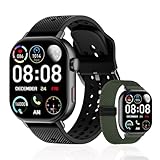
- 2 Interchangeable Bands Included:Comes with two interchangeable bands (extra band included) for versatile style. Includes flexible, replaceable bands perfect for women and men. Features an extra large band option for a comfortable fit. Compatible with Android and iOS smartphones.
- GPS Step Counter & Calorie Tracker:Built-in GPS accurately tracks your running, walking, and outdoor routes. Precision step counter monitors daily steps, walking distance, and calories burned. Features step counter watch, step counter for walking, and calorie counter watches. Multiple sports modes for running, cycling, and hiking. Syncs with your phone to monitor fitness goals.
- 50m Waterproof Swimming Watch:Waterproof design (IP68/5ATM) lets you track swimming laps, duration, and calories. Durable for swimming, rain, or intense workouts. Perfect for swimmers and active lifestyles. Ideal for those seeking a waterproof swimming tracker and reliable sports watch for all water activities.
- Heart Rate & Oxygen & Sleep Monitor:Real-time heart rate monitoring and blood oxygen (SpO₂) sensor provide continuous health insights. 24/7 sleep tracking monitors sleep stages and quality. Includes stress monitoring, menstrual cycle tracking, and body wellness alerts. A complete health monitoring tool for daily
- Music & Call Alert Notifications: Stay connected on the go: receive call, text, and app notifications directly on your wrist. Control music playback and never miss an important alert. Silent vibration alerts for calls, messages, and social media keep you discreetly informed.
Expect roughly a 10–20 percent per hour hit when combining GPS and music, depending on GPS mode and headphone efficiency. That translates into 7–10 hours on mid‑range models and significantly more on endurance‑focused watches like the Forerunner 955, Enduro, or Fenix series.
Crucially, Garmin’s estimates are conservative and reliable. If the watch says it will last a 4‑hour long run with music, it almost always will, which is invaluable for race prep and long training blocks.
GPS Accuracy Modes Make a Bigger Difference Than Music Quality
Many runners assume higher bitrate audio drains battery faster, but GPS settings matter more. Multi‑band or dual‑frequency GPS can increase power draw far more than switching from standard MP3s to streaming‑service downloads.
On Garmin and some Wear OS watches, dropping from multi‑band to single‑band GPS can add hours of music‑enabled runtime. Apple Watch users have fewer manual controls here, which limits optimization for ultra‑long sessions.
If battery life matters, prioritizing GPS efficiency over audio fidelity is almost always the smarter compromise.
Headphones Matter More Than Most People Expect
Bluetooth headphones vary significantly in efficiency. Older Bluetooth standards, unstable connections, or frequent reconnects can noticeably increase drain on the watch.
Apple’s own AirPods are highly optimized for Apple Watch and generally deliver better battery efficiency than third‑party options. Garmin users often see the best results with simple, low‑latency running headphones rather than feature‑heavy models with ANC or multipoint.
This is one of the easiest variables to optimize without changing your watch.
Daily Use vs Training Battery: Two Very Different Stories
Music playback during workouts is a worst‑case scenario for battery life. Casual listening during commutes or chores has a much smaller impact, especially if GPS isn’t active.
Smartwatches handle this better overall. Apple Watch and Wear OS models absorb occasional music use into daily battery budgets with little drama, as long as workouts are short.
Running watches flip the equation. They excel during long GPS+music sessions but often feel conservative in daily smartwatch use, with simpler displays, fewer background processes, and slower UI interactions that trade convenience for endurance.
What Battery Trade-Offs Mean When Choosing a Music Watch
If your runs are short, frequent, and paired with heavy smartwatch use, Apple Watch and Wear OS models deliver the most enjoyable music experience, even if you charge nightly.
If your training includes long runs, back‑to‑back sessions, or races where battery anxiety is unacceptable, Garmin and similar running watches remain the safest option, even with clunkier music handling.
Music on the wrist is liberating, but it is never free. Understanding how each platform spends its battery lets you choose a watch that supports your training instead of limiting it.
Headphones, Bluetooth Stability, and Audio Controls While Running
Once battery life and music storage are understood, the next real-world variable is how reliably your watch stays connected to your headphones while you are actually moving. Phone‑free running exposes Bluetooth weaknesses quickly, especially with arm swing, sweat, layered clothing, and crowded radio environments.
This is where differences between smartwatch platforms become obvious, and where the “best music watch” on paper can feel frustrating on the run.
Bluetooth Stability: Why the Watch Matters as Much as the Headphones
Wrist‑based Bluetooth is inherently harder than phone‑to‑headphone connections. The antenna is smaller, your body blocks signal during arm swing, and the watch is managing GPS, sensors, and storage access simultaneously.
Apple Watch remains the benchmark for stability during running, particularly when paired with AirPods or Beats. Apple controls the Bluetooth stack, audio codec behavior, and hardware tuning, which results in fewer dropouts even at faster paces or in urban areas.
Garmin has improved significantly in recent generations, especially on Forerunner 255 Music, 265, 955, 965, and Fenix models. Stability is generally good with simple Bluetooth headphones, but it is more sensitive to interference, cold weather layers, and where the watch sits on your wrist.
Wear OS watches sit in the middle. Pixel Watch and Samsung Galaxy Watch handle music well in open areas, but are more prone to brief stutters during intervals or crowded races, especially when YouTube Music or Spotify is syncing aggressively in the background.
Headphone Choice: Lightweight Beats Feature‑Heavy Every Time
For running, simpler headphones almost always outperform premium feature‑heavy models. Active noise cancellation, multipoint pairing, voice assistants, and touch‑sensitive controls all increase power draw and reconnection complexity.
Basic Bluetooth earbuds designed for sport, with stable single‑device pairing, tend to deliver fewer dropouts and longer watch battery life. This is particularly true on Garmin and Wear OS devices.
Bone‑conduction headphones deserve a special mention. They are not ideal for music quality, but they are extremely stable for phone‑free running, maintain situational awareness, and pair reliably with Garmin, Apple Watch, and Wear OS models alike.
Left Wrist vs Right Wrist and Why Placement Still Matters
It sounds trivial, but wrist choice can influence Bluetooth reliability. Most headphones have a primary earbud that acts as the Bluetooth receiver, commonly the right side.
Wearing your watch on the same side as the primary earbud can reduce signal blockage caused by your torso. For runners experiencing intermittent cutouts, this is often an immediate, zero‑cost fix.
Watch fit also matters. A watch that slides, rotates, or sits loosely during running is more likely to suffer momentary signal drops, especially during tempo efforts or downhill sections.
Audio Controls While Running: Buttons Beat Touchscreens
Once music is playing, controlling it mid‑run is where many smartwatches struggle. Sweaty fingers, rain, gloves, and motion make touchscreens unreliable.
Apple Watch handles this well thanks to the Digital Crown, which allows precise volume adjustment without obscuring the screen. Physical side buttons can be mapped for play and pause depending on workout mode and watchOS version.
Garmin’s button‑based controls remain the gold standard for runners. Dedicated up, down, and select buttons make skipping tracks or pausing music possible without breaking stride, even in winter conditions.
Wear OS watches rely heavily on touch input. Some models offer rotating bezels or crowns, but music control during intervals is less intuitive and often requires multiple swipes.
Music App Behavior During Workouts
How the music app behaves once a workout starts varies by platform. Apple Music and Spotify on Apple Watch integrate tightly with Workout modes, resuming playback reliably after pauses or alerts.
Garmin’s music player is independent of the activity profile. This makes it stable but less flexible, as changing playlists mid‑run is slower and requires deeper menu navigation.
Wear OS apps behave more like phone apps. This allows richer interfaces, but increases the risk of background refresh issues, accidental pauses, or delayed controls during high‑intensity efforts.
Offline Playback Reliability: Downloads Are Not Equal
Offline music only works as well as the download process behind it. Apple Watch generally handles offline sync smoothly, especially when charging, though storage limits still apply depending on model.
Garmin’s syncing can be slower and more finicky, particularly with Spotify and Amazon Music, but once files are on the watch, playback is extremely reliable and unaffected by connectivity.
Wear OS watches depend heavily on app optimization. Spotify and YouTube Music work well once synced, but failed or partial downloads are more common if the watch disconnects from Wi‑Fi mid‑sync.
Real‑World Takeaway for Runners
If seamless Bluetooth stability and effortless controls matter most, Apple Watch paired with AirPods remains the most polished experience. It feels designed around running with music, not adapted to it.
If reliability during long, sweaty, button‑heavy training sessions matters more than elegance, Garmin’s music watches still deliver the most dependable on‑run control, especially with straightforward headphones.
Wear OS works best for runners who value ecosystem flexibility and already use Android music services, but it rewards patience and careful headphone choice more than the other platforms.
Which Watch Is Best for Phone-Free Running? Real-World Scenarios and Use Cases
All of the platforms above can technically play music without a phone, but the experience changes dramatically depending on how you run, how often you train, and how much friction you’re willing to tolerate before you even leave the house. The differences become clearest when you stop thinking in spec sheets and start thinking in actual running scenarios.
The Daily 5–10K Runner Who Just Wants Music to Work
If your runs are short to moderate, mostly urban, and you want music to start instantly and stay out of the way, Apple Watch remains the most frictionless option. Apple Music, Spotify, and even manually synced MP3s behave predictably, and playback resumes cleanly after alerts, pauses, or traffic stops.
Battery life is not a concern here. Even smaller Apple Watch models can handle a GPS run with offline music and Bluetooth headphones comfortably, as long as you’re not stacking LTE streaming or ultra-long sessions.
Comfort also plays a role. Apple Watch’s slim case, light aluminum options, and breathable sport bands make it easy to forget you’re wearing it, which matters when your priority is rhythm and consistency rather than metrics tinkering.
The Structured Training Runner Doing Intervals and Tempo Work
For runners who rely heavily on intervals, pace alerts, and physical controls mid-run, Garmin’s music watches still feel purpose-built. Models like the Forerunner 255 Music, 265, 955, or Fenix series allow full music control via buttons, even with gloves or sweaty hands.
Garmin’s music apps are less elegant, but they’re extremely predictable. Once a playlist is synced, nothing interrupts playback, regardless of GPS mode, sensor load, or workout complexity.
The trade-off is setup friction. Spotify, Amazon Music, or Deezer syncing takes longer, storage management is manual, and playlist changes mid-run are slow. But for runners who value reliability during hard sessions, that trade-off often feels acceptable.
The Long-Distance Runner Prioritizing Battery Over Everything
If your runs routinely exceed two hours, or you’re training for ultras, Garmin dominates this scenario. Even with offline music playing continuously, many Garmin watches can still deliver double-digit hours of GPS tracking.
Watches like the Fenix 7, Enduro, or Forerunner 955 balance stainless steel or titanium cases with polymer bodies, keeping weight manageable despite their size. Physical buttons also reduce accidental inputs late in long runs when fatigue sets in.
Apple Watch, even Ultra models, can handle long runs with music, but battery anxiety becomes part of the equation unless settings are carefully managed. For runners who don’t want to think about battery at mile 18, Garmin is the safer bet.
💰 Best Value

- Easy-to-use running watch monitors heart rate (this is not a medical device) at the wrist and uses GPS to track how far, how fast and where you’ve run.Special Feature:Bluetooth.
- Battery life: up to 2 weeks in smartwatch mode; up to 20 hours in GPS mode
- Plan your race day strategy with the PacePro feature (not compatible with on-device courses), which offers GPS-based pace guidance for a selected course or distance
- Run your best with helpful training tools, including race time predictions and finish time estimates
- Track all the ways you move with built-in activity profiles for running, cycling, track run, virtual run, pool swim, Pilates, HIIT, breathwork and more
The Android Runner Deep in the Google Ecosystem
If you use YouTube Music as your primary service, Wear OS watches are currently the most straightforward solution. Pixel Watch, Galaxy Watch, and TicWatch models allow direct offline downloads without workarounds.
The experience feels more like using a phone app on your wrist. That’s a benefit for browsing and playlist management, but it also introduces background behavior risks, especially during intense workouts.
Battery life is the limiting factor. Most Wear OS watches handle music plus GPS for shorter runs well, but they’re not ideal for frequent long sessions unless you’re disciplined with settings and screen usage.
The Runner Who Wants MP3 Control and Zero Subscriptions
For runners with personal music libraries, Garmin again stands out. Drag-and-drop MP3 support is native, storage is generous on most music-enabled models, and files never expire or de-sync unexpectedly.
Apple Watch technically supports local files, but the process is slower and less transparent, especially for large libraries. Wear OS can handle MP3s through third-party apps, but reliability varies widely.
If you want to load albums once and never think about syncing again, Garmin offers the least maintenance over time.
The Minimalist Runner Who Hates Charging and Menus
Some runners simply want a watch that tracks the run, plays music, and stays out of the way. In this case, physical controls, long battery life, and simple menus matter more than app ecosystems.
Garmin’s Forerunner Music models strike the best balance here. They’re lightweight, plasticky rather than premium-feeling, but that’s often a positive when comfort and sweat resistance matter more than aesthetics.
Apple Watch offers a more polished interface, but its touchscreen-heavy interaction and frequent charging can feel intrusive if your goal is minimalism rather than smartwatch features.
The Runner Who Also Wants a Full Smartwatch All Day
If your watch needs to function as a productivity tool outside of running, Apple Watch and Wear OS have a clear advantage. Notifications, voice assistants, quick replies, and third-party apps integrate seamlessly with daily life.
Music syncing fits naturally into this ecosystem, especially if you already use Apple Music or Spotify across devices. The watch becomes an extension of your phone rather than a dedicated training tool.
Garmin watches can handle notifications and basic smart features, but they still feel like sports instruments first. That’s either a flaw or a feature, depending on what you want when the run ends.
Choosing Based on How You Actually Run
The best watch for phone-free running isn’t the one with the longest feature list, but the one that matches your habits. Short, frequent runs with a focus on ease favor Apple Watch. Long, structured, battery-intensive training favors Garmin. Android-centric music users will feel most at home on Wear OS.
Music support is no longer rare, but how it’s implemented still shapes the entire running experience. When the watch fades into the background and the music just carries you forward, that’s when you’ve chosen the right one.
Quick Buyer Recommendations: Best Overall, Best for Spotify, Best for Apple Music, Best for MP3s
With the trade-offs now clearly defined, this is where the decision becomes practical. These picks focus less on theoretical features and more on how smoothly music actually works when you’re mid-run, sweaty, and trying not to think about your tech at all.
Best Overall: Garmin Forerunner 965
If you want the most reliable phone-free music experience wrapped in a serious running watch, the Forerunner 965 stands at the top. It supports Spotify, Amazon Music, Deezer, and local MP3 files, with up to 32GB of internal storage and rock-solid Bluetooth headphone pairing.
The AMOLED display finally gives Garmin a modern visual experience without sacrificing battery life, which still stretches into days even with regular GPS runs and music playback. Physical buttons make track skipping and volume control usable in the rain, with gloves, or at race pace.
It’s light for its size, sits flat on the wrist, and the polymer case keeps it comfortable over long runs rather than feeling like a luxury object you need to baby. For runners who train consistently and don’t want to think about charging schedules or syncing failures, this is the safest all-around choice.
Best for Spotify: Garmin Forerunner 255 Music
Spotify users who care more about running than smartwatch features should start here. Offline Spotify playlists sync directly over Wi‑Fi through Garmin Connect, and once loaded, playback is completely phone-independent.
Battery life remains excellent for its class, with multiple days of use and long GPS sessions even when music is enabled. Storage is more limited than the 965 at around 4GB, but that’s still enough for several large playlists.
The transflective display isn’t flashy, yet it’s always readable in bright sunlight and consumes very little power. It’s a purpose-built running watch that happens to play Spotify, rather than a smartwatch trying to double as a sports tool.
Best for Apple Music: Apple Watch Series 9
For Apple Music subscribers, no other watch integrates as seamlessly. Music syncing is fast, reliable, and deeply baked into watchOS, with smart downloads, easy playlist management, and excellent Bluetooth stability.
The Series 9 is slim, well-finished, and comfortable enough for all-day wear, transitioning effortlessly from workouts to work notifications. Storage is generous, and Apple Music, podcasts, and audiobooks all coexist without juggling space.
The compromise is battery life, which realistically means daily charging if you run with music and GPS. For runners doing shorter sessions who want the best smartwatch experience outside training, it remains unmatched.
Best for MP3s: COROS Pace 3
If you own your music files and don’t want subscriptions or syncing services, the COROS Pace 3 is refreshingly straightforward. Load MP3s directly from a computer, pair Bluetooth headphones, and you’re done.
Battery life is exceptional for such a lightweight watch, even with music enabled, making it ideal for long runs and ultras where simplicity matters. The interface is stripped-back, fast, and controlled via a digital dial rather than touch.
You won’t get Spotify, Apple Music, or streaming services of any kind, and that’s the point. For runners who want a pure training watch with offline music that never nags you to log in or resync, it’s one of the most friction-free options available.
FAQs and Common Pitfalls When Choosing a Music-Enabled Running Watch
By this point, the differences between Spotify-friendly running watches, Apple Music-first smartwatches, and simple MP3-based options should be clear. Where most buyers still trip up is in the fine print: platform lock-ins, syncing limitations, storage realities, and the very real battery cost of running with music. This FAQ section tackles the questions that come up most often once you’re close to making a decision.
Do all music-enabled running watches support Spotify?
No, and this is the most common misconception. Spotify offline support is limited to a relatively small group of watches, primarily from Garmin, Fitbit, and select Wear OS models.
Even within those brands, support isn’t universal across the range, and some older models only support playlist downloads, not podcasts or audiobooks. Spotify also requires a Premium subscription for offline playback on watches.
Can I use Apple Music on non-Apple watches?
Apple Music is effectively locked to the Apple ecosystem for offline playback. Outside of Apple Watch, you won’t find native Apple Music syncing on Garmin, COROS, Polar, or Wear OS watches.
Some watches can control playback on a nearby phone, but that defeats the purpose of phone-free running. If Apple Music is your primary library and you want offline playback, Apple Watch is the only truly seamless option.
What about YouTube Music and Amazon Music?
YouTube Music offline support is currently limited to Wear OS watches from brands like Samsung and Google. Garmin does not support YouTube Music at all, even though it supports Spotify and Amazon Music.
Amazon Music has broader coverage, including several Garmin models, but the experience varies. Syncing can be slower, and playlist management is less polished than Spotify’s watch apps.
Is MP3 playback still worth considering in 2026?
Absolutely, especially for runners who value reliability over convenience. MP3 playback bypasses subscription requirements, account logins, and app compatibility issues entirely.
Watches like the COROS Pace 3 or certain Garmin models let you drag and drop files directly from a computer. The downside is manual playlist management, but the upside is that your music never disappears due to app updates or service changes.
How much storage do I actually need for music?
Most runners overestimate their storage needs. A typical hour-long playlist in compressed format takes roughly 100–150MB.
A watch with 4GB of usable storage can comfortably hold multiple playlists for weeks of running. Larger storage capacities mainly matter if you sync podcasts, audiobooks, or large libraries simultaneously.
Does music playback significantly reduce battery life?
Yes, and how much depends on the watch type. GPS plus Bluetooth audio can reduce battery life by 30–50 percent compared to GPS-only tracking.
Running-focused watches with efficient chipsets and transflective displays handle this far better than smartwatch-style devices. AMOLED screens and LTE features further increase power drain, which is why Apple Watch users should expect daily charging.
Do I need LTE or cellular connectivity for music?
No, and for most runners, LTE adds cost without meaningful benefit. Offline music playback works entirely without cellular data once playlists are synced.
LTE is useful for streaming music spontaneously or for safety features like calls and messages without a phone. For structured training runs, offline playback is simpler and far more battery-efficient.
Are Bluetooth headphones all compatible with running watches?
Most modern Bluetooth headphones will pair, but stability varies. Running watches tend to work best with simple SBC or AAC codecs rather than high-end multipoint or adaptive setups.
Connection dropouts are more common with earbuds designed primarily for phones or laptops. Sports-focused earbuds with basic Bluetooth profiles usually deliver the most reliable experience.
Can I switch music services later if I change ecosystems?
This depends heavily on the watch. Garmin gives you flexibility to move between Spotify and Amazon Music, but not Apple Music.
Apple Watch locks you firmly into Apple Music for offline playback. MP3-based watches remain the most future-proof if you anticipate changing platforms or subscriptions.
Is a touchscreen necessary for managing music on runs?
Not at all, and many runners prefer physical buttons. Touchscreens can be frustrating with sweat, rain, or gloves.
Button-driven interfaces, especially those with a rotating dial or crown, allow reliable control mid-run without breaking stride. This is one reason dedicated running watches remain popular for music playback despite simpler visuals.
The biggest mistake buyers make
The most common error is choosing a watch based on music features alone while ignoring training needs, comfort, and battery life. A watch that plays your favorite service perfectly but dies mid-long run or feels awkward on the wrist quickly becomes a regret.
The best music-enabled running watch is the one that fits your training volume, ecosystem, and tolerance for charging, not just your playlist preferences.
In the end, music support should complement the watch’s core purpose, not define it. Whether you want the polish of Apple Music, the flexibility of Spotify, or the bulletproof simplicity of MP3s, understanding these trade-offs ensures your next run is powered by the right soundtrack and the right tool on your wrist.