If you have ever opened Garmin Connect and wondered whether a Pulse Ox number in the low 90s is a problem, or why your watch only seems to measure it at night, you are not alone. Blood oxygen saturation sounds medical, but Garmin presents it as a lifestyle metric alongside sleep, stress, and Body Battery, which can make its purpose feel unclear.
This section strips Pulse Ox back to basics. You will learn exactly what Garmin is measuring, what SpO₂ means in normal human terms, and why the watch behaves the way it does when collecting that data. By the end, you should be able to look at your own readings and understand what is signal, what is noise, and what Garmin never intended this sensor to diagnose.
What blood oxygen saturation actually means
Blood oxygen saturation, abbreviated as SpO₂, is the percentage of your red blood cells that are carrying oxygen at any given moment. Oxygen binds to hemoglobin, the protein inside red blood cells that transports it from your lungs to the rest of your body. An SpO₂ value of 98 percent means that almost all available hemoglobin molecules are loaded with oxygen.
In healthy adults at sea level, resting SpO₂ typically falls between about 95 and 100 percent. Values can dip temporarily during sleep, intense exertion, or at altitude without indicating illness. The number is a snapshot of oxygen availability, not a measure of lung strength, fitness, or cardiovascular performance.
🏆 #1 Best Overall

- ACCURATE AND RELIABLE - Accurately determine your SpO2 (blood oxygen saturation levels), pulse rate and pulse strength in 10 seconds and display it conveniently on a large digital LED display.
- SPORTS/HEALTH ENTHUSIASTS - For sports enthusiasts like mountain climbers, skiers, bikers, and anyone needing to monitor their SpO2 and pulse rate. The pulse oximeter LED display faces the user for an easy read.
- EASY TO USE – Simply insert your finger fully into the chamber, press the power button, and keep your hand still. Movement can affect accuracy. Wait a few seconds for the device to stabilize and display your results.
- ACCOMODATES WIDE RANGE OF FINGER SIZES - Finger chamber with SMART Spring System. Works for ages 12 and above.
- LOADED WITH ACCESSORIES - Include 2X AAA BATTERIES that will allow you to use the pulse oximeter right out of the box for convenience. Comes with 12 months WARRANTY and USA based technical phone support.
How Garmin measures SpO₂ on your wrist
Garmin uses optical pulse oximetry, which relies on the same sensor package used for heart rate tracking. Red and infrared LEDs shine light into the skin, and photodiodes measure how much light is absorbed versus reflected back. Oxygenated and deoxygenated blood absorb light differently, allowing the device to estimate oxygen saturation.
Unlike a fingertip medical pulse oximeter that clamps firmly and blocks ambient light, a watch sensor must work through skin movement, variable contact pressure, and changes in blood flow. This is why Garmin is conservative about when it measures SpO₂ and why fit, strap tightness, and wrist anatomy matter more than most users expect.
Why Garmin prioritizes sleep and stillness for readings
Most Garmin watches record Pulse Ox primarily during sleep, when motion is minimal and blood flow is more stable. Some models allow all-day tracking or manual spot checks, but these modes come with accuracy trade-offs and higher battery drain. During activities or casual daytime movement, the data becomes far noisier.
Nighttime measurements give Garmin cleaner trends rather than perfect point-in-time accuracy. The goal is to detect patterns, such as consistently lower oxygen saturation at altitude or unusual drops during sleep, not to replace clinical monitoring.
What Garmin Pulse Ox is good at—and what it is not
Garmin Pulse Ox excels at showing relative changes over time within the same person. If your baseline at home is 97 percent and you travel to 2,500 meters of elevation, a sustained drop into the low 90s is meaningful even if the exact number is not lab-grade precise. This makes it useful for altitude acclimatization, travel awareness, and sleep context.
It is not designed to diagnose sleep apnea, lung disease, or acute medical conditions. Single low readings, especially if they appear briefly or coincide with movement or poor fit, are rarely cause for concern on their own.
Why odd or low readings happen
Several everyday factors can skew wrist-based SpO₂. Loose straps, cold skin, low peripheral circulation, tattoos, darker skin tones, and sleeping positions that compress blood flow can all interfere with the optical signal. Even rolling onto your arm at night can temporarily drop readings.
Software filtering smooths some of this out, but Garmin intentionally avoids overcorrecting. This is why you may see brief dips that resolve by morning and why trends matter far more than isolated values.
Accuracy compared to medical pulse oximeters
Medical-grade fingertip pulse oximeters are regulated devices designed for spot accuracy under controlled conditions. Garmin watches are wellness devices optimized for comfort, battery life, and long-term wearability. In controlled tests, wrist-based SpO₂ often tracks general direction correctly but can be off by several percentage points.
This gap does not make the data useless; it defines how it should be used. Garmin Pulse Ox is best treated as a contextual health signal, similar to resting heart rate or HRV trends, rather than a diagnostic reading.
Battery life trade-offs and why Garmin limits usage
Pulse Ox is one of the most power-hungry sensors on a Garmin watch. Continuous LED illumination and signal processing significantly reduce battery life, especially on smaller cases with limited capacity. This is why many models default to sleep-only tracking and require manual activation for daytime use.
From a real-world usability standpoint, this is a deliberate design choice. Garmin prioritizes multi-day battery life, outdoor reliability, and training features over constant oxygen monitoring that would add limited value for most users.
How to think about SpO₂ in daily life
Pulse Ox data is most useful when interpreted alongside sleep quality, altitude exposure, training load, and how you actually feel. A slightly lower number during heavy training blocks or mountain travel can be normal. A sudden, sustained drop that coincides with fatigue or illness is worth paying attention to, but not panicking over.
Used correctly, Garmin Pulse Ox adds context rather than answers. It helps explain why sleep felt poor at altitude, why recovery lagged on a trip, or why your body needed more time to adapt, without pretending to be something it is not.
How Garmin Smartwatches Measure SpO₂: Pulse Oximetry, Sensor Hardware, and Wrist-Based Limitations
To make sense of Pulse Ox data, it helps to understand how Garmin is actually collecting it. The watch is not estimating oxygen from movement or heart rate trends; it is using optical pulse oximetry, adapted for long-term wrist wear and battery efficiency rather than clinical precision.
This design choice explains both the strengths and the quirks you may notice in Garmin SpO₂ charts, especially overnight or at altitude.
The basics of pulse oximetry and what SpO₂ represents
SpO₂ stands for peripheral capillary oxygen saturation, or the percentage of hemoglobin in your blood that is carrying oxygen. In healthy adults at sea level, this typically sits between about 95 and 100 percent, with small variations during sleep, illness, or physical stress.
Pulse oximetry works because oxygenated and deoxygenated blood absorb light differently. By shining specific wavelengths of light into tissue and measuring what reflects back, the sensor can estimate how much oxygen your red blood cells are carrying.
This is the same underlying principle used by fingertip pulse oximeters in hospitals and clinics. The difference lies in where and how the measurement is taken.
Garmin’s optical sensor hardware on the wrist
Garmin measures SpO₂ using the optical sensor array on the back of the watch, the same housing that contains the green LEDs used for heart rate. For Pulse Ox, the watch activates red and infrared LEDs, which penetrate the skin differently and are more sensitive to blood oxygen levels.
These LEDs pulse light into the capillaries of your wrist, and photodiodes measure the returning signal. Garmin’s algorithms then filter out motion noise, skin tone variation, and signal scatter to estimate oxygen saturation.
Because this happens on the wrist rather than the fingertip, the signal is inherently weaker. Blood flow is lower, tissue thickness varies more, and the sensor has to work harder to isolate a usable reading.
Why Garmin prioritizes sleep and stillness for SpO₂ readings
Garmin watches are most confident in SpO₂ data when you are still. This is why Pulse Ox is typically measured during sleep or during manual spot checks when you remain motionless.
Movement introduces noise that overwhelms the subtle optical differences the sensor is trying to detect. Even small wrist shifts, changes in strap pressure, or flexing the hand can distort the signal enough to cause dropouts or artificially low values.
During sleep, circulation stabilizes, movement is minimal, and the watch maintains consistent skin contact. This allows Garmin to average multiple samples over time and present a more reliable overnight trend rather than a single fragile data point.
Wrist-based limitations compared to fingertip sensors
Fingertip pulse oximeters benefit from dense capillary beds and thinner tissue, which produce stronger, cleaner signals. They are also typically used for short, controlled measurements where the user remains completely still.
On the wrist, the watch must contend with bone, tendons, hair, skin temperature, and strap fit. Cold environments can further reduce blood flow to the extremities, which is why winter training or sleeping in a cool room can sometimes produce lower or inconsistent readings.
This does not mean wrist-based SpO₂ is inaccurate by default. It means it is better at showing direction and change over time than delivering a single, clinically precise number.
The role of fit, materials, and watch design
How your Garmin fits matters more for Pulse Ox than for most other metrics. A loose strap allows light to leak and the sensor to lift slightly during movement, while an overly tight strap can restrict blood flow and distort readings in the opposite direction.
Case size and backplate shape also play a role. Larger cases with broader sensor housings often maintain more consistent contact, while lighter plastic-backed models may shift more on smaller wrists during sleep.
Silicone straps tend to work best overnight because they maintain even pressure without digging in. Metal bracelets, leather straps, or fabric bands can compromise sensor contact and are more likely to produce gaps or erratic overnight SpO₂ data.
Why skin tone, tattoos, and hair can affect readings
Optical sensors rely on light reflection, so anything that alters how light is absorbed or scattered can affect results. Darker skin tones, dense arm hair, and tattoos directly under the sensor can reduce signal strength.
Garmin’s algorithms attempt to compensate for these factors, but compensation is not perfect. This is another reason Garmin emphasizes trends and averages rather than isolated values.
If your overnight SpO₂ chart shows frequent gaps or sudden drops that do not align with how you feel, sensor interference is often the explanation rather than a true physiological change.
Why SpO₂ sampling is periodic, not continuous
Unlike heart rate, Garmin does not track SpO₂ continuously throughout the day on most models. Each measurement requires sustained LED activation and more intensive processing, which significantly increases power draw.
By sampling periodically during sleep or during manual checks, Garmin balances data usefulness with battery life. This is especially important on outdoor-focused models where multi-day endurance, GPS reliability, and durability take priority.
From a daily usability standpoint, this approach reflects how SpO₂ is best used: as a background signal that adds context over hours, not a real-time metric to monitor minute by minute.
What the watch is calculating behind the scenes
Garmin does not display raw optical data. The SpO₂ value you see is the result of signal filtering, motion rejection, and averaging across multiple samples.
Short-lived drops may be smoothed out, while sustained changes across the night are more likely to appear in your charts. This is why a single low point should be interpreted cautiously, especially if surrounding values return to normal.
Understanding this processing helps explain why Garmin Pulse Ox feels conservative. The watch is designed to avoid false alarms, even if that means occasionally underreporting brief fluctuations that a medical device might capture in a controlled setting.
When and Why Garmin Records Pulse Ox Data: Sleep Tracking, Altitude Acclimation, All-Day vs On-Demand Modes
After understanding how Garmin processes and smooths SpO₂ data, the next question becomes timing. Garmin is very intentional about when Pulse Ox is recorded because blood oxygen saturation is slow-moving, context-dependent, and costly to measure in terms of battery life.
Rather than treating SpO₂ like heart rate, Garmin positions it as a background health signal. The recording modes reflect when the data is most reliable and most useful for interpreting longer-term physiological stress.
Why sleep is the default Pulse Ox window
On most Garmin watches, Pulse Ox is enabled only during sleep by default. This is when motion is minimal, skin contact is consistent, and temperature is more stable, all of which improve optical signal quality.
From a physiological standpoint, sleep is also when oxygen saturation patterns matter most. Breathing irregularities, altitude stress, illness, or alcohol intake are more likely to show up as sustained overnight changes rather than brief daytime dips.
There is also a practical wearability angle. A snug but comfortable fit overnight, especially on lighter polymer-cased models like Forerunner or Venu, improves data consistency without the discomfort that tighter daytime wear might cause.
Pulse Ox during altitude acclimation
Garmin’s outdoor-focused watches, such as Fenix, Epix, Enduro, and Instinct lines, place special emphasis on SpO₂ at altitude. As elevation increases, reduced oxygen pressure leads to predictable drops in blood oxygen saturation, even in healthy users.
Rank #2

- ACCURATE AND RELIABLE - Accurately determines your SpO2 (blood oxygen saturation levels), pulse rate and pulse strength in 10 seconds and displays it conveniently on a large digital LED display.
- FULL SPO2 VALUE - The ONLY LED pulse oximeter that can read and display SpO2 up to 100%.
- SPORTS/HEALTH ENTHUSIASTS - For sports enthusiasts like mountain climbers, skiers, bikers, and anyone needing to monitor their SpO2 and pulse rate. The pulse oximeter LED display faces the user for an easy read.
- ACCOMODATES WIDE RANGE OF FINGER SIZES - Finger chamber with SMART Spring System. Works for ages 12 and above.
- LOADED WITH ACCESSORIES - Includes 2 x AAA BATTERIES, allowing the pulse oximeter to be used right out of the box; a SILICONE COVER to protect from dirt and physical damage; and a LANYARD for convenience. Comes with a 12-month WARRANTY and USA based technical phone support.
Garmin uses overnight Pulse Ox trends to support altitude acclimation features rather than real-time alerts. Gradual improvement in overnight SpO₂ across several days is a sign your body is adapting, while persistently low values can indicate insufficient acclimation or excessive strain.
This is why Pulse Ox pairs naturally with Garmin’s training load, recovery time, and sleep metrics during mountain travel. The watch is not diagnosing altitude sickness, but it can provide an early contextual signal that your recovery is being compromised.
All-day Pulse Ox: what it adds and what it costs
Some Garmin models allow all-day Pulse Ox tracking, but it is disabled by default for a reason. Continuous or frequent daytime sampling dramatically increases power consumption due to extended LED use and processing.
In real-world testing, enabling all-day Pulse Ox can reduce battery life by several days on watches designed for week-long endurance. This trade-off is especially noticeable on AMOLED models, where display power draw already competes with sensor usage.
From a data standpoint, daytime SpO₂ adds limited actionable value for most users. Movement, posture changes, and inconsistent skin contact make the readings noisier, which can obscure trends rather than clarify them.
On-demand Pulse Ox checks: when they make sense
Garmin also allows manual, on-demand Pulse Ox measurements. These spot checks are best treated as situational snapshots rather than diagnostic tools.
They can be useful after arriving at altitude, during travel fatigue, or when recovering from illness to see if values align with how you feel. To get the best result, remain still, keep the watch snug, and allow the full measurement to complete without interruption.
If a single on-demand reading seems low but your overnight trends are stable, the manual result is usually the outlier. Garmin’s own design philosophy favors multi-hour averages over one-off numbers for this reason.
Why Pulse Ox is not used during workouts
Garmin does not record Pulse Ox during exercise, even on high-end multisport watches. Optical oxygen sensing is highly sensitive to motion, and arm swing or muscle contraction severely degrades signal reliability.
More importantly, SpO₂ is not a responsive performance metric during workouts at sea level. Oxygen saturation typically remains near baseline even as intensity increases, making heart rate, pace, power, and respiration far more informative.
By excluding Pulse Ox from workouts, Garmin avoids presenting misleading data and preserves battery life for GPS accuracy, sensor fusion, and training analytics.
Choosing the right mode for your daily use
For most users, sleep-only Pulse Ox delivers the best balance of insight, accuracy, and battery longevity. It integrates cleanly with sleep stages, Body Battery, and recovery metrics without requiring any extra management.
All-day tracking makes sense primarily for high-altitude expeditions or short-term monitoring where battery access is not a concern. On-demand checks are best used sparingly, as confirmation tools rather than constant reassurance.
Understanding these modes helps set realistic expectations. Garmin Pulse Ox works best when it fades into the background, quietly adding context to your health data instead of demanding attention throughout the day.
Understanding Your Garmin SpO₂ Numbers: What’s Normal, What’s Low, and What Context Really Matters
Once you know when Garmin measures Pulse Ox and why it avoids certain scenarios, the next challenge is interpreting the numbers themselves. SpO₂ looks deceptively simple, but context determines whether a value is reassuring, expected, or genuinely worth paying attention to.
Garmin presents blood oxygen saturation as a percentage, averaged over time rather than as a single clinical reading. That design choice is critical to understanding what your watch is really telling you.
What SpO₂ percentages actually represent
SpO₂ reflects the percentage of hemoglobin in your blood that is carrying oxygen. A reading of 97 percent means that 97 percent of available hemoglobin binding sites are occupied by oxygen molecules.
In healthy adults at sea level, medical-grade pulse oximeters typically show resting values between about 95 and 100 percent. Garmin’s readings aim to track within that range, but they are not medical measurements and should be interpreted as trends rather than absolutes.
Your watch estimates this value using reflected light at the wrist, not transmitted light through a fingertip like a hospital sensor. That difference matters when you see numbers that seem lower or fluctuate more than expected.
What’s considered normal on a Garmin watch
For most users sleeping at or near sea level, overnight averages in the mid-to-high 90s are entirely normal. Many Garmin users will see typical sleep values cluster between roughly 95 and 98 percent.
It is also normal to see brief dips during the night, especially during deep sleep or when sleeping on your back. Garmin’s charts smooth these fluctuations into longer averages, which is why the nightly value matters more than individual low points.
Daytime on-demand checks often read slightly lower than overnight averages. Movement, posture, and circulation changes can all influence a quick snapshot taken while awake.
When numbers look low but aren’t necessarily a problem
Seeing values in the low 90s does not automatically indicate a health issue, particularly if the change is temporary or tied to a known cause. Altitude is the most common example.
At elevations above roughly 1,500 to 2,000 meters, SpO₂ commonly drops into the low 90s or even high 80s as part of normal acclimatization. Garmin watches are widely used by hikers and climbers for this reason, not to diagnose problems but to observe how the body adapts over days.
Cold skin, loose fit, wrist movement, tattoos, or darker ambient lighting conditions can also pull readings down artificially. If a low number does not match how you feel and your longer-term trend looks stable, sensor limitations are the more likely explanation.
What genuinely low readings look like in context
Consistently low overnight averages, especially values hovering below about 90 percent at sea level, deserve attention. The key word is consistent, not occasional.
Patterns matter more than thresholds. A gradual downward shift over multiple nights, paired with symptoms like unusual fatigue, breathlessness, or poor sleep quality, is more meaningful than a single alarming datapoint.
Garmin intentionally avoids triggering medical-style alerts for this reason. The watch is designed to surface trends that prompt awareness, not to replace clinical evaluation.
Why sleep trends are more reliable than spot checks
During sleep, your arm is still, circulation is stable, and external interference is minimized. That makes overnight Pulse Ox data the cleanest signal Garmin can collect.
Garmin also averages readings across hours rather than minutes. This reduces noise and explains why overnight values often look calmer and more believable than manual daytime checks.
If your sleep SpO₂ trend remains stable across weeks, occasional low on-demand readings can usually be dismissed. This is exactly why Garmin emphasizes background tracking rather than frequent user-initiated measurements.
How illness, stress, and recovery can influence SpO₂
Respiratory infections, congestion, and inflammation can temporarily lower blood oxygen saturation during sleep. In these cases, Garmin Pulse Ox often shifts alongside changes in resting heart rate, respiration rate, and sleep quality.
High stress and poor recovery can also indirectly affect readings by fragmenting sleep or altering breathing patterns. The SpO₂ value itself is only part of the picture.
Garmin’s ecosystem is built around cross-referencing metrics. A small SpO₂ drop paired with elevated overnight heart rate and reduced Body Battery tells a more complete story than oxygen data alone.
Skin tone, wrist anatomy, and sensor limitations
Like all optical sensors, Garmin’s Pulse Ox can be affected by skin tone, wrist size, hair density, and local blood flow. Darker skin tones and thicker tissue can reduce reflected light signal strength, sometimes leading to slightly lower readings.
This does not make the data unusable, but it reinforces the importance of comparing your readings to your own baseline rather than to someone else’s numbers. Consistency on your wrist matters more than hitting an ideal percentage.
Wearing the watch snugly, higher on the wrist, and reserving interpretation for longer-term trends helps minimize these limitations.
When to use Garmin SpO₂ data—and when not to
Pulse Ox data is best used to understand acclimatization at altitude, changes during illness recovery, and long-term sleep-related patterns. It adds valuable context when combined with sleep stages, respiration, and heart rate trends.
It should not be used to self-diagnose medical conditions, guide training intensity, or replace clinical tools. Garmin’s own software design reflects this by keeping SpO₂ quietly in the background rather than placing it at the center of daily performance metrics.
Understanding what’s normal for you, and why deviations happen, turns Pulse Ox from a source of anxiety into a genuinely useful wellness signal.
Accuracy Reality Check: How Garmin Pulse Ox Compares to Medical-Grade Fingertip Oximeters
After understanding when Garmin’s Pulse Ox data is most useful, the natural next question is how much trust you can place in the numbers themselves. This is where expectations matter, because wrist-based SpO₂ tracking and medical-grade fingertip oximeters are designed for very different jobs.
Garmin’s Pulse Ox is a wellness and trend sensor, not a diagnostic instrument. That distinction explains most of the accuracy gap users notice when comparing watch readings to a dedicated fingertip device.
What medical-grade fingertip oximeters do differently
A clinical or FDA-cleared fingertip oximeter measures blood oxygen saturation using transmissive pulse oximetry. Light passes directly through the fingertip, where capillary density is high and tissue thickness is relatively consistent.
Because the sensor clamps firmly in place and isolates ambient light, motion and placement variables are tightly controlled. Under resting conditions, many fingertip oximeters are accurate to within about ±2 percent in the normal SpO₂ range.
These devices are optimized for short, spot-check measurements, not continuous overnight tracking or everyday wear.
Why wrist-based SpO₂ is inherently less precise
Garmin watches use reflective pulse oximetry, shining red and infrared light into the wrist and measuring what bounces back. The wrist has lower blood perfusion than the fingertip, more movement, and greater variability in tissue composition.
Rank #3
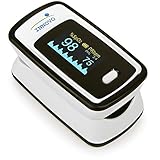
- Accurate and Reliable - The Innovo iP900AP Finger Pulse Oximeter is a premium model with an improved LED and sensor, allowing SpO2 and pulse rate measurement even at low blood perfusion. Consistently beat other pulse oximeters in clinical studies
- Plethymosgraph and Perfusion Index - Ensure accurate SpO2 and Pulse Rate readings. Eliminate doubts about reliability or reading issues.
- Upgraded Hardware and Software - Enhanced performance with internal upgrades. iP900AP model includes auditory alarm, pulse detection beeps, and adjustable display brightness.
- Sports Enthusiasts, Aviation or Home Use - Ideal for climbers, skiers, bikers, aviators, and on-the-go SpO2 and pulse rate tracking. Use pre or post-exercise. Remain still during measurement
- Ready to use out of the box - Include 2x AAA batteries and a lanyard for convenience.
Micro-movements during sleep, slight changes in strap tightness, and even sleeping position can affect signal quality. This is why Garmin typically restricts Pulse Ox to sleep or still periods, when conditions are most favorable.
In real-world use, it’s normal to see wrist-based readings vary several percentage points compared to a fingertip device, especially on single-night or on-demand checks.
What “accurate enough” actually looks like on a Garmin watch
In controlled conditions, many Garmin users see overnight averages that land within roughly 2–4 percent of a fingertip oximeter taken at rest. That margin widens with movement, poor fit, cold skin, or interrupted sleep.
More important than absolute accuracy is directional accuracy. Garmin Pulse Ox is generally reliable at showing whether your oxygen saturation is stable, gradually declining at altitude, or temporarily suppressed during illness.
If your baseline is normally around the mid-to-high 90s, a consistent drop into the low 90s across several nights is usually meaningful, even if the exact percentage differs from a medical device.
Why single readings are the least reliable comparison
A common mistake is comparing a one-off Garmin Pulse Ox reading to a fingertip oximeter taken while sitting upright and awake. These two measurements are taken under entirely different physiological and mechanical conditions.
Garmin’s strength is in multi-hour sampling and averaging during sleep. Fingertip oximeters excel at moment-in-time confirmation when you are still, warm, and well-perfused.
Comparing overnight trends from the watch to repeated fingertip checks taken under similar conditions provides a much fairer accuracy comparison than any single data point.
Altitude is where Garmin Pulse Ox earns its keep
At higher elevations, the absolute number matters less than the pattern. As oxygen availability drops, Garmin watches typically show a gradual, expected decline in overnight SpO₂ during the first days at altitude.
While the watch may not match a fingertip oximeter point-for-point, it reliably tracks acclimatization trends. Rising overnight SpO₂ over successive nights is a strong signal that your body is adapting, even if the values aren’t clinically precise.
This is one of the clearest examples of where continuous wrist-based tracking is more informative than occasional spot checks.
Why Garmin avoids presenting Pulse Ox as a performance metric
Garmin’s software design is intentionally conservative with SpO₂. The data is buried within sleep and health views rather than surfaced as a headline training number.
That reflects both the limitations of wrist-based measurement and the reality that oxygen saturation rarely fluctuates enough at sea level to guide daily training decisions. Small nightly changes are more about recovery, illness, or environment than fitness gains.
By framing Pulse Ox as background context rather than actionable performance data, Garmin avoids encouraging over-interpretation of inherently noisy measurements.
When a fingertip oximeter is the better tool
If you need to verify oxygen saturation during acute illness, evaluate symptoms like shortness of breath, or follow medical guidance, a fingertip oximeter is the appropriate choice. It provides clearer, faster, and more standardized readings.
Garmin Pulse Ox should not be used to rule out or confirm health conditions. Its role is observational, not diagnostic.
For everyday wellness, sleep insights, and altitude travel, the watch offers a level of convenience and continuity that medical-grade devices simply aren’t designed to provide.
The bottom line on trust and interpretation
Garmin Pulse Ox is best trusted as a trend sensor that works within a known margin of error. It is not broken if it disagrees with a fingertip oximeter by a few percentage points.
Consistency, fit, and long-term patterns matter far more than chasing a “perfect” SpO₂ number. Used with realistic expectations, Garmin’s approach delivers useful insight without pretending to replace clinical tools.
Common Causes of Odd or Inconsistent Pulse Ox Readings (Fit, Skin Tone, Movement, Temperature, Sleep Position)
Once you understand that Garmin Pulse Ox is designed to be a background trend sensor, the next step is knowing why the numbers can still look strange from night to night. Most “bad” SpO₂ readings aren’t signs of poor health or a faulty watch, but of challenging measurement conditions at the wrist.
Garmin’s optical sensor has to push light into living tissue, detect tiny changes in reflection, and do it while your body is moving, cooling, flexing, and pressing against a mattress. Small changes in how you wear the watch or how you sleep can have an outsized impact on the result.
Watch fit and placement matter more than most users realize
Loose fit is the most common reason for unexpectedly low or highly variable Pulse Ox readings. If the watch can slide, rotate, or lift slightly off the skin, ambient light leaks in and corrupts the signal.
For sleep tracking, Garmin generally recommends wearing the watch a bit tighter than during the day. It should be snug enough that the sensor stays flat against the skin, but not tight enough to restrict circulation or leave deep marks in the morning.
Placement also matters. Wearing the watch too close to the wrist bone reduces contact consistency, especially when your hand bends during sleep. Moving it a finger-width higher up the forearm often improves overnight SpO₂ stability.
Skin tone, tattoos, and skin characteristics
Pulse Ox relies on light absorption, and darker skin tones naturally absorb more of the green and red wavelengths used by wrist-based sensors. This can reduce signal strength and increase noise, particularly during low-perfusion states like deep sleep.
Tattoos under the sensor are a well-known challenge. Dense ink can scatter or block light, leading to dropouts or artificially low readings. If you have tattoos near the wrist, switching wrists or adjusting position slightly can sometimes help.
Very dry skin, thick hair, or lotions applied before bed can also interfere with optical contact. These factors don’t break the sensor, but they raise the likelihood of inconsistent nights.
Movement and micro-movements during sleep
Although Garmin primarily records Pulse Ox during sleep, that doesn’t mean your body is still. Tossing, turning, and even subtle muscle tension can disrupt blood flow at the wrist.
Side sleepers often see more variability because body weight compresses the arm or pushes the watch against the mattress. This can temporarily reduce perfusion or tilt the sensor just enough to degrade the signal.
This is why many users notice gaps or sudden dips during restless nights. The sensor isn’t measuring a real oxygen drop; it’s struggling to get a clean optical reading in a dynamic environment.
Cold temperature and reduced circulation
Peripheral circulation drops when you’re cold, and the wrist is one of the first places this shows up. In a cool bedroom, blood vessels near the skin constrict, making it harder for the sensor to detect oxygenated blood.
This effect is especially noticeable in winter or in air-conditioned rooms. Lower readings in these conditions are often a circulation issue, not a respiratory one.
Warming the room slightly or wearing a long-sleeve sleep top that keeps your arms warmer can improve consistency without changing anything about the watch itself.
Sleep position and pressure on the sensor
Pressure is an underrated factor in odd Pulse Ox data. Sleeping with your wrist tucked under your head, pillow, or body can compress the sensor area and distort readings.
Extended pressure can temporarily reduce blood flow, leading to falsely low values that rebound later in the night. This often appears as sharp drops followed by a return to baseline rather than a gradual trend.
Back sleepers and side sleepers with a free arm tend to get the cleanest overnight data, while stomach sleepers see the most interruptions.
Why one strange night usually means nothing
Because all of these factors can change from night to night, isolated low readings should be interpreted cautiously. A single night at 90–92 percent, especially without symptoms, is far less meaningful than a sustained multi-night pattern.
Garmin’s value comes from seeing how your own readings behave under similar conditions. When fit, temperature, and sleep habits are consistent, the data becomes more stable and easier to interpret.
Understanding these limitations helps prevent unnecessary worry and reinforces why Pulse Ox is best used as a long-term context tool rather than a nightly scorecard.
Pulse Ox and Battery Life: How Much Power It Uses and How to Balance Data vs Runtime
All of the environmental and fit-related factors that affect Pulse Ox accuracy also tie directly into power consumption. Garmin’s blood oxygen sensor is one of the most energy-hungry health features on the watch, and how often it runs can dramatically change real-world battery life.
This is why Garmin treats Pulse Ox differently from metrics like heart rate or steps. It’s not a background sensor that can run continuously without consequence.
Why Pulse Ox uses so much power
Pulse Ox relies on high-intensity red and infrared LEDs that shine light into the wrist for extended periods. Compared to green LEDs used for heart rate, these wavelengths require more power and longer sampling windows to get usable data.
The watch also needs the wrist to be still to improve signal quality. That’s why Garmin prioritizes overnight measurement, when movement is lower and the sensor doesn’t have to repeatedly restart scans that failed due to motion.
Every failed or noisy reading still costs energy. Restless sleepers, loose straps, or cold skin don’t just reduce data quality—they also increase how hard the sensor has to work.
Sleep-only vs all-day Pulse Ox: a massive battery difference
On most Garmin watches, Pulse Ox can be set to sleep-only, all-day, or completely off. The difference between these modes is not subtle.
Sleep-only Pulse Ox typically reduces battery life by around 10 to 20 percent compared to having it disabled. On a watch that normally lasts 10 days, that might mean losing one to two days of runtime.
Rank #4
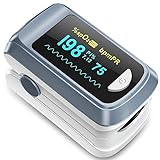
- Easy to use: this finger pulse oximeter designed with one button control which makes measurement more convenient and easier, users just need to put one of his fingers into the fingertip photoelectric sensor for measurement, then the screen will directly show the result clearly, the oxygen level monitor automatically powers off after 10 seconds of inactivity, making the experience safer and more environmentally friendly
- Accurate and reliable: our oxygen blood monitor can accurately determine your spo2 blood oxygen saturation levels in 10 seconds and oled display make this finger oxygen monitors very easy to read
- Easy to carry: this oxygen level monitor are very light and small size, convenient in carrying, also it comes with a detachable lanyard which can measure your oxygen saturation anywhere
- Two aaa batteries power supply design: 2 aaa batteries power supply also use the aaa batteries to supply power at any time anywhere
- You will get: 1 x fingertip pulse oximeter, 2 x aaa batteries, 1 x lanyard, 1 x user manual
All-day Pulse Ox can cut battery life by 30 to 50 percent or more, depending on the model. Even large, outdoor-focused watches like the Fenix or Epix feel this impact, while smaller AMOLED models can see their battery life nearly halved.
Why all-day Pulse Ox rarely makes sense
Daytime SpO₂ values are usually stable for healthy users at sea level. Once you know your baseline, continuous daytime tracking adds very little new insight.
Movement, arm swing, and changing skin conditions also make daytime readings noisier. You end up burning battery to collect lower-quality data that rarely changes your understanding of your health.
This is why Garmin itself positions all-day Pulse Ox primarily for altitude acclimation, not everyday wellness tracking.
Altitude, travel, and when Pulse Ox is worth the battery hit
Pulse Ox becomes more meaningful at elevation, especially above roughly 1,500 to 2,000 meters. Oxygen saturation often drops during the first few days at altitude, and trends matter more than individual values.
In these scenarios, enabling all-day Pulse Ox temporarily can help you see how your body is adapting. A gradual overnight recovery toward your normal baseline is often more informative than a single daytime number.
Once acclimation stabilizes or you return to lower elevation, switching back to sleep-only preserves battery without losing long-term context.
Model differences: not all Garmin watches pay the same price
Battery impact varies significantly across Garmin’s lineup. Larger watches with bigger batteries and more efficient power management handle Pulse Ox better.
A Fenix 7X Solar or Enduro can absorb sleep-only Pulse Ox with minimal lifestyle impact. A Venu or Vivoactive with a smaller battery and brighter AMOLED display will feel the drain much more quickly.
Physical size, case thickness, and even strap choice matter here. A heavier watch with a wider strap often maintains better sensor contact, reducing retries and saving a bit of power over time.
How Pulse Ox interacts with other features
Pulse Ox doesn’t operate in isolation. It competes for battery with GPS, music playback, on-device maps, Wi‑Fi sync, and bright display usage.
If you train with GPS most days or use music storage on the watch, adding all-day Pulse Ox compounds the drain. The combined effect often surprises users who assume each feature only has a small cost.
This is especially relevant for multi-day trips or races where charging opportunities are limited. Turning off Pulse Ox can add more usable time than lowering screen brightness or disabling smart notifications.
Best-practice settings for most users
For the majority of Garmin owners, sleep-only Pulse Ox is the sweet spot. It captures the most useful data, under the best conditions, with a manageable battery penalty.
Pairing sleep-only Pulse Ox with consistent wear, a snug but comfortable fit, and a warm sleeping environment improves both data quality and energy efficiency.
If battery life is a top priority, such as during travel or long outdoor adventures, disabling Pulse Ox entirely is reasonable. You’re not losing critical training or recovery metrics by doing so.
How to think about Pulse Ox as a tool, not a default setting
Pulse Ox is best treated as a situational sensor rather than a permanent background feature. Turn it on when the question you’re asking actually needs oxygen saturation data.
If you’re troubleshooting poor sleep at altitude, recovering from illness, or adjusting to a new environment, the battery trade-off makes sense. If you’re at home, healthy, and sleeping normally, the added drain often doesn’t justify the insight.
Understanding this balance helps you get the most out of your Garmin without constantly wondering why your battery isn’t lasting as long as expected.
Using Pulse Ox for Training, Recovery, and Altitude: What the Data Is Useful For—and What It Isn’t
Once you understand Pulse Ox as a situational tool rather than a background metric, its role in training and recovery becomes clearer. Garmin’s SpO₂ data is most valuable when the environment or your physiology is changing, not when everything is stable.
This is where Pulse Ox fits into a broader interpretation mindset alongside heart rate, HRV status, sleep stages, and training load. On its own, oxygen saturation rarely tells a complete story, but it can add context when something feels off.
Pulse Ox and training performance: context, not optimization
During workouts, Garmin does not use Pulse Ox data to guide intensity, pacing, or training effect. The sensor simply isn’t designed for reliable real-time readings under movement, sweat, and variable arm position.
Even when an on-demand SpO₂ reading is taken post-workout, it should not be interpreted as a performance score. A temporary dip after hard intervals or long endurance work is not uncommon and doesn’t indicate poor fitness or oxygen delivery problems.
Where Pulse Ox can help is by explaining why training feels harder than expected. If overnight SpO₂ trends are lower than your normal baseline, perceived exertion may rise even if heart rate and pace look “on plan.”
Why Garmin doesn’t use Pulse Ox for VO₂ max or training load
Garmin’s core performance metrics rely on heart rate, pace or power, and workload history. These inputs are far more stable and reproducible than wrist-based oxygen saturation.
Pulse Ox measurements vary with skin temperature, micro-movement, and sleep position, introducing noise that would degrade training models. That variability is acceptable for wellness insights, but not for performance algorithms that depend on consistency.
This is why disabling Pulse Ox does not reduce the quality of your VO₂ max estimates, race predictions, or training readiness scores. Those systems were never built around oxygen saturation data in the first place.
Using Pulse Ox during recovery and illness
Recovery is one area where Pulse Ox can provide supportive information, especially during periods of stress, illness, or poor sleep. A sustained drop in overnight SpO₂ alongside elevated resting heart rate or suppressed HRV can signal that your body is under strain.
This doesn’t mean Pulse Ox can diagnose respiratory issues or infections. It simply adds another data point that something may be affecting oxygen uptake or breathing efficiency during sleep.
Garmin users often find this most useful during colds, flu, or post-travel fatigue. Watching how quickly SpO₂ returns to your personal baseline can be reassuring during recovery, even if the absolute numbers aren’t clinically precise.
Altitude acclimatization: where Pulse Ox shines
Altitude is the clearest use case for Garmin Pulse Ox. As elevation increases, available oxygen decreases, and blood oxygen saturation naturally drops.
Garmin watches record these changes reliably during sleep, when movement is minimal and breathing patterns stabilize. Nighttime SpO₂ trends at altitude often align well with how acclimatized you feel during the day.
Rather than focusing on a single number, look for stabilization over several nights. When overnight SpO₂ stops declining and begins to plateau, it usually indicates your body is adapting, even if daytime workouts still feel harder.
Why absolute SpO₂ numbers matter less than trends
Many users fixate on whether their watch shows 96 percent or 98 percent. In practice, those differences fall well within the margin of error for wrist-based optical sensors.
What matters more is your personal baseline and how it changes. A consistent overnight range at sea level, followed by a sustained drop at altitude or during illness, is far more informative than chasing a textbook “normal” value.
This trend-based approach also helps avoid unnecessary worry. Wrist Pulse Ox is not a medical device, and single-night anomalies are often caused by movement, cold skin, or loose fit rather than true physiological changes.
What Pulse Ox cannot tell you about recovery
Pulse Ox does not measure how well your muscles are recovering, how glycogen is replenished, or whether you’re ready for a hard session. Those processes are better reflected in HRV trends, sleep quality, and subjective fatigue.
A normal SpO₂ reading does not mean you are fully recovered. Likewise, a slightly lower reading does not automatically mean you should skip training.
Think of Pulse Ox as a supporting actor. It can reinforce what other metrics are already suggesting, but it shouldn’t override them.
Sleep, breathing patterns, and overnight dips
During sleep, brief drops in SpO₂ are common, especially during REM stages or when sleeping on your back. Garmin records these fluctuations, but they are not inherently problematic.
Unless you see consistent, prolonged drops well below your normal range, occasional overnight dips should be interpreted cautiously. Strap tightness, mattress firmness, and even pillow height can influence readings.
For users monitoring suspected sleep-disordered breathing, Pulse Ox may raise awareness but cannot confirm or rule out conditions like sleep apnea. Any persistent concern should be addressed with a medical professional.
Training at home versus training in new environments
At your usual altitude and routine, Pulse Ox often adds little actionable insight. Stable oxygen saturation is the expected outcome, and deviations are rare without a clear trigger.
When you travel, change climates, or shift training environments, the metric becomes more relevant. Cold temperatures, higher elevation, and disrupted sleep all tend to show up first in overnight SpO₂ before they affect performance metrics.
This is another reason sleep-only Pulse Ox aligns well with real-world usefulness. It captures the signal when it matters most, without draining the battery during routine training days.
How to use Pulse Ox without overinterpreting it
The most effective way to use Garmin Pulse Ox is to ask a specific question. Am I adapting to altitude? Is illness affecting my sleep physiology? Did travel disrupt my recovery more than I realized?
💰 Best Value

- Easy to use: this finger pulse oximeter designed with one button control which makes measurement more convenient and easier.This Product Is for Sports or Aviation Use Only and Not for Medical Use
- Auto shutdown: the item automatically powers off after 10 seconds of inactivity
- Fast and Easy: This item provides readings in just 10 seconds, with an OLED display that makes results simple to read
- 2 aaa batteries power supply design: 2 aaa batteries power supply, you can also use the batteries to supply power at any time anywhere, which is convenient and fast.
- This item are very light and small size, low power consumption and convenient in carrying, also it comes with a detachable lanyard
If the data helps answer that question over several nights, it’s doing its job. If you find yourself checking single readings during the day or worrying about small fluctuations, the feature is likely adding noise rather than clarity.
Used sparingly and interpreted alongside other metrics, Pulse Ox can add meaningful context. Used constantly and in isolation, it often creates confusion that the data was never meant to resolve.
Pulse Ox in Garmin Connect: How to View Trends, Nightly Averages, and Long-Term Insights
Once you stop chasing single readings, Garmin Connect becomes the place where Pulse Ox actually makes sense. The app is designed to smooth noisy data into patterns, which is exactly how this sensor should be used.
Instead of treating SpO₂ like heart rate or pace, Garmin presents it as a background physiological signal. Understanding where to look and what each view represents is the difference between useful context and unnecessary worry.
Where Pulse Ox lives in Garmin Connect
In the Garmin Connect mobile app, Pulse Ox appears as its own card under Health Stats. On newer versions, it’s also accessible through the Health Snapshot hub and via device-specific health dashboards.
Tapping into Pulse Ox opens a day-by-day view rather than a live feed. That design choice is intentional and reflects how Garmin expects the data to be interpreted.
On compatible watches, you may also see Pulse Ox listed in the device settings and sensors menu. Those settings control when measurements are taken, but the actual analysis happens in Garmin Connect.
Understanding nightly averages versus raw fluctuations
Garmin emphasizes nightly average SpO₂ rather than showing you every second of data. This average represents multiple readings taken during sleep, filtered to remove obvious motion artifacts.
Below the average, you’ll often see a graph showing variability throughout the night. Short dips are common and expected, especially during REM sleep or position changes.
The key is consistency across nights. A stable average that stays within your normal range matters far more than a brief drop at 3 a.m.
How to read daily and weekly trend views
Switching from the daily view to 7-day or 4-week trends reveals the real value of Pulse Ox. These timelines help you see whether changes persist or resolve on their own.
Gradual shifts downward over several nights are more meaningful than any single data point. This is especially relevant after travel, illness, or altitude exposure.
If your weekly trend stabilizes again without intervention, that’s usually a sign your body has adapted. Garmin’s presentation subtly encourages patience rather than reaction.
Long-term insights and altitude adaptation
Over months, Pulse Ox can act as a quiet indicator of how your body responds to environmental stress. Users who live or train at elevation often notice a lower baseline that rebounds when returning to sea level.
Garmin does not explicitly label this as acclimatization, but the pattern is easy to spot when viewed alongside training load and sleep quality. A temporary dip followed by recovery is the expected trajectory.
This long-term view is also where Pulse Ox pairs best with the acclimation and altitude widgets found on higher-end outdoor watches. Together, they provide context without overpromising precision.
Connecting Pulse Ox with sleep and recovery data
Pulse Ox data is most informative when viewed alongside sleep stages, respiration rate, and overnight heart rate. Garmin Connect allows you to swipe between these metrics within the same night.
If SpO₂ drops coincide with poor sleep scores, elevated respiration, or increased restlessness, the picture becomes clearer. If everything else looks normal, the oxygen data alone is rarely cause for concern.
This cross-referencing is why sleep-only Pulse Ox works so well. It anchors oxygen data to a controlled, low-motion window.
What Garmin does not show—and why that matters
Garmin intentionally avoids presenting Pulse Ox as a real-time or alert-driven metric. There are no alarms for low SpO₂, and daytime readings are limited or disabled by default.
This reduces false positives and helps preserve battery life, especially on watches designed for multi-day use. Continuous Pulse Ox tracking can dramatically shorten runtime, particularly on AMOLED models.
The absence of aggressive alerts is a reminder that this is a wellness and adaptation tool, not a diagnostic one.
Making Pulse Ox useful without micromanaging it
The most productive way to use Pulse Ox in Garmin Connect is to check it periodically, not daily. Weekly or monthly reviews provide enough resolution to spot meaningful changes.
If you’re traveling, training at altitude, or recovering from illness, Pulse Ox trends can validate how you feel subjectively. When you feel fine and the trend is stable, there’s nothing to fix.
Garmin’s interface quietly nudges users toward this mindset. The data is there when you need it, and easy to ignore when you don’t.
Who Should Enable Garmin Pulse Ox—and Who Can Safely Ignore It
Seen in the context of long-term trends and paired with sleep and recovery metrics, Pulse Ox becomes a situational tool rather than a constant companion. That distinction matters, because not every Garmin user benefits equally from having it switched on.
The decision to enable Pulse Ox is less about curiosity and more about whether oxygen saturation adds meaningful context to how you train, sleep, or travel. For some users, it’s quietly valuable; for others, it’s noise that costs battery life.
Users who benefit most from enabling Pulse Ox
Pulse Ox makes the most sense for users whose environment or physiology routinely challenges oxygen availability. If that describes you, overnight SpO₂ trends can explain changes that heart rate or sleep stages alone cannot.
Altitude travelers and mountain athletes
If you live at sea level and periodically travel to higher elevations, Pulse Ox can be genuinely informative during the first few nights. Drops into the high 80s or low 90s are common while acclimating and usually normalize as sleep quality improves.
For climbers, hikers, and skiers using Fenix, Enduro, or Epix models, Pulse Ox pairs well with Garmin’s acclimation and altitude widgets. The value isn’t in the exact number but in watching stabilization over several nights.
Endurance athletes during heavy training blocks
During periods of high volume or intensity, a gradual downward drift in overnight SpO₂ can sometimes mirror accumulated fatigue, poor sleep, or insufficient recovery. When seen alongside elevated resting heart rate or declining HRV, it adds another layer of confirmation.
This is especially relevant for runners and cyclists training in variable terrain or heat, where breathing efficiency and sleep quality are already under strain.
Users monitoring sleep-disordered breathing trends
Garmin is not diagnosing sleep apnea, but repeated overnight oxygen dips combined with elevated respiration rates and restless sleep can flag patterns worth paying attention to. For users already aware of breathing issues, Pulse Ox offers a rough trend line rather than a medical verdict.
In these cases, sleep-only Pulse Ox is the least intrusive and most interpretable configuration.
Users recovering from illness or respiratory stress
After respiratory infections or extended illness, short-term SpO₂ trends can help validate whether recovery is progressing normally. Gradual normalization over nights tends to match subjective improvements in energy and sleep depth.
Again, the direction of change matters more than the absolute number on any single night.
Who can safely ignore Pulse Ox without missing much
For many Garmin owners, leaving Pulse Ox disabled has little downside. If your training, sleep, and recovery metrics already make sense without it, SpO₂ may not add actionable insight.
Most low-altitude, healthy daily users
If you live and train at low elevation, sleep well, and see stable heart rate and HRV trends, Pulse Ox rarely changes decisions. Minor night-to-night fluctuations are common and usually reflect sensor noise rather than physiology.
In these cases, Pulse Ox can create unnecessary second-guessing without improving outcomes.
Battery-conscious users and long-adventure athletes
Pulse Ox is one of the most power-hungry sensors on a Garmin watch. Continuous or all-day tracking can significantly shorten battery life, particularly on AMOLED models like Venu or Epix.
For users who prioritize multi-day GPS activities, expeditions, or infrequent charging, disabling Pulse Ox helps preserve the core strengths of Garmin hardware: endurance and reliability.
Data-sensitive or anxiety-prone users
Because wrist-based pulse oximetry is sensitive to motion, temperature, skin tone, and fit, occasional low readings are inevitable. For users who find themselves reacting emotionally to single data points, Pulse Ox can do more harm than good.
Garmin’s lack of alerts is intentional, but the numbers still exist. If they cause stress rather than insight, it’s reasonable to opt out.
How to choose the right Pulse Ox setting
For most people who do enable Pulse Ox, sleep-only tracking strikes the best balance. It captures data during low motion, aligns with recovery metrics, and minimizes battery drain.
All-day tracking is best reserved for specific scenarios like high-altitude travel or short-term observation periods. It’s not designed for permanent use.
The practical takeaway
Pulse Ox is neither essential nor useless; it’s selective. When your environment, training load, or health context affects oxygen availability, it provides helpful background information.
When those factors are stable, ignoring Pulse Ox doesn’t make your Garmin any less capable. Used intentionally and sparingly, it supports better understanding without demanding constant attention—which is exactly how Garmin designed it to work.