Garmin doesn’t use the term “upcoming race” casually. When you add a race inside Garmin Connect, you’re not just pinning a date on a calendar—you’re activating a specific training state that tells your watch what you’re preparing for, when it’s happening, and how important it is compared to everything else you’re doing.
For runners coming from basic activity tracking, this can feel like a small administrative step. In practice, it’s the switch that turns your Garmin from a passive recorder into an adaptive training coach that understands deadlines, tapering, and race-day execution.
Before you add your first race, it helps to understand exactly what Garmin considers an “upcoming race,” what data it uses, and whether your specific watch model can fully take advantage of it.
What counts as an “upcoming race” in Garmin’s ecosystem
In Garmin Connect, an upcoming race is a scheduled endurance event with a fixed date, a defined distance, and an associated sport type. Most commonly this is a running race like a 5K, 10K, half marathon, or marathon, but it can also include trail races and triathlons on supported devices.
🏆 #1 Best Overall

- Easy-to-use running smartwatch with built-in GPS for pace/distance and wrist-based heart rate; brilliant AMOLED touchscreen display with traditional button controls; lightweight design in 43 mm size
- Up to 11 days of battery life in smartwatch mode and up to 19 hours in GPS mode
- Reach your goals with personalized daily suggested workouts that adapt based on performance and recovery; use Garmin Coach and race adaptive training plans to get workout suggestions for specific events
- 25+ built-in activity profiles include running, cycling, HIIT, strength and more
- As soon as you wake up, get your morning report with an overview of your sleep, recovery and training outlook alongside weather and HRV status (data presented is intended to be a close estimation of metrics tracked)
When you add a race, Garmin links it to your training calendar rather than treating it like a note or reminder. That race date becomes a reference point that influences suggested workouts, training load targets, recovery recommendations, and taper timing.
Crucially, Garmin treats the race as the peak of a training cycle. Everything leading up to it—long runs, intensity sessions, rest days—is evaluated in terms of whether it’s helping or hurting your readiness for that specific event.
What information Garmin actually uses from your race entry
At minimum, Garmin uses three pieces of information: the race date, the distance, and the primary sport. From that alone, it can already adjust Daily Suggested Workouts to shift emphasis from base-building to race-specific intensity as the event approaches.
If your watch supports advanced training metrics, the race also influences VO2 max projections, predicted race times, and training status labels like “Productive,” “Peaking,” or “Overreaching.” As you get closer, Garmin will typically reduce volume while preserving intensity, creating a built-in taper without you having to manually plan it.
On higher-end models, the race can also tie into Race Day features such as pacing strategies, finish-time estimates, and course-based execution if you load a course file. This is where the feature goes from helpful to genuinely strategic.
Which Garmin watches support upcoming races—and at what level
Not every Garmin watch handles upcoming races the same way. Entry-level and older models may let you add a race to your calendar, but they won’t necessarily adjust training or surface race-specific insights on the watch itself.
Watches like the Forerunner 55 and Venu Sq support basic race visibility and calendar integration. You’ll see the race date in Garmin Connect, but the adaptive training impact is limited, and most coaching still happens manually or through simple plans.
Mid-range models such as the Forerunner 255, Forerunner 265, and Venu 3 unlock Daily Suggested Workouts that actively reference your upcoming race. These watches balance battery life, lightweight comfort, and solid GPS accuracy, making them ideal for runners who want guidance without a bulky device.
Full race integration on performance-focused Garmin watches
The most complete experience lives on watches like the Forerunner 955, Forerunner 965, Fenix 7 series, Enduro, and Epix (Gen 2). These devices combine upcoming race data with Training Readiness, HRV status, advanced recovery tracking, and multi-band GPS for precise pacing.
On these watches, adding a race directly influences how your watch interprets fatigue, sleep, and training load. You’ll see clearer cues about when to push, when to back off, and when you’re entering an optimal taper window.
They also offer the battery life and durability needed for marathon training blocks and long race days, with AMOLED or memory-in-pixel displays that remain readable at pace. The result is a watch that doesn’t just know you’re racing—it actively helps you arrive at the start line prepared rather than guessing.
Why support matters more than the race entry itself
If your watch doesn’t support adaptive training features, adding an upcoming race still has value as a planning tool. But the real payoff comes when the device can respond to that race in real time, adjusting workouts based on how you’re actually recovering and performing.
This is why two runners can add the same race in Garmin Connect and have very different experiences depending on their watch. One sees a date on a calendar; the other gets a dynamically evolving training plan built around that goal.
Understanding where your watch sits on that spectrum sets realistic expectations—and makes the next step, actually adding your race in Garmin Connect, far more meaningful.
Before You Start: Requirements, Compatibility, and Data That Makes This Feature Work
Before you add a race and expect your Garmin to reshape your training around it, it’s worth understanding what this feature depends on. The upcoming race entry is simple on the surface, but the real intelligence comes from the data ecosystem behind it. Think of this section as a quick systems check that ensures your watch can actually deliver the adaptive guidance described earlier.
A Garmin account and Garmin Connect setup
Everything starts with Garmin Connect, not the watch itself. You need an active Garmin account and a watch that regularly syncs with the Garmin Connect mobile app or desktop web platform. If your watch data isn’t syncing daily, the race feature won’t have enough context to work properly.
Make sure Garmin Connect is fully updated on your phone and that your watch firmware is current. Garmin often refines race-aware training logic through software updates, and older firmware can limit how much your device responds to an added race.
Compatible watches and what “compatibility” really means
Most modern Garmin watches allow you to add an upcoming race to your calendar, but compatibility isn’t binary. Entry-level devices may only store the event date and distance, acting more like a reminder than a coach.
Watches that support Daily Suggested Workouts tied to races, Training Readiness, and adaptive load management are where this feature truly comes alive. Models like the Forerunner 255/265, Venu 3, Forerunner 955/965, Fenix 7 series, Epix (Gen 2), and Enduro can actively modify training suggestions based on your race goal, not just display it.
Physical design matters here too. Lightweight polymer cases and breathable silicone straps on Forerunner models make daily wear more comfortable during high-mileage blocks, while Fenix and Epix models trade a bit of weight for titanium or steel bezels, sapphire glass options, and added durability for long-term training and racing.
Activity profiles that match your race
Garmin’s race integration works best when your primary activity profile matches the event you’re training for. A road 10K or marathon should be paired with Run activities, while triathlons require consistent use of Triathlon or Multisport profiles.
If your training is logged under mismatched profiles, the watch can’t accurately interpret pace, load focus, or recovery demands. This is especially important for athletes who cross-train heavily, since Garmin weighs sport-specific stress differently when shaping race-focused suggestions.
The data streams that power race-aware training
Adding a race only becomes meaningful once Garmin has enough historical and real-time data to work with. At minimum, this includes recent training volume, intensity distribution, and GPS-based pace data.
On supported watches, heart rate variability measured during sleep plays a major role. HRV status helps the system decide whether to push intensity, maintain steady volume, or back off when fatigue accumulates. Sleep duration and quality also feed directly into Training Readiness, influencing how aggressively your watch prepares you for race day.
More advanced devices layer in metrics like acute and chronic training load, load ratio, VO2 max trends, heat and altitude acclimation, and recovery time. These inputs allow Garmin to adjust workouts day by day instead of locking you into a static plan.
Why consistent wear matters more than perfect workouts
Garmin’s race logic rewards consistency over perfection. Wearing your watch all day, especially overnight, improves the accuracy of recovery, readiness, and fatigue modeling far more than nailing every interval session.
Comfort and fit matter here. A watch that’s too heavy, too loose, or uncomfortable at night reduces data quality. This is why many runners prefer slimmer cases, softer straps, and watches with reliable wrist-based heart rate for 24/7 wear during a training cycle.
Battery life and GPS settings can influence results
Race-focused training assumes your watch can handle frequent GPS workouts without forcing compromises. If battery anxiety leads you to skip recording runs or switch to less accurate GPS modes, Garmin loses visibility into your actual workload.
Watches with multi-band GPS and strong battery life, such as the Forerunner 955/965 or Fenix and Epix lines, maintain pace accuracy even in urban or tree-covered routes. That accuracy matters when Garmin predicts race pace, taper timing, and confidence levels heading into your event.
What this feature does not replace
Even with all requirements met, adding a race doesn’t magically override poor training habits. Garmin responds to the data you give it, not the goal you wish you were ready for.
If mileage is inconsistent, recovery is ignored, or workouts are frequently skipped, the watch will adjust expectations downward. That feedback is part of the value. The race feature works best when treated as a dialogue between you and the device, grounded in honest training data.
Once these pieces are in place, adding your upcoming race becomes more than a calendar entry. It becomes a reference point that your Garmin uses to interpret every run, every night of sleep, and every recovery day leading up to the start line.
Step-by-Step: How to Add an Upcoming Race in Garmin Connect (Mobile and Desktop)
With your watch collecting consistent training, recovery, and sleep data, Garmin is finally ready for a specific target. Adding an upcoming race is the moment where your general fitness tracking becomes race-aware, allowing the platform to align daily decisions with a fixed end date.
The process is simple, but a few choices along the way directly affect how accurate your predictions, taper, and confidence metrics will be. Here’s how to do it correctly on both mobile and desktop.
Adding a Race in Garmin Connect Mobile (iOS and Android)
Most runners will add races from the Garmin Connect app, and the mobile workflow is where Garmin has put its newest training logic.
Open the Garmin Connect app and tap the More tab in the bottom-right corner. From there, select Training & Planning, then choose Races & Events.
If this is your first race, tap Add Race. Otherwise, you’ll see a list of upcoming and past events, with the option to add another.
Garmin will ask you to choose an event type. This step matters more than it looks. Select the closest match to your actual race, such as 5K, 10K, half marathon, marathon, triathlon, or cycling event. The chosen distance determines how Garmin models pacing, fatigue accumulation, and taper length.
Next, enter the race date. Garmin uses this as a hard deadline, so double-check the calendar selection. Being even one week off can change taper timing and confidence trends.
You’ll then be prompted to set a target time or pace. If you’re unsure, choose a realistic goal based on recent performances rather than a dream outcome. Garmin adjusts training intensity based on this number, and an overly aggressive target can skew daily workout recommendations.
After saving the race, it appears immediately in your training calendar. Within a few hours—sometimes sooner—you may notice subtle changes in suggested workouts, confidence indicators, and race prediction charts.
Adding a Race in Garmin Connect on Desktop
The desktop version of Garmin Connect offers the same functionality with a broader calendar view, which some athletes prefer when planning an entire season.
Log in at connect.garmin.com and select Training from the left-hand menu. Choose Races & Events to open your race dashboard.
Rank #2
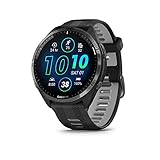
- Brilliant AMOLED touchscreen display with traditional button controls and lightweight titanium bezel
- Battery life: up to 23 days of battery life in smartwatch mode, up to 31 hours in GPS mode
- Confidently run any route using full-color, built-in maps and multi-band GPS
- Training readiness score is based on sleep quality, recovery, training load and HRV status to determine if you’re primed to go hard and reap the rewards (data presented is intended to be a close estimation of metrics tracked)
- Plan race strategy with personalized daily suggested workouts based on the race and course that you input into the Garmin Connect app and then view the race widget on your watch; daily suggested workouts adapt after every run to match performance and recovery
Click Add Race and select your event type from the list. As on mobile, this choice drives how Garmin structures intensity and taper logic, so accuracy matters.
Enter your race date and target time or pace, then save the event. The race syncs automatically across your account and appears in both desktop and mobile calendars, as well as on compatible watches after your next sync.
Desktop users often notice race-related changes most clearly in the Training Status, Race Predictor, and calendar views, where taper weeks and reduced load become visually obvious as race day approaches.
Confirming the Race Has Synced to Your Watch
Adding the race in Garmin Connect is only part of the process. Your watch needs to receive that information to activate race-aware features.
Sync your watch using the Garmin Connect app or Garmin Express. On most modern Forerunner, Fenix, Epix, and Enduro models, the race will appear automatically without additional setup.
On the watch, navigate to Training Status or Race Widget, depending on your model. You should see the race name, date, and countdown in days. Some watches also display race-focused confidence metrics or predicted finish times tied specifically to that event.
If you don’t see the race, confirm that your watch firmware is up to date and that you’re signed into the same Garmin account used to add the event.
Choosing the Right Target Time: Conservative vs. Ambitious
Garmin treats your target time as an intent signal, not a promise. Still, it strongly influences how workouts are weighted.
A conservative goal tends to stabilize training suggestions, improve confidence scores, and produce a smoother taper. This approach works well for first-time racers or athletes returning from injury.
An ambitious but realistic goal increases intensity earlier in the cycle and often leads to sharper workouts. However, if recovery metrics consistently trend negative, Garmin may reduce confidence and adjust training downward as race day approaches.
What matters most is honesty. Garmin’s strength lies in adapting to reality, not reinforcing optimism.
What Changes After the Race Is Added
Once the race is in place, Garmin begins framing your data around that endpoint. Daily Suggested Workouts subtly shift to emphasize race-specific energy systems rather than general fitness.
Training Load and Load Focus start reflecting whether your current mix of easy, tempo, and high-intensity work aligns with the demands of your chosen distance. As the race approaches, Garmin gradually reduces volume while preserving intensity, creating an automated taper.
Race Predictor and confidence metrics become more responsive, updating as new workouts and recovery data come in. These tools are most accurate when GPS pace data is reliable and heart rate tracking is consistent, which is why watches with stable fit, comfortable straps, and strong battery life perform better in real-world training.
Editing or Removing a Race
Plans change, and Garmin allows flexibility without penalty.
To edit a race, return to the Races & Events section in Garmin Connect, select the event, and adjust the date or target time. Garmin recalculates training priorities almost immediately.
To remove a race entirely, delete it from the same menu. Training suggestions will gradually return to general fitness mode, typically within a few days of normal activity data.
This ability to adapt is part of the system’s strength. Adding a race isn’t a commitment to perfection—it’s a way to give your watch context so it can guide you more intelligently through the training you’re already doing.
Choosing the Right Race Details: Distance, Date, Target Time, and Course Profile
Once you decide to add a race, the quality of Garmin’s guidance depends almost entirely on the details you enter. Think of this step as setting the rules of the game for your watch.
Garmin isn’t just logging an event on your calendar. It’s using these inputs to shape workout intensity, recovery expectations, taper timing, and even how confident it feels about your readiness.
Selecting the Correct Distance
Distance is the single most influential variable in Garmin’s training logic. A 5K, 10K, half marathon, marathon, or triathlon all demand different energy systems, and Garmin adjusts your training load distribution accordingly.
Shorter races bias the system toward higher-intensity work like VO2 max intervals and threshold runs. Longer races push Garmin to prioritize aerobic base, fatigue resistance, and longer steady-state efforts.
Be precise here. If your event is a 10-mile race, don’t default to a half marathon just because it’s close. Garmin treats each distance as a distinct physiological problem to solve.
Choosing the Exact Race Date
The race date anchors everything. It determines how long your build phase lasts, when intensity ramps up, and when tapering begins.
Set the actual race day, not the weekend or a rough estimate. Even being off by a week can shift the taper too early or too late, which affects freshness and confidence heading into race day.
If you’re unsure between two dates, pick the one you’re most likely to commit to. You can always edit it later, and Garmin will re-balance your training within a few sync cycles.
Setting a Realistic Target Time
Target time is where many runners accidentally undermine the system. Garmin uses this number to judge whether your current fitness trajectory is on track, aggressive, or unsustainable.
For beginners, this can simply be a “finish strong” time based on recent training runs or a previous race. You’re not locking yourself into a prediction; you’re giving Garmin a reference point.
Experienced runners should resist the urge to input a stretch goal unless it’s supported by recent data. If the target is too ambitious, Garmin may prescribe harder workouts early, then scale back later if recovery metrics deteriorate.
Understanding How Garmin Uses Your Target Time
Garmin compares your target time against VO2 max estimates, recent pace trends, and heart rate response. This is why consistent GPS accuracy and reliable heart rate data matter so much.
Watches with secure wrist fit, breathable straps, and stable sensors deliver cleaner data, which makes these predictions more meaningful. A loose fit or erratic heart rate tracking can skew confidence scores and suggested paces.
If Garmin repeatedly flags your target as unlikely, take it as feedback, not failure. Adjusting the time slightly can restore alignment and produce more productive workouts.
Adding a Course Profile or Elevation Context
Garmin doesn’t require a course profile, but adding one can significantly improve specificity, especially for hilly or trail races. When available, linking or creating a course with elevation data gives Garmin insight into terrain demands.
Hilly courses often trigger more hill repeats, strength-oriented runs, and conservative pacing guidance. Flat courses usually emphasize steady pacing and sustained efforts at race pace.
If your race isn’t in Garmin’s event database, you can still create a custom course in Garmin Connect using the Courses tool. Even a rough elevation profile is better than none.
Why Course Details Matter More Than You Think
Elevation changes affect pacing, muscular fatigue, and recovery needs. Garmin’s algorithms account for this when estimating training stress and race readiness.
This is especially noticeable during the taper. For demanding courses, Garmin tends to preserve intensity while trimming volume more carefully to avoid residual fatigue.
Trail runners and triathletes benefit the most here, but even road runners on rolling courses will see more relevant training suggestions when elevation is accounted for.
When Simplicity Is the Better Choice
Not every runner needs to dial in every detail. If you’re training for your first 5K or returning from time off, distance and date alone can be enough to unlock meaningful guidance.
Garmin’s system is adaptive. It refines recommendations as your fitness evolves, even if your initial inputs were conservative.
The key is accuracy, not complexity. The cleaner and more honest your race details are, the more useful every training insight becomes from that point forward.
What Changes After You Add a Race: Training Status, Load Focus, and Race Countdown
Once your race is saved, Garmin stops treating your training as open-ended. From this point forward, nearly every headline metric in Garmin Connect begins orienting itself around a fixed endpoint, which is exactly how effective race preparation should work.
You’re no longer just accumulating fitness. You’re building toward a specific performance on a specific day, and Garmin’s software finally knows where the finish line is.
Rank #3

- Our brightest AMOLED touchscreen display with button controls and an aluminum bezel in 42 mm size to fit smaller wrists
- Up to 10 days of battery life in smartwatch mode and up to 18 hours in GPS mode for a more complete picture of your training and recovery
- Train for an event, achieve a milestone, or improve your fitness with Garmin Coach training plans; these running and triathlon plans are personalized to you and adapt based on your performance and recovery
- Training readiness score is based on sleep quality, recovery, training load and HRV status to determine if you’re primed to go hard and get the most out of your workout (data presented is intended to be a close estimation of metrics tracked)
- Built-in microphone and speaker let you make and take phone calls from your wrist when your watch is paired to your smartphone — and you can even use your smartphone’s voice assistant to respond to text messages and more
Training Status Shifts From Generic to Race-Aware
Before adding a race, Training Status looks backward. It evaluates recent VO2 max trends, load, and recovery to label your fitness as Maintaining, Productive, Overreaching, or Detraining.
After a race is added, that same status becomes more forward-looking. Garmin weighs not just whether your fitness is improving, but whether it’s improving at the right rate for the time you have left.
This is why some runners see a sudden change in status after adding a race. A plan that was “Productive” without a deadline may flip to “Peaking” or even “Maintaining” once Garmin realizes you’re already close to race fitness.
That’s not a downgrade. It’s the system telling you there’s less room for aggressive gains without compromising freshness on race day.
Load Focus Becomes Intentional, Not Just Balanced
Load Focus is one of the clearest areas where adding a race changes behavior. Without a race, Garmin simply tries to keep your load spread across low aerobic, high aerobic, and anaerobic work.
With a race on the calendar, that balance becomes purposeful. A marathon build will bias high aerobic work and longer steady efforts, while a 5K or 10K build will tolerate more high-intensity sessions earlier in the cycle.
You’ll often notice this first in Daily Suggested Workouts. Easy runs stay easy, but quality days become more race-specific in duration, pacing, and recovery structure.
This also explains why Garmin sometimes reduces anaerobic work late in a build, even if your Load Focus panel shows it drifting “low.” That’s taper logic, not neglect.
Daily Suggested Workouts Start Speaking the Language of Your Race
Once a race is added, suggested workouts stop feeling generic. Paces, intervals, and long-run lengths are increasingly framed around what you’ll need on race day.
For example, marathon runners often see long runs capped slightly earlier than expected as the race approaches. That’s Garmin prioritizing freshness over one more big mileage day.
Shorter race builds show the opposite pattern. Intervals tighten, recovery shortens, and threshold work becomes more prominent as the system sharpens speed without overloading volume.
If you train by heart rate or power, this specificity becomes even clearer. Target zones reflect race demands rather than broad fitness development.
Training Load and Recovery Start Respecting the Finish Line
Adding a race also changes how Garmin interprets fatigue. Training Load doesn’t just look at whether you’re within your optimal range, but whether that load is sustainable given how close you are to race day.
This is why hard sessions late in a build often trigger longer recovery times than the same workout earlier in the season. Garmin is protecting readiness, not just managing stress.
For runners using watches with newer heart rate sensors and solid wrist fit, these recovery recommendations tend to feel uncannily accurate. Poor sensor contact or erratic heart rate data can still throw things off, which is why fit and strap tension matter more than most people realize.
The Race Countdown Quietly Reframes Your Entire Dashboard
Once a race is added, Garmin Connect starts displaying a race countdown across multiple screens. It’s subtle, but it changes how you interpret everything else.
A hard workout three weeks out feels different than the same workout three days out, and the countdown reinforces that context every time you check your stats.
This is especially useful for athletes juggling work, family, and inconsistent training windows. Seeing the remaining time forces more intentional decisions about when to push and when to protect recovery.
On many watches, the race widget or glance makes this even more tangible, turning your event into something you carry on your wrist every day.
Race Readiness and Confidence Scores Gain Real Meaning
If your watch supports Race Readiness or confidence metrics tied to a specific event, adding a race is what activates their full value. These scores stop being abstract indicators and start answering a simple question: are you on track for this race?
Fluctuations become easier to interpret. A dip after a hard week makes sense, and a rebound during taper feels earned rather than mysterious.
Over time, this also helps you learn your own patterns. Many experienced runners discover that their best races happen when confidence isn’t at 100 percent, but stable and trending upward.
Why This Matters More Than Any Single Workout
The biggest change after adding a race isn’t one metric or feature. It’s alignment.
Training Status, Load Focus, suggested workouts, recovery, and readiness all start working toward the same outcome instead of operating as separate feedback tools.
That cohesion is what turns Garmin from a passive tracker into an active training partner. You still make the decisions, but now every recommendation understands exactly what you’re preparing for and when it needs to happen.
How Garmin Uses Your Race to Adapt Training Plans and Daily Suggested Workouts
Once a race is on your calendar, Garmin stops treating your training like an open-ended fitness project. Everything from workout intensity to recovery timing starts pointing toward a specific date and distance.
This is where the ecosystem quietly shifts from tracking what you did to shaping what you should do next.
Your Race Becomes the Anchor for Garmin’s Training Logic
Adding a race gives Garmin Connect a fixed endpoint, which is critical for how its algorithms work. Without a race, training suggestions aim to maintain or gradually improve general fitness.
With a race added, your watch understands exactly how much time it has to build fitness, sharpen speed, and then back off at the right moment. That timeline influences how aggressive or conservative each week becomes.
The closer you get to race day, the more Garmin prioritizes specificity over volume.
Daily Suggested Workouts Shift From Generic to Purpose-Driven
Daily Suggested Workouts are where most runners feel the impact first. When a race is added, these sessions stop rotating randomly between base, tempo, and VO2 max efforts.
Instead, Garmin begins structuring workouts around what your race demands. A 5K race leads to more short intervals and threshold work, while a marathon shifts the balance toward longer steady efforts and controlled progression runs.
Even easy days become intentional, placed to absorb harder sessions rather than just fill space on the calendar.
Pace, Power, and Heart Rate Targets Get Smarter
Once a race distance and goal are defined, Garmin recalibrates workout targets. Suggested paces are no longer based only on recent performance, but on what you need to sustain on race day.
For watches that support running power, workouts may emphasize power ranges that align with race effort rather than raw speed. Heart rate targets also tighten, especially as you move closer to taper.
This is why adding a realistic goal time matters. An overly ambitious target can push suggested workouts into unsustainable zones, while a conservative one may leave fitness untapped.
Garmin Training Plans Automatically Respect Your Race Date
If you’re following a Garmin Coach plan or a self-guided training plan, the race date becomes non-negotiable. Long runs, key workouts, and recovery weeks are reshuffled to fit the countdown.
Miss a session or shift workouts due to travel or fatigue, and the plan adapts around the race rather than forcing you to “catch up.” That flexibility is especially valuable for runners balancing training with real life.
Plans also adjust taper length automatically, removing the guesswork that often leads athletes to train too hard too close to race day.
Tapering Happens Whether You Think You Need It or Not
One of the biggest advantages of adding a race is that Garmin enforces a taper. As race day approaches, total load drops even if you feel capable of doing more.
Intensity stays present, but volume comes down. Shorter workouts with race-pace elements replace long or draining sessions.
This protects freshness and reduces the risk of arriving at the start line fit but flat, which is a common mistake among motivated runners training without a structured endpoint.
Training Load and Recovery Are Judged Against Race Proximity
After adding a race, Training Load no longer exists in isolation. Garmin evaluates whether your recent load supports peak performance at the right time.
Rank #4

- Easy-to-use running watch monitors heart rate (this is not a medical device) at the wrist and uses GPS to track how far, how fast and where you’ve run.Special Feature:Bluetooth.
- Battery life: up to 2 weeks in smartwatch mode; up to 20 hours in GPS mode
- Plan your race day strategy with the PacePro feature (not compatible with on-device courses), which offers GPS-based pace guidance for a selected course or distance
- Run your best with helpful training tools, including race time predictions and finish time estimates
- Track all the ways you move with built-in activity profiles for running, cycling, track run, virtual run, pool swim, Pilates, HIIT, breathwork and more
A heavy week far from race day may still earn a productive status. The same load two weeks out might trigger warnings or easier suggestions.
Recovery time, sleep quality, and stress readings are all interpreted through the lens of how close you are to your event, not just how hard yesterday’s workout was.
Multiple Races and Priority Events Change the Equation
Garmin allows you to add more than one race, but only one can be marked as your primary event. That distinction matters.
Daily Suggested Workouts and taper behavior are driven by the primary race. Secondary races are treated more like supported efforts or hard training days.
This setup works well for runners doing tune-up races before a big goal event, as the watch won’t sacrifice long-term preparation for a short-term result.
What This Looks Like on the Watch, Not Just in the App
On compatible watches, these changes show up directly on the device. Suggested workouts reference race-specific pacing, and countdown widgets reinforce urgency without being distracting.
Battery life and comfort also matter here. Wearing your watch consistently, especially during sleep, gives Garmin the data it needs to make accurate adjustments.
A loose strap, skipped nights, or inconsistent usage can blunt the effectiveness of these adaptive features, especially during high-stakes race preparation.
Why This System Works Best When You Trust It—but Verify It
Garmin’s race-based adaptations are powerful, but they aren’t magic. They work best when you respond honestly to fatigue, adjust goal times if needed, and keep your data clean.
Used correctly, adding a race turns Daily Suggested Workouts and training plans into a cohesive progression rather than a collection of well-meaning suggestions.
It doesn’t remove your role as an athlete. It simply ensures every recommendation understands exactly what you’re training for and when it matters most.
Race-Day Benefits on the Watch: Pace Guidance, Race Widgets, and Performance Confidence
By the time race morning arrives, the real payoff of adding your event becomes visible on the watch itself. Everything you’ve done in Garmin Connect—goal time, course, priority designation—now translates into real-time guidance you can actually use while running.
Instead of guessing or second-guessing, your watch becomes a calm, data-driven companion that helps you execute the plan you’ve been training for.
Race-Specific Pace Guidance That Adapts as You Run
On compatible Garmin watches, adding a race unlocks race-aware pacing tools that go far beyond a simple average pace field. Features like PacePro create a structured pacing plan based on your goal time, course profile, and distance, then guide you mile by mile or kilometer by kilometer.
If your race includes elevation changes, the watch adjusts target pace dynamically, encouraging restraint on climbs and controlled speed on descents. This is especially valuable in half marathons and marathons, where even pacing errors early on can derail the final third of the race.
The guidance shows up directly on the watch face during the activity, with clear prompts and progress indicators. You’re not digging through menus or trying to remember splits—you glance down and know exactly where you stand.
Course-Aware Feedback Reduces Mental Load
When a course is linked to your race, the watch becomes context-aware rather than reactive. Upcoming climbs, distance remaining, and planned effort are anticipated instead of calculated after the fact.
This reduces cognitive fatigue, which matters more than most runners realize. Late in a race, decision-making gets harder, and having the watch handle pacing math lets you focus on form, fueling, and staying relaxed.
On AMOLED models like the Forerunner 265 or Epix series, this information is especially easy to read at a glance. On MIP-display watches like the Forerunner 955 or Fenix line, visibility remains excellent in bright outdoor conditions, which is where most races happen.
The Race Widget: A Quiet Anchor Before and During the Event
In the days leading up to your race, the Race Widget becomes one of the most useful screens on the watch. It shows a countdown to race day, expected weather, and confidence indicators based on your training readiness.
This isn’t hype or motivation for motivation’s sake. It’s a practical check-in that reflects how prepared your body actually is, pulling from sleep, HRV status, training load, and recovery trends.
On race morning, that same widget reinforces that nothing new needs to be decided. The plan is set, the taper has been accounted for, and the watch confirms you’re ready to execute.
Confidence Metrics That Keep You from Overreaching
One of the biggest race-day mistakes is starting too fast because you feel good in the first mile. Garmin’s race-linked guidance actively pushes back against that impulse.
Performance Condition, real-time heart rate trends, and pacing alerts work together to tell you whether today’s effort matches the plan. If your heart rate is climbing faster than expected at goal pace, that information arrives early enough to adjust before damage is done.
This is where trusting the system pays off. The watch isn’t reacting to a single data point—it’s interpreting effort in the context of weeks or months of training aimed specifically at this event.
Fueling, Alerts, and Focused Data Screens
Many runners underestimate how much smoother a race feels when alerts and screens are tailored to the event. When a race is added, suggested data fields and alerts align with race execution rather than general training.
Time-based or distance-based fueling reminders become easier to stick to when they’re synced to your race pace. Lap alerts, pace deviation warnings, and distance-to-go fields are all tuned toward finishing strong rather than just logging another run.
This also minimizes distraction. You’re not scrolling through irrelevant metrics or questioning which screen matters most, because the watch prioritizes what’s useful in that moment.
Battery Life and Comfort Matter More Than You Think
Race day is not when you want to think about battery anxiety or wrist discomfort. Garmin’s endurance-focused designs play a quiet but important role here.
Lightweight polymer cases on Forerunner models reduce wrist fatigue over long distances, while titanium or steel bezels on Fenix and Epix watches add durability for rough conditions without compromising comfort. Silicone straps are designed for sweat-heavy efforts, staying secure without cutting off circulation.
Battery life is equally critical. Watches that can run GPS, heart rate, and race features for the entire event—plus warm-up and cooldown—remove one more variable from your mental checklist.
From Execution to Post-Race Insight, Seamlessly
Once you cross the finish line, the benefits don’t stop. Because the race was defined in advance, post-race analysis is framed around how well you executed the plan, not just what the raw numbers say.
Splits, heart rate drift, and effort distribution are easier to interpret when compared against a race-specific pacing strategy. This makes the data far more useful for future races, especially if you’re building toward a longer or more demanding event.
The key difference is intention. Adding a race turns race day from an improvised effort into a guided performance, with the watch supporting you from the first step to the final result.
Common Mistakes and Limitations: When the Feature Doesn’t Work as Expected
Adding a race unlocks some of Garmin’s most useful training tools, but the experience isn’t foolproof. When something feels off—missing workouts, odd race predictions, or features not appearing—it’s usually due to a small setup issue or a limitation of the ecosystem rather than a broken watch.
Understanding these pitfalls ahead of time helps you avoid frustration and get the intended payoff from the feature.
Adding a Race Too Late (or Constantly Changing It)
One of the most common mistakes is adding a race only a week or two before race day. Garmin’s adaptive training logic needs time to respond, especially for longer events like half marathons, marathons, or triathlons.
If the race is added late, you may see minimal changes to suggested workouts, no meaningful taper, or generic training guidance that doesn’t feel race-aware. Similarly, repeatedly changing the race date or distance can confuse the system and delay adjustments.
Best practice is to add the race as soon as you commit to it, even if the date feels far away. You can always refine your goal time later without resetting the entire training context.
Expecting the Feature to Override an Existing Training Plan
Garmin treats races and training plans as related but separate layers. If you’re following a Garmin Coach plan or a third-party structured plan synced to your watch, the race won’t automatically rewrite that plan.
This often leads users to assume the race feature “isn’t working” because workouts don’t visibly change. In reality, the race primarily influences daily suggested workouts, race predictions, and race day tools—not externally imposed plans.
If you want Garmin’s adaptive suggestions to fully respond to your race, you’ll need to pause or complete your current plan and rely on Daily Suggested Workouts instead.
Using a Watch Model That Doesn’t Support Full Race Features
Not every Garmin watch treats races the same way. Entry-level or older models may allow you to add a race in Garmin Connect but won’t surface advanced features like race widgets, pacing strategies, or confidence estimates on the watch itself.
💰 Best Value

- Brilliant AMOLED touchscreen display with traditional button controls; lightweight design in 46 mm size
- Up to 13 days of battery life in smartwatch mode and up to 20 hours in GPS mode
- As soon as you wake up, get your morning report with an overview of your sleep, recovery and training outlook alongside HRV status, training readiness and weather (data presented is intended to be a close estimation of metrics tracked)
- Plan race strategy with personalized daily suggested workouts based on the race and course that you input into the Garmin Connect app and then view the race widget on your watch; daily suggested workouts adapt after every run to match performance and recovery
- Training readiness score is based on sleep quality, recovery, training load and HRV status to determine if you’re primed to go hard and get the most out of your workout (data presented is intended to be a close estimation of metrics tracked)
For example, most modern Forerunner, Fenix, and Epix models fully integrate races into training and race day execution. More basic models may limit the experience to calendar visibility and post-run tagging.
Before assuming something is broken, check whether your specific model supports race-specific tools, especially if battery life, memory, or processing power is more limited.
Inaccurate Fitness Data Skewing Race Guidance
Garmin’s race insights are only as good as the data feeding them. If you’ve been training inconsistently, skipping outdoor runs, or recording workouts with incorrect GPS or heart rate data, race predictions and readiness scores can feel wildly off.
This is especially common for runners who train mostly indoors but expect accurate outdoor pacing guidance on race day. Without recent GPS-based runs, Garmin has less confidence in pace modeling.
Wearing the watch consistently, using GPS for key workouts, and avoiding manual data gaps helps ensure race-related insights actually reflect your current fitness.
Misunderstanding Goal Time vs. Finish Reality
Setting an overly aggressive goal time can backfire. Garmin will attempt to guide training toward that target, but it won’t magically override your current fitness level.
When the goal is unrealistic, you may see confusing signals: workouts that feel too hard, race predictions that ignore your goal, or confidence metrics that remain low. This isn’t the watch being pessimistic—it’s reflecting the gap between ambition and data.
A more effective approach is to set a challenging but achievable goal, then let the metrics trend upward as fitness improves.
Race Distance Mismatches and Custom Events
Garmin works best with standard race distances like 5K, 10K, half marathon, and marathon. Custom distances or unusual events—trail races with extreme elevation, stage races, or mixed-terrain triathlons—can limit how well the system adapts.
You may still get calendar integration and basic race day tools, but pacing strategies and predictions may feel generic or irrelevant. Elevation profiles, heat, altitude, and technical terrain are not fully accounted for in most race guidance.
In these cases, the race feature still adds structure, but it shouldn’t replace course-specific planning or experience-based judgment.
Assuming Race Day Alerts Will Replace Familiar Data Screens
Some runners expect the watch to automatically show everything they need on race day without checking data screens in advance. While Garmin prioritizes race-relevant metrics, it doesn’t always override your existing activity profiles.
If your Run profile is cluttered with unused screens or missing critical fields like lap pace or distance remaining, race day can feel distracting rather than streamlined.
The fix is simple but often overlooked: review your activity screens before race day and make sure they align with how you want to execute the event.
Battery and Sensor Limitations Still Apply
Even with excellent battery life, race features don’t eliminate hardware constraints. Older batteries, always-on displays, music playback, or multi-band GPS can all reduce runtime faster than expected.
For ultra-distance events or long triathlons, this can lead to missing data late in the race, even if the race was added correctly. Comfort also matters—heavier watches with metal bezels may feel more noticeable over several hours, especially if strap fit isn’t dialed in.
Garmin’s race tools work best when paired with realistic battery settings and a setup you’ve already tested in long training sessions.
When Expectations Don’t Match Garmin’s Philosophy
The final limitation is conceptual. Garmin’s race feature is designed to guide, not command. It offers structure, predictions, and adaptive suggestions, but it won’t force compliance or guarantee outcomes.
Runners who expect rigid, coach-like instructions may find it underwhelming, while those who treat it as a decision-support system tend to get far more value. The watch informs your choices—it doesn’t replace your judgment.
When used with that mindset, most of these limitations become manageable rather than deal-breaking.
Who Should Use This Feature (and Who Might Not): Beginners, Marathoners, and Multisport Athletes
Once you understand what Garmin’s race feature does—and just as importantly, what it doesn’t—the next question is whether it actually fits your training reality. The answer depends less on speed or experience and more on how much structure, feedback, and forward planning you want from your watch.
This is where expectations and outcomes tend to align or diverge.
Beginner Runners Training for Their First Race
If you’re preparing for your first 5K, 10K, or even a local fun run, adding a race to Garmin Connect can be surprisingly powerful. It turns an abstract goal into a visible endpoint that shapes daily training without requiring you to understand periodization, tapering, or load management.
Once the race is added, Garmin Coach plans and Daily Suggested Workouts automatically orient toward that date. Easy runs stay easy, harder sessions appear at the right time, and rest days are no longer something you have to guess at.
For beginners, this also reduces anxiety. Seeing “race day readiness,” countdowns, and confidence-building workouts makes training feel purposeful rather than random, especially if you’re wearing an entry- or mid-level Forerunner with long battery life and a lightweight polymer case that’s comfortable enough to wear all day.
The only reason a beginner might skip this feature is if they’re not committed to a specific event yet. If the race date is still hypothetical, Garmin’s guidance can feel premature rather than helpful.
Intermediate and Advanced Runners Chasing Personal Bests
For runners targeting half marathons, marathons, or time-based improvements, adding a race is where Garmin’s ecosystem starts to feel genuinely strategic. The watch uses the event date to adjust training load trends, recovery expectations, and taper timing in a way that manual planning often misses.
Race-adaptive Daily Suggested Workouts become more nuanced. Long runs extend or shorten appropriately, intensity shifts as the event approaches, and taper weeks feel intentional rather than abrupt.
This is especially effective on watches with advanced sensors—wrist-based heart rate accuracy, barometric altimeters for elevation tracking, and multi-band GPS for pacing precision. Comfort matters here too; a well-fitted silicone or nylon strap and a case size that doesn’t bounce during long runs make it easier to trust the data over hours on the road.
Where this group may hesitate is control. Runners who already work with a coach or follow a strict external plan may prefer to keep Garmin in a passive tracking role rather than letting it influence training decisions.
Marathoners and Ultra-Distance Athletes
For marathoners, adding a race is less about novelty and more about consistency. Garmin’s race integration helps keep training stress aligned with a fixed end goal, which is critical during high-mileage blocks when fatigue can quietly accumulate.
The taper is where this feature shines. Rather than guessing when to pull back, Garmin gradually reduces volume while maintaining intensity, supporting freshness without sacrificing fitness.
Battery life and durability become non-negotiable here. Longer events demand watches with proven multi-hour GPS performance, conservative display settings, and a form factor that won’t cause wrist fatigue. Titanium bezels and sapphire lenses add durability, but lighter builds often win on comfort over four or five hours of racing.
Ultra runners may still need to override suggestions. Terrain, aid stations, and elevation profiles aren’t fully accounted for, so experience must remain the final authority.
Triathletes and Multisport Athletes
Multisport athletes benefit from race scheduling differently. Adding a triathlon or multisport event helps Garmin contextualize training load across swim, bike, and run disciplines, rather than treating each session in isolation.
On compatible watches, this improves recovery estimates and prevents one discipline from silently overloading the system. It also sharpens race-week guidance, especially when brick workouts and discipline-specific intensity matter.
However, triathletes should be realistic. Garmin won’t build a fully customized triathlon macrocycle unless you’re using a dedicated plan. The race feature supports structure, but it won’t replace event-specific coaching or technical prep.
Who Might Not Need It
If you train purely by feel, don’t race, or prefer completely unstructured running, adding a race can feel unnecessary. The feature assumes you want progression, deadlines, and feedback—and not everyone does.
It’s also less useful if your watch is older, your battery health is compromised, or you frequently ignore suggested workouts. In those cases, the data exists, but the payoff is limited.
Why Most Garmin Runners Still Should Use It
For the majority of Garmin users, adding an upcoming race is a low-effort, high-return step. It connects your watch’s sensors, software, and training logic around a single, motivating goal.
You’re not locking yourself into rigid instructions. You’re giving the watch context—something it can’t infer on its own.
Used thoughtfully, this one setting turns your Garmin from a passive recorder into an active training partner, helping you arrive on race day better prepared, more confident, and with fewer surprises.