Changing an Apple Watch band looks simple, but compatibility is where most people get stuck. Apple has kept its band system remarkably consistent over the years, yet case sizes, generations, and special models can make things confusing fast. Before you press a release button or buy a new band, understanding what actually fits your watch will save you frustration, money, and the risk of damage.
This section breaks down how Apple Watch band compatibility really works, across case sizes, model generations, and unique designs like the Ultra. By the end, you’ll know exactly which bands are safe to use with your watch and why some combinations feel perfect while others should be avoided.
How Apple Watch Case Sizes Determine Band Fit
Apple Watch bands don’t fit by generation first, they fit by case size category. Apple uses two size families, and bands are interchangeable within each family regardless of year.
The smaller case family includes 38mm, 40mm, 41mm, and the newer 42mm (Series 10). Any band labeled for one of these sizes will fit all others in this group, with the connector locking securely into the lug slot.
🏆 #1 Best Overall

- Water Resistant: Our innovative splash-proof stretchy apple watch band allows droplets slides away which makes it handle sweat, light rain, and even accidental splashes without any issues. For some types of spills on this apple watch strap, like coffee, just a quick rinse under water within 1 minute and you will get a clean band
- Variety of Colors: With 10 colors in one pack to match any outfit, these apple watch bands for women and men offers a fashionable touch to iWatch. With a range of color options, you can easily switch up your look to suit any occasion, from professional meetings to casual outings. Enjoy the versatility of a band that complements your lifestyle and personal style effortlessly
- Comfort & Durability: Enjoy all-day comfort with our iwatch bands for women, designed to fit your wrist without any constriction. Crafted from soft, skin-friendly and durable sweat-wicking nylon, this apple watch se band is lightweight and breathable, preventing irritation and ensuring your wrist stays comfortable and cool, even during workouts
- Customizable Fit: Find your perfect fit with these iphone watch bands for women. Featuring a reinforced stainless steel buckle, these wristbands are fully adjustable to your desired length. The stretchable design ensures a snug and comfortable fit, suitable for both women and men with wrist sizes from 4.5" to 8.7"
- Compatible Models: Butifacion elastic apple watch sport band compatible with Apple Watch 38mm 40mm 41mm 42mm 44mm 45mm 46mm 49mm, iWatch Series Ultra/Ultra 2//Ultra 3 & Series 11/10/9/8/7/6/5/4/3/2/1/SE 3. The Water-Resistant design and comfortable material makes it suitable for everyday activities and outdoor fun, also ideal as a surprise for Birthdays, Mother's Day, Father's Day, Valentine's Day, Christmas and Thanksgiving Day
The larger case family includes 42mm, 44mm, 45mm, 46mm (Series 10), and 49mm. Bands made for any of these sizes will fit across the entire larger range, including Apple Watch Ultra models.
Apple Watch Generations and Band Compatibility
One of Apple’s most user-friendly design decisions is that band compatibility spans generations. A band from the original Apple Watch Series 0 can still attach properly to a current Series 9 or Series 10, as long as the case size family matches.
This applies across aluminum, stainless steel, and titanium cases. The locking mechanism has remained mechanically consistent, so you don’t need to worry about older bands failing to secure on newer watches.
Where generations do matter is comfort and proportion. A slim stainless steel link bracelet from an early 38mm watch may technically fit a modern 41mm case, but visually and ergonomically it can feel undersized.
Apple Watch Ultra and Large-Case Bands
Apple Watch Ultra models use the 49mm case, which places them firmly in the large-size band family. That means most 44mm, 45mm, and 46mm bands will physically fit an Ultra without issue.
However, Ultra-specific bands like the Ocean Band, Alpine Loop, and Trail Loop are designed for heavier use and thicker cases. They tend to be wider, more rugged, and better balanced on the wrist, especially during workouts or long wear.
Using a thin fashion band on an Ultra isn’t unsafe, but it can feel top-heavy and reduce comfort during daily wear or fitness tracking.
Band Width, Materials, and Real-World Comfort
Even when a band fits the case, materials and width play a big role in how it wears. Sport Bands and Sport Loops are forgiving and flexible, making them ideal for fitness tracking, sleep tracking, and all-day battery-friendly wear.
Leather bands, metal link bracelets, and third-party steel or titanium options often have less flex. On smaller wrists, pairing a heavy band with a large case can cause pressure points and reduce comfort during long sessions.
If you wear your Apple Watch for health metrics, workouts, or overnight tracking, prioritize breathable materials and secure closures that won’t loosen as you move.
What Does Not Fit (and Common Mistakes)
Bands designed for the small case family will not lock securely into large case watches, and vice versa. Forcing a band into the wrong slot can damage the band connector or the watch’s internal latching system.
Another common mistake is assuming all third-party bands follow Apple’s sizing standards. Some inexpensive bands use slightly off-spec connectors, which may slide in but fail to click securely.
If a band doesn’t glide in smoothly and lock with an audible click, stop immediately. A properly compatible Apple Watch band should never require force.
Quick Compatibility Reference
If your watch is 38mm, 40mm, 41mm, or 42mm (Series 10), look for bands labeled for those sizes.
If your watch is 42mm (older models), 44mm, 45mm, 46mm, or 49mm, choose bands labeled for the larger sizes.
Once you confirm the size family, you can safely explore different styles, materials, and use cases, knowing the band will attach correctly and wear as intended.
Before You Start: Safety Checks, Workspace Setup, and Common Mistakes to Avoid
Once you’ve confirmed band compatibility and sizing, taking a moment to prepare properly will make the swap smooth and risk-free. Changing an Apple Watch band is simple, but small missteps can lead to scratched cases, damaged connectors, or a band that doesn’t lock securely. A calm setup and a few quick checks go a long way toward protecting both your watch and your new band.
Power Down and Remove the Watch from Your Wrist
Before handling the band, take the Apple Watch off your wrist and turn it over so the back crystal faces up. Removing a band while wearing the watch increases the chance of dropping it or twisting the lugs at an angle.
You don’t need to fully power the watch off, but disabling Wake on Wrist Raise or simply locking the screen prevents accidental taps. This is especially helpful on larger models like the Ultra, which are heavier and easier to fumble one-handed.
Choose a Clean, Soft Workspace
Work on a flat, well-lit surface where small parts are easy to see. A microfiber cloth, soft desk mat, or folded towel creates a cushioned layer that protects the display, case edges, and rear sensors.
Avoid hard surfaces like stone countertops or glass tables. Even Apple’s sapphire or Ion-X glass can scuff if grit is present, and brushed or polished finishes show marks quickly under direct light.
Check the Band Connectors Before Installing
Before pressing any release buttons, inspect the ends of the band you plan to install. The metal connectors should be clean, straight, and free of burrs or debris that could interfere with the locking mechanism.
Third-party bands deserve extra attention here. Slightly off-spec connectors may look fine at first glance but can bind or fail to click, which compromises long-term security during daily wear or workouts.
Understand the Release Button Mechanics
The band release buttons are flush with the back of the case and require deliberate pressure. Press and hold the button fully before sliding the band out, keeping the movement straight and level with the case.
If the band does not move immediately, do not force it. Reapply pressure to the button and try again, as forcing a stuck band can damage the internal latching system that keeps bands secure.
Avoid These Common Band-Swapping Mistakes
One of the most frequent errors is pulling the band diagonally instead of straight out. This puts uneven stress on the connector rails and can cause premature wear, especially on heavier metal or titanium bands.
Another mistake is assuming a partial slide means the band is unlocked. Always confirm the release button is fully depressed before moving the band, and never pry it out with tools or fingernails.
Watch Orientation Matters More Than You Think
Position the watch so the Digital Crown faces away from you while removing and installing bands. This orientation gives your thumbs better leverage on the release buttons and keeps the case balanced on the surface.
On larger cases, especially 45mm and above, rotating the watch incorrectly can cause it to tip mid-swap. Keeping the watch flat and stable reduces the chance of drops and accidental impacts.
Confirm the Lock Before Wearing the Watch Again
After installing a new band, gently tug each side without pressing the release buttons. A properly installed band will not slide or rattle and should feel solidly integrated with the case.
This step is critical for fitness tracking, sleep tracking, and daily movement. A band that is not fully locked may detach under motion, risking damage to the watch and loss of health data during activity.
When to Stop and Recheck Compatibility
If a band refuses to slide in smoothly or won’t click into place, stop immediately. Resistance is a sign of incorrect sizing, reversed orientation, or manufacturing tolerance issues.
Recheck the case size family and band labeling, and inspect the connectors again under good light. A correct Apple Watch band installation should feel controlled, smooth, and precise from start to finish.
Identifying Your Band Type (Sport Band, Solo Loop, Braided Solo Loop, Leather, Milanese, Link Bracelet, Third-Party Bands)
Before you slide anything in or out again, it helps to pause and identify exactly which type of band you’re working with. Different Apple Watch bands share the same connector system, but their materials, construction, and flexibility change how they behave during removal and installation.
Knowing your band type also helps you anticipate resistance, weight, and alignment quirks, especially on larger case sizes or with metal bands that have tighter tolerances.
Sport Band
The Sport Band is Apple’s most common and forgiving design, made from fluoroelastomer with a pin-and-tuck closure. It has two separate pieces that slide out independently, making it one of the easiest bands to remove and reinstall.
Because the material is flexible and lightweight, Sport Bands rarely bind in the rails. If one feels stuck, it’s almost always due to incomplete release button pressure rather than a fit issue.
Solo Loop
The Solo Loop is a single, continuous piece with no clasp, buckle, or adjustment points. It stretches slightly to go over your hand, which means you must remove the entire band as one unit rather than separating top and bottom pieces.
Rank #2
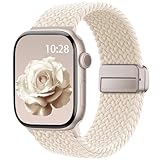
- Compatible Models: The HEARTBOOM magnetic nylon sport bands compatible for iWatch all versions. Suitable for Apple Watch Series 3/2/1 (38mm), Series 4/5/6/SE/SE 2/SE 3 (40mm), Series 7/8/9 (41mm), Series 11/10 (42mm). Pls check the model on the back of your watch to select the correct size
- Comfortable & Fit: HEARTBOOM stretchy apple watch band is made of recycled polyamide with a fabric weave, which is skin-friendly, breathable, lightweight, washable, sweat-resistant and quick-drying. Perfect for Fitness, Running, Yoga and daily wear, as it ensures that your wrist remains comfy and gentle feeling
- Multi Colors & Freely Adjustable: Our iwatch bands come with Various rich & muted colors for your choices, personalize your smartwatch to fit your outfit in daily life and easy change for every occasion. Suitable for women and men with 5.5"-9.6"(140mm~244mm) wrists. One size fit for most people,no need to measure your wrist to choose the size like the traditional braided bands
- Confidently Secure with Upgraded Magnets: Experience the perfect blend of style and security with our braided stretch band for Apple Watch. The enhanced magnetic Closure creates a strong, reliable connection that is easily adjustable for a flawless custom fit. Designed for all-day comfort and peace of mind, it stays put during any activity. Tool-free installation and one-click removal make it incredibly easy to use
- Perfect Gift: This apple watch bands blend fashion with functionality, look more fashionable and youthful. It's a a thoughtful and well-made gift. Suitable for Christmas, New Year's, Father's Day, Mother's Day and birthdays as a surprise for your parents, loved ones, and friends.We offer 24/7 friendly support
When sliding a Solo Loop out, keep the band straight and level with the case. Twisting or angling the loop can cause the connector ends to drag unevenly against the rails.
Braided Solo Loop
The Braided Solo Loop looks softer, but it behaves differently from the standard Solo Loop due to its woven yarn construction. It has less elastic recovery over time and a slightly thicker connector housing.
Take extra care to keep the band aligned during removal, especially on older braided bands that may have relaxed. Forcing it at an angle can stress the fabric near the connector ends.
Leather Bands
Apple’s leather bands, including modern leather links and older buckle styles, typically separate into two pieces like the Sport Band. However, the leather adds stiffness near the connectors, which can reduce flexibility during sliding.
Support the connector end with your fingers rather than pulling from the leather strap itself. This prevents creasing, premature wear, and uneven pressure on the latching mechanism.
Milanese Loop
The Milanese Loop is made from stainless steel mesh with a magnetic closure and has a noticeable weight compared to silicone or fabric bands. It slides out as two separate pieces but requires more control due to the metal-on-metal contact.
Keep the watch flat and steady when removing or installing a Milanese Loop. The added mass can cause the case to shift suddenly if the band releases unexpectedly.
Link Bracelet
The Link Bracelet is Apple’s most complex band, featuring solid metal links and a butterfly-style clasp. It separates into two pieces, but the connectors are rigid and precisely machined.
Because tolerances are tight, the release button must be fully depressed before movement begins. Never wiggle or rock a Link Bracelet side to side, as this can mark the rails or connector finish.
Third-Party Bands
Third-party bands vary widely in materials, connector quality, and finishing. Some match Apple’s tolerances closely, while others may feel looser, tighter, or less smooth when sliding.
If a third-party band resists insertion or removal, stop and inspect the connector ends closely. Rough edges, misaligned tabs, or incorrect case size labeling are common issues and should not be forced into the watch.
Why Band Type Affects Compatibility and Feel
All Apple Watch bands within the same size family are technically compatible, but real-world usability differs by band type. Heavier metal bands amplify poor alignment, while soft bands can hide minor installation mistakes until they slip loose during activity.
Understanding what you’re handling lets you adjust your technique and expectations. That awareness is the difference between a smooth, confidence-building swap and unnecessary wear on your watch’s connector system.
Step-by-Step: How to Remove an Apple Watch Band Safely
Now that you understand how different band types behave at the connector, the removal process itself becomes predictable and low-risk. Apple designed the band system to be tool-free, but precision and patience matter, especially with heavier metal bands or tightly machined connectors.
Follow these steps in order, and you’ll avoid scratched cases, stuck bands, and unnecessary wear on the release mechanism.
Step 1: Power Off and Prepare Your Workspace
Before touching the band, turn off your Apple Watch. This prevents accidental screen taps and reduces the chance of dropping the watch if it shifts in your hands.
Place the watch face-down on a clean, soft surface like a microfiber cloth or folded towel. This protects the display and sapphire or Ion-X glass from micro-scratches while keeping the case stable.
Step 2: Orient the Watch Correctly
Make sure the Digital Crown is facing away from you, with the band ends pointing left and right. This orientation gives your thumbs natural access to the band release buttons on the back of the case.
Avoid holding the watch in mid-air during removal. A flat surface provides leverage and prevents sudden movement when the connector disengages.
Step 3: Locate and Fully Press the Band Release Button
On the back of the Apple Watch, you’ll find an elongated oval button near each band connector. This button retracts the internal locking pin that holds the band in place.
Press and hold the button firmly. Partial pressure is the most common reason bands refuse to slide out, especially on newer watches with tight tolerances.
Step 4: Slide the Band Straight Out, Not Up or Down
While holding the release button, slide the band horizontally out of the case channel. The motion should be smooth and linear, following the rail system built into the watch.
Never lift, twist, or angle the band during removal. Any vertical force can score the connector rails or stress the locking mechanism, particularly on stainless steel and titanium cases.
Step 5: Release the Button Only After the Band Clears the Slot
Once the band piece has fully exited the channel, you can let go of the release button. Releasing too early can cause the pin to snap back into the connector mid-slide.
Set the removed band piece aside and repeat the process for the second half. Always remove one side at a time to keep the watch balanced on your work surface.
What to Do If the Band Doesn’t Slide Out Easily
If the band won’t move even with the button fully pressed, stop and reassess rather than applying force. Slight pressure variations or debris in the channel can prevent smooth movement.
Gently wiggle the band left and right by a millimeter while maintaining button pressure, then try sliding again. For metal bands, especially the Link Bracelet or Milanese Loop, this micro-adjustment often frees the connector without damaging the finish.
Extra Caution for Larger Case Sizes and Heavier Bands
Larger Apple Watch cases, like 45 mm, 46 mm, and Ultra models, amplify the weight of metal bands during removal. When a connector releases, that added mass can cause the case to pivot suddenly.
Keep one hand stabilizing the watch body at all times. This is particularly important if you’re removing a stainless steel Link Bracelet or a third-party metal band with solid end links.
Quick Safety Check Before Moving On
After both band pieces are removed, inspect the connector slots on the watch. They should look clean, smooth, and free of burrs or debris.
If you notice resistance marks, metal dust, or rough edges from a third-party band, clean the area gently before installing a new strap. A clean interface ensures the next band slides in securely and locks as intended.
Step-by-Step: How to Attach a New Apple Watch Band Correctly
With the connector slots clean and unobstructed, you’re ready to install the new band. Take a moment to orient yourself, because correct alignment matters just as much during installation as it does during removal.
Step 1: Confirm Band Size and Case Compatibility
Before sliding anything in, check that the band matches your Apple Watch case size. Apple uses two size groups: smaller cases (38 mm, 40 mm, 41 mm) and larger cases (42 mm, 44 mm, 45 mm, 46 mm, and Ultra).
A band from the same size group will fit securely, even across generations. If the band doesn’t match the case group, it may slide partway but will not lock safely, which can lead to accidental detachment during daily wear or workouts.
Step 2: Identify the Correct Top and Bottom Band Pieces
Most Apple Watch bands come in two pieces, one for the top slot and one for the bottom. The side with the buckle, clasp, or adjustment mechanism usually goes on the top of the watch, closest to 12 o’clock.
Look for subtle markings or connector shape differences on metal and leather bands. Installing the pieces reversed won’t damage the watch, but it can affect comfort, wrist articulation, and how the band sits against the case.
Step 3: Align the Connector With the Slot, Not at an Angle
Hold the watch face-down on a soft surface, keeping it steady with one hand. With the other hand, align the band connector so it sits perfectly straight with the slot, matching the rail system you inspected earlier.
Rank #3

- 【Fit All Models】SuperNaNa Sport silicone watch band compatible with apple watch bands 40mm 38mm 42mm 44mm 41mm 45mm 46mm 49mm women men,Soft breathable replacement sport strap for iwatch bands series 11 series 10 series 9 series 8 series 7 series 6 series 5 series 4 series 3 series 2 series 1. and iwatch Ultra 3 2, Ultra, SE(2nd Gen). All iwatch versions can attach perfectly and seamlessl.
- 【Soft Silicone Material】apple watch bands for women men are made of premium soft silicone, prevents skin from irritation, lightweight, persistent, skin-friendly, touch comfortable, water-resistant and sweat-proof; iphone watch bands for women perfectly fit for runs, hiking, rides, camping, climbing, swims, workouts, traveling and more outdoor activities. iWatch bands 40mm womens completely unburdened to wear on the wrist, perfect for all day.
- 【Adjustable size for all wrist】Our Sport apple watch strap compatible for 38mm/40mm/41mm/42mm(series 11 10), this size fits for 5.1"-7.1" (130mm-180mm) wrist; soft silicone iwatch strap compatible for 42mm(series 3 2 1)/44mm/45mm/46mm/49mm, this size fits for 5.9" - 7.9" (150mm-200mm) wrist. Please check the size on the back of your watch to choose the right size.
- 【Easy installation & removal】Our watch bands for women come with Innovative pin-and-tuck closure design, which locks onto smart watch interface precisely and securely. No tool needed,easy to install and remove,provides a secure and comfortable fit for extended wear.
- 【20+ Colors Choice】Silicone iwatch bands for women come with 20+ different cute colors available for women men. black starlight apple watch band etc colors personalize your Apple Watch and fit your daily mood and outfit. A idear option for your smartwatch accessories.
Do not press the release button during installation. A properly aligned band should slide in smoothly without resistance, guided by the internal rails rather than forced into place.
Step 4: Slide the Band In Until You Feel and Hear the Click
Gently push the band piece into the slot using even, horizontal pressure. You should feel a soft click as the locking pin engages, signaling that the connector has seated fully.
If you don’t feel or hear that click, stop and remove the band to realign it. A band that looks inserted but hasn’t locked can slide out unexpectedly, especially during fitness tracking or all-day wear.
Step 5: Perform a Gentle Lock Test Before Moving On
Once the band clicks into place, lightly tug it side-to-side without pressing the release button. It should not slide, lift, or rattle within the slot.
This check is especially important for heavier materials like stainless steel link bracelets, titanium bands, and third-party metal straps, where weight can mask an incomplete lock.
Step 6: Repeat the Process for the Second Band Piece
Flip the watch carefully and install the remaining band piece using the same alignment and sliding technique. Always work one side at a time to maintain control of the watch body.
Avoid resting the watch on the already-installed band while attaching the second piece, as this can stress the connector or scratch polished case finishes.
Step 7: Check Fit, Orientation, and Wrist Comfort
Turn the watch face-up and place it on your wrist without fastening the band fully. Confirm that the band curves naturally around your wrist and that the watch sits centered and flat against the skin.
Pay attention to comfort and sensor contact, especially if you use heart rate tracking, sleep tracking, or workouts. A properly attached band improves daily usability, sensor accuracy, and long-term comfort across different activities.
Step 8: Final Safety Check Before Daily Use
Press both band release buttons once with the band installed, ensuring nothing moves unless the button is held. Visually inspect the connector gaps; there should be no visible spacing between the band and the case.
If anything feels loose, gritty, or uneven, remove the band and repeat the process. Taking an extra minute here protects the locking mechanism, preserves the case finish, and ensures your Apple Watch stays secure through work, workouts, and everyday wear.
Special Instructions for Popular Band Styles (Solo Loop Sizing, Link Bracelet Release Buttons, Milanese Loop Magnets)
Once you’ve confirmed a secure lock using the steps above, it’s worth slowing down for certain Apple band designs that behave differently from standard sport bands. These styles introduce unique sizing, release mechanisms, or fastening systems that affect both installation and daily wear.
Understanding these nuances helps you avoid forced removal, poor fit, or gradual wear to the band connectors and watch case.
Solo Loop and Braided Solo Loop: Getting the Size and Install Right
Solo Loop and Braided Solo Loop bands have no clasp or buckle, which means correct sizing matters more than any other Apple Watch band. If the size is even slightly off, the watch can feel either constricting during workouts or loose enough to compromise sensor contact.
Before installing, stretch the band gently with both hands to loosen initial stiffness, especially on new silicone Solo Loops. This makes sliding the band ends into the case slots smoother and reduces strain on the connector rails.
When attaching, keep the watch face-down on a soft surface and install one side at a time, just as you would with a standard band. Listen carefully for the click, because Solo Loop material can sometimes dampen the sound, making it less obvious than with rigid bands.
After installation, pull the band evenly over your hand rather than twisting it onto your wrist. Twisting stresses the band over time and can cause the watch to rotate off-center, affecting comfort and heart rate accuracy during daily wear or workouts.
If your Solo Loop feels loose during movement or tight after prolonged wear, that’s a sizing issue rather than an installation problem. Apple’s Solo Loop sizing is precise, and switching to a different size usually delivers better long-term comfort and more reliable fitness tracking.
Apple Link Bracelet: Using the Hidden Release Buttons Correctly
The Apple Link Bracelet uses a completely different removal method and should never be detached from the watch as a single rigid loop. Attempting to slide it out without separating the bracelet can damage the internal release mechanism or scratch the case.
To remove it safely, place the watch face-down and locate the small oval release buttons on the bracelet links near the watch lugs. Press both buttons firmly on one side to separate the bracelet into two halves before sliding each piece out of the case.
When reinstalling, slide each half straight into the case channel without angling. The bracelet should glide smoothly and lock with a clean, mechanical click that feels more solid than softer bands due to its stainless steel construction.
After installation, perform the lock test with extra care. The Link Bracelet’s weight can mask incomplete engagement, especially during desk work or arm movement, which is why a firm side-to-side tug is essential.
For daily usability, confirm that the butterfly clasp closes evenly and that the bracelet articulates freely. A properly installed Link Bracelet balances weight well across the wrist, improving comfort for all-day wear despite its heavier material and polished finish.
Milanese Loop: Managing the Magnetic Closure and Fine Adjustment
The Milanese Loop installs like a standard band, but its magnetic closure requires careful adjustment after attachment. Once both ends are locked into the case, open the magnetic clasp fully before putting the watch on your wrist.
Slide the mesh band through the magnetic loop rather than pulling it outward. This preserves the fine woven steel mesh and prevents kinks that can develop with aggressive adjustment.
When positioning the magnet, aim for a snug fit that keeps the watch flat against your wrist without restricting circulation. The magnet is strong enough to hold during workouts, but correct tension improves comfort, reduces micro-movement, and maintains consistent sensor contact for health tracking.
Avoid placing the magnet directly against the watch case. While it won’t harm the Apple Watch, it can interfere with smooth adjustment and cause cosmetic scuffing over time, especially on polished stainless steel finishes.
If you frequently switch between typing, workouts, and sleep tracking, recheck the magnet position throughout the day. The Milanese Loop’s strength is its micro-adjustability, and small tweaks can dramatically improve long-term comfort and daily wearability.
Troubleshooting Fit Issues and Stuck Bands (What to Do If It Won’t Slide Out or Click In)
Even when you follow the steps perfectly, some Apple Watch bands can feel stubborn. Tolerances are tight by design to protect the watch during workouts, daily movement, and long-term wear, so resistance usually points to alignment, debris, or compatibility rather than a defect.
Before forcing anything, slow down and reassess. Nearly every stuck band can be removed or seated cleanly without tools or damage if you approach it methodically.
If the Band Won’t Slide Out of the Case
Start by confirming the release button is fully depressed. It should sit flush with the case and stay pressed as you slide the band, not clicked or partially engaged.
Hold the watch face-down on a soft surface and keep the band perfectly straight. Even a slight upward or downward angle can cause the internal locking lug to catch inside the channel.
If it still won’t budge, apply gentle back-and-forth micro-movements while holding the release button. This can help disengage tension created by wrist movement, sweat buildup, or minor debris.
Check for Dirt, Sweat, or Grit Inside the Band Channel
Bands worn during workouts or daily commuting can collect skin oils, dust, and dried sweat inside the case rails. This is especially common with Sport Bands, Solo Loops, and fabric bands that absorb moisture.
Use a dry microfiber cloth or a soft wooden toothpick to clean the channel. Never use metal tools, which can scratch the case or deform the locking mechanism.
If residue is stubborn, lightly dampen the cloth with water and wipe again, then allow the watch to dry fully before retrying. Moisture inside the channel can increase friction and make removal harder.
If the Band Slides In but Won’t Click
A band that slides smoothly but never locks usually means it isn’t centered. Remove it completely and reinsert while keeping even pressure across the entire band edge.
Rank #4

- Newest Engraved Flower Design: SNBLK Apple watch band has clear vivid flower patterns made by advanced laser carving technology. Unique and stylish design that is sure to add a touch of elegance to your everyday outfit. One with sunflowers and the other with roses. Their cute floral print is perfect for anyone who loves nature and wants to add a personal touch to their daily wear. In addition, it's a thoughtful and well-made gift that is sure to be appreciated by anyone who receives it
- Comfortable to Wear: The Apple watch bands are made of high-quality soft silicone material that provides a comfortable and flexible fit on your wrist. The soft and lightweight nature of the band makes it perfect for everyday use, as it ensures that your skin remains comfy and free from irritation even when you wear the watch for extended periods of time. Plus, the silicone material is water-resistant and sweat-proof, making it perfect for use during physical activities or outdoor adventures
- Compatible Models & Size Options: These flower bands are designed for iWatch all versions. Suitable for Apple Watch Series 3/2/1(38mm),Series 4/5/6/SE/SE 2/3(40mm),Series 7/8/9(41mm),Series 11/10(42mm);For Series 3/2/1(42mm),Series 4/5/6/SE/SE 2/3(44mm),Series 7/8/9(45mm),Series 11/10(46mm),Ultra 3/Ultra 2/Ultra(49mm); 38/40/41/42mm Size fits 5.1"-7.1" (130mm-180mm) wrist, 44/45/46/49/42mm Size fits 5.9"-7.9" (150mm-200mm). Pls check the model on the back of your watch to select the correct size
- Enjoy the Thrill of Experimenting with Diverse Combinations: Enhance your iWatch with our stylish and intricately engraved printed strap, allowing you to personalize your smartwatch and effortlessly match your mood and outfit every day. Mix and match straps of various colors to elevate the look of your iWatch and showcase your distinct style. With a 6-pack of replacement, you can effortlessly transform your watch for various occasions, whether it's for sports, leisure, work, or everyday life
- Unmatched Durability: Our iWatch bands are built to withstand the test of time. Made from premium-grade silicone, it exhibits exceptional resistance to wear, tear, and daily use. Whether you're an athlete pushing your limits or a professional with a busy lifestyle, it is designed to keep up with your active routine, ensuring it remains in pristine condition. In addition, they comes with double hole and metal snap fastener, easier to take on/put off, no worry of loosing your watch any more
Listen carefully for the click rather than relying on feel alone. Some lightweight bands, like Sport Loops and braided Solo Loops, produce a softer sound that’s easy to miss.
Once inserted, always perform the lock test. Gently pull the band straight out from both ends without pressing the release button to confirm it’s fully engaged.
Confirm Case Size and Band Compatibility
Apple Watch bands are size-specific, and mixing incompatible sizes is a common cause of fit issues. A 41mm band will not lock correctly in a 45mm case, even if it partially slides in.
Check the engraving on the band connector or the original packaging if you’re unsure. Older 38mm and 40mm bands are compatible with 41mm cases, while 42mm, 44mm, and 45mm bands work interchangeably, but only within their size group.
Third-party bands can vary more in tolerance. If a non-Apple band consistently fails to click, it may be slightly out of spec, which can compromise long-term security and daily usability.
What to Do If a Metal Band Feels Jammed
Metal bands like the Link Bracelet or third-party stainless steel bracelets are heavier and less forgiving. Their weight can twist the connector during removal, especially if the watch is held upright.
Lay the watch flat, press the release button, and support the bracelet close to the case to keep it level. Avoid letting the bracelet hang, as gravity can cause it to bind in the channel.
If resistance persists, stop and reset your grip rather than increasing force. Excess pressure can damage the internal latch or scratch polished case finishes.
When a Band Clicks but Feels Loose
A band that clicks but shifts side-to-side slightly may not be fully seated. Remove it and reinstall, paying attention to whether it slides all the way to the stop before clicking.
Inspect the connector for wear, especially on older bands that have seen years of daily use. Rounded edges or deformation can reduce locking confidence and affect long-term safety.
If looseness continues, retire the band from active use. While it may hold during light wear, it’s not worth risking a dropped watch during workouts or daily movement.
Important Safety Warnings Before You Try Again
Never force a band with excessive pressure or tools. Apple Watch cases house antennas, sensors, and seals that can be compromised by bending or scratching.
Avoid lubricants, oils, or sprays. These attract dirt and can interfere with the locking mechanism, leading to future fit problems or unexpected release.
If an Apple-branded band is genuinely stuck and won’t release after careful cleaning and alignment, contact Apple Support or visit an Apple Store. They have tools and techniques to remove bands safely without damaging the watch.
Handled correctly, band changes should feel controlled and predictable. Once you understand how precise the system is, troubleshooting becomes less stressful and far more confidence-building, especially if you rotate bands regularly for work, fitness, sleep tracking, or style.
Case Size and Model-Specific Notes (38/40/41mm vs 42/44/45/49mm Ultra)
Once you’re comfortable with the release mechanism and handling pressure, the next variable that matters is case size. Apple has kept band attachment consistent across generations, but physical dimensions, weight, and case geometry change how a band feels and installs in real-world use.
Understanding these differences helps you avoid compatibility mistakes and explains why a band that feels perfect on one watch may feel awkward or unbalanced on another.
Apple Watch Case Size Families Explained
Apple Watch bands fall into two main size families that share connector dimensions. Bands designed for 38mm, 40mm, and 41mm cases are interchangeable within that group, and the same is true for 42mm, 44mm, and 45mm cases.
This compatibility applies across Series models and SE versions, regardless of aluminum, stainless steel, or titanium cases. The locking mechanism is identical, so installation steps do not change between generations.
The key difference is visual proportion and comfort, not mechanical fit. A band may technically fit but feel too wide, too narrow, or poorly balanced depending on the case.
38mm, 40mm, and 41mm Watches: Fit and Handling Notes
Smaller Apple Watch cases are lighter and sit closer to the wrist, which makes band changes feel easier and more forgiving. The lower weight reduces stress on the connector when sliding bands in and out.
Slimmer bands, such as Solo Loop, Sport Band, Braided Solo Loop, and leather options, tend to look most balanced on these sizes. Heavier metal bracelets can feel top-heavy and may rotate slightly on smaller wrists.
When installing bands, pay attention to alignment. Because the channel is narrower, even slight tilting can prevent the band from clicking fully into place, especially with third-party connectors that aren’t perfectly machined.
42mm, 44mm, and 45mm Watches: Weight and Proportion Considerations
Larger Apple Watch cases have more mass, particularly in stainless steel and titanium models. That extra weight increases the importance of keeping the watch flat during band changes to prevent binding.
Wider bands distribute weight more comfortably and improve stability during workouts, daily movement, and sleep tracking. Sport Loop, Trail Loop, and metal link-style bracelets tend to feel more planted on the wrist at these sizes.
During installation, support the band close to the case, especially with rigid materials. The longer connector rail can exaggerate resistance if the band enters the channel at a slight angle.
Apple Watch Ultra (49mm): Unique Fit and Band Design
Apple Watch Ultra uses a 49mm case but shares band compatibility with the 44mm and 45mm size family. That said, Ultra-specific bands are engineered differently to match the case’s thickness, flat edges, and outdoor-focused use.
Bands like the Ocean Band, Alpine Loop, and Trail Loop are wider, stiffer, and designed to counterbalance the Ultra’s heavier titanium case. Using a standard 45mm band works mechanically but may feel underbuilt or visually mismatched.
When changing bands on the Ultra, expect more resistance simply due to size and materials. Keep the watch fully supported on a flat surface and slide the band straight, without twisting, to protect the connector and the case’s brushed and polished surfaces.
Mixing Bands Across Sizes: What Works and What to Avoid
Staying within the correct size family is essential. A 41mm band will not safely lock into a 45mm or Ultra case, and forcing it risks damaging the latch or deforming the connector.
Within the same family, mixing is safe, but comfort varies. A narrow leather band from a smaller watch may technically fit a 45mm case yet feel unbalanced for all-day wear or fitness use.
For active users, prioritize bands designed for your case size and activity level. Proper proportion improves comfort, sensor contact for heart rate and blood oxygen tracking, and overall confidence that the watch will stay secure throughout the day.
Quick Compatibility Reference for Confidence
If your watch is 38mm, 40mm, or 41mm, only use bands labeled for those sizes. If your watch is 42mm, 44mm, 45mm, or 49mm Ultra, use bands labeled for that larger group.
When shopping third-party, look closely at sizing labels and user reviews. Quality varies, and precise connector machining makes a noticeable difference in how smoothly a band installs and how secure it feels long-term.
Knowing your case size removes guesswork. Once that’s locked in, changing bands becomes a simple, repeatable routine rather than a moment of hesitation every time you want to switch styles or materials.
Caring for Your Apple Watch Bands (Cleaning, Storage, and Long-Term Wearability)
Once you’re comfortable changing bands and mixing sizes correctly, care becomes the next piece of the puzzle. A well-maintained band not only looks better but also feels more comfortable, lasts longer, and maintains secure contact with the watch’s sensors for accurate health and fitness tracking.
Different Apple Watch band materials age very differently in the real world. Sweat, skin oils, UV exposure, and daily movement all leave their mark, especially if you rotate bands frequently for work, workouts, and downtime.
💰 Best Value
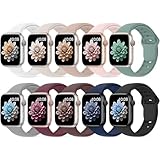
- 【Compatible Models】: UJUTL Sport silicone bands perfect compatible with Apple Watch Bands Series 11 10 -(42mm), Series 9 8 7 -(41mm), Series 6 5 4 SE3 SE2 -(40mm), Series 3 2 1 SE -(38mm), Check your watch size before ordering, Size fits 5.3"-7.6" (135mm-193mm) wrist
- 【Newest Original Design 】: The breathable groove design wicks away moisture to keep you cool during workouts and daily activities, Hidden buckle design that does not come into contact with any metal, Keep the irritate away from you
- 【Premium Material】: Comfort & Breathability - Made of high quality silicone, these bands provide soft, irritation-free wear for sensitive wrist, Durable & Easy to Clean - Non-sticky, stain-resistant silicone stays fresh through sweat, rain, and daily use. Simply wipe with a damp cloth for instant refresh
- 【10 Colors in One Pack】: Available in a variety of colors, these bands can be easily swapped out to match your outfit or mood, perfect for mixing styles with outfits or seasons. Also proper to be used as gifts for Wedding, birthday, Valentines' day, Mothers' day, father' day, Christmas, Thanksgiving Day etc
- 【Worry-Free Purchase】: To ensure 100% customer satisfaction, we provide 24/7 online support. If you encounter any issues with our product, please contact us immediately—we will prioritize resolving your concerns and offer tailored solutions promptly
Cleaning Apple Watch Bands by Material
Silicone and fluoroelastomer bands, including Sport Bands and Ocean Bands, are the easiest to maintain. Rinse them under warm water after workouts, then use a small amount of mild hand soap to remove sweat and residue.
Avoid harsh cleaners or antibacterial soaps, which can dry the material and cause it to feel sticky over time. Let the band air-dry completely before reattaching it to the watch to prevent moisture from sitting against the case or sensors.
Nylon bands like the Sport Loop, Trail Loop, and Alpine Loop need more frequent attention if you exercise regularly. These materials absorb sweat and oils, which can lead to odor and stiffness if ignored.
Hand-wash nylon bands in warm water with gentle detergent, lightly scrubbing with your fingers. Rinse thoroughly and allow them to air-dry flat, away from direct heat, to preserve elasticity and stitching.
Leather bands require the most restraint. Wipe them down with a dry or slightly damp cloth, and avoid soaking them entirely, as water accelerates cracking and discoloration.
Leather is not designed for workouts or prolonged moisture exposure. Rotating a leather band only for work or casual wear dramatically extends its lifespan and keeps the material supple.
Metal bands, including stainless steel link bracelets and Milanese loops, benefit from occasional cleaning to remove skin oils and dust from the links. A soft microfiber cloth works well for regular upkeep.
For deeper cleaning, remove the band from the watch and lightly brush with a soft toothbrush dipped in warm water. Dry thoroughly to prevent water spots or long-term corrosion, especially around clasp mechanisms.
Safe Storage Between Band Changes
How you store unused bands matters more than most people realize. Tossing bands into a drawer leads to bent connectors, stretched fabric, and surface scratches over time.
Store bands flat or gently curved, with the connector ends protected from pressure. Small pouches, watch rolls, or compartmentalized organizers work well and make rotating bands quicker and safer.
Keep leather and fabric bands away from direct sunlight and humidity. Prolonged exposure can fade colors, weaken stitching, and cause odors that are difficult to remove later.
Metal bands should be stored separately from softer materials to avoid abrasion. Even finely finished stainless steel can mark leather or silicone if they rub together during storage.
Managing Long-Term Wear and Comfort
Rotating bands isn’t just about style. It allows materials to rest and recover, particularly elastic nylon loops that can stretch if worn continuously.
If you wear your Apple Watch all day and overnight for sleep tracking, consider switching to a softer, lighter band at night. This improves comfort and reduces pressure points while still keeping sensors aligned for reliable data.
Pay attention to fit as bands age. A stretched loop or worn clasp can compromise security, increasing the risk of the watch slipping off during activity.
If a band no longer locks in with a clean click or shows visible deformation at the connector, it’s time to retire it. Secure attachment protects both the watch case and your wrist during daily movement and workouts.
Protecting the Watch While Caring for Bands
Always remove the band from the watch before deep cleaning or drying. This prevents moisture from entering the speaker grilles, microphone ports, or sensor array on the back of the case.
When reinstalling a freshly cleaned band, slide it straight in without angling or forcing it. This preserves the precision of the connector rails, which are essential for long-term durability across repeated swaps.
Caring for your bands turns changing them into a sustainable habit rather than a cycle of replacements. With basic maintenance and thoughtful rotation, even heavily used Apple Watch bands can deliver years of comfort, reliability, and confidence on the wrist.
When to Replace or Upgrade Your Band (Comfort, Fitness Use, Work Style, and Durability Considerations)
All the care and rotation habits you’ve built lead to a simple question: when does a band move from “well-used” to “no longer serving you”? Knowing when to replace or upgrade an Apple Watch band isn’t just about appearance. It’s about comfort, accuracy of health tracking, safety, and how well your watch fits into your daily routine.
A band that no longer suits your lifestyle can quietly undermine the Apple Watch experience. The good news is that small, intentional upgrades can make the watch feel new again without touching the case itself.
Comfort Signals You Shouldn’t Ignore
Discomfort is the clearest sign that a band has outlived its usefulness. Hot spots, pinching, wrist fatigue, or pressure marks after normal wear suggest the material or fit is no longer working with your skin and movement.
Materials change over time. Silicone can stiffen, leather can harden or curl, and woven bands can lose elasticity, all of which affect how evenly the watch sits on your wrist.
If you rely on heart rate, blood oxygen, or sleep tracking, consistent sensor contact matters. A band that shifts or loosens during the day can reduce data accuracy, even if it still looks fine at a glance.
Upgrading for Fitness and Active Use
If your workouts have evolved, your band should evolve with them. A band that felt fine for casual walks may struggle with sweat-heavy training, swimming, or high-impact sessions.
Sport Bands and Sport Loops are designed for moisture management and quick drying, but even these wear out. Loss of flexibility, surface cracking, or a sticky feel after cleaning are signs it’s time to replace them.
For strength training or interval workouts, a secure fit is essential. If you find yourself tightening a band more than before to keep the watch from sliding, the material has likely stretched beyond its ideal working range.
Matching Your Band to Work and Daily Style
Your Apple Watch often moves between environments faster than traditional watches ever did. A band that works at the gym may feel out of place or uncomfortable at a desk, on video calls, or during long meetings.
Leather and metal bands tend to distribute weight differently, which can improve comfort during extended sedentary wear. If your wrist feels tired by the end of a workday, a more balanced or breathable option can make a noticeable difference.
Upgrading for work isn’t about formality alone. A well-finished band with secure hardware also reduces micro-adjustments throughout the day, helping the watch disappear on your wrist instead of demanding attention.
Durability, Safety, and Attachment Integrity
No matter the material, the connector area is the most critical point of failure. If the band no longer slides in smoothly or requires force to lock, replacement is non-negotiable.
A loose or worn connector risks the watch detaching during normal arm movement. This is especially important for larger Apple Watch cases, which place more leverage on the band during motion.
Check clasps, pins, and magnetic closures regularly. Any slipping, incomplete closure, or unexpected release means the band can no longer be trusted with an expensive piece of hardware on your wrist.
When an Upgrade Is the Smarter Choice
Sometimes a band isn’t failing, but it’s holding you back. New materials, improved breathability, better adjustability, and refined finishes can noticeably improve daily wear even if your old band is technically intact.
Upgrading can also solve compatibility frustrations. Newer bands often offer finer size increments or redesigned closures that work better across different wrist shapes, especially if your wrist size fluctuates with temperature or activity.
Think of a band upgrade the same way you’d think about better shoes. The watch stays the same, but how it feels, performs, and integrates into your life improves dramatically.
Closing Perspective: The Band Is the Experience
The Apple Watch case houses the technology, but the band defines how you live with it. Comfort affects how long you wear it, durability protects your investment, and the right style ensures it fits seamlessly into every part of your day.
Replacing or upgrading a band isn’t a failure of maintenance. It’s a natural step in adapting your watch to changing routines, priorities, and expectations.
When your band supports your comfort, activity, and confidence without drawing attention to itself, your Apple Watch delivers exactly what it’s meant to: effortless, reliable companionship on your wrist.