If you have ever finished a long run, ride, or hike and watched your remaining battery drop faster than expected, Garmin’s power modes are the tool that fixes that problem when used correctly. They are not just low-power presets, but a system-level way to control how GPS, sensors, screen behavior, and background features behave during an activity. Once you understand how they interact, you stop guessing and start planning battery life with intent.
Power modes matter most when workouts get longer, routes get remote, or charging opportunities disappear. A 45-minute tempo run, a five-hour gravel ride, and a three-day fastpacking trip all demand very different trade-offs. Garmin power modes let you make those trade-offs ahead of time instead of reacting mid-activity when battery anxiety kicks in.
By the end of this section, you’ll know what Garmin power modes actually do under the hood, how they behave across different activity types, and which Garmin watches support them. That foundation is critical before we get into customizing modes for specific sports and scenarios later in the guide.
What Garmin Power Modes Actually Are
Garmin power modes are configurable profiles that control how aggressively your watch manages power consumption during an activity or expedition. They sit above individual settings like GPS accuracy or backlight timeouts and act as a coordinated rule set. When a power mode is active, it overrides multiple subsystems at once to achieve a targeted battery lifespan.
🏆 #1 Best Overall

- Easy-to-use running watch monitors heart rate (this is not a medical device) at the wrist and uses GPS to track how far, how fast and where you’ve run.Special Feature:Bluetooth.
- Battery life: up to 2 weeks in smartwatch mode; up to 20 hours in GPS mode
- Plan your race day strategy with the PacePro feature (not compatible with on-device courses), which offers GPS-based pace guidance for a selected course or distance
- Run your best with helpful training tools, including race time predictions and finish time estimates
- Track all the ways you move with built-in activity profiles for running, cycling, track run, virtual run, pool swim, Pilates, HIIT, breathwork and more
Each power mode can adjust GPS sampling, satellite systems, wrist heart rate behavior, Pulse Ox, onboard music, Wi‑Fi, Bluetooth syncing, backlight behavior, and how often the screen wakes. On AMOLED models, power modes heavily influence display wake gestures and always-on behavior. On MIP-based watches, they primarily manage sensor polling and backlight usage.
The key thing many users miss is that power modes are not locked presets. Even the default modes Garmin ships can be edited, duplicated, or rebuilt entirely. You can create a power mode that is perfect for marathon training, another for all-day bikepacking, and another strictly for emergencies when battery life matters more than data richness.
How Power Modes Behave During Activities
Power modes are applied at the activity level, not system-wide daily use, unless you explicitly choose an expedition or battery saver profile. This means your watch can behave one way during a run and completely differently during a hike without affecting everyday smartwatch functions like notifications or sleep tracking.
During an activity, the active power mode determines how frequently GPS points are recorded, whether multi-band GNSS is used, and how aggressively sensors are sampled. For example, switching from multi-band GPS to standard GPS can cut power draw significantly while still delivering usable track accuracy for road running or open terrain hiking.
Importantly, power modes do not simply turn features off blindly. Many modes dynamically scale behavior based on motion and interaction. Screen brightness may stay low until you raise your wrist, heart rate may sample continuously during movement but reduce polling when stationary, and GPS may log less frequently when pace and direction are stable.
Built-In Power Modes You’ll See on Most Watches
Most compatible Garmin watches ship with several predefined power modes that serve as starting points. Normal mode is the default and prioritizes full data capture with minimal restrictions. It is ideal for short to medium workouts where battery life is not a concern.
Battery Saver modes reduce GPS accuracy, limit background features, and shorten screen-on time to extend activity duration. These are often useful for long training days where you still want core metrics like distance, time, and heart rate without draining the battery before the workout ends.
Expedition modes are the most aggressive and are designed for multi-day or multi-week use. GPS is sampled infrequently, often once per hour or less, and most sensors are disabled. These modes are about preserving location breadcrumbs and survival-level tracking rather than training analytics.
Which Garmin Watches Support Power Modes
Garmin power modes are primarily found on mid-range to premium outdoor and performance watches. Entry-level fitness watches generally do not offer customizable power modes, relying instead on fixed GPS and sensor behavior.
Fully featured power modes are supported on the Fenix series, including Fenix 6, Fenix 7, Fenix 7 Pro, and their solar variants. The Epix Gen 2 and Epix Pro models also support power modes, with additional emphasis on AMOLED display management. Enduro and Enduro 2 are especially optimized around power modes, with extreme battery longevity when tuned correctly.
Outdoor-focused watches like the Instinct 2 and Instinct 2X support power modes, though with fewer display-related controls due to their monochrome MIP screens. The Tactix series mirrors Fenix functionality with additional stealth-oriented options layered on top.
Many Forerunner models also support power modes, particularly the Forerunner 955, 965, and 945 LTE. These watches offer nearly the same control as Fenix models, but in lighter polymer cases that are often more comfortable for long runs and triathlon training. Battery impact is slightly more noticeable due to smaller physical battery sizes, making power mode tuning especially valuable.
Solar, AMOLED, and Case Design Considerations
The effectiveness of power modes depends heavily on hardware. Solar models benefit more from conservative GPS and sensor settings during daylight, especially on long outdoor activities. Power modes that reduce screen wake frequency allow solar input to offset power draw more effectively.
AMOLED watches like the Epix and Forerunner 965 gain the most battery savings by controlling always-on display behavior and gesture sensitivity. A well-tuned power mode can double usable activity time without sacrificing GPS accuracy. MIP-based watches rely less on display tuning and more on sensor and GNSS optimization.
Case size and materials also matter. Larger cases like the Fenix 7X or Enduro 2 house bigger batteries and dissipate heat better during long GPS sessions. Lighter watches may feel more comfortable for endurance events but require more thoughtful power mode configuration to avoid mid-activity shutdowns.
Why Power Modes Are More Important Than Ever
Modern Garmin watches track more data than ever, from multi-band GPS to advanced heart rate variability and blood oxygen trends. That richness is valuable, but it comes at a cost if left unmanaged. Power modes are Garmin’s answer to letting athletes choose when that data matters and when battery life takes priority.
Once you understand which watches support power modes and how they influence activity behavior, you stop treating battery life as a limitation. It becomes another training variable you can control, just like pace, effort, or fueling strategy.
How Power Modes Actually Save Battery: GPS Sampling, Sensors, Display, and CPU Load Explained
At a practical level, Garmin power modes work by reducing how often the watch measures, processes, and displays data during an activity. Every adjustment targets a specific drain source, and understanding those sources helps you decide what to sacrifice and what to protect.
Think of power modes less like “low battery mode” and more like a preset manager for the watch’s internal workload. GPS, sensors, display behavior, and background computation all compete for power, and power modes rebalance that competition.
GPS Sampling: Where Most of the Battery Goes
GPS is the single largest battery consumer during activity tracking, especially on multi-band capable watches. Power modes save energy by altering how often the GPS chip wakes, how many satellite constellations it listens to, and whether multi-band precision is used.
In standard performance modes, the watch records a GPS fix every second using multiple satellite systems. This delivers excellent track fidelity but keeps the GNSS chipset fully active throughout the session.
Battery-focused power modes typically switch to UltraTrac-style sampling or reduced fix intervals. Instead of continuous tracking, the watch estimates position between fixes using accelerometer data, dramatically lowering power draw at the cost of corner accuracy and pace smoothness.
Multi-band GPS is another major variable. Power modes can force single-band operation, which still performs well in open terrain but uses significantly less energy. On watches like the Fenix 7 and Epix Pro, this change alone can add several hours to long activities.
Sensor Management: Optical HR, Pulse Ox, and External Inputs
Optical heart rate tracking is a steady, predictable drain that adds up over long sessions. Power modes often reduce sampling frequency or disable wrist-based heart rate entirely if an external chest strap is connected.
Pulse Ox is one of the most power-hungry sensors Garmin offers. In activity-specific power modes, it is usually disabled completely, as blood oxygen data adds limited value during movement compared to sleep or acclimation tracking.
Temperature, altimeter, and compass sensors are less demanding but still contribute to background power use. Power modes may reduce how frequently these sensors update, especially when their data is not critical to the activity profile.
External sensors like power meters and speed sensors can actually help battery life in some scenarios. When cadence, speed, or heart rate comes from an ANT+ device, the watch can reduce reliance on internal sensors and processing.
Display Behavior: AMOLED vs MIP Power Strategies
Display tuning behaves very differently depending on screen technology. AMOLED models benefit massively from controlling brightness, timeout duration, and always-on behavior during activities.
Power modes on Epix and Forerunner 965 typically disable always-on display, reduce gesture sensitivity, and cap brightness levels. This prevents the display driver from constantly refreshing pixels, which is a major drain during long outdoor sessions.
MIP displays consume far less power when static, so power modes focus more on reducing backlight usage. Limiting backlight activation on button presses or alerts can stretch battery life noticeably on Fenix and Enduro models.
Solar-equipped MIP watches gain an extra advantage here. When display wakeups are minimized, solar input can partially offset GPS and sensor draw, especially during bright daylight activities.
CPU Load and Background Computation
Every metric the watch calculates adds CPU workload. Training load, real-time stamina, ClimbPro, navigation prompts, and advanced physiological analytics all require continuous processing.
Power modes reduce CPU load by disabling or simplifying these features. Navigation still works, but recalculations happen less often. Performance Condition and advanced stamina models may be turned off entirely.
Map rendering is another hidden drain. Power modes can reduce map detail, refresh rate, or disable background map loading unless explicitly viewed. This matters most on watches with onboard maps and touch interaction.
The result is a cooler-running processor with fewer wake cycles, which improves both battery life and long-session stability.
Activity-Specific Behavior: Why Power Modes Feel Different Across Sports
Power modes are applied per activity profile, not globally, which is why they behave differently depending on what you are tracking. A run, ride, hike, or expedition each prioritizes different data streams.
For short workouts, power modes may leave GPS and heart rate untouched while limiting display wakeups and analytics. This preserves training quality without unnecessary drain.
For long training sessions or races, power modes often trade GPS precision and screen activity for consistent recording and sensor reliability. The goal shifts from perfect data to finishing the session with battery to spare.
Ultra and expedition modes go further by aggressively throttling GPS, disabling most sensors, and limiting interaction. These modes are designed for time-on-wrist endurance rather than training insight.
Why Small Changes Add Up Over Hours and Days
No single setting transformation doubles battery life on its own. The real gains come from stacking small reductions across multiple systems.
Reducing GPS precision, limiting display wakeups, disabling nonessential sensors, and lowering CPU workload compound over time. On a two-hour run, the difference may be minimal, but on a 12-hour hike or multi-day expedition, it becomes the difference between finishing and charging mid-activity.
Once you understand these mechanics, customizing power modes becomes intentional rather than experimental. You stop guessing which setting helps and start choosing based on how the watch actually consumes power during tracking.
Default Garmin Power Modes Breakdown: Normal, Max Battery, Expedition, and Device-Specific Variants
With the fundamentals in mind, the next step is understanding what Garmin’s default power modes actually do in practice. These presets are not arbitrary labels; they are carefully bundled collections of sensor, GPS, display, and processor behaviors designed around specific use cases.
The names are consistent across many Garmin models, but the exact implementation varies by device class. A Forerunner, fēnix, Enduro, Instinct, or Edge head unit may share a mode name while delivering very different real‑world battery results.
Normal Mode: Full-Feature Tracking With Predictable Drain
Normal mode is the baseline experience and what most users rely on for daily training. It prioritizes data completeness and responsiveness over battery conservation.
GPS runs at full precision, typically multi-band on newer watches, with second-by-second recording. Heart rate, accelerometer data, barometric altitude, training metrics, and activity alerts remain fully enabled.
Display behavior is unchanged, meaning gesture wake, touchscreen input on supported models, backlight timeouts, and map interaction work exactly as expected. On AMOLED devices, this also means higher display draw during frequent glances.
In real-world use, Normal mode is ideal for runs, rides, gym sessions, and workouts under three to four hours. Battery life is predictable and aligns closely with Garmin’s advertised tracking estimates for each model.
Where Normal mode struggles is during long trail runs, ultra events, or back-to-back training days without charging. The watch remains responsive and data-rich, but efficiency is not the priority.
Max Battery Mode: Long Sessions With Strategic Compromises
Max Battery mode is where Garmin starts making deliberate trade-offs to extend recording time. The goal is to preserve core activity tracking while trimming power-hungry extras.
GPS typically shifts to a lower power setting, often reducing sampling frequency or switching from multi-band to single-band operation. Accuracy remains acceptable for distance and route shape, but fine-grained pace and corner precision are softened.
Display behavior is more restrictive. Gesture wake may be delayed or disabled, backlight intensity is reduced, and touch input can be limited or turned off depending on the device.
Background features such as Bluetooth syncing, Wi‑Fi scanning, music playback, and advanced analytics are reduced or disabled. Heart rate usually remains active, but some secondary sensors or metrics may be paused.
For endurance athletes, Max Battery mode shines during six- to twelve-hour efforts, long training rides, or full-day hikes. You still get usable GPS tracks and heart rate trends, but with significantly longer runtime than Normal mode.
This mode is also a strong candidate for events where you only interact with the watch occasionally. Fewer screen wakeups translate directly into less drain over time.
Expedition Mode: Time-on-Wrist Survival Over Data Detail
Expedition mode is fundamentally different from traditional activity tracking. It is designed for multi-day use where charging opportunities are limited or nonexistent.
Rank #2

- Easy-to-use running smartwatch with built-in GPS for pace/distance and wrist-based heart rate; brilliant AMOLED touchscreen display with traditional button controls; lightweight design in 43 mm size
- Up to 11 days of battery life in smartwatch mode and up to 19 hours in GPS mode
- Reach your goals with personalized daily suggested workouts that adapt based on performance and recovery; use Garmin Coach and race adaptive training plans to get workout suggestions for specific events
- 25+ built-in activity profiles include running, cycling, HIIT, strength and more
- As soon as you wake up, get your morning report with an overview of your sleep, recovery and training outlook alongside weather and HRV status (data presented is intended to be a close estimation of metrics tracked)
GPS sampling drops dramatically, often to one point per hour or at set intervals. Routes become breadcrumb-style tracks rather than continuous paths, and pace or distance metrics lose real-time relevance.
Heart rate tracking is usually disabled or sampled infrequently. Most activity metrics, alerts, and training insights are turned off entirely to minimize processor and sensor activity.
The display becomes extremely conservative. Screen updates are limited, backlight use is minimized, and user interaction is intentionally slow to prevent accidental power loss.
On watches like the fēnix Solar, Enduro, or Instinct Solar, Expedition mode pairs with solar charging to stretch battery life into weeks. On non-solar models, it still offers days of continuous tracking.
This mode is not suitable for training analysis. It exists for expeditions, thru-hikes, mountaineering, or remote travel where location logging matters more than performance metrics.
Device-Specific Variants: UltraTrac, SatIQ, and Model-Dependent Tweaks
Beyond the headline modes, many Garmin watches include device-specific variants that sit between Normal and Expedition behavior. These are often the most misunderstood but also the most useful.
UltraTrac, found on many fēnix and Forerunner models, reduces GPS sampling while keeping other sensors active. It extends battery life significantly while preserving more detail than Expedition mode.
SatIQ, available on newer multi-band devices, dynamically switches between GPS modes based on signal quality. While not labeled as a power mode, it functions like an intelligent efficiency layer within Normal or Max Battery settings.
Instinct models emphasize durability and simplicity, often pairing aggressive power-saving behaviors with monochrome displays and button-only navigation. This results in longer real-world tracking times even in higher accuracy modes.
AMOLED-based watches, such as the Forerunner 265 or Epix series, rely heavily on display management for battery savings. Power modes on these devices are more display-centric than GPS-centric compared to MIP-based models.
Edge cycling computers and outdoor handhelds follow similar principles but apply them differently due to larger screens, constant navigation use, and external sensor pairing.
Understanding these variants matters because two watches set to “Max Battery” may behave very differently. Battery life claims are only meaningful when interpreted through the lens of hardware, display technology, and sensor load.
As you move from presets toward custom power modes, these default behaviors become your reference points. Knowing what Garmin disables first and what it preserves helps you build a mode that fits your specific training and adventure needs.
Custom Power Modes Step-by-Step: Building Your Own Battery-Saving Profile for Any Activity
Once you understand how Garmin’s preset modes behave on your specific hardware, custom power modes become the most powerful battery tool in the system. Instead of accepting Garmin’s idea of what should be disabled first, you decide exactly which features matter for a given activity.
This is where intermediate users cross into advanced territory. A well-built custom mode can double tracking time without sacrificing the data you actually use in training or navigation.
Where to Find Custom Power Modes on Your Garmin
On most recent Garmin watches, custom power modes live inside the activity settings, not the system battery menu. This matters because power behavior can be different for Run versus Hike versus Bike.
From the watch: Activities → select the activity → Settings → Power Mode → Add New or Customize. On touch-enabled models like Epix or Forerunner AMOLED devices, this is often faster via swipe navigation, while button-only watches like Instinct or older fēnix models rely on deeper menu stacks.
Garmin Connect Mobile mirrors this structure but is slower for experimentation. Building your first mode directly on the watch gives immediate feedback on estimated battery life.
Start With a Purpose, Not a Preset
Before toggling anything, decide what the activity actually needs. A two-hour tempo run, a six-hour trail run, and a multi-day hike all have radically different data priorities.
Ask three questions. Do I need precise pace and distance, or just a breadcrumb track. Do I need continuous heart rate or only occasional checks. Will I interact with the screen often or barely at all.
Answering these upfront prevents over-optimizing and accidentally stripping out metrics you later miss.
GPS Settings: The Single Biggest Battery Lever
GPS choice dominates battery consumption more than any other setting. This is where most gains are made, especially on multi-band watches.
For road running and cycling in open areas, GPS Only or SatIQ delivers excellent accuracy with far lower drain than full All-Systems + Multi-Band. Save the highest accuracy modes for races, dense cities, or technical mountain terrain.
For hiking or ultra-distance efforts, UltraTrac or reduced GPS sampling can extend tracking into multiple days. Expect slower pace updates and smoother tracks, but location data remains usable for navigation and review.
Heart Rate and Physiological Sensors: Choose What You’ll Actually Use
Wrist-based heart rate is a constant power draw, but it is not always essential. If you train by pace, RPE, or power, disabling optical HR can significantly extend battery life.
For chest strap users, turning off wrist HR while keeping external HR enabled is an efficient compromise. The watch saves power, and you retain high-quality data.
Advanced metrics like Pulse Ox should almost always be disabled during activities. Even spot-check mode adds measurable drain and provides little value mid-workout.
Display Behavior: AMOLED vs MIP Strategy
Display tuning depends heavily on screen technology. AMOLED watches benefit massively from aggressive screen management.
On Epix and Forerunner AMOLED models, set the display to gesture-based wake, reduce timeout duration, and disable always-on during activities unless navigation demands it. These changes alone can add hours to long runs or rides.
MIP displays on fēnix and Instinct models are less power-hungry but still benefit from backlight control. Lower brightness and shorter backlight timeout preserve battery without affecting readability in daylight.
Connectivity and Smart Features: Silent Drains That Add Up
Music, Wi‑Fi, and phone notifications quietly erode battery during tracking. If you are not actively using them, turn them off inside the custom power mode.
Music playback is especially costly. Even offline playlists stored on the watch can cut tracking time by 30 to 50 percent depending on volume and headphones.
LiveTrack, incident detection, and real-time weather are useful but situational. Enable them only for activities where safety or sharing truly matters.
Navigation and Maps: Optimize, Don’t Eliminate
Full-color maps and turn-by-turn navigation are power-intensive but often non-negotiable for trail and adventure use. The key is reducing screen interaction rather than disabling maps entirely.
Use zoom levels that minimize redraws and rely on breadcrumb navigation when possible. On AMOLED watches, navigation combined with always-on display is one of the fastest ways to drain the battery.
For long hikes, pairing maps with reduced GPS accuracy often yields better total endurance than keeping everything at maximum fidelity.
Sensor Pairing and Accessories: Small Gains That Matter Over Time
External sensors like power meters, cadence sensors, and lights all contribute incremental drain. One sensor is negligible, but a fully loaded bike setup can shorten long rides.
Disable automatic sensor search inside the power mode to prevent the watch from hunting for devices you are not using. This is especially useful for multisport athletes switching between setups.
ANT+ sensors generally consume less power than Bluetooth equivalents, but the difference is modest. The bigger savings come from turning off what is unnecessary.
Real-World Examples: Three Custom Modes That Actually Work
For a long training run or ride, start with Normal GPS or SatIQ, wrist HR on, notifications off, music off, and gesture-based display. This preserves training metrics while extending battery comfortably past typical session length.
For ultra events or all-day trail adventures, drop GPS accuracy one tier, disable wrist HR if using a strap or pacing by feel, reduce display wake behavior, and limit navigation screen time. This mode trades fine-grain metrics for reliability.
For multi-day hikes, combine UltraTrac or low-frequency GPS with minimal sensors, no smart features, and conservative display settings. The watch becomes a durable tracking instrument rather than a smartwatch.
Each of these profiles can be saved per activity, allowing seamless switching without manual reconfiguration mid-session.
Test, Refine, and Trust Your Mode
Garmin’s battery estimates update in real time as you adjust settings. Use these numbers as directional guidance, not absolute truth.
Run short test activities with new power modes before committing to them in races or remote trips. Pay attention to what data you miss afterward, not just battery percentage remaining.
The goal is not maximum battery life at all costs. It is achieving the longest usable tracking time while preserving the data that makes the activity meaningful to you.
GPS Optimization in Power Modes: Multi-Band vs All-Systems vs UltraTrac and When Each Makes Sense
Once you have trimmed sensors, screen behavior, and smart features, GPS becomes the dominant lever for battery life. In Garmin power modes, GPS selection often matters more than every other setting combined.
The key is understanding how each GPS option behaves in the real world, not just what Garmin’s labels imply. Accuracy, signal stability, track smoothness, and battery drain all shift depending on terrain, speed, and duration.
Multi-Band GPS: Maximum Accuracy, Maximum Cost
Multi-Band GPS uses multiple satellite frequencies simultaneously, typically L1 and L5, to reduce signal bounce and atmospheric interference. On compatible watches like the Fenix 7 Pro, Epix Pro, Enduro 2, Forerunner 965, and newer Instinct models, this delivers the cleanest tracks Garmin currently offers.
In dense environments, this mode shines. City running between tall buildings, steep alpine valleys, tight switchbacks under tree cover, and technical trail racing all benefit from the improved positional stability.
The tradeoff is power draw. Multi-Band can cut GPS battery life by 30 to 50 percent compared to single-band options, depending on the watch and sampling rate. On AMOLED models, the screen often compounds this drain, making Multi-Band a poor default for long sessions.
Use Multi-Band intentionally. It makes sense for races where pace accuracy matters, for mapping-heavy trail runs, or for short sessions where data quality matters more than runtime.
All-Systems GPS: The Sweet Spot for Most Training
All-Systems GPS connects to multiple satellite constellations, such as GPS, GLONASS, Galileo, and QZSS, but typically uses a single frequency. This dramatically improves satellite availability without the full power penalty of Multi-Band.
For most runners, cyclists, and triathletes, this is the best balance of accuracy and efficiency. Tracks are clean, pace is stable, and elevation data remains reliable, even in mixed terrain.
Battery life improves meaningfully compared to Multi-Band. On watches like the Fenix 7 or Forerunner 955, All-Systems can extend tracking time by several hours without a noticeable loss in data quality.
If you are building a “long training” power mode, All-Systems is usually the correct choice. It preserves performance metrics while allowing wrist heart rate, structured workouts, and navigation to coexist comfortably.
Rank #3

- Nautical smartwatch features a 1.4" stunning AMOLED display with a titanium bezel and built-in LED flashlight
- Built-in inReach technology for two-way satellite and LTE connectivity (active subscription required; coverage limitations may apply, e.g., satellite coverage up to 50 miles offshore; some jurisdictions regulate or prohibit the use of satellite communication devices)
- Boat mode brings your vessel-connected apps to the forefront that let you control your autopilot and give you access to trolling motor and other boat data — so you can easily take command from your smartwatch
- Keep your focus on the water, and control your compatible chartplotter via Bluetooth connectivity with voice commands
- Enjoy comprehensive connectivity and remote control capabilities with select compatible Garmin chartplotters, autopilots, Force trolling motors, Fusion stereos and more
SatIQ: Automatic Switching Done Right
SatIQ deserves special mention because it bridges the gap between accuracy and efficiency. When enabled, the watch dynamically switches between Multi-Band and All-Systems depending on signal conditions.
In open terrain, it behaves like All-Systems. In difficult environments, it temporarily escalates to Multi-Band. The result is accuracy close to Multi-Band with battery life closer to single-band tracking.
This mode works best when you are moving through varied terrain during a single activity. Long trail runs that transition from open fire roads to forested climbs are a perfect example.
SatIQ is not magic, but it is smart. If you want strong accuracy without micromanaging GPS modes per activity, it is one of Garmin’s most practical recent additions.
UltraTrac: Distance Over Detail
UltraTrac reduces GPS sampling frequency dramatically, relying on accelerometer data and predictive modeling between fixes. This slashes power consumption, often doubling or tripling tracking time.
The cost is visible track smoothing and less reliable pace data. Tight turns get cut, switchbacks blur, and instant pace becomes largely meaningless.
UltraTrac is not for performance training. It is a survival mode for multi-day hikes, expedition races, or ultra-distance events where recording the route matters more than analyzing splits.
When paired with minimal sensors and conservative display behavior, UltraTrac turns a Fenix or Enduro into a long-duration field instrument. The watch feels less like a smartwatch and more like a GPS logger with exceptional durability and comfort on the wrist.
Activity-Specific GPS Recommendations
For road running and structured workouts under two hours, All-Systems or SatIQ delivers excellent accuracy with manageable drain. Multi-Band is rarely necessary unless you train in dense urban environments.
For trail running, hiking, and mountain biking, SatIQ is often the best default. It adapts to terrain changes without forcing you to sacrifice battery prematurely.
For cycling, especially with a head unit as primary navigation, All-Systems is usually sufficient. Multi-Band rarely adds meaningful value on open roads and drains battery faster than the gains justify.
For ultras, adventure racing, and multi-day trips, UltraTrac or reduced-frequency GPS inside a custom power mode is the difference between finishing with a full track or running out of recording time entirely.
How GPS Choice Interacts With the Rest of the Watch
Higher GPS accuracy increases processor load, which subtly affects everything from map redraw speed to wrist temperature during long sessions. On metal-cased watches like the Fenix or Epix, this can also influence comfort over many hours.
Navigation amplifies GPS cost. Constantly viewing maps, especially with zoom and pan gestures, increases both GPS and display drain, regardless of mode.
Strap choice matters more than most users expect. Silicone straps trap heat and sweat during long GPS-heavy activities, while nylon bands improve comfort and make extended battery-focused sessions more tolerable.
Choosing the right GPS mode is not about chasing specs. It is about matching signal behavior to terrain, duration, and what you actually need to review when the activity is over.
Sensor and Feature Trade-Offs: Heart Rate, Pulse Ox, Maps, Music, and Connectivity Settings
Once GPS behavior is dialed in, the biggest remaining battery wins come from sensor and feature discipline. Garmin’s power modes do not magically make the watch more efficient; they selectively turn off the most power-hungry subsystems so the processor, optical sensors, radios, and display are not all fighting for energy at the same time.
This is where many users unknowingly sabotage long activities. A watch set to UltraTrac can still drain faster than expected if heart rate sampling, maps, music, and connectivity are left running at full tilt.
Wrist-Based Heart Rate vs External Sensors
The optical heart rate sensor is one of the most consistent battery draws during an activity. Even at standard sampling rates, the green LEDs fire continuously, and during cold weather or rough terrain the watch often increases effort to maintain signal quality.
For short workouts and daily training, wrist-based heart rate is worth the cost. It feeds training load, recovery, and intensity metrics that most athletes actually use, and the drain is modest over one to two hours.
During ultras, multi-day hikes, or bikepacking, this changes. Disabling wrist heart rate inside a custom power mode can extend recording time significantly, especially on watches like the Fenix 7, Enduro, or Instinct where the optical sensor is always active by default.
Chest straps are the efficiency play. A low-energy ANT+ chest strap uses far less power than optical sensing and delivers better data during long or high-movement sessions. For endurance athletes, pairing a strap and turning off wrist heart rate is one of the cleanest battery optimizations available.
Pulse Ox: High Cost, Low Return During Activities
Pulse Ox is one of Garmin’s most battery-intensive features, and during activities it rarely provides actionable insight. Continuous blood oxygen monitoring requires high-intensity LED output and frequent sampling, which is why Garmin disables it automatically in most default activity profiles.
At altitude camps or during sleep, Pulse Ox can have value. During tracking, especially for running, cycling, or hiking, it offers little beyond curiosity and drains battery at a rate that is difficult to justify.
For power modes, the rule is simple. Leave Pulse Ox off during activities unless you are explicitly studying acclimatization on a short, controlled session. For multi-day expeditions, it should always be disabled.
Maps and Navigation: When to Use Them, When to Let Them Go
Mapping is not just a screen feature; it increases processor load, memory access, and GPS demand. On AMOLED watches like the Epix, map redraws also wake a high-drain display, which compounds battery loss during frequent checks.
For structured routes, courses with turn prompts are far more efficient than free-roaming maps. Following a breadcrumb line with occasional alerts allows the watch to stay in a lower-power state between glances.
If you do not need real-time navigation, disabling maps entirely inside a power mode is a major gain. The track will still record cleanly, and reviewing the route post-activity costs nothing in terms of battery.
On long hikes or adventure racing, a practical compromise is to leave maps enabled but reduce interaction. Avoid zooming and panning, rely on auto-zoom, and keep the watch in gesture-only wake to limit unnecessary redraws.
Music Playback: The Fastest Way to Kill a Battery
On-device music playback is one of the most aggressive drains on any Garmin watch. It engages storage, processing, Bluetooth, and often forces the display to wake more frequently during controls and prompts.
For runs under an hour, the hit is manageable. For long runs, rides, or hikes, music can halve usable tracking time, even in an otherwise conservative power mode.
If battery longevity matters, stream music from your phone instead and let the watch act as a passive controller. Better yet, skip music entirely for long efforts and preserve battery for tracking and safety features.
Garmin’s power modes allow music to be disabled per activity. This is an essential step when creating a long-duration or expedition profile.
Connectivity: Bluetooth, Wi-Fi, and Live Features
Bluetooth is deceptively costly during activities. Phone notifications, LiveTrack, spectator messaging, and constant sync requests keep the radio awake far more than most users realize.
For races or safety-critical outings, LiveTrack is worth the drain. For training, it is usually unnecessary and can be disabled inside the activity’s power mode without affecting recording quality.
Wi-Fi should be off during activities. It offers no benefit while tracking and only increases background scanning behavior, particularly in urban environments.
Garmin Pay, incident detection, and assistance features sit somewhere in the middle. They add minor overhead but can be worth keeping enabled depending on your risk tolerance and environment.
Display Behavior: The Silent Multiplier
While not a sensor, display behavior amplifies the cost of every other feature. Always-on AMOLED displays magnify the drain of maps, music, and frequent data field updates.
For battery-focused modes, gesture-only wake, reduced backlight brightness, and longer timeouts make a measurable difference. On MIP-based watches, reducing backlight activation is just as important, especially during night activities.
Data field discipline matters. Fewer fields and simpler screens reduce refresh demand, which keeps processor load lower over long durations.
Practical Sensor Combinations That Work
For short workouts, leave wrist heart rate on, maps off unless needed, music optional, and Bluetooth enabled. Battery impact remains reasonable, and you preserve full training metrics.
For long training sessions, pair a chest strap, disable Pulse Ox and music, use courses instead of maps, and limit connectivity. This setup balances data quality with endurance.
For ultras and multi-day activities, turn off wrist heart rate, Pulse Ox, music, Wi-Fi, and non-essential Bluetooth features. Use UltraTrac or reduced GPS sampling, minimal display behavior, and treat the watch as a purpose-built tracking instrument rather than a smartwatch.
This is the mindset shift that makes Garmin power modes effective. You are not downgrading the watch; you are reallocating its resources toward the data that actually matters for the duration and conditions you are facing.
Screen and Interface Tweaks That Matter: Backlight, Touch, Always-On Display, and Data Screens
Once sensors and radios are under control, the screen becomes the next major lever. It is the one component you interact with constantly during an activity, and small interface decisions compound into hours of battery difference over long sessions.
This is where Garmin power modes quietly do their best work. They let you turn the display from a smartwatch-first interface into a purpose-driven instrument that only wakes when it truly needs to.
Backlight Behavior: Brightness, Timeout, and Activation
Backlight settings are one of the highest-impact changes you can make, especially during activities that last more than a few hours. Even on MIP-based watches like the Fenix, Enduro, or Instinct, frequent backlight activation adds up quickly.
In battery-focused power modes, reduce brightness to the lowest readable level for your environment. Outdoors in daylight, this is often far lower than most users expect, particularly on MIP displays that rely on ambient light rather than illumination.
Timeout length matters just as much. A short backlight timeout, typically 4 to 8 seconds, prevents accidental activations from costing you minutes of cumulative screen-on time over a long run or ride.
Button-activated backlight is the most efficient option. Gesture-based backlight feels convenient but triggers far more often than you realize, especially when running with arm swing or hiking with poles.
Gesture Wake vs Button Wake: Choosing Control Over Convenience
Gesture wake is one of the most underestimated battery drains on Garmin watches. On AMOLED models like the Forerunner 965, Epix, Venu, and newer MARQ variants, it is especially expensive because each wake involves a bright, high-refresh display.
For short workouts, gesture wake is usually fine. The battery hit is small relative to total session length, and usability remains excellent.
For long training days or ultras, button-only wake is the smarter choice. It forces intentional interaction and dramatically reduces accidental screen activations, particularly during steady-state endurance efforts where you are not constantly checking metrics.
On MIP watches, the savings are smaller but still meaningful, especially during night activities when the backlight is doing all the work.
Always-On Display on AMOLED: When to Kill It Completely
Always-on display is the single biggest differentiator between AMOLED and MIP watches in power modes. On Garmin’s AMOLED devices, AOD keeps a dimmed version of the screen active even when not interacting.
For daily wear, AOD is part of the appeal. During tracked activities, especially long ones, it becomes a liability unless you are frequently glancing at data.
Rank #4
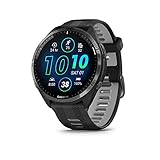
- Brilliant AMOLED touchscreen display with traditional button controls and lightweight titanium bezel
- Battery life: up to 23 days of battery life in smartwatch mode, up to 31 hours in GPS mode
- Confidently run any route using full-color, built-in maps and multi-band GPS
- Training readiness score is based on sleep quality, recovery, training load and HRV status to determine if you’re primed to go hard and reap the rewards (data presented is intended to be a close estimation of metrics tracked)
- Plan race strategy with personalized daily suggested workouts based on the race and course that you input into the Garmin Connect app and then view the race widget on your watch; daily suggested workouts adapt after every run to match performance and recovery
For races, long runs, gravel rides, or hikes, disabling AOD inside the activity’s power mode delivers a substantial battery gain. You still get full data access on demand, but the display stays truly off between checks.
This is one of the reasons Epix and Forerunner AMOLED users see such large differences between default and customized power modes. The hardware is capable; it just needs disciplined display behavior.
Touchscreen Control: Precision Beats Accidental Input
Touchscreens are fantastic for maps, menus, and daily navigation. During activities, they can be more trouble than they are worth.
Accidental touches from rain, sweat, gloves, or jacket cuffs not only disrupt the interface but also wake the display repeatedly. Each interaction costs power and can even pause or scroll data unintentionally.
For most endurance activities, disabling touch during the activity is the optimal setup. Buttons provide reliable, low-power control and reduce screen-on time.
There are exceptions. If you rely heavily on map panning or pinch-to-zoom during navigation-heavy hikes or ski touring, touch can be worth keeping enabled. In those cases, pair it with aggressive backlight and timeout settings to limit the damage.
Data Screens: Fewer Fields, Lower Refresh Cost
Every data field you add increases processing load. Fields that update frequently, such as pace, grade-adjusted pace, power, or real-time climb metrics, demand more frequent screen refreshes.
For battery-focused modes, simplify your data screens. Three to four fields per screen is a practical upper limit for long sessions, especially on AMOLED displays.
Avoid unnecessary animations and graph-style fields during endurance events. They look great, but they refresh constantly and provide little actionable value hour after hour.
If you need occasional detail, use multiple screens and scroll deliberately rather than cramming everything onto one page.
Maps and Navigation Screens: Use Them Intentionally
Maps are a double hit: they tax both GPS processing and display refresh. On AMOLED watches, they are particularly expensive when the screen stays active for navigation.
If you only need basic course guidance, rely on breadcrumb trails and turn prompts rather than full map screens. This preserves navigation utility without the constant redraw overhead.
When you do need maps, zoom level matters. Staying zoomed out reduces redraw frequency and processing load compared to constant panning at high detail.
For ultra-distance or expedition use, consider navigating primarily by alerts and occasional checks rather than continuous map display.
Auto Scroll, Alerts, and Background UI Features
Auto scroll sounds harmless, but it forces repeated screen refreshes whether you are looking or not. For long activities, it is best left off.
Frequent alerts, lap notifications, and excessive vibration also wake the screen repeatedly. Streamline alerts to only those that influence pacing, fueling, or navigation.
Locking the screen during activities can further reduce accidental interactions. On watches with a dedicated lock shortcut, this is a simple way to protect both data integrity and battery life.
Matching Screen Strategy to Activity Duration
For short workouts, prioritize readability and convenience. Gesture wake, touch, moderate brightness, and richer data screens are reasonable because total screen-on time remains limited.
For long training sessions, shift toward intention. Button wake, reduced brightness, simpler screens, and limited map usage strike a strong balance between usability and endurance.
For ultras and multi-day efforts, treat the display as a checkpoint tool, not a dashboard. Minimal wake behavior, no AOD, locked screens, and essential-only data preserve battery for the hours that truly matter.
Real-World Scenarios: Best Power Mode Setups for Short Workouts, Long Training Days, and Ultra-Endurance Events
All the individual settings discussed so far only reach their full potential when they are combined into a purpose-built power mode. Garmin’s strength is not just battery size, but the ability to tailor behavior at the activity level so the watch works differently for a 45-minute run than it does for a 30-hour ultra.
What follows are real-world power mode setups I use and recommend after testing across Forerunner, Fenix, Enduro, Epix, and Instinct lines. Think of these as starting templates rather than rigid rules.
Short Workouts (30–90 Minutes): Prioritize Convenience, Not Conservation
For short runs, rides, or gym sessions, battery preservation is largely irrelevant. The priority should be frictionless data access and a smooth software experience.
Use the default power mode or create a “Performance” mode that keeps full GPS accuracy enabled. All-systems or multi-band GPS is appropriate here, especially in urban areas or tree cover where clean tracks matter more than marginal battery savings.
Optical heart rate, Pulse Ox off, and all standard training metrics can stay active. The impact of sensors over an hour is negligible, and disabling them only adds setup complexity with no real gain.
Screen behavior should favor ease of use. Gesture wake, touch enabled, moderate to high brightness, and even always-on display on AMOLED watches are reasonable because screen-on time remains brief.
Maps, if needed, can be used freely. For city runs or structured bike workouts, having a live map screen visible improves safety and navigation without meaningfully affecting battery over a short duration.
This is also where richer data screens make sense. Multiple fields, color accents, charts, and auto scroll are fine if they help you stay engaged and informed.
Long Training Days (2–8 Hours): Balanced Endurance Without Sacrificing Insight
This is where custom power modes start paying real dividends. A long run, century ride, or extended hike can quietly drain 30–50 percent battery if left fully unrestricted.
Switch to a custom “Endurance” power mode rather than the default. GPS should remain high quality, but consider moving from multi-band to all-systems or even GPS-only if your environment allows it.
Optical heart rate stays on, but disable Pulse Ox entirely. Pulse Ox provides little actionable value during most training sessions and is one of the more power-hungry background sensors.
Screen strategy becomes intentional. Button wake only, reduced brightness, and simplified data screens with fewer fields keep the display from becoming the dominant drain.
Maps should be used selectively. Course following with turn prompts works well without leaving the map screen active. If you need to check position, glance briefly, then return to a low-refresh data screen.
Alerts deserve scrutiny here. Keep pace, heart rate, power, or fueling alerts that directly influence execution, but remove redundant lap or status notifications that add noise and vibration.
This setup preserves the metrics that drive training decisions while extending usable battery life enough to cover back-to-back sessions or a full day outdoors without charging anxiety.
Ultra-Endurance Events (12–48+ Hours): Battery Is the Primary Resource
For ultras, expeditions, and multi-day adventures, the power mode should feel almost austere. The watch becomes a tool for safety, tracking, and decision-making rather than constant feedback.
Start with Garmin’s Ultra or Expedition power mode as a base, then customize from there. GPS should be reduced thoughtfully rather than blindly minimized. On newer watches, UltraTrac-style adaptive sampling or reduced fix intervals can dramatically extend battery while maintaining acceptable track quality for open terrain.
Optical heart rate may still be useful, but be honest about its value. In cold weather, high fatigue, or technical terrain, wrist-based HR often degrades. Disabling it can yield meaningful savings over long durations.
The display should be locked down. No always-on display, no gesture wake, button-only interaction, low brightness, and screen lock enabled. Treat the screen like a checkpoint tool you consult deliberately.
Maps should be considered optional rather than default. Use breadcrumb navigation, alerts, and course cues instead of continuous map display. When maps are necessary, zoom out and check briefly rather than panning in detail.
Data screens should be stripped to essentials: elapsed time, distance, pace or speed, elevation, and remaining battery. Anything that does not inform safety, navigation, or pacing can be removed.
On watches like Enduro, Fenix Solar, or Instinct Solar, solar input becomes a real variable. Keeping the screen off as much as possible allows solar charging to offset background drain rather than fighting constant display usage.
Activity-Specific Tweaks That Matter More Than You Think
Cycling generally allows more aggressive power saving than running because the watch is stationary on the bars. Lower brightness, button wake, and limited screen interaction are easier to live with when you are not constantly checking cadence or form.
Trail running and hiking benefit from conservative GPS choices combined with occasional accuracy bursts. Using a higher-accuracy GPS mode only when navigating complex terrain can preserve battery without sacrificing safety.
Swimming and triathlon modes deserve special attention. In long-course triathlons or swimrun events, disable unnecessary screen behavior during the swim leg where interaction is minimal, then allow richer data during bike and run segments if battery allows.
Cold weather changes everything. Lithium batteries drain faster in low temperatures, so ultra modes that felt conservative in summer may be barely adequate in winter. Always build margin into cold-weather power modes.
Saving Multiple Power Modes and Assigning Them Intelligently
Garmin allows multiple custom power modes, and advanced users should take advantage of this. Create clearly named modes like “Run Short,” “Endurance Day,” and “Ultra Low” so selection becomes instinctive.
Assign power modes at the activity profile level rather than switching manually before every session. This reduces the chance of starting an ultra in a high-drain mode or accidentally neutering data during a key workout.
Revisit your modes every few months. Firmware updates, new metrics, and changes in training focus can all shift what is worth preserving versus what can be sacrificed.
Used correctly, Garmin’s power modes turn battery life from a limitation into a controllable variable. The goal is not to save power at all costs, but to spend it deliberately where it delivers the most value for the effort ahead.
Multi-Day and Expedition Use: Power Modes for Hiking, Backpacking, and Adventure Racing
Once you move beyond single-day training, power modes stop being a convenience feature and become a core planning tool. On a multi-day hike or expedition, battery life is not about finishing an activity with 20 percent remaining, but about ensuring the watch still records meaningful data on day three or day five without external charging.
Garmin’s power modes are especially powerful here because they allow you to trade precision for longevity in controlled, intentional steps. The goal is not to cripple the watch, but to stretch battery life while preserving navigation reliability, time awareness, and essential physiological signals.
Why Multi-Day Activities Demand a Different Power Strategy
Hiking, backpacking, and adventure racing differ from endurance sports like marathons or centuries because duration is unpredictable. Weather, terrain, navigation errors, and sleep cycles all extend recording time beyond neat estimates.
Unlike a race, you are rarely checking lap pace or power every few minutes. Most of the time the watch is worn for safety, navigation, and post-trip analysis, which means screen behavior and sensor sampling can be heavily optimized.
This is where Garmin’s Ultra and custom expedition-style power modes shine. They allow the watch to remain a reliable tool on your wrist rather than a battery liability.
GPS Strategy: The Biggest Battery Lever on Long Expeditions
For multi-day tracking, GPS choice matters more than any other setting. Standard multi-band or all-systems GPS is often unnecessary once you leave technical terrain and established trails.
💰 Best Value

- Designed with a bright, colorful AMOLED display, get a more complete picture of your health, thanks to battery life of up to 11 days in smartwatch mode
- Body Battery energy monitoring helps you understand when you’re charged up or need to rest, with even more personalized insights based on sleep, naps, stress levels, workouts and more (data presented is intended to be a close estimation of metrics tracked)
- Get a sleep score and personalized sleep coaching for how much sleep you need — and get tips on how to improve plus key metrics such as HRV status to better understand your health (data presented is intended to be a close estimation of metrics tracked)
- Find new ways to keep your body moving with more than 30 built-in indoor and GPS sports apps, including walking, running, cycling, HIIT, swimming, golf and more
- Wheelchair mode tracks pushes — rather than steps — and includes push and handcycle activities with preloaded workouts for strength, cardio, HIIT, Pilates and yoga, challenges specific to wheelchair users and more (data presented is intended to be a close estimation of metrics tracked)
For most backpacking and thru-hiking scenarios, GPS Only or UltraTrac-style modes provide sufficient track fidelity. Your recorded path may appear less smooth in tight switchbacks, but distance and elevation trends remain accurate enough for planning and review.
A smart compromise is creating two power modes: a low-drain navigation mode and a higher-accuracy “check-in” mode. Switch briefly to higher accuracy when route-finding, then revert to the low-power mode once you are back on track.
Mapping and Navigation Without Killing the Battery
Garmin’s mapping watches tempt users into constant screen interaction, which is disastrous for multi-day battery life. Continuous map panning and zooming keeps the display active and prevents the watch from entering low-power states.
Instead, rely on course alerts, breadcrumb tracks, and minimal glance checks. Configure your power mode to disable touch input and reduce backlight brightness, forcing intentional button-based interaction only when needed.
Turn-by-turn alerts, off-course warnings, and vibration cues consume far less power than constant map viewing and are more effective when you are tired or moving slowly.
Sensors to Keep, Sensors to Sacrifice
Heart rate tracking is often less critical on expeditions than during training, especially when movement is low-intensity and variable. Disabling wrist-based heart rate can dramatically extend battery life with minimal downside for most hikers.
Pulse Ox should almost always be disabled during activity on multi-day trips. Even on high-altitude expeditions, spot checks during rest periods are more efficient than continuous monitoring.
Altimeter, barometer, and compass sensors are generally worth keeping enabled. They consume relatively little power and provide meaningful safety and navigation value over long distances.
Screen Behavior: Set It and Forget It
Display settings quietly determine whether your watch lasts days or dies early. For expedition use, button wake only is non-negotiable.
Reduce timeout durations to the minimum and avoid data-heavy screens with animated graphs. A simple time-of-day and distance screen is often all you need while moving.
On AMOLED models, this matters even more. Disable always-on display during activities and keep brightness conservative to prevent exponential battery drain.
Cold Weather and Altitude: Building Margin Into Your Power Mode
Cold environments punish lithium batteries, sometimes cutting usable capacity by 30 percent or more. A power mode that looks safe on paper may become marginal overnight at altitude.
For winter backpacking or alpine objectives, assume worse-than-estimated battery life and build redundancy into your setup. Use more aggressive power saving than you think you need, especially overnight when the watch is still tracking.
Wearing the watch over a sleeve or storing it inside a sleeping bag at night can preserve battery health and improve real-world longevity.
Solar Models: How Power Modes Multiply Their Advantage
Solar-assisted Garmin watches benefit disproportionately from well-tuned power modes. The less power you consume per hour, the more meaningful solar charging becomes during daylight movement.
For long hikes in open terrain, pairing a low-drain GPS mode with minimal screen usage can allow solar input to offset a significant portion of daily consumption. This does not make the watch infinite, but it dramatically extends the window before external charging is required.
The key is consistency. Solar gains disappear quickly if brightness, GPS accuracy, or screen behavior creep upward during the day.
Adventure Racing and Stage-Based Events
Adventure racing adds complexity because activities shift rapidly between trekking, paddling, cycling, and navigation-heavy segments. One static power mode rarely works for the entire event.
Create discipline-specific power modes tied to activity profiles, such as a low-power trekking mode and a higher-detail cycling mode. Assign them ahead of time so transitions do not require menu diving under fatigue.
In navigation stages, prioritize GPS reliability and alerts. In transport stages, strip the watch down to essentials and let the battery recover as much as possible.
A Practical Expedition Power Mode Example
A proven expedition setup might use GPS Only or UltraTrac, wrist heart rate off, Pulse Ox off, button wake only, low brightness, vibration alerts enabled, and mapping limited to breadcrumb navigation.
This configuration preserves time, distance, elevation, and track data while allowing most Garmin outdoor watches to record continuously for multiple days. It also keeps the watch comfortable on the wrist, avoids constant interaction, and maintains reliability when conditions deteriorate.
For advanced users, saving a second “Navigation Boost” mode with higher GPS accuracy and temporary mapping access gives flexibility without committing to full-time battery drain.
Advanced Tips and Common Mistakes: Getting Maximum Battery Without Ruining Your Data
By this point, you’ve seen how flexible Garmin’s power modes can be when they’re aligned with your activity and environment. The final step is refinement: knowing where users accidentally throw away battery life, and where small adjustments preserve endurance without degrading the data you actually care about.
This is where most gains are made, especially for experienced users who already understand the basics.
Don’t Chase Maximum Battery at the Expense of Usable Metrics
The most common mistake is disabling too much at once in pursuit of headline battery numbers. A watch that lasts twice as long but fails to record elevation, laps, or a clean GPS track often defeats the purpose of wearing it.
Before turning anything off, ask a simple question: will I look at this data later to analyze effort, pacing, or navigation? If the answer is yes, protect it. If the answer is no, it’s a candidate for removal.
For example, wrist heart rate can often go during ultra-distance hikes or multi-day expeditions, but GPS accuracy and barometric altitude should almost always stay intact.
GPS Mode Selection Matters More Than Sensor Count
Users tend to fixate on secondary sensors while overlooking the largest drain: GNSS configuration. Switching from multi-band or multi-constellation tracking to GPS Only often saves more battery than disabling half a dozen smaller features combined.
For trail running, hiking, and bikepacking, GPS Only is usually sufficient and produces clean tracks unless you are in deep canyons or dense urban corridors. UltraTrac can be useful for expeditions, but it should be treated as a specialized tool, not a default.
A practical rule is to reduce GPS accuracy one step at a time and test the results. If the track still meets your needs, you’ve found free battery life.
Screen Behavior Is a Silent Battery Killer
Display settings are easy to underestimate because each interaction feels small. Over hours or days, frequent wrist gestures, high brightness, and long timeout durations quietly erode endurance.
Button-only wake is one of the highest-impact changes you can make for long activities. Pair it with conservative brightness and a short timeout, and your watch becomes far more efficient without sacrificing readability when you actually need it.
On AMOLED models, this is even more critical. On MIP displays, the gains are smaller but still meaningful during constant movement.
Be Selective With Alerts, Not Eliminative
Turning off all alerts to save battery often backfires. Smart alert use reduces screen checks, which in turn saves power.
Vibration alerts for laps, nutrition reminders, or navigation cues allow you to keep your head up and your screen dark. Sound alerts can usually be disabled, but vibration provides a strong return on investment in real-world endurance use.
The goal is fewer interactions, not zero feedback.
Activity-Specific Power Modes Beat Global Compromises
Another frequent error is trying to create one universal low-power mode for everything. Running, cycling, hiking, and paddling stress the watch differently and require different data priorities.
A lightweight running mode might preserve wrist heart rate and cadence while trimming display behavior. A cycling mode can drop wrist heart rate entirely if you use a chest strap. A hiking mode should favor GPS stability and altitude accuracy over physiological metrics.
Garmin allows you to tie power modes directly to activity profiles. Use that capability and avoid constant manual switching mid-session.
External Sensors Can Save Battery, Not Cost It
It seems counterintuitive, but pairing external sensors can reduce overall drain. Chest heart rate straps are more power-efficient than wrist-based optical sensors during long activities, especially in cold weather.
Similarly, cycling power meters and speed sensors allow the watch to rely less on GPS smoothing and wrist motion detection. The result is cleaner data and slightly lower internal sensor load.
For endurance athletes, this is one of the most overlooked optimizations.
Solar Watches Reward Discipline, Not Spikes
On solar-assisted models, consistency matters more than occasional restraint. One hour of high brightness or constant map interaction can erase an entire day’s worth of solar gain.
Treat solar input as a multiplier, not a safety net. Keep your power mode conservative throughout the day and let the solar layer quietly extend your margins.
This is especially important on long summer days where steady movement and low drain allow solar charging to meaningfully offset consumption.
Test Power Modes Before They Matter
Never debut a new power mode during a race, expedition, or unsupported outing. Even small configuration changes can have unintended consequences, such as missing alerts, incomplete tracks, or confusing post-activity summaries.
Test each mode during training sessions that mirror your real use. Check the recorded data afterward and confirm that nothing critical was lost.
Once validated, lock the configuration and stop tinkering unless conditions change.
Understand When Not to Use Power Modes
For short workouts or daily training sessions under two hours, aggressive power modes often provide negligible benefit. The battery saved rarely justifies the loss of convenience or data richness.
In these cases, Garmin’s default activity settings are usually well-balanced. Save power modes for long days, back-to-back sessions, or situations where charging access is uncertain.
Knowing when not to optimize is just as important as knowing how.
Bringing It All Together
Garmin’s power modes are not about stripping your watch to survival mode. They are about aligning power use with purpose, so every percentage of battery supports meaningful data.
When configured thoughtfully, power modes let your watch disappear on the wrist while continuing to do its job quietly and reliably. That balance is what turns a capable sports watch into a true endurance tool, whether you’re training for tomorrow’s workout or navigating deep into the backcountry for days at a time.