Most Garmin owners collect a huge amount of heart rate data without ever being taught how to use it. You finish a run, ride, or gym session, see colorful charts and percentages, and move on, unsure whether the workout actually moved you closer to your goals. Heart rate zones are the missing link that turns those numbers into clear training intent.
When you understand heart rate zones, your Garmin stops being a passive recorder and becomes a real-time coaching tool. Zones explain why some workouts should feel easy, why others should feel uncomfortably hard, and why doing everything at a “moderately hard” effort often leads to stalled progress and fatigue. This section will show you how zones work, how Garmin defines them, and how to make better daily training decisions using the data already on your wrist.
Heart rate zones translate effort into purpose
Heart rate zones are simply ranges of heart rate that correspond to different physiological stress levels. Each zone targets specific adaptations, such as aerobic endurance, fat oxidation, lactate threshold, or maximal cardiovascular output. Instead of guessing effort based on pace or feel alone, zones give you an objective measure of how hard your body is actually working.
This matters because your body does not adapt based on distance or time alone. It adapts based on internal load, which heart rate reflects more reliably than speed, especially across hills, heat, fatigue, or different sports. A slow run at the right heart rate can be far more effective than a fast run done in the wrong zone.
🏆 #1 Best Overall

- Easy-to-use running watch monitors heart rate (this is not a medical device) at the wrist and uses GPS to track how far, how fast and where you’ve run.Special Feature:Bluetooth.
- Battery life: up to 2 weeks in smartwatch mode; up to 20 hours in GPS mode
- Plan your race day strategy with the PacePro feature (not compatible with on-device courses), which offers GPS-based pace guidance for a selected course or distance
- Run your best with helpful training tools, including race time predictions and finish time estimates
- Track all the ways you move with built-in activity profiles for running, cycling, track run, virtual run, pool swim, Pilates, HIIT, breathwork and more
How Garmin calculates and displays heart rate zones
Garmin uses your maximum heart rate, resting heart rate, or lactate threshold heart rate to define zones, depending on your device and settings. By default, most Garmin watches use a percentage of estimated max heart rate, which is easy to understand but not always perfectly accurate. More advanced models allow zones based on heart rate reserve or lactate threshold, which better reflect individual fitness.
You can see zones live during an activity, after the workout in Garmin Connect, and summarized over weeks and months. Time in zone charts, intensity minutes, and training load all pull directly from this data. When zones are set correctly, these metrics become meaningful rather than just decorative graphs.
Why zone-based training improves endurance and performance
Endurance improvements come primarily from spending enough time in lower zones, especially what Garmin labels Zone 2. This zone builds mitochondrial density, capillary networks, and aerobic efficiency while keeping recovery demands low. Many athletes unintentionally train too hard here, drifting into higher zones and turning easy days into stressful ones.
Garmin’s real-time alerts and post-workout breakdowns help keep these sessions honest. If your watch shows prolonged time above the intended zone, it’s a clear signal to slow down, shift gears, or adjust resistance. Over weeks, consistently hitting the right zones leads to faster progress with less fatigue.
Using zones to burn fat without burning out
Fat oxidation is highest at relatively low to moderate intensities, typically in Garmin’s Zone 2 and low Zone 3. Training here allows longer sessions with manageable stress on joints, muscles, and the nervous system. For beginners and weight-focused athletes, this is where consistency becomes sustainable.
Garmin watches make this practical by showing zone distribution across all activities, not just runs or rides. Walking, elliptical sessions, and steady gym cardio all count when they land in the right range. This reinforces that effective fat loss is driven by repeatable effort, not maximal suffering.
Heart rate zones as an early warning system for overtraining
One of the most underrated benefits of heart rate zone awareness is fatigue management. If your heart rate climbs unusually fast or sits in higher zones at paces that used to feel easy, your body is signaling incomplete recovery. Garmin’s data makes this visible before performance drops or injury appears.
Metrics like elevated resting heart rate, reduced heart rate variability, and higher perceived effort at the same zones all point to the same conclusion: back off. Training by zones allows you to adjust intensity day by day instead of blindly following a plan that no longer matches your physiology.
Turning zone data into daily decisions, not just reports
Heart rate zones matter most during the workout, not after it. Garmin’s vibration alerts, color-coded screens, and customizable data fields let you respond in real time. You can slow down, push harder, or stop early based on objective feedback rather than motivation alone.
This is where smarter training decisions happen. Instead of asking whether you trained hard enough, you start asking whether you trained appropriately. Once you grasp this shift, your Garmin becomes less about tracking workouts and more about guiding them, setting the foundation for everything that follows in zone-based training.
What Heart Rate Zones Actually Are (And the Physiology Behind Each Zone)
Once you start making daily decisions based on heart rate, the next logical question is what those zones actually represent inside your body. Heart rate zones are not arbitrary ranges invented by watch companies. They are practical intensity bands that reflect how your cardiovascular, muscular, and metabolic systems respond to increasing workload.
Your Garmin isn’t just showing effort levels. It is giving you a simplified window into which energy systems you are stressing, how much fatigue you are accumulating, and what type of adaptation you are likely to get from a session.
How heart rate zones are defined in Garmin
Most Garmin watches divide intensity into five zones, displayed consistently across running, cycling, gym cardio, and many other activities. By default, these zones are based on percentages of your maximum heart rate, but Garmin allows deeper customization if you want more precision.
You can set zones using estimated max heart rate, tested max heart rate, heart rate reserve, or lactate threshold heart rate. For beginners, the default setup is usually good enough to start training smarter. For intermediate athletes, switching to lactate threshold–based zones often improves accuracy, especially for endurance work.
Garmin calculates and updates these values using a mix of age-based formulas, detected performance trends, and test data from hard workouts. If you use a chest strap, the zone accuracy improves further, especially during intervals, hills, or strength sessions where wrist-based sensors can lag.
Zone 1: Very easy effort and recovery physiology
Zone 1 sits at the lowest end of the intensity spectrum. Breathing is relaxed, conversation is effortless, and fatigue accumulation is minimal. Physiologically, your body is relying almost entirely on aerobic metabolism with very low stress on muscles, tendons, and the nervous system.
Blood flow increases without significant lactate production, which helps deliver oxygen and nutrients while clearing metabolic byproducts. This makes Zone 1 ideal for recovery days, warm-ups, cool-downs, and adding low-stress movement on rest days.
On your Garmin, Zone 1 time often comes from walking, easy cycling, or light cardio circuits. While it may not feel like “training,” this zone supports consistency by promoting circulation and recovery without interfering with harder sessions.
Zone 2: Aerobic base and fat oxidation
Zone 2 is where endurance fitness is built. Effort feels steady and controlled, breathing is deeper but still conversational, and you can sustain this intensity for long periods. This zone places a strong demand on your aerobic system while remaining metabolically efficient.
At this intensity, your muscles rely heavily on fat oxidation and improve mitochondrial density, capillary development, and oxygen utilization. These adaptations increase your ability to sustain effort later at higher intensities with less fatigue.
Garmin users often underestimate how slow Zone 2 can feel at first. If your watch shows you drifting into Zone 3 at paces you used to consider easy, it is not a failure. It is feedback that your aerobic base is still developing or that fatigue is present.
Zone 3: Moderate intensity and aerobic stress
Zone 3 sits in the middle ground where training starts to feel like work. Breathing becomes rhythmic and focused, conversation is broken, and sessions here create noticeable fatigue. Physiologically, you are still aerobic, but lactate production begins to rise faster than clearance.
This zone improves muscular endurance and cardiovascular capacity, but it comes with a higher recovery cost than Zone 2. Frequent training here without enough easy volume or recovery can stall progress, especially for runners and cyclists.
Garmin data often reveals how much unintentional Zone 3 training people do. Long runs that creep too fast or steady rides pushed slightly too hard can accumulate stress without delivering the benefits of true high-intensity work.
Zone 4: Threshold training and performance development
Zone 4 corresponds closely to lactate threshold for many athletes. Effort is hard but controlled, breathing is deep and forceful, and sustaining this intensity requires focus. This is where performance gains become very specific and very taxing.
Physiologically, your body is operating near its limit for balancing lactate production and clearance. Training here improves your ability to hold faster paces or higher power outputs for longer before fatigue forces you to slow down.
Garmin watches shine in this zone by helping you stay precise. Real-time alerts keep you from overshooting into unsustainable intensity or backing off too much. Because recovery demands are high, Zone 4 sessions should be deliberate, not accidental.
Zone 5: Maximum effort and anaerobic capacity
Zone 5 represents near-maximal to maximal effort. Breathing is rapid, speech is impossible, and intensity can only be sustained briefly. This zone stresses anaerobic pathways, neuromuscular coordination, and maximal cardiovascular output.
Adaptations here include improved VO2 max, speed, and power, but fatigue accumulates quickly. These efforts place significant strain on the nervous system and require ample recovery to be productive.
On your Garmin, Zone 5 usually appears during short intervals, sprints, or hard hill efforts. The data is most useful for confirming that you reached sufficient intensity rather than trying to hold the zone for long durations.
Why zones are ranges, not rigid rules
Heart rate zones are intentionally broad because physiology is not static. Hydration, sleep, heat, stress, altitude, and cumulative fatigue all affect heart rate responses on any given day. Garmin reflects this reality by showing trends rather than pretending every session is identical.
If your heart rate sits higher than expected for a given pace, the zone shift is valuable information, not an error. It tells you something about readiness and recovery that pace or power alone cannot capture.
Learning to interpret these fluctuations is what turns zone-based training into a skill. Your Garmin provides the data, but understanding what those zones mean inside your body is what allows you to train with intent instead of habit.
How Garmin Calculates Your Heart Rate Zones: Max HR, LTHR, and HRR Explained
Once you understand what each heart rate zone feels like in your body, the next step is understanding how your Garmin decides where those zones begin and end. Garmin does not use a single universal method. Instead, it gives you three physiologically different models to choose from, each suited to different experience levels and training goals.
These methods are based on Max Heart Rate, Lactate Threshold Heart Rate (LTHR), and Heart Rate Reserve (HRR). Choosing the right one is less about which is “best” and more about which best reflects how your body actually responds to training.
Max Heart Rate (Max HR): The default and most widely used method
Max HR zones are calculated as percentages of your maximum heart rate, which is the highest number of beats per minute your heart can reach during an all-out effort. Garmin often estimates this automatically using age-based formulas at first, then refines it over time using workout data if you allow auto-detection.
This method is simple and works reasonably well for beginners. It is also the most common system used in group classes, gym cardio equipment, and general fitness advice, which makes it familiar and easy to follow.
The limitation is precision. Two people of the same age can have vastly different true max heart rates, and small errors at the top shift every zone below it. If your Max HR is underestimated, Garmin may label moderate efforts as “too hard,” and if it is overestimated, you may never appear to reach higher zones even when working hard.
How Garmin estimates and updates Max HR
Modern Garmin watches use a combination of workout intensity, heart rate response, and recovery patterns to refine Max HR automatically. Hard intervals, races, and long climbs where heart rate plateaus are especially informative for the algorithm.
For this to work well, you need consistent data and a snug, stable fit so the optical sensor can read accurately. Chest straps improve accuracy further, especially during high-intensity efforts where wrist-based readings can lag or spike.
You can also manually set Max HR if you have lab-tested data or have completed a true maximal field test. This is often worthwhile once you have some training experience and want cleaner zone boundaries.
Lactate Threshold Heart Rate (LTHR): The performance-focused option
LTHR is the heart rate you can sustain for a prolonged hard effort before fatigue rapidly accelerates due to lactate accumulation. For most trained athletes, this corresponds to roughly a 30–60 minute all-out effort, depending on sport and conditioning.
Garmin calculates LTHR automatically using structured workouts, steady-state efforts, and heart rate variability patterns, provided your watch supports threshold detection. This feature is most reliable for runners and cyclists using compatible devices and, ideally, a chest strap.
Zones based on LTHR tend to feel more accurate at moderate to high intensities. Tempo and threshold workouts sit exactly where they should, making this method popular with endurance athletes training for performance rather than general fitness.
Rank #2

- Easy-to-use running smartwatch with built-in GPS for pace/distance and wrist-based heart rate; brilliant AMOLED touchscreen display with traditional button controls; lightweight design in 43 mm size
- Up to 11 days of battery life in smartwatch mode and up to 19 hours in GPS mode
- Reach your goals with personalized daily suggested workouts that adapt based on performance and recovery; use Garmin Coach and race adaptive training plans to get workout suggestions for specific events
- 25+ built-in activity profiles include running, cycling, HIIT, strength and more
- As soon as you wake up, get your morning report with an overview of your sleep, recovery and training outlook alongside weather and HRV status (data presented is intended to be a close estimation of metrics tracked)
Why LTHR-based zones often feel “right” during hard training
Unlike Max HR, which anchors zones to a rarely reached ceiling, LTHR is tied to a physiologically meaningful point you train near frequently. This reduces the impact of day-to-day heart rate drift and makes zones more stable across conditions.
If you notice that Garmin’s Zone 4 and Zone 5 efforts finally match how hard the workout feels, that is usually a sign LTHR is a better model for you. It is especially useful for structured intervals, race-pace training, and long sustained efforts.
The trade-off is accessibility. Beginners often lack the consistent data or pacing control needed for accurate threshold detection, and the zones can be misleading early on.
Heart Rate Reserve (HRR): Accounting for fitness and recovery
Heart Rate Reserve uses both Max HR and resting heart rate to calculate zones. The formula subtracts resting heart rate from Max HR, then applies zone percentages to that usable range before adding resting heart rate back in.
This approach accounts for cardiovascular efficiency. As fitness improves and resting heart rate drops, HRR-based zones adjust automatically, even if Max HR stays the same.
Garmin supports HRR zone calculation across many models, and it can be particularly effective for recreational athletes, weight loss goals, and cross-training where relative effort matters more than race-specific pacing.
When HRR can outperform Max HR zones
Two athletes with the same Max HR but different resting heart rates do not experience effort the same way. HRR reflects this difference, often making easy zones truly easy and moderate zones more realistic.
If you find that Zone 2 feels too hard or recovery days never seem to register as low intensity, HRR is often the fix. It is also useful during periods of stress or poor sleep, when resting heart rate rises and training capacity temporarily drops.
Accurate resting heart rate data is critical here, which means wearing your Garmin consistently, including during sleep, and ensuring good overnight sensor contact.
Which zone method should you use on your Garmin?
For beginners, Max HR is a perfectly acceptable starting point, especially while learning to associate effort with numbers. As training becomes more structured and intentional, HRR or LTHR usually provides better alignment with how workouts actually feel.
Endurance athletes focused on pace, power, and race performance will benefit most from LTHR-based zones once enough data is available. Recreational athletes balancing fitness, health, and recovery often do best with HRR.
Garmin allows you to switch methods easily in Garmin Connect, and experimenting is encouraged. The goal is not to chase perfect numbers, but to choose a model that helps you train consistently, recover well, and progress without guesswork.
Setting Up and Customising Heart Rate Zones on Your Garmin Watch and Garmin Connect
Once you have chosen a zone method that matches your training goals, the next step is making sure your Garmin is actually using it. This is where many athletes go wrong, assuming the watch automatically applies the most appropriate model.
Garmin gives you deep control over heart rate zones, but those settings live across both the watch and Garmin Connect. Understanding where to make changes, and how they interact, ensures the data you see during workouts truly reflects effort rather than guesswork.
Where heart rate zones are controlled in the Garmin ecosystem
All heart rate zone calculations are ultimately managed through Garmin Connect, not just the watch itself. The watch displays and uses the zones, but the logic and thresholds sync from your account profile.
In Garmin Connect (mobile app or web), zones are set under your user profile, then applied across compatible devices. Any changes you make will sync to your watch the next time it connects via Bluetooth or Wi‑Fi.
If you own multiple Garmin watches, this centralized approach keeps your zones consistent across devices, whether you are running with a Forerunner, cycling with an Edge, or wearing a Fenix all day.
Step-by-step: selecting your heart rate zone calculation method
Open Garmin Connect and navigate to your profile settings, then Heart Rate Zones. From there, you can choose between Max HR, Heart Rate Reserve, or Lactate Threshold, depending on your watch model and available data.
Once selected, Garmin will automatically calculate zone boundaries using the percentages tied to that method. You can accept these defaults initially, which is recommended unless you have lab-tested values.
After saving, sync your watch and confirm the zones directly on the device under User Profile or Heart Rate settings. This verification step prevents mismatches between what the app shows and what the watch uses during training.
Manually adjusting zone boundaries when needed
Garmin allows manual editing of each zone’s upper and lower limits. This is useful if you have testing data, coach-provided targets, or consistently find a specific zone feels misaligned.
Manual adjustments should be made cautiously and infrequently. Small changes of 2–3 beats per minute are usually enough, and large shifts often indicate the wrong calculation method rather than incorrect zones.
If you manually edit zones, keep a note of when and why you changed them. This context matters when reviewing long-term trends in Garmin Connect or interpreting training load and recovery metrics.
Sport-specific heart rate zones and why they matter
Garmin supports different heart rate zones for different activity types on many watches. Running, cycling, and swimming can each use unique zones that reflect how heart rate behaves in those sports.
Cycling heart rate typically runs lower than running at the same perceived effort, especially for athletes with a strong endurance base. Using shared zones across all sports often overestimates cycling intensity and underestimates recovery.
If your watch supports it, enable sport-specific zones in Garmin Connect. This ensures your aerobic load, intensity minutes, and recovery recommendations are based on realistic physiological effort.
Ensuring accurate Max HR, resting HR, and threshold inputs
Heart rate zones are only as good as the numbers behind them. Garmin can auto-detect Max HR and Lactate Threshold on supported watches, but these features rely on consistent, quality data.
Wear your watch snugly during workouts and overnight to capture resting heart rate accurately. Optical sensors perform best with steady contact, especially on lighter polymer cases with curved casebacks like those used on Forerunner and Fenix models.
For higher accuracy during intervals or strength training, pairing a chest strap improves signal stability. Garmin’s dual-band ANT+ and Bluetooth straps integrate seamlessly and can refine threshold detection over time.
Using heart rate alerts and data screens during workouts
Once zones are set, make them actionable by configuring alerts. Heart rate alerts can notify you when you drift above or below a target zone, keeping easy days easy and hard sessions honest.
Custom data screens showing current zone, average heart rate, and time in zone are especially useful for steady aerobic work. On AMOLED displays like the Venu series, zone color coding is easy to read at a glance, even in the gym.
For endurance sessions, pairing heart rate with pace or power provides context. Heart rate alone tells you effort, but combined metrics explain why that effort is changing.
Common setup mistakes that skew zone-based training
One frequent mistake is setting zones once and never revisiting them. As fitness improves, resting heart rate often drops, thresholds shift, and zones need recalibration.
Another issue is relying on wrist heart rate during activities with heavy wrist movement, such as kettlebells or rowing. In these cases, erratic readings can distort zone time and training load calculations.
Finally, many users forget to sync after changing settings. If your watch still feels “off,” force a sync and restart the device to ensure the updated zones are active.
How zone settings influence Garmin’s training metrics
Heart rate zones directly affect metrics like Training Load, Aerobic and Anaerobic Effect, Intensity Minutes, and recovery time. Incorrect zones can make easy training look stressful or hide accumulated fatigue.
Garmin’s algorithms assume your zones reflect true physiological intensity. When they do, features like Daily Suggested Workouts and Training Readiness become far more useful and trustworthy.
Taking the time to set up zones properly is not just about cleaner charts. It is about making every metric on your watch align with how your body actually responds to training.
Understanding Garmin’s Five-Zone Model: What Each Zone Feels Like and Trains
Once your zones are set correctly, the next step is knowing what those numbers actually mean when you are moving. Garmin’s five-zone model maps heart rate to physiological stress, giving structure to how hard you train and why certain sessions feel the way they do.
These zones are displayed consistently across Garmin watches and in Garmin Connect, whether you are running, cycling, or logging a gym workout. The colors, alerts, and post-workout charts all reference this same framework, so understanding it turns raw heart rate data into meaningful feedback.
Zone 1: Very Easy / Recovery
Zone 1 typically sits below about 60 percent of your maximum heart rate or well under your lactate threshold if zones are threshold-based. This is the lightest intensity Garmin tracks, often shown as grey or pale blue on your watch and in Connect.
It feels extremely easy. You can breathe through your nose, hold a full conversation, and your legs feel loose rather than loaded. Many people underestimate how slow this zone feels, especially runners coming from pace-based training.
Physiologically, Zone 1 promotes blood flow, supports recovery, and helps clear metabolic byproducts without adding fatigue. Garmin counts time here toward Intensity Minutes only at a reduced rate, but it plays a key role in recovery days, warm-ups, cool-downs, and between hard intervals.
Zone 2: Easy Aerobic / Endurance Base
Zone 2 generally spans roughly 60 to 70 percent of max heart rate. On Garmin watches, this is the zone most endurance athletes aim to accumulate over weeks and months.
Rank #3

- Nautical smartwatch features a 1.4" stunning AMOLED display with a titanium bezel and built-in LED flashlight
- Built-in inReach technology for two-way satellite and LTE connectivity (active subscription required; coverage limitations may apply, e.g., satellite coverage up to 50 miles offshore; some jurisdictions regulate or prohibit the use of satellite communication devices)
- Boat mode brings your vessel-connected apps to the forefront that let you control your autopilot and give you access to trolling motor and other boat data — so you can easily take command from your smartwatch
- Keep your focus on the water, and control your compatible chartplotter via Bluetooth connectivity with voice commands
- Enjoy comprehensive connectivity and remote control capabilities with select compatible Garmin chartplotters, autopilots, Force trolling motors, Fusion stereos and more
The effort feels comfortable but purposeful. Breathing deepens, conversation is still possible in full sentences, and you feel like you could continue for a long time without strain.
This zone builds aerobic efficiency by improving mitochondrial density, fat oxidation, and cardiovascular durability. Garmin’s Training Load labels Zone 2 work as low aerobic, and consistent time here is what allows features like Training Readiness to trend positively instead of showing chronic fatigue.
Zone 3: Moderate / Tempo
Zone 3 sits in the middle and is often the most misunderstood. It typically ranges from about 70 to 80 percent of max heart rate, depending on how your zones are set.
It feels steady but noticeably harder. You can still talk, but only in short phrases, and the effort requires concentration. This is the intensity many people drift into unintentionally on “easy” days.
Zone 3 trains aerobic power and muscular endurance, but it also generates more fatigue than Zones 1 and 2. Garmin will often flag long sessions here as moderate aerobic load, which can be useful in controlled doses but counterproductive if it dominates your week.
Zone 4: Hard / Threshold
Zone 4 aligns closely with lactate threshold for most athletes. On Garmin devices, this zone is critical because it strongly influences Training Effect, recovery time, and suggested workouts.
The effort feels hard and focused. Breathing is heavy, conversation is limited to single words, and you are counting minutes rather than enjoying the scenery.
Training here improves your ability to sustain higher speeds or power outputs without fatiguing quickly. Garmin’s algorithms interpret Zone 4 time as high aerobic load, so frequent sessions here require sufficient recovery to avoid declining Training Readiness scores.
Zone 5: Very Hard / Anaerobic
Zone 5 is the highest intensity, usually above 90 percent of max heart rate. On your watch, it often appears briefly during sprints, surges, or short hill repeats.
It feels explosive and uncomfortable. Breathing is rapid, muscles burn, and efforts are measured in seconds rather than minutes.
This zone targets anaerobic capacity, neuromuscular power, and speed development. Garmin treats Zone 5 time as anaerobic load, which heavily impacts recovery calculations even if total duration is short, making accurate heart rate data especially important here.
Why zones feel different across sports and devices
The same heart rate zone can feel different depending on the activity. Cycling often produces lower heart rates than running at similar perceived effort, while gym workouts may show delayed spikes due to intermittent movement.
Garmin applies sport-specific profiles but still uses the same underlying zone model. This is why pairing heart rate with pace, power, or reps gives better context, especially when wrist-based sensors are affected by grip tension or vibration.
Understanding these sensations alongside the numbers helps you trust what your watch is telling you. When effort, feeling, and data align, heart rate zones stop being abstract percentages and become a practical guide for daily training decisions.
How to Train in Each Heart Rate Zone: Practical Workouts for Endurance, Fat Loss, and Performance
Once you understand how each zone feels and how Garmin interprets it, the next step is turning those zones into purposeful training. This is where heart rate data stops being passive information and becomes an active coaching tool on your wrist.
Rather than chasing speed or distance every session, you choose the physiological outcome first. Endurance, fat metabolism, threshold improvement, or speed, then let heart rate guide the effort regardless of terrain, weather, or fatigue.
Zone 1: Recovery and Circulation
Zone 1 sessions are not workouts you “push.” They are deliberate recovery tools that keep you moving while minimizing stress on the nervous system.
A typical Zone 1 session might be a 20 to 40 minute easy walk, gentle spin on the bike, or very light jog the day after a hard session. On Garmin, you want to see Training Effect close to zero and minimal recovery time added.
This zone is ideal when Training Readiness is low or HRV status shows imbalance. Using Zone 1 instead of complete rest often improves circulation, reduces stiffness, and helps you feel fresher the next day without compromising recovery metrics.
Zone 2: Aerobic Base and Fat Oxidation
Zone 2 is where long-term endurance is built. It develops mitochondrial density, improves fat metabolism, and creates the aerobic foundation that supports all higher-intensity work.
A classic Zone 2 workout is a steady 45 to 90 minute run, ride, or brisk hike where heart rate stays stable and breathing remains controlled. On Garmin, pace may feel slow at first, but heart rate should stay comfortably within the zone without frequent alerts.
This is also the most effective zone for fat loss when paired with sufficient volume and consistency. Garmin’s calorie burn estimates and aerobic Training Effect respond strongly to accumulated Zone 2 time, making this zone ideal for users focused on health, weight management, and endurance longevity.
Zone 3: Tempo Endurance and Efficiency
Zone 3 sits in a tricky middle ground. It is too hard to be recovery-focused, but not hard enough to maximize high-intensity adaptations.
Used intentionally, Zone 3 improves muscular endurance and efficiency at moderate intensities. A practical workout might be a 30 to 50 minute steady session slightly faster than Zone 2, such as a controlled tempo ride or progression run where heart rate gradually rises into low Zone 3.
Garmin will often label these sessions as moderate aerobic load. They are useful during base-building phases or for time-crunched athletes, but frequent unplanned Zone 3 training can lead to accumulated fatigue without clear performance gains.
Zone 4: Threshold Development and Performance Gains
Zone 4 training is where performance starts to change noticeably. It improves lactate threshold, allowing you to sustain faster paces or higher power with less fatigue.
A common Zone 4 workout is intervals such as 3 to 5 repeats of 6 to 10 minutes at threshold effort, with equal or slightly shorter recovery in Zone 2. Garmin’s workout builder makes these sessions easy to follow with on-watch alerts and post-workout Training Effect feedback.
Because Garmin heavily weights Zone 4 time in recovery calculations, these sessions should be planned, not accidental. If you see rising recovery time or declining Training Readiness after repeated threshold days, it is a sign that intensity distribution needs adjusting.
Zone 5: Speed, Power, and Anaerobic Capacity
Zone 5 is reserved for short, sharp efforts. It develops top-end speed, anaerobic capacity, and neuromuscular coordination.
Effective Zone 5 workouts are brief by design. Examples include 6 to 10 hill sprints lasting 20 to 40 seconds, or short track intervals with full recovery until heart rate drops back into Zone 2. On Garmin, total Zone 5 time may only be a few minutes, but anaerobic Training Effect will spike quickly.
These sessions place high stress on muscles and connective tissue. Garmin’s recovery metrics often respond more to Zone 5 than total workout duration, making it essential to space these efforts appropriately and avoid stacking them on days when sleep or HRV are already compromised.
How to Combine Zones Across a Training Week
Effective training is not about living in one zone. It is about balance.
For most recreational athletes, a weekly structure where the majority of time is spent in Zones 1 and 2, with one to two Zone 4 sessions and occasional Zone 5 work, aligns well with Garmin’s performance and recovery models. This distribution supports steady fitness gains without driving chronic fatigue.
Garmin Connect makes this visible through weekly intensity minutes, load focus charts, and Training Status trends. When these indicators stay stable or improve, it is a sign your zone-based approach is working as intended.
Using Garmin Features to Stay in the Right Zone
Real-world training rarely happens on flat roads or perfect tracks. Heart rate zones help normalize effort when conditions change.
Garmin’s real-time heart rate alerts, workout targets, and pace or power overlays allow you to adjust on the fly. If heart rate drifts upward during a long Zone 2 run, slowing down is not failure, it is correct execution.
For wrist-based sensors, snug fit and stable positioning matter, especially in Zones 4 and 5. During high-intensity or interval-heavy training, pairing a chest strap improves accuracy and ensures Garmin’s load and recovery metrics reflect the true physiological cost of the session.
By matching each session to a specific heart rate zone and purpose, your Garmin watch becomes more than a tracker. It becomes a training guide that adapts to your fitness, protects recovery, and supports long-term progress across endurance, fat loss, and performance goals.
Using Heart Rate Zones Across Sports: Running, Cycling, Gym Training, and Cardio Classes
Once you understand what each heart rate zone represents physiologically, the next step is applying those zones intelligently across different types of training. The numbers on your Garmin do not change between sports, but how you interpret and use them absolutely should.
Each activity places different demands on muscles, joints, and the cardiovascular system. Garmin’s strength is that it keeps effort consistent across those contexts, even when pace, power, or movement patterns vary.
Running: Controlling Effort When Pace Lies
Running is where most athletes first encounter heart rate zone training, and it is also where it becomes most valuable. Terrain, weather, fatigue, and accumulated load can all distort pace, but heart rate reflects internal effort.
Easy runs should live comfortably in Zone 2, even if that means running slower than expected. Garmin’s wrist-based optical sensor is generally reliable here, and the watch’s comfort and lightweight design make long aerobic runs easy to tolerate without strap irritation.
For tempo and interval sessions, Zones 3 and 4 help prevent common pacing mistakes. If heart rate spikes too early in a workout, it is a sign the effort is unsustainable, even if pace initially feels controlled.
During high-intensity intervals that push Zone 5, heart rate lag becomes more noticeable. This is where pairing a chest strap improves responsiveness, especially on watches like the Forerunner and Fenix lines that support advanced training load and recovery analytics.
Rank #4
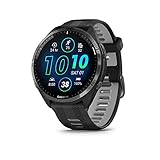
- Brilliant AMOLED touchscreen display with traditional button controls and lightweight titanium bezel
- Battery life: up to 23 days of battery life in smartwatch mode, up to 31 hours in GPS mode
- Confidently run any route using full-color, built-in maps and multi-band GPS
- Training readiness score is based on sleep quality, recovery, training load and HRV status to determine if you’re primed to go hard and reap the rewards (data presented is intended to be a close estimation of metrics tracked)
- Plan race strategy with personalized daily suggested workouts based on the race and course that you input into the Garmin Connect app and then view the race widget on your watch; daily suggested workouts adapt after every run to match performance and recovery
Cycling: Why Heart Rate Complements Power
Cycling introduces a unique challenge because power output does not always reflect physiological strain. Heat, dehydration, and fatigue can drive heart rate higher at the same wattage, and Garmin captures that drift clearly.
Zone 2 rides are foundational for endurance cyclists, and heart rate is often a better limiter than speed or distance. Keeping heart rate steady helps prevent turning an endurance ride into an accidental tempo session.
For interval work, Zones 4 and 5 align closely with threshold and VO2 max efforts. Garmin’s ability to display heart rate alongside power, cadence, and elevation allows cyclists to see when cardiovascular strain is rising faster than mechanical output.
Bike vibrations and hand pressure can interfere with wrist sensors, especially during sprints or rough roads. A chest strap improves data quality and ensures Garmin’s Training Load and Recovery Time calculations stay accurate.
Gym Training: Managing Cardiovascular Stress in Strength Work
Heart rate zones are often misunderstood in the gym, but they still provide valuable context. Traditional strength training rarely produces long stretches in a single zone, instead creating short spikes into Zones 3 or 4 during compound lifts.
Garmin classifies most lifting sessions as low aerobic or anaerobic load, depending on rest periods and movement density. Watching heart rate trends helps you understand whether a session is neurologically demanding or metabolically taxing.
Circuit training, supersets, and high-rep work often push sustained time in Zone 3. This is not inherently bad, but stacking these sessions too frequently can interfere with recovery, something Garmin’s HRV and Training Status metrics will flag.
Because wrist flexion and gripping can disrupt optical readings, chest straps are again useful here. Comfort matters as well, and lighter Garmin models with softer straps tend to interfere less with barbell and dumbbell movements.
Cardio Classes and Group Fitness: Staying Honest About Intensity
Cardio classes like spin, HIIT, bootcamp, and rowing intervals are where heart rate zones add immediate clarity. Music, coaching energy, and group dynamics often push effort higher than intended.
Garmin watches make it easy to see whether you are spending most of the class in Zone 3 or repeatedly touching Zones 4 and 5. This matters because frequent high-intensity classes can quietly accumulate fatigue even when sessions feel short.
Zone distribution after class tells the real story. A workout dominated by Zone 4 with repeated Zone 5 spikes carries a much higher recovery cost than one centered on Zone 2 and 3, regardless of calorie burn.
Battery life and durability also come into play here. Sweat resistance, secure straps, and clear displays ensure your Garmin remains readable mid-session without distraction or adjustment.
Adapting Zones When Switching Sports
Heart rate zones are sport-agnostic, but your response to each sport is not. Many athletes notice higher heart rates when running compared to cycling at similar perceived effort due to greater muscle recruitment and impact forces.
Garmin allows sport-specific profiles while keeping zones consistent, which helps you compare effort across activities without redefining thresholds. Over time, trends in heart rate response across sports reveal where your aerobic base is strongest and where efficiency can improve.
The key is consistency, not perfection. Using heart rate zones as a guide across all training modalities helps align effort with intent, protects recovery, and ensures that no single sport quietly undermines your overall progress.
Reading and Interpreting Post-Workout Zone Data in Garmin Connect
Once the workout ends, the real learning begins. Garmin Connect turns your heart rate zones into a visual report of how closely your effort matched your intention, regardless of sport.
Instead of relying on how the session felt, zone data shows where your cardiovascular system actually spent time. This is where smart adjustments are made for the next workout, not during it.
Where to Find Zone Data After a Workout
Open the activity in Garmin Connect on your phone or desktop, then scroll past the summary to the heart rate section. You will see a time-in-zones chart showing minutes and percentages spent in each zone.
This chart is paired with a continuous heart rate graph that overlays zones across the entire session. Together, these views reveal not just how hard you worked, but when intensity rose or drifted.
On compatible watches, tapping into laps or intervals adds another layer. You can see zone distribution per interval, which is especially valuable for structured workouts, tempo runs, and gym circuits.
Understanding Time-in-Zone Distribution
Time spent in each zone tells a different training story than average heart rate. A low average can still hide frequent spikes into Zones 4 and 5 that increase fatigue and recovery demands.
For aerobic base or fat-oxidation sessions, the goal is usually a dominant Zone 2 bar with minimal spill into Zone 3. If Zone 3 creeps higher than planned, it often signals pacing drift, heat stress, or poor fueling.
Hard workouts look different by design. Intervals and races will show deliberate Zone 4 and 5 exposure, but the key is whether those minutes align with your training plan rather than appearing randomly.
Using the Heart Rate Graph to Spot Pacing Errors
The heart rate graph shows how smoothly your effort unfolded. A steady line within a zone suggests controlled pacing, while sawtooth patterns indicate repeated surges or inconsistent effort.
Early spikes into higher zones are a common red flag. If your heart rate jumps to Zone 4 in the first minutes of a workout meant to be easy, it often points to insufficient warm-up or starting too fast.
Late-session drift also matters. A gradual rise in heart rate at the same pace or power, known as cardiac drift, suggests dehydration, heat buildup, or fatigue accumulating faster than expected.
Connecting Zones to Training Effect and Load
Garmin translates your zone distribution into Aerobic and Anaerobic Training Effect scores. These are driven largely by how much time you spend above Zone 3 and how often intensity changes.
A workout heavy in Zone 2 typically produces a low to moderate aerobic effect with minimal anaerobic stimulus. Sessions with repeated Zone 4 and 5 efforts raise both training effect and overall training load.
Watching how these metrics respond over weeks is more valuable than any single workout. Consistently high load from frequent high-zone sessions can explain stagnation or declining Training Status even when motivation is high.
Interpreting Zone Data Across Different Sports
Zone distribution should be interpreted within the context of the sport. Running often shows higher zones at lower perceived effort compared to cycling or rowing due to impact and muscle recruitment.
Strength training sessions may show brief spikes into higher zones during sets, followed by extended Zone 1 recovery. This pattern is normal and should not be mistaken for endurance stress.
Garmin Connect allows you to compare activities side by side. Over time, you may notice certain sports consistently pushing you into higher zones, which helps guide recovery planning and weekly balance.
Spotting Sensor and Fit Issues in the Data
Post-workout zone charts can also reveal measurement problems. Sudden drops to unrealistically low heart rates or instant jumps to max effort often point to optical sensor disruption.
Wrist-based readings are more sensitive to strap tightness, sweat, arm tension, and temperature. Slimmer Garmin watches with lighter cases and softer straps tend to stay more stable during longer sessions.
If zone data looks erratic during intervals or strength work, comparing it with chest strap data can clarify whether the issue is physiology or hardware. Accurate zones depend on consistent, reliable heart rate input.
Turning Zone Insights Into Next-Session Decisions
The most useful question after reviewing zone data is whether the workout matched its purpose. If an easy day drifted too hard, the correction happens in the next session, not by adding intensity later.
Likewise, if a hard workout never reached its intended zones, fatigue, fueling, or recovery may need adjustment. Garmin’s Recovery Time and Body Battery metrics often support what the zone data already suggests.
By regularly reviewing zone distribution in Garmin Connect, training becomes intentional rather than reactive. The watch stops being a passive tracker and becomes an active coaching tool guiding smarter effort choices.
Common Mistakes With Heart Rate Zone Training (And How to Avoid Overtraining)
Once you start reviewing zone charts and recovery metrics regularly, patterns become obvious. The problem is that misreading those patterns is one of the fastest ways to stall progress or drift into chronic fatigue.
Most overtraining issues don’t come from training too hard once. They come from repeating small zone-related mistakes week after week, often while trusting the watch but misunderstanding the data.
Training Too Much in the Middle Zones
One of the most common errors is living in Zone 3. These sessions feel productive because breathing is elevated and heart rate looks “athletic,” but they often deliver limited adaptation relative to fatigue.
Garmin zone charts frequently reveal this when most weekly time clusters in Zone 3 with very little true Zone 1–2 or Zone 4–5. This pattern is especially common among runners and cyclists who skip easy days and never push truly hard.
To avoid this, deliberately polarize your training. Easy sessions should stay easy enough that heart rate remains stable in Zone 2, while hard sessions are short, purposeful, and clearly push into higher zones.
Using Incorrect Heart Rate Zones
Garmin assigns default zones based on age-predicted max heart rate, which works reasonably well for general fitness but can be inaccurate for individuals. If your true max or threshold differs significantly, every zone-based decision becomes distorted.
💰 Best Value

- Designed with a bright, colorful AMOLED display, get a more complete picture of your health, thanks to battery life of up to 11 days in smartwatch mode
- Body Battery energy monitoring helps you understand when you’re charged up or need to rest, with even more personalized insights based on sleep, naps, stress levels, workouts and more (data presented is intended to be a close estimation of metrics tracked)
- Get a sleep score and personalized sleep coaching for how much sleep you need — and get tips on how to improve plus key metrics such as HRV status to better understand your health (data presented is intended to be a close estimation of metrics tracked)
- Find new ways to keep your body moving with more than 30 built-in indoor and GPS sports apps, including walking, running, cycling, HIIT, swimming, golf and more
- Wheelchair mode tracks pushes — rather than steps — and includes push and handcycle activities with preloaded workouts for strength, cardio, HIIT, Pilates and yoga, challenges specific to wheelchair users and more (data presented is intended to be a close estimation of metrics tracked)
Signs of incorrect zones include Zone 2 feeling uncomfortably hard, or Zone 4 never appearing even during all-out efforts. This often leads to accidental overreaching because the watch underestimates stress.
Updating zones using a lactate threshold test, guided field test, or recent race data improves accuracy dramatically. Garmin Connect allows manual zone customization, and it’s one of the highest-impact adjustments you can make.
Chasing Daily Metrics Instead of Trends
Seeing low Body Battery or high recovery time can tempt users to constantly modify sessions based on a single day’s reading. This reactive approach often creates inconsistency rather than smarter training.
Heart rate zones are best interpreted over rolling weeks, not isolated workouts. One high-zone session doesn’t indicate overtraining, just as one low-energy day doesn’t erase fitness.
Use Garmin’s weekly summaries and load graphs to guide decisions. If elevated zones and shortened recovery persist across several days, that’s when backing off becomes productive rather than cautious.
Ignoring Cardiac Drift During Long Sessions
During extended runs, rides, or hikes, heart rate often rises gradually even when pace or power stays constant. Garmin zone charts may show a shift from Zone 2 into Zone 3 late in the session.
Many athletes respond by slowing excessively or cutting sessions short, assuming fatigue or poor fitness. In reality, mild cardiac drift can reflect heat, dehydration, or normal endurance strain.
Instead of chasing a perfectly flat heart rate, monitor perceived effort and fueling. If breathing and movement feel controlled, brief zone creep late in long workouts is acceptable and often unavoidable.
Assuming All High Heart Rate Is Productive Stress
High zones during intervals, hills, or races are expected. High zones during strength training, technical drills, or poorly recovered days are not always beneficial.
Garmin data sometimes shows repeated spikes into Zone 4 or 5 during sessions that weren’t intended to be intense. This often reflects poor recovery, excessive caffeine, dehydration, or sensor artifacts rather than meaningful cardiovascular work.
Review the context of each spike. If intensity doesn’t align with session goals, the solution is often more rest, better warm-ups, or improved sensor stability rather than more training.
Overtrusting Wrist-Based Readings Without Cross-Checking
Modern Garmin optical sensors are impressively capable, but they still have limitations. Cold weather, loose straps, wrist flexion during strength work, and high vibration can all distort readings.
Slim, lightweight Garmin models with softer silicone or nylon straps tend to maintain better contact, improving comfort and consistency during long sessions. Even so, errors can still appear in demanding conditions.
For key workouts or testing phases, pairing a chest strap provides a valuable reality check. Consistency matters more than perfection, but knowing when hardware affects zones prevents false conclusions.
Stacking Intensity Without Respecting Recovery
Zone-based training makes intensity visible, but it doesn’t automatically enforce balance. It’s easy to schedule back-to-back high-zone days when motivation is high and fatigue signals are subtle.
Garmin’s Training Load Focus, Recovery Time, and HRV Status often flag this before performance drops. Ignoring these indicators while continuing to hit high zones is a common path toward stagnation.
Plan high-zone sessions with recovery in mind. If the watch consistently reports incomplete recovery, the smartest adjustment is reducing intensity frequency, not pushing harder.
Believing More Data Means Better Training
Heart rate zones are a tool, not a verdict. Obsessively checking zone percentages mid-workout or forcing heart rate to behave a certain way often increases stress rather than improving outcomes.
The most effective Garmin users treat the watch like a coach’s notebook. They execute the session by feel, then review the data afterward to confirm alignment with intent.
When zones guide reflection instead of control every moment, training becomes sustainable. That’s the difference between using heart rate data and being ruled by it.
Advanced Garmin Features That Enhance Zone-Based Training: Alerts, Training Load, Recovery, and Battery Considerations
Once heart rate zones stop being abstract numbers and start shaping your sessions, Garmin’s deeper training features come into play. These tools don’t replace good planning or body awareness, but they dramatically reduce guesswork when used correctly.
Think of them as guardrails rather than rules. They help keep your zone-based training aligned with intent, recovery, and real-world constraints like battery life.
Heart Rate Zone Alerts: Staying Honest Without Staring at Your Wrist
Garmin’s heart rate alerts are one of the most underused tools for zone-based training. Instead of constantly checking your watch, you can set upper and lower zone alerts that notify you when effort drifts outside your target range.
For beginners, this is especially valuable during easy runs or rides where intensity creeps up unintentionally. A gentle vibration when you slip into a higher zone reinforces discipline without breaking rhythm.
More advanced athletes can use alerts strategically in intervals or long endurance sessions. For example, setting a cap just below Zone 3 during a long run ensures aerobic focus even as fatigue builds and pace fluctuates.
Alerts work best when zones are correctly set. If you’ve refined max heart rate or lactate threshold values, alerts become precise coaching cues rather than constant interruptions.
Training Load and Load Focus: Turning Zone Time Into Context
Heart rate zones explain effort, but Training Load explains impact. Garmin calculates load by combining intensity and duration, translating your time in each zone into physiological stress.
Load Focus then breaks this down into low aerobic, high aerobic, and anaerobic contributions. This is where zone-based training becomes strategic rather than reactive.
If most of your week sits in high aerobic or anaerobic load, Garmin will flag imbalance even if individual sessions feel manageable. This often explains plateaus or rising fatigue that aren’t obvious from heart rate alone.
Well-balanced training usually shows a strong low aerobic base with carefully placed higher-intensity work. When your zone distribution matches your training goal, Load Focus confirms that your plan and execution are aligned.
Recovery Time and HRV Status: When Zones Need Restraint
Zone-based training only works when recovery is respected. Garmin’s Recovery Time estimate gives a practical window for how long your body may need before another hard session.
While not perfect, repeated patterns matter more than single numbers. If high-zone sessions consistently trigger long recovery suggestions, intensity density is likely too high.
HRV Status adds another layer by tracking how your nervous system responds over time. Suppressed or unbalanced HRV alongside frequent Zone 4–5 work is a strong signal to pull back, even if motivation is high.
Using these tools together encourages patience. They reinforce that adaptation happens between sessions, not during them.
Daily Suggested Workouts: Zones With Structure Built In
On compatible Garmin models, Daily Suggested Workouts use your recent training load, recovery status, and VO2 max trends to prescribe sessions. These workouts are explicitly zone-based, often targeting heart rate rather than pace.
For athletes training without a formal plan, this feature quietly teaches zone discipline. Easy days stay easy, quality days are clearly defined, and recovery days are respected.
You don’t have to follow these suggestions blindly. Treat them as a second opinion that often confirms when your body needs restraint more than intensity.
Battery Life and Sensor Strategy: Protecting Data Quality Over Long Sessions
Zone-based training relies on continuous heart rate tracking, which has real battery implications. Long runs, rides, or hikes can strain smaller Garmin models if GPS and sensors aren’t managed thoughtfully.
Most modern Garmins offer multiple GPS modes, including All-Systems and UltraTrac. While high-accuracy modes improve pace precision, heart rate zones remain reliable even in battery-saving configurations.
Optical heart rate tracking is efficient, but cold conditions or loose straps can degrade signal quality over time. Slim cases, lightweight materials, and well-designed straps improve comfort and contact, especially during multi-hour sessions.
For ultra-distance efforts, pairing a chest strap and selecting a balanced GPS mode often delivers the best mix of accuracy and longevity. Reliable data across the entire session matters more than perfect resolution early on.
Using Advanced Features Without Letting Them Take Over
These Garmin features are powerful because they reinforce intent. Alerts keep effort honest, Training Load adds context, recovery metrics protect consistency, and battery awareness ensures complete data.
The key is restraint. Use these tools to validate decisions, not replace judgment or enjoyment.
When heart rate zones guide training rather than dominate it, Garmin becomes what it’s meant to be: a quiet, capable partner in long-term progress.