If you have ever finished a pool session, glanced at your watch, and wondered whether those numbers actually mean anything, you are not alone. Swim tracking is one of the least intuitive areas of smartwatch fitness, especially compared to running or cycling where pace and distance feel obvious. In the water, your watch is forced to infer performance from movement patterns rather than directly measuring speed or power.
Swim metrics exist because swimmers need feedback on efficiency, consistency, and technique, not just how long they were in the pool. Your smartwatch is trying to turn raw wrist motion into a usable picture of how well you move through water, how repeatable your stroke is, and how much effort it costs you to hold a given pace. Understanding that intent is the key to using metrics like SWOLF, stroke count, and stroke rate without letting them confuse or mislead you.
Before diving into individual numbers, it helps to understand what the watch can and cannot see, and why swimming forces wearables to rely on proxies rather than direct measurement.
Swimming is hard to measure because water breaks the rules
In pool swimming, GPS does not work, heart rate signals are degraded, and speed constantly resets every time you push off the wall. Unlike running outdoors, there is no continuous forward motion that a satellite can track. Instead, watches must rely on internal sensors and assumptions about pool length to reconstruct your swim after the fact.
🏆 #1 Best Overall
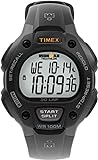
- Performance Functionality: 100-hour chronograph with 30-lap memory and 24-hour countdown timer; on-screen prompts allow easy forward or backward setting
- Everyday Utility: Three daily, weekday, or weekend alarms; 24-hour military time mode; three time zones; and day/date/month calendar keep you organized on the go
- Clear Readability: Gray digital display with INDIGLO light-up dial for easy viewing in any light
- Durable Build: 38 mm gray and black resin case with acrylic lens ensures long-lasting wear
- Comfort Fit: Adjustable black 16 mm resin strap fits wrists up to 8 inches
This is why swim metrics often feel indirect. They are not measuring performance in the same way a power meter does on a bike. They are estimating efficiency based on how consistently and economically your body moves between walls.
What your smartwatch is actually measuring
At the core of swim tracking is the accelerometer and gyroscope inside the watch. These sensors detect changes in wrist acceleration and rotation, which software algorithms interpret as strokes, turns, and rest periods. Every major platform, from Garmin and Apple to Polar and COROS, uses this same basic approach with brand-specific tuning.
When your watch counts strokes, it is identifying repeated motion patterns that match a learned model of freestyle, backstroke, breaststroke, or butterfly. When it detects a turn, it looks for a pause followed by a sharp acceleration that resembles a push-off. Distance is then calculated by multiplying the number of lengths detected by the pool length you entered.
Why most swim metrics are proxies, not absolutes
Metrics like pace, SWOLF, and efficiency scores are not measuring water speed directly. They are combining time, distance, and stroke-related data to estimate how efficiently you cover a known length. This means two swimmers can produce identical metrics while moving very differently through the water.
For example, a strong push-off and glide can lower your pace and SWOLF without improving your actual mid-pool stroke. Conversely, a technically sound swimmer who minimizes wall assistance may appear less efficient on paper. Smartwatches do not know why you moved faster, only that you did.
The real problem swim metrics are trying to solve
The core question swim metrics aim to answer is not “how fast are you” but “how repeatable and economical is your swimming.” Stroke count reflects how much distance you cover per stroke. Stroke rate reflects how quickly you turn those strokes over. SWOLF attempts to combine time and strokes into a single efficiency snapshot.
These numbers exist to help swimmers spot trends over time. If your pace improves while stroke count stays stable, you are likely becoming more efficient. If stroke rate climbs while pace stalls, you may be spinning your arms without generating propulsion.
Why watches focus on consistency rather than perfection
No consumer smartwatch can perfectly model hydrodynamics, body position, or propulsion. What they can do very well is track consistency session to session. Battery life, waterproofing, comfort on the wrist, and secure straps matter here because a loose or shifting watch degrades data quality more than most people realize.
This is why swim metrics work best when you compare yourself to yourself. A Garmin Forerunner, Apple Watch Ultra, or Polar Vantage is less useful for judging absolute skill and far more useful for detecting changes in efficiency, fatigue, and form drift over a training block.
How to think about swim metrics before using them
The most productive mindset is to treat swim metrics as signals, not scores. They are meant to highlight patterns, confirm sensations you felt in the water, and guide technique-focused adjustments. Chasing perfect numbers without context often leads to gaming the system rather than improving swimming.
Once you understand what your watch is trying to approximate, metrics like SWOLF, stroke count, stroke rate, and pace stop feeling arbitrary. They become tools that, when interpreted correctly, can help you swim smoother, longer, and faster with less wasted effort.
Pool tracking basics: lengths, distance, pace and how watches detect laps
Before metrics like SWOLF or stroke efficiency can mean anything, your watch has to get the fundamentals right. Lengths, distance, and pace form the foundation of every pool swim file, and they all depend on one core task: reliably detecting when you reach the wall and start a new lap.
This is where pool swimming differs radically from running or open-water swimming. There is no GPS underwater, so your watch must infer distance from movement patterns rather than position.
What a “length” actually means in watch data
In pool tracking, a length is defined as one uninterrupted swim from one wall to the other. Most watches assume a fixed pool size, typically 25 m, 50 m, or 25 yd, which you select before starting the workout.
Every time the watch believes you have completed a length, it adds one unit of that preset distance. Distance is therefore not measured directly but calculated as lengths multiplied by pool length.
If the watch misses or adds a length, your total distance, average pace, SWOLF, and stroke metrics all shift accordingly. This is why accurate lap detection matters far more than people realize.
How watches detect laps without GPS
Smartwatches rely primarily on inertial sensors: accelerometers and gyroscopes that detect changes in arm motion and rotation. When you push off the wall, there is a distinctive sequence of events: a pause or deceleration, a push, a glide, and then the resumption of strokes.
Algorithms look for this pattern rather than a single trigger. A strong push-off followed by a brief glide is usually enough for a modern Garmin, Apple Watch, Polar, or COROS to mark a new length with high confidence.
The more consistent your turns, the cleaner this signal becomes. Flip turns, with their clear rotational movement and forceful push, are the easiest for watches to recognize.
Why turns and push-offs matter more than strokes
Many swimmers assume stroke detection is the main challenge, but lap detection is actually anchored at the wall. If the watch misreads a turn, everything downstream becomes noisy.
Soft touches, very short pauses at the wall, or stopping mid-pool to adjust goggles can confuse the algorithm. The watch may think you ended a length early or started a new one that never happened.
This is also why drill-heavy sessions can produce messy data. Kicking with a board, one-arm drills, or sculling often lack the arm patterns the watch expects after a push-off.
Pool length selection and why it must be correct
Selecting the correct pool length is non-negotiable. A 25 m pool logged as 25 yd introduces a roughly 10 percent distance error, which cascades into pace, efficiency, and training load calculations.
Most watches let you set pool length manually, and some can remember your last-used setting. A few ecosystems attempt auto-detection, but even the best are not foolproof.
If you travel or switch facilities, make checking pool length part of your pre-swim routine, just like tightening your goggles or securing your strap.
How distance and pace are calculated in pool swims
Once lengths are counted, distance is simple multiplication. Pace is then calculated as time per unit distance, usually per 100 m or 100 yd.
Unlike running pace, swim pace includes everything between walls: push-offs, glides, strokes, and micro-rests during turns. This means two swimmers with identical stroke speed can show different paces based on turn quality alone.
This is not a flaw, but a feature. Strong push-offs and streamlined glides are part of efficient swimming, and watches correctly reward them in pace metrics.
Why average pace can hide useful detail
Most watches report average pace for the entire swim, but this smooths over variability. Short rests at the wall, uneven effort, or fatigue-related slowdowns all get blended together.
Looking at per-length or per-interval pace, available in platforms like Garmin Connect, Apple Fitness, and Polar Flow, reveals far more. You can often see exactly when technique deteriorated or when rest crept longer without you noticing.
For structured training, lap-by-lap pace is usually more actionable than a single session average.
Auto-rest detection and its limitations
Many watches attempt to distinguish between swimming and resting automatically. When motion drops below a threshold at the wall, the watch assumes you are resting and pauses length counting.
This works well for continuous swims with clear stops. It struggles when rests are extremely short, when you hang onto the wall lightly, or when you continue gentle movement while catching your breath.
If you rely on rest metrics for interval training, manual lap buttons or structured workouts tend to produce cleaner data than fully automatic modes.
Why watch fit and hardware still matter
Even the best algorithms depend on clean sensor data. A loose watch, flexible strap, or top-heavy case can rotate or slide during push-offs, degrading detection accuracy.
Larger watches like the Apple Watch Ultra or Garmin Fenix offer excellent battery life and bright displays, but they need a secure fit to perform well in the pool. Slimmer models often feel more stable for smaller wrists, which can translate into better data consistency.
Comfort, strap material, and how confidently the watch stays in place during turns are not just wearability concerns. They directly affect the quality of your swim metrics.
What “good” pool tracking accuracy looks like
No watch is perfect, and occasional missed or extra lengths happen even for elite swimmers. A well-performing watch should be correct the vast majority of the time in steady swimming with consistent turns.
If errors are frequent, the cause is often behavioral rather than technical: inconsistent push-offs, frequent stops, or drills outside the watch’s expectations. Understanding these limits helps you interpret the data rather than distrust it.
Once lengths, distance, and pace are stable, higher-level metrics like stroke count, stroke rate, and SWOLF become meaningful. Without this foundation, those numbers are built on sand.
Stroke detection explained: stroke count, stroke rate (cadence) and stroke types
Once length counting and pacing are reliable, watches start analysing how you move through the water rather than just how far you go. Stroke-based metrics are where technique, efficiency, and wearable algorithms intersect, and they are also where swimmers most often misinterpret the data.
Understanding what your watch is actually detecting helps you use stroke metrics as feedback, not as a source of confusion or false precision.
How watches detect strokes in the first place
In pool swimming, stroke detection is driven primarily by the accelerometer and gyroscope inside the watch. Each arm recovery, catch, and pull produces a repeatable motion pattern that the software looks for over time.
The watch does not “see” your stroke. It infers it from wrist movement, which is why consistency matters more than textbook technique.
Push-offs, glide phases, and turns are deliberately excluded from stroke analysis. Most platforms ignore the first one to two seconds after a wall to avoid counting propulsion from the legs as arm strokes.
Stroke count: what the number really represents
Stroke count is the number of arm strokes taken per length, typically counting one arm only. A reported value of 18 strokes for a 25 m pool usually means 18 right-arm (or left-arm) entries, not 36 total arm movements.
Lower stroke count is often associated with better efficiency, but it is not automatically “better” in isolation. Height, wingspan, stroke style, and swim speed all influence what a realistic number looks like.
If you force stroke count down by over-gliding or pausing excessively, pace usually suffers and fatigue increases. The metric only becomes useful when considered alongside pace or SWOLF.
Why stroke count accuracy varies
Stroke count is sensitive to wrist path and timing. Clean, symmetrical strokes are easier for watches to classify than crossover entries, sculling, or unconventional drills.
Breathing patterns also affect accuracy. A pronounced head lift or asymmetrical breathing can introduce extra wrist movement that the algorithm may interpret as a partial stroke.
Equipment like paddles or pull buoys can confuse detection as well. Some watches handle paddles better than others, but expect occasional under- or over-counting during tool-assisted sets.
Stroke rate (cadence): the tempo of your swimming
Stroke rate, often shown as strokes per minute, describes how quickly you cycle your arms. Unlike stroke count, it is a time-based metric and reacts immediately to changes in effort.
Most watches calculate stroke rate by measuring the time between repeated arm movement patterns within a length. Sudden accelerations or decelerations can cause brief spikes, which is why lap averages are more useful than second-by-second graphs.
Rank #2
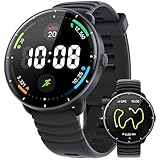
- 【5ATM SWIMMING SMARTWATCH – ADVANCED SWIM ANALYTICS】Swim smarter and perform better! Designed for passionate swimmers, track every lap with precision and monitor freestyle, breaststroke, backstroke, and more. Real-time metrics include distance, speed, stroke rate, SWOLF, and underwater heart rate. Customize pool lengths and pair with the app for advanced analytics, trend tracking, and technique tips. For open water, built-in GPS records your swim route and distance for easy review. With robust 5ATM waterproofing—beyond IP68—train confidently in pools or open water. Note: Avoid pressing buttons underwater and keep away from hot baths or saunas for optimal performance.
- 【BUILT-IN GPS & COMPASS – PHONE-FREE WORKOUTS】Enjoy complete freedom on runs, hikes, or rides. This high-precision GPS smartwatch for men and women tracks distance, pace, and calories automatically—no phone required. Real-time GPS maps your route, while the built-in compass keeps you on track. After each activity, sync with the app for full route maps, detailed stats, and performance insights. Make every workout smarter, safer, and more rewarding.
- 【100+ BUILT-IN SPORTS MODES SUPPORTING AI ANALYSIS】The FitNova R1 indoor and outdoor fitness watch is your ultimate fitness tracker, supporting 100+ workout modes including running, cycling, swimming, HIIT, yoga, strength training, and more. It auto-detects running, walking, and cycling—no manual start needed—tracking every move accurately. Paired with the app, get 7- and 21-day performance trends plus AI-driven tips to optimize pace, form, and endurance. Whether training indoors, outdoors, or for a triathlon, train smarter and reach your goals faster.
- 【24/7 HEALTH GUARDIAN & SMART ALERTS】This advanced smart health watch offers continuous heart rate monitoring all day and night—including underwater—and tracks resting heart rate trends for better health insights. It deeply monitors sleep cycles, including deep, light, and REM stages. You can customize start and end times in the app’s Sleep Do Not Disturb mode to ensure uninterrupted, restful nights. It also tracks blood oxygen and stress levels, supports women’s health, and provides reminders for goals, hydration, breathing exercises, plus smart notifications for calls, texts, and more—right on your wrist.
- 【ULTRA-HD AMOLED DISPLAY WITH CUSTOM & VIDEO WATCH FACES】This 42mm (1.65") smartwatch for men and women features a 1.32” (33.5mm) ultra-HD AMOLED screen (466×466, 60Hz), sharper than most smartwatches. Always-On Display keeps time visible all day. One-button design ensures intuitive operation. Choose from 200+ watch faces, and upload your own photos or videos to create personalized animated watch faces—a feature most smartwatches lack.
In practical terms, stroke rate tells you how you increase speed. Some swimmers go faster by lengthening the stroke, others by increasing cadence, and most use a blend of both.
Using stroke rate to swim more efficiently
Comparing stroke rate against pace reveals how you produce speed. If pace improves while stroke rate stays stable, you are likely becoming more efficient per stroke.
If stroke rate climbs sharply with minimal pace gain, you may be spinning your arms without effective propulsion. This is common late in hard sets or when technique breaks down under fatigue.
Advanced watches from Garmin, COROS, and Polar allow stroke rate tracking per interval, which makes it easier to spot where form starts to degrade across a session.
Stroke type detection: freestyle, backstroke, breaststroke, butterfly
Most modern swim watches attempt to classify stroke type automatically. This is done by matching wrist movement patterns, body orientation, and timing against known stroke signatures.
Freestyle and backstroke are generally detected with high reliability due to their rhythmic, alternating arm patterns. Butterfly and breaststroke are more challenging because the arms move together and often involve longer glide phases.
Drills, mixed strokes within a length, or unconventional technique can confuse detection. It is common to see a breaststroke length logged as freestyle if the arm recovery is atypical.
Why stroke type errors matter less than you think
Incorrect stroke classification rarely affects distance or time, but it can skew stroke count and SWOLF for that length. This is why swimmers sometimes notice a single length with an oddly high or low efficiency score.
For training analysis, consistency across the session matters more than perfect labeling. If most of your freestyle lengths are classified correctly, a few errors will not invalidate trends.
Some platforms allow manual correction after the swim, while others lock the data. Knowing whether your watch supports editing can influence how much you rely on stroke-type breakdowns.
Hardware, fit, and their impact on stroke detection
Stroke metrics are particularly sensitive to how the watch sits on your wrist. A rotating case or loose strap introduces noise that looks like extra motion to the sensors.
Heavier watches with metal cases or large batteries need a snug fit to avoid lag during quick arm recoveries. Lighter polymer cases often feel less intrusive and can improve consistency, especially for smaller wrists.
Silicone and fluoroelastomer straps tend to perform best in the pool. Woven or leather straps are not only impractical in water but also compromise sensor stability.
How to use stroke metrics without obsessing over them
Stroke count and stroke rate are best used as comparative tools, not targets. Look for patterns across similar sets, speeds, or weeks of training rather than chasing a specific number.
If a technique change reduces stroke count at the same pace, that is meaningful progress. If cadence increases but fatigue drops, that is also a win.
Smartwatch swim metrics are most powerful when they guide awareness. They point you toward what to feel in the water, not what to micromanage on every length.
SWOLF demystified: what it is, how it’s calculated, and why it’s often misunderstood
After stroke metrics, SWOLF is usually the next number swimmers fixate on, partly because watches present it as an “efficiency” score. That framing is where much of the confusion starts.
SWOLF can be useful, but only if you understand what it actually measures and, just as importantly, what it does not.
What SWOLF actually stands for
SWOLF is a blend of swim and golf, and the idea is deliberately simple. Lower is better, just like a golf score.
On a smartwatch, SWOLF is calculated for each length by adding the time it took to swim that length and the number of strokes you used. If you swim a 25 m length in 20 seconds and take 18 strokes, your SWOLF for that length is 38.
Most watches then average SWOLF across the session or display it per length in post-workout analysis.
Why SWOLF exists in swim tracking
SWOLF was designed to give swimmers a quick snapshot of efficiency without needing multiple charts. Time captures speed, stroke count captures economy, and SWOLF merges them into a single number.
For watch platforms with small screens and limited in-workout feedback, this made sense. A single metric was easier to glance at than juggling pace, strokes, and cadence mid-set.
Modern watches have far richer displays and apps, but SWOLF has stuck around because it is familiar and easy to compare from session to session.
How smartwatches calculate SWOLF in practice
In pool swimming, watches calculate SWOLF per length using accelerometer-based stroke detection and wall-to-wall timing. The pool length you set is critical, because time is measured per length, not per 100 m.
In open water, SWOLF is either disabled or calculated very differently, depending on brand. Garmin and COROS typically avoid SWOLF in open water because stroke detection and GPS timing do not align cleanly.
Because SWOLF depends on accurate stroke count and clean length timing, the same factors discussed earlier, fit, turn detection, and stroke classification, directly affect its reliability.
Why SWOLF is not a pure efficiency metric
SWOLF is often described as an efficiency score, but it does not measure hydrodynamics, propulsion quality, or energy cost. It only combines speed and strokes, nothing more.
Two swimmers can have identical SWOLF scores with very different techniques. One might be muscling through with high effort and short rest, while the other is relaxed and sustainable.
This is why elite swimmers rarely use SWOLF as a primary training metric, even though their watches still record it.
The pace problem: why faster is not always better SWOLF
Because time is part of the equation, swimming faster almost always lowers SWOLF, even if technique deteriorates slightly. This can reward brute force rather than efficiency.
If you sprint a length and add two extra strokes but drop several seconds, your SWOLF will likely improve. That does not mean your long-distance efficiency improved.
For endurance swimmers and triathletes, this is a key limitation. SWOLF favors speed over sustainability unless you control pace carefully.
Why pool length changes break SWOLF comparisons
SWOLF is only comparable within the same pool length. A 25 m pool and a 50 m pool will produce very different SWOLF values for the same swimmer at the same pace.
This catches many smartwatch users out when traveling or switching facilities. A sudden jump in SWOLF is often due to pool length, not fitness regression.
If your training spans multiple pools, SWOLF trends only make sense when filtered by pool size in the app.
Device differences and their impact on SWOLF
Different brands handle stroke detection and turn timing slightly differently, which affects SWOLF. Garmin tends to be conservative on stroke counts, while Apple Watch often logs slightly higher counts on messy lengths.
Heavier watches with steel cases or thicker sapphire glass can introduce a fraction more lag during turns if the strap is not snug. Over many lengths, that can nudge SWOLF upward.
Battery-saving modes that reduce sensor sampling can also subtly affect stroke detection. This matters more on long sessions with older watches or smaller batteries.
How to use SWOLF without misusing it
The most productive way to use SWOLF is to compare similar efforts. Same stroke, same pool length, similar pace, and similar fatigue levels.
Technique-focused drills are where SWOLF shines. If a change reduces strokes without slowing you down, SWOLF will drop for the right reason.
Avoid comparing easy aerobic sets to race-pace intervals. A higher SWOLF during recovery swimming is not a problem, it is expected.
SWOLF versus looking at the raw ingredients
For most swimmers, pace and stroke count tell a clearer story when viewed separately. Pace shows how fast you moved, stroke count shows how economically you moved.
SWOLF compresses those into one number, which can hide trade-offs. A stable SWOLF might mask faster pace with worse mechanics, or better form with deliberate slowing.
Use SWOLF as a flag, not a verdict. When it changes, look underneath at time, strokes, and how the swim felt in your body.
Efficiency vs speed: how to interpret SWOLF, strokes and pace together
By this point, it should be clear that no single swim metric deserves to be judged in isolation. SWOLF, stroke count, and pace are most useful when read together, because each answers a different question about how you move through the water.
Smartwatches are very good at measuring outcomes, but they cannot see intent. Understanding whether you were trying to swim fast, swim relaxed, or swim technically clean is the context that turns raw numbers into insight.
What speed really tells you in the pool
Pace is the most straightforward metric your watch reports: how long it takes you to cover a given distance. For interval work, race preparation, or comparing sessions in the same pool, pace is the clearest indicator of performance.
However, pace alone cannot tell you how hard you worked to achieve it. Two swims at 1:40 per 100 m can feel completely different if one required frantic strokes and the other felt controlled and repeatable.
This is where many swimmers plateau. They chase faster pace without understanding whether the limiting factor is conditioning, technique, or inefficiency.
Stroke count as a window into efficiency
Stroke count gives you a proxy for how economically you are moving through the water. Fewer strokes per length generally mean you are traveling farther with each pull, assuming the pace is held constant.
That assumption matters. A very low stroke count at a slow pace is not automatically good swimming, it is often just gliding and under-rotating.
When stroke count drops while pace stays the same or improves, that usually signals a genuine technical gain. Better catch, improved body position, or cleaner turns all show up here before they show up in pace.
Rank #3

- WATERPROOF FUNCTION: 164 ft waterproof (50 M) - 5ATM. NOTE: please DO NOT press any buttons in the water
- DESIGN for SPORT: shock resistant, stop watch, military 24H time mode, and LED back light functions make it perfect for all kind of sport and daily use
- SIMPLE and FASHION: sport fashion design with simplicity, perfect for both indoor and outdoor activities
- MULTI-FUNCTIONAL: Calendar Date Week Month, Alarm, Water Resistant, LED Display, Back Light, Shock Resistant, Stop Watch
- WHAT IS IN THE PACKAGE: Watch x 1, Instruction Manual x 1
Where SWOLF fits between speed and efficiency
SWOLF sits in the middle, combining how fast you swam and how many strokes it took. It is useful precisely because it highlights the relationship between those two elements.
A dropping SWOLF often means you are either getting faster for the same stroke count or using fewer strokes at the same pace. Both are positive, but they imply different adaptations.
The problem arises when swimmers treat SWOLF as a target rather than a reflection. You cannot “swim a SWOLF” in the same way you can hold a pace or execute a drill.
Common metric combinations and what they actually mean
If your pace improves, stroke count rises, and SWOLF stays roughly the same, you likely gained speed by increasing turnover. This can be useful for racing and short intervals, but it is usually less sustainable over longer distances.
If your pace stays stable, stroke count drops, and SWOLF improves, you are becoming more efficient. This is the ideal outcome of technique-focused sessions and drills.
If your pace slows, stroke count drops significantly, and SWOLF improves slightly, you may be over-gliding. Many watches will reward this with a lower SWOLF number even though your effective speed has fallen.
Stroke rate adds a missing piece
Some watches, particularly from Garmin, COROS, and Apple Watch, also report stroke rate. This metric explains how you achieved a given stroke count and pace.
A low stroke count paired with a very low stroke rate often indicates excessive glide and deceleration. A moderate stroke count with a stable, slightly higher stroke rate often produces better real-world efficiency.
Triathletes should pay special attention here. Open water conditions favor a slightly higher stroke rate than pool swimming, even if it nudges SWOLF upward.
Using these metrics for different training goals
For aerobic endurance sets, look for a narrow range of pace with stable stroke count. SWOLF should remain consistent across repeats, drifting only slightly as fatigue sets in.
For technique sessions, pace matters less. Focus on reducing stroke count without introducing pauses, and check that SWOLF improves for the right reason, not because you slowed down.
For speed and race-pace work, accept that stroke count and SWOLF may worsen. What matters is that pace improves while stroke rate stays controlled rather than chaotic.
Why your watch can’t decide efficiency for you
Smartwatches measure time and motion extremely well, but they do not understand drag, propulsion quality, or how much energy you expended. Two swimmers with identical SWOLF can have very different oxygen costs and fatigue profiles.
Watch design also plays a subtle role. Heavier cases, thick sapphire crystals, and looser straps can slightly exaggerate wrist movement, affecting stroke detection during hard efforts.
This does not invalidate the data, but it reinforces the need to interpret trends rather than fixate on individual lengths or sessions.
Building a practical interpretation habit
After a swim, start with pace to understand performance, then look at stroke count to assess efficiency. Only then bring SWOLF into the picture to see how those two interacted.
Over weeks, not days, patterns emerge. A swimmer whose pace gradually improves while stroke count stays stable is becoming fitter; one whose stroke count falls at the same pace is becoming more efficient.
When all three improve together, that is usually the result of consistent training, better technique, and a watch that is snug, comfortable, and reliable enough to disappear on your wrist while you focus on the water.
Rest, turns and drills: where swim metrics break down and why accuracy varies
Once you move beyond continuous swimming, the tidy relationship between pace, strokes, and SWOLF starts to fray. Rest periods, wall turns, and drill work all introduce movement patterns that look nothing like steady freestyle, yet your watch still has to interpret them using the same sensors and algorithms.
This is where even excellent swim watches from Garmin, Apple, Polar, or COROS can disagree with each other, and sometimes with what you know you actually swam.
Why rest confuses lap detection
Most pool swim tracking relies on a hard push-off from the wall to mark the start of a new length. During rest, especially if you float, scull, or lightly kick while holding the wall, the watch may struggle to decide whether a new lap has started or whether you are still in the previous one.
Watches that require a strong accelerometer spike can miss a length if your push-off is gentle, common in long aerobic sets or technique-focused sessions. Others may falsely record an extra length if you move your arm sharply while adjusting goggles or checking the pace screen.
Auto-rest features add another layer of complexity. When enabled, the watch tries to infer rest based on a sudden drop in movement, which can shorten or extend recorded rest times depending on how still you are and how aggressive the algorithm is.
Turns: the single most important moment for accuracy
Turns are the anchor point for almost every pool swimming metric. Lap count, pace per length, stroke count, and SWOLF all depend on the watch correctly identifying when one length ends and the next begins.
Flip turns produce a clear rotational and acceleration signature that most modern watches handle well. Open turns, especially slow or asymmetrical ones, are far more likely to be misread, particularly by lighter watches or those worn loosely on the wrist.
Watch fit and mass matter here. A heavier case or thicker construction can exaggerate wrist inertia during the turn, while a soft silicone strap that allows micro-movement can blur the signal the sensors rely on.
How drills break stroke detection
Drill sets are where swim metrics are most likely to become misleading rather than merely noisy. One-arm freestyle, catch-up, fist drills, or kickboard work all violate the assumptions baked into stroke detection algorithms.
Most watches expect a regular, alternating arm pattern with consistent acceleration peaks. When that pattern disappears, stroke count may drop to near zero, spike unrealistically, or be attributed to the wrong stroke type entirely.
This does not mean the watch is “bad at swimming,” only that it was never designed to understand drills as technique tools. Some platforms allow drill logging modes where distance is tracked but strokes and SWOLF are ignored, which is often the more honest option.
Why SWOLF suffers most during rest and drills
Because SWOLF combines time and stroke count, any error in either side compounds quickly. A missed lap, a misdetected turn, or a stroke count skewed by drills can inflate or deflate SWOLF enough to make it meaningless for that length.
This is why SWOLF often looks erratic during mixed sessions that include drills, long rests, or variable turns. The metric itself is not flawed, but it assumes a clean, continuous swim that rarely exists in real-world training.
For analysis, SWOLF is best filtered mentally to steady swimming lengths where your technique and effort are relatively consistent.
Pool length, walls, and real-world constraints
Incorrect pool length settings are a silent accuracy killer. A 25-yard pool logged as 25 meters throws off pace, distance, and SWOLF immediately, even if stroke detection itself is perfect.
Crowded lanes introduce additional chaos. Mid-length slowdowns, half-stops, or altered strokes to avoid collisions can look like rests or turns to the watch, particularly in shorter pools.
Older or smaller pools with shallow gutters and softer walls also produce weaker push-offs, reducing the clarity of turn detection compared to modern competition pools with firm, vertical walls.
Why different watches disagree on the same swim
Each brand balances sensitivity and conservatism differently. Garmin tends to favor clear push-offs, Apple often smooths data more aggressively in post-processing, and Polar and COROS sit somewhere in between depending on model and firmware.
Hardware plays a role too. Sampling rates, gyroscope quality, and even battery-saving behaviors during long sessions can subtly alter detection accuracy, especially in watches optimized for multi-day battery life.
Software updates matter more than many swimmers realize. Swim algorithms evolve quietly, and a watch that struggled with rest detection last year may behave very differently after a firmware revision.
How to work with these limitations, not against them
Treat rest-heavy and drill-heavy sessions as qualitative rather than quantitative. Use the watch to track total time and approximate distance, but rely on feel, coach feedback, or manual notes for technique progress.
For metric-focused analysis, separate steady swims from drills whenever possible. Even a simple structure like grouping drills at the end of a session keeps your core data cleaner and easier to interpret.
Most importantly, aim for consistency rather than perfection. A watch worn snugly, used in the same pool, with the same settings, will reveal trends over time even if individual lengths are imperfect.
Understanding where swim metrics break down is not a reason to distrust your watch. It is what allows you to extract value from the data that matters and ignore the noise that inevitably comes with water, walls, and human movement.
Comparing brands: how Garmin, Apple Watch, Polar, COROS and Fitbit handle swim metrics
Once you understand why swim data is imperfect, brand differences start to make more sense. Each company chooses where to spend accuracy budget: raw detection, post-workout smoothing, battery life, or long-term trend analysis.
These choices affect not just numbers like SWOLF or stroke count, but how usable the data feels when you try to apply it to real training.
Garmin: maximum metrics, minimal interpretation
Garmin takes a data-first approach to swimming. Most Garmin watches record lengths, distance, pace per length, stroke type, stroke count, stroke rate, SWOLF, and detailed rest intervals, often with length-by-length breakdowns visible directly on the watch and in Garmin Connect.
SWOLF on Garmin is calculated in the traditional way: time for a length plus strokes taken during that length. This makes it very sensitive to push-offs and wall quality, which is why SWOLF can fluctuate wildly in crowded or shallow pools.
Garmin generally avoids heavy smoothing. If your stroke count jumps because of a missed turn or awkward length, you will usually see it reflected in the data. For analytical swimmers and triathletes, this transparency is a strength, but beginners may find the variability confusing.
Hardware also matters here. Larger Forerunner and Fenix models benefit from stronger antennas, better inertial sensors, and more stable wrist fit, especially when paired with snug silicone straps. Smaller Garmin models can be slightly more prone to stroke misclassification if worn loosely.
Battery life is a quiet advantage. Long pool sessions, swim-run bricks, or week-long training blocks do not force Garmin to compromise sampling rates, which helps consistency across sessions.
Apple Watch: polished data and strong stroke recognition
Apple Watch prioritizes clean, readable swim summaries over raw granularity. It tracks distance, lengths, average pace, stroke type, stroke count, and SWOLF, but typically hides some of the messier edge cases through post-processing.
Apple’s SWOLF uses the same core formula as Garmin, but Apple smooths stroke detection and timing more aggressively. The result is often more stable SWOLF scores from length to length, even when the swim itself is not perfectly consistent.
Stroke recognition is a standout strength. Freestyle, backstroke, breaststroke, and butterfly detection is among the most reliable in consumer wearables, helped by Apple’s high sampling rates and powerful onboard processing.
The downside is transparency. Apple does not expose as much per-length diagnostic detail, and it is harder to understand why a specific length looks “wrong.” For swimmers focused on feel and general efficiency trends, this is rarely an issue.
Rank #4

- Comfort, Lightweight, Durable: Designed as the ultimate running watch, the COROS PACE 3 GPS sports watch merges an 11.7mm ultra-slim profile and 30g featherweight design (with nylon band) for 24/7 wear in completely distraction-free comfort.
- Always-On 1.2" Transflective Touchscreen: COROS PACE 3 GPS sports watch features a touchscreen experience (Backlight Display settings include three modes: Always On, Navigation & Activity, or Navigation Only)
- Extended Battery Life: Transform your training with a GPS running watch built for endurance and speed. 38 hours of continuous GPS tracking or 24 days of daily use on a single charge.
- Accurate GPS with Dual-Frequency: Built with a redesigned Dual-Frequency satellite chipset, the PACE 3 GPS Sport Watch will keep your GPS tracks and GPS coordinates accurate, even in high-rise cities. It also records air pressure and elevation gain.
- ROUTE PLANNER: Easily build custom routes or search for a destination on the COROS App, then sync the navigation directly to your COROS PACE 3 GPS Sport Watch. The Breadcrumb navigation feature helps you stay on track without losing sight of your other activity data.
Comfort plays a role too. The flatter case profile and softer sport bands reduce wrist movement artifacts for many swimmers, especially those with smaller wrists. Battery life is sufficient for pool work, but multi-session days require more charging discipline.
Polar: efficiency-focused metrics with conservative detection
Polar’s swim tracking philosophy sits between Garmin and Apple. You get core metrics like distance, pace, stroke count, stroke rate, and SWOLF, but with fewer experimental or edge-case features.
Polar tends to be conservative in what it records. Missed turns are less likely to inflate stroke counts, but borderline movements may be ignored altogether. This can make Polar data feel calmer, though sometimes at the expense of detail.
SWOLF is calculated traditionally, but Polar often presents it more as a session-level efficiency indicator than a length-by-length coaching tool. This aligns well with Polar’s broader training load and recovery ecosystem.
Hardware design contributes here. Polar watches often have slightly thicker cases and firmer straps, which can stabilize sensor readings during steady swimming. The trade-off is that some swimmers notice the watch more during long sets.
Polar’s platform rewards consistency. Swimmers who repeat similar sessions week to week often find Polar’s trend data more useful than obsessing over single-session anomalies.
COROS: long battery life with simplified swim analysis
COROS emphasizes durability and battery life, and its swim metrics reflect that priority. Distance, pace, stroke type, stroke rate, and SWOLF are supported, but presentation is streamlined.
COROS tends to smooth aggressively at the session level. Length-by-length quirks often disappear in favor of cleaner averages, which makes the data approachable but less diagnostic for technique work.
SWOLF on COROS behaves more like an efficiency trend than a coaching metric. It is useful for comparing similar sessions over time, but less helpful for identifying which specific lengths broke down.
The hardware is light and stable, especially on nylon straps, which helps with comfort during long pool or open-water swims. Sampling strategies favor battery preservation, which can slightly reduce sensitivity in short or highly variable pool sets.
For endurance athletes balancing swimming with cycling and running, COROS offers dependable swim tracking without demanding much attention or interpretation.
Fitbit: basic swim metrics for general fitness
Fitbit treats swimming as part of overall activity tracking rather than a technical discipline. Most models record distance, time, pace, lengths, and stroke type, with limited access to stroke count and no deep SWOLF analysis on many devices.
When SWOLF is present, it is usually hidden in summaries rather than emphasized. Fitbit’s platform does not encourage swimmers to optimize efficiency at a granular level.
Stroke detection is adequate for steady freestyle but less reliable for mixed strokes or drills. Fitbit’s algorithms favor simplicity and battery efficiency over nuanced interpretation.
Fitbit watches are comfortable and easy to wear, which reduces user error, but their swim metrics are best suited for casual swimmers tracking consistency rather than performance improvement.
What these differences mean for your training
If you enjoy dissecting technique, comparing stroke counts, and analyzing efficiency length by length, Garmin offers the deepest toolbox. You will see the mess, but you will also see the truth.
If you want clean summaries that reflect how the swim felt rather than every micro-error, Apple Watch delivers highly usable data with minimal friction.
Polar and COROS appeal to swimmers who care about efficiency trends over time without drowning in numbers. Fitbit works best when swimming is one part of a broader wellness routine.
No brand is objectively right or wrong. The best swim metrics are the ones you understand, trust, and can apply consistently without second-guessing every length.
Using swim metrics to improve technique: practical examples for real swimmers
Once you understand what your watch is measuring and why different brands present data differently, the real value comes from using those numbers to change how you swim. This is where metrics stop being abstract and start influencing technique, pacing, and efficiency in very practical ways.
The examples below reflect common situations I see when reviewing swim files from Garmin, Apple Watch, Polar, COROS, and Fitbit users. None require elite fitness or perfect data, just consistency and a willingness to look beyond total distance and time.
Lowering SWOLF without swimming harder
SWOLF is often misunderstood as a score you should chase downward at all costs. In reality, it is a proxy for efficiency, combining how fast you swim a length with how many strokes it takes to get there.
A common pattern among recreational swimmers is a stable pace with a high and rising stroke count as fatigue sets in. Your watch might show SWOLF creeping upward in the second half of a session even though your pace barely changes.
The fix is not to sprint or force longer glides. Instead, focus on maintaining stroke length as you tire by improving body position and catch timing, especially in the last third of each length.
A simple drill-based application is to swim 4 × 100 at a relaxed pace, watching stroke count per length rather than SWOLF itself. If the final 25 of each 100 shows two to three extra strokes, that is where efficiency is leaking.
Garmin and Apple Watch make this easiest because stroke count is visible per length. Polar and COROS users should look for average strokes per length drifting upward across repeats rather than within them.
Using stroke count to diagnose over-gliding or rushing
Stroke count is one of the most actionable metrics your watch provides, but only when interpreted alongside pace. Very low stroke counts are not automatically good, especially if pace slows or feels forced.
If your watch shows a low stroke count but pace is inconsistent, you may be over-gliding and losing momentum between strokes. This often feels smooth but costs speed and increases fatigue over longer sets.
On the other hand, a rising stroke count paired with faster pace can indicate rushed, inefficient turnover where the arms move faster but do less useful work.
A practical way to use this data is to swim controlled repeats at a fixed pace, then aim to hold stroke count within a one-stroke window per length. If pace improves without adding strokes, efficiency is genuinely improving.
Apple Watch users benefit from clean stroke detection here, while Garmin users can dive deeper into length-by-length variability. Fitbit users should focus on session averages and trends rather than individual lengths.
Finding your effective stroke rate, not the fastest one
Stroke rate is especially useful for triathletes and open-water swimmers, but it is easy to misuse. Many swimmers assume a higher stroke rate automatically means better performance.
In practice, every swimmer has a stroke rate range where propulsion and control balance best. Outside that range, efficiency drops even if effort increases.
If your watch supports stroke rate graphs or averages per interval, compare sets where pace is similar but stroke rate differs. The rate that produces the lowest SWOLF or most stable pace is usually your sweet spot.
Garmin and COROS devices are particularly strong here, while Apple Watch users may need to rely on post-workout summaries rather than real-time cues.
This insight is valuable for race pacing, where maintaining a sustainable stroke rate under fatigue matters more than chasing speed early.
Using pace and lengths to clean up turns and push-offs
Pool pace data is influenced heavily by what happens at the wall. Watches measure time per length, not pure swimming speed, so inefficient turns show up clearly if you know where to look.
If your pace fluctuates wildly despite steady effort, especially every few lengths, inconsistent push-offs or breath timing into the wall may be the culprit.
Look at pace per length or per 25 and identify outliers. These often correspond to distracted turns, late breaths, or weak push-offs rather than mid-pool technique.
A targeted fix is to swim short repeats focusing solely on consistent wall behavior, then check whether pace variability tightens even if average pace stays the same.
Garmin and Apple Watch provide the clearest visibility here. Polar and COROS users should watch for smoother average pacing across intervals rather than single-length precision.
Spotting fatigue patterns across a session
One of the most underrated uses of swim metrics is identifying how your technique degrades over time. Watches are very good at capturing trends even when absolute values are imperfect.
If stroke count climbs, pace slows, and SWOLF rises in the final third of most swims, endurance or breathing efficiency is limiting your technique, not raw strength.
This is where longer, steadier sets at controlled effort pay off more than sprint intervals. The goal is to hold form, not chase speed.
Fitbit users, despite simpler metrics, can still spot this pattern by comparing first-half and second-half averages. You do not need granular length data to see fatigue-related drift.
Over weeks, the goal is not perfect stability but slower deterioration, which is a clear sign of improving swim fitness.
Matching metrics to your watch and your tolerance for data
The final step is aligning how you use metrics with the strengths of your device and your own mindset. Overanalyzing noisy data can be as unhelpful as ignoring it entirely.
Garmin rewards swimmers who enjoy detailed review and can tolerate occasional miscounts. Apple Watch suits swimmers who want reliable summaries that match perceived effort.
Polar and COROS are best for tracking efficiency trends over weeks, especially for endurance athletes balancing multiple sports. Fitbit works when the goal is consistency and habit rather than technique refinement.
The most effective swimmers use one or two metrics per session as feedback, not every number their watch records. The watch should support your swimming, not distract from it.
Common mistakes and metric obsession: what not to overthink after a swim
As you start using swim metrics more intentionally, it is easy to swing from ignoring the data to letting every number dictate how you feel about a session. This is where otherwise useful metrics like SWOLF, stroke count, and pace can become misleading if they are taken too literally.
Most swim tracking errors are small, normal, and consistent. The real mistake is assuming every fluctuation means something is wrong with your technique or fitness.
Chasing a lower SWOLF at all costs
SWOLF is one of the most misunderstood metrics because it blends speed and efficiency into a single number. A lower SWOLF is not automatically better if it comes from over-gliding, under-kicking, or swimming unnaturally slow to reduce strokes.
💰 Best Value

- 【5ATM Waterproof Swimming Fitness Tracker — Your Perfect Swim Companion!】Take your pool workouts to the next level with the Parsonver 5ATM waterproof watch, built for serious swimmers and daily wear. With 50m water resistance, it tracks freestyle, breaststroke, backstroke, and butterfly, recording stroke count, rate, and SWOLF measure and master your swim. Lap counting works only in pools; other features fully functional. Avoid pressing buttons underwater or in hot baths, saunas, or steam rooms.
- 【PEDOMETER WITH 110+ BUILT-IN SPORTS MODES & ALL-DAY ACTIVITY TRACKING】Stay motivated with our versatile fitness watch featuring over 110 built-in exercise modes—no extra setup needed! From walking, running, cycling, and swimming to yoga and gym training, it tracks your heart rate, steps, and calories with precision. Explore new activities freely and turn daily effort into meaningful progress. Stylish and convenient, this smartwatch keeps you connected to your goals every step of the way.
- 【24/7 ACCURATE HEALTH MONITORING】Unlock your full health potential with this stylish smart watch for men women! It features continuous heart rate monitoring, Blood Oxygen (SpO₂), and detailed sleep tracking—including deep, light, and REM stages. Track stress levels, get sedentary reminders, follow guided breathing, and use the advanced menstrual cycle tracker for women. Stay informed, energized, and balanced with this essential health companion.
- 【1.47” ULTRA-SLIM & LIGHTWEIGHT HD TOUCHSCREEN WITH 150+ WATCH FACES & DIY】Experience the future of smartwatches with the Parsonver Pedometer Watch. Its stunning 1.47-inch HD display delivers crystal-clear visuals and a sleek, lightweight design for all-day comfort. Enjoy perfect clarity in any lighting and express your style with 150+ customizable watch faces—or upload your favorite photos to create a truly unique look. Slim, stylish, and powerful, this smartwatch makes you stand out every day!
- 【SMART MESSAGE NOTIFICATIONS】Stay connected at all times with instant alerts for SMS, emails, and popular apps like WhatsApp, Instagram, LinkedIn, and Twitter—right on your wrist. Never miss an important update, whether at work or on the go. Plus, incoming call notifications let you easily decline calls directly from the watch without reaching for your phone. (Note: Calls cannot be answered or messages replied to on the watch.) Stylish, practical, and convenient for your busy lifestyle!
Many swimmers see their SWOLF drop when they back off effort, especially in pool swims. That does not mean efficiency improved; it often means pace simply fell faster than stroke count rose.
Use SWOLF to compare similar efforts and similar sets, not to rank every swim. Garmin and Polar surface SWOLF prominently, but even on Apple Watch it should be treated as a trend metric, not a target.
Obsessing over stroke count on every length
Stroke count naturally varies with push-off strength, breathing pattern, fatigue, and even which lane you are in. Trying to force the same number of strokes on every length often leads to rushed breathing or excessive glide.
Smartwatches are also imperfect at counting strokes, especially during drills, mixed strokes, or when form breaks down late in a session. A single odd length is rarely meaningful.
What matters is whether your average stroke count for a set or session is stable at a given pace. COROS and Polar users in particular should look at session-level consistency rather than length-by-length precision.
Reading too much into pace fluctuations
Pool pace is heavily influenced by wall behavior, lane traffic, and how cleanly the watch detects turns. A difference of a few seconds per 100 is often noise, not a fitness change.
This is especially true on watches that prioritize simplicity over raw detail, such as Fitbit or Apple Watch in default views. Even Garmin’s highly detailed pace graphs can exaggerate small inconsistencies.
Instead of fixating on pace spikes, ask whether effort felt controlled and whether average pace across comparable sets is improving over weeks. That longer view is where pace becomes actionable.
Comparing pool swims across different pools or settings
Changing pool length, watch placement, or even wearing a different strap can affect swim metrics. A 25 m pool and a 25 yd pool are not interchangeable, even if your watch converts distances automatically.
Turn detection is also affected by wall depth, pool gutters, and how aggressively you push off. Apple Watch tends to be very consistent here, while Garmin can be more sensitive to subtle changes.
Comparisons only make sense when conditions are similar. If the environment changes, treat the swim as a new baseline rather than a step forward or backward.
Expecting perfect data from drills and mixed strokes
Kick sets, one-arm drills, sculling, and underwater work confuse even the best algorithms. Stroke count and SWOLF during these sets are often meaningless, no matter which brand you use.
Some watches allow drill mode, but distance estimation is still manual and subjective. That is not a failure of the device; it is a limitation of wrist-based motion tracking.
The mistake is judging your session quality based on metrics that were never designed to evaluate drills. Focus on feel and intent during technical work, then use metrics on full-stroke swimming.
Letting bad data ruin a good swim
Every swimmer eventually sees a session with miscounted lengths or obviously wrong pace. Dwelling on it adds stress without adding insight.
Garmin users are most likely to encounter this because of the depth of data and sensitivity of detection, but no platform is immune. Battery level, loose fit, or a rushed wall can all throw things off.
If perceived effort, breathing control, and form felt good, trust that experience. The watch is a tool, not the final authority on how well you swam.
Measuring progress swim to swim instead of week to week
Day-to-day variability in swimming is high, especially for recreational swimmers balancing other training. Sleep, hydration, and shoulder stiffness can all shift metrics without reflecting real fitness changes.
True progress shows up as smoother averages, slower fatigue drift, and more repeatable sessions across several weeks. This is where Polar, COROS, and Garmin trend views become more valuable than single workouts.
Apple Watch and Fitbit users can achieve the same insight by mentally grouping similar swims and comparing how they feel and perform over time.
Forgetting that comfort and usability matter too
A watch that digs into your wrist, shifts during push-offs, or distracts you mid-set will undermine even the best metrics. Strap material, case size, and how securely the watch sits all affect swim tracking quality.
Silicone straps with a snug but not tight fit tend to perform best in the pool. Larger cases may offer better visibility but can exaggerate motion artifacts for smaller wrists.
The best swim data comes from a watch you forget you are wearing. If the hardware or software experience pulls attention away from swimming, the numbers are already costing more than they give back.
How to use swim data long-term: trends, benchmarks and realistic improvement goals
Once you stop treating every swim as a test, the real value of swim tracking starts to show. Long-term data smooths out bad wall pushes, missed lengths, and off days, letting patterns emerge that actually reflect how you swim rather than how the watch guessed.
This is where metrics like SWOLF, stroke count, and pace finally make sense. Not as scores to chase, but as signals that change slowly when technique, fitness, or consistency truly improves.
Think in trends, not sessions
A single swim rarely tells you anything useful. A month of similar swims, logged under similar conditions, tells you almost everything you need to know.
Most platforms now surface this well. Garmin’s weekly averages and swim charts, COROS’s clean trend lines, and Polar’s longer-term summaries all help highlight whether efficiency and pace are moving in the right direction. Apple Watch and Fitbit users need to do more of this interpretation mentally, but the principle is the same.
If your average pace over 100 meters drops slightly over four to six weeks while stroke count stays stable, that’s meaningful progress. If SWOLF fluctuates daily but the rolling average slowly improves, that’s exactly what improvement usually looks like.
Establishing your own benchmarks
Benchmarks should come from your own swimming, not from internet tables or elite swimmer numbers. A beginner with a SWOLF of 55 can be swimming beautifully for their experience level, while a triathlete with a SWOLF of 42 might be inefficient for their fitness.
Start by identifying a repeatable “baseline swim.” This might be a steady 1,000 m pool swim, a weekly technique-focused session, or a main set you perform regularly. Use the average metrics from several of these sessions as your personal reference point.
From there, compare like with like. Pool length, stroke, watch fit, and fatigue level all matter. Changing any of those variables makes comparisons less useful and can mask real progress.
Using SWOLF as a long-term efficiency signal
SWOLF is most valuable when viewed as a slow-moving efficiency trend. It responds best to improved streamlining, cleaner turns, and better stroke timing rather than brute fitness alone.
Over months, a gradual reduction in SWOLF at the same perceived effort is a strong sign that your swimming is becoming more economical. Short-term drops driven by sprinting or over-gliding are less meaningful and often come with trade-offs elsewhere.
For most recreational swimmers, realistic SWOLF improvement might be one to three points over a training block. Anything faster usually reflects a change in how you’re swimming that may not hold up under fatigue.
Stroke count and stroke rate: watching stability, not extremes
Long-term stroke count trends reveal whether your technique holds together as fitness improves. A stable or slightly reduced stroke count at faster paces suggests better propulsion per stroke.
What you want to avoid is a steady increase in strokes per length over time at the same pace. That often signals creeping fatigue, rushed timing, or a loss of catch quality rather than progress.
Stroke rate is most useful when paired with pace. If pace improves while stroke rate remains similar, efficiency has likely improved. If stroke rate climbs sharply without pace gains, you’re working harder without moving better.
Pace trends that actually matter
Pace is the most intuitive metric, but also the easiest to misinterpret. Long-term improvement often shows up as reduced variability before it shows up as raw speed.
Look for sets that feel easier at the same pace, or swims where your slowest lengths creep closer to your average. Watches that show pace distribution or lap consistency, like Garmin and Polar, are particularly helpful here.
Expect pace gains to come in small steps. For many adult swimmers, dropping 2–5 seconds per 100 m over several months is significant and sustainable progress.
Fatigue drift and repeatability as hidden metrics
Some of the most important improvements never appear as headline numbers. Reduced pace drop-off across a session and more consistent stroke metrics late in a swim are strong signs of better endurance and technique integration.
Compare the first third of a steady swim to the last third over time. If the gap narrows, you are swimming more economically, even if average pace barely changes.
This is where watches with lap-by-lap and segment views provide more value than those that focus on a single session score. The ability to review how form holds up under fatigue matters more than peak performance.
Setting realistic improvement goals
The biggest mistake swimmers make with smartwatch data is expecting linear improvement. Swimming adapts in plateaus, especially when technique changes are involved.
Set goals around consistency first. Completing an extra swim per week, holding form for longer sets, or maintaining metrics when tired are all valid progress markers.
Metric-based goals should be modest and time-bound. A small SWOLF reduction, a slightly steadier stroke count, or smoother pacing over six to eight weeks is far more realistic than chasing dramatic changes.
Let the hardware and software support the process
Long-term tracking only works if the watch is comfortable, reliable, and easy to live with. Battery life matters for swimmers training frequently, especially on Apple Watch and Fitbit models that require more regular charging.
Software clarity also plays a role. Clean trend views, easy access to historical swims, and simple lap breakdowns encourage reflection rather than obsession. This is an area where Garmin and COROS tend to appeal to data-focused swimmers, while Apple Watch excels in everyday usability.
Ultimately, the best watch is the one that disappears on your wrist and reappears only when you want insight.
Bringing it all together
Used over weeks and months, swim data becomes a quiet coach rather than a loud judge. It confirms what good swimming already feels like and highlights where efficiency slips under stress or fatigue.
When you focus on trends, personal benchmarks, and small, realistic goals, metrics like SWOLF and stroke count stop being confusing numbers and start reflecting real progress. The watch doesn’t make you a better swimmer, but used patiently, it can help you recognize when you truly are becoming one.