Some links on this page are affiliate links: if you buy through them we may earn a commission, at no extra cost to you.
For owners of a Tizen-based Galaxy Gear, Galaxy Watch Active or Active2, the most useful apps were Spotify, Navigation Pro, Camera One and Voice Memo—but in 2026, none should be treated as a guaranteed new install. Samsung has discontinued distribution of Tizen watch apps: some existing listings may remain, but Tizen apps can no longer receive updates. Check Samsung’s notice and your regional Galaxy Store before paying, deleting an app or resetting your watch.
This is a guide to 11 historically useful Tizen apps, not a claim that all are currently available or supported. Galaxy Watch4 and later run Wear OS Powered by Samsung, so these Tizen apps are not the right list for those watches.
First, check which Galaxy watch you own
“Galaxy Gear” covers multiple generations with different Tizen versions, hardware and phone compatibility. The Galaxy Watch Active and Active2, Galaxy Watch and Watch3, plus Gear S3 and Gear Sport updated to Tizen 4.0 or later, are among the devices covered by Samsung’s Tizen wearable documentation. That does not mean every app below works on every model. Check the model and software version in the watch’s About or Software information settings, and confirm the exact model in Galaxy Wearable.
Free tools Windows power users keep installed
One-click scans. No signup required.
If you have a Galaxy Watch4 or newer, stop here and look for Wear OS apps instead. Wear OS and Tizen apps are not interchangeable. Samsung’s platform notice explains both the Tizen distribution change and the move to Wear OS for newer Galaxy Watches.
#1 Best Overall
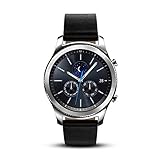
- This Certified Refurbished product is tested and certified to look and work like new. The refurbishing process includes functionality testing, basic cleaning, inspection, and repackaging. The product ships with all relevant accessories, a minimum 90-day warranty, and may arrive in a generic box. Only select sellers who maintain a high performance bar may offer Certified Refurbished products on Amazon.com
- This Item Is Bluetooth Model & International Version. (It Does Not Support 2g, 3g, 4g Lte Mobile Networks)
- Compatible with Android 4.4 (Kitkat) and Later with 1.5gb Ram. Some Features May Not Be Available. For Best Compatibility, Connect with Samsung Galaxy Phones. (It Does Not Support Samsung Tablet & iOS)
- The Gear S3 Has a Built-in Speaker That Lets You Make or Take Calls Right Away Without Ever Having to Remove Your Phone from Your Pocket. (Bluetooth Model Requires Wi-fi Connection and a Voice Call App for Phone-free Calls.)
- Battery : 380mah (up to Three Days) (Battery Life May Vary Depending on Usage and Settings.) / Sensor : Accelerometer, Barometer, Gyro Sensor, Hr Sensor, Light Sensor / Connectivity : Bluetooth V4.2, Wi-fi B/g/n, Nfc, Mst, Gps/glonass
What the 2026 availability warning means
The original 11-app list was published in November 2019. It remains useful as a record of what Tizen owners could do, but it cannot establish that an app can still be installed, logged into or used today. Samsung says new Tizen watch apps and updates can no longer be registered; existing apps may remain for sale, but cannot be updated. Availability can depend on country, watch model, software version and whether the required phone-side app still exists.
Think of the entries below as a shortlist to investigate, not a current ranking verified in every store. A working legacy installation may be difficult to recover: before uninstalling, unpairing or factory-resetting your watch, consider whether you can reinstall the app and its phone companion. Do not assume a Wear OS version or listing is a Tizen version.
Quick comparison
| App | Historical purpose | Phone or service dependency | 2026 caution |
|---|---|---|---|
| Spotify | Music playback and control | Varies by playback mode and account | Check current Tizen support and offline-playback requirements |
| Navigation Pro | Google Maps turn prompts on the watch | Phone notification relay | Not native Google Maps; notifications and background operation can fail |
| Camera One | Remote phone-camera control | Usually needs a compatible phone app | Phone, camera permissions and Android compatibility matter |
| Voice Memo | Record voice notes | Varies; transcription may need phone or cloud processing | Compare with the watch’s built-in recorder |
| Find My Car | Save a parked-car location | Location and map services | Mapping integration may have changed |
| PPT Controller | Control a presentation | Phone or computer connection | Check current PowerPoint and connection compatibility |
| Facer | Third-party watch faces | Typically an account or companion app | Wear OS catalog access does not guarantee Tizen access |
| Samsung Flow | Samsung-device and Windows integration | Compatible phone and PC software | Best suited to the Samsung and Windows ecosystem |
| G-Keyboard Pro | Third-party text input | May require phone-side support and permissions | Legacy paid app; risky if it cannot be restored |
| Yandex Translate | Voice translation | Likely service and companion-app dependent | Verify languages, service access and privacy terms |
| Player4YouTube | YouTube playback on the watch | Network and possibly phone dependent | Novelty, not a practical everyday video solution |
The 11 apps, ranked for historical usefulness
This order favors practical jobs over novelty. It is an editorial ranking of the apps’ historical uses, not a verified 2026 availability or performance ranking.
-
Spotify — the strongest historical use case for phone-free music
Spotify was attractive because a watch could provide music playback or control, and some configurations supported downloads or streaming. The exact capabilities depended on the watch, account, connectivity and service support. Offline listening also needs watch storage and compatible Bluetooth headphones; streaming may require Wi-Fi or LTE. A Samsung compatibility document records Spotify support in the Active2 era, but that is historical evidence, not a guarantee of current Tizen login, downloads or playback.
Worth checking if: music on a workout without carrying a phone is your priority. Confirm the watch listing, account requirements and playback mode before relying on it. If it is unavailable, use the watch to control phone playback or consider a currently supported smartwatch platform.
-
Navigation Pro — useful prompts, but not Google Maps running on the watch
Navigation Pro historically relayed Google Maps navigation notifications from a phone to the watch. It was not necessarily a standalone Google Maps app, and LTE on the watch would not remove its dependence on the phone’s navigation notifications.
The historical setup required a phone app and watch component, notification access, a connection between the devices and, in some cases, relaxed battery-optimization settings. Missing prompts can result from disabled notification access, Android stopping the companion app, a Bluetooth disconnect, changes to Maps notifications or an unavailable component. A legacy setup guide documents that notification-relay model; it does not verify present-day operation.
Special offer. See more information about Outbyte and uninstall instructions. Please review EULA and Privacy policy.Worth checking if: you already own a compatible setup and can test it before a trip. If you need dependable directions, use phone navigation and supported notification mirroring, or a newer watch with a currently supported mapping app.
Rank #2
Sale Samsung Galaxy Watch 8 (2025), Silver, 40mm, Bluetooth Smartwatch
- WHY GALAXY WATCH8: Advanced health and sleep tracking features.* A lighter, more snug design for all day comfort.* Improved user interface.* Personal AI assistant for hands free help.⁴* 2-Year Warranty.
- SLEEP SMARTER. LIVE BETTER: Energize your days with a great night’s rest using Advanced Sleep Coaching¹ - improved with even more ways to keep your nights on track. Plus, Bedtime Guidance² helps you find your optimal bedtime.
- YOUR RUN, YOUR COACH: Step up your running routine with a Running Coach³ that analyzes your performance and gives you real-time feedback. Training for an event? Try specific programs built for 5Ks, marathons and more.
- NEW DESIGN. LIGHTWEIGHT FEEL: Maximize your days with a minimalist design. The sleek, thinner-than-ever silhouette makes Galaxy Watch8 look as good as it functions. With a snug fit and sporty style, it gives you readings without getting in your way.
- A PERSONAL ASSISTANT, RIGHT ON YOUR WRIST: Your Watch just became your personal assistant.⁴ Stay one step ahead of your day with a watch that helps you navigate your tasks and to-do lists.
-
Camera One — a practical remote for group or tripod photos
Remote camera control solves a real wrist-sized problem: framing a group shot or triggering a phone mounted out of reach. Camera One was historically described as offering controls and a live preview. Its operation generally depended on a compatible phone companion, camera permissions and the phone’s camera support; Bluetooth or Wi-Fi behavior could also matter.
Worth checking if: you often use a phone as a remote camera. Confirm both watch and phone apps are available and compatible before relying on it. Otherwise, use the phone maker’s camera remote features or a current wearable solution that explicitly supports your devices.
-
Voice Memo — quick capture, if it improves on the built-in recorder
A watch microphone is convenient for capturing a reminder while your phone is put away. Recording and transcription are separate: audio may be recorded locally, while transcription or transfer can depend on a phone app, cloud processing, storage and permissions. Samsung listed voice memo capability for the Active2 era, but that does not confirm the availability of this particular third-party app.
What’s actually slowing this PC down?
Pick the symptom - the matching free tool is one click away.
Special offer. See more information about Outbyte and uninstall instructions. Please review EULA and Privacy policy.Worth checking if: the third-party app offers a feature you need—such as better export or organization—that the watch’s built-in recorder lacks. Test where recordings are stored and how they reach your phone before trusting it for anything important.
-
Find My Car — a useful idea with a potentially fragile map dependency
Find My Car historically saved a parked location and could include a photograph or voice memo, then help you locate the vehicle. The original description relied on HERE Maps, so current usability may depend on whether its map integration and location permissions still work.
Do not confuse it with Samsung’s device-finding services. For many people, saving the parking location in a phone’s map app is easier to restore after a watch reset and less dependent on a legacy watch listing.
-
PPT Controller — a niche but sensible presentation remote
A watch can make a convenient slide remote in a classroom or meeting, especially when the presenter does not want to hold a clicker. PPT Controller historically offered presentation controls through the watch. It should not be assumed to control a computer independently: the connection path may involve a phone or computer, and compatibility with present-day PowerPoint and Bluetooth setups needs checking.
Free tools Windows power users keep installed
One-click scans. No signup required.
Special offer. See more information about Outbyte and uninstall instructions. Please review EULA and Privacy policy.Worth checking if: you already have a working setup and can test it with the actual computer and presentation software. A dedicated Bluetooth presentation remote or a phone-and-PC utility may be more reliable for an important event.
Rank #3
 Samsung Galaxy Gear S2 Smartwatch SM-R730V 4G (Verizon) with Large Rubber Band - Renewed , Heart Rate Monitor(Dark Gray)
- With elegant curves and premium finishes, function meets style in the Gear S2. Personalize it with custom watch faces to create a smartwatch that is uniquely your own.
- Get notifications from your phone right on your wrist with a glance. With the Gear S2, you can receive calendar notifications, texts and even news updates.
- With built-in wireless charging, it's easy to keep the Gear S2 powered up. Whether you're at home, work or anywhere in between, you can power up by simply setting your Gear S2 on the included wireless charging dock.
- We've partnered with many of the apps you love, so now you can get to them without having to reach for your phone.
-
Facer — customization, with an uncertain Tizen catalog
Facer offered third-party watch faces beyond the built-in selection. Its catalog, companion app and service can change, and a face made for Wear OS is not automatically available for Tizen. Third-party faces may use more battery, and a paid face may not transfer between platforms or be recoverable after a reset if its Tizen listing disappears.
Worth checking if: you find a specific Tizen-compatible face in your store and accept the restoration risk. Do not buy a Wear OS face expecting a Tizen version.
-
Samsung Flow — most relevant to Samsung phone and Windows owners
Samsung Flow historically connected Samsung devices and Windows PCs for functions such as sharing content, notifications and unlocking a PC. It is ecosystem-dependent: the phone and PC need compatible software, permissions and a working connection, and watch functionality can vary by model.
Quick wins for a faster PC:
Fix the driver behind crashes, sound loss and screen glitchesFind Drivers →Clear out junk files and repair common Windows errorsFree Scan →Special offer. See more information about Outbyte and uninstall instructions. Please review EULA and Privacy policy.Worth checking if: you use a compatible Samsung phone and Windows PC and can verify the exact watch feature you need. It is not a universal recommendation for every Android phone, and an old watch listing alone does not prove the feature still works.
-
G-Keyboard Pro — a historical answer to tiny-screen typing
G-Keyboard Pro provided a third-party QWERTY keyboard and speech-to-text input for Samsung watches. Text entry is a real limitation on small displays, but a keyboard can depend on Tizen version, special permissions and phone-side software. The original 2019 article listed a price of INR 199; that is a historical price, not a current offer.
Worth checking if: the listing is still available for your exact model and its companion works. Treat a paid legacy keyboard as a risky purchase if it cannot be updated or restored after a reset.
-
Yandex Translate — historically handy for quick phrases
The watch app was described as accepting voice input and displaying translated text, a potentially useful travel convenience. Translation is service-dependent, however. Language support, account requirements, network access, privacy terms and the phone companion may have changed since 2019; an old language list should not be treated as current.
PerformanceWindows Errors? Fix Them Before They SpreadDriversOutdated Drivers Are Slowing You DownPerformancePC Slower Than It Used to Be?Special offer. See more information about Outbyte and uninstall instructions. Please review EULA and Privacy policy.Worth checking if: the watch and phone components remain available in your region and you have verified the languages and service behavior you need. Otherwise, use a current phone translation app.
Rank #4
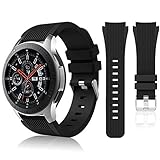 HSWAI Compatible with Samsung Galaxy Watch 46mm Bands/Gear S3 Frontier, Classic Watch Bands/Galaxy Watch 3 Bands 45mm, 22mm Soft Silicone Bands Bracelet Sports Strap for Men & Women. (Black)
- 【 Suitable For Modle 】 Replacement for Samsung Galaxy Watch 1 46mm(Released in 2018)/Samsung Galaxy Gear S3 Classic/Samsung Galaxy Gear S3 Frontier/samsung galaxy watch 3 45mm Smart watch. Only compatible with these 4 Samsung watches, not compatible with other Samsung models. (NOT for galaxy watch 4/5/6/7 all series, Galaxy Watch 3 41mm.)Please confirm your watch model before purchasing.(Watch is NOT included.)
- 【 Good Material 】 This smart watch bands made of premium silicone, skin-friendly and no fading. Premium Watch Buckle design, 22mm quick release easy to install and remove.
- 【 Multiple Color Selection 】 A variety of colors are available for perfect for daily and nightly wear. Make your galaxy watch 3 45mm/ Gear S3 Frontier watch/ galaxy watch 46mm look unique.
- 【 One Size --S & L Bands Included】The package includes: 1 X short side, 2 X long side compatible with your Galaxy Watch 46mm /Gear S3 Frontier, Classic Watch /Galaxy Watch 3 45mm. Suitable for men and women.
- 【 Excellent After-Sales Service 】 HSWAI provide a wonderful shopping experience, If there is any problem when using this band, just contact us and then we will offer a perfect solution immediately.
-
Player4YouTube — technically interesting, rarely practical
Player4YouTube demonstrated that video playback was possible on Tizen, but the small screen, slow input, limited battery and network dependence make a watch a poor YouTube device. The historical coverage described playback as slow. Service changes could also break an unofficial or third-party client.
Worth checking if: you want to experiment and accept that it may not work. It is not a sensible reason to buy a Tizen watch or spend much time restoring a legacy app.
How to check whether an app is installable before you commit
- Identify the exact watch. Check its model name and Tizen version; “Gear” is not a compatibility specification.
- Confirm the pairing setup. Check that the watch is paired in Galaxy Wearable and note the phone manufacturer and Android version. Phone-side features may be limited on unsupported devices, and iPhone compatibility is model- and function-dependent.
- Search the official Galaxy Store route. Samsung’s older app-management guidance describes installing through Galaxy Wearable or the Galaxy Store. Search for the watch listing using the account and region you actually use.
- Inspect the listing before paying. Check compatible devices, last update, price, permissions, in-app purchases, required companion app and regional restrictions. For apps involving location, microphone or notifications, make sure the permissions match the function you expect.
- Verify the companion separately. A watch app may be visible while its Android companion or service is not. Navigation Pro, camera control, translation and cross-device tools are especially dependent on phone-side support.
- Test the whole job. Pair, grant only the necessary permissions and try the feature in ordinary conditions. For navigation, test prompt delivery and battery behavior; for music, test the exact online or offline mode; for a recorder, confirm the file can be retrieved.
Samsung’s app-management documentation describes the historical installation routes. Its discontinuance notice is the more important current caveat: a listing or old compatibility reference does not establish that an app can still be updated or restored.
Recommended Free Tools
If the app does not appear or stops working
Common explanations include delisting, regional restrictions, an unsupported watch or Tizen version, a missing phone companion, an incompatible phone, a disconnected watch, or a service changing how its notifications or sign-in work. For Navigation Pro, for example, check notification access, background battery restrictions, Google Maps notifications and the Bluetooth connection before assuming the watch component alone is at fault.
Avoid treating random APK or TPK download sites as the default fix. Unofficial packages can create malware, signing, licensing and update problems; they do not restore official support. If an app still works on your watch, do not casually uninstall it when you cannot confirm a safe reinstall path.
Should you still use or buy a Tizen Galaxy watch?
If you already own one and its core functions meet your needs, continued use can make sense. Be more cautious if your reason for keeping or buying one is access to a broad, actively maintained app ecosystem: Samsung has ended new Tizen app distribution and updates, while Galaxy Watch4 and later use Wear OS. No specific third-party app on this list should be treated as a guaranteed future feature.
For a replacement, choose a platform based on currently supported apps and your phone, not on assumptions that a Tizen purchase or paid legacy app will be easy to restore. If the watch hardware is fine, a compatible band or charger may be a better way to extend its useful life; check accessory compatibility by exact model.
Outdated Drivers Are Slowing You Down
One free scan finds every outdated or missing driver and matches the right update for your exact hardware.Free scan · exact hardware matchWindows Errors? Fix Them Before They Spread
Repair common Windows errors and clear accumulated junk for a smoother, more stable PC - no reinstall needed.Free scan · no reinstallQuick Recap
Practical alternatives by task
- Navigation: Run navigation on the phone and use supported notification mirroring, or move to a watch platform with a currently maintained mapping app.
- Music: Use the watch as a phone playback controller, or verify current offline support before relying on wrist-only listening.
- Camera remote: Try the phone’s own camera features or a supported current wearable app; verify phone compatibility first.
- Voice notes: Compare the watch’s built-in recorder with the phone’s recorder, especially for transcription and export.
- Watch faces: Use installed faces or listings still confirmed for Tizen; do not assume catalogs transfer from Wear OS.
- Presentations: Use a tested phone/computer solution or a dedicated presentation remote when reliability matters.
Product prices and availability are accurate as of the date/time indicated and are subject to change. Any price and availability information displayed on Amazon at the time of purchase will apply.

