Some links on this page are affiliate links: if you buy through them we may earn a commission, at no extra cost to you.
The Beats Studio Buds+ are worth buying for their compact stemless design, long battery life, improved microphones and unusually balanced support for both iPhone and Android. The transparent finish is distinctive, but it is only a color option—not a separate technical model—and does not improve sound, noise cancellation or durability. They are less compelling at the $169.99 US list price if you want the strongest available ANC or AirPods Pro-level Apple integration.
Launched in May 2023, the Studio Buds+ are no longer “new” in the literal sense. They remain a sensible choice for buyers who value discreet earbuds, physical controls and cross-platform convenience more than automatic ear detection, wireless charging or seamless Apple device switching.
Beats Studio Buds+: what changed?
The Studio Buds+ retain the original model’s compact, stemless shape but update several important components. Beats says the new version has microphones three times larger than before, improved voice targeting, redesigned acoustic venting and active noise cancellation that is up to 1.6 times more effective than the original Studio Buds. That 1.6-times figure is a manufacturer claim, not a universal independent measurement or a promise of 60% less perceived noise in every environment.
Recommended Free Tools
The practical upgrades are more straightforward: the earbuds are rated for longer playback, calls should benefit from the microphone changes, ANC is improved, and the box includes four ear-tip sizes—XS, S, M and L—instead of a narrower selection. The charging case continues to use USB-C.
#1 Best Overall

- BEATS’ CUSTOM ACOUSTIC PLATFORM delivers rich, immersive sound whether you’re listening to music or taking calls.
- HEAR WHAT YOU WANT with two distinct listening modes: personalized Active Noise Cancelling (ANC) and Transparency mode.
- MORE MUSIC, LESS CHARGING with up to 36 hours of listening time.
- ENHANCED COMPATIBILITY with one-touch pairing and a robust set of native Apple and Android features.
- FIND YOUR FIT with four pairs of silicone tip sizes to fit a wider range of ears. The tips create a comfortable seal for the best acoustic performance while keeping noise out.
The transparent model is sold alongside Black/Gold and Ivory finishes. Its technical specifications are the same as the other Studio Buds+ colors.
Design: the transparent finish is the attraction
The transparent Studio Buds+ use clear, gray-tinted shells that reveal some of the internal components. The charging case is translucent too, giving the set a more distinctive appearance than conventional black or white earbuds. The styling is unusual without making the earbuds larger or more conspicuous in the ear.
Whether the finish looks premium or simply different is subjective. Its main practical drawback is visibility: fingerprints, dust and earwax can be easier to notice through translucent plastic than on a dark opaque shell. The case also makes it relatively easy to identify the left and right earbuds and see the charging hardware inside. Over time, small scratches may be more apparent than they would be on Black/Gold or Ivory, although the available evidence does not justify claiming that the transparent material is more fragile.
The Tool Desk
Outbyte Driver Updater FREEFix the driver behind crashes, sound loss and screen glitchesFind Drivers →Outbyte PC Repair FREERepair Windows errors before they cause bigger problemsFix Now →The color does not change the acoustic platform, battery rating, water resistance or software features. Buy it because you like the look, not because “transparent” implies a special edition with better construction.
Fit and comfort
The low-profile, stemless shape is a good fit for people who dislike AirPods-style stems. There is less hardware protruding from the ear, and the physical button on each earbud can be pressed for playback, calls, listening-mode changes and voice-assistant functions. A button also avoids the accidental touches that can occur with some touch-sensitive earbuds.
Comfort remains highly dependent on ear shape. The housing may press against the outer ear for some users, while others will find it stable enough for walking, commuting and exercise. The four included tip sizes improve the odds of getting a secure seal. Start with the size that fills the ear canal without requiring excessive insertion, then try the next size up or down on each ear if necessary.
Fit is not just a comfort issue. An incomplete seal reduces passive isolation, weakens bass and can make ANC appear ineffective. If the earbuds sound thin or outside noise is overwhelming, change the tips and reseat the buds before assuming there is a hardware problem.
The earbuds have an IPX4 rating, meaning they are designed to resist sweat and light splashes. They are not waterproof, suitable for swimming or protected against immersion. The case should not be treated as IPX4 unless its own specifications say so, and wet earbuds should be dried before charging.
Rank #2

- BEATS’ CUSTOM ACOUSTIC PLATFORM delivers rich, immersive sound whether you’re listening to music or taking calls.
- HEAR WHAT YOU WANT with two distinct listening modes: personalized Active Noise Cancelling (ANC) and Transparency mode.
- MORE MUSIC, LESS CHARGING with up to 36 hours of listening time.
- ENHANCED COMPATIBILITY with one-touch pairing and a robust set of native Apple and Android features.
- FIND YOUR FIT with four pairs of silicone tip sizes to fit a wider range of ears. The tips create a comfortable seal for the best acoustic performance while keeping noise out.
Sound quality: balanced rather than stereotypically bass-heavy
Beats describes the Studio Buds+ as using a custom acoustic platform and two-layer transducers for powerful, balanced sound. Those are product claims; they should not be confused with laboratory measurements. Existing coverage and the product positioning point toward a sound that is energetic without relying on the exaggerated bass boost associated with older Beats products.
With a good seal, bass has the weight needed for hip-hop and electronic music while remaining usable with pop and rock. Vocals and other midrange material should remain clear enough for podcasts and spoken voice, rather than being buried beneath the low end. Treble detail helps guitars, percussion and ambient material, although listeners who turn the volume up may find the top end less forgiving with bright recordings.
Classical and acoustic recordings benefit most from the fit-dependent balance: a poor seal can remove bass foundation and make the presentation sound distant, while the correct tip restores body. The Studio Buds+ are not a replacement for a neutral reference monitor, but they are better understood as broadly enjoyable everyday earbuds than as a bass-only product.
Dolby Atmos spatial audio is supported for compatible content and devices. It can make supported films and some music feel more spacious, but spatial processing is not automatically an improvement for every track. Stereo music may sound more focused and natural with it disabled, while compatible video content is the more convincing use case.
ANC and Transparency mode
The Studio Buds+ offer active noise cancellation and Transparency mode. ANC is most useful against continuous low-frequency sound such as aircraft cabins, trains, buses and HVAC systems. It can reduce the rumble that otherwise masks music and speech.
Human voices, keyboard clicks, traffic details and sudden sounds are harder for any compact earbud to eliminate completely. A good ear-tip seal makes a substantial difference, so ANC comparisons are meaningful only when the fit is consistent. Beats’ “up to 1.6x” improvement should therefore be read as a specified comparison with the original Studio Buds under Beats’ testing conditions, not as a guarantee that every office, café or aircraft will become silent.
Transparency mode feeds outside sound through the microphones so you can walk, commute or have a brief conversation without removing the earbuds. Nearby voices should be easier to hear than with ANC enabled, but the result can vary with fit, surroundings and microphone condition. If the mode sounds weak, tinny or unnatural, check the microphone openings for debris, try another tip size and install available firmware updates.
The physical controls can switch between ANC and Transparency mode. Exact labels and available settings can vary with the operating system and app version; Apple’s Beats support guide documents the controls and pairing process.
Rank #3

- BEATS’ CUSTOM ACOUSTIC PLATFORM delivers rich, immersive sound whether you’re listening to music or taking calls.
- HEAR WHAT YOU WANT with two distinct listening modes: personalized Active Noise Cancelling (ANC) and Transparency mode.
- MORE MUSIC, LESS CHARGING with up to 36 hours of listening time.
- ENHANCED COMPATIBILITY with one-touch pairing and a robust set of native Apple and Android features.
- FIND YOUR FIT with four pairs of silicone tip sizes to fit a wider range of ears. The tips create a comfortable seal for the best acoustic performance while keeping noise out.
Calls and microphones
Beats says the Studio Buds+ use upgraded, voice-targeting microphones to deliver clearer calls than the original Studio Buds. The larger microphones and revised venting are meaningful hardware changes, but “clearer calls” remains a manufacturer-supplied claim unless confirmed by a specific independent test.
In quiet indoor settings, the microphones should be adequate for normal calls and video meetings. Outdoors, performance depends on wind and surrounding traffic: voice-targeting and noise suppression can help, but they cannot guarantee studio-quality speech in a busy street or café. Both earbuds can be used independently, which is useful for longer calls or when you want to keep one ear open.
Battery life and charging
Battery life is one of the clearest reasons to choose the Studio Buds+. Beats rates each earbud for up to nine hours with ANC and Transparency disabled, or up to 36 hours including the case. With ANC or Transparency enabled, the rating falls to up to six hours per charge and 24 hours total with the case.
Outdated Drivers Are Slowing You Down
One free scan finds every outdated or missing driver and matches the right update for your exact hardware.Free scan · exact hardware matchPC Slower Than It Used to Be?
A free scan shows the junk files, broken settings and background clutter dragging Windows down - then fixes them in one click.Free scan · Windows 10 & 11These are maximum manufacturer figures, not guaranteed everyday results. Volume, calls, spatial audio, Bluetooth conditions and listening-mode use can reduce runtime. The important comparison is the mode you actually use: the six-hour figure is the relevant one if you normally leave ANC or Transparency switched on.
Fast Fuel provides about one hour of playback after a five-minute charge, according to Beats. The case charges through USB-C and includes a USB-C-to-USB-C cable; a power adapter is sold separately. The official listings specify USB-C charging and do not list wireless charging, so buyers who expect to place the case on a Qi or MagSafe pad should not assume that capability.
Apple features: convenient, but not AirPods Pro
iPhone and iPad users get one-touch pairing, “Hey Siri,” Find My support, automatic firmware updates and Dolby Atmos spatial audio for compatible content. The Beats controls also work without relying entirely on a touchscreen, and settings can be managed through the supported Apple software experience.
However, Apple compatibility does not mean AirPods-equivalent integration. Compared with AirPods Pro, the Studio Buds+ do not provide:
- Automatic in-ear detection and pause.
- Automatic switching between Apple devices.
- iCloud synchronization of paired devices.
- Audio Sharing.
- Personalized spatial audio.
- An Apple ear-tip fit test.
That distinction matters most if you use a Mac, iPhone and iPad throughout the day. The Studio Buds+ pair easily, but they do not replicate every convenience associated with Apple’s AirPods platform.
Rank #4
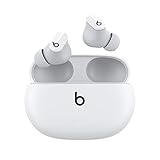
- Custom acoustic platform delivers powerful, balanced sound
- Control your sound with two distinct listening modes: Active Noise Cancelling (ANC) and Transparency mode
- Three soft ear tip sizes for a stable and comfortable fit while ensuring an optimum acoustic seal
- Up to 8 hours of listening time (up to 24 hours combined with pocket-sized charging case)
- Industry-leading Class 1 Bluetooth for extended range and fewer dropouts
Android features: a genuine strength
Android buyers are not treated as an afterthought. The official listing includes Google Fast Pair, Audio Switch across compatible Android and Chromebook devices, Google Find My Device and the Beats Android app. The app can provide customization, firmware updates and supported controls.
Availability can vary with Android version, device manufacturer, Google account configuration, permissions and compatible hardware. Still, this is unusually broad support for a product associated with Apple-owned Beats. Android users who want Apple-adjacent industrial design without giving up Android conveniences have a strong reason to consider the Studio Buds+.
Setup and controls
To pair with an iPhone, open the charging case near the phone and follow the on-screen prompt. If the prompt does not appear, open Bluetooth settings and select the earbuds. On Android, use Google Fast Pair where supported or pair through Bluetooth settings, then install the Beats app if you want its customization and update features.
Free tools Windows power users keep installed
One-click scans. No signup required.
Pressing the physical button on either earbud handles playback and calls. The button can also change listening modes and invoke the voice assistant, depending on the configured control behavior. Because labels and options vary by current iOS, Android and Beats app versions, use the official support documentation for the exact controls shown on your device.
Who should buy the transparent Studio Buds+?
- iPhone users: Buy if you want compact earbuds, Siri, Find My and spatial audio but can live without AirPods-specific conveniences.
- Android users: They are especially attractive if Fast Pair, Audio Switch, Find My Device and an Android management app matter to you.
- Commuters: ANC, Transparency mode, a low-profile fit and long battery life make them practical for daily travel.
- Gym users: The earbuds’ IPX4 rating suits sweat and light splashes, but not swimming or heavy water exposure.
- Appearance-first buyers: The transparent finish is genuinely distinctive, provided you accept that it changes aesthetics rather than performance.
- Original Studio Buds owners: The upgrade makes the most sense if you need longer battery life, better microphones, stronger ANC or the extra XS ear tip. If the original model already fits well and meets your call and battery needs, the case for upgrading is weaker.
Who should hesitate?
Do not buy them expecting the strongest ANC in the category, wireless charging or full AirPods Pro integration. They are also less attractive at the $169.99 US list price if a more advanced competitor is discounted nearby. The Apple and Beats US listings show $169.99, but retailer prices vary by country, date and promotion, so check the live price before buying.
At a meaningful discount, the Studio Buds+ become easier to recommend because their combination of battery life, physical controls, compact fit and dual-platform support is unusual. At full list price, decide whether the transparent design and cross-platform flexibility outweigh missing premium features.
Common problems and fixes
- Weak ANC or thin bass: Try all four tip sizes, reseat both earbuds and check the seal.
- Unnatural Transparency mode: Inspect microphone openings for dust or debris, update firmware and test another tip size.
- Uneven battery drain: Confirm both earbuds sit correctly in the case and touch the charging contacts; clean visible debris carefully.
- Pairing failure: Forget the earbuds in Bluetooth settings, return them to the case, close and reopen the lid, then retry pairing using the official support procedure.
- Missing Android features: Check Android version, Google account setup, Fast Pair compatibility, app permissions and Beats app updates.
- Missing Apple features: Remember that the Studio Buds+ support selected Apple services but do not include every feature of AirPods Pro.
- Water exposure: Dry the earbuds fully and never charge wet earbuds; IPX4 does not mean immersion protection.
Firmware can change behavior over time. For any formal hands-on review, record the firmware version and the iOS or Android versions used, since results and available options may differ after updates.
Quick wins for a faster PC:
Repair Windows errors before they cause bigger problemsFix Now →Scan for outdated or missing drivers - takes under a minuteDriver Scan →Clear out junk files and repair common Windows errorsFree Scan →Verdict
The Beats Studio Buds+ are a well-balanced choice for buyers who want small, stemless earbuds with effective everyday ANC, long claimed battery life, physical controls and credible Apple-and-Android support. The transparent shell is fun and recognizable, but the meaningful improvements are inside: better microphones, revised venting, more flexible ear tips and longer runtime.
They are not AirPods Pro in a clear case, and they are not the obvious choice for class-leading ANC, wireless charging or advanced Apple automation. Buy the transparent Studio Buds+ when the design appeals to you and the price is right; choose something else when ecosystem integration or maximum noise cancellation matters more than compactness and cross-platform flexibility.
Quick Recap
Product prices and availability are accurate as of the date/time indicated and are subject to change. Any price and availability information displayed on Amazon at the time of purchase will apply.

