Free tools Windows power users keep installed
One-click scans. No signup required.
Some links on this page are affiliate links: if you buy through them we may earn a commission, at no extra cost to you.
The Garmin vívofit jr. 3 is the better pick for younger children who need activity goals, chores and rewards without regular charging. The original Garmin Bounce is for a different job: it adds LTE messaging and location features for a child who is becoming more independent, but those features require a paid plan, adequate coverage and a charged watch. Buying in 2026? Compare the original Bounce with the newer Bounce 2 before choosing.
These are different kinds of kids’ watches
The vívofit jr. 3 is a screen-based activity tracker managed through Garmin’s Jr. app. It tracks movement and sleep estimates and supports routines such as chores and rewards; it has no cellular connection, calls, messages or live location. Garmin lists the U.S. Marvel version at $89.99 on its product page; price and availability can change.
The original Bounce is a connected smartwatch. Its distinguishing features are parent-approved messaging, location tracking, check-ins and location alerts, subject to LTE service, coverage, battery, GPS conditions and configuration. It is not a general-purpose smartphone or an unrestricted app platform. Garmin’s Bounce page describes the product and its connected features.
Garmin vívofit jr. 3: a low-maintenance routine tracker
Fit, screen and battery
Garmin specifies the vívofit jr. 3 for ages 4 and up, with an adjustable band for wrists measuring 130–175 mm. It weighs 25 g and has a 0.56-inch, 112-by-112-pixel transflective 64-color MIP display. The small screen suits a simple tracker, not reading long messages or navigating a rich interface. A hands-on comparison found the screen and button interaction could frustrate younger children; parents may find chores easier to manage in the app than on the watch. See the comparison for those usability observations.
#1 Best Overall

- Brilliant AMOLED Screen: Experience crystal-C clarity and smooth interaction with the upgraded AMOLED screen—a big leap from ordinary LCD displays. This kids fitness watch lasts up to 10 days on one charge, keeping up with your child's day and night activities.
- No Phone or App Required: This kids watch operates independently without requiring a smartphone connection. Easy to set up and use, it delivers essential functions like step counting, heart rate monitoring, and sports modes—ideal for young users who want to use it right out of the box.
- Better Activity & Health Tracking: Equipped with advanced sensors, this watch for kids ensures precise step counting and reliable continuous heart rate monitoring. It also analyzes sleep stages and offers a daily sleep score along with tips to help your child rest better.
- 3ATM Waterproof & 10 Sports Modes: Whether running, cycling, or swimming, this boys watch supports 10 different activities. With its upgraded 3ATM water resistance, it's not just splash-proof—it's swim-proof! Kids can wear it all day, rain or shine, even in the pool.
- Good Habits, Fun Games & Virtual Pet: New interactive features inspire kids to stay active! habit reminders (e.g., study time, meals, exercise), interactive mini-games, and an e-pet that grows as they move. It's more than a kids watch boys love—it's a fun companion that encourages healthy habits.
Garmin rates its user-replaceable CR2025 coin-cell battery for up to one year, so there is no routine charging cable. That is a manufacturer rating, not a guarantee; use, temperature, battery age and settings can affect life. An adult should replace the coin cell and keep loose batteries securely away from children because swallowing one is dangerous. Specs are on Garmin’s product page.
Activity, chores and rewards
The vívofit jr. 3 records steps, daily activity and movement-based sleep estimates, and supports timed activities, fitness cards, Toe-to-Toe challenges, chores, reminders and virtual rewards through Garmin Jr. The parent app is where the family sets up much of this routine. Garmin outlines the activity features on its product page and the app’s chore, reward and Kid Mode concepts in its launch announcement.
These are motivational estimates, not medical measurements: sleep tracking is movement-based, and steps and activity are not perfectly accurate. Rewards work best when parents decide in advance what virtual coins mean—if anything outside the app—so they do not become a daily negotiation. Neither watch should be treated as a diagnostic or clinical sleep device.
The Tool Desk
Outbyte PC Repair FREEClear out junk files and repair common Windows errorsFree Scan →Outbyte Driver Updater FREEScan for outdated or missing drivers - takes under a minuteDriver Scan →What it cannot do
The vívofit jr. 3 has no cellular service, calls, messaging or live location. It does include an ICE (“In Case of Emergency”) widget for parent-entered emergency contact information, but that is stored information, not a way to call for help. A compatible adult smartphone with the Garmin Jr. app is needed for setup, syncing and parental management; the child does not need a personal phone.
Rank #2

- Kids smartwatch sends messages and tracks their location to help encourage an active lifestyle while offering parents peace of mind (active subscription and LTE connectivity required)
- Durable, swim-friendly smartwatch features a bright color touchscreen display and up to 2 days of battery life between charges (connected feature usage and LTE network conditions will significantly impact battery life)
- Easily stay in contact with your child via text and voice messaging from the Garmin Jr. app on your compatible smartphone to the Bounce smartwatch and from Bounce to the Garmin Jr. app (active subscription and LTE connectivity required)
- Real-time location tracking lets you check in on your child’s whereabouts through the Garmin Jr. app on your compatible smartphone and even receive notifications when your child enters or leaves parent-defined boundaries (active subscription and LTE connectivity required)
- For added peace of mind, the Assistance feature lets your child quickly trigger a message with their live location to their family contacts (requires setup and your child to be in an area with network coverage where data connectivity is available)
Original Garmin Bounce: a connected watch with ongoing obligations
Messaging and location
The original Bounce’s LTE features are intended to give a child a way to exchange parent-approved text and voice messages, check in, and share location or trigger configured location alerts. The Garmin Jr. app handles account settings, contacts and parental management. Garmin states that each compatible Bounce-series watch needs its own LTE subscription; see Garmin support and the U.S. subscription page for current plan terms. Do not assume the watch can simply be added to a family’s ordinary phone plan.
These functions are not interchangeable with emergency response. Location tracking shows the watch’s reported position; geofencing sends an alert when it crosses a configured boundary; an assistance workflow depends on the watch, account, LTE service and configured contacts. None should be treated as a guaranteed direct connection to 911 or a local dispatcher. A parent should have a separate plan for emergencies.
Charging and coverage are part of the feature set
Unlike the coin-cell tracker, Bounce needs regular charging. A 2023 hands-on comparison reported roughly two days of use, with results affected by connected use and reception; that is secondary testing, not a current manufacturer guarantee. The review also reported weaker reception in some buildings and emphasized the practical burden of charging. See the comparison.
LTE and GPS do not guarantee continuous or precise location. Indoor coverage, terrain, buildings, battery level, GPS conditions, delayed syncing, a watch left behind or removed, and app settings can all affect what a parent sees. Check Garmin’s coverage and plan information for the child’s country, then test the device at home, school, on the route and at regular activity locations during the return period if possible.
Rank #3
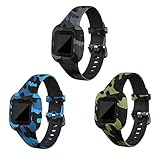
- ✤New arrived silicone bands for Garmin Vivofit jr 3 , Utilize advanced printing craft ensure the pattern color that your vivofit jr 3 bands will not be faded and make it corrosion-resistant and durable.
- ✤Made from eco-friendly silicone and covered with anti-dust surface oil makes it as soft as baby skin. No harm to body, and protecting the Vivofit jr 3 tracker from dirt and scratches.
- ✤These Vivofit jr 3 bands fits 130-175 mm (ages 4+). Alternative holes and metal buckle available for you to adjust the length. You don't need to worry about your Vivofit jr 3 falling off or lossing.
- ✤All-in-one design, It easily slides onto the watch band from the Vivofit junior 3 bottom, locks onto JR 3 interface precisely and securely. No tool needed.
- ✤Unique pattern design , dress up your Vivofit jr 3, 9 colors to replace, which is the best gift, perfect as a Christmas or birthday gift.
Screen, water resistance and school rules
The original Bounce has a larger color touchscreen than the vívofit jr. 3, making messages and navigation more practical. A 2023 comparison identifies the original model’s display as a 1.3-inch, 240-by-240-pixel LCD; do not confuse that with Bounce 2’s AMOLED display. The same secondary comparison describes the original Bounce as swim-friendly with a 5 ATM rating. Check the exact model’s manual for water-use limits, and do not treat water resistance as indestructibility. Avoid hot tubs, high-pressure water, diving and chemical exposure unless Garmin permits them; inspect a damaged case or loose band before water exposure.
Before buying a connected watch, ask the child’s school about rules for smartwatches, messaging and location-capable devices. A “kids” label does not make a watch acceptable in class.
Independent reader supportYour contribution helps us test, update, and keep practical guides available for everyone.Head-to-head: which trade-off matters most?
| Factor | vívofit jr. 3 | Original Bounce |
|---|---|---|
| Best use | Activity encouragement, routines, chores and rewards | Phone-free parent-approved messaging and location features |
| LTE plan | Not required | Required for connected features; each compatible watch needs its own subscription |
| Child’s smartphone | Not needed | Not needed when using Garmin LTE service |
| Parent phone and app | Compatible smartphone and Garmin Jr. app needed for the full parent experience | Garmin Jr. app needed for settings, contacts and tracking |
| Battery | Garmin rates replaceable CR2025 for up to one year | About two days reported in 2023 secondary coverage; connected use and conditions affect life |
| Communication and location | No calls, messages or live location; has an ICE information widget | Messaging, check-ins and location features depend on plan, coverage, GPS, battery and settings |
| Display | 0.56-inch, 112-by-112 MIP display | 1.3-inch, 240-by-240 LCD according to 2023 secondary coverage |
| Water rating | 5 ATM, per Garmin | 5 ATM reported by secondary coverage; confirm the exact model manual |
| Main compromise | Small screen and no contact or tracking | Recurring cost, charging and network dependence |
Specifications for the tracker are from Garmin; Bounce subscription requirements are from Garmin support; original Bounce display, battery and water observations are from the 2023 comparison.
What’s actually slowing this PC down?
Pick the symptom - the matching free tool is one click away.
In 2026, distinguish the original Bounce from Bounce 2
Garmin introduced Bounce 2 on September 17, 2025. It adds two-way calling, keyboard texting and a 1.2-inch AMOLED display, among other features. Garmin’s announcement gave a U.S. suggested retail price of $299.99, a $9.99-per-month smartwatch plan and battery life of up to two days; connected-feature use and LTE conditions affect battery life. These are Bounce 2 details, not original Bounce specifications. Check Garmin’s announcement and current product and plan pages for live availability and terms.
If buying new, compare Bounce 2 with the original Bounce rather than assuming an older listing represents Garmin’s current connected-watch experience. The original may make sense at a substantial discount if its feature set fits, but verify that it can be activated in your country, the LTE service remains available for your location, the battery holds charge, the right cable is included, it is not account-locked, and activation is covered by the return policy. The available information does not establish that the original’s service has been discontinued, so confirm activation directly before purchase.
Quick Recap
Choose by the child and the family’s routine
- A 5-year-old wants a watch: Start with the vívofit jr. 3 if the goal is a wearable, activity prompts or routines. The fit and age guidance are manufacturer specifications, not a developmental rule.
- A child needs chores without GPS: The vívofit jr. 3’s app-based chores and rewards address that need without an LTE plan.
- A 9-year-old walks to a friend’s house: Consider Bounce only if parent-approved contact and location would help, the child can use it responsibly, and coverage works on that route. The watch is an additional contact option, not a safety guarantee.
- You are delaying a smartphone: Bounce can offer a narrower, parent-managed communication option. For a new Garmin purchase, compare Bounce 2’s calling and keyboard features with the older model and weigh the plan cost.
- Your child forgets to charge devices: The vívofit jr. 3 is the more practical fit. A dead Bounce cannot message or report location.
- You have more than one child: Budget for a separate LTE subscription for each compatible Bounce-series watch, as Garmin support specifies.
- You are considering a used original Bounce: Confirm activation eligibility, local coverage, account status, battery condition, included charger and return terms before paying.
Set it up with realistic expectations
- Check fit and compatibility. Measure the child’s wrist against Garmin’s 130–175 mm band range for vívofit jr. 3, and confirm that the adult’s iPhone or Android device supports the Garmin Jr. app.
- Check school rules and intended locations. For Bounce, verify LTE coverage at home, school, routes and common destinations, and check the school’s device policy.
- Budget for ownership, not just the watch. The vívofit jr. 3 avoids an LTE subscription; Bounce requires one for connected features. Check Garmin’s current U.S. plan page for price and terms before committing.
- Set access deliberately. Review approved contacts and parent or caregiver permissions in the app, and decide who can see location. Add ICE information on the vívofit jr. 3 if useful. Consult Garmin’s current privacy information and applicable local rules for data-handling questions.
- Test before relying on it. Send a test message and check location reporting at the places the child visits. Explain that offline service, low battery, GPS conditions or delayed syncing can make location unavailable or stale.
- Make charging—or battery replacement—an adult-owned routine. Pick a visible charging spot for Bounce. For the vívofit jr. 3, have an adult replace and safely store the CR2025 when needed.
Product prices and availability are accurate as of the date/time indicated and are subject to change. Any price and availability information displayed on Amazon at the time of purchase will apply.

