Quick wins for a faster PC:
Repair Windows errors before they cause bigger problemsFix Now →Fix the driver behind crashes, sound loss and screen glitchesFind Drivers →Clear out junk files and repair common Windows errorsFree Scan →Some links on this page are affiliate links: if you buy through them we may earn a commission, at no extra cost to you.
Use the Fossil Smartwatches phone app—not the watch itself—to change a Fossil Hybrid face: open the paired watch, choose Customize (or Customization), select or edit a dial, tap Save/Apply, and leave Bluetooth connected until synchronization finishes. Menu names and editing tools differ among original Hybrid, Hybrid HR, and Gen 6 Hybrid models.
This guide applies to analog Fossil Hybrids and Hybrid HR watches. Fossil touchscreen watches running Wear OS use a different, on-watch procedure.
Identify your Fossil watch first
“Fossil Hybrid” covers several generations. Original Hybrids use physical hands with limited digital indicators; Hybrid HR models add an always-on e-ink display beneath the hands; Gen 6 Hybrid models use the current Fossil Smartwatches app. A Fossil touchscreen running Wear OS is a separate category.
| Watch type | Built-in face changes | Complication editing | Photo background | Touchscreen face selection |
|---|---|---|---|---|
| Older Fossil Hybrid | Usually, with model-dependent menus | Model- and face-dependent | Do not assume | No |
| Fossil Hybrid HR | Yes, through the Fossil app | Supported on compatible faces and models | Advertised for Hybrid HR and compatible models | No |
| Gen 6 Hybrid | Yes, through Fossil Smartwatches | Subject to model and app limits | Verify in the editor | No |
| Fossil Wear OS touchscreen | Different workflow | Wear OS-specific | Not the Hybrid workflow | Yes |
Fossil says the app supports Hybrid smartwatches and Gen 6 Wear OS devices, while features can vary by country and platform. See the Google Play listing or Apple App Store listing for the current app.
#1 Best Overall

- Get strapped with our new handsome black silicone style. Fit for any case with 22mm lugs.
- Black silicone watch band, adjustable stainless steel buckle closure for a customized fit
- Band Width: 22mm; interchangeable with 22mm Fossil watches; compatible with any watch case with 22mm lugs
- Secure your strap by pushing the pin tab inward while aligning watch band with pin holes on either side of the watch. Release the pin tab to lock the strap in place.
- There’s no better way to keep your favorite looks fresh than with Fossil's swappable, versatile watch straps. Our quick release pins allow you to change up your look as often as you like while maintaining your signature style.
Prepare the phone and watch
- Install Fossil Smartwatches.
- Pair the watch inside the app; merely seeing it in the phone’s Bluetooth list is not enough.
- Turn on Bluetooth and keep the phone close to the watch.
- Ensure the watch has adequate power. Fossil’s setup guidance covers app installation, Bluetooth, watch power, and in-app pairing at its Hybrid support page.
- Use a current Android or iOS release supported by the app. Fossil notes that compatibility and features may change by platform and country.
Change to another built-in face
- Open Fossil Smartwatches.
- Tap the connected watch, sometimes labelled Your Watch.
- Open Customize, Customise, or Customization.
- Tap the face preview and browse the available faces, dials, or gallery.
- Tap the design you want.
- Choose Apply, Set, Save, or the equivalent confirmation button.
- Keep Bluetooth on, leave the phone nearby, and wait for the update to reach the watch.
Fossil uses more than one label across app versions, so do not treat one exact word as universal. A changed preview in the app means the design is selected; it does not necessarily mean the watch has finished receiving it.
Edit the current face
- Open the paired watch in the app and enter Customize/Customization.
- Tap the circular watch preview or its pencil, edit, or settings control.
- Select the part of the dial you want to change.
- Adjust the controls exposed for your model and selected face.
- Save the design, apply it, and wait for Bluetooth synchronization.
Backgrounds and colors
Supported editors may offer a built-in background, a color choice, or an image. The App Store description lists background customization, but older Hybrids can have a much smaller selection.
Complications and readouts
Complications are the information fields shown on the dial—for example steps, weather, battery, heart rate, calories, date, notifications, or another supported indicator. Availability depends on the watch, sensors, and face layout; no model exposes every option. Fossil describes changing dial designs and complications in its Hybrid app overview.
What’s actually slowing this PC down?
Pick the symptom - the matching free tool is one click away.
Complication appearance, text, and stickers
On compatible faces, the app may let you change complication shape and color, add text, or place stickers. These controls are app- and model-dependent, not guaranteed features of every original Hybrid.
Rank #2

- The 22mm width quick release replaceable watch band compatible with Fossil Q Marshal, Wander, Founder Gen 2 / Q Explorist Gen 3 / Q Explorist HR Gen 4, Grant, Commuter, Sport 43mm, Gen 5 Carlyle HR, Gen 5 Julianna HR, Gen 5 Garrett HR, Gen 5E 44MM, Gen 6 44MM
- Fits 5.51"-8.07" (140mm-205mm) wrist
Shortcuts and buttons
Shortcut or button assignments may appear elsewhere in the same watch-management area. They change what a physical button does; they are separate from the visual face and may not be available on every generation.
Use a personal photo on Hybrid HR
Fossil’s app listing specifically advertises setting a photo as the dial background for Hybrid HR and compatible models. In the editor, choose the background or photo option, select an image from the phone, preview the crop, then save and apply it.
The e-ink-style display is low-detail and commonly monochrome, so a simple, high-contrast image with a clear subject is more legible than a busy photograph. Do not assume an original Fossil Hybrid accepts photos: those watches may offer only built-in dials or limited background choices.
What the analog hands can—and cannot—change
The app can change the digital/e-ink dial design, background, complications, and related styling where supported. It does not provide evidence of arbitrary redesign of the physical hand hardware. Hand shape, movement, and the analog layout remain constrained by the watch and the selected face design.
Rank #3

- 【Compatible Models】Tobfit sport band compatible with Fossil Women's Gen 6 42mm/ Women's Gen 5E 42mm/Gen 4 Women's Sport/Gen 4 Venture HR/Gen 3 Q Venture/Gen 3 Venture HR/Fossil Q Venture/Sloan HR/Scarlette/Tailor Sport 41mm. Fit for any watches with 18mm lugs (Watch is not included)
- 【Skin-Friendly Silicone Material】The replacement watch band for Fossil Women's Gen 6 42mm/ Women's Gen 5E 42mm/Gen 4 Women's Sport/Gen 4 Venture HR replacement band are made of premium silicone materials, which can prevent skin from irritation rash, it is soft, durable, breathable, washable, drying fast and comfortable to wear. A great alternative to original bands for Sports. Soft and comfortable feeling brings good time all day
- 【Unique Design】The Premium Waterproof Material soft sport wristband with a buckle clasp for quick and easy adjustment. Suitable for 6.3"- 8.7" (160mm-220mm) wrist. Replacement for Fossil Women's Gen 6 42mm/ Women's Gen 5E 42mm watch band for Women, Fossil Women's Gen 6 42mm/ Women's Gen 5E 42mm/Gen 4 Women's Sport/Gen 4 Venture HR band with a sturdy fastener, double-reinforced to prevent smartwatch from falling
- 【Multi Color Choices】 Tobfit Durable Elastomer Exercise sport bands for CFossil Women's Gen 6 42mm/ Women's Gen 5E 42mm are available in a variety of colors to match different outfits and suit different occasions and moods, highlight your unique taste. Perfect for running, riding, workouts, parties, climbing, hiking, camping, traveling and more outdoor activities. Also can be a pleasant gift for family and friends, it will be your best choice
- 【Security & Easy to install】The 18mm quick release watch bands with quick release spring bars on both sides, which locks onto smart watch Interface precisely and securely, allows you to change bands easily, no tool is need. Free replacement or refund if there is any quality problems of the Fossil Women's Gen 6 42mm/ Women's Gen 5E 42mm/Gen 4 Women's Sport/Gen 4 Venture HR/Gen 3 Q Venture/Gen 3 Venture HR Bands in 12 months
If the new face does not appear
- Confirm that the intended watch—not another Fossil device—is selected.
- Check Bluetooth and keep both devices close together.
- Press a watch button to confirm it has power and responds.
- Close and reopen Fossil Smartwatches, then wait for its connection status to return.
- Apply the face again and keep the app open during transfer.
- Restart the phone and watch if the connection remains stale.
- Update Fossil Smartwatches from the App Store or Google Play.
- Remove and re-pair the watch only after these steps fail; re-pairing can require repeating setup.
Fossil’s release notes emphasize pairing, performance, and bug-fix updates, so an outdated app can produce a connection or menu problem.
When “Customize” is missing
- The watch is listed in phone Bluetooth settings but is not fully connected in Fossil Smartwatches.
- A different paired Fossil watch is selected.
- The app needs an update or a fresh connection.
- Your model does not support that type of face, photo, complication, or styling.
- You are using a Fossil Wear OS watch and looking for the Hybrid controls.
- The option is unavailable for your phone platform or region, or the interface changed after an update.
Fossil explicitly qualifies feature availability by country and compatibility. Its current support information is available at Hybrid support.
Hybrid versus Wear OS face changes
For an analog Fossil Hybrid, use Fossil Smartwatches app → paired watch → Customize/Customization → face editor → Save/Apply. For a Fossil touchscreen Wear OS watch, press and hold the touchscreen dial, then swipe through faces and select one; Fossil documents that workflow at its Wear OS guide. A Wear OS face app such as Facer is not a substitute for the official Hybrid workflow.
Recommended Free Tools
Practical limits and ownership notes
Changing a face does not add sensors or data that the hardware lacks. A complication absent from the editor may simply be unsupported by the watch or selected layout. The app can manage multiple Fossil watches, so verify the device before applying a design.
Rank #4

- [22mm Watch Bands] Compatible with Fossil Gen 6/Gen 5E 44mm/Gen 5 Carlyle/Gen 4 Explorist HR/Gen 5 Julianna/Gen 5 Garrett HR/Gen 4/Gen 3/Gen 2 Q
- Compatible with Garmin Instinct/Instinct 2/Instinct Tide/Instinct Tactical/Instinct Solar/Instinct 2 Solar, Compatible with Garmin Vivoactive 4/Venu 2/Venu 3, Compatible with Garmin Forerunner 965/955/945/935/745/265/255/255 Music, Bip 5/GTR 4/GTR 3 Pro/GTR 3/GTR 2/2e/GTR 47mm, Compatible with COROS Pace 3/Apex 2 Pro/Apex Pro/Apex 46mm, Compatible with Pebble, Compatible with Ticwatch, and other watches with 22mm width lugs
- Easy to adjust the length to fit your wrist. Fit 6.0"-8.5" (150mm-215mm) wrist. Made of high quality silicone rubber, skin-friendly. Comfortable and Durable
- Come with Quick Release Pins, easy to install and remove from watch without using tool
- Smart Watch and other accessories Not Included
Some battery-powered Hybrids are maintained differently from rechargeable touchscreen watches; Fossil’s support material discusses battery replacement for applicable models. A discontinued or out-of-stock model can still use its supported app features, but replacement availability and future software support are not guaranteed. The example Hybrid HR Everett product page, for instance, has shown changing availability at Fossil’s product page.
Independent reader supportYour contribution helps us test, update, and keep practical guides available for everyone.Frequently Asked Questions
Can every Fossil Hybrid use a personal photo?
No. Photo backgrounds are specifically advertised for Hybrid HR and compatible models. Older Hybrids may be limited to built-in dials or simpler background controls.
Why does the app show my new face but the watch still shows the old one?
The app preview can change before Bluetooth transfer is complete. Keep the app open, the devices nearby, and Bluetooth enabled; then retry after confirming the watch is connected.
Do these 3 things before closing this tab:
1Clear out junk files and repair common Windows errors2Scan for outdated or missing drivers - takes under a minute3Repair Windows errors before they cause bigger problemsCan I add a complication that is not listed?
No. The available complications depend on the watch’s sensors, firmware, and selected face layout.
Best Value
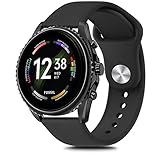
- Compatible Models : Meliya 22mm Quick Release Bands Designed for Perfect compatible for Fossil Men's Gen 6 44mm(Not 42mm)/Gen 5E 44mm(Not 42mm)/ Men's Gen 5 Carlyle / Men's Gen 4 Explorist HR / Women's Gen 5 Julianna / Gen 5 Garrett HR / Gen 4 Sport / Gen 3 Q Explorist / Gen 2 Q Founder / Gen 2 Q Marshal / Gen 2 Q Wander / Q Founder / Q Marshal / Q Wander / Q Crewmaster / Q Grant / Q Explorist / Commuter / Men's Sport 43mm.
- Comfortable Material : Meliya replacement bands are made of premium silicone durable material, providing you maximum comfort and breathability, makes it a perfect decoration for your Fossil Men's Gen 6 from sports to work. These sport straps are lightweight, waterproof, sweat resistant and durable. Very soft and comfortable to wear.
- Unique Design : The wristband is designed with Aluminum Buckle, easy to install and adjustable, holds your smartwatch band securely in place, no worry fall off. One Size for 6.7" -8.7" (170mm-220mm) wrist. Size can be adjustable with buckle. And multi colors for you choices.
- Easy Installation : The quick-release spring bars on both ends of the bracelet are made with seamless connection technology, slide the pin into the notch of the watch and keep two sides of the connector locked to your Fossil Men's Gen 6 44mm, push the pin inward, slide the other end inside.
- Excellent After-sales Service : Any issues with our Fossil Men's Gen 6 watch bands, please contact us via "contact seller" by email without hesitation, and we will fix for you within 24 hours.
Can I change the physical analog hand style?
The documented controls change the dial design and digital/e-ink elements. They do not establish arbitrary replacement of the physical hands or movement layout.
Does changing a face have a guaranteed sync time?
No universal time is documented. Transfer duration varies with the watch, phone, connection, and design.
Can a third-party Wear OS face app customize my Fossil Hybrid?
Do not assume so. Hybrid watches use Fossil’s app-based workflow, while third-party Wear OS face apps target touchscreen Wear OS devices.
Windows Errors? Fix Them Before They Spread
Repair common Windows errors and clear accumulated junk for a smoother, more stable PC - no reinstall needed.Free scan · no reinstallCrashes, No Sound, or Screen Glitches?
Random freezes, missing sound and display glitches usually trace back to one bad driver. Find and replace yours safely.Free scan · under a minuteQuick Recap
Product prices and availability are accurate as of the date/time indicated and are subject to change. Any price and availability information displayed on Amazon at the time of purchase will apply.

