Some links on this page are affiliate links: if you buy through them we may earn a commission, at no extra cost to you.
To change the time on most basic digital watches, return to the ordinary time display, hold SET or ADJUST until a number flashes, use MODE to move between fields, and use the other buttons to change the flashing value. Then confirm or exit the setting screen.
There is no universal button combination: the exact sequence depends on the brand, model, and module. If the general method below does not work, find the model or module number on the case back and use the manufacturer’s official manual.
Try this standard method first
These steps work as a starting point for many inexpensive four-button digital watches, including some sports watches and G-SHOCK-style models:
The Tool Desk
Outbyte PC Repair FREEClear out junk files and repair common Windows errorsFree Scan →Outbyte Driver Updater FREEFix the driver behind crashes, sound loss and screen glitchesFind Drivers →- Press MODE repeatedly until the normal hour-and-minute display appears. This may be called Time, Clock, Normal Time, or Timekeeping mode.
- Hold SET, ADJUST, or the button that appears to control settings for two or three seconds. Do not just tap it.
- Stop when the seconds, hour, date, city code, or another field begins flashing.
- Press MODE to move to the hour.
- Use START/STOP, RESET, or the watch’s increase/decrease buttons to set the hour.
- Press MODE to move to minutes, then adjust them.
- Check the AM/PM indicator or choose 12-hour or 24-hour display.
- Press SET, ADJUST, or sometimes MODE to save. Some watches save automatically when you stop pressing buttons.
Some models begin with seconds, the date, a home city, or a time zone instead of the hour. Button labels and hold times also vary, so treat this as a general pattern—not a guaranteed sequence.
#1 Best Overall

- 【DIGITAL MULTIFUNCTION WATCHES】 ⌚:Appeals to mens, especially to those who like doing sports, shock resistant, stop watch, and LED back light functions make it perfect for all kind of sport and daily use
- 【3ATM WATERPROOF WATCHES FOR MEN】⌚:Mens wrist watches is waterproof 30M/3ATM, suitable for sweat-proof, rain-proof and hand-wash. BUT NOT for bathing, swimming, diving, or immersion in water. Please avoid hot water and steam. Note: Keep your hands dry before pressing the button; do not press underwater.Fashion and casual style, suitable for most indoor or outdoor activities.
- 【Mens Analog Watch】⌚ Mens watch made with anti-scratch mineral dial window, exquisitely crafted. Ultra soft silicone strap, wear-resistant and scratch-resistant, breathable, easy to maintain. Men's wrist watch is an ideal present for you and your loved ones.
- 【Mens Digital Watch】⌚ Simple and easy-to-operate functions, with Waterproof, 12/24 hours switch, alarm clock, hourly alarm and daily alarm, Auto Date, Stop Watch, LED Light
- 【Purchase without Worry】⌚ This stylish and simple sport work watches surprising woemen watch casual watch is very suitable for active lifestyles, will suitable for personal use and good for anniversary, graduation, business, birthday, Christmas, for father, boyfriend, or other male friend, classmates.
What the buttons usually do
| Button | Typical function |
|---|---|
| SET or ADJUST | Enters or exits the setting screen. |
| MODE | Cycles through watch modes or moves the flashing cursor to the next field. |
| START/STOP | Often increases the selected value. |
| RESET | Often decreases a value or changes the 12/24-hour format. |
| LIGHT | Usually illuminates the display, though some models give it a secondary setting function. |
These are common assignments, not standards. Use the labels printed on your watch and do not assume that every four-button Casio, Timex, or unbranded watch works alike.
Make sure you are setting the clock, not the alarm
A digital watch may have separate stopwatch, countdown timer, alarm, world-time, and dual-time modes. If you change a time and the main clock remains wrong, you were probably in the alarm or another secondary mode.
Press MODE until you see the ordinary current-time screen. On many Casio watches this is called Timekeeping Mode. Only then hold the setting button.
Quick wins for a faster PC:
Fix the driver behind crashes, sound loss and screen glitchesFind Drivers →Repair Windows errors before they cause bigger problemsFix Now →Scan for outdated or missing drivers - takes under a minuteDriver Scan →Change only the hour or minutes
Enter the setting screen and watch which field is flashing. Press the field-selection button—often MODE—until the hour flashes. Adjust it, move to minutes, and adjust them. Finish by saving or exiting.
Move carefully through the fields. Depending on the model, the same sequence may also include the year, month, day, home city, DST setting, or display format.
Choose 12-hour or 24-hour time
12-hour format uses AM and PM, sometimes shown as A, P, or PM. 24-hour format runs from 00:00 through 23:59.
Rank #2

- Shock-resistant and durable: The watch is made of high-quality materials and has a strong shock-resistant structure, making it suitable for various outdoor sports and daily wear.
- Multiple functions: The watch has multiple functions such as stopwatch, calendar, backlight, alarm clock, etc., making it more convenient for your daily life.
- Easy to read: The watch has a clear digital display, and the numbers are large and easy to read, even in dark environments.
- Comfortable to wear: The watch has a soft and comfortable silicone strap, which fits comfortably on your wrist and is not easy to fall off.
- Water resistant: The watch has a water resistance of up to 50 meters, in general, suitable for swimming and snorkeling, but not diving.
Look for a setting labeled 12H, 24H, 12/24, or 24-hour. It may be a separate field, or it may appear while the hour is flashing.
Windows Errors? Fix Them Before They Spread
Repair common Windows errors and clear accumulated junk for a smoother, more stable PC - no reinstall needed.Free scan · no reinstallOutdated Drivers Are Slowing You Down
One free scan finds every outdated or missing driver and matches the right update for your exact hardware.Free scan · exact hardware matchCheck AM/PM whenever you set an hour in 12-hour mode. Setting the display to 7:00 without checking the indicator can produce 7:00 PM when you intended 7:00 AM. Switching temporarily to 24-hour format makes this mistake easier to spot: 07:00 is morning and 19:00 is evening.
Set the seconds accurately
Many digital watches let you reset seconds to 00. For an accurate result, watch a reliable clock and press the adjustment button when it reaches the start of the desired minute. Then set the hour and minutes if needed.
The effect of resetting seconds is model-specific. Some Casio manuals state that resetting seconds during the second half of a minute advances the minutes by one; do not assume every digital watch behaves this way. See the exact manual for your model.
Correct the date and day
If the date is wrong, the watch can appear incorrect around midnight even when the hour and minutes are right. In the setting screen:
Quick wins for a faster PC:
Fix the driver behind crashes, sound loss and screen glitchesFind Drivers →Clear out junk files and repair common Windows errorsFree Scan →- Cycle to the year, month, and day fields.
- Adjust each field.
- Check that the watch is not set to the previous or next day.
- Confirm whether the display uses month/day or day/month order.
Basic watches may not handle every month length or leap year automatically. More advanced models may do so, but the behavior depends on the module.
Rank #3
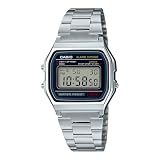
- CLASSIC RETRO CASIO DESIGN A timeless digital watch that has remained an icon for decades. The vintage square face and polished stainless steel bracelet deliver a clean, minimalist style that complements casual, business, and everyday wear for both men and women.
- RELIABLE EVERYDAY DIGITAL FUNCTIONS Stay organized with practical features including a 1/100-second stopwatch, daily alarm, hourly time signal, auto calendar, and selectable 12/24-hour time format—everything you need in a dependable everyday
- LONG-LASTING 7-YEAR BATTERY Powered by a dependable CR2016 battery designed to last approximately seven years under normal use, giving you years of worry-free performance with minimal maintenance.
- LIGHTWEIGHT & COMFORTABLE Weighing only 46 grams, the slim profile and adjustable stainless steel bracelet provide exceptional comfort for all-day wear. The self-adjustable clasp allows for a customized fit on a wide range of wrist sizes.
- TRUSTED CASIO QUALITY Built with Casio's legendary reliability, this water-resistant digital watch features a durable chrome-plated resin case, stainless steel bracelet, LED backlight for nighttime visibility, and quartz accuracy of approximately ±30 seconds per month.
Check daylight saving time and the time zone
If the watch is exactly one hour fast or slow, check for DST, Summer Time, or ST. Daylight-saving time advances the displayed time by one hour, but whether it should be enabled depends on your location and the watch’s configuration. It is not observed uniformly in every region; for example, Arizona and Hawaii do not follow the same DST pattern as most U.S. states.
On watches with a city or time-zone setting, select the correct home city first, then set DST according to your local time. A wrong home city can also produce a one-hour error.
Do not enable DST automatically just because the watch offers it. Follow the local time where you are, and check the official instructions for the model.
Recommended Free Tools
Digital and analog displays
On a combination watch, set the digital time first. The analog hands may synchronize automatically, but some watches require a separate hand-alignment procedure called H-SET or hand alignment.
If the hands and digital display disagree, use the model’s specific analog-adjustment instructions. Do not assume that turning the crown or repeating the digital procedure will correct both displays.
Independent reader supportYour contribution helps us test, update, and keep practical guides available for everyone.Bluetooth, radio-controlled, GPS, solar, and smart watches
These watches should not all be treated like ordinary button-operated digital watches:
Rank #4

- Micro Light, Hourly Time Signal, Auto Calendar
- 12/24 Hour Formats
- Dial Code: Digital
- Water Resistant
- Daily Alarm
- Bluetooth watches: compatible models may synchronize with a paired phone through the manufacturer’s app. Check the phone’s time zone before forcing a manual change.
- Radio-controlled watches: may correct themselves after receiving a time signal, often overnight. Reception can be better near a window and may take time.
- GPS watches: commonly obtain time from satellite or location data, but the exact process is model-specific.
- Solar watches: solar charging affects power availability, not necessarily the manual time-setting procedure.
- Smartwatches: normally use the paired phone’s time and time-zone settings rather than a button-based clock-setting sequence.
For compatible models, automatic synchronization may be more accurate than manual entry. Confirm how the feature works before changing the time by hand.
When the standard method does not work
| Problem | Likely cause | What to try |
|---|---|---|
| Nothing flashes | You are in the wrong mode, or you tapped instead of held. | Return to the normal time display and hold the likely setting button for two or three seconds. |
| The alarm changes instead of the clock | The watch is in Alarm mode. | Press MODE until the main current-time display appears, then enter settings. |
| The time is 12 hours wrong | AM/PM is incorrect. | Check the indicator or switch to 24-hour format and correct the hour. |
| The time is exactly one hour wrong | DST, home city, time zone, or synchronization settings are incorrect. | Check DST and the selected city/time zone; also check the paired phone if applicable. |
| The setting screen disappears | The watch timed out after inactivity. | Re-enter the setting screen and complete the sequence without pausing. Some models exit after roughly two or three minutes. |
| Analog and digital displays disagree | They use separate adjustment systems. | Set the digital time, then follow the model’s H-SET or hand-alignment procedure. |
| The display is blank, faint, or keeps resetting | The battery or electronics may be failing. | Stop troubleshooting the settings and arrange battery or watch service. |
Find the exact instructions for your watch
The most dependable solution is the manufacturer’s manual for the exact model or module:
- Remove the watch or turn it over.
- Find the model name, module number, or operating-instruction number on the case back.
- Search the manufacturer’s official manual database.
- Open the section titled something like Adjusting the Current Time, Setting the Time and Date, Timekeeping, or Home City and Summer Time.
- Follow the button diagram for that exact watch.
For Casio watches, use the official manual lookup and search by model name or module number. Casio also provides a time-adjustment support page. This matters even within the G-SHOCK range: official guides for modules 3547 and 5641 use different buttons and sequences. A current module 5762 guide published in March 2026 is another reminder that procedures remain module-specific.
For another brand, use its own official support site rather than relying on an unrelated video or manual mirror.
When to stop troubleshooting
Arrange professional service if the display remains blank despite a fresh battery, buttons do not respond, the watch repeatedly loses time, or the digital and analog displays cannot be aligned using the official manual.
If the watch is water-resistant, avoid opening the case yourself just to replace the battery. Opening it can compromise the seal; use a qualified watch technician when water resistance matters.
Quick Recap
Product prices and availability are accurate as of the date/time indicated and are subject to change. Any price and availability information displayed on Amazon at the time of purchase will apply.

