If you’ve ever glanced at your Garmin and seen a VO2 Max number without knowing whether it’s impressive, worrying, or even accurate, you’re not alone. Garmin presents VO2 Max as a single, clean score, but behind it sits a surprisingly practical snapshot of how efficiently your heart, lungs, and muscles work together during real exercise. Understanding what this number represents is the foundation for knowing why Garmin highlights it so prominently across watches, widgets, and training features.
At its core, Garmin’s VO2 Max estimate is not just lab science repackaged for a wrist. It’s a training-aware metric that reacts to how you actually run or ride, how hard your heart has to work at different speeds or power outputs, and how that relationship changes over time. Once this clicks, VO2 Max stops being a mystery stat and starts functioning like a fitness compass that helps guide effort, expectations, and progress.
This section breaks down what Garmin really means by VO2 Max, how your watch calculates it using Firstbeat physiology, and why it connects directly to everyday performance rather than abstract physiology. By the time you move on, you’ll know exactly why this metric matters before you even learn where to find it on your watch or in the app.
What VO2 Max actually measures in plain language
VO2 Max is a measure of how much oxygen your body can use at maximum effort, relative to your body weight. Higher values generally mean your cardiovascular system can deliver oxygen more efficiently and your muscles can use it more effectively during sustained exercise. On Garmin, this is expressed as a single number that allows comparisons across age, gender, and fitness levels.
🏆 #1 Best Overall

- Easy-to-use running smartwatch with built-in GPS for pace/distance and wrist-based heart rate; brilliant AMOLED touchscreen display with traditional button controls; lightweight design in 43 mm size
- Up to 11 days of battery life in smartwatch mode and up to 19 hours in GPS mode
- Reach your goals with personalized daily suggested workouts that adapt based on performance and recovery; use Garmin Coach and race adaptive training plans to get workout suggestions for specific events
- 25+ built-in activity profiles include running, cycling, HIIT, strength and more
- As soon as you wake up, get your morning report with an overview of your sleep, recovery and training outlook alongside weather and HRV status (data presented is intended to be a close estimation of metrics tracked)
What makes this useful is not the theoretical maximum, but the practical implication. If your VO2 Max improves, you can typically hold faster paces or higher power with less strain, or maintain the same effort for longer before fatiguing. That’s why endurance athletes have used VO2 Max as a performance benchmark for decades.
How Garmin estimates VO2 Max without a lab test
Garmin watches use Firstbeat algorithms to estimate VO2 Max from real workout data rather than direct oxygen measurement. During eligible activities, the watch analyzes the relationship between your heart rate response and your running pace or cycling power. Over time, it learns how efficiently your body converts effort into speed or output.
Accuracy improves when heart rate data is clean and workouts include a range of intensities. A snug-fitting watch, stable cadence, and consistent effort matter more than short all-out sprints. While it’s still an estimate, long-term trends on Garmin are reliable enough to guide training decisions for most recreational and competitive athletes.
Which activities count toward Garmin VO2 Max
Not every workout updates VO2 Max, and this often confuses users. For running-based VO2 Max, Garmin requires outdoor runs with GPS, steady effort, and heart rate data, typically sustained above a moderate intensity threshold. Indoor treadmill runs usually do not count unless the watch supports calibrated pace and meets specific criteria.
For cyclists, VO2 Max estimates require a power meter paired to the watch. Heart rate alone is not enough because speed varies too much with terrain and wind. Activities like strength training, yoga, hiking, or casual walks do not generate VO2 Max updates, even though they still contribute to overall fitness.
Why VO2 Max matters beyond bragging rights
On Garmin watches, VO2 Max feeds directly into other features that affect your day-to-day training experience. Training Status, Training Load Focus, Race Predictions, and suggested workouts all rely on this number to scale intensity appropriately. A rising VO2 Max often unlocks more aggressive training suggestions, while a declining one can trigger recovery-focused guidance.
It also provides context when fatigue, stress, or lifestyle changes affect performance. If your pace feels harder than usual and your VO2 Max trends downward, that’s often an early signal of accumulated fatigue, illness, or insufficient recovery. Seen this way, VO2 Max becomes a feedback tool rather than a judgment.
How to interpret your Garmin VO2 Max score realistically
Garmin categorizes VO2 Max into performance ranges based on age and gender, labeling them from poor to superior. These labels are meant for population-level comparison, not self-worth or athletic potential. A “fair” score for a beginner runner may still represent excellent progress and meaningful health benefits.
More important than the absolute number is direction and stability. Gradual increases suggest effective training and recovery, while sudden drops usually reflect short-term stressors rather than lost fitness. Looking at trends over weeks and months gives far more insight than reacting to any single update.
Why VO2 Max may be missing or slow to update
Many users assume something is broken when VO2 Max doesn’t appear, but the cause is usually eligibility rather than malfunction. The watch needs enough qualifying data, and new users may need several outdoor runs or rides before the first estimate appears. Inconsistent heart rate readings or workouts that stay too easy can also delay updates.
Device capability matters as well. Entry-level Garmin models may support VO2 Max viewing but not advanced analysis, while older or lifestyle-focused watches may not support the metric at all. Knowing what your specific watch can calculate sets realistic expectations before troubleshooting.
Why this metric is especially useful on Garmin watches
Garmin’s strength is not just displaying VO2 Max, but weaving it into the broader training ecosystem. Battery life measured in days, comfortable all-day wear, and durable cases mean your watch can collect enough consistent data to make the metric meaningful. Unlike one-off fitness tests, this is a living number that evolves as you do.
When used correctly, Garmin VO2 Max acts less like a scorecard and more like a training translator. It turns heart rate, pace, and power into a simple signal you can check at a glance, then act on with confidence as you move deeper into understanding where to find it and how to use it.
Which Garmin Watches Support VO2 Max Tracking (Device Compatibility Explained)
Understanding whether your Garmin can calculate VO2 Max is the logical next step before tapping through menus or troubleshooting missing data. Garmin’s VO2 Max estimates rely on a specific mix of hardware, sensors, and Firstbeat-powered software, so support is tied closely to the watch’s positioning in Garmin’s lineup.
In practical terms, most modern Garmin fitness, running, and multisport watches support VO2 Max in some form. Simpler lifestyle models and older entry-level devices may not, or they may only display a basic score without deeper context.
The core requirements a Garmin watch must have
For VO2 Max to work at all, a Garmin watch needs three non-negotiable capabilities. It must have a built-in optical heart rate sensor, GPS for pace or speed data, and Firstbeat physiology algorithms enabled in the firmware.
This is why VO2 Max only updates during certain outdoor activities. The watch must be able to correlate how hard your heart is working with how fast you are moving through real space, which indoor workouts and GPS-free devices simply cannot provide.
If a watch lacks any one of these elements, VO2 Max will not appear, no matter how fit you are or how long you train.
Garmin watch families that support VO2 Max
Garmin does not lock VO2 Max behind a single “premium” tier. Instead, it appears across several families, with differences in how much context and analysis you get around the number.
Most Forerunner models support VO2 Max, including popular watches like the Forerunner 55, 165, 255, 265, 745, 955, and 965. These watches are designed for runners first, with lightweight cases, breathable straps, and displays that stay readable during fast outdoor sessions, making them ideal for consistent VO2 Max tracking.
The Fenix and Epix lines also support VO2 Max and tend to show it alongside deeper training metrics. These watches are larger, heavier, and built with metal bezels, sapphire options, and longer battery life, which suits users who train hard but also want rugged durability and all-day wear.
Venu models such as the Venu Sq, Venu 2, and Venu 3 support VO2 Max as well, though the experience is more simplified. You’ll see the score and basic trend information, but not the same depth of performance condition or training load context found on sport-focused watches.
Instinct watches, including Instinct 2 and Instinct Crossover, also support VO2 Max. Despite their monochrome displays and tactical styling, these watches use the same physiological engine under the hood and are fully capable of tracking VO2 Max during qualifying activities.
Many Edge cycling computers support VO2 Max for cycling when paired with a compatible heart rate strap and power meter. This matters for cyclists who may never wear a watch during rides but still want a VO2 Max estimate tied to outdoor cycling performance.
Garmin models that do not support VO2 Max
Some Garmin watches are intentionally designed without VO2 Max tracking. These are typically lifestyle, wellness, or basic activity trackers rather than training tools.
The Lily series, Vivomove hybrid watches, and most Vivosmart bands do not support VO2 Max. They prioritize comfort, slim cases, analog styling, or long battery life over advanced performance metrics.
Older or discontinued models may also lack support, even if they include GPS or heart rate. In these cases, the limitation is usually software-based, and no update or setting change can add VO2 Max after the fact.
Why two VO2 Max scores may exist on the same watch
Some Garmin watches display separate VO2 Max estimates for running and cycling. This often confuses users who see two different numbers and assume something is wrong.
Running VO2 Max is calculated from outdoor runs with GPS and wrist-based heart rate. Cycling VO2 Max requires a power meter in addition to heart rate, which is why many users only see a running score.
These are sport-specific estimates, not contradictions. A strong runner with limited cycling experience may have a much lower cycling VO2 Max, and that difference is completely normal.
How to confirm VO2 Max support on your specific Garmin
The fastest way to confirm support is inside Garmin Connect. Open the app, tap More, go to Performance Stats, and look for VO2 Max. If the section exists but shows no data, your watch supports the metric but has not collected enough qualifying activity yet.
You can also check directly on the watch by navigating to the Training or Performance widget list. Watches that support VO2 Max allow it to be added as a glance or widget, even before the first estimate appears.
If VO2 Max does not appear in either place, check your exact model name on Garmin’s official specs page. This avoids confusion between similar-sounding models that may differ significantly in sensor hardware and software capability.
Why higher-end watches don’t automatically give better VO2 Max data
A more expensive Garmin does not calculate VO2 Max more accurately by default. The underlying Firstbeat algorithm is consistent across supported devices, whether you are wearing a lightweight Forerunner or a titanium-cased Fenix.
What higher-end watches offer is better context and usability. Longer battery life means more frequent outdoor sessions, better screens make trends easier to spot, and deeper training metrics help explain why VO2 Max is rising or falling.
In real-world use, the best watch for VO2 Max tracking is the one you can wear comfortably, trust during workouts, and use consistently. Compatibility opens the door, but habits are what make the metric meaningful.
What Activities Actually Generate a VO2 Max Estimate on Garmin
Once you know your watch supports VO2 Max, the next point of friction is understanding why the number appears after some workouts but not others. Garmin does not estimate VO2 Max from every activity type, even if heart rate is recorded and the session feels hard.
This is intentional. The Firstbeat algorithm needs specific inputs and controlled conditions to turn raw heart rate data into a reliable fitness estimate, and only certain activities meet those requirements.
Outdoor running is the primary and most reliable source
For the vast majority of users, VO2 Max is generated from outdoor runs recorded with GPS and wrist-based heart rate. This is the default and most accessible pathway built into Garmin’s ecosystem.
The run needs to be steady enough for the algorithm to model the relationship between pace and heart rate. That usually means at least 10 minutes of continuous running at a moderate to hard effort, not a stop-start jog through traffic lights.
Treadmill runs do not count, even if pace and heart rate look accurate. Without GPS-derived speed and distance, Garmin cannot anchor the physiological model in the way Firstbeat requires.
Cycling requires a power meter, not just heart rate
Cycling VO2 Max works differently and catches many people off guard. An outdoor ride recorded with GPS and heart rate alone is not enough.
To generate a cycling VO2 Max estimate, Garmin requires a connected power meter. Power provides an objective workload measurement that pace cannot offer on the bike due to terrain, wind, and drafting.
This is why runners often see a VO2 Max score quickly, while cyclists may never see one at all. Without power data, the watch has no reliable way to translate effort into oxygen demand.
Indoor cycling and smart trainers still have limitations
Even with a smart trainer, indoor cycling VO2 Max is not guaranteed. The trainer must transmit true power data to the watch, and the activity must be recorded as a cycling profile that supports VO2 Max.
Some users record indoor rides through third-party apps or virtual platforms that do not pass full power and heart rate data into Garmin Connect. In those cases, the workout may appear complete but still fail to qualify for VO2 Max.
If cycling VO2 Max is a priority, recording directly on the watch with a paired power meter or trainer is the safest option.
Rank #2
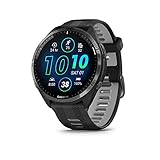
- Brilliant AMOLED touchscreen display with traditional button controls and lightweight titanium bezel
- Battery life: up to 23 days of battery life in smartwatch mode, up to 31 hours in GPS mode
- Confidently run any route using full-color, built-in maps and multi-band GPS
- Training readiness score is based on sleep quality, recovery, training load and HRV status to determine if you’re primed to go hard and reap the rewards (data presented is intended to be a close estimation of metrics tracked)
- Plan race strategy with personalized daily suggested workouts based on the race and course that you input into the Garmin Connect app and then view the race widget on your watch; daily suggested workouts adapt after every run to match performance and recovery
Walking, hiking, and trail activities usually do not qualify
Garmin does not calculate VO2 Max from walking, hiking, or trail running activities by default. Even brisk walks with elevated heart rate are excluded.
The reason is consistency. Variable terrain, frequent stops, elevation changes, and load carriage break the clean pace-to-effort relationship the algorithm depends on.
Some watches support a separate Walking VO2 Max feature, but this is model-dependent and more sensitive to data quality. For most users, it should be viewed as supplemental rather than a replacement for running-based estimates.
HIIT, strength training, and mixed workouts are excluded
High-intensity interval training, CrossFit-style workouts, and strength sessions do not generate VO2 Max estimates. These activities produce highly variable heart rate responses that do not reflect steady-state aerobic demand.
Even if your heart rate spikes into high zones, the algorithm cannot isolate aerobic capacity from anaerobic surges, recovery periods, or external load.
This is one area where users often feel the system is “missing” hard work. In reality, Garmin is prioritizing accuracy over effort recognition.
Why pace consistency matters more than intensity
A common misconception is that VO2 Max requires all-out effort. In practice, consistency matters more than suffering.
Garmin looks for a stable relationship between speed and heart rate over time. A controlled tempo run often produces a better estimate than an erratic max-effort session with frequent slowdowns.
This is also why early VO2 Max estimates can fluctuate. As the watch collects more qualifying runs under similar conditions, the algorithm gains confidence and the number stabilizes.
How long it takes before VO2 Max appears
For new users, VO2 Max usually appears after two to three qualifying outdoor runs. These runs do not need to be long, but they must meet the minimum duration and data quality thresholds.
If you record multiple runs that feel valid but still see no VO2 Max, check for common issues: disabled GPS, heart rate dropouts, or activities recorded under the wrong sport profile.
Once the first estimate appears, future qualifying activities refine the value rather than resetting it. From that point forward, trends matter far more than any single workout.
Why daily wear still matters even though it doesn’t generate VO2 Max
Passive data like resting heart rate, sleep quality, and stress do not directly generate VO2 Max, but they influence how Garmin interprets your training state around it.
Wearing the watch consistently improves heart rate baselines and recovery context. That makes VO2 Max changes easier to interpret and less likely to feel random or misleading.
In practical terms, the watch works best when it lives on your wrist, not just during workouts. VO2 Max may come from specific activities, but its value is shaped by everything else the watch sees.
How to Check VO2 Max Directly on Your Garmin Watch (Step‑by‑Step)
Once your watch has collected enough qualifying data, VO2 Max becomes a native, always-available metric on the device itself. You do not need to open Garmin Connect or sync your watch to see your current value.
The exact button presses vary slightly by model, but the logic is the same across nearly all modern Garmin watches, from Forerunner and Fēnix to Venu, Epix, and Instinct.
Step 1: Wake the watch and access the main interface
Start by waking your watch with the light button or a wrist gesture. This brings you to the watch face, where Garmin displays time and any custom data fields you’ve chosen.
From here, you are looking for the device’s metrics or glance system. On button-based watches, this is accessed by pressing the down button. On touchscreen models, you’ll swipe up or down depending on your layout.
Step 2: Scroll through your Glances or Widgets
Garmin organizes health and performance data into Glances, sometimes still called widgets on older software versions. These are vertically stacked cards showing things like heart rate, Body Battery, training status, and performance metrics.
Scroll steadily rather than quickly. VO2 Max is often grouped near Training Status, Training Readiness, or Performance, especially on performance-focused watches like the Forerunner 255, 265, 955, Fēnix 7, or Epix.
If VO2 Max has been generated, there will be a dedicated VO2 Max glance rather than a buried submenu.
Step 3: Open the VO2 Max glance
When you see VO2 Max, select it using the start button or a tap, depending on your watch. This opens the detailed VO2 Max screen.
Here you’ll typically see a single numeric value expressed in ml/kg/min. Many watches also show a small trend arrow or a colored category like Fair, Good, or Excellent, based on age- and sex-adjusted norms.
On higher-end models, this screen may also indicate whether the value is based on running or cycling, which matters if you use a power meter on the bike.
Step 4: Interpret what you’re seeing on the watch screen
The number displayed is your current estimated VO2 Max, not a daily measurement and not a lab test. It updates only after qualifying activities, even though it remains visible every day.
If your watch shows a status message like “Maintaining” or “Improving,” that’s coming from trend analysis, not from a single workout. Small day-to-day changes are normal, especially early on or after changes in training load.
Remember that the watch face experience prioritizes clarity over depth. The watch shows the headline number, while deeper context lives in Garmin Connect.
What if you don’t see VO2 Max at all?
If VO2 Max does not appear anywhere in your Glances, the most common reason is that your watch has not yet recorded a qualifying activity. Indoor workouts, treadmill runs without calibration, strength training, and HIIT sessions do not generate VO2 Max estimates.
Another possibility is device compatibility. Entry-level or lifestyle-focused models may not support VO2 Max at all, or may only support it for running, not cycling. Garmin’s performance models use more advanced Firstbeat physiology features, which require specific sensors and data quality.
You can also manually add the VO2 Max glance if it exists but isn’t visible. Go to the glance editing menu, add a new glance, and check under Performance or Training categories.
Differences between touchscreen and button-based watches
Touchscreen models like the Venu series or Epix make navigation feel more like a phone, with swipes and taps. Button-driven watches like the Forerunner and Instinct prioritize reliability in rain, sweat, or gloves, which endurance athletes often prefer.
In daily use, both systems get you to VO2 Max in under ten seconds once you know where it lives. The real difference is comfort and interaction style, not access to the data itself.
Battery life and durability also matter here. Long battery life ensures the watch captures enough qualifying activities consistently, which directly affects how stable and trustworthy your VO2 Max estimate becomes.
Why checking VO2 Max on the watch still matters
Seeing VO2 Max directly on your wrist reinforces that it’s a long-term fitness indicator, not a post-workout score. It encourages you to think in trends rather than chasing spikes after hard sessions.
The watch view is intentionally minimal. It gives you the signal without overwhelming you, which aligns with how Garmin expects athletes to use VO2 Max as part of a broader training picture.
In the next section, we’ll move off the watch and into Garmin Connect, where you can see how this number has evolved over weeks, months, and training cycles, and where it starts to become truly actionable.
How to Find Your VO2 Max in the Garmin Connect App (Mobile and Web)
Once you move off the watch and into Garmin Connect, VO2 Max stops being a single number and becomes a trend you can actually learn from. This is where Garmin’s software experience shines, especially if you want context across weeks, seasons, or different training phases.
The mobile app and web dashboard show the same underlying data, but they surface it slightly differently. Knowing where to tap or click saves a lot of frustration, especially if you’re new to Garmin’s ecosystem.
Finding VO2 Max in the Garmin Connect mobile app
Start by opening the Garmin Connect app on your phone and make sure your watch has fully synced. If your most recent qualifying activity hasn’t uploaded yet, VO2 Max won’t update here either.
From the Home tab, scroll down to the section labeled My Day or At a Glance. Look for a card called VO2 Max or Training Status, depending on how your dashboard is customized.
If you see VO2 Max listed, tap it directly. This opens a dedicated screen showing your current estimated value, your fitness classification, and a historical graph.
If you don’t see the VO2 Max card right away, tap Edit My Day or Edit Home at the bottom of the screen. From there, add VO2 Max from the Performance or Training category and save your layout.
Inside the VO2 Max detail page, you’ll see separate tabs or toggles for running and cycling if your device supports both. This matters because Garmin calculates and stores these values independently.
Scroll down and you’ll find a timeline that lets you view changes over 4 weeks, 12 weeks, or longer periods. This is where VO2 Max becomes useful, because stability or gradual improvement matters far more than single-day jumps.
Finding VO2 Max on Garmin Connect Web
The web version of Garmin Connect is ideal for larger screens and deeper analysis. It’s especially helpful if you like seeing long-term trends without scrolling on a phone.
Go to connect.garmin.com and log into your account. From the left-hand navigation menu, select Health Stats or Training, depending on your layout.
Rank #3

- Our brightest AMOLED touchscreen display with button controls and an aluminum bezel in 42 mm size to fit smaller wrists
- Up to 10 days of battery life in smartwatch mode and up to 18 hours in GPS mode for a more complete picture of your training and recovery
- Train for an event, achieve a milestone, or improve your fitness with Garmin Coach training plans; these running and triathlon plans are personalized to you and adapt based on your performance and recovery
- Training readiness score is based on sleep quality, recovery, training load and HRV status to determine if you’re primed to go hard and get the most out of your workout (data presented is intended to be a close estimation of metrics tracked)
- Built-in microphone and speaker let you make and take phone calls from your wrist when your watch is paired to your smartphone — and you can even use your smartphone’s voice assistant to respond to text messages and more
Look for VO2 Max in the list of available metrics and click into it. If it’s not visible, open the customization or edit menu and add VO2 Max to your dashboard.
The VO2 Max page on web shows a larger, more detailed chart than the mobile app. You can hover over data points to see specific dates, values, and how they align with your training load.
If your watch supports multiple sport profiles, you can toggle between running VO2 Max and cycling VO2 Max here as well. This is particularly useful if you split your training between disciplines and want to see how each one is progressing.
Why VO2 Max sometimes looks “missing” in Garmin Connect
If VO2 Max doesn’t appear in either the app or the web dashboard, it usually comes down to data eligibility rather than a software issue. Garmin won’t display VO2 Max unless at least one qualifying outdoor run or ride has been recorded with good heart rate data.
Make sure your activity used GPS, lasted long enough, and maintained a steady effort. Erratic pacing, pauses, or missing heart rate can prevent an estimate from being generated.
Device support also matters here. Some watches only calculate VO2 Max for running, not cycling, and others don’t support the metric at all.
Using the app to interpret changes over time
Garmin Connect automatically smooths VO2 Max data to emphasize trends instead of noise. Small day-to-day changes are normal and usually reflect fatigue, heat, or training load rather than real fitness gains or losses.
When you see VO2 Max rising slowly over several weeks, it usually means your aerobic base is improving. A plateau often signals that your current training stimulus has run its course.
Sharp drops usually align with illness, missed training, or prolonged fatigue. Seeing this in the app helps you adjust before overtraining becomes a bigger issue.
How VO2 Max connects to the rest of Garmin’s training ecosystem
VO2 Max in Garmin Connect doesn’t live in isolation. It feeds directly into Training Status, Training Load Focus, and race predictions if your watch supports those features.
This is why Garmin emphasizes consistency and device wear time. The more complete your data, the more reliable your VO2 Max trend becomes across both the app and the web dashboard.
Think of Garmin Connect as the long-view lens. The watch gives you the signal, but the app shows you the story behind it.
How Garmin Calculates VO2 Max: Firstbeat Physiology Explained Simply
By this point, you’ve seen where VO2 Max shows up in Garmin Connect and how it feeds into your broader training picture. The next logical question is what’s actually happening behind the scenes when your watch produces that number.
Garmin doesn’t guess your VO2 Max, and it doesn’t require a lab mask or treadmill test either. Instead, it uses a science-backed estimation model developed by Firstbeat Analytics, a Finnish sports physiology company Garmin acquired and fully integrated into its ecosystem.
What VO2 Max really represents in Garmin terms
VO2 Max is a measure of how efficiently your body can take in oxygen, deliver it through the cardiovascular system, and use it to produce energy during exercise. In simple terms, it’s a proxy for aerobic engine size rather than raw speed or strength.
Garmin expresses VO2 Max as milliliters of oxygen per kilogram of body weight per minute. This normalization allows fair comparisons across different body sizes, genders, and ages, which is why the same value can mean very different performance levels depending on the athlete.
What matters most for Garmin users isn’t the absolute number but how it trends over time under similar conditions. Firstbeat’s role is to make that trend meaningful using real-world workout data.
The Firstbeat model: heart rate meets pace or power
Firstbeat’s VO2 Max estimation is built on the relationship between external work and internal response. Your watch looks at how hard you’re moving and how hard your cardiovascular system has to work to sustain that effort.
For running, the key inputs are GPS-derived pace and continuous heart rate. For cycling, it’s power output combined with heart rate, which is why a compatible power meter is mandatory for cycling VO2 Max.
If your heart rate is relatively low for a given pace or power, the algorithm interprets that as higher aerobic efficiency. If your heart rate climbs quickly for modest output, VO2 Max is estimated lower.
Why steady outdoor efforts matter so much
Firstbeat’s model depends on clean, stable data. That’s why Garmin requires outdoor activities with GPS and sustained effort rather than stop-start workouts.
Intervals, heavy traffic, trail runs with frequent elevation spikes, or lots of pauses can all degrade the quality of the estimate. The algorithm needs several minutes of consistent movement where pace and heart rate settle into a predictable relationship.
This is also why treadmill runs, indoor rides without power, and strength training don’t generate VO2 Max updates. The external workload simply can’t be measured accurately enough.
How your watch’s hardware affects accuracy
The quality of the VO2 Max estimate is only as good as the data feeding it. Optical heart rate sensors on the wrist have improved dramatically, but fit, skin contact, and movement still matter.
Watches with lighter cases, curved lugs, and breathable silicone or nylon straps tend to maintain better contact during runs. A loose fit, cold weather, or excessive arm swing can introduce heart rate noise that weakens the calculation.
Using a chest strap can improve consistency, especially for advanced runners or cyclists, but it isn’t mandatory. Garmin’s algorithms are designed to work with wrist-based heart rate as long as wear comfort and placement are dialed in.
Why Garmin adjusts for age, gender, and environment
Firstbeat doesn’t treat every user the same. Your age, sex, body weight, and training history are factored into the physiological model to keep estimates realistic.
Environmental stress also plays a role. Heat and altitude increase cardiovascular strain, which can temporarily suppress VO2 Max estimates even if your fitness hasn’t changed.
This is why you might see VO2 Max dip during summer training or high-altitude travel, then rebound once conditions normalize. Garmin isn’t penalizing you; it’s contextualizing the effort.
Why VO2 Max updates don’t happen every workout
Even with a compatible watch, VO2 Max doesn’t update after every run or ride. Garmin only logs a new estimate when the activity meets quality thresholds and adds useful information to your existing profile.
Easy recovery runs, very short sessions, or heavily fatigued efforts may be recorded without influencing VO2 Max. This protects the long-term trend from being distorted by noise.
Think of VO2 Max updates as checkpoints rather than daily grades. Fewer, higher-quality data points lead to more reliable insights.
How Firstbeat turns estimates into performance insights
Once VO2 Max is calculated, Garmin uses it as a cornerstone metric across the platform. Race time predictions, Training Status, load recommendations, and even daily workout suggestions depend on it.
This is why consistency matters more than perfection. Wearing the same watch, using the same strap setup, and training in similar conditions allows Firstbeat’s model to learn your physiology more accurately over time.
The result is a VO2 Max value that isn’t just a number on your watch, but a living metric that adapts as your fitness, fatigue, and training focus evolve.
Understanding Your VO2 Max Score, Fitness Age, and Performance Labels
Once Garmin has enough high-quality data to calculate VO2 Max, the number you see is only the starting point. The real value comes from how that score is contextualized using performance labels, sport-specific profiles, and Garmin’s Fitness Age feature.
This layer of interpretation is where raw physiology turns into something actionable. Instead of asking “Is this number good?”, you start asking “What does this say about my current fitness, and where can it realistically go next?”
What your VO2 Max number actually represents
VO2 Max is measured in milliliters of oxygen per kilogram of body weight per minute. In practical terms, it reflects how efficiently your heart, lungs, blood, and muscles work together during sustained aerobic effort.
Higher numbers generally indicate stronger aerobic capacity, but the same score can mean very different things for different people. A VO2 Max of 45 might be elite for one age group and only average for another, which is why Garmin never shows the number in isolation.
Garmin watches display VO2 Max as a single rounded value, but internally the model tracks small fluctuations. What you see on the watch face or in Garmin Connect is a stabilized snapshot designed to emphasize trends over time.
How Garmin’s performance labels work
Alongside your VO2 Max score, Garmin assigns a performance label such as Poor, Fair, Good, Excellent, or Superior. These labels are based on large population datasets and are adjusted for age and sex.
The label is not comparing you to elite athletes. It compares you to people like you, which makes it far more useful for everyday training decisions.
As your VO2 Max improves or declines, the label may change even if the numeric shift is small. Crossing a label boundary often reflects meaningful fitness progress rather than day-to-day variation.
Why runners and cyclists see separate VO2 Max profiles
Garmin tracks running VO2 Max and cycling VO2 Max independently because the physiological demands are different. A strong runner may initially see a lower cycling VO2 Max, and vice versa.
Cycling VO2 Max requires a power meter or a smart trainer, since wrist-based heart rate alone isn’t enough to model cycling workload accurately. Running VO2 Max can be calculated with GPS pace and heart rate alone.
This separation is intentional. It prevents one sport from masking weaknesses or strengths in the other, which is especially useful for multisport athletes and cross-training plans.
Understanding Fitness Age and how it relates to VO2 Max
Fitness Age is Garmin’s way of translating complex physiology into something intuitive. It uses VO2 Max as a primary input, along with body composition data if available.
Rank #4

- Easy-to-use running watch monitors heart rate (this is not a medical device) at the wrist and uses GPS to track how far, how fast and where you’ve run.Special Feature:Bluetooth.
- Battery life: up to 2 weeks in smartwatch mode; up to 20 hours in GPS mode
- Plan your race day strategy with the PacePro feature (not compatible with on-device courses), which offers GPS-based pace guidance for a selected course or distance
- Run your best with helpful training tools, including race time predictions and finish time estimates
- Track all the ways you move with built-in activity profiles for running, cycling, track run, virtual run, pool swim, Pilates, HIIT, breathwork and more
If your Fitness Age is lower than your actual age, it suggests your cardiovascular fitness is above average for your demographic. If it’s higher, it doesn’t mean something is wrong, only that there’s room for improvement.
Changes in Fitness Age tend to lag behind VO2 Max improvements. This is normal, and it reflects Garmin’s preference for stability over dramatic swings.
Why small VO2 Max changes matter more than the absolute score
Many users fixate on hitting a specific VO2 Max number, but the direction of travel is far more important. A steady increase of one or two points over several months indicates effective training and recovery balance.
Short-term drops are common during high-volume blocks, heat exposure, illness, or stress. Garmin’s earlier contextual adjustments are designed to prevent these periods from misleading you.
If your VO2 Max plateaus, it often signals that your body has adapted to your current training stimulus. This is useful feedback, not a failure.
How to read VO2 Max trends inside Garmin Connect
In the Garmin Connect app, VO2 Max trends are displayed as a graph rather than a single value. This view helps separate meaningful changes from noise.
Look for sustained rises or falls over several weeks, not single-session spikes. Garmin intentionally smooths the data to reward consistency rather than heroic efforts.
For watches with limited screen real estate, the on-device view focuses on the current value and label. The deeper story always lives in the app.
Common reasons your VO2 Max label doesn’t match how you feel
Feeling fit and seeing a lower-than-expected label is surprisingly common. Poor sleep, accumulated fatigue, or recent environmental stress can all suppress estimates temporarily.
Inconsistent wear, loose straps, or switching watches mid-training cycle can also disrupt the model’s learning process. Comfort, fit, and daily usability directly affect data quality.
The solution is rarely to train harder. It’s usually to train more consistently, recover better, and let the system recalibrate.
Using VO2 Max and labels as a coaching tool, not a judgment
Garmin’s performance labels are best treated as guidance, not grades. They help frame your training load, race predictions, and recovery needs.
When VO2 Max improves, you can usually tolerate higher aerobic workloads. When it declines, it’s often a sign to prioritize recovery or adjust intensity distribution.
Seen this way, VO2 Max becomes a conversation between you and your watch. The goal isn’t perfection, but alignment between how you train, how you feel, and what the data is telling you.
Why Your VO2 Max Might Be Missing or Not Updating (Common Issues and Fixes)
Once you understand how Garmin interprets VO2 Max trends, the next frustration many users hit is simple: the number is missing, stuck, or hasn’t changed in weeks. In most cases, this isn’t a bug or a failing on your part, but a signal that one of Garmin’s input requirements isn’t being met consistently.
Garmin’s VO2 Max is conservative by design. It only updates when the watch is confident in the data quality, the activity type, and the physiological context.
Your activity type doesn’t qualify for VO2 Max
Garmin only calculates VO2 Max from specific outdoor activities where speed and effort can be reliably compared. For most users, that means outdoor running or outdoor cycling with a power meter.
Indoor treadmill runs, trail runs with extreme elevation changes, hikes, strength training, yoga, and casual walks do not generate VO2 Max updates. Even if they feel hard, the algorithm can’t normalize the data well enough.
Fix: Record outdoor runs with GPS enabled, or outdoor rides paired to a power meter. If you primarily train indoors, expect VO2 Max to update rarely or not at all.
Your intensity never reaches the required threshold
VO2 Max updates only occur when you spend enough time working at a moderate to hard aerobic intensity. Easy runs below roughly 70 percent of your maximum heart rate usually don’t qualify.
This is common for beginners, base-building phases, or recovery-heavy weeks. The watch needs to see how your heart rate responds as speed or power increases.
Fix: Include at least one steady or progressive effort each week where heart rate rises and stabilizes. This doesn’t need to be all-out, just controlled and purposeful.
Heart rate data quality is too inconsistent
VO2 Max estimation depends heavily on clean heart rate data. Optical sensors struggle with loose straps, wrist movement, cold weather, tattoos, or rapid pace changes.
A watch that’s comfortable but worn too low or too loose can still record workouts while silently degrading data quality. Daily wear comfort matters, but so does a secure fit during training.
Fix: Wear the watch snugly, about a finger’s width above the wrist bone. For colder conditions or higher-intensity sessions, consider a chest strap for the most reliable updates.
You haven’t recorded enough qualifying activities yet
New watches, factory resets, or long breaks from structured training all reset Garmin’s confidence in your physiology. VO2 Max doesn’t appear immediately out of the box.
Most Garmin watches need several qualifying outdoor sessions before showing an initial estimate. Until then, the field may stay blank or hidden.
Fix: Record at least three to five outdoor runs or rides with consistent heart rate data over one to two weeks. The estimate usually appears automatically once the model stabilizes.
Your watch model doesn’t support VO2 Max
Not every Garmin watch includes VO2 Max estimation. Entry-level or lifestyle-focused models may track heart rate and workouts but lack Firstbeat performance metrics.
Older devices may also limit VO2 Max to running only, or omit cycling estimates entirely. Software support matters just as much as hardware sensors.
Fix: Check your specific model’s feature list in Garmin Connect or on Garmin’s website. If VO2 Max is important to you, Forerunner, Fenix, Epix, and higher-end Venu models offer the most complete support.
You’re switching watches or wearing it inconsistently
Garmin’s VO2 Max model learns from your long-term patterns. Switching between multiple watches, forgetting to wear it on easy days, or only using it for workouts slows adaptation.
The watch doesn’t need to be worn 24/7, but regular wear improves resting heart rate trends and contextual accuracy.
Fix: Use one primary device for training and wear it consistently during workouts. If you upgrade watches, expect a short recalibration period.
Environmental or physiological stress is suppressing updates
Heat, altitude, illness, poor sleep, and accumulated fatigue can all prevent VO2 Max from updating even when workouts feel productive. Garmin often flags these sessions as unreliable for fitness estimation.
This is intentional. The system prioritizes long-term accuracy over frequent updates.
Fix: Focus on recovery, hydration, and sleep during stressful periods. VO2 Max typically resumes updating once conditions normalize.
Your VO2 Max is updating, just not changing
Sometimes the number is there, but it hasn’t moved. This often happens when your training load, intensity distribution, and aerobic efficiency are stable.
A flat line doesn’t mean you’re stagnating. It usually means your current training is maintaining fitness rather than pushing adaptation.
Fix: If improvement is the goal, gradually introduce new stimuli like longer tempo efforts, hill work, or higher-volume weeks. If maintenance is the goal, a stable VO2 Max is a success signal.
Where to double-check VO2 Max when it seems missing
On the watch, VO2 Max usually lives under Training Status, Performance, or My Stats, depending on the model and software version. Smaller displays may only show the value, not the trend.
In Garmin Connect, go to Performance Stats, then VO2 Max. If the tile is absent, it usually means no qualifying data has been recorded yet.
Fix: Start with the app, not the watch. Garmin Connect always shows more context and makes it easier to confirm whether the estimate truly isn’t there or just hasn’t updated recently.
How to Improve or Maintain Your VO2 Max Using Garmin Training Insights
Once you know where to find your VO2 Max and why it updates or stalls, the next step is using Garmin’s training insights to influence it intentionally. Garmin watches don’t just report fitness; they quietly coach you toward improving or preserving it when you know what signals to follow.
This is where VO2 Max stops being a passive number and becomes a feedback loop between your body, your training, and your device.
Start with Training Status, not individual workouts
VO2 Max responds to trends, not hero sessions. Garmin’s Training Status pulls together VO2 Max direction, training load, and recovery to tell you whether your current pattern supports improvement.
If your status shows Productive, your VO2 Max trend is either rising or well supported by recent load. Maintaining this status over weeks is one of the most reliable ways to nudge VO2 Max upward without overreaching.
💰 Best Value

- Brilliant AMOLED touchscreen display with traditional button controls; lightweight design in 46 mm size
- Up to 13 days of battery life in smartwatch mode and up to 20 hours in GPS mode
- As soon as you wake up, get your morning report with an overview of your sleep, recovery and training outlook alongside HRV status, training readiness and weather (data presented is intended to be a close estimation of metrics tracked)
- Plan race strategy with personalized daily suggested workouts based on the race and course that you input into the Garmin Connect app and then view the race widget on your watch; daily suggested workouts adapt after every run to match performance and recovery
- Training readiness score is based on sleep quality, recovery, training load and HRV status to determine if you’re primed to go hard and get the most out of your workout (data presented is intended to be a close estimation of metrics tracked)
If you’re Stalled or Maintaining, Garmin is telling you the stimulus is sufficient to hold fitness but not strong enough to force adaptation. That’s not a failure; it’s often exactly what you want during base phases or busy life periods.
Use Training Load and Load Focus to target aerobic gains
VO2 Max is primarily driven by aerobic development, not just intensity. Garmin’s Load Focus breaks your recent training into low aerobic, high aerobic, and anaerobic contributions.
For most runners and cyclists trying to improve VO2 Max, high aerobic load is the key bucket. This includes tempo efforts, sustained climbs, steady-state threshold work, and long intervals where breathing is deep but controlled.
If your Load Focus shows a heavy skew toward low aerobic only, VO2 Max will likely plateau. If it’s dominated by anaerobic spikes, fatigue accumulates faster than fitness gains.
Follow Daily Suggested Workouts when consistency is the challenge
Garmin’s Daily Suggested Workouts are often underestimated, but they’re one of the smartest tools for VO2 Max development. These sessions adapt daily based on your VO2 Max trend, recovery time, sleep, and recent load.
When VO2 Max is stable, Garmin tends to prescribe more base and tempo work. When it detects readiness, you’ll see intervals specifically designed to raise aerobic ceiling.
This works best when the watch is worn consistently and battery life supports uninterrupted tracking. Models like the Forerunner and Fenix lines excel here, offering multi-day battery life that reduces missed data and keeps suggestions accurate.
Respect Training Readiness and HRV Status
VO2 Max does not improve when your nervous system is overloaded. Training Readiness and HRV Status act as gatekeepers, helping you decide whether to push or protect fitness.
Low readiness doesn’t mean skip training entirely, but it does mean high-intensity aerobic sessions are less likely to produce a VO2 Max gain. On these days, easy aerobic volume maintains VO2 Max without adding stress.
When readiness and HRV are balanced or positive, Garmin’s VO2 Max estimates are also more likely to update accurately, reinforcing the importance of recovery as part of improvement.
Let Recovery Time guide session spacing
Garmin’s Recovery Time metric is often ignored, yet it plays a direct role in VO2 Max trends. Hard aerobic sessions too close together suppress adaptation, even if total weekly volume looks reasonable.
If your watch consistently shows extended recovery needs, VO2 Max may stagnate despite frequent training. Spacing demanding workouts just one extra day apart often unlocks progress.
This is especially important for users wearing lighter, smaller watches where comfort encourages all-day wear. Continuous data improves recovery accuracy, not just workout metrics.
Use race tools like PacePro and ClimbPro for structured stress
Structured stress is more effective than random effort. PacePro helps runners hold controlled intensity across terrain, preventing early spikes that reduce aerobic efficiency.
ClimbPro does something similar for hilly routes, especially for trail runners and cyclists. By managing effort on climbs, you accumulate high-quality aerobic load instead of anaerobic fatigue.
These tools indirectly support VO2 Max by keeping workouts in the intensity zones that Garmin’s algorithms recognize as productive for aerobic development.
Maintenance is a valid goal, and Garmin will show it
There are long stretches where maintaining VO2 Max is the smartest outcome. Travel, injury prevention phases, aging athletes, or high life stress all benefit from stability over growth.
Garmin reflects this honestly. A flat VO2 Max trend paired with Maintaining or Productive status means your current habits are working.
From a value perspective, this is where Garmin watches shine as long-term training companions. Durable cases, comfortable straps, and reliable sensors support years of consistent data, which matters more than chasing short-term gains.
Small behavior changes make the data work harder
Improving VO2 Max doesn’t always mean training harder. Wearing the same watch for most sessions, syncing regularly, and recording outdoor activities with GPS all improve estimate quality.
Even software habits matter. Keeping Garmin Connect updated and reviewing trends weekly helps you spot patterns before plateaus turn into frustration.
When the system has clean data and you respond to its cues, VO2 Max becomes less mysterious and more predictable, whether your goal is improvement or confident maintenance.
VO2 Max Limitations, Accuracy Expectations, and When Lab Testing Makes Sense
Once you understand how Garmin estimates VO2 Max and how to support it with good training habits, the next step is setting realistic expectations. Garmin’s VO2 Max is a powerful coaching metric, but it is still an estimate, not a direct measurement of oxygen consumption.
Knowing where the number is strong, where it can mislead you, and when a lab test is worth considering helps you use the data with confidence instead of second-guessing it.
Why Garmin VO2 Max is an estimate, not a medical measurement
Garmin VO2 Max is calculated using Firstbeat algorithms that model how your heart rate responds to speed or power during steady outdoor efforts. For runners, this means GPS pace combined with heart rate. For cyclists, it relies on power data from a compatible power meter plus heart rate.
The watch is not measuring oxygen uptake directly. Instead, it compares your efficiency against large population datasets and known physiological relationships between workload and cardiovascular response.
In real-world use, this approach works remarkably well for trend tracking. It is far less reliable as a single “true” value taken in isolation.
Typical accuracy ranges you can expect
For most runners and cyclists training consistently, Garmin VO2 Max estimates tend to fall within about 3 to 5 percent of lab-tested values. That margin tightens when your data is clean and consistent, and widens when conditions are noisy or inconsistent.
Accuracy improves when workouts are steady, at moderate to hard intensities, and long enough for heart rate to stabilize. Short intervals, frequent stops, or heavy fatigue can distort the estimate.
This is why two users with identical fitness can see different numbers if one wears their watch daily and trains consistently, while the other records sporadically or mixes many activity types that do not contribute to VO2 Max estimation.
Situations where Garmin VO2 Max can be misleading
Environmental conditions play a major role. Heat, humidity, altitude, and dehydration all elevate heart rate relative to pace or power, which can temporarily suppress your VO2 Max estimate even if your fitness has not changed.
Wrist-based heart rate quality also matters. Poor sensor contact, loose fit, tattoos, or cold weather reducing blood flow can skew readings, especially during faster efforts.
Another common limitation is activity mismatch. Treadmill runs, indoor cycling without power, strength training, hiking, and most multisport activities do not generate VO2 Max updates, even though they may improve your aerobic fitness.
Why trends matter more than the number itself
Garmin’s real strength is long-term pattern recognition. Watching your VO2 Max trend over weeks and months is far more meaningful than reacting to a single jump or dip.
A gradual rise paired with Productive training status suggests your aerobic system is adapting well. A stable line with Maintaining status often means you are preserving fitness efficiently, which is valuable during busy or high-stress periods.
Sharp drops are usually data-related before they are fitness-related. Reviewing recent workouts, heat exposure, sleep, and heart rate reliability often explains the change.
Device differences and sensor quality influence confidence
Higher-end Garmin watches tend to deliver more stable VO2 Max trends due to better sensors and software support. Models with newer optical heart rate sensors, dual-band GPS, and stronger processing handle real-world variability more effectively.
Comfort plays an underrated role here. Lightweight cases, balanced dimensions, and soft silicone or nylon straps encourage consistent all-day wear, which improves recovery metrics and context for VO2 Max changes.
Battery life also matters. Watches that comfortably last a week or more reduce missed data and keep training history intact, especially for endurance athletes logging long outdoor sessions.
When lab VO2 Max testing actually makes sense
A laboratory VO2 Max test measures oxygen consumption directly using a metabolic cart and mask during a graded exercise test. It is the gold standard for absolute accuracy.
Lab testing makes sense if you are a competitive athlete needing precise physiological benchmarks, working with a coach on tightly defined training zones, or using VO2 Max for research or medical reasons.
It is also useful if you want a one-time calibration reference. Knowing your true VO2 Max can help you interpret your Garmin number as a relative tracking tool rather than an absolute truth.
Why most Garmin users do not need lab testing
For the majority of recreational and serious fitness-focused users, lab testing offers limited day-to-day value. It is expensive, time-consuming, and provides a snapshot rather than continuous insight.
Garmin’s strength is ongoing monitoring. Seeing how your estimated VO2 Max responds to training blocks, recovery weeks, illness, travel, or aging delivers more actionable information than a single lab number.
If your goal is better fitness, smarter training, and sustainable progress, Garmin’s estimate is more than sufficient when used correctly.
How to think about Garmin VO2 Max the right way
Treat Garmin VO2 Max as a compass, not a ruler. It points you in the right direction, showing whether your habits are supporting aerobic fitness or quietly undermining it.
When paired with training status, load focus, recovery time, and how you feel in real life, it becomes a powerful coaching signal rather than a source of confusion.
Used this way, VO2 Max stops being a mysterious score and becomes a practical tool, helping you train with clarity, adjust expectations, and make confident decisions about your fitness over the long term.