Overall Winner: TicWatch C2+
Both watches are great options at their respective price points. However, the TicWatch C2+ is clearly the better designed, the better built, and the better-performing smartwatch.
Please note, we purchased the TicWatch C2+ and E2 directly from mobvoi.com on 03/04/2021, click here to check their current prices.
TicWatch C2+ vs. TicWatch E2
Mobvoi is one of the brands that keep pushing high-end smartwatches forward. And despite issues with the Wear OS platform, they continue to prove that they can make it work.
However, the higher-end TicWatch models may be too expensive for some. And first-time users who haven’t decided if the Wear OS platform or if Mobvoi’s offerings fit them will find the price too steep. Luckily, Mobvoi has released entry-level models such as the TicWatch C2+ and the TicWatch E2
The C2+ is more of a mid-range model and focuses more on fashion. The E2, on the other hand, is the more affordable model that has an equal focus on fashion and fitness. There are some differences between these two models but the core features are very similar.
If you are having a tough time deciding between these two watches, then you have come to the right place. In this article, we will be comparing several aspects such as design and build quality, display quality, features, and software performance. Keep on scrolling to find out which watch is for you.
As an Amazon Associate I earn from qualifying purchases.
TicWatch Brand Overview
Mobvoi is a tech company based in Beijing, China founded in 2012 with the primary goal of this company is the integration and advancement of voice AI communication. Mobvoi has also developed its own voice search app engine called Chumenwenwen.
In 2014 when Mobvo developed an Android-based smartwatch operating system called TicWear OS and soon after released the TicWatch in collaboration with Frog Design.
Mobvoi continues to launch newer versions of the TicWatch and each version continues to improve the use of AI with feature-rich smartwatches.
Learn more about Mobvoi in our full TicWatch Brand Review.
Crashes, No Sound, or Screen Glitches?
Random freezes, missing sound and display glitches usually trace back to one bad driver. Find and replace yours safely.Free scan · under a minuteWindows Errors? Fix Them Before They Spread
Repair common Windows errors and clear accumulated junk for a smoother, more stable PC - no reinstall needed.Free scan · no reinstallPackaging and Unboxing Experience
Winner: TicWatch C2+
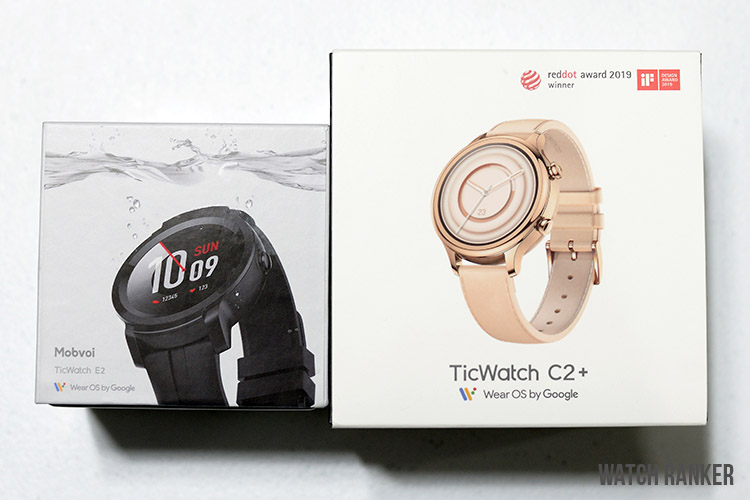
As seen in our TicWatch related articles, Mobvoi is no slouch when it comes to the unboxing experience. Any of their watches, regardless of the price, is sure to give a great first impression.
The TicWatch E2’s packaging is similar to the TicWatch S2. You get a small and compact box that houses all the goods. Everything from the font used to the box art is very professional, which makes the watch feel way more premium than its entry-level price. The unboxing is rather straightforward and encourages you to try out the watch immediately.
The TicWatch C2+ takes things up a notch by giving you a much larger box. This time around, the package is divided into three pieces. The thin outer box contains the cover art and the specs, the larger inner box contains the smartwatch, and the smaller inner box contains the silicone strap.
Both gave a great unboxing experience that made us very excited to try out the watches. The TicWatch C2+ is the clear winner, but both give an excellent unboxing experience.
#1 Best Overall

- Read Before You Buy — No Video Output: These adapters support charging and USB 2.0 data transfer, but cannot transmit video signals. Except for standard USB webcams (which use USB data only), they are not compatible with HDMI/DisplayPort cables, video-capable USB-C hubs, or docking stations with video output.
- Convert USB-A Ports to USB-C: Designed to connect USB-C earphones, cables, flash drives, card readers, and other USB-C accessories to standard USB-A ports. Plug-and-play with no drivers or software required.
- Aluminum Alloy Housing: Built with a sturdy aluminum alloy shell that aids in heat dissipation and protects against daily wear and scratches. Designed to maintain a stable and secure connection.
- Compact & Travel-Friendly: The ultra-compact design allows the adapter to stay plugged into your device without blocking adjacent ports or adding bulk, reducing wear and tear on your original USB ports.
- 12-Month Warranty: Backed by a 12-month manufacturer warranty for peace of mind. Designed to meet strict quality control standards for reliable everyday performance.
Design and Build Quality
Overall Winner: TicWatch C2+
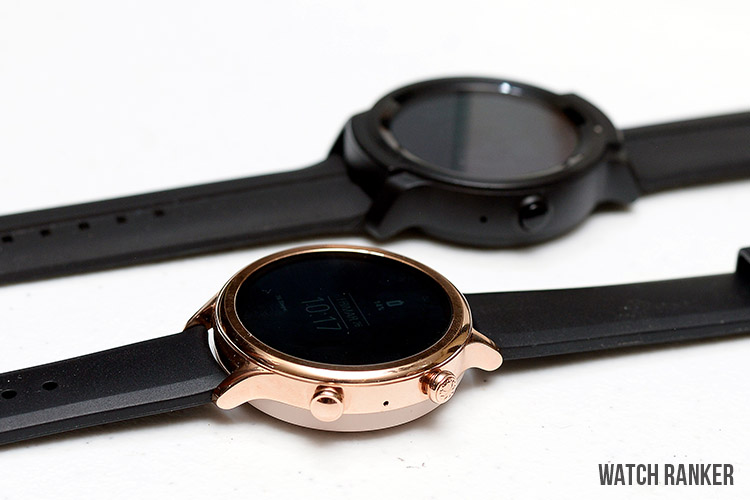
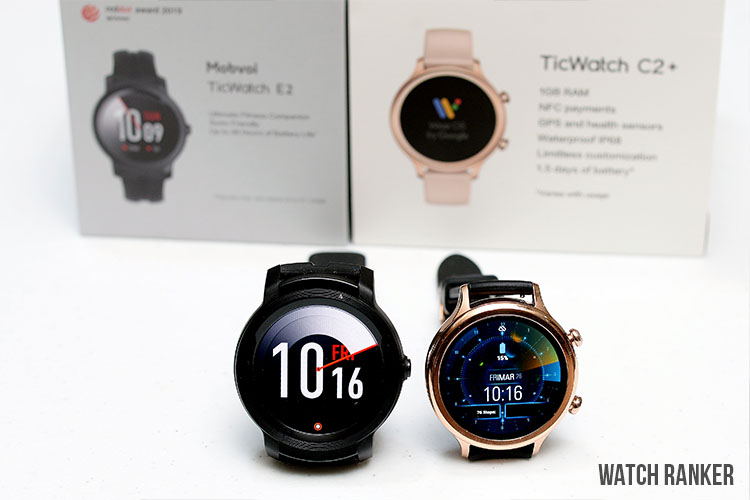
The TicWatch C2+ clearly shows that it is the superior smartwatch when it comes to design and build quality. Mobvoi has made sure that they make the TicWatch C2+ as gorgeous as possible.
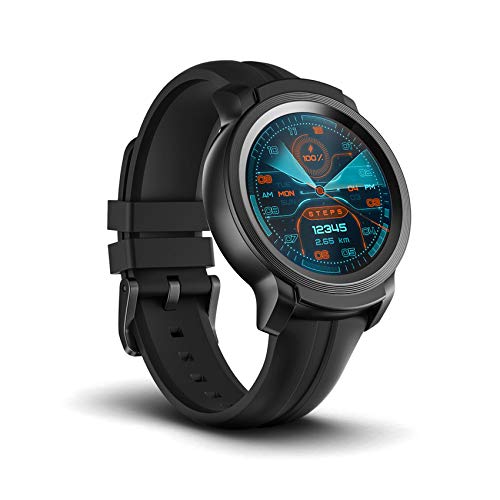
The TicWatch C2+’s looks are inspired by classic analog wristwatches. It has two fully programmable buttons on the side and an AMOLED display on the front. There aren’t any bezel markings or curvature on the glass, but the clean front panel makes it adapt easily to any kind of watch face.
Everything about the watch feels premium. The button clicks are solid, the aluminum body feels sturdy, and the stock genuine leather strap is comfortable. There are even small details, such as the very subtle branding on the strap and the small textured logo on the first button.
The TicWatch C2+’s screen and casing are smaller compared to the TicWatch E2. This gives it a small and lightweight design that fits both men and women.
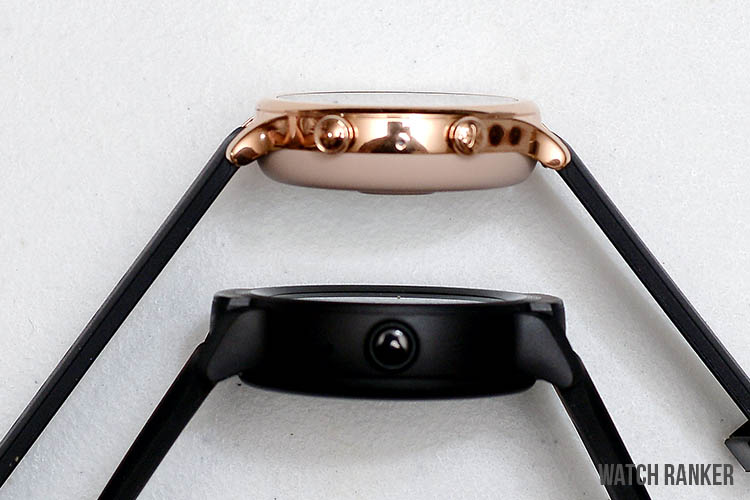
The TicWatch E2, on the other hand, has a bulkier design that utilizes more basic materials compared to the TicWatch C2+. What throws off the whole look is the polycarbonate body. It makes the watch light and comfortable but is an odd choice given how many watches in the same price range use materials such as aluminum.
The less premium materials do not compromise the build of the E2. However, it just doesn’t hold up well against the TicWatch C2+.
Additionally, the TicWatch E2 only features a single button. It is found directly on the right side and is easy to press. There are no fancy design elements and is pretty much straightforward.
Display Quality
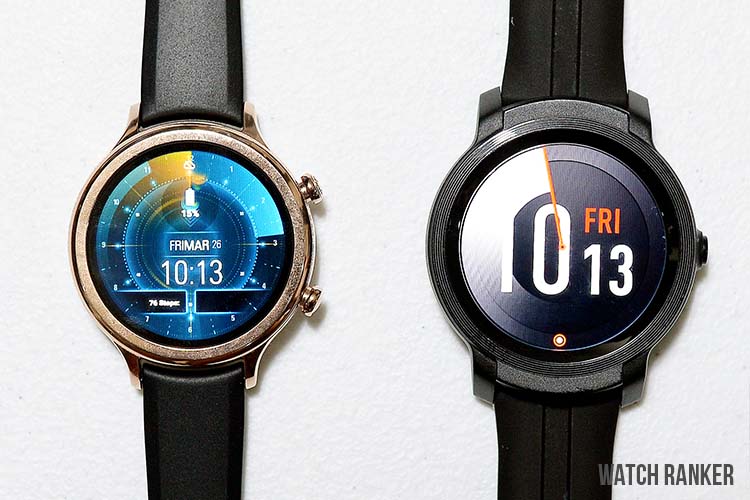
Aside from the difference in the size of these two displays, the display quality and sharpness are very similar. Both watches utilize high-quality AMOLED displays that display sharp and vibrant images. Throughout our testing, both watches can get very bright and can easily be seen both indoors and in bright outdoor environments.
Both watches also utilize Corning Gorilla Glass 3 to protect their displays. This gives you the confidence to use them in any situation with wearing about scratches or glass shattering.
The main difference between these two watches is the size and resolution of their screens. The TicWatch C2+ has a 1.3” screen with a screen resolution of 360×360, while the TicWatch E2 has a larger 1.39” screen with a screen resolution of 400×400.
The difference in size does not affect the image quality of the TicWatch C2+. Its smaller screen makes the pixels denser and thus retains clarity and sharpness. However, we prefer the larger size of the TicWatch E2’s display since it gives us more screen real estate, especially for complex watch faces with lots of onscreen elements.
This entirely depends on your personal preference, but overall, both screens are excellent.
Rank #2

- 5-in-1 USB-C Hub: Experience comprehensive connectivity featuring a Power Delivery input, two USB-A 2.0 ports, a USB-A 3.0 port, and an HDMI port. (Note: The USB-C power delivery input port is only for connecting an external wall charger to power your laptop and cannot power peripheral devices.)
- 90W Pass-Through Charging: Achieve optimal charging with 90W pass-through power to your laptop, supported by a total input of 100W, with the hub reserving 10W for operational efficiency. (Note: Wall charger not included.)
- Quick Data Transfers: Accelerate your productivity with rapid data transfers using a high-speed 5Gbps USB 3.0 port and two 480Mbps USB 2.0 ports.
- 4K HDMI Display: Enhance your visual experience with a hub capable of delivering 4K resolution at 30Hz in both mirror and extend modes. Please note that this hub is compatible with MacBook (macOS 12 and newer), Windows 10 and 11, ChromeOS, and laptops equipped with DP Alt Mode and Power Delivery. Note: This device is not compatible with Linux.
- What You Get: Anker USB-C Hub (5-in-1, 4K HDMI), welcome guide, 18-month warranty, and our friendly customer service.
Features
Winner: Tie
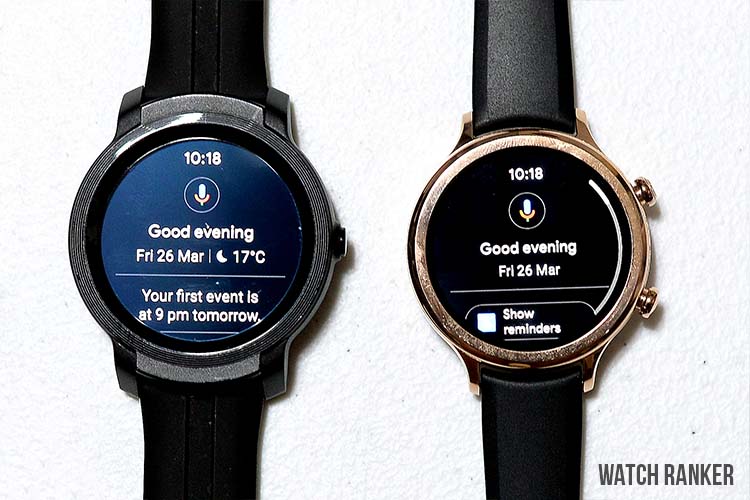
Both watches sport similar features. The TicWatch C2+ and E2 are both running the same version of Wear OS (Wear OS 2.25). In terms of Wear OS features, both watches offer great notification support with the ability to reply to messages using your voice, the onscreen keyboard, or by writing on the screen.
Both watches also have essential features such as weather updates, reminders, and the Google Assistant. However, it should be noted that you have to manually read the Google Assistant’s responses since both watches do not feature a loudspeaker. This also means that you cannot make or answer phone calls using these watches.
Both models have Wi-Fi support giving them access to the Google Play Store to install third-party apps to improve the Wear OS experience.
Both watches support continuous heart rate monitoring and other essential health tracking, fitness activities.
Unfortunately, neither model comes with the native sleep tracking app as the TicSleep app is currently not supported on either of these models. There are apps on the Play Store but haven’t found one that worked as well as the native app.
One key difference between these two watches is the number of buttons they have. Since the TicWatch E2 only has one button, it is missing out on the ability to set the second button to a shortcut. This can become clutch due to the TicWatch E2’s software performance, which we will be discussing next.
Overall, both watches are very much feature-packed and easily beat competing options from brands such as Huawei and Amazfit.
However, it is in the software performance where the difference between these two watches starts to show.
What’s actually slowing this PC down?
Pick the symptom - the matching free tool is one click away.
Watch Software Performance
Overall Winner: TicWatch C2+
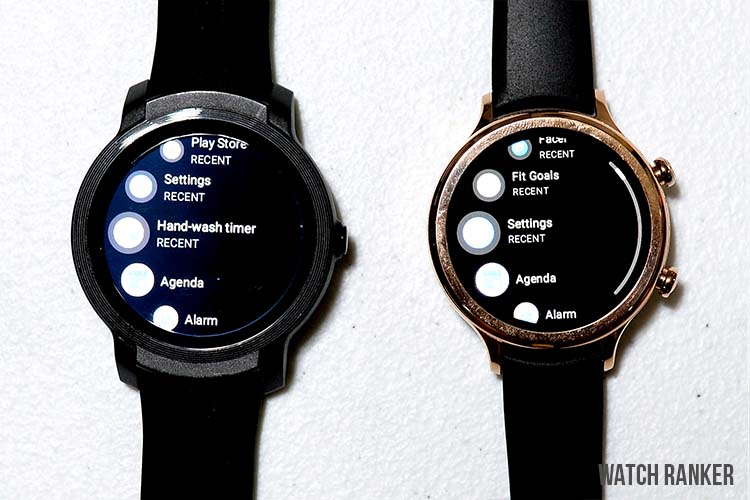
Choosing between these two watches looked to be quite straightforward at first. You simply had to decide if you wanted a premium smartwatch and if you wanted a larger display. The software and features are kept the same, so you would have been happy either way. But because of the software performance, there is a clear winner here.
The TicWatch C2+ and E2 both use the Qualcomm Snapdragon 2100 processor that was first introduced in 2016.
The only difference is that the C2+ has 1 GB of RAM while the E2 only has 512 MB.
This small difference may not seem like a big deal. However, the difference in RAM greatly affects each watch’s performance.
The TicWatch C2+ is smooth and stable in navigating the UI, app installations, and in using third-party apps. The TicWatch E2, on the other hand, is a lot slower, which led to more freezes and crashes.
If using the TicWatch E2 to check notifications, the time and date, and other basic features, then it works normally. But when accessing the Play Store, opening third-party apps, or even using the Google Assistant, it runs into so many problems.
This makes us wonder why Mobvoi even decided to pack as many features as it did with the TicWatch E2 when most of it is almost unusable. The lower-end processor and specs drag down the TicWatch E2 and is easily outperformed by similar watches that do not use Wear OS.
The TicWatch C2+ also isn’t perfect and has its fair share of bugs. However, it is a vast improvement over the TicWatch E2. It feels more responsive, and we haven’t experienced as much lag as we did on the TicWatch E2. Opening apps and using Google Assistant was also a lot smoother and worked most of the time.
If you are expecting smartphone-like responsiveness and fluidity, the TicWatch C2+ vastly outperforms the TicWatch E2.
Rank #3

- Sleek 7-in-1 USB-C Hub: Features an HDMI port, two USB-A 3.0 ports, and a USB-C data port, each providing 5Gbps transfer speeds. It also includes a USB-C PD input port for charging up to 100W and dual SD and TF card slots, all in a compact design.
- Flawless 4K@60Hz Video with HDMI: Delivers exceptional clarity and smoothness with its 4K@60Hz HDMI port, making it ideal for high-definition presentations and entertainment. (Note: Only the HDMI port supports video projection; the USB-C port is for data transfer only.)
- Double Up on Efficiency: The two USB-A 3.0 ports and a USB-C port support a fast 5Gbps data rate, significantly boosting your transfer speeds and improving productivity.
- Fast and Reliable 85W Charging: Offers high-capacity, speedy charging for laptops up to 85W, so you spend less time tethered to an outlet and more time being productive.
- What You Get: Anker USB-C Hub (7-in-1), welcome guide, 18-month warranty, and our friendly customer service.
Third-Party Apps
As mentioned earlier, both watches support third-party apps. Every app that is available for the C2+ is also compatible with the E2. However, this is the big problem.
The TicWatch E2 has trouble with running some apps. Installing third-party watch faces with lots of customization options tends to slow the watch down. It even made basic navigation a lot slower.
Opening apps such as Fitify was also a lot slower on the TicWatch E2. It works fine when you finally open the app, but we wish we didn’t have to wait as much.
The TicWatch C2+, on the other hand, is vastly superior to the TicWatch E2 when it comes to third-party apps. Regardless of which watch face, app, or mod we installed, the TicWatch C2+ didn’t slow down.
Battery Life
Winner: Tie
The biggest weakness of these two watches is their battery life. With the number of features that they have, you simply cannot expect a long-lasting battery life.
Mobvoi claims that both watches could last up to two days. However, during our testing, both watches already needed a recharge by the end of the day. The only way we got it to reach the two-day mark was to turn off most of the features, which defeats the purpose of having a feature-packed smartwatch.
We were expecting better battery life out of the TicWatch C2+. Smartwatches with better performance tend to have better efficiency as well. However, that is sadly not the case here. The TicWatch C2+ lasts just as long as the TicWatch E2.
As for charging, both watches use their own proprietary charger. They both do not feature a removable cable, so bringing them around will surely be a hassle. If battery life is your top priority, there are plenty of smartwatches that can do better.
Rank #4

- Dual Converters, Infinite Potential:Includes 2× USB C male to USB A female adapters and 2× USB A male to USB C female adapters. Perfect for a wide range of uses—tablets with Bluetooth keyboards, expand USB ports on macbook, and more. Two different converters for all your daily needs
- Next-Level 10Gbps & 3A Charging: No more slow 480Mbps, this usb to usb c adapter has a transfer speed of up to 10Gbps, allowing you to do more transferring in less time. This usb adapter fits both USB A and USB C charger, supporting up to 3A fast charging
- Upgraded Exquisite Craftsmanship: With an aluminum alloy housing and metal connector, the usbc to usb adapter is extremely durable and sturdy. Rigorously tested to withstand more than 10,000 times of plugging and unplugging, ensuring long-lasting performance
- Broad Compatible: The usb c to usb adapter widely supports all USB C/ USB A devices like laptops, tablets, cellphones, car chargers, and phone chargers. Such as compatible with MacBook Pro/Air 2023/2022, Thunderbolt 4/3 Devices,Apple MagSafe Watch 9/8/7/SE/Ultra, iPad Pro 2022/2021, Samsung Galaxy S23/S20/S10, and iPhone 17/16/15 Pro. Plug and play
- Please Note: To reach 10Gbps speed, keep the cable under 3.3 ft. For USB A Male to USB C adapters, try flipping the USB C connector. USB C Male to USB A adapters support bidirectional 10Gbps transfer within 3.3 ft
Comparison Winner: TicWatch C2+
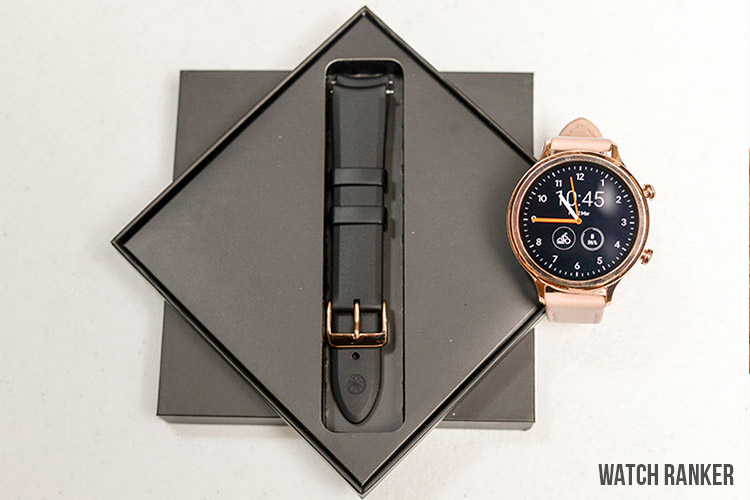
Both watches are excellent when it comes to their aesthetics and build quality. However, the software experience clearly puts the TicWatch C2+ way ahead of the TicWatch E2.
It is better in nearly every aspect. It has a better build, more fluid and reliable software experience, and is overall more usable than the TicWatch E2. That is quite a shame since the TicWatch E2 could have had the potential to be a much better smartwatch.
So unless you have a strict budget, we highly recommend skipping the TicWatch E2 and its variant, the TicWatch S2, and go directly to the TicWatch C2+. And if you can go even further, we recommend going straight to Mobvoi’s flagship TicWatch Pro 3.
The Tool Desk
Outbyte Driver Updater FREEFix the driver behind crashes, sound loss and screen glitchesFind Drivers →Outbyte PC Repair FREEClear out junk files and repair common Windows errorsFree Scan →Quick Recap
Best Value

- 5-in-1 Connectivity: Equipped with a 4K HDMI port, a 5 Gbps USB-C data port, two 5 Gbps USB-A ports, and a USB C 100W PD-IN port. Note: The USB C 100W PD-IN port supports only charging and does not support data transfer devices such as headphones or speakers.
- Powerful Pass-Through Charging: Supports up to 85W pass-through charging so you can power up your laptop while you use the hub. Note: Pass-through charging requires a charger (not included). Note: To achieve full power for iPad, we recommend using a 45W wall charger.
- Transfer Files in Seconds: Move files to and from your laptop at speeds of up to 5 Gbps via the USB-C and USB-A data ports. Note: The USB C 5Gbps Data port does not support video output.
- HD Display: Connect to the HDMI port to stream or mirror content to an external monitor in resolutions of up to 4K@30Hz. Note: The USB-C ports do not support video output.
- What You Get: Anker 332 USB-C Hub (5-in-1), welcome guide, our worry-free 18-month warranty, and friendly customer service.
Specifications
 |
 |
|
| Screen Size | 1.39” AMOLED Display | 1.3” AMOLED Display |
| Screen Protection | Corning Gorilla Glass 3 | Corning Gorilla Glass 3 |
| Screen Resolution | 400 x 400 pixel | 360 x 360 pixel |
| Pixel Density | 407 PPI | – |
| Input Type | Touch Screen/ Physical Buttons | Touch Screen/ Physical Buttons |
| Watch Dimensions | 46.9 x 52.2 x 12.9 mm | 42.8 x 42.8 x 12.7 mm |
| Weight | 53.2 grams | 42 grams |
| Watch Case Material | Polycarbonate | Polycarbonate |
| Bezel Material | Polycarbonate | Polycarbonate |
| Watch Design | Circular | Circular |
| Strap Size | 22 mm | 20 mm 18mm |
| Watch Colors | Black | Black and platinum 20mm Rose-gold 18mm |
| Water Resistance | Waterproof (5ATM) | IP68 |
| Swim-proof | Yes, recommended | Not recommended |
| NFC | Not Supported | Yes |
| GPS | GPS/GLONASS/Beidou | GPS/GLONASS/Beidou |
| CONNECTIVITY Wi-fi |
Yes | Yes |
| Bluetooth | Yes | Yes |
| SENSORS Accelerometer | Yes | Yes |
| Heart Rate | Yes | Yes |
| Compass | No | No |
| Gyroscope | Yes | Yes |
| Altimeter | No | No |
| SPO2 | No | No |
| Elevation | Yes | No |
| Ambient Light | No | Yes |
| Barometer | No | No |
| FITNESS TRACKING Sleep tracking |
Yes | Yes |
| Steps | Yes | Yes |
| Floors Climbed | No | – |
| Heart Rate Monitoring | Yes | Yes |
| Calories | Yes | Yes |
| Distance | Yes | Yes |
| Stress | Yes | – |
| VO2 Max | Yes | – |
| Blood Oxygen | No | No |
| Blood Pressure | No | No |
| Menstrual cycle tracking | No | No |
| Swim tracking | No | No |
| Underwater heart rate tracking |
No | No |
| On-screen workout modes | No | No |
| Triathlon mode | No | No |
| ECG tracking | No | No |
| Preloaded sport modes | Yes | Yes |
| Safety tracking | No | No |
| Battery Life | Standby: 2 days+; Mixed usage: 1 day+ | Standby: 2 days+; Mixed usage: 1 day+ |
| Battery Technology | Li-Ion | Li-Ion |
| Charging Time | About 1-2 Hours | About 1-2 Hours |
| Charging Type | USB based charging dock | USB based charging dock |
| Compatible OS | Android iOS |
Android iOS |
| NOTIFICATIONS Email Alert |
Yes | Yes |
| SMS Alert | Yes | Yes |
| Calls Alert | Yes | Yes |
| Event Reminder | Yes | Yes |
| Weather | Yes | Yes |
| Third-party Apps | Yes | Yes |
| MEDIA Audio |
mp3/mp4 | mp3/mp4 |
| Music Streaming | Yes | Yes |
| Bluetooth Music | Yes | Yes |
| Radio | No | No |
| Loud Speaker | Yes | No |
| Microphone | Yes | Yes |
| CLOCK FEATURES Time/Date |
Yes | Yes |
| Stopwatch | Yes | Yes |
| Alarm | Yes | Yes |
| OTHER FUNCTIONS Control camera | Yes | Yes |
| Music Control | Yes | Yes |
| Find Phone | Yes | Yes |
| Text Response | Yes(Android Only) | Yes(Android Only) |
| Answer Call | Yes | Yes |
| MISC Payment System |
No | Google Pay |
| Companion App | Mobvoi App | Mobvoi App |
| Customizable watch face | Yes | Yes |
| Interchangeable band | Yes | Yes |
| Voice command | Yes | Yes |
| Internal Storage | 4 GB | 4 GB |
| Operating system | Wear OS by Google™ | Wear OS by Google™ |
Product prices and availability are accurate as of the date/time indicated and are subject to change. Any price and availability information displayed on Amazon at the time of purchase will apply.