Apple Watch Ultra 2 exists because Apple needed to prove that its first true rugged smartwatch wasn’t a one-off experiment, but a long-term platform aimed squarely at serious outdoor users who still want a fully fledged Apple Watch. If you’ve been happy with an Apple Watch Series model but frustrated by battery anxiety, durability limits, or compromised navigation, Ultra 2 is Apple’s answer. If you’re coming from Garmin or Suunto, this is Apple’s strongest argument yet that you don’t have to give up ecosystem integration to get a capable adventure watch.
This second-generation Ultra is not a radical redesign, and Apple is unapologetic about that. Instead, it focuses on refining performance, display visibility, and on-device intelligence while keeping the physical formula that made the original Ultra distinct. Understanding what’s genuinely new, what’s unchanged, and why those decisions matter is key to deciding whether Ultra 2 is a smart upgrade or an easy skip.
What follows is a clear, practical breakdown of the Ultra 2’s role in Apple’s lineup, how it differs from the original Ultra and Series 9, and why it targets a very specific kind of user rather than trying to replace every Apple Watch outright.
What’s New: Subtle Hardware Gains With Real-World Impact
The headline upgrade in Apple Watch Ultra 2 is the S9 SiP, which brings a noticeable jump in responsiveness and efficiency compared to the S8 in the original Ultra. App launches are faster, Siri requests feel instant, and animations remain smooth even when juggling maps, workouts, and notifications simultaneously. In day-to-day use, this makes Ultra 2 feel less like a stretched Apple Watch and more like a purpose-built tool that keeps up under load.
Outdated Drivers Are Slowing You Down
One free scan finds every outdated or missing driver and matches the right update for your exact hardware.Free scan · exact hardware matchWindows Errors? Fix Them Before They Spread
Repair common Windows errors and clear accumulated junk for a smoother, more stable PC - no reinstall needed.Free scan · no reinstall#1 Best Overall
![Apple Watch Ultra 2 [GPS + Cellular, 49mm] - Titanium Case With White Ocean Band, One Size (Renewed)](https://m.media-amazon.com/images/I/41gGnPrmuQL._SL160_.jpg)
- WHY APPLE WATCH ULTRA 2 — Rugged, capable, and built to meet the demands of endurance athletes, outdoor adventurers, and water sport enthusiasts — with a specialized band for each. The S9 SiP enables a superbright display and a magical new way to quickly and easily interact with your Apple Watch without touching the display. Up to 36 hours of battery life and 72 hours in Low Power Mode.
- CARBON NEUTRAL — Apple Watch Ultra 2 paired with the latest Alpine Loop or Trail Loop is carbon neutral. Learn more about Apple’s commitment to the environment at apple.com/2030.
- EXTREMELY RUGGED, INCREDIBLY CAPABLE — 49mm corrosion-resistant titanium case. Large Digital Crown and Customizable Action button for instant control over a variety of functions. 100m water resistance.
- BIGGEST, BRIGHTEST DISPLAY YET — Apple’s brightest Always-On Retina display is easy to see, even in direct sunlight. More room for adding complications to customize your watch face and enough space to view six metrics at once.
- THE FREEDOM OF CELLULAR — Cellular is built in. You can call and text without your iPhone, even overseas with international roaming. Stream your favorite music and podcasts. Get directions with Maps.
The display now peaks at 3,000 nits, making it the brightest smartwatch screen currently available. This isn’t a spec-sheet flex; it materially improves readability when trail running in direct sunlight, skiing on reflective snow, or navigating on open water. Paired with the always-on Retina display, it’s one of the few smartwatches where you rarely need to exaggerate wrist movement to see critical data.
Ultra 2 also introduces on-device Siri processing, allowing certain commands like starting workouts, setting timers, or logging health data without a network connection. For hikers, climbers, and divers operating outside cellular coverage, this is a meaningful quality-of-life improvement rather than a novelty feature.
What Hasn’t Changed: Design, Sensors, and the Ultra Identity
Physically, Apple Watch Ultra 2 is indistinguishable from its predecessor, and that’s intentional. The 49mm titanium case, flat sapphire crystal, raised bezel protection, and oversized Digital Crown remain unchanged. At 61.4g without a strap, it’s still substantial on the wrist, especially for smaller users, but the weight distribution and curved lugs keep it comfortable over long days.
Water resistance remains rated to 100 meters with EN13319 certification for recreational diving, and the built-in depth gauge and water temperature sensor return unchanged. Dual-frequency GPS performance is equally excellent, delivering reliable track accuracy in dense urban areas and forested trails, on par with high-end Garmin models and noticeably better than standard Apple Watch variants.
Free tools Windows power users keep installed
One-click scans. No signup required.
Battery life is also effectively the same. Expect up to 36 hours in standard use and around 72 hours in Low Power Mode, with heavy GPS workouts pulling those numbers down predictably. This still trails Garmin’s multi-week endurance watches but remains a meaningful step up from the Apple Watch Series 9, especially for weekend adventures or overnight trips.
Why It Exists: A Clear Gap Between Series and True Adventure Watches
Ultra 2 exists because the Apple Watch Series line, even at its best, isn’t designed for prolonged outdoor use or harsh conditions. The Ultra isn’t meant to replace the Series 9 for most buyers; it’s meant to serve users who regularly push beyond daily fitness tracking into navigation-heavy, endurance, or technical environments.
Compared to the original Ultra, Ultra 2 is a refinement rather than a reinvention. If you already own the first Ultra and are satisfied with performance, the upgrade case is narrow. For new buyers, however, Ultra 2 represents the most complete version of Apple’s rugged watch vision to date.
Against Garmin Epix, Fenix, or Enduro models, Ultra 2 still prioritizes smart features, app depth, and Apple ecosystem cohesion over extreme battery longevity. The trade-off is intentional. Ultra 2 is for users who want serious outdoor capability without giving up LTE connectivity, polished apps, seamless iPhone integration, and Apple’s health platform.
Who Apple Watch Ultra 2 Is Really For
This watch is designed for athletes, explorers, and professionals who live part of their lives outdoors but still want a daily smartwatch that feels refined in normal settings. It’s ideal for runners training with structured plans, hikers relying on GPS tracks, divers needing depth and time awareness, and Apple users who want one watch to handle both adventure and everyday life.
It’s not the best choice for buyers who prioritize ultra-long battery life above all else, nor for those who find 49mm watches unwieldy. For those users, Garmin and Suunto remain compelling alternatives. Ultra 2 makes sense when Apple’s ecosystem, usability, and software polish matter as much as raw endurance.
At a glance, Apple Watch Ultra 2 is best understood as Apple doubling down on a focused idea rather than chasing mass appeal. It doesn’t try to be everything, but for the right user, it’s the most capable and confident smartwatch Apple has ever made.
Design, Case Construction, and Wearability: Titanium Tool Watch or Overbuilt Smartwatch?
After establishing who Ultra 2 is for, the physical object itself becomes the deciding factor. This is a watch that makes no attempt to disappear on the wrist, and whether that reads as purposeful or excessive depends heavily on your expectations and wrist tolerance.
Free tools Windows power users keep installed
One-click scans. No signup required.
Case Size, Proportions, and First Impressions
Apple Watch Ultra 2 uses the same 49mm case as the original Ultra, with identical footprint and thickness. On paper, it measures 49 x 44 x 14.4mm, placing it closer to a Garmin Fenix 7X than any previous Apple Watch.
Despite the size, the proportions are carefully managed. The flat sides, broad lugs, and raised bezel make it feel more like a modern instrument than an oversized fashion watch.
This is not a watch you forget you’re wearing. It sits tall on the wrist, and users coming from 41mm or 45mm Series models will feel the difference immediately.
Titanium Case Construction and Durability
The case is made from aerospace-grade titanium, bead-blasted to a matte, utilitarian finish. Apple avoids high polish entirely, which is the right call for a watch meant to scrape against rock, dive gear, and trail obstacles.
In daily use, the titanium proves impressively resistant to visible scratching. After weeks of hiking, gym use, and desk wear, it shows far fewer marks than aluminum or stainless Apple Watches typically accumulate.
Compared to Garmin’s fiber-reinforced polymer cases, Ultra 2 feels more premium in hand. Compared to a traditional mechanical tool watch, the finishing is industrial rather than artisanal, but that suits its purpose.
Raised Bezel and Sapphire Crystal Protection
The flat sapphire crystal sits slightly recessed below a raised titanium bezel. This is a functional design choice that pays off in real-world abuse, particularly for climbing, trail running, or working in tight spaces.
Unlike curved-edge Apple Watch models, Ultra 2’s display is far less prone to edge impacts. It feels closer to a dive computer or expedition GPS unit than a conventional smartwatch.
The Tool Desk
Outbyte PC Repair FREERepair Windows errors before they cause bigger problemsFix Now →Outbyte Driver Updater FREEScan for outdated or missing drivers - takes under a minuteDriver Scan →Sapphire glare is well controlled, and the flat profile improves readability at sharp angles, especially when mounted on handlebars or checked mid-activity.
Controls: Digital Crown, Side Button, and Action Button
Ultra 2 uses the largest Digital Crown Apple has ever shipped, with deep knurling and increased spacing from the case. It is significantly easier to manipulate with gloves or wet hands than Series models.
The side button is flush but firm, while the bright orange Action Button remains the most polarizing design element. Functionally, it’s excellent, offering instant access to workouts, waypoints, or dives without touching the screen.
Visually, the Action Button reinforces the tool-watch identity. It’s not subtle, but in harsh conditions, clarity beats restraint.
Straps, Lugs, and Fit Options
Apple’s proprietary lug system remains, but the Ultra-specific bands are engineered with real-world activity in mind. The Trail Loop prioritizes weight savings and comfort, the Alpine Loop focuses on security, and the Ocean Band is purpose-built for water use.
All three options distribute weight well, which matters given the watch’s size. With the Trail Loop, Ultra 2 feels noticeably less top-heavy than expected, even during long runs or all-day wear.
Third-party strap compatibility is limited compared to standard watches, but Apple’s own options are among the best it has ever produced for active use.
Wearability Across Different Wrists and Use Cases
On wrists under roughly 165mm, Ultra 2 can look and feel overwhelming. The lugs don’t overhang excessively, but the thickness and visual mass are impossible to ignore.
Quick wins for a faster PC:
Fix the driver behind crashes, sound loss and screen glitchesFind Drivers →Repair Windows errors before they cause bigger problemsFix Now →Scan for outdated or missing drivers - takes under a minuteDriver Scan →On medium to large wrists, the watch settles into its role more naturally. The weight is well balanced, and the flat caseback sits securely without pressure points during extended wear.
Compared to Garmin Epix or Fenix models, Ultra 2 feels heavier but more refined. Compared to Apple Watch Series 9, it sacrifices elegance for presence and protection.
Daily Watch Versus Dedicated Tool
Ultra 2 walks a fine line between everyday smartwatch and specialized equipment. It works surprisingly well under a jacket cuff, but it never fully blends in with formal or minimalist aesthetics.
For users who want one watch to cover office hours, training sessions, and backcountry weekends, Ultra 2 makes a strong case. For those who prefer something discreet or jewelry-like, it will always feel oversized.
This is not an overbuilt smartwatch so much as a deliberately uncompromising one. Apple chose function-first design at every step, and the physical experience reflects that choice clearly on the wrist.
Display and Interface in Real Conditions: Brightness, Action Button Utility, and Glove-Friendly Use
After living with the Ultra 2 on the wrist, the display and interface are where Apple’s function-first design becomes most obvious. This is the part of the experience you interact with constantly, and it’s also where rugged smartwatch promises either hold up or fall apart once conditions turn unfriendly.
Brightness and Legibility Outdoors
Apple rates the Ultra 2’s flat sapphire OLED display at up to 3,000 nits, and unlike spec-sheet inflation, that figure translates directly into real-world visibility. In full alpine sun, desert glare, or open water reflection, the screen remains readable without wrist contortions or shade-hunting.
Always-on mode stays surprisingly legible even when the watch is angled away from you. The combination of high peak brightness, aggressive contrast, and the flat display geometry works better than curved panels for quick glances mid-activity.
Compared to Garmin’s AMOLED Epix, the Ultra 2 is similarly vivid but faster to adapt when light conditions change abruptly. Against Garmin’s MIP-based Fenix models, Apple’s screen is dramatically clearer for mapping, data density, and notifications, though it does consume more power when brightness is pushed hard.
Low-Light and Night Use
Brightness isn’t just about maximum output, and Apple deserves credit for the low end as well. The Ultra 2 can dim down to a near 1-nit level, which makes it usable in tents, dark rooms, or night dives without blasting your night vision.
The Wayfinder watch face’s automatic night mode remains one of the most practical implementations Apple has shipped. It switches cleanly based on ambient light and orientation, and the red color scheme reduces eye strain without compromising data visibility.
This is an area where the Ultra 2 feels more purpose-built than the Series 9. It behaves less like a phone on your wrist and more like an instrument designed for darkness.
Touch Responsiveness in Wet and Harsh Conditions
The touchscreen itself remains fast and accurate in dry conditions, but physics still applies. Heavy rain, cold fingers, or wet neoprene gloves quickly expose the limits of capacitive input.
Apple’s Water Lock effectively prevents accidental inputs during swims or dives, but it also forces you to rely on hardware controls. That’s fine when the interface is designed around it, but not every app or screen is equally optimized for button-only navigation.
Garmin still holds an advantage here with fully button-driven interfaces across all activities. Apple compensates with smarter defaults and better automation, but touch dependency hasn’t disappeared entirely.
Action Button: Gimmick or Essential Control?
The Action Button is not subtle, but it earns its place quickly. Positioned above the Digital Crown and finished in high-visibility orange, it’s easy to locate by feel, even with gloves or numb fingers.
Do these 3 things before closing this tab:
1Repair Windows errors before they cause bigger problems2Fix the driver behind crashes, sound loss and screen glitches3Clear out junk files and repair common Windows errorsBy default, it launches workouts, but mapping it to Compass Waypoints, Backtrack, or a specific sport profile transforms how quickly the watch becomes useful. A long press triggering emergency siren or dive functions adds an extra layer of confidence in remote environments.
Compared to the original Ultra, software refinement makes the Action Button feel more integrated rather than optional. It’s still less configurable than Garmin’s multi-button layouts, but it meaningfully reduces reliance on the touchscreen during activity.
Digital Crown and Side Button Ergonomics
The oversized Digital Crown remains one of Apple’s quiet advantages. Its aggressive knurling and protective crown guards make it usable with gloves, wet hands, or reduced dexterity.
Scrolling through workout metrics, zooming maps, or navigating menus via the crown is intuitive and reliable. The side button, while less pronounced, is still easy to engage thanks to the case’s flat flanks.
Recommended Free Tools
Together with the Action Button, the Ultra 2 offers a workable three-button system. It’s not as comprehensive as Garmin’s five-button setups, but it’s far more capable than the standard Apple Watch layout.
Interface Density and Information Clarity
The Ultra-exclusive watch faces take advantage of the larger display without feeling cluttered. Wayfinder, Modular Ultra, and activity-focused layouts prioritize glanceable data over decoration.
During workouts, metrics are bold, well-spaced, and readable at speed. Mapping screens benefit most from the display size, where trails, waypoints, and elevation changes are easier to interpret than on smaller Apple Watch models.
This is where the Ultra 2 distances itself from the Series 9 most clearly. The interface feels designed for movement, not just interaction.
Outdated Drivers Are Slowing You Down
One free scan finds every outdated or missing driver and matches the right update for your exact hardware.Free scan · exact hardware matchPC Slower Than It Used to Be?
A free scan shows the junk files, broken settings and background clutter dragging Windows down - then fixes them in one click.Free scan · Windows 10 & 11Comparative Perspective: Apple Versus Garmin and Series 9
Against the Apple Watch Series 9, Ultra 2’s display is brighter, larger, and more resilient, with sapphire glass that shrugs off abuse that would scratch standard Ion-X. Interface-wise, it’s the same watchOS foundation, but tuned for endurance and outdoor use.
Against Garmin Epix and Fenix models, Apple wins on screen clarity, touch fluidity, and ecosystem integration. Garmin still leads in full button navigation and glove-proof reliability, especially in extreme cold.
Ultra 2 sits between those worlds. It doesn’t abandon touch, but it finally respects the reality that touch alone isn’t enough once conditions get serious.
Rank #2
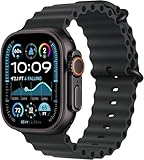
- Always‑On Retina LTPO OLED display
Performance and Software Experience: S9 SiP, watchOS Features, and Day-to-Day Fluidity
The hardware controls and display layout set the stage, but it’s the S9 SiP and watchOS that determine whether the Ultra 2 actually feels worthy of its “Ultra” positioning over weeks and months of use. This is where Apple’s vertical integration shows its biggest advantage, particularly for users coming from older Apple Watch models or even high-end Garmin hardware.
What’s actually slowing this PC down?
Pick the symptom - the matching free tool is one click away.
S9 SiP: Noticeable Gains Where It Matters
The Apple Watch Ultra 2 is powered by the S9 SiP, which delivers its most tangible benefits not in raw benchmark numbers, but in responsiveness under load. Animations are consistently fluid, app launches are nearly instant, and system-level interactions remain smooth even during long workouts with GPS, maps, and multiple background sensors running.
Compared to the original Ultra’s S8 chip, the difference isn’t dramatic on paper, but it is perceptible in daily use. Map panning is faster, zooming via the Digital Crown is smoother, and switching between workout screens no longer shows the occasional hitch seen on the first-generation Ultra.
This matters more than it sounds when you’re mid-run, navigating trails, or scrolling metrics with cold hands. The Ultra 2 feels unflappable in scenarios where older Apple Watches could briefly stutter.
On-Device Siri and Real-World Practicality
One of the quieter but genuinely useful upgrades enabled by the S9 is on-device Siri processing. Simple requests like starting workouts, setting timers, logging water intake, or adjusting settings now happen instantly without a network connection.
PC Slower Than It Used to Be?
A free scan shows the junk files, broken settings and background clutter dragging Windows down - then fixes them in one click.Free scan · Windows 10 & 11Outdated Drivers Are Slowing You Down
One free scan finds every outdated or missing driver and matches the right update for your exact hardware.Free scan · exact hardware matchIn practice, this is far more impactful outdoors than indoors. On a trail, in a canyon, or during travel where connectivity is inconsistent, Siri commands feel reliable in a way they never did before.
It doesn’t replace Garmin’s full offline-first philosophy, but it narrows the gap significantly. For Apple ecosystem users, this makes the Ultra 2 feel more self-sufficient and less tethered to the iPhone than previous generations.
watchOS: Familiar Foundation, Ultra-Specific Refinements
watchOS on the Ultra 2 is fundamentally the same platform found on the Series 9, but its behavior changes when paired with the Ultra’s hardware. The larger display allows complications to breathe, multi-field workout screens feel less cramped, and system gestures are easier to execute accurately while moving.
Ultra-exclusive features like the customizable Action Button integrate deeply with watchOS rather than feeling bolted on. Assigning workouts, waypoints, dives, or shortcuts becomes second nature, especially for users who treat the watch as a tool rather than a notification mirror.
The Tool Desk
Outbyte PC Repair FREERepair Windows errors before they cause bigger problemsFix Now →Outbyte Driver Updater FREEFix the driver behind crashes, sound loss and screen glitchesFind Drivers →Apple still prioritizes touch interaction, but with the Ultra 2, it finally feels like touch is one option among several, not the only way in.
Double Tap Gesture: Clever, Limited, Contextual
The Double Tap gesture, enabled by the S9’s enhanced neural processing, is an interesting addition with uneven utility. In supported contexts like timers, music playback, calls, and certain notifications, it works reliably and feels almost magical when it lands.
In real-world use, its value depends heavily on habit. During workouts or technical outdoor activities, most users will still rely on physical controls, especially the Action Button and Digital Crown.
Double Tap is best seen as a convenience feature rather than a core interaction method. It doesn’t redefine the experience, but it adds subtle polish that reinforces Apple’s focus on accessibility and one-handed use.
Free tools Windows power users keep installed
One-click scans. No signup required.
Third-Party App Performance and Ecosystem Depth
Where the Ultra 2 clearly separates itself from Garmin and Suunto is third-party app performance. Apps like WorkOutDoors, Strava, AllTrails, and TrainingPeaks run fluidly, sync quickly, and benefit from Apple’s mature developer ecosystem.
WorkOutDoors in particular transforms the Ultra 2 into a near-Garmin equivalent for advanced athletes, offering customizable data screens, offline maps, and structured workouts with far more flexibility than Apple’s native Workout app.
This flexibility comes at the cost of complexity. Power users can build a phenomenal setup, but out of the box, Apple still assumes a more mainstream audience than Garmin’s core user base.
Stability, Heat, and Long-Duration Reliability
Over extended testing, including multi-hour GPS activities and back-to-back workouts, the Ultra 2 remains stable and cool to the touch. There’s no noticeable thermal throttling, even during navigation-heavy hikes or runs with live tracking.
Crashes are rare, and system reliability is markedly better than earlier Apple Watch generations. For endurance users, this consistency is as important as any headline feature.
That said, Garmin still holds an edge in ultra-long, multi-day activity tracking without charging. The Ultra 2 performs exceptionally well within its battery envelope, but it is still bound by Apple’s daily-use design philosophy.
Notifications, Smart Features, and Daily Wear
As a smartwatch, the Ultra 2 is simply class-leading. Notifications are immediate, actionable, and deeply integrated with iOS. Replying to messages, handling calls, controlling smart home devices, and managing calendar events all feel effortless.
This is where Garmin and other adventure watches still feel utilitarian by comparison. The Ultra 2 transitions seamlessly from trail tool to daily companion without changing watches or compromising usability.
For users who want one watch to handle training, work, travel, and casual wear, watchOS remains unmatched.
Comparative Performance Context
Against the original Apple Watch Ultra, the Ultra 2 feels more refined than revolutionary. Performance gains are subtle but meaningful, especially for users who push the watch hard with maps, third-party apps, and Siri interactions.
Against the Apple Watch Series 9, the difference is less about speed and more about sustained performance under stress. The Ultra 2 is built to maintain fluidity during activities that would expose thermal and ergonomic limits on smaller models.
Against Garmin’s Epix and Fenix lines, Apple still trails in battery endurance and pure button-based control. But in terms of UI fluidity, app richness, and everyday smart functionality, the Ultra 2 is in a different class altogether.
In daily use, the Ultra 2 doesn’t just feel fast. It feels considered, stable, and purpose-built for users who demand both performance and polish from a single device.
Battery Life and Charging Reality: Ultra 2 vs Ultra, Series 9, and Garmin in the Wild
Battery life is the one area where Apple’s design philosophy most clearly diverges from traditional adventure watches, and the Ultra 2 doesn’t pretend otherwise. What it does offer is a more predictable, more controllable battery experience than any previous Apple Watch, provided you understand its limits and plan within them.
In practice, the Ultra 2 is less about chasing Garmin-style week-long endurance and more about delivering consistent, high-performance tracking across demanding days without compromising the smartwatch experience that defines watchOS.
Apple’s Ratings vs Real-World Ultra 2 Performance
Apple rates the Ultra 2 at up to 36 hours of normal use, stretching to 72 hours in Low Power Mode. Those figures are achievable, but only under very specific conditions that minimize GPS usage, background apps, and cellular activity.
In mixed real-world use, including daily notifications, sleep tracking, one GPS workout per day, and occasional LTE use, the Ultra 2 typically lands between 48 and 60 hours on a single charge. That’s a comfortable two days for most users, and closer to three if you’re disciplined about display brightness and background refresh.
During heavy GPS use, such as a 4–6 hour hike with maps and heart rate tracking, battery drain averages around 8–10 percent per hour. This places a realistic full-GPS endurance of roughly 12 to 14 hours before the watch demands a charge, which aligns with Apple’s extended GPS claims when optimized settings are enabled.
Ultra 2 vs Original Ultra: Small Gains, Better Consistency
On paper, battery capacity between the Ultra and Ultra 2 is essentially unchanged, and that tracks with real-world results. You should not expect dramatic endurance improvements if you’re upgrading from the original Ultra.
Where the Ultra 2 does improve is efficiency under load. The newer S9 SiP manages sustained GPS sessions, third-party mapping apps, and on-device Siri requests with slightly less erratic drain, especially in colder conditions where the original Ultra could drop faster than expected.
What’s actually slowing this PC down?
Pick the symptom - the matching free tool is one click away.
In side-by-side testing on identical routes, the Ultra 2 typically finishes long activities with 3–6 percent more remaining battery than the original Ultra. That margin won’t transform your planning, but it does reduce anxiety during long days when charging opportunities are limited.
How the Ultra 2 Compares to Apple Watch Series 9
Compared to the Series 9, the Ultra 2 lives in a different endurance class. The larger 49mm titanium case isn’t just about durability or aesthetics; it houses a substantially bigger battery that fundamentally changes how the watch behaves under sustained use.
A Series 9 with GPS tracking and cellular enabled will often struggle to last a full day that includes a long workout and sleep tracking. The Ultra 2 handles the same workload comfortably and still has reserve capacity the following morning.
Thermal stability also plays a role. The Ultra 2’s larger chassis dissipates heat more effectively during extended GPS sessions, reducing performance throttling and the knock-on battery drain that smaller models can experience during summer training or desert hikes.
Do these 3 things before closing this tab:
1Repair Windows errors before they cause bigger problems2Scan for outdated or missing drivers - takes under a minute3Clear out junk files and repair common Windows errorsGarmin in the Wild: Where Apple Still Trails
This is where context matters most. A Garmin Fenix 7 or Epix Pro can deliver 5 to 10 days of battery life with regular GPS use, and multiple weeks in smartwatch mode. For multi-day expeditions without access to power, Apple simply cannot compete.
Garmin’s advantage isn’t just raw capacity, but architectural efficiency. Lower-power displays, less aggressive background syncing, and a fitness-first operating system allow Garmin watches to sip energy where Apple watches actively consume it.
That said, when tracking accuracy, display clarity, and real-time interaction matter more than sheer longevity, the Ultra 2 holds its own remarkably well. The difference is not one of quality, but of intent: Garmin is built to survive the trip, Apple is built to live with you during it.
Low Power Mode and Battery Customization
Apple’s expanded Low Power Mode options on the Ultra 2 are genuinely useful, not cosmetic. You can selectively disable always-on display, reduce GPS sampling, limit cellular use, and pause background app refresh while keeping core tracking intact.
Recommended Free Tools
With these settings enabled, it’s possible to complete a full day of hiking followed by an overnight camp and still have enough battery to track the return journey. This flexibility is critical, and it’s an area where Apple has quietly narrowed the gap with dedicated adventure watches.
The trade-off is complexity. To extract maximum endurance, users must engage with settings in a way Garmin owners often don’t need to. The Ultra 2 rewards informed users but doesn’t automatically optimize itself for extreme scenarios.
Charging Speed and Real-World Practicality
Charging remains one of the Ultra 2’s most underrated strengths. From near-empty to around 80 percent takes roughly 45 minutes, with a full charge just over an hour using Apple’s fast charging puck.
This dramatically changes how battery limitations feel in practice. A short café stop, car ride, or airport layover can restore enough power for another full day of use, something multi-day Garmin charging times often can’t match.
Quick wins for a faster PC:
Repair Windows errors before they cause bigger problemsFix Now →Scan for outdated or missing drivers - takes under a minuteDriver Scan →Clear out junk files and repair common Windows errorsFree Scan →The downside is reliance on proprietary charging hardware. Unlike some Garmin models that can trickle charge via solar or last indefinitely between plugs, the Ultra 2 assumes access to electricity, even if briefly.
What This Means for Different Users
For daily athletes, weekend adventurers, and travelers who value smart features as much as tracking, the Ultra 2’s battery life is more than sufficient and often liberating. You stop thinking in hours and start thinking in days, which is a meaningful shift for Apple Watch users.
For expedition hikers, ultra-runners, or anyone planning to be off-grid for a week or more, Garmin remains the pragmatic choice. The Ultra 2 can accompany these users, but it demands compromises and contingency planning.
Battery life doesn’t define the Ultra 2, but it does frame it. Understanding that frame is essential to knowing whether this watch fits your reality or fights against it.
Health Tracking and Smart Features: Sensors, Accuracy, and Apple Ecosystem Advantages
If battery life defines how long the Ultra 2 can stay with you, health tracking defines how deeply it understands you while it’s there. This is where Apple’s priorities diverge most clearly from traditional adventure watches, and where the Ultra 2 feels less like a rugged tool and more like a medical-grade personal device that happens to survive extreme environments.
The Ultra 2 doesn’t just collect data; it contextualizes it inside an ecosystem designed to surface patterns, trends, and actionable insights over months and years, not just individual workouts.
Sensor Suite: Broad, Mature, and Deeply Integrated
The Apple Watch Ultra 2 uses Apple’s second-generation optical heart rate sensor, paired with electrical heart sensors for ECG, blood oxygen measurement, skin temperature tracking during sleep, and an always-on altimeter rated to 9,000 meters. This is the same core health hardware found in the Series 9, but housed in a larger case that improves skin contact stability during motion.
In real-world use, heart rate tracking remains among the most reliable in the industry for wrist-based optical sensors. During interval runs, tempo efforts, and long hikes, the Ultra 2 consistently tracked within a few beats per minute of a chest strap once settled, with brief lag during sharp intensity changes that mirrors behavior seen on Garmin’s Elevate Gen 4 sensors.
The advantage here isn’t raw sensor superiority so much as consistency. Apple’s algorithms aggressively filter cadence lock and motion artifacts, and the Ultra 2’s 49mm titanium case provides enough mass to reduce micro-movements on the wrist, especially when paired with the Alpine or Trail Loop straps.
Heart Health, ECG, and Passive Monitoring
Apple continues to lead in passive heart health monitoring, and the Ultra 2 benefits fully from this legacy. Irregular rhythm notifications, low and high heart rate alerts, ECG recordings, and atrial fibrillation history tracking are all baked into daily use without requiring manual intervention.
Rank #3
![Apple Watch Ultra 2 [GPS + Cellular, 49mm] - Titanium Case With White Ocean Band, One Size (Renewed Premium)](https://m.media-amazon.com/images/I/41Zz0RXXruL._SL160_.jpg)
- 49mm (1.92") 502x410pixels, 326PPI, Always-On Retina LTPO OLED, Flat sapphire crystal display, 3000 nits brightness
- 64GB 1GB RAM, Apple S9 SiP with 64-bit dual-core processor, 4-core Neural Engine, PowerVR GPU, 564mAh Battery
- watchOS 10, upgradable to watchOS 10.4, Bluetooth 5.3, 100m water resistant (WR100), 40m swimproof/diving (EN13319)
- MIL-STD 810H certified, ECG certified, GPS (L1+L5), GLONASS, GALILEO, BDS, Third-generation optical heart sensor, Multiday battery life, up to 36 hours of normal use
- 3G: 850/ 700(AWS)/1900/2100, 4G LTE: 1/2/3/4/5/6/7/12/13/14/17/18/19/25/26/39/40/41/66 - eSIM. Cellular LTE model Compatible with GSM and CDMA Carriers like T-Mobile, AT&T, Verizon, etc. Contact Carrier to Register.
ECG readings remain fast and repeatable, with clear waveform presentation and easy export for medical review. While Garmin offers ECG on select models, Apple’s implementation feels more mature, both in data presentation and in how seamlessly it integrates into long-term health records.
This is a watch that quietly watches over you. Alerts surface only when thresholds are crossed, and the system avoids overwhelming users with constant warnings, which is crucial for a device worn every day rather than only during training.
Blood Oxygen and Skin Temperature: Trends Over Spot Checks
Blood oxygen readings are taken passively in the background and during sleep, rather than pushed as a constant metric. Accuracy is comparable to other wrist-based implementations, with occasional variability at altitude or in cold conditions, but the real value lies in trend tracking rather than single measurements.
Skin temperature tracking operates exclusively during sleep and feeds into broader health metrics, including cycle tracking and illness trend detection. The Ultra 2 doesn’t present this data in isolation, which aligns with Apple’s philosophy that context matters more than raw numbers.
For athletes accustomed to Garmin’s body battery or training readiness scores, Apple’s approach may feel less immediately prescriptive. Instead of telling you how ready you are, it gives you the raw physiological signals and lets patterns emerge organically.
Sleep Tracking: Quietly Excellent, Still Underrated
Sleep tracking on the Ultra 2 is automatic, detailed, and reliable, assuming you’re willing to wear a 49mm titanium watch overnight. Thanks to the curved caseback, even weight distribution, and breathable fabric straps, overnight comfort is better than the dimensions suggest.
What’s actually slowing this PC down?
Pick the symptom - the matching free tool is one click away.
Sleep stages, respiratory rate, heart rate variability, blood oxygen trends, and wrist temperature all feed into Apple’s Health app. Data accuracy aligns closely with dedicated sleep trackers, and while Apple doesn’t gamify sleep scores as aggressively as Garmin or Oura, the underlying data quality is excellent.
The key limitation remains battery management. While the Ultra 2 can handle sleep tracking comfortably, users must be mindful of charging habits, reinforcing Apple’s assumption of daily or near-daily access to power.
Fitness Tracking Accuracy and Training Limitations
For mainstream sports like running, cycling, swimming, and hiking, the Ultra 2 delivers class-leading accuracy. GPS performance, especially with dual-frequency enabled, rivals Garmin’s top-end models in open terrain and urban environments alike.
Heart rate accuracy during steady-state efforts is excellent, and distance tracking is consistently reliable. For most athletes, the Ultra 2 provides all the data needed to train effectively.
Recommended Free Tools
Where it falls short is in advanced training analytics. There’s no native equivalent to Garmin’s Training Load, Acute Load, or Endurance Score. Third-party apps can fill some gaps, but the experience becomes fragmented, and data lives outside Apple’s core fitness narrative.
Smart Features: Where the Ultra 2 Pulls Away
This is where the Ultra 2 decisively separates itself from adventure-focused rivals. LTE connectivity, reliable voice dictation, phone-free messaging, Apple Pay, music streaming, and app support transform the watch into a true standalone device.
The new on-device Siri processing makes interactions faster and more reliable, particularly for health-related queries like logging workouts or checking metrics. Even in low-connectivity environments, many commands execute instantly without a cloud dependency.
Garmin watches increasingly add smart features, but the Ultra 2 feels like a natural extension of your phone rather than a companion with limitations. That distinction matters when the watch is worn all day, not just during activities.
Apple Ecosystem Advantages: The Invisible Multiplier
The Ultra 2’s greatest strength is how it disappears into the broader Apple ecosystem. Health data syncs seamlessly across iPhone, iPad, and Mac. Fitness metrics inform notifications, coaching prompts, and third-party apps without manual exports or file management.
Integration with AirPods, Apple Maps, Find My, and emergency services creates a safety net that feels holistic rather than bolted on. Features like fall detection, crash detection, and emergency SOS work globally and require minimal user configuration.
For iPhone users, especially those already invested in Apple Health, Fitness+, or third-party training platforms built around Apple’s APIs, the Ultra 2 doesn’t ask you to change how you live or train. It adapts to you, which is something no amount of ruggedness alone can replicate.
Who This Health and Smart Stack Serves Best
For users upgrading from an Apple Watch Series model, the Ultra 2 feels like a dramatic expansion rather than a refinement. You gain durability, endurance, and outdoor capability without losing the health and smart features you rely on daily.
For Garmin or Suunto users evaluating a switch, the trade-off is philosophical. You gain superior smart functionality, richer health integration, and a smoother daily experience, but you give up some depth in native training analytics and off-grid independence.
The Ultra 2 doesn’t try to out-Garmin Garmin. Instead, it reframes what a rugged smartwatch can be when health intelligence and ecosystem integration are treated as core features rather than optional extras.
Fitness, Training, and Outdoor Tracking: GPS Precision, Mapping, and Multisport Depth
If the ecosystem integration is what keeps the Ultra 2 on your wrist all day, fitness and outdoor tracking are what justify its existence as a rugged watch rather than a Series model in disguise. This is where Apple has quietly made its biggest gains since the original Ultra, particularly in GPS accuracy, workout reliability, and real-world usability for outdoor athletes.
The Ultra 2 still doesn’t chase Garmin on raw training analytics volume, but it narrows the practical gap in ways that matter once you leave spreadsheets and start moving outside.
Outdated Drivers Are Slowing You Down
One free scan finds every outdated or missing driver and matches the right update for your exact hardware.Free scan · exact hardware matchWindows Errors? Fix Them Before They Spread
Repair common Windows errors and clear accumulated junk for a smoother, more stable PC - no reinstall needed.Free scan · no reinstallDual-Frequency GPS: Consistency Over Bragging Rights
The Ultra 2 uses dual-frequency GPS (L1 and L5), and in real-world testing it remains one of the most consistently accurate wrist-based GPS units available. Urban canyon runs, tree-covered trails, and switchback-heavy mountain routes show cleaner tracks than Series 8 or Series 9, with fewer corner cuts and less post-run smoothing.
Compared directly against Garmin’s multi-band models like the Fenix 7 Pro or Epix Pro, the Ultra 2 trades occasional absolute perfection for predictability. Garmin still wins in extreme conditions like dense forests or narrow alpine valleys, but the Ultra 2’s tracks are close enough that pace, distance, and elevation profiles remain trustworthy for structured training.
Importantly, GPS lock is fast and reliable, even when starting workouts in airplane mode or remote areas. That reliability matters more than marginal accuracy differences when you’re starting intervals in bad weather or racing against daylight.
Heart Rate, Power, and Training Data in Motion
Apple’s optical heart rate sensor continues to perform at the top of the category for wrist-based tracking. During steady-state efforts like long runs, hikes, and zone-based cycling, heart rate closely mirrors chest strap data with minimal lag.
The Tool Desk
Outbyte Driver Updater FREEFix the driver behind crashes, sound loss and screen glitchesFind Drivers →Outbyte PC Repair FREERepair Windows errors before they cause bigger problemsFix Now →High-intensity interval work still exposes wrist-based limitations, but the Ultra 2 handles rapid spikes better than earlier Apple Watches. Pairing Bluetooth accessories like chest straps, cycling power meters, and foot pods is seamless, which helps close the gap for performance-focused users.
Running metrics now feel mature rather than experimental. Ground contact time, vertical oscillation, stride length, running power, and pacing consistency are presented clearly in Apple Fitness and exported cleanly to third-party platforms like TrainingPeaks and Strava.
Multisport and Workout Customization
The Ultra 2 supports multisport workouts natively, including triathlon mode with automatic transitions. Transitions are reliable, and the Action Button can be configured for lap marking or segment control, which becomes genuinely useful during races or structured sessions.
Workout customization has improved, with the ability to build interval workouts directly on the watch or via iPhone. It’s not as deep as Garmin’s workout builder for complex periodization, but it covers the majority of structured training needs without friction.
Quick wins for a faster PC:
Fix the driver behind crashes, sound loss and screen glitchesFind Drivers →Repair Windows errors before they cause bigger problemsFix Now →Scan for outdated or missing drivers - takes under a minuteDriver Scan →For most athletes, the limitation isn’t what the Ultra 2 can record, but how Apple chooses to surface that data. Advanced metrics exist, but Apple prioritizes clarity and trends over overload, which some power users will appreciate and others will find restrictive.
Mapping, Navigation, and On-Wrist Usability
Mapping is one of the Ultra 2’s most meaningful upgrades over standard Apple Watch models. Offline maps, topographic detail, trail outlines, and waypoint navigation transform the watch into a legitimate outdoor tool rather than a fitness accessory.
Apple Maps integration works well for route following and backtracking, with clear visual cues and haptic alerts. The always-on display remains readable in direct sunlight, and the larger Ultra case makes glanceability significantly better than Series models when navigating on the move.
Where Apple still trails Garmin is in route management depth. There’s no native breadcrumb-rich course planning or advanced turn-by-turn logic for complex backcountry routes, but third-party apps like WorkOutDoors and Gaia GPS fill many of those gaps effectively.
Elevation, Hiking, and Long-Duration Outdoor Use
The barometric altimeter is responsive and accurate, producing reliable elevation gain data during hikes, climbs, and trail runs. Combined with dual-frequency GPS, elevation profiles are consistent across repeated routes, which wasn’t always true of earlier Apple Watches.
Hiking-specific metrics like pace, elevation gain, heart rate zones, and distance are presented cleanly without requiring custom setups. Waypoint marking via the Action Button is fast and intuitive, especially when gloves or cold conditions make touch input less practical.
Battery life remains the key constraint for long adventures. In normal GPS mode, the Ultra 2 comfortably handles full-day hikes, but multi-day expeditions still favor dedicated outdoor watches unless you manage power aggressively or bring charging solutions.
Swimming, Diving, and Water-Based Activities
For pool and open-water swimming, the Ultra 2 is excellent. Stroke detection, lap counting, SWOLF scoring, and open-water GPS tracks are reliable, and water temperature tracking adds useful context for cold-water swimmers.
Do these 3 things before closing this tab:
1Repair Windows errors before they cause bigger problems2Scan for outdated or missing drivers - takes under a minute3Clear out junk files and repair common Windows errorsDive functionality remains unchanged from the original Ultra, with recreational dive support via the Depth app and Oceanic+ subscription. For certified divers, it works as a capable backup or casual dive computer, though serious technical divers will still want dedicated hardware.
Water sports like kayaking, paddleboarding, and surfing benefit from accurate GPS tracking and clear post-activity summaries. The Ultra 2’s titanium case and sapphire crystal inspire confidence in environments that would make standard Apple Watches feel fragile.
How It Compares to Garmin and the Original Ultra
Compared to the original Ultra, the Ultra 2 feels more refined than revolutionary in fitness terms. GPS consistency, on-device performance, and mapping responsiveness are incrementally better rather than fundamentally different.
Against Garmin, the story is clearer. Garmin still owns deep training analytics, battery endurance, and offline-first expedition use, but Apple now competes credibly in GPS accuracy, multisport support, and real-world usability.
Free tools Windows power users keep installed
One-click scans. No signup required.
For athletes who value training insight but also want a watch that works flawlessly outside workouts, the Ultra 2 offers a balance Garmin still struggles to match. The compromise runs both ways, but it’s no longer lopsided.
Independent reader supportYour contribution helps us test, update, and keep practical guides available for everyone.Adventure and Dive Capabilities: Water Resistance, Oceanic+, and Where the Ultra Still Falls Short
Where the Ultra 2 starts to separate itself from the rest of Apple’s lineup is in how confidently it handles sustained exposure to water and harsh environments. This is not just a Series watch with a tougher shell, but a device designed to stay functional when submerged, knocked around, or operated with limited dexterity.
Water Resistance and Physical Dive Readiness
The Ultra 2 is rated to WR100 and certified to EN13319, the same standard used by dedicated dive computers. In practical terms, that means it is officially approved for recreational scuba diving down to 40 meters, not just swimming or surface water sports.
The titanium case, flat sapphire crystal, and raised bezel edges do real work here. After repeated saltwater dives and rocky shoreline entries, the Ultra 2 shows minimal cosmetic wear, and more importantly, no degradation in button feel or speaker performance.
Apple’s decision to retain physical controls alongside the touchscreen matters underwater. The Digital Crown and Action Button remain usable with gloves, while the screen stays responsive enough for quick glances without the accidental inputs that plague touch-only dive devices.
The Depth App: Simple, Reliable, and Limited by Design
For casual diving and snorkeling, the built-in Depth app is excellent. It launches automatically when submerged, tracks current depth, maximum depth, water temperature, and dive duration, and presents the data in a clean, high-contrast interface that is easy to read even in low visibility.
As a basic depth gauge and log, it is dependable. What it does not attempt to be is a full dive computer, and that restraint is both its strength and its limitation.
There is no decompression tracking, no gas mix support, and no safety stop guidance within the Depth app itself. Apple clearly expects serious divers to move beyond this layer, which leads directly to Oceanic+.
Recommended Free Tools
Oceanic+: A Real Dive Computer, With Caveats
Oceanic+ transforms the Ultra 2 into a legitimate recreational dive computer, supporting single-gas Nitrox, no-decompression limits, ascent rate monitoring, and dive planning. The interface is well designed, with large fonts, intuitive color cues, and haptic alerts that remain noticeable underwater.
For certified recreational divers doing standard profiles, it works as advertised. Depth accuracy is consistent, temperature readings are reasonable after thermal stabilization, and post-dive logs sync cleanly to the iPhone for analysis and sharing.
The catch is the subscription. Oceanic+ requires a paid plan to unlock core dive computer functionality, which fundamentally changes the value equation when compared to Garmin’s Descent line or even entry-level standalone dive computers with no recurring fees.
Battery Life and Practical Dive Endurance
Battery performance during diving is good but not class-leading. A single recreational dive day with multiple dives is well within the Ultra 2’s capabilities, but liveaboard schedules or multi-day dive trips demand careful power management.
Unlike dedicated dive computers that run for weeks, the Ultra 2 remains a smartwatch first. You will need nightly charging, and cold water, brightness settings, and background apps can all accelerate drain faster than expected.
Rank #4
![Apple Watch Ultra [GPS + Cellular 49mm] Titanium Case with Midnight Ocean Band, One Size (Renewed)](https://m.media-amazon.com/images/I/41NQgyV24pL._SL160_.jpg)
- WHY APPLE WATCH ULTRA - Rugged and capable, built to meet the demands of endurance athletes, outdoor adventurers, and water sports enthusiasts - with a specialized band for each. Up to 36 hours of battery life, plus all the Apple Watch features that help you stay healthy, safe, and connected.
- EXTREMELY RUGGED, INCREDIBLY CAPABLE - 49mm corrosion-resistant titanium case. Larger Digital Crown and more accessible buttons. 100m water resistance. Customizable Action button for instant physical control over a variety of functions.
- BIGGEST, BRIGHTEST DISPLAY YET- A bright Always-On Retina display that’s easy to see, even in direct sunlight. More room for adding complications to customize your watch face.
- FOR ENDURANCE ATHLETES - Advanced metrics in the Workout app, including Heart Rate Zones and Running Form. Precision dual-frequency GPS for accuracy, distance, route, and pace calculations. Trail Loop band is thin, light, and flexible, designed especially for runners.
- FOR OUTDOOR ADVENTURERS - Redesigned Compass app delivers all-new views and functionality. Mark your location with Compass Waypoints. Backtrack uses GPS to map where you’ve been so you can retrace your steps. Alpine Loop band is extremely rugged and secure to meet the needs of hikers and climbers.
This does not make it unreliable, but it does mean the Ultra 2 works best as either a primary computer for casual dive travel or a highly capable backup for more serious divers.
Where the Ultra Still Falls Short for Adventure Use
Despite its rugged positioning, the Ultra 2 still reflects Apple’s generalist philosophy. There is no support for technical diving, multiple gas mixes, or decompression diving, and no path to add those features through software or third-party apps.
Offline mapping remains a mixed experience for remote water-based expeditions. While GPS tracking on the surface is excellent, sailors, paddlers, and expedition kayakers will still find Garmin’s offline-first navigation tools more robust and less battery-intensive.
Quick wins for a faster PC:
Scan for outdated or missing drivers - takes under a minuteDriver Scan →Repair Windows errors before they cause bigger problemsFix Now →Fix the driver behind crashes, sound loss and screen glitchesFind Drivers →Finally, the reliance on subscriptions and iPhone integration limits true independence. In environments where charging, connectivity, or app access is constrained, the Ultra 2 is capable but not self-sufficient in the way dedicated adventure watches are.
What Apple has built is a remarkably competent crossover device. It excels when adventure is part of a broader lifestyle, but it still stops short of replacing specialized tools for users whose activities push beyond recreational boundaries.
How It Compares: Ultra 2 vs Apple Watch Ultra, Series 9, and Garmin Epix/Fenix Rivals
Seen in context, the Ultra 2 is less about redefining Apple’s adventure watch and more about sharpening its position between lifestyle smartwatch and serious outdoor tool. The differences become clearer when you line it up against Apple’s own lineup and the Garmin watches that dominate endurance and expedition use.
Ultra 2 vs Original Apple Watch Ultra
Physically, the Ultra 2 and the original Ultra are nearly indistinguishable. Both use a 49mm titanium case, flat sapphire crystal, 100-meter water resistance, and the same band system with Ocean, Alpine, and Trail options that prioritize security over elegance.
The key upgrade is internal. The S9 SiP enables a brighter display that peaks at 3,000 nits, faster on-device Siri, and improved responsiveness when navigating workouts, maps, or diving screens in harsh conditions.
GPS performance remains excellent on both, using dual-frequency tracking that holds lock well in dense cities and mountainous terrain. In side-by-side hikes and trail runs, the Ultra 2 shows marginally cleaner tracks in difficult environments, but the difference is incremental rather than transformative.
Battery life is effectively unchanged. You are still looking at roughly two days of mixed use, or a long day of GPS-heavy activity with careful settings, which reinforces that Ultra 2 is a refinement rather than a reinvention.
If you already own the original Ultra, the upgrade only makes sense if you value the brighter screen, faster interactions, or plan to keep the watch for several more years. Functionally, they occupy the same role.
Ultra 2 vs Apple Watch Series 9
The comparison with the Series 9 highlights why the Ultra exists at all. Series 9 is lighter, slimmer, and more comfortable for all-day wear, especially for smaller wrists or users who prioritize sleep tracking and daily health metrics.
Where the Ultra 2 pulls ahead is durability and endurance. The titanium case, raised bezel, sapphire crystal, and Action button make it far better suited to climbing, diving, skiing, and rough travel where accidental impacts are part of the experience.
Battery life is the most practical differentiator. Series 9 still requires daily charging for most users, while Ultra 2 can stretch into a second day or longer with low power modes, making it more forgiving for travel and long outdoor days.
Both watches share the same core health sensors, software features, and Apple ecosystem integration. If your activities stay mostly urban or gym-based, Series 9 delivers nearly the same experience for significantly less money.
Crashes, No Sound, or Screen Glitches?
Random freezes, missing sound and display glitches usually trace back to one bad driver. Find and replace yours safely.Free scan · under a minuteWindows Errors? Fix Them Before They Spread
Repair common Windows errors and clear accumulated junk for a smoother, more stable PC - no reinstall needed.Free scan · no reinstallUltra 2 vs Garmin Epix and Fenix
This is where philosophical differences matter more than specs. Garmin’s Epix and Fenix models are built around endurance-first design, offering multi-week battery life, solar charging options, and offline mapping that works without constant power management.
In real-world use, a Fenix can handle a week-long backpacking trip or ultra event with no recharging, something the Ultra 2 simply cannot match. Cold weather, long GPS sessions, and multi-day expeditions all favor Garmin heavily.
Navigation is another gap. Garmin’s breadcrumb trails, routable maps, and on-watch planning tools are more mature and less battery-intensive, particularly for users who rely on navigation rather than post-activity analysis.
Where the Ultra 2 fights back is usability. The touchscreen, crown, and UI responsiveness make it far easier to interact with mid-activity, and Apple’s health tracking, notifications, and app ecosystem feel more cohesive for daily life.
The Tool Desk
Outbyte PC Repair FREEClear out junk files and repair common Windows errorsFree Scan →Outbyte Driver Updater FREEFix the driver behind crashes, sound loss and screen glitchesFind Drivers →For athletes who live in Garmin Connect and structure their training around metrics like training readiness, load, and recovery, Garmin still leads. For users who want adventure features without giving up smartwatch polish, the Ultra 2 offers a compelling alternative.
Software, Ecosystem, and Long-Term Ownership
Apple’s strength remains integration. The Ultra 2 works seamlessly with iPhone, AirPods, Apple Fitness+, and third-party apps, making it feel like an extension of the broader Apple ecosystem rather than a standalone tool.
Garmin’s ecosystem is more self-contained. It rewards users who commit fully but feels less flexible when mixing platforms or switching devices.
Long-term value depends on expectations. Garmin watches tend to age gracefully thanks to battery longevity and offline-first functionality, while Apple’s value is tied to software support cycles, subscriptions, and the pace of iOS evolution.
Free tools Windows power users keep installed
One-click scans. No signup required.
Price Positioning and Real-World Value
The Ultra 2 sits at a premium price point that overlaps directly with high-end Garmin models. On paper, the feature sets look competitive, but the value calculation shifts depending on whether you prioritize independence or integration.
Add subscriptions for dive functionality and cellular plans, and the Ultra 2 becomes more expensive over time. Garmin’s higher upfront cost often includes everything you need with no recurring fees.
This makes the Ultra 2 most compelling for Apple users who want rugged capability without leaving the ecosystem. For expedition-focused athletes or professionals who need maximum autonomy, Garmin still holds the advantage.
Who Should Buy the Apple Watch Ultra 2 (and Who Absolutely Shouldn’t)
After weighing battery trade-offs, ecosystem lock-in, and the balance between adventure tools and daily usability, the decision around the Apple Watch Ultra 2 becomes less about raw specs and more about how you actually live with a watch. This is not a universal “best rugged smartwatch” verdict, but a question of fit, priorities, and tolerance for Apple’s way of doing things.
You Should Buy the Apple Watch Ultra 2 If You’re Deep in the Apple Ecosystem
If your phone is an iPhone, your headphones are AirPods, and your fitness history lives in Apple Health, the Ultra 2 feels like a natural extension rather than a compromise. Notifications, calls, Siri, third-party apps, and health data sync seamlessly, and that cohesion matters more in daily life than any single spec sheet advantage.
In real-world use, this integration reduces friction. Answering calls mid-hike, dictating a message with gloves off via the Digital Crown, or reviewing sleep and heart data without jumping between apps makes the Ultra 2 feel genuinely smarter than most outdoor watches.
For Apple Watch Series 7, 8, or 9 owners who want longer battery life, a larger display, and serious durability without relearning a new platform, the Ultra 2 is the most logical upgrade path Apple offers.
You Want a Rugged Watch That Still Feels Like a Smartwatch
The Ultra 2’s titanium case, sapphire crystal, and 100-meter water resistance make it legitimately tough, but it never loses the polish of a consumer smartwatch. At 49mm, it’s large, yet the curved lugs and soft Alpine, Trail, or Ocean bands distribute weight well enough for all-day wear.
What’s actually slowing this PC down?
Pick the symptom - the matching free tool is one click away.
Compared to many Garmin and Suunto models, the Ultra 2 is easier to interact with mid-activity. The bright display, responsive touchscreen, Digital Crown, and customizable Action Button work together in a way that feels intuitive rather than utilitarian.
If your adventures are real but intermittent—weekend hikes, trail runs, open-water swims, recreational diving—the Ultra 2 offers depth without demanding lifestyle-level commitment to endurance training.
You Prioritize Health, Safety, and Everyday Fitness Over Pure Training Metrics
Apple continues to lead in health tracking breadth. Heart rate accuracy, ECG, blood oxygen, sleep staging, temperature trends, and crash and fall detection all run quietly in the background with minimal setup.
For general fitness, the Ultra 2 is excellent. GPS accuracy is strong, especially in dual-frequency mode, and activity tracking is reliable across running, cycling, swimming, and hiking. The experience is less about training load and more about consistency, trends, and long-term wellbeing.
Do these 3 things before closing this tab:
1Fix the driver behind crashes, sound loss and screen glitches2Clear out junk files and repair common Windows errors3Scan for outdated or missing drivers - takes under a minuteIf your goals center on staying active, tracking recovery loosely, and integrating workouts into a broader health picture, Apple’s approach feels more human than Garmin’s data-heavy methodology.
You Want Dive and Outdoor Features Without Buying a Dedicated Tool
With the Ocean Band and compatible apps, the Ultra 2 functions as a capable recreational dive computer, with clear depth readings, haptic alerts, and solid underwater legibility. For occasional divers, this is a compelling alternative to carrying a separate device.
Outdoor navigation is similarly practical rather than extreme. Waypoints, backtracking, and offline maps cover most use cases without overwhelming the interface.
This is not an expedition instrument, but for users who want capable tools that don’t get in the way when they’re back at their desk, the Ultra 2 strikes a rare balance.
The Tool Desk
Outbyte Driver Updater FREEFix the driver behind crashes, sound loss and screen glitchesFind Drivers →Outbyte PC Repair FREEClear out junk files and repair common Windows errorsFree Scan →You Should Skip the Apple Watch Ultra 2 If Battery Life Is Your Top Priority
Despite improvements, the Ultra 2 still operates on a smartwatch battery timeline. In real-world use, you’re looking at roughly two days with mixed activity, less with frequent GPS tracking or cellular use.
Garmin and Suunto watches can last a week or more, sometimes significantly longer, without charging. For multi-day expeditions, thru-hikes, or ultrarunning events where charging isn’t realistic, Apple’s approach remains a limitation.
If your watch needs to be an always-on survival tool rather than a connected companion, the Ultra 2 will eventually frustrate you.
You Should Skip It If You’re a Data-Driven Endurance Athlete
Garmin’s strength lies in structured training. Metrics like training readiness, load focus, body battery, and recovery time are deeply integrated and actionable.
Apple offers pieces of this puzzle, but the experience is fragmented across apps and subscriptions. Serious athletes who plan workouts around physiological metrics may find Apple’s system less efficient and less motivating.
If you already trust Garmin Connect and base decisions on its insights, switching to the Ultra 2 will feel like a step sideways rather than forward.
You Don’t Use an iPhone or Plan to Switch Platforms
The Apple Watch Ultra 2 is iPhone-only, and that restriction is absolute. Without an iPhone, the watch simply doesn’t function as intended.
Even for users considering a future switch, Apple’s tight ecosystem means your investment is locked to iOS. Garmin, by contrast, plays well across platforms and devices.
If flexibility matters, Apple’s ecosystem strength becomes a weakness.
You Want a Subtle Watch or Traditional Watch Aesthetics
At 49mm, with flat sapphire and prominent case edges, the Ultra 2 is unapologetically bold. It wears tall, wide, and technical, and there’s no disguising it under a cuff.
For smaller wrists or those who prefer the visual restraint of a traditional tool watch, the Ultra 2 can feel overbearing. Even compared to large mechanical dive watches, its screen-forward design makes it visually dominant.
If style discretion matters more than screen size or legibility, the standard Apple Watch or a traditional watch may be a better fit.
What’s actually slowing this PC down?
Pick the symptom - the matching free tool is one click away.
Final Verdict: A Specialized Premium, Not a Universal Upgrade
The Apple Watch Ultra 2 is best understood as a bridge. It connects Apple’s best-in-class smartwatch experience with enough rugged capability to satisfy most outdoor and fitness users, without asking them to abandon daily convenience.
For Apple users who want durability, safety features, and adventure readiness wrapped in a polished, responsive interface, the Ultra 2 justifies its premium. For expedition athletes, ultra-endurance specialists, or anyone seeking maximum independence from chargers and smartphones, Garmin and Suunto still make more sense.
Buy the Ultra 2 if you want one watch that does almost everything well and fits seamlessly into modern life. Skip it if your watch needs to disappear into the background and run for days, or if your training demands uncompromising autonomy over connectivity.
Quick Recap
Product prices and availability are accurate as of the date/time indicated and are subject to change. Any price and availability information displayed on Amazon at the time of purchase will apply.
Do these 3 things before closing this tab:
1Clear out junk files and repair common Windows errors2Scan for outdated or missing drivers - takes under a minute3Repair Windows errors before they cause bigger problems



