The Garmin smartwatch behind the “make and take calls” headline is the Venu 2 Plus, announced on January 4, 2022. It added a speaker and microphone so you can answer calls, dial contacts, and speak to your phone’s voice assistant from your wrist. It is not a cellular watch: ordinary calls still use a compatible iPhone or Android phone connected over Bluetooth.
What the original Garmin calling announcement meant
Garmin’s Venu 2 Plus was introduced at a launch MSRP of $449.99, with a rated battery life of up to nine days in smartwatch mode. The announcement described calls and smartphone voice-assistant access as headline features, alongside GPS fitness tracking, health monitoring, music, Garmin Pay, and more than 25 sports apps. See Garmin’s original announcement.
Because the announcement is from 2022, “new smartwatch” is historical wording rather than current 2026 news. The Venu 2 Plus remains the model that introduced this capability to the Venu line, but newer Garmin watches now offer similar Bluetooth calling.
How calls work on the Venu 2 Plus
The watch’s built-in speaker and microphone handle the conversation, while the paired phone supplies the cellular connection. You can start a call from the watch or control an incoming call without taking the phone out of your pocket.
Free tools Windows power users keep installed
One-click scans. No signup required.
#1 Best Overall
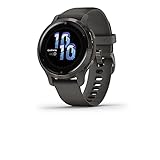
- Suit your style with a smartwatch that's available in two colors and features a bright AMOLED display
- Know your body better with extensive health monitoring features including health snapshot, Body Battery energy levels, sleep score, fitness age, stress tracking and more (this device is intended to be an estimation of your activity and metrics; it is not a medical device)
- Find new ways to keep your body moving with more than 25 built-in indoor and GPS sports apps, including walking, running, cycling, HIIT, swimming, golf and many more
- Use preloaded workouts that include cardio, yoga, strength, HIIT and Pilates, create your own in the Garmin Connect app on your compatible smartphone, or try Garmin Coach free adaptive training plans to help you prepare for your next running challenge
- Download up to 750 songs to your watch, including playlists from Spotify, Amazon Music or Deezer (may require a premium subscription), and connect with wireless headphones (not included) for phone-free listening
Making an outgoing call
- Hold the watch’s designated button.
- Select Phone Calling.
- Choose Dial pad to enter a number, Contacts to select a saved contact and number, or swipe up for Recent calls.
- Select the call button. Select the hang-up button when finished.
Garmin documents this menu path in the Venu 2 Plus owner’s manual.
Answering or rejecting an incoming call
- When the phone receives a call, the watch displays the caller’s name or number.
- Select the answer button to accept or the decline button to reject.
- With a compatible Android phone, select the message option to reject the call and send a preset text reply.
The Venu 2 Plus keeps a call list created on the watch; Garmin says it does not synchronize that list with the phone’s own recent-call list. Preset rejection texts are an Android-only feature, so they should not be expected on iPhone.
Can the Venu 2 Plus call without a phone?
No. The Venu 2 Plus is a Bluetooth calling watch, not a standalone cellular phone. The paired smartphone must remain connected and close enough for a usable Bluetooth link. If the phone is left at home, loses Bluetooth connectivity, or cannot provide the call connection, the watch cannot place a normal carrier call by itself.
That distinction is central: “make calls from your wrist” describes the interface and audio hardware, not an independent phone number or cellular modem. Garmin’s product information says calling requires a compatible smartphone; the manual specifies the Bluetooth connection.
The Tool Desk
Outbyte PC Repair FREEClear out junk files and repair common Windows errorsFree Scan →Outbyte Driver Updater FREEScan for outdated or missing drivers - takes under a minuteDriver Scan →Rank #2

- See everything clearly with large, easy-to-read text on the bright AMOLED display that includes an always-on mode, perfect for quick glances
- With up to 11 days of battery life in smartwatch mode, you won’t have to take your watch off every night to charge — which means a more complete 24/7 picture of your health
- Health is important to you, so monitor everything from your Body Battery energy levels, sleep score, respiration, hydration and stress to women’s health, heart rate and more (This device is intended to give an estimate of your activity and metrics)
- Find new ways to keep your body moving with more than 25 built-in indoor and GPS sports apps, including walking, running, cycling, HIIT, swimming, golf and many more
- Never miss a call, text or social media alert from your paired Apple or Android smartphone with smart notifications delivered right to your wrist
iPhone and Android compatibility
Garmin lists the Venu 2 Plus as compatible with both iPhone and Android phones. Compatibility is not identical to universal support: Garmin warns that some smartphones may not support every voice-related function. Pair the watch in Garmin Connect, enable Bluetooth, and check Garmin’s current compatibility information for your exact phone before buying.
- Both platforms: Bluetooth call alerts, accepting or declining calls, and watch-based conversation when supported by the phone.
- Android-specific: preset text replies when rejecting a call, subject to phone compatibility.
- Voice assistant: the watch invokes the assistant provided by the paired phone, such as Siri, Google Assistant, or Bixby; it does not run a separate assistant with its own mobile connection.
What else came with the Venu 2 Plus
Calling was an addition to an established health-and-fitness platform rather than the watch’s sole purpose. Depending on region and phone support, the Venu 2 Plus includes:
- AMOLED touchscreen, GPS, and indoor and outdoor sports profiles
- Sleep score and sleep insights
- Stress tracking and Body Battery energy monitoring
- Pulse Ox, where available
- Women’s health features
- Garmin Pay and music storage with supported services
- Safety and tracking functions when paired with a compatible phone
- Customizable workouts and more than 25 preloaded GPS and indoor sports apps
Safety features that rely on a phone should not be treated as guaranteed emergency cellular service; requirements and availability vary by feature and region.
Battery life when calling and using the display
“Up to nine days” is Garmin’s smartwatch-mode rating, not a nine-day calling guarantee. Garmin’s assumptions include only a small amount of daily voice-assistant or phone-call use. The company lists an always-on-display scenario of up to two days, and GPS, music, calls, notifications, Pulse Ox, and frequent screen interaction can reduce endurance further. Garmin’s battery guidance is available on its support page.
Windows Errors? Fix Them Before They Spread
Repair common Windows errors and clear accumulated junk for a smoother, more stable PC - no reinstall needed.Free scan · no reinstallCrashes, No Sound, or Screen Glitches?
Random freezes, missing sound and display glitches usually trace back to one bad driver. Find and replace yours safely.Free scan · under a minuteRank #3

- Designed with a bright, colorful AMOLED display, get a more complete picture of your health, thanks to battery life of up to 11 days in smartwatch mode (5 days display always-on)
- Body Battery energy monitoring helps you understand when you’re charged up or need to rest, with even more personalized insights based on sleep, naps, stress levels, workouts and more (data presented is intended to be a close estimation of metrics tracked)
- Get a sleep score and personalized sleep coaching for how much sleep you need — and get tips on how to improve plus key metrics such as HRV status to better understand your health (data presented is intended to be a close estimation of metrics tracked)
- Find new ways to keep your body moving with more than 30 built-in indoor and GPS sports apps, including walking, running, cycling, HIIT, swimming, golf and more
- Wheelchair mode tracks pushes — rather than steps — and includes push and handcycle activities with preloaded workouts for strength, cardio, HIIT, Pilates and yoga, challenges specific to wheelchair users and more (data presented is intended to be a close estimation of metrics tracked)
Bluetooth calling versus newer Garmin communication options
| Model | Calling or communication method | Phone required? | Best fit |
|---|---|---|---|
| Venu 2 Plus | Speaker-and-microphone calls routed through Bluetooth | Yes, for ordinary calls | Original call-capable Venu design, especially at a lower current price |
| Venu 3 | Bluetooth calling with a compatible smartphone | Yes | Current general-purpose lifestyle and wellness watch |
| Venu X1 | Built-in speaker and microphone with paired-phone calling | Yes | Large two-inch AMOLED display and premium everyday design |
| fēnix 8 | Bluetooth calling with a paired smartphone | Yes | Rugged outdoor use, mapping, and advanced multisport training |
| fēnix 8 Pro | Garmin Messenger and inReach communication over LTE-M | No phone for supported communication, but an active plan and coverage are required | Phone-free Garmin messaging and voice features away from a phone |
Garmin’s fēnix 8 Pro requirements make an important limitation clear: its LTE-M service is not a conventional carrier plan with a normal phone number. Communication is provided through Garmin Messenger and inReach services, subject to plan and coverage. It is therefore different from ordinary cellular voice calling on an Apple Watch or Galaxy Watch.
Independent reader supportYour contribution helps us test, update, and keep practical guides available for everyone.Which Garmin makes sense now?
Choose the Venu 2 Plus when
- You specifically want the original Venu model with wrist-based call handling.
- You mainly need short conversations while your phone is nearby.
- You find it at a meaningfully lower price than newer models and accept older hardware.
Its $449.99 launch MSRP is historical; check Garmin or an authorized retailer for current availability and pricing on the live product page.
Choose the Venu 3 or Venu X1 when
The Venu 3 is the more current balanced lifestyle and wellness option with paired-phone calling. The Venu X1 is aimed at buyers who prioritize its large display and premium design. Neither removes the need for a phone for ordinary calls.
Choose the fēnix 8 when
Mapping, rugged construction, and advanced outdoor or multisport training matter more than buying a watch solely for call handling. Its calling feature remains Bluetooth-based.
Rank #4

- Suit your style with a smartwatch that's available in two colors and features a bright AMOLED display
- Know your body better with extensive health monitoring features including health snapshot, Body Battery energy levels, sleep score, fitness age, stress tracking and more (this device is intended to be an estimation of your activity and metrics; it is not a medical device)
- Find new ways to keep your body moving with more than 25 built-in indoor and GPS sports apps, including walking, running, cycling, HIIT, swimming, golf and many more
- Use preloaded workouts that include cardio, yoga, strength, HIIT and Pilates, create your own in the Garmin Connect app on your compatible smartphone, or try Garmin Coach free adaptive training plans to help you prepare for your next running challenge
- Download up to 650 songs to your watch, including playlists from Spotify, Amazon Music or Deezer (may require a premium subscription), and connect with wireless headphones (not included) for phone-free listening
Choose the fēnix 8 Pro when
You genuinely need Garmin Messenger/inReach communication away from your phone and are willing to pay for an eligible plan and rely on coverage. Do not buy it expecting ordinary carrier calls or standard SMS from an independent phone number.
Troubleshooting common calling problems
Calls do not appear on the watch
- Confirm Bluetooth is enabled and the watch shows as connected in Garmin Connect.
- Check phone-call notifications and permission settings.
- Keep the phone within reliable Bluetooth range.
- Verify that the phone model supports Garmin’s voice functions.
The watch shows the call but has no audio
The phone may have routed audio to earbuds, a car, or another Bluetooth device. The watch may be connected for notifications but not correctly connected for call audio, or the speaker and microphone may be obstructed. Moving closer to the phone, checking the phone’s audio output, and rechecking the Bluetooth pairing can isolate the problem.
The recent-call list looks different
That is expected: Garmin says the Venu 2 Plus does not synchronize its watch-generated recent-call list with the phone’s list.
Text-reply controls are missing
Preset call-rejection replies require a compatible Android phone. They are not a feature to promise iPhone buyers.
The Bottom Line
The Venu 2 Plus made Garmin calling practical in 2022, but it did not turn the watch into a standalone phone. Buy it—or a newer Venu, Venu X1, or fēnix 8—for convenient Bluetooth calling with your phone nearby; choose the fēnix 8 Pro only if Garmin Messenger/inReach communication away from a phone justifies its plan and coverage requirements.
Quick Recap
Product prices and availability are accurate as of the date/time indicated and are subject to change. Any price and availability information displayed on Amazon at the time of purchase will apply.




