The best apps for a Samsung Galaxy Watch running Wear OS are the ones that add useful watch-sized features without duplicating what your phone already does: start with Samsung Health, then choose from Maps, Wallet, messaging, music, tasks, and specialist apps that fit your routine. This guide focuses on Galaxy Watch4 and newer models; app availability and features can still depend on your watch, Wear OS version, phone, account, and region.
Compatibility: Galaxy Watch4 and newer models use Wear OS; older Galaxy Watch, Active, Active2, and Watch3 models use Tizen and cannot use the same Play Store app selection. Wear OS Galaxy Watches are not compatible with iPhones. See Samsung’s Wear OS setup guide and Samsung’s compatibility guide.
The 15 best Galaxy Watch apps at a glance
| App | Best for | Key limitation |
|---|---|---|
| Samsung Health | Health, sleep, and everyday workouts | Features vary by watch, phone, and region |
| Google Maps | Turn-by-turn directions | Phone, LTE, or supported offline maps may be needed |
| Spotify | Music, podcasts, and audiobooks | Offline downloads require Premium |
| Messages and calls from the wrist | Phone-free features depend on connectivity and app version | |
| Google Wallet | Contactless payments and passes | Requires NFC, screen lock, supported card, and region |
| Google Keep | Short notes and lists | Not suited to long-form editing |
| Google Calendar | Checking your schedule | Wear OS app has account and feature limits |
| Todoist | Tasks and reminders | Some features are paid or in beta |
| Strava | Activity recording and training history | Avoid recording the same workout in another app |
| Komoot | Planned hiking and cycling routes | Requires a logged-in phone; not fully phone-independent |
| YouTube Music | Music and podcasts for Google users | Offline and streaming features depend on account and connection |
| Google Home | Google-compatible smart-home controls | Requires setup and internet connectivity |
| Facer | Third-party watch faces | Check compatibility with your Wear OS version |
| Hole19 | Golf distances and course information | Specialist app; check regional availability and paid features |
| Sofascore | Live sports scores and fixtures | Most useful to sports fans |
Best Galaxy Watch apps, explained
1. Samsung Health: the essential foundation
Samsung Health is the first health and fitness app to try: it brings watch measurements and activity tracking together, and is preinstalled on many Galaxy Watch models. Its features can include steps, exercise, heart rate, sleep, blood oxygen, body composition, nutrition, water, and stress, but availability depends on the watch and region. Treat its readings as fitness and wellness information, not a medical diagnosis. See Samsung’s Samsung Health data overview.
Keep Samsung Health as your default if it meets your needs. Samsung says Samsung Health and Google Fit data cannot be synced directly, and Google Fit on the watch does not include sleep tracking; see Samsung’s Google Fit guide.
Recommended Free Tools
#1 Best Overall

- 【The application type】: The Screen Protector case is Designed for both 2026 Galaxy watch 9 40mm and 2025 Samsung Galaxy watch 8 40mm, Not for samsung other watch, Please Check you Samsung Galaxy watch Model before Orde
- 【Full protection】:This case is designed with precise cutouts, that makes easy access to all controls, buttons, sensors and watch features. Won’t affect to turn the bezel and other funtion of watch; easy to put on and take off, no need to take off this case when it is charging.Easy to take on/off
- 【Touching Sensitive】:Only 0.1mm thickness maintains original response sensitivity, ensuring quick app launching. The case Protect against dust, fingerprints and scratches. High definition transparency which keeps the bright and colorful image quality
- 【Waterproof】:Landhoo Samsung galaxy watch 6+6 accessories solve your touch troubles. Water and fog will not enter the screen and affect the touch screen, so you no longer need to remove the case and wipe the water repeatedly after showering, washing hands, exercising, underwater diving, etc
- 【Warm tip】:You will get 6 x High Performance Hard PC case,6 x HD Tempered Glass,1 x Cleaning Cloth, 1 x Wet/Dry Wipes. It have any question when you received the protector case about quality,Please contact us , we will give you the best solution
2. Google Maps: directions on your wrist
Google Maps offers place search and turn-by-turn walking, driving, and cycling directions on Wear OS, with turn prompts on the watch. It is useful for checking an unfamiliar route without repeatedly taking out your phone. Connectivity matters: without a nearby phone, LTE is needed for walking, cycling, and driving directions, except that downloaded offline maps can support driving directions. Navigation can use more battery. Details are in Google’s Maps on Wear OS help.
3. Spotify: music and podcasts
Spotify lets you control playback, browse your library, and listen from the watch. Premium is required to download playlists, albums, podcasts, and audiobooks for offline listening. Phone-free playback needs downloaded content or a network connection, plus compatible headphones or a supported speaker. See Spotify’s Wear OS guide.
4. WhatsApp: wrist-based messaging
The Wear OS app lets you start conversations, reply, and use voice messages; calling and phone-free behavior can vary with the watch, connection, app version, and account setup. Install the official watch app from Play Store rather than relying on a sideloaded phone app. Google lists WhatsApp among Wear OS communication apps in its messaging help.
5. Google Wallet: payments and passes
Google Wallet can put eligible payment cards and passes on your wrist. Contactless payments require an NFC watch, screen lock, supported card, and a supported country or region; adding a card to the watch does not necessarily add it to your phone. Pass availability also depends on the pass and Wear OS version. Check Google’s payment requirements and Wallet pass support. Samsung Wallet may be an alternative where your device, bank, and region support it.
Rank #2

- Made from the high quality tempered-glass for maximum scratch protection and no residue when removed
- 2.5D rounded edge glass for comfort on the fingers and hand
- 9H hardness, 99.99% HD clarity, and maintains the original touch experience
- Hydrophobic and oleo-phobic coating to reduce sweat and reduce fingerprints
- Include 3 pcs tempered glass screen protectors
6. Google Keep: quick notes and lists
Keep is handy for short voice-captured notes, shopping lists, and checklists you want to glance at or tick off from your wrist. It is better for quick capture and retrieval than editing long notes. See Google Keep on Wear OS.
7. Google Calendar: schedule awareness
Use Calendar to check upcoming events and tasks, receive event notifications, and handle supported event actions. The Wear OS app is centered on Google accounts; it does not support non-Google accounts or Work Profile and Managed Workspace accounts, and syncing new data requires internet access. Google says Calendar replaced the older Agenda experience from Wear OS 4 onward. See Google Calendar on Wear OS.
8. Todoist: tasks and reminders
Todoist is a stronger fit than Keep if you already organize work, recurring chores, and reminders in a task system. You can review and complete tasks on the watch, with supported quick-add and reminder features. Some advanced features require a paid plan; Todoist describes its Wear OS Ramble voice capture as beta. See the Todoist Play Store listing and Todoist’s Ramble announcement.
9. Strava: activity history and training
Strava records activities on Wear OS, including running, cycling, hiking, swimming, walking, and strength training, and is a good choice if you use its training history or social features. It supports Wear OS 3 and newer. Do not run Strava alongside another active workout recorder: Wear OS generally supports only one active exercise tracker at a time. Beacon also needs connectivity; a non-LTE watch generally needs its phone nearby to send a Beacon message when an activity starts. See Strava’s Wear OS support.
Rank #3

- 👉2-Pack Convenient Spare Charger: Comes with 2 chargers in one pack, which can be used in various ways. Long, lightweight and compact enough fit in travel, home and office, such as night stand, desk, end table, car, camper and motorhome etc. You can carry it in your bag at any time in case you forget an extra charger
- 👉Wide Compatibility: Autallgee smart watch charger is compatible with Samsung Watch such as 8, 8 Classic, Ultra, 7, 6, 6 Classic, 5, 5 Pro, 4, 4 Classic, 3, as well as Active 2, Active, FE. [Watch 8(40mm/44mm), Watch 8 Classic(46mm), Watch Ultra (47mm), Watch 7 (40mm/44mm), Watch 6 (40mm/44mm), Watch 6 Classic (43mm/47mm), Watch 5 Pro (45mm), Watch 5 (40mm/44mm), Watch 4 (40mm/44mm), Watch 4 Classic (42mm/46mm), Watch 3 (41mm/45mm), Watch Active 2 (40mm/44mm), Watch Active 1 (40mm), FE(40mm) ]. 【Note: Not compatible with Samsung Watch 9/Ultra 2, Galaxy Gear S and Galaxy Fit】
- 🌳【Carbonfree Certified】Autallgee watch charging cables are Carbonfree Certified. Carbonfree Certified by ClimeCo, which certifies consumer products based on a cradle-to-grave assessment to determine the carbon footprint of the product and associated carbon emission reductions. Everyone contributes to the world’s carbon emission problems
- 👉Safe Charging: Build-in short-circuit protection IC in this charger to avoid overvoltage and overcurrent, also premium quality copper wire ensure charging Samsung Galaxy Watch to full 100% safety and reliability. Please Note: (1) Use only a standard 5V power adapter. (2) Ensure the adapter is safety-certified. (3) Operate the product in a dry, room-temperature environment.
- 👉Precise & Strong Magnet: builting-in magnet charging module, the magnet was strong enough, holds your watch in place precisely and automatically without any hassle. Charge at a touch,that's simple
10. Komoot: planned hiking and cycling routes
Komoot can show planned routes and turn instructions on compatible Samsung Wear OS watches, making it useful for hikes and rides. Its watch app is not a fully independent navigation solution: Komoot says you must remain logged in on the smartphone, the watch normally shows only the last ten planned routes, and saving a finished activity is currently done on the phone. Check Komoot’s Samsung watch requirements before relying on it outdoors.
11. YouTube Music: a Spotify alternative
YouTube Music is a natural option if your music and podcast listening already lives in Google’s service. Whether you can stream or listen offline depends on your account, downloaded content, and connection. Choose it instead of installing a second music service unless you have a reason to keep both.
12. Google Home: smart-home controls
Google Home provides watch controls for compatible devices in a configured Google Home setup. It is most useful for a few frequently used actions, not for replacing the full phone app; controls require internet connectivity. Google lists Google Home for Wear OS 3 and newer in its current app recommendations at Wear OS by Google.
13. Facer: third-party watch faces
Facer offers a large catalog of watch faces for people who want alternatives to the built-in designs. Face availability and behavior depend on the watch and Wear OS version, so check that the current Facer version supports your device before relying on a particular face.
Free tools Windows power users keep installed
One-click scans. No signup required.
Rank #4
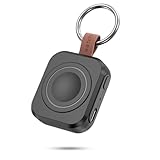
- Designed for Samsung Watch: This portable charger for Samsung Watch 8/8 Classic/7/ 7 Ultra / 6 /6 Classic / 5 / 5 Pro / 4 /3, Active 2 / Active 1 ensures seamless compatibility with new and old watches. This for Samsung galaxy watch charger can be carried around without a power source and can solve your low battery anxiety anytime.(Not for Galaxy Watch 9,Ultra 2)
- Easy Charging: Simply place the watch in the center of the charging area and press the power button to start charging immediately. The built-in magnets hold the watch in place, ensuring that the charging contacts are perfectly aligned for efficient charging. Once charging is complete, the portable galaxy watch charger can be turned off by pressing the power button twice; if no manual operation is required, the galaxy watch will automatically power off after 30s of inactivity.
- 1200mAh Battery: The portable watch charger has a built-in 1200mAh battery that can charge your watch 1-2 times. Ideal goods for traveling, exercising or extended outdoor activities.
- Compact and Portable: The 1200mAh galaxy watch ultra charger measures 5 x 4.6 x 1.5 cm (2*1.8*0.6 in), which is small enough to fit in a pocket or small purse. The watch charger comes with a keychain and eliminates the need for a charging cable, making it perfect for traveling and carrying.
- Package Includes: 1*Portable charger for samsung galaxy watch, 1*USB-C Charging Cable (1 meter), 1*Instruction Manual. It is very suitable as a Christmas gift, New Year's gift, Valentine's Day gift, Mother's Day gift, Father's Day gift, etc. to give to family and friends on special days.
14. Hole19: golf information
Hole19 is a specialist pick for golfers who want GPS distances and course information on their watch. Its usefulness depends on supported courses, region, device compatibility, and which features require a subscription; check those details before a round.
15. Sofascore: scores and fixtures
Sofascore is worth considering if you follow live sports and want scores and fixtures at a glance. It is a niche companion rather than an essential watch app, so install it only if you regularly check sports results.
Independent reader supportYour contribution helps us test, update, and keep practical guides available for everyone.How to install an app on a Galaxy Watch
Install from the watch
- Wake the watch and open the app menu.
- Open Play Store and tap Search.
- Search for the app, then tap Install.
The watch needs Wi-Fi or LTE to search for and download apps. See Google’s Wear OS installation guide.
Install from the phone
- Open Galaxy Wearable on your phone.
- Tap Store and search for the app.
- Choose the watch-compatible listing and tap Install.
For Wear OS Galaxy Watches, Samsung’s Store section opens the watch version of Google Play. The Galaxy Store is for older Tizen models, not Wear OS watches. See Samsung’s app-management guide and Samsung’s Google services guide. If an app appears on the phone but not the watch, search directly in the watch’s Play Store; a compatible listing may not be available for your model, OS version, account, or region.
Do these 3 things before closing this tab:
1Scan for outdated or missing drivers - takes under a minute2Repair Windows errors before they cause bigger problems3Fix the driver behind crashes, sound loss and screen glitchesBest Value

- [Compatible Models]: Designed for the Samsung Galaxy Watch 8/9 40mm Smartwatch, Not for other watch model, Please check the back of your galaxy watch, and make sure you order the correct size
- [All-around defense and Sensitive Touch Screen]: Set of the durable hard PC watch case and tempered glass screen protector, protect your smartwatch from scratches, impacts, and daily wear; the tempered glass film is crystal clear with no any loss of touch sensitivity
- [Bling Rhinestone-encrusted and Precise Cutout Design]: Sparkling diamond case giving your watch a dressy, eye-catching upgrade, making your smartwatch stand out at any occasion; precise cutouts for easy access to all controls, buttons, sensors and watch features
- [Waterproof and Anti-fog]: The tempered glass adheres tightly to the watch screen, preventing water from seeping in, No moisture or fog will form between the case and the screen, keeping the original clarity and touch sensitivity of the watch screen
- [Package Include]: 6 pack different color bling case + 6 pack tempered glass screen protector for galaxy watch 8/9 40mm; and any questions about the product, please contact us directly, we will surely give you a satisfactory reply
FAQ
Can I use these apps on an older Galaxy Watch?
This list is for Wear OS Galaxy Watches, principally Watch4 and newer. Earlier Galaxy Watch, Active, Active2, and Watch3 models use Tizen and do not have the same Play Store app ecosystem.
Can a Galaxy Watch use these apps with an iPhone?
Wear OS Galaxy Watches are not compatible with iPhones. Check Samsung’s compatibility guidance for device requirements.
Can I use Google Maps without my phone nearby?
Sometimes. Google says LTE is needed for standalone walking, cycling, and driving directions, while downloaded offline maps can support driving directions. A Bluetooth-only watch should not be assumed to provide fully independent navigation. See Google’s Maps guidance.
Should I use Samsung Health or Google Fit?
Start with Samsung Health for Galaxy Watch sensor and sleep features. Samsung says the two services do not sync data directly, and Google Fit on the watch does not include sleep tracking. Use Google Fit only if its specific features or ecosystem suit you.
Can I record workouts in Samsung Health and Strava at the same time?
Strava advises against running it with another active workout-recording app. Use one recorder for a workout to avoid one app interrupting the other; see Strava’s Wear OS support page.
Quick Recap
Product prices and availability are accurate as of the date/time indicated and are subject to change. Any price and availability information displayed on Amazon at the time of purchase will apply.




