Do these 3 things before closing this tab:
1Clear out junk files and repair common Windows errors2Fix the driver behind crashes, sound loss and screen glitches3Repair Windows errors before they cause bigger problemsOn December 15, 2015, AT&T announced NumberSync support for its cellular Samsung Gear S2. It let the watch make and receive calls and send and receive messages using the customer’s existing AT&T smartphone number, even when the phone was not nearby or powered on. The service still required an eligible account, a compatible cellular watch and AT&T coverage. AT&T now lists the Gear S2 as no longer available; whether it will activate a used one today is unconfirmed.
What AT&T NumberSync changed
NumberSync was an AT&T carrier feature, not a new Samsung operating-system capability. The cellular Gear S2 was the first device identified in launch coverage as receiving NumberSync, with AT&T saying additional devices were planned. Its central idea was to use one smartphone number across compatible devices. TechTimes reported the launch on December 15, 2015.

A Bluetooth-connected smartwatch generally relies on its paired phone for a connection. NumberSync’s phone-free use case instead relied on the Gear S2’s own cellular connection and AT&T service. Bluetooth could still be useful for phone-connected features, but it was not required for the watch to handle supported calls and messages independently. “Without your phone” therefore meant without the phone nearby or powered on—not without cellular coverage or an active service.
What the Gear S2 could do
- Receive incoming calls to the customer’s smartphone number and place outgoing calls from the watch.
- Receive and send text messages while using cellular service rather than a Bluetooth connection to the phone.
- Present the familiar smartphone number in normal domestic AT&T coverage, subject to a caller-ID exception described below.
AT&T’s NumberSync promotional description said the phone did not need to be nearby or powered on. Messaging was not identical to using a phone: the watch’s small screen and input methods suited short exchanges, not lengthy typing. SMS and MMS usage and restrictions also depended on the wearable service and applicable data rules.
What’s actually slowing this PC down?
Pick the symptom - the matching free tool is one click away.
#1 Best Overall

- With elegant curves and premium finishes, function meets style in the Gear S2. Personalize it with custom watch faces to create a smartwatch that is uniquely your own.
- Get notifications from your phone right on your wrist with a glance. With the Gear S2, you can receive calendar notifications, texts and even news updates.
- With built-in wireless charging, it's easy to keep the Gear S2 powered up. Whether you're at home, work or anywhere in between, you can power up by simply setting your Gear S2 on the included wireless charging dock.
- We've partnered with many of the apps you love, so now you can get to them without having to reach for your phone.
Which Gear S2 and accounts qualified
NumberSync applied to a compatible cellular AT&T Gear S2, not every watch sold under the Gear S2 name. AT&T’s archived product page identifies the relevant variant as a 4G watch with a nano-SIM and NumberSync capability. A Wi-Fi-only or non-AT&T model should not be assumed to qualify; the exact model, carrier, account and plan mattered.
AT&T’s archived NumberSync service terms identify an AT&T postpaid smartphone account, HD Voice, a compatible wearable, an eligible plan and connection to AT&T’s cellular network as requirements. Device software also needed to be current or the latest available before setup. The archived Gear S2 page lists a 1.2-inch circular Super AMOLED display, 300 mAh battery, and manufacturer-rated estimates of up to six hours of talk time and up to four days of standby; actual battery life depends on use. Direct watch calling can use more battery than phone-connected operation, as Samsung’s Gear support guidance notes.
Rank #2
2015 launch pricing
At launch, TechTimes reported that AT&T offered the Gear S2 for $99 with a two-year contract, with an additional $10 per month for voice and data on qualifying Mobile Share Value plans. These are reported December 2015 prices, not current offers or evidence of present-day activation terms.
How setup worked on the Gear S2
The Gear S2 Classic AT&T manual documents the following device-side route. The wording reflects that manual; it should not be assumed that a present-day activation flow is still available.
Recommended Free Tools
Rank #3
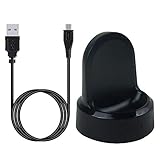
- ▶Compatibility: This charger compatible with Samsung Gear S2 & Gear S2 Classic (with 3.3 feet USB charging cable)
- ▶Durable & Premium: The Gear S2 charging dock is made of high quality and durable plastic, it works like the official charger. It is a good choice to replace lost or damaged charging cable.
- ▶Safe Protection: The Gear S2 charger build-in smart chips, provides a stable charging performance, protecting watch from over-current, over-voltage or short-circuit.
- ▶Convenience: To get a charge, just plug into USB port with power. very convenient to charge Gear S2 watch at home, in office, in car or on travel.
- ▶Package includes: 1 x Gear S2 charger dock, 1 x Micro-usb charging cable (smart watch is not included); with sincerely after-sales service, if have any question we will deal with it for you within 24 hours. Thank You!
- On the Gear S2, open Settings.
- Select Connections.
- Select AT&T NumberSync, then Set up.
- Follow the on-screen prompts. If asked for a synchronization code, choose Get sync code and use it as directed.
- Use NumberSync info or Help on the watch for device guidance.
The steps appear in the AT&T Gear S2 Classic manual. AT&T’s later support flow for newer Samsung watches places cellular-network connection before NumberSync enrollment; that is useful context, but it does not establish that the newer interface exactly matches the 2015 Gear S2 setup.
Independent reader supportYour contribution helps us test, update, and keep practical guides available for everyone.Limits that mattered in practice
Coverage and caller ID
The watch needed AT&T cellular coverage for independent use. AT&T’s archived terms say the wearable’s own number could appear on calls made outside AT&T’s owned-and-operated domestic coverage area, rather than the smartphone number. NumberSync was designed around a shared number, but that caller-ID behavior was not universal.
Rank #4

- US Version. WiFi Only, 42mm Stainless Steel Case with White Sport Band, 1.2" AMOLED 360 x 360 Touchscreen
- Intuitive circular interface and rotating bezel for easy navigation, Access to important notifications, texts, and updates at a glance
- 1GHz ARM Cortex-A7 Dual-Core Processor, 4GB Storage Capacity + 512MB of RAM
- S-Health with Heart Rate Monitoring, Samsung Pay, Wi-Fi, Bluetooth 4.1, NFC
- For Android 4.4 and Later, Water and Dust-Resistant
Messaging, data and travel
AT&T’s archived Gear S2 documentation says SMS and MMS use through the wearable counted against the wearable’s data allocation or incurred applicable data charges. It also lists restrictions for group, picture and video messages by geography. International calls could incur international rates or require an applicable package, and roaming charges could apply while traveling. Those terms do not establish that every message type or roaming scenario behaved like domestic SMS service.
Emergency calls and compatible devices
AT&T’s archived disclosure says 911 calling was not supported outside the United States, Puerto Rico or the U.S. Virgin Islands. It also notes that some account features were incompatible with NumberSync and limits service to compatible devices and eligible plans. The archived terms state a limit of up to five compatible wearables; that is a historical service rule, not confirmation of every later NumberSync policy.
Is the Gear S2 still a practical NumberSync purchase?
No dependable current purchase or activation should be assumed. AT&T’s archived Gear S2 listing says the watch is no longer available. That does not by itself prove whether AT&T will still provision a used unit, and current activation availability is unconfirmed.
If considering a second-hand watch, verify the exact model and IMEI with AT&T before buying, and ask whether it can be activated on the intended account and plan. Do not rely on the 2015 price, archived setup instructions or an old listing as proof of current service eligibility. For a present-day cellular watch, compare current LTE models from AT&T’s wearable lineup, Samsung, Apple or Google; confirm model, phone compatibility and carrier support with the seller or carrier before purchase.
Quick Recap
Product prices and availability are accurate as of the date/time indicated and are subject to change. Any price and availability information displayed on Amazon at the time of purchase will apply.




