Crashes, No Sound, or Screen Glitches?
Random freezes, missing sound and display glitches usually trace back to one bad driver. Find and replace yours safely.Free scan · under a minutePC Slower Than It Used to Be?
A free scan shows the junk files, broken settings and background clutter dragging Windows down - then fixes them in one click.Free scan · Windows 10 & 11Fitbit Inspire devices detect sleep automatically when you wear them overnight, but the amount of detail depends on the model. Inspire 3, Inspire 2, and Inspire HR can estimate sleep stages and provide a Sleep Score; the original Inspire provides a basic sleep log. For the most dependable results, wear an Inspire snugly on your wrist, keep it charged, sync it each morning, and treat the readings as wellness estimates rather than medical measurements.
Which Fitbit Inspire models support sleep tracking?
“Fitbit Inspire” is a product family, not one uniform device. Google’s device documentation distinguishes the available sleep features by generation.
| # | Preview | Product | Price | |
|---|---|---|---|---|
| 1 |
|
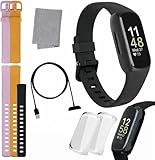
Fitbit Inspire 3 Health & Fitness Tracker Bundle - with Stress Management, Workout Intensity, Sleep... | $109.99 | Buy on Amazon |
| 2 |

|
Fitbit Inspire Fitness Tracker, One Size (Renewed) | $40.99 | Buy on Amazon |
| Model | Sleep log | Sleep stages | Sleep Score | What to know |
|---|---|---|---|---|
| Inspire | Yes | Not stated | Not stated | Basic model; do not assume later heart-rate features. |
| Inspire HR | Yes | Yes | Yes | Heart-rate hardware enables richer sleep estimates. |
| Inspire 2 | Yes | Yes | Yes | Supports stages and Sleep Score. |
| Inspire 3 | Yes | Yes | Yes | Current primary model and the focus of this walkthrough. |
See Google’s model-by-model capability table at Google’s device documentation. The US Google Store lists Inspire 3 at $99.95 at the time reflected by the product listing; price, offers, and availability can change. It is rated for up to 10 days of battery life and works with most phones running Android 11 or later or iOS 16.4 or later. A Google Account and internet connection are required.
Before bed: prepare an Inspire 3 for better overnight data
Charge it before sleep
“Up to 10 days” is a maximum rating, not a promise for every setting or user. Always-on display, notifications, frequent workouts, and other features can shorten runtime. If the battery may not last the night, charge before bed; a powered-down tracker cannot record the missing hours. Google recommends charging every few days so the device remains active overnight. Details are in the Inspire 3 specifications.
#1 Best Overall
- INSPIRED FITNESS: The Fitbit Inspire 3 is an all in one 24/7 fitness tracker. Track active minutes, fitness exercises, steps, distance, calories, skin temperature, sleep cycles and more. Help optimize your fitness and performance with this easy to use tracker.
- PREMIUM BUNDLE: The Fitbit Inspire 3 watch bundle includes - 1 Fitbit Inspire 3, 2 silicone replacement bands (small and large), 2 screen protectors, a cleaning cloth and fast charger. Unisex design is great for men and women of all ages and activity levels.
- WATER RESISTANT: Enjoy swim proof water resistant use up to 50 meters. Perfect for swimming and tracking laps in the pool or running and dancing in the rain. Full color touchscreen works when dry and when wet.
- STYLISH DESIGN: You'll love the stylish sleek look of the Fitbit Inspire 3. It looks great with all outfits and the low profile design won't get in the way while you work out, run, walk, swim or hike. The Fitbit Inspire 3 bands can be swapped out to mix and match different colors and band lengths.
- WORKS WITH YOUR PHONE: 10 day battery life keeps you connected longer than ever. Enjoy Smart Wake alarm, call, text and app notifications, find my phone, do not disturb and sleep modes. Even make purchases with Fitbit Pay. Works with Apple iOS 15 or higher and Android OS 9 or higher.
Wear it on your wrist
Wear the band about two to three finger widths above the wrist bone. It should be secure enough for continuous sensor contact but loose enough to avoid pressure marks or irritation. Google recommends wrist wear for sleep and advises against using a clip or pendant for overnight tracking. A clip can be convenient during the day, but it is the wrong choice when sleep stages are your goal.
Confirm the wearing mode
On Inspire 3, swipe down from the clock face, open Settings, and check that the device is set to Worn on Wrist. If you put the tracker in its clip, select Clipped on Body; however, clip mode disables heart-rate tracking, automatic exercise tracking, and Active Zone Minutes. Without wrist heart-rate data, stage estimates and related sleep features may be unavailable.
Use Sleep Mode if you want a quiet night
Swipe down from the clock face and enable Sleep Mode. It dims the display, turns off wrist-turn wake, and mutes notifications, goal celebrations, and reminders. The screen stays dark until you wake it manually. Sleep Mode is optional and does not start or improve tracking; it controls interruptions. It cannot be enabled at the same time as Do Not Disturb. A schedule is available through Settings → Sleep Mode. Current behavior is documented at Google Health’s Inspire 3 controls guide.
How Fitbit automatically detects sleep
There is normally no start button. A wrist-worn Fitbit begins recording after your body has been completely at rest and has not moved for approximately an hour, according to Google. Quietly lying awake can therefore be classified as sleep, while tossing and turning can appear as restless or awake time. A long inactive period during the day can also create an unintended sleep record, and short naps may be handled differently from an overnight session. Automatic detection is convenient, but it is not infallible.
Why estimates are not a sleep study
Fitbit predicts stages from movement and heart-rate patterns. It does not measure brain waves, eye movements, or muscle activity directly as a clinical polysomnogram does. Google maps conventional non-REM sleep into consumer categories: Light broadly corresponds to N1/N2, while Deep corresponds approximately to N3. These are wrist-based estimates, not direct measurements of brain activity. Read the methodology at Google Health’s sleep-stage explanation.
How to see sleep on the Inspire 3
- Wake the tracker and, from the clock face, swipe up to open Fitbit Today.
- Find the Sleep tile and review the latest session.
- Swipe through the tile for recent history when available.
If the tile is missing, scroll to the bottom of Fitbit Today, tap Settings, and turn on the Sleep tile. Firmware updates can change wording or placement slightly.
How to view sleep in the Google Health app
- Open the Google Health app after waking and keep the tracker near your phone.
- Sync the device and wait until the progress indicator finishes.
- On the Today tab, open the sleep-duration or sleep-timeline card.
- Tap the session to see duration, timeline, stages, and any available score.
- Switch to day, week, month, three-month, or year views to examine patterns.
Google’s current documentation uses “Google Health app,” although some accounts, regions, or older help pages may still show Fitbit branding. If a score or updated metric is slow to appear, allow about a minute after syncing; Google specifically notes that processing delay. Turn on Bluetooth, keep the tracker close, manually start a sync, and charge it if synchronization repeatedly fails. See Google’s sleep-viewing instructions.
What the sleep graph means
Time asleep, time in bed, awake, and restless
Time in bed is the approximate interval from sleep start to final wake time. Time asleep is the estimated portion not classified as awake. Awake marks detected wakefulness, while restless represents movement or disrupted sleep that does not necessarily mean a full awakening. A brief graph spike is not proof that you consciously woke up.
Do these 3 things before closing this tab:
1Repair Windows errors before they cause bigger problems2Fix the driver behind crashes, sound loss and screen glitches3Clear out junk files and repair common Windows errorsLight, Deep, and REM
Heart-rate-equipped models estimate Light, Deep, and REM stages. Do not judge one night in isolation or treat Deep as a simple synonym for “restorative.” Stage percentages naturally vary, and trends over several weeks are more useful than a single unusual chart. Google says naps generally need at least 20 minutes of data for stage estimates; shorter naps may be logged without stages.
Sleeping heart rate and other overnight metrics
Inspire 3 can present sleeping heart rate and, where supported, heart rate, resting heart rate, heart-rate variability, breathing rate, skin-temperature variation, and SpO2-related information. Availability and presentation depend on region, settings, device support, and app processing, so no metric is guaranteed every night. The Inspire 3 product listing describes its advertised sleep features at Google Store.
How Sleep Score works
Sleep Score summarizes Fitbit’s estimate of the previous sleep period using factors such as duration and continuity, with personalized targets. Google’s broad bands are:
Rank #2
- Track all-day activity, including steps, distance, hourly activity, active minutes and calories burned
- Automatically track your sleep & set silent alarms that wake you by buzzing on your wrist
- Enjoy up to 5 days of battery for daily progress without constant charging. Varies with use & other factors
- Automatically and conveniently record workouts like walks, swimming & bike rides with SmartTrack
- The on-screen dashboard, intuitive touchscreen & backlit display make the Inspire tracker easy to use & love
- 90–100: Excellent
- 80–89: Good
- 60–79: Fair
- Below 60: Poor
Google reports that many users average between 72 and 83, but your own trend is more informative than a population comparison. A low score can follow short sleep, fragmentation, unusual timing, illness, alcohol, travel, or a sensor problem. A high score does not prove that every aspect of your sleep is healthy, and the score is not a diagnosis or a direct measure of how restored you feel.
What’s actually slowing this PC down?
Pick the symptom - the matching free tool is one click away.
Editing the start or end of a sleep log can recalculate the score or make it unavailable. Manually extended records may also contain gaps at the beginning or end of stage data. More detail is available in Google Health’s Sleep Score documentation.
Independent reader supportYour contribution helps us test, update, and keep practical guides available for everyone.Smart Wake: useful convenience, not a guarantee
Inspire 3’s Smart Wake alarm attempts to wake you during a lighter estimated sleep stage within the 30 minutes before your set alarm. If it cannot find a suitable time, it sounds at the scheduled time. It cannot compensate for too little sleep, guarantee a better morning, or provide a scientifically precise wake point. Availability and controls can differ on older Inspire generations, so follow the alarm controls shown on your device and app rather than assuming an identical menu.
Troubleshoot missing or implausible sleep data
No sleep session
- Confirm you wore the device overnight and on your wrist.
- Check that the setting was Worn on Wrist, not clip mode.
- Make sure the battery lasted through the night.
- Check that the band was secure and the tracker sat above the wrist bone.
- Sync fully in the Google Health app and verify the correct Google Account.
A log appears but has no stages
Possible causes include a model without stage support, unavailable heart-rate readings, a loose band, clip mode, a sleep period that was too short, or incomplete syncing. Move the device higher on the wrist and allow synchronization to finish before drawing conclusions.
The duration is wrong
Use the app’s edit function to correct start or end times, but remember that editing can create stage gaps or change the Sleep Score. Do not repeatedly edit a strange graph simply to make it look plausible.
Free tools Windows power users keep installed
One-click scans. No signup required.
The score is missing
Sleep Score depends on stage data. If stages were not recorded, no score may be generated; processing can also take additional time after syncing.
Repeatedly strange readings
Check fit, wrist-versus-clip mode, battery, completed syncing, and updates to the device and app. Clean and dry the band and skin, loosen it, or stop wearing it temporarily if irritation develops. Compare recurring patterns with how you feel and with other measurements rather than relying on one graph.
Is Fitbit Inspire 3 sufficient for sleep tracking?
Inspire 3 is a sensible choice if you want a small, lightweight band for automatic sleep duration, stage estimates, Sleep Score, Smart Wake, and long battery life. It is the current Inspire model and the relevant starting point for buyers who mainly want sleep and basic activity information. The official product page is Google Store’s Inspire 3 listing; its displayed US price and any included three-month Google Health Premium trial are subject to change and eligibility terms. Basic sleep tracking does not require Premium, which adds coaching, workouts, and other guidance.
Consider a more advanced tracker such as Fitbit Charge 6 if you need broader exercise features or GPS-related capability, or a Versa 4 if you prefer a larger smartwatch-style display. Those devices are less discreet than Inspire 3. No consumer tracker replaces clinical testing, and a subscription is not a substitute for medical evaluation.
Do these 3 things before closing this tab:
1Clear out junk files and repair common Windows errors2Scan for outdated or missing drivers - takes under a minute3Repair Windows errors before they cause bigger problemsWhen Fitbit data is not enough
Consumer sleep estimates can help you notice patterns and prepare questions, but they cannot diagnose sleep apnea, insomnia, or another disorder. Discuss persistent loud snoring, witnessed breathing pauses, gasping, severe daytime sleepiness, or recurring insomnia with a qualified clinician. Bring several weeks of trends if useful, while explaining that the graphs are estimates rather than laboratory measurements.
Quick Recap
A practical nightly routine
- Charge the Inspire sufficiently for the night.
- Wear it snugly, two to three finger widths above the wrist bone.
- Confirm Worn on Wrist and avoid the clip for sleep-stage tracking.
- Enable Sleep Mode only if you want its display and notification behavior.
- Go to bed without starting a session manually.
- Sync in the morning and wait for completion.
- Review the night, then judge changes over a week or longer.
Product prices and availability are accurate as of the date/time indicated and are subject to change. Any price and availability information displayed on Amazon at the time of purchase will apply.




