Yes—some Galaxy Ring owners report severe battery drain, but the available evidence does not establish a defect affecting every ring or identify one confirmed cause. Samsung rates the ring for up to six or seven days depending on size, under specified conditions. A ring that repeatedly runs down in hours or dies overnight is far below that day-scale rating and warrants troubleshooting and, if it persists, a Samsung service request.
Reports of sudden or long-term deterioration appear in Samsung community discussions and customer reviews, alongside owners who report normal multi-day battery life. Those accounts establish a recurring complaint, not a failure rate. They do not prove that a particular update caused the problem or that every unit will develop it.
What battery life does Samsung claim?
Samsung’s rating is an “up to” maximum, not a guarantee of everyday runtime. Its support page says results vary with ring size, usage, environmental and connection conditions, and whether the ring is left outside its charging case. Samsung’s stated test scenario included six hours of sleep tracking, 90 minutes of work auto-detection, and limited activity and settings events. The figures below are Samsung’s capacities and maximum claims, not independently measured typical results.
| Ring size | Rated capacity | Samsung’s stated maximum |
|---|---|---|
| 5–7 | 17 mAh | Up to 6 days |
| 8–11 | 18.5 mAh | Up to 6 days |
| 12–13 | 22.5 mAh | Up to 7 days |
Samsung’s battery-drain support guidance says wearing a Galaxy Watch at the same time may extend ring battery life by up to 30%, because the devices can reduce redundant measurements. That is Samsung’s stated potential benefit, not a guaranteed improvement for every wearer. Samsung’s US product page also describes up to seven days from the ring and up to 14 days when the charging cradle is included in the charging routine; it notes that smaller sizes last less than the largest sizes and that results vary.
Recommended Free Tools
#1 Best Overall
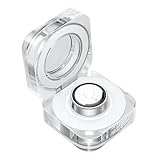
- CHARGING JUST GOT A GLOW UP: Experience charging in a new light with the Galaxy Ring Charging Cradle.¹ The portable crystal-clear charging case glows delicately as the light around the Multipurpose button turns on
- MULTIPLE FUNCTIONS AT THE CLICK OF A BUTTON: Even during charging easily manage your Galaxy Ring by pushing the Multipurpose button on the charging cradle.² With a short press of the button, the indication light switches on to show the battery level
- TAKE WIRELESS CHARGING WITH YOU: Power up your Galaxy Ring, even when you’re on the go - just put Galaxy Ring in its cradle for wireless charging.² The charging cradle is easy to carry and holds up to a week’s worth of charge
- CHARGERS ARE SIZE-SPECIFIC: Your Samsung Galaxy Ring size can be found on the inside of your smart ring.
Some overnight battery use is expected when tracking sleep. Smaller sizes have less capacity, and heavy exercise detection, gestures, repeated reconnection, or frequent app interaction can affect runtime. But a ring that repeatedly falls from full to nearly empty overnight is not reasonably explained by Samsung’s several-day maximum simply being an “up to” figure.
What are owners reporting—and how much does that prove?
Samsung Community threads include reports of a ring falling from full to about 10% in eight hours, lasting only a day or two, or abruptly dropping from multi-day runtime to hours. Other owners describe a decline after months of use or after a software update. Samsung’s product-review pages also include individual accounts of severe deterioration after months of ownership. These are user reports, not controlled testing or a representative survey.
The reports recur across Samsung-owned community channels and product reviews, which makes the complaint difficult to dismiss as a single isolated post. At the same time, community volume cannot show what share of all rings are affected, and some owners report normal battery performance. See the Samsung Community battery-drain discussion, reports that include post-update complaints and counterexamples, and individual reviews on Samsung’s Canadian silver size 5 and Canadian gold size 7 product pages.
The available sources do not establish a failure rate, a universal firmware cause, a confirmed fix that works for every case, or a recall. They also do not show that every ring will fail after a year. Treat reports as warning signs and diagnostic clues—not proof that your specific ring has the same fault.
The Tool Desk
Outbyte PC Repair FREERepair Windows errors before they cause bigger problemsFix Now →Outbyte Driver Updater FREEScan for outdated or missing drivers - takes under a minuteDriver Scan →Rank #2
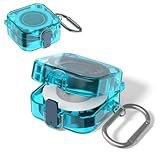
- [COMPATIBILITY] The charger protector case cover is specially designed for Samsung Galaxy Ring Charger.⚠Note: The Samsung Galaxy Ring Charger device not included.
- [SLIM DESIGN] This TPU protective case cover forSamsun Galaxy Ring Charger is thin and lightweight design that does not add any extra burden and is suitable for various scenarios.
- [HIGH QUALITY] The Samsung Galaxy Ring Charger protector case cover made of high quality TPU material,Extremely durable and lightweight.
- [PERFECT PROTECTION] The protective case for Samsung Galaxy Ring Charger is full protection design,protect your Ring Charging Case from damage,drop and scratch.
- [EASY CARRY] The charger protector case cover comes with carabiner,Very convenient to carry.It can be hung on backpacks, shoulder bags, belts, etc.
Could software, the charging case, or hardware be responsible?
Battery symptoms can point in different directions, but a pattern is only a clue, not a diagnosis. Some owners report that the decline began after an update; others have reported normal performance around the same update period. That timing is an association, not proof that firmware caused the drain. A Samsung Members report specifically describes drain after One UI 7, but it cannot establish that the update is the cause for other rings: Samsung Members report.
| Observed pattern | What it may point toward |
|---|---|
| Drain starts suddenly after a software or app update | Software, pairing, or app-state issue; timing alone does not prove causation |
| Runtime gradually worsens over months | Battery aging or a hardware problem, among other possibilities |
| Drain while the ring is off the finger and outside its case | Expected sensor activity may contribute: Samsung says sensors remain active outside the case |
| Drain while supposedly stored in the case | Check whether it is seated and charging; a charging, battery, or hardware issue may need investigation |
| Case does not recognize the ring or charging is inconsistent | Seating, dirty or wet contacts, an uncharged case, or a hardware fault |
| Heat, swelling, deformation, or visible damage | Potentially serious physical damage; stop wearing it and contact Samsung |
Samsung says a ring left outside its charging case continues running its sensors, which can cause unnecessary consumption. Store it in the case when it is not being worn. This may explain avoidable idle drain, but it does not by itself account for a healthy ring losing most of its charge in a few hours during normal use.
How to test the drain before resetting or requesting service
1. Record a few charge cycles
Start with a full charge and note the battery level at bedtime, after eight hours, and after 24 hours. Repeat for two or three cycles if the ring is not showing a safety concern. Include the ring size; whether you used sleep tracking, exercise detection, gestures, or Find My Ring; whether it was left outside the case while not worn; and whether you wore a Galaxy Watch. A single unexpected reading is less useful than a repeated pattern.
Keep a short timeline with the purchase date, ring size and model number, phone model, Galaxy Wearable and Samsung Health versions, ring firmware version, when the symptom began, and whether that date followed an update. Note charging behavior, temperatures, and any error messages too. This gives Samsung something more concrete to investigate than “the battery is bad.”
Rank #3
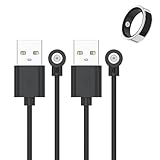
- 📩【Broad Compatibility】This universal magnetic charger works with most 1‑pin magnetic charging devices, such as smart rings, compact electronics, and lighting fixtures. The charging ring diameter is 4 mm. Please measure your device’s charging contacts before ordering. It is compatible with SSPATIOS Smart Ring, R02, R09, R18, HitTopss Smart Ring, FMNGOP, Colmi Smart Ring, and more. (Compatibility Notice: Please be aware that this product does not work with Oura Ring, Samsung Ring, Ultrahuman Ring, or RingConn Ring.)
- 📩【Safe & Stable Charging】Made of high-grade ABS and PVC materials for excellent durability. The built-in smart chip improves charging efficiency while protecting your smart ring battery, providing safe, stable power and preventing overcharging.
- 📩【Strong Magnetic Charging】Built with a pure copper probe, this magnetic charger provides a secure and stable connection. The magnetic design automatically aligns your device for reliable, wobble-free charging while enhancing overall charging efficiency and speed.
- 📩【Portable & Built to Last】Made of high-grade materials, this charger is flexible, durable, and can endure over 10,000 bends. The 60cm lightweight cable is compact and stylish, perfect for travel. It fits easily into your bag, car, or office for convenient on-the-go charging.
- 📩【What You Will Get】We provide 2-PACK magnetic Smart Ring Charger Cable, 12-month worry-free warranty for any quality issue.
2. Verify that charging is complete and consistent
- Use the supplied or Samsung-approved charging case and make sure the ring is seated correctly.
- Check that the case itself has charge and that it recognizes the ring.
- Clean and dry the charging contacts, and avoid assessing runtime after an interrupted or incomplete charge.
- Put the ring in the case whenever it is not being worn.
3. Check software and pairing
Confirm that Galaxy Wearable, Samsung Health, the phone operating system, and the ring firmware are current, and verify that the ring remains paired to the intended phone. Galaxy Ring firmware updates are delivered through the Galaxy Wearable ecosystem, but menu labels can vary by phone, app release, and region. Samsung’s support article does not confirm one universal menu path, so use the current in-app device controls rather than relying on a path that may not match your version. The Galaxy Ring user guide covers the device and its software-update and troubleshooting functions.
4. Run one controlled cycle
After recording your baseline, keep the ring paired to one phone, keep the phone nearby, and avoid repeated unpairing, re-pairing, or opening the ring controls unnecessarily. Store the ring in its case when not wearing it, and note whether you wear it alone or with a Galaxy Watch. If practical, compare a typical night with a night that does not include exercise detection or gestures. This can help identify a pattern, but it does not prove the underlying cause.
5. Preserve evidence before resetting
A reset may be reasonable if the issue appears tied to pairing or app state, but it is not a proven fix for a degraded battery and could remove useful context. Before resetting, save battery screenshots, your timeline and software versions, any error messages, a short video of charging behavior if relevant, and your receipt and support-ticket numbers. Samsung’s community moderators recommend submitting an error report through the wearable/support ecosystem when recommended steps have not helped; see the battery-drain discussion.
Independent reader supportYour contribution helps us test, update, and keep practical guides available for everyone.When should you stop troubleshooting and contact Samsung?
Seek Samsung support or service if a fully charged ring repeatedly dies overnight or within hours, its runtime abruptly collapses after previously being normal, it continues to drain rapidly after a controlled cycle and software check, or it fails to charge reliably. A battery diagnostic fault is also a reason to escalate. Use Samsung’s support and repair channels for your country; the available route and outcome depend on region, purchase channel, warranty status, and Samsung’s diagnosis.
PC Slower Than It Used to Be?
A free scan shows the junk files, broken settings and background clutter dragging Windows down - then fixes them in one click.Free scan · Windows 10 & 11Crashes, No Sound, or Screen Glitches?
Random freezes, missing sound and display glitches usually trace back to one bad driver. Find and replace yours safely.Free scan · under a minuteRank #4

- Strong Magnetic Alignment|Secure & Stable Charging: Equipped with an advanced magnetic array, the charger automatically aligns to the optimal charging position and holds your Phone firmly in place (✅ no slipping even when shaken). ⚠️ Note: Be must used with a MagSafe/magnetic case to achieve the magnetic effect For stronger attachment, we recommend using a MagSafe-compatible case
- 15W Samsung Fast Wireless Charging|Quick Power Boost: Supports up to 15W fast charging for samsung Galaxy series, delivering a 50% charge in just 30 minutes and a full charge in 2.5 hours (✅ 3x faster than standard 5W charging). ⚠️ Note: A 15W/20W or higher PD adapter is required to achieve maximum speed. Using an adapter below 10W may result in slower charging performance
- Silent Breathing LED|Sleep-Friendly Design: Blue breathing pulse: Soft light during normal charging (automatically turns off after 1 minute, ✅ no sleep disturbance). Standby/abnormal alerts: Standby mode: Gentle Blue breathing light for 3 seconds before turning off. Foreign object detection: Rapid blue flashing for clear notification
- Advanced Safety Protection + Efficient Cooling: Adopts the latest chip, passed FCC/CE/ROHS certification, featuring overcurrent, overvoltage, overheating, . In case of any abnormality, the LED indicator will flash blue and green rapidly and automatically stop charging. Features honeycomb cooling vents on the back to dissipate heat effectively, ensuring safe and stable charging
- Wide Compatibility|Works with Samsung Devices: Compatible models: Samsung Galaxy:S26 S26+ S26 Ultra/S25/S25+/S25 Ultra/S24/S24+/S24 Ultra, S23/S23+/S23 Ultra, S22/S22+/S22 Ultra, S21/S21 FE/S21+/S21 Ultra, S20/S20 FE/S20+/S20 Ultra, iPhone 17 Series: 17/17 Air/17 Pro/17 Pro Max iPhone 16 Series: 16/16 Plus/16 Pro/16 Pro Max iPhone 15 Series: 15/15 Plus/15 Pro/15 Pro Max iPhone 14 Series: 14/14 Plus/14 Pro/14 Pro Max iPhone 13 Series: 13/13 Mini/13 Pro/13 Pro Max iPhone 12 Series: 12/12 Mini/12 Pro/12 Pro Max Earbuds: AirPods Pro 3/2 (requires wireless charging case)
If the ring becomes unusually hot, swells, deforms, or shows physical damage, stop wearing it and contact Samsung promptly. Do not try to open the ring or replace its battery yourself; the available sources do not establish a user-replaceable battery service.
What should US owners know about warranty and cost?
Samsung’s US purchase page displayed a standard limited-warranty term of one year for the product. That is not a promise that every battery complaint will qualify: coverage depends on the applicable terms, jurisdiction, purchase date, and Samsung’s defect determination. Keep the receipt and symptom records. In the US, Samsung’s store listed the Galaxy Ring at $399.99 and a $49 Samsung Care+ option for a two-year term when the store was checked on August 16, 2026; prices, offers, availability, and coverage terms can change. The store’s Care+ listing described repair or replacement benefits, but a battery complaint is not automatically covered. Check the current Samsung US purchase page and Samsung Care+ terms for current details.
Should you buy, keep, repair, or switch?
If you already own one
If your ring lasts several days with reasonably consistent results, a complaint thread alone is not a reason to replace it. If its runtime is measured in hours, or it has suddenly shifted from multi-day use to less than a day, document the pattern and pursue service rather than treating it as ordinary variation. A reset or a different ring should not be assumed to solve the problem without diagnosis.
If you are considering a purchase
The Galaxy Ring is a more defensible choice for someone who wants Samsung Health integration and a discreet tracker and accepts charging every few days and the possibility of service if a unit develops a fault. It is a weaker fit if uninterrupted sleep tracking is essential, you need proven long-term battery durability, or you do not want to depend on Samsung’s ecosystem and service process. Buy from a seller with a return policy you understand, and check the current warranty terms for your region.
Other form factors involve different trade-offs rather than a guaranteed battery solution: Oura Ring 4 is an alternative for buyers interested in its sleep and wellness ecosystem, with membership as a key consideration; Ultrahuman Ring AIR is positioned as subscription-free, but buyers should check compatibility and support; and a Samsung Galaxy Watch makes more sense if a screen and broader exercise features matter more than a discreet ring. Current alternative prices, fees, and warranty terms are not compared here, so check the manufacturers’ current terms before choosing.
Quick Recap
Product prices and availability are accurate as of the date/time indicated and are subject to change. Any price and availability information displayed on Amazon at the time of purchase will apply.




