The Skagen Falster Gen 6 began receiving Wear OS 3 on January 12, 2023—not in a new 2026 release. The rollout was reported as global, but that did not mean every watch received it at once. Before installing, prepare for a move to the Skagen Smartwatches app, a possible factory reset, and the absence of Google Assistant.
Which watch received the update, and when?
This update is for the Qualcomm-based Skagen Falster Gen 6, not every Falster model or every Skagen smartwatch. Droid Life reported the rollout on January 12, 2023, describing it as rolling out globally. That is a historical rollout report, not a guarantee of availability on every unit at the same time or in every country. The report did not give a country-by-country schedule or a specific software build number. Droid Life’s Falster Gen 6 update report
The related Fossil Gen 6 received its Wear OS 3 rollout in October 2022. The Falster update followed the same broader Gen 6 transition, but owners of earlier Falster generations should not assume they are eligible. Droid Life’s Fossil Gen 6 rollout report
How to check for Wear OS 3
- Charge the watch and keep it connected to Wi-Fi, with your phone nearby.
- On the watch, open Settings → System → About → System updates.
- If an update is offered, read the on-screen setup or reset warning before accepting.
- Before starting, make sure you can install or open the Skagen Smartwatches app on your phone.
The update path above was reported for the Falster Gen 6. The report did not specify a minimum battery percentage, download size, or installation time, so allow enough time for the update and any subsequent setup rather than relying on a fixed estimate.
Free tools Windows power users keep installed
One-click scans. No signup required.
#1 Best Overall

- Editor's Notes: This 44mm Kuppel features a white sandblast dial, two-hand sub-second color pop movement and brown leather strap. The watch strap is interchangeable.
- Case & Movement: 44mm case, 22mm band width, scratch resistant mineral crystal, accurate Quartz movement with 2-hand analog display, imported.
- Dial: Black, round sleek stainless steel case, with a white dial and black/orange accents.
- Watch Band: Brown, genuine leather band with a secure single prong strap buckle closure which is self adjustable for a customized fit.
- Water Resistant: Up to 50m (165ft): Wearable while swimming in shallow water; 5 ATM.
Prepare for a change in setup—and possibly a reset
Wear OS 3 shifts setup and more of the watch-management experience from Google’s general Wear OS app to the manufacturer’s companion app. For the Falster Gen 6, that means the Skagen Smartwatches app. The Falster rollout report describes this app transition but does not independently confirm that every Falster update requires a factory reset.
There is a meaningful reason to prepare for one: Fossil said the related Fossil Gen 6 Wear OS 3 migration required a factory reset and setup again through the Fossil app. That is strong context for the shared Gen 6 transition, but it is not proof that every Falster owner sees identical reset prompts. Treat the migration as potentially destructive and follow the warning shown on your own watch. Fossil Gen 6 reset and setup context
Rank #2
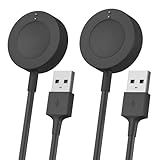
- Proven Compatibility:Design for Fossil Gen 4 Explorist HR / Venture HR / Sport,for Gen 5 Garrett Hr / Carlyle / Julianna / Gen 5E / Gen 6, for Michael Kors Rounway / Sofie HR / MKGO / Runway(MKT0002),for Emporio Armani / Skagen falster 2 / Misfit Vapor 2 / Diesel Guard 2.5 / Kate Spade Scallop 2 Smartwatch
- Fast Charging Speed: Original high-speed, do not worry this replacement charging cable is wasting your precious time
- Enhanced Durability: With 6000+ bend lifespan and reinforced cable joint, this charger is more than ready to handle the stresses and strains of daily use
- Safety & Reliability: The charging cable includes built-in over-current, over-voltage, short-circuit and over-temperature protection.Premium quality copper wire and pin gold-plated ensure charging safety and reliability
- What You Get: 2 pack 3.3Ft replacement charger for Fossil smartwatch, our 12-month customer support and 24-hour friendly customer service, we're here to help with any product issues
- Record important settings and make any backups the relevant apps allow.
- Have your Google account credentials available and ensure the Skagen app is ready on your phone.
- Allow time to pair the watch again and reconfigure notifications, tiles, apps, payment cards, and watch faces as needed.
- Do not begin immediately before travel or another occasion when you depend on the watch.
What changes—and what does not
Watch management moves to Skagen’s app
After the transition, use the Skagen Smartwatches app for the manufacturer-managed connection and setup experience. The evidence supports a shift in that role; it does not establish that Google’s Wear OS app becomes completely useless for every function.
Google Assistant is not included
Google Assistant was not included in this Wear OS 3 update for Qualcomm-powered Gen 6 watches. Its absence does not, by itself, mean the update failed. Do not assume another assistant offers the same functions. Droid Life’s Falster Gen 6 report
Recommended Free Tools
Rank #3
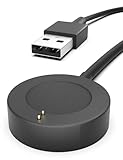
- Proven Compatibility : Compatible with Fossil Gen 6 / Gen 5 / Gen 5E / Gen 4 / Michael Kors Rounway / Sofie HR / MKGO / Runway(MKT0002) / Emporio Armani / Skagen falster 2 / Misfit Vapor 2 / Diesel Guard 2.5 / Kate Spade Scallop 2 Smartwatch
- Fast Charging Speed: High-speed charging, do not worry this replacement charging cable is wasting your precious time
- Enhanced Durability: With 6000+ bend lifespan and reinforced cable joint, this charger is more than ready to handle the stresses and strains of daily use
- Safety & Reliability: The charging cable includes built-in over-current, over-voltage, short-circuit and over-temperature protection.Premium quality copper wire and pin gold-plated ensure charging safety and reliability
- What You Get: 1 pack 3.3Ft replacement charger for Fossil Gen 6 / Gen 5 / Gen 5E / Gen 4, our 12-month customer support and 24-hour friendly customer service, we're here to help with any product issues
Do not expect every newer Wear OS feature
The Falster update was described as similar to the Fossil Gen 6 version, with much of the newer Gen 6 software experience expected to reach the original platform. That does not establish feature parity with newer Samsung- or Pixel-watch hardware, nor does it confirm that every Fossil Wellness Edition feature or watch face is present on the Falster.
Some users reported missing older watch faces
Contemporaneous users said some older faces were missing after updating. Those reports do not establish which faces were affected, whether the issue was universal, or whether a face could be restored. Check that any face you rely on remains available before you start, but treat removal as a reported possibility rather than a guaranteed outcome. Contemporaneous r/WearOS discussion
Rank #4
![Compatible for Skagen Falster Gen 6 Screen Protector, Lamshaw [3 Pack] 9H Tempered Glass Screen Protector Film Compatible for Skagen Falster Gen 6 Touchscreen Smartwatch (3 Pack)](https://m.media-amazon.com/images/I/41lIg1iwS4L._SL160_.jpg)
- Attention: Please contact us at the first time if got defective items, for 30 day after the date of purchase, we take care of all quality-related issues with a replacement or refund
- High definition: Made from agc glass material. 99% light transmittance, reveal phone's true color
- No scratches: 0.2mm explosion-proof, protect against accidental drop, scratches, dirt and dust, no influence on the touch-screen accuracy
- Easy installation: Smart guide sticker make applying curved glass simple and accurate, hassle-free and bubble-free
Should you install the update?
| Consider installing if… | Consider waiting if… |
|---|---|
| You want the Wear OS 3 software base and the Skagen-managed setup and watch-management experience. | You depend on Google Assistant, which was not included in this Qualcomm Gen 6 update. |
| You are ready to pair and configure the watch again if the migration requests a reset. | You need a particular older watch face or workflow and have not checked whether it remains available. |
| You want the newer Gen 6 software experience and accept that visible changes may be modest. | You cannot spare time for setup or would be disrupted by an app, card, notification, or face needing reconfiguration. |
Install when you can handle a possible reset and reconfiguration. If a missing Assistant feature or a specific face matters more than moving to Wear OS 3, there is a practical reason to delay rather than update on impulse.
Independent reader supportYour contribution helps us test, update, and keep practical guides available for everyone.If the update does not appear or something goes wrong
No update is listed
- Return to Settings → System → About → System updates and check again.
- Confirm the watch is charged and connected, then restart it and retry.
- Check again later. A global rollout report does not mean every device is offered the update simultaneously.
- Some Falster owners in the contemporaneous Reddit thread said repeatedly tapping the update screen helped the check proceed. This is an unofficial, anecdotal workaround—not a guaranteed or manufacturer-confirmed fix. User reports about the rollout
The watch requests a reset or will not pair afterward
Read the watch’s prompt and proceed only if you are prepared to set it up again. Open the Skagen Smartwatches app on your phone and follow its pairing flow. The available reporting supports the app transition and a reset requirement for the related Fossil Gen 6 migration, but does not document Falster-specific recovery screens or button combinations; avoid undocumented reset procedures.
Do these 3 things before closing this tab:
1Clear out junk files and repair common Windows errors2Fix the driver behind crashes, sound loss and screen glitches3Repair Windows errors before they cause bigger problemsBest Value

- COMPATIBILITY - Smartwatches with Wear OS by Google are compatible with phones running the latest version of Android or iOS. Qualcomm 4100+ chipset has 30% enhanced performance. Improved power, more reliable connection and up to 4x range with Bluetooth 5.
- ALEXA ENABLED - Get a little extra help with Alexa built-in. Easily access the Amazon Alexa app to get quick news and information, check the weather, set timers and alarms, control smart home devices, and more - all through the sound of your voice.
- HEALTH - Automatically tracks activity goals, steps, sleep, cardio and more. Activity modes with GPS keep you on track with your distance and path. Advanced sensors provide data to power your health and fitness tracker apps. Swimproof.
- PERSONALIZED STYLE - Always-on display now brighter with more colors and higher pixel count. Thousands of watch faces to personalize your look and always see the time. Hundreds of apps from fitness, music, social, news, stop watches and more.
- STAY CONNECTED - Notifications for calls, texts, apps. Automatic time zone and calendar syncing. Answer and make calls directly on your watch when your phone is out of reach. This smart watch features a speaker, microphone, and customizable buttons.
Assistant or a watch face is missing
Assistant’s absence is an expected limitation of this update, not necessarily an installation fault. Missing older faces were reported by some users, but the reports do not establish a universal loss or a confirmed restoration method.
What owners should take away
The Falster Gen 6’s Wear OS 3 rollout began in January 2023. It is a software and companion-app migration, not a promise of every feature found on newer Wear OS watches. Check the update from the watch settings, prepare for a possible reset, and weigh the Skagen-app transition against the missing Google Assistant and any faces or workflows you rely on.
Quick Recap
Product prices and availability are accurate as of the date/time indicated and are subject to change. Any price and availability information displayed on Amazon at the time of purchase will apply.




