First identify the generation. Spectacles 1, 2, and 3 are camera glasses that pair with Snapchat and transfer captures into Memories. Spectacles ’24 are see-through AR glasses that use the separate Spectacles App, Snap OS, and Lenses. The setup, controls, and purpose are different.
| Model | App | Main use | Start here |
|---|---|---|---|
| Spectacles 1, 2, or 3 | Snapchat | Capture and import Snaps | Snapchat → Profile → Settings → Spectacles |
| Spectacles ’24 | Spectacles App | Standalone AR Lenses and Snap OS | Spectacles App → Begin Setup |
If your glasses have no display and a capture button, use the legacy instructions below. If they show AR content and use Lens Explorer or Snap OS, use the Spectacles ’24 workflow.
What you need before setup
Spectacles 1, 2, and 3
- A compatible iOS or Android phone with the latest Snapchat app
- A Snapchat account and Bluetooth enabled
- At least 10% battery on the glasses
- The phone and glasses close together
See Snap’s legacy pairing requirements. Menu names can vary by Snapchat version, operating system, and region.
Spectacles ’24
- A compatible phone and operating system
- The Spectacles App and a Snapchat account connected to it
- Bluetooth, internet access, and a nearby Wi‑Fi network and password
- At least 10% battery
- Permission to use the camera and microphone during setup
How to pair older Spectacles with Snapchat
- Open Snapchat.
- Tap Profile in the upper-left, then the Settings gear.
- Tap Spectacles.
- Press and hold either button on the glasses for about seven seconds, until the internal LEDs flash.
- Name the glasses.
- Select that name in the accessory list and wait for pairing confirmation.
You can associate multiple pairs with one phone and account, but only one pair is active. Only the active pair can import captures or collect location data; pairing another pair can disconnect the previously active one.
#1 Best Overall

- 3D VIDEO & PHOTO: Meet Spectacles 3 — camera glasses that capture your world in 3D. Two HD cameras record 3D videos and photos at 60 fps, and four built-in microphones capture immersive, high-fidelity audio.
- CHARGING CASE: Recharge Spectacles 3 on the go in their included leather Charging Case, which can store up to four charges at a time — featuring a collapsible design that can fold flat when not in use.
- 3D EFFECTS & 3D VIEWING: Reimagine the moment with a suite of 3D Effects on Snapchat, or relive it using the included 3D Viewer. You can even invite a friend to experience it on YouTube VR.
- SHARE ANYWHERE: Send your favorite moments on Snapchat, or export and share them anywhere you’d like. You can even create 3D Prints with Pops to have a memory you can hold onto.
- WHAT’S INSIDE: Spectacles 3, Charging Case, Charging Cable, 3D Viewer, Cleaning Cloth.
How to pair Spectacles ’24
Do not look for Profile → Settings → Spectacles in Snapchat. That is the older camera-glasses path. Spectacles ’24 uses the Spectacles App.
- Hold the right temple button for three seconds to turn on the glasses and wait for the startup animation.
- Open the Spectacles App and tap Begin Setup.
- Hold the left temple button for seven seconds.
- Confirm the Bluetooth pairing request.
- Choose a Wi‑Fi network and enter its password.
- On supported iPhones, complete the app’s interpupillary-distance (IPD) measurement.
- Review and accept the camera and microphone data-collection information.
- Choose whether to enable location data and notifications.
- Complete the tutorial Lens.
How to capture photos and videos with older Spectacles
Video
Press the button once to record 10 seconds. Press it again to add another 10 seconds, and a third time to reach 30 seconds total. Press and hold for about two seconds to stop early.
Photo
Press and hold the button to take a photo. Internal LEDs show capture status, while exterior LEDs signal to nearby people that recording or photography is taking place. Do not cover or disable those lights.
These controls are documented in Snap’s capture instructions.
The Tool Desk
Outbyte PC Repair FREEClear out junk files and repair common Windows errorsFree Scan →Outbyte Driver Updater FREEFix the driver behind crashes, sound loss and screen glitchesFind Drivers →Rank #2
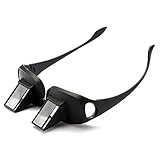
- 【NEW UPGRADE】: We use 2026 new developed materials, which is lighter than the previous style. Durable plastic with mirrors; Lightweight and easy to travel with; Throw in your bag or bring on a plane or morning train commute.
- 【90° VISION】: Turn your view to a downward 90 degree angle, eliminating the need for head movement. Turn your view to a downward 90 degree angle; Glasses do not magnify or focus images, but simply tilt images at a 90-degree angle in order to view vertical images while in a horizontal position; Users need wear their usual eyewear with the prism spectacles if necessary, such as Myopia, Presbyopia, Astigmatism.
- 【CAN BE WORN OVER SPECTACLES】: Similar in shape as ordinary glasses; It can be wear over your ordinary glasses (include prescription glasses).
- 【PROTECT YOUR EYES AND SPINE】: By taking advantage of optics principles and employing the reflecting prisms; High-definition optical prism, Designed to allow people reading books, Playing Games or watching TV while lying in bed; Enjoy a clear view without moving your head; Perfect for those with limited mobility.
- 【 PREFECT GIFTS & 100% AFTER-SALE GUARANTEE】: NYKKOLA brand lazy glasses is a practical and thoughtful gift idea for your family and friends.Used for both youngsters and old people,great for the bedridden and hospital patients. Sincerely, we offer 1-year quality guarantee and 24 hours friendly support. Can add to cart Now!!
How to import Snaps into Snapchat Memories
- Pair the glasses with the intended phone and account.
- Turn on Bluetooth and Wi‑Fi, keep the glasses nearby, and ensure they have more than 10% battery.
- Open Snapchat and swipe up to Memories.
- Open the Snaps tab and tap Import beside available captures.
- On iOS, tap Join when Snapchat asks to connect to the Spectacles Wi‑Fi. Android may begin automatically.
Import time depends on the number and type of captures. Taking another photo or video interrupts an import. Imported content appears with the Spectacles logo; 3D-capable content has a 3D indicator.
Enable background importing on Android
- Open Snapchat and go to Memories.
- Tap the Spectacles icon in the upper-right.
- Select the device under My Spectacles.
- Turn on Background Import.
Do not sign out of Snapchat or delete the app while Memories is still backing up. Interrupting that backup can make content unrecoverable. The complete import guidance is in Snap’s support article.
View and edit captures
View
In Memories, open Snaps and tap a capture. Rotate the phone to inspect supported 3D content. Pinch to zoom out and see the full moment. See Snap’s viewing instructions.
Edit and send
- In Memories → Snaps, press and hold a thumbnail.
- Tap Edit Snap.
- Use the available text, doodle, sticker, scissors, web attachment, timer, loop, voice-filter, and location-artwork tools.
- Send it to friends or groups, add it to My Story, or submit it to Our Story.
Location artwork reflects where the glasses are when the Snap imports, not necessarily where it was captured. Video trimming is documented as iOS-only in the legacy support article. Saved edits cannot be undone, so export or preserve the original first. See editing and sending details.
Rank #3

- 2-Pack Value Combo: You will receive 2 pairs of premium lazy glasses. Available in M and L two sizes for different face types. Made of lightweight sturdy premium resin, this set is great for sharing with family or keeping a spare for daily use at home and travel
- Dual Size Option Design: Our prism glasses come in standard M and large L size, suitable for men, women, teens and seniors with various face widths. Made of flexible durable frame material for long-lasting use. Perfect for bedroom, living room and travel occasions, ideal laying down reading glasses for relaxed horizontal viewing anytime
- Resin Construction: these lightweight upside down glasses use shatterproof resin frame and prism lens; Skin-friendly, pressure-reducing and only 85g for all-day comfy wear; Great for bed, sofa and long trip scenarios, lets you enjoy lying flat reading and screen watching without discomfort
- Core Relaxation Function: Our laying down reading glassesfeature professional 90° prism view technology. Made with high definition optical prism for clear undistorted sight. Ideal for bed reading, lazy TV time and casual parties, effectively ease neck strain while you enjoy fully reclined comfortable viewing experience
- Multi-Scene Daily Companion: This 2-pack periscope glasses set fits all daily leisure scenes from bedroom to travel. Crafted with tough crush-resistant resin for daily wear and easy portability. These prism glasses let you lie flat watching TV, scrolling phone and enjoying movies, no need to bend your neck at any resting moment
Export photos, videos, and Stories
One or more Snaps
- Open Memories → Snaps.
- Press and hold a Snap and tap Export Snap.
- For several files, select one Snap to enter Selection Mode, add others, then use the share/export control.
- Choose a format.
A Story
- Open Memories → Stories.
- Press and hold the Day Story.
- Tap Export Story and choose a format.
Snap documents these formats: circular with a white border, circular with a black border, widescreen 16:9, horizontal 4:3, vertical 9:16, and square 1:1. A Story made entirely from Spectacles captures can export as one continuous video or separate files. A mixed phone/Spectacles Story exports as individual photos and videos. The documented workflow limits Stories to 20 Snaps for export. See export instructions.
Charge and update the glasses
Older models
- Double-tap the right side or check the level in Snapchat Memories.
- Charge with the supplied cable and a USB power source. Spectacles 2 Original can also charge in its case.
- Dry the glasses completely before charging after water exposure.
- Do not remove or replace the battery.
Water resistance is generation-specific: Snap describes Spectacles 2 variants as water resistant, while first-generation Spectacles are not. Never charge wet glasses. See charging guidance.
Update older Spectacles
- Open Memories.
- Tap the Spectacles icon in the upper-right.
- Select the device under My Spectacles.
- Tap Check For Updates.
Use Wi‑Fi or cellular data and at least 75% charge, unless the glasses are charging. Do not capture during an update. If it fails, restore phone proximity and connection and retry; re-pair if no completion message appears. See update support.
Update Spectacles ’24
Keep the Spectacles App current and accept device-software updates when prompted. For charging details, use Snap’s current Spectacles ’24 charging page; the available setup text does not specify a connector or case procedure.
Quick wins for a faster PC:
Fix the driver behind crashes, sound loss and screen glitchesFind Drivers →Repair Windows errors before they cause bigger problemsFix Now →Rank #4

- Lazy Glasses Laying Down: Horizontal glasses allow you to easily read books, watch TV and perform other activities while lying in bed or on the sofa
- High Quality Construction: Employing reflecting prisms made of high-qualified optical materials for comfortable wearing experience
- Protect Cervical Spine and Eyes: High definition prism glasses help you read books without eye fatigue or physical strain, promoting better health
- Universal Glasses Design: Suitable for both youngsters and elderly users, compatible with nearsighted and reading glasses
- Wide Application Scenarios: Suitable for multiple scenes including lying down watching TV, using mobile phones, reading books, and other leisure activities
What using Spectacles ’24 is actually like
Spectacles ’24 are not simply a hands-free Snapchat camera. They are see-through AR glasses built around Snap OS and Lenses. Supported experiences can use voice, gestures, touch, hand tracking, and phone interaction. Snap describes the platform at spectacles.com and in its developer documentation; interaction capabilities are detailed in the Interaction Kit documentation. Lens Studio is intended for people building Lenses, not for ordinary capture and sharing.
Do not assume a Lens available in phone Snapchat is automatically identical to a Spectacles Lens. Spectacles ’24 is primarily a developer and early-adopter platform. Snap’s official site describes a consumer debut of “Specs” in 2026, but the cited pages do not establish a generally available consumer retail price or purchase route.
Independent reader supportYour contribution helps us test, update, and keep practical guides available for everyone.Common problems and fixes
Spectacles will not pair
- Charge above the required threshold.
- Turn Bluetooth off and on again.
- Confirm the phone is online and keep the glasses close.
- Restart the phone.
- Forget or remove an existing Bluetooth entry, then run setup again.
- Update Snapchat or the Spectacles App.
- Check that another pair is not the active device.
Captures will not import
- Confirm the glasses are paired to the intended Snapchat account and are the active pair.
- Turn on Bluetooth and Wi‑Fi, keep the glasses nearby, and charge them.
- Wait for any existing import to finish.
- Check that Memories backup has not been interrupted.
Import keeps stopping
Do not press the capture button during import. Keep the glasses near the phone, maintain both wireless connections, and retry after charging.
An update fails
Restore proximity, Wi‑Fi or cellular data, and adequate battery, then retry. Re-pair if the app never confirms completion.
Do these 3 things before closing this tab:
1Repair Windows errors before they cause bigger problems2Scan for outdated or missing drivers - takes under a minute3Clear out junk files and repair common Windows errorsBest Value

- SET THE TREND: Show off your unique style with Mighty Skins for your Snapchat Spectacles! Don’t like the Stained Glass Window skin? We have hundreds of designs to choose from, so your Snapchat Spectacles will be as unique as you are!
- DURABLE PROTECTION FOR YOUR DEVICE: Manufactured with ultra-thin, ultra-durable, stain-resistant laminate vinyl in order to effectively protect your gear from dings, scrapes, dust, and the wear and tear of everyday use!
- GOES ON AND COMES OFF EASY: Putting your Mighty Skin on your Snapchat Spectacles is super easy thanks to its patented low grip air release adhesive that’s built to last but removes easily and leaves no sticky residue when you’re ready to switch to a different design!
- SATISFACTION : Our friendly, knowledgeable staff is here to help and customer satisfaction is our top priority! If you have any issues with your order or you’re not happy for any reason, just let us know and we’ll be there to help!
- PROUDLY MADE IN THE USA: We Use Only 3M automotive-grade vinyl, the industry's most trusted brand, Mighty Skins are produced in our state-of-the-art facility in West Palm Beach, Florida.
The wrong account receives captures
Older captures follow the Snapchat account with which the glasses are paired. Stop, import all desired Snaps, sign into the intended account, and pair again rather than assuming a second-hand pair is unowned.
Borrowing or returning older Spectacles
- Import all available Snaps before lending them.
- Have the borrower pair the glasses to their own phone and account.
- Explain that subsequent captures import to that account.
- Re-pair to the owner’s account when returned.
- Do not clear device storage until all desired captures are imported.
Snap’s sharing guidance covers this account hand-off.
Privacy and recording etiquette
Spectacles ’24 needs camera and microphone access to function; location data is an optional setup choice described during pairing. Older Spectacles use exterior LEDs to show when recording or photography is occurring. Tell people when you are recording, respect locations where photography is prohibited or inappropriate, and never cover the recording indicators.
Importing into Memories is not the same as publishing. Before sending, posting to a Story, or exporting to another app, check recipients, Story visibility, and the destination. Snap’s Spectacles privacy supplement explains camera, microphone, and related data practices.
Should you buy or subscribe?
Legacy Spectacles are owned camera accessories, but second-hand units carry battery, water-exposure, account-pairing, and support risks. Spectacles ’24 is documented as a developer-focused subscription rather than an ordinary casual Snapchat accessory. Snap’s support page lists $99 plus tax per month, a minimum 12-month commitment, an optional first-year payment of $1,188 plus tax, automatic renewal, cancellation generally at least four days before the current period ends, return requirements after termination, and a potential lost or damaged fee of up to $1,200. These are subscription terms, not a verified retail price for a future consumer “Specs” product; check the current terms before subscribing.
For ordinary Snapchat photos, a phone camera is the lowest-cost option. Spectacles make sense when first-person capture, Snap-specific AR, or development access matters more than the added hardware and subscription commitments.
Quick Recap
Product prices and availability are accurate as of the date/time indicated and are subject to change. Any price and availability information displayed on Amazon at the time of purchase will apply.




