Do these 3 things before closing this tab:
1Fix the driver behind crashes, sound loss and screen glitches2Repair Windows errors before they cause bigger problems3Scan for outdated or missing drivers - takes under a minuteYes, Mentra has released its first commercial glasses. Mentra Live was announced on January 15, 2026, and runs MentraOS, an MIT-licensed open-source operating system with a developer SDK and MiniApp Store. The important qualification is that “open-source” most clearly describes the software stack—not the complete hardware design—and Mentra Live itself is a camera-and-audio product with no display.
The current product page lists Mentra Live at $349, with U.S.-only shipping, one-to-three-day fulfillment, a 30-day return period and a one-year limited warranty for covered defects. That is different from the original Batch 1 announcement, which offered 1,000 units at an introductory $299 price.
What Mentra actually launched
Mentra calls Mentra Live its first released glasses. The company announced them on January 15, 2026, saying the first 1,000 Batch 1 units would ship on February 15 at $299. The current product page presents Mentra Live as an orderable product at $349 rather than a limited pre-launch batch.
This is a claim about Mentra’s own product history, not a claim that Mentra invented smart glasses or was the first company to offer software for them. The launch is notable because it combines consumer glasses with an open operating system, cross-device SDK and app-distribution layer.
PC Slower Than It Used to Be?
A free scan shows the junk files, broken settings and background clutter dragging Windows down - then fixes them in one click.Free scan · Windows 10 & 11Outdated Drivers Are Slowing You Down
One free scan finds every outdated or missing driver and matches the right update for your exact hardware.Free scan · exact hardware match#1 Best Overall

- 【4K Hands-Free Camera with EIS Stabilization】Capture ultra-HD 4K videos and 32MP photos using the 8MP lens with IMX219 sensor and Electronic Image Stabilization, ensuring smooth, shake-free first-person footage for vlogging, driving, hiking, cycling, cooking, or outdoor adventures – simply use voice command ("Hey star, take a photo") or tap the shutter button while keeping your hands completely free.
- 【Smart Bluetooth Calling】Enjoy high-fidelity stereo sound with four advanced speakers embedded in the eyeglass arms. The open-ear design allows you to listen to music or podcasts while remaining completely aware of your environment—ideal for safe commuting or jogging. With seamless Bluetooth connectivity and dual-mic ENC (Environmental Noise Cancellation), background noise is effectively filtered out, giving you crystal-clear, hands-free calls no matter where you are.
- 【Dual-Lens Protection for Smart Eyewear】Adaptive visual technology for your modern lifestyle. Our sunglass lenses block harsh light outdoors, and we've also included a dedicated anti-blue light lens featuring no-blue-reflection technology, ensuring zero color distortion while you use the device. One smart frame, two pro lenses — designed for all-day wear.
- 【Built-in AI Assistant】Discover AI-powered smart glasses featuring a built-in intelligent assistant. Simply say "Hey Star" to activate it hands-free — get real-time answers, current weather, and tailored help whenever you need it. Just aim the camera at landmarks, menus, or objects for on-the-spot recognition. Your own personal AI guide, always by your side
- 【REAL-TIME AI TRANSLATOR & No Additional Fees】Supporting over 165 languages. iONCT Smart Glasses offers a comprehensive translation matrix for various scenarios: includes real-time translation mode, glasses-to-phone mode, Photo translation via the app, and seamless video call translation for remote clients. Whether during travel or international business, it instantly breaks down language barriers.
Mentra’s launch announcement also describes the product as having an app store. In practice, that store is accessed through the companion phone app rather than as a standalone marketplace built into the frames.
What “open-source” means—and what it does not
MentraOS and its developer stack
MentraOS is the clearest open-source part of the proposition. Mentra describes the OS as “100% open source,” and the public MentraOS repository identifies the project as MIT-licensed. Mentra says developers can own, host, modify and extend the software.
The accompanying documentation covers MiniApps, mobile Bluetooth applications and contributions to the OS. Mentra’s OS page explains how applications can use capabilities exposed by compatible hardware, including cameras, microphones, speakers, buttons, touch controls, Bluetooth and, on other glasses, displays.
What the public material does not establish
Nothing in the available product documentation establishes that Mentra Live’s industrial design, camera, chipset, optical system, battery, manufacturing files or every firmware component are open hardware or independently reproducible. It also does not establish that users can replace the stock system without technical work, or that every cloud service used by a MiniApp is open-source or self-hostable.
The most accurate description is therefore: Mentra’s operating system and developer stack are open-source and MIT-licensed; the complete hardware design is not established as open-source.
Rank #2
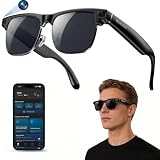
- 【Upgraded & Lightweight Design】The upgraded Blackview AI Smart Sunglasses feature a lightweight design with robust stainless steel hinges and an ergonomic frame, ensuring all-day comfort without pressure on the nose or ears. High-quality metal hinges replace fragile plastic connectors, and after rigorous hinge lifespan testing, the stainless steel hinges can withstand 3-4 times more hinge cycles than plastic hinges, approximately 80,000-100,000 cycles. The high-strength stainless steel hinges provide a smoother opening and closing experience, a longer lifespan, and a comfortable fit suitable for both men and women.
- 【4K HD Photo & Video Recording】The AI smart glasses feature a built-in 800P high-definition camera, capturing lifelike 4K images from a first-person perspective. It supports 1200P video recording and an AI-powered image stabilization algorithm that automatically optimizes image quality, easily recording every moment. The glasses can store up to 6000 photos. They also feature built-in image privacy protection. By connecting to the "Hey Cyan" mobile app, images and videos can be transferred to your phone in real-time via Wi-Fi. After the transfer is complete, photos and videos are automatically deleted from the glasses, ensuring image security for anyone else using the glasses.
- 【ChatGPT & Object Recognition】The Blackview smart glasses have built-in ChatGPT 4.5 AI and support voice wake-up (command "Hey Cyan") or one-click activation by short-pressing the top button on the temple.Voice conversations enable tasks like copywriting and information retrieval, quickly addressing various issues. Built-in AI object recognition accurately identifies dishes, landmarks, plants, and various objects, providing real-time AI analysis and voice commentary—a portable smart encyclopedia.
- 【AI Real-time Translation】These AI smart glasses utilize AI real-time translation, supporting simultaneous interpretation and real-time speech recognition transcription for 139 languages across various scenarios. Through AI logic, they quickly organize meeting content and automatically extract key information, overcoming language barriers. Ideal for meetings, overseas travel, and everyday use, they make your travels, global communication, and business interactions smoother and more seamless.
- 【Bluetooth Calling & ENC Noise Cancellation】The smart glasses feature an open design, supporting Bluetooth music playback and clear hands-free calls. While listening to music, you can also be aware of your surroundings. Enjoy 360° surround sound and up to 6 hours of continuous music playback on a single charge. Equipped with upgraded ENC intelligent noise reduction dual microphones to filter out ambient noise, Bluetooth 6.0 provides a stable, low-latency connection, ensuring clear and uninterrupted hands-free calls. Note: There may be a slight external speaker effect during calls.
How the MiniApp Store works
The MiniApp Store is Mentra’s distribution layer for compatible glasses. Users browse from a phone or computer, select an app and tap Install. The app then appears in the Mentra mobile app and runs through the MentraOS experience.
Mentra lists categories including captions, notes, translation, streaming, camera tools, proactive AI and fitness. The iOS app listing names examples such as Merge, Live Captions, Notes, Streamer, LinkLingo, MemCards, Teleprompter, Live Translation, Calendar Reminders and Dash. The product overview is at mentraglass.com/apps.
This model lets users add or remove functions instead of relying only on what the hardware maker shipped. It also means an app store should not be confused with a large, mature or independently audited ecosystem: app quality, privacy practices, hardware support and resource demands can vary.
Recommended Free Tools
How the software architecture works
Mentra says MiniApps run on the phone inside a host or runtime environment, while the glasses provide input and output. Moving substantial processing to the phone can help keep the frames lighter and preserve their battery, but it creates practical dependencies:
- A compatible iOS or Android phone and the Mentra app.
- Bluetooth, and in some workflows Wi-Fi or an internet connection.
- Phone permissions for functions such as the microphone, camera, notifications or location.
- Phone battery consumption in addition to the glasses’ battery use.
Mentra says multiple apps can share a connection, allowing combinations such as captions, notes, notifications and AI tools. The trade-off is that running several MiniApps can affect responsiveness and battery life. The iOS listing contains user reports of pairing problems and slowdowns when multiple apps are active; those are user reports, not independent performance tests.
Rank #3

- HDR10 AR Glasses with 201” Virtual Screen – Experience over 10 billion colors and ultra-deep contrast on a massive 201-inch virtual display. Compared to standard LCD screens, HDR10 delivers brighter highlights and richer blacks, making movies, Netflix streaming, and gaming more immersive at home, in bed, or on flights.
- Vision 4000 Chip with AI SDR-to-HDR Upscaling – Co-developed with Pixelworks, this processor enhances color, sharpness, and motion clarity in real time. Enjoy smooth 120Hz visuals for PS5, Steam Deck, Switch 2, and mobile gaming without lag or motion blur.
- 3D Movie Glasses for Immersive Viewing – Watch native 3D films or convert 2D videos into 3D with AI depth enhancement. Transform any room into a private cinema experience with theater-like depth and realism—perfect for movie nights or travel entertainment.
- Audio by Bang & Olufsen – Four precision speakers deliver immersive 360° spatial sound for movies and gaming. Use whisper mode for private listening in public spaces. Optional Sound Tube accessory boosts volume up to 15dB (sold separately).
- Universal USB-C Compatibility – No WiFi or Apps Required. Connect directly to iPhone 17/16/15 (USB-C models), Android phones, MacBook, iPad, Steam Deck, and PlayStation consoles. No battery inside—lighter weight and instant setup wherever you go.
Mentra Live hardware specifications
| Specification | Mentra Live |
|---|---|
| Weight | 43 g |
| Dimensions | 162 × 148 × 47 mm |
| Display | None |
| Camera | HD 1080p video; 12MP stills (3264 × 2448) |
| Camera field of view | 119 degrees, landscape |
| Microphones | Three |
| Audio | Stereo speakers |
| Glasses battery | 260 mAh |
| Charging case | 2,200 mAh |
| Phone compatibility | iOS 15.1+ and Android 12+ |
| Connectivity | Wi-Fi and Bluetooth |
| Lens configuration | Clear non-prescription lenses listed on the product page |
| Current listed price | $349 |
| Shipping | United States only, according to the current FAQ |
Mentra’s own page gives two mixed-use battery figures: “12+ hours” in the specification list and “10+ hours” in the FAQ. Both are company claims, and actual endurance will vary with recording, streaming, calls, music, Wi-Fi and MiniApp activity. The full specification and purchasing information is at mentraglass.com/live.
There is no display
Mentra Live has no visual display. It uses a camera, microphones and speakers, so audio prompts, phone-connected services and camera capture are central to the experience. It cannot project navigation, teleprompter text, notifications or captions into the wearer’s field of view.
Free tools Windows power users keep installed
One-click scans. No signup required.
MentraOS can also run on display-capable products. Mentra currently lists Even Realities G2 and G1 and Vuzix Z100 as compatible devices, with NIMO described as coming soon on its OS page. Display functions therefore depend on the connected model, not on Mentra Live itself. See the current compatibility information at mentraglass.com/os.
What Mentra Live can do
- Take photographs and record video.
- Make calls and play music.
- Accept voice commands.
- Use live captions and translation through compatible apps.
- Create AI-assisted notes.
- Livestream a first-person camera view.
- Run MiniApps from the MentraOS environment.
Mentra says photos, video, calls and music can continue without internet access. That does not make every MiniApp offline: translation, AI and other services may require a network or a third-party cloud.
Independent reader supportYour contribution helps us test, update, and keep practical guides available for everyone.Setup and common problems
- Check that the glasses and phone meet Mentra’s compatibility requirements.
- Install the Mentra app from Mentra’s download page, the Apple App Store or the linked Google Play listing.
- Turn on Bluetooth and grant the permissions requested by the app.
- Open Mentra, pair the glasses and use the app’s one-tap connection flow.
- Open the MiniApp Store, choose an app and tap Install.
- Launch and configure the MiniApp from the Mentra app.
If the phone sees the glasses in system Bluetooth settings but Mentra cannot finish pairing, check permissions, disconnect other glasses apps and retry from Mentra rather than pairing through the manufacturer’s original app at the same time. A MiniApp may also fail because the connected glasses lack a required display, camera, microphone, network connection or permission. Android and iOS features may not be identical, and store availability can vary by country.
Rank #4

- 【AI Real-Time Translation & ChatGPT Assistant】AI glasses break language barriers instantly with AI real-time translation. The built-in ChatGPT voice assistant helps you communicate, learn, and handle travel or business conversations smoothly—ideal for conferences, overseas trips, and daily use.
- 【4K Ultra HD】 Smart glasses feature 4K resolution for clear, detailed visuals, making them suitable for travel, outdoor activities, everyday moments, and daily use.
- 【Bluetooth Music & Hands-Free Calls 】Smart glasses provide Bluetooth music and crystal-clear hands-free calls with an open-ear design. Stay aware of your surroundings while listening—comfortable for long wear and safer for commuting, cycling, and outdoor use.
- 【IP65 Waterproof & Long Battery Life】 AI glasses are designed for daily wear with IP65 waterproof protection against sweat, rain, and dust. The built-in 290mAh battery provides reliable performance for workdays and travel—no anxiety when you’re on the go.
- 【Smart App Control & Object Recognition】Smart glasses connect to the companion app for easy setup, file management, and feature control. They support AI object recognition to help identify items and improve your daily efficiency—perfect for travel exploration and a smart lifestyle.
What developers can build
MiniApps
MiniApps run inside MentraOS and can be distributed through the MiniApp Store. The SDK documentation includes TypeScript examples, and Mentra’s OS page demonstrates the @mentra/sdk package, AppServer, session events and display methods such as showTextWall for hardware that has a display.
Free tools Windows power users keep installed
One-click scans. No signup required.
Direct Bluetooth applications
The documentation distinguishes MentraOS MiniApps from mobile Bluetooth apps that connect directly to glasses through the Bluetooth SDK. That distinction matters: an open SDK does not guarantee identical behavior on every supported model. Display APIs, camera access, permissions and manufacturer integrations can differ.
Private and enterprise deployments
Developers can contribute to the public repository, publish MiniApps or create private applications for a team or enterprise workflow. Mentra provides a developer console at console.mentraglass.com. No public paid SDK or developer-plan price is established in the available product material.
Privacy, cloud use and practical limitations
Mentra says users control their data and that MentraOS stores an email address and installed-app information. It also says some apps can work without Mentra-hosted cloud infrastructure. Those statements do not prove that every third-party MiniApp is cloud-free, locally processed or governed by the same privacy policy. Check each app’s data practices before enabling camera, microphone, contacts or AI features.
- No display: not suitable if your priority is visual navigation, HUD notifications or projected captions.
- Phone dependence: pairing, permissions and much of the runtime live on the phone.
- Battery uncertainty: Mentra lists both 10+ and 12+ hours of mixed use.
- Weather limits: Mentra says the glasses are not for swimming or heavy rain.
- Availability: the current FAQ states U.S.-only shipping.
- Lens choices: the product page lists clear non-prescription lenses; confirm the current prescription process before ordering.
- Ecosystem maturity: an app store provides extensibility but does not by itself establish broad catalog size, consistent quality or independent audits.
Who should buy Mentra Live?
A strong fit
- Developers who want an SDK and cross-hardware smart-glasses platform.
- Enterprise teams building hands-free or private workflows.
- Buyers seeking camera, speakers, microphones and audio or AI functions without a display.
- Early adopters interested in community-built MiniApps.
- Privacy-conscious users who value a publicly inspectable software stack, while still checking individual app data practices.
A poor fit
- Anyone specifically seeking visual navigation, projected captions or notifications.
- Buyers who do not want a companion phone app.
- People outside the United States while the current shipping restriction remains.
- Anyone expecting completely open hardware.
- Users who need heavy-rain protection or guaranteed offline AI.
- Buyers expecting a polished mainstream ecosystem comparable to Meta’s consumer platform.
How it compares conceptually
| Product or platform | Most relevant distinction | Best fit |
|---|---|---|
| Mentra Live | Camera-and-audio glasses with MentraOS, an open SDK and MiniApp distribution; no display | Developers, enterprises and early adopters |
| Meta Ray-Ban | More established consumer camera/audio ecosystem; not positioned around Mentra’s MIT-licensed cross-vendor model | Mainstream consumer use |
| Even Realities G1/G2 | Display-oriented glasses listed as MentraOS-compatible | Visual prompts, captions and notifications |
| Vuzix Z100 | Enterprise-oriented display glasses listed as MentraOS-compatible | Enterprise display workflows |
See Ray-Ban’s electronics page, Even Realities and the Vuzix Z100 product page for the manufacturers’ current information. Exact feature support on MentraOS depends on the hardware model.
What’s actually slowing this PC down?
Pick the symptom - the matching free tool is one click away.
Bottom line
Mentra Live is real and commercially available, and its distinctive feature is the combination of consumer glasses, an MIT-licensed operating system, a cross-device SDK and a MiniApp Store. The accurate mental model is an open software platform wrapped around lightweight camera-and-audio glasses—not a fully open hardware project and not a display-based AR headset. At $349, it makes the most sense for developers, enterprise teams and early adopters who accept phone dependence and want to experiment with extensible glasses software.
Quick Recap
Product prices and availability are accurate as of the date/time indicated and are subject to change. Any price and availability information displayed on Amazon at the time of purchase will apply.




