Recommended Free Tools
Quick answer: choose Pixel Minimal Watch Face for a clean digital layout, Pear Analog Watch Face for a traditional dial, your watch’s built-in Google or Samsung face for the lowest-risk experience, Facer for a huge catalog, or WatchMaker/Pujie Black for hands-on design.
Check your exact watch and Wear OS version before installing. Google requires the Watch Face Format (WFF) for watch-face installation on Wear OS devices as of January 2026, so an older face that worked on Wear OS 3 or 4 may no longer be installable. See Google’s Watch Face Format documentation and watch-face availability guidance.
At a glance: five good directions
| Recommendation | Best for | Compatibility and format | Complications | Price model | Companion app or account | Main drawback |
|---|---|---|---|---|---|---|
| Pixel Minimal Watch Face | Minimal digital design | Current listing advertises WFF and broad Wear OS support; verify your model | Up to six in the listed version | Free install with in-app purchases | Google Play listing; companion requirements can vary | Similar names, and older compatibility text may be stale |
| Pear Analog Watch Face | Classic analog appearance | WFF support advertised; verify device | Four custom slots | $1.49 in the retrieved U.S. listing; price varies | Native Google Play installation | Less information density than a digital face |
| Official Pixel or Samsung faces | Reliability and easy restoration | Native to the relevant watch family | Varies by face | Usually included with the watch | No extra marketplace account | Less variety and fewer creator tools |
| Facer | Variety, branded and community designs | Current Wear OS 6/WFF architecture on supported models; legacy support differs | Varies by design | Free options, individual purchases and premium access | Facer account and app commonly required | Catalog quality and compatibility vary |
| WatchMaker or Pujie Black | Designing and deeply customizing faces | Check the exact current app, WFF status and watch model | Built by the user or template | Platform pricing varies; verify before purchase | Marketplace or creator app | More setup and possible ongoing platform costs |
What to check before choosing
- Legibility: the time should remain readable in interactive and ambient modes.
- Useful complications: count slots, placement and whether your preferred weather, health or calendar provider exposes compatible data.
- Battery behavior: dark backgrounds, restrained animation, limited second-by-second updates and a simple ambient mode are generally easier on OLED watches. They are design characteristics, not guaranteed percentage savings.
- Compatibility: check the exact model, Wear OS release, screen geometry and WFF support. “Works with Wear OS” is not a universal guarantee.
- Installation and transfer: determine whether it installs directly from Google Play, needs a companion app, uses a marketplace account or is a legacy product. Purchases may not transfer to a rebuilt WFF version.
- Privacy and advertising: inspect the current Google Play data-safety panel and permissions, especially for free companion apps.
- Cost: distinguish a one-time purchase from ads, in-app unlocks, subscriptions or marketplace membership.
1. Pixel Minimal Watch Face: best minimalist digital pick
Pixel Minimal Watch Face is a strong fit if you want a restrained, Pixel-inspired digital display without giving up useful data. The listed design uses a full-black AMOLED-oriented look, offers color and layout controls, and advertises up to six complication slots. The newer listing advertises Watch Face Format support.
The Google Play page showed free installation with in-app purchases, more than five million downloads and roughly 32,000 reviews when retrieved, and an update dated January 8, 2026. Those counts and feature gates can change. Its broad Wear OS 2 and Wear OS 3 wording should not be treated as proof that every Wear OS 5 or 6 watch is supported; confirm compatibility on your watch’s Play Store listing.
#1 Best Overall

- [22mm Watch Bands] Compatible with Fossil Gen 6/Gen 5E 44mm/Gen 5 Carlyle/Gen 4 Explorist HR/Gen 5 Julianna/Gen 5 Garrett HR/Gen 4/Gen 3/Gen 2 Q
- Compatible with Garmin Instinct/Instinct 2/Instinct Tide/Instinct Tactical/Instinct Solar/Instinct 2 Solar, Compatible with Garmin Vivoactive 4/Venu 2/Venu 3, Compatible with Garmin Forerunner 965/955/945/935/745/265/255/255 Music, Bip 5/GTR 4/GTR 3 Pro/GTR 3/GTR 2/2e/GTR 47mm, Compatible with COROS Pace 3/Apex 2 Pro/Apex Pro/Apex 46mm, Compatible with Pebble, Compatible with Ticwatch, and other watches with 22mm width lugs
- Easy to adjust the length to fit your wrist. Fit 6.0"-8.5" (150mm-215mm) wrist. Made of high quality silicone rubber, skin-friendly. Comfortable and Durable
- Come with Quick Release Pins, easy to install and remove from watch without using tool
- Smart Watch and other accessories Not Included
Choose it if
- You want a clean digital face with more information than the simplest built-in options.
- You prefer black backgrounds and configurable colors or layouts.
Trade-offs
- Several developers use “Pixel Minimal” or similar names; use the package-linked listing and identify the developer before installing.
- Free installation does not mean every feature is free.
- It is not an official Google watch face.
2. Pear Analog Watch Face: best traditional dial
Pear Analog Watch Face recreates a conventional watch while retaining smartwatch data. Its listing advertises a true-black background, four hand styles, eight index styles, four custom complication slots, multiple themes, ambient-display controls and WFF support.
The retrieved U.S. Google Play result showed a 4.7-star rating from 86 reviews, a December 2025 update and a $1.49 one-time price. Google Play prices and availability vary by country and can change, so treat that amount as a listing signal rather than a guaranteed worldwide price.
Rank #2

- 【Quick Installation】The quick-release strap has a quick-release function, the quick-release spring bar allows you to change the watch strap in seconds without tools.
- 【High-quality material】: The watch strap is made of high-strength and environmentally friendly silicone rubber with a black matte stainless steel buckle. Simple fashion and durable.
- 【Soft and skin-friendly】: The watch accessory watch straps have no sharp edges, feel soft, are light, flexible to use, and very strong. The bracelet can be washed repeatedly without fading.
- 【Wide Application】: The watch strap for men and women is suitable for creating your unique daily style. Ideal for outdoor sports such as running, fitness, hiking, climbing, camping, fishing, golf and more.
- 【Compatibility】: The replacement silicone watch strap is suitable for any watch that uses a standard 22mm spring bar. Please confirm the width of the watch lugs before purchasing. Just choose the strap with the appropriate width; it will fit your watch.
Choose it if
- You want an analog watch at a glance but still need a few weather, fitness or calendar fields.
- You value a dark, uncluttered dial.
Trade-offs
- Four slots cannot match the information density of a digital layout with six or more fields.
- Confirm that the desired complication providers work on your particular watch.
3. Official Pixel or Samsung faces: safest default
Built-in faces are a legitimate recommendation, not merely a fallback. Pixel Watch owners get Google’s native collection; Galaxy Watch owners get Samsung’s faces and Galaxy Wearable customization tools. Native faces normally avoid an extra marketplace account, use the watch’s own complication system and are easier to restore when changing phones or watches.
Google directs users to the Play Store for compatible free and paid faces and warns that some older faces may no longer be available to install or restore on a new watch (Google’s guidance). Native does not automatically mean maximum battery life or features: complications, animation, brightness and refresh behavior still matter.
Windows Errors? Fix Them Before They Spread
Repair common Windows errors and clear accumulated junk for a smoother, more stable PC - no reinstall needed.Free scan · no reinstallCrashes, No Sound, or Screen Glitches?
Random freezes, missing sound and display glitches usually trace back to one bad driver. Find and replace yours safely.Free scan · under a minuteRank #3

- [Fit All Models]: Sunnywoo sports nylon watch bands - Compatible with apple watch for women and men, Fits all apple watches, iWatch Bands for Se, Ultra 3/2/1, Series 11, Series 10, Series 9, Series 8, Series 7, Series 6, Series 5, Series 4, Series 3, Series 2, Series 1, iWatch wrist straps offer two size options, ① 5.11"–7.87" (130–200mm) fits 38/40/41/42mm cases ② 5.51"–8.66" (145–220mm) fits 44/45/46/49mm cases. Please check the size on the back of the watch and choose the right size
- [Easy to Wear]: Our watch bands for women men feature a magic tape closure for easy, one-handed length adjustments, ensuring a snug fit during workouts and outdoor adventures. Durable, breathable, and comfortable, they keep your smartwatch securely in place no matter how active you get
- [Skin-Friendly Material]: Sunnywoo watch straps are crafted from high-quality nylon, as soft as silk, ensuring all-day comfort. With excellent breathability and a lightweight design, they keep your wrists cool and comfortable during outdoor activities. Plus, cleaning is super easy, allowing you to maintain freshness and comfort no matter where you are
- [Multi-Colors]: With 14 stunning colors to choose from, you can easily match your daily outfit and create a personalized style statement. The Sunnywoo smart watch bands for women men are the perfect fashion watch accessory to complement any look, making them a must-have for your wardrobe
- [Warm Presents]: Know someone who loves their iWatch and has a passion for fashion and fitness? Treat them to a Sunnywoo nylon watch band! With 14 vibrant colors to choose from, they can effortlessly match their band to their daily style. It's the ultimate thoughtful Presents that combines practicality with personal flair
Choose them if
- You are new to Wear OS or moving to another watch and want minimal troubleshooting.
- You prioritize predictable updates and integration over novelty.
Trade-offs
- The design pool is smaller than Facer’s or a creator platform’s.
- Some advanced Samsung options are most useful on Galaxy Watch hardware, and faces can be tied to a particular generation.
4. Facer: best marketplace for variety
Facer combines a large community catalog, official branded designs and creator tools. Its current listing describes a Wear OS 6 architecture based on WFF and lists support for Galaxy Watch 4 through Galaxy Watch 8, Pixel Watch models, OnePlus Watch 2, 2R and 3, Oppo Watch X and X2, and Mobvoi TicWatch devices. Facer’s brand list also covers many Fossil and older models, but support differs between legacy and current installations; consult its brand list and compatibility details.
Individual faces can carry different “Power Impact” labels. Treat those as Facer’s predicted indicators, not independent battery tests. Prices vary: the platform includes free designs, individual purchases and premium access, and the retrieved listing did not establish a universal U.S. price.
Rank #4
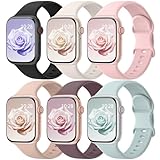
- Patented Design & Universal Compatibility: HEARTBOOM premium silicone sport bands compatible for iWatch all versions. Suitable for Apple Watch Ultra 4/3/2/1, SE 3/2/1, Series 12, Series 11, Series 10, Series 9, Series 8, Series 7, Series 6, Series 5, Series 4, Series 3, Series 2, Series 1. Two size options: ①38mm/40mm/41mm/(42mm-series 12 11 10) size for 5.1"-7.1" (130mm-180mm) wrist| ② 44mm/45mm/46mm/49mm/(42mm-series 3 2 1) size for 5.9"-7.9" (150mm-200mm) wrist. Pls check the model on the back of your watch to select the correct size
- Comfortable to Wear: This iWatch Bands for women and men are made from soft, breathable and skin-friendly silicone, prevents skin from irritation, lightweight, touch comfortable, water-resistant and sweat-proof. Perfect for workdays, workouts and overnight sleep, as it ensures that your skin remains comfy and free from irritation even when you wear the watch for extended periods of time
- Multi Colors & Adjustable Size: Our iwatch bands come with Various rich & muted colors for your choices, personalize your smartwatch to fit your outfit in daily life and easy change for every occasion. 38mm/40mm/41mm/(42mm-Series 11 10) Size fits 5.1"-7.1" (130mm-180mm) wrist. Our bands for Apple watch can perfectly match your Apple watch
- Easy installation & Secure Fit: Our sport bands for apple watch bands for women men feature a completely new design of upgraded oval holes and innovative pin-and-tuck closure design, which locks onto Apple watch interface precisely and securely. No tool needed, easy and direct installation and one button removal
- Perfect Gift: These 6-pack fashionable & high-quality colorful apple watch bands for women men look more fashionable, youthful and sporty. It's a thoughtful and well-made gift that is sure to be appreciated by anyone who receives it. Suitable for Christmas, New Year's, Father's Day, Mother's Day and birthdays as a surprise for your parents, loved ones, and friends. We highly value your experience and offer 24/7 Friendly Support
Choose it if
- You want frequent changes, pop-culture themes, licensed designs or a single place to browse many styles.
- You are comfortable with an account and marketplace workflow.
Legacy warning
Facer says Google removed legacy watch apps from Google Play on January 14, 2026. Older devices may retain an already installed legacy app but be unable to install it again or make new purchases. Facer’s current catalog and legacy catalog are not interchangeable. A rebuilt face may appear as a separate product, and an old purchase may not unlock the rebuilt WFF version; see Facer’s purchase and compatibility FAQ and legacy-app notice.
Independent reader supportYour contribution helps us test, update, and keep practical guides available for everyone.5. WatchMaker or Pujie Black: best for making your own
These are platforms rather than single faces. WatchMaker is aimed at a broad design ecosystem and creator tools. Pujie Black suits readers who want to construct a highly personal layout around fitness, weather, calendar or productivity data. Google identifies both among third-party marketplace examples alongside Facer and TIMEFLIK (Google’s discussion).
Verify the exact current app, Wear OS 6 distribution and WFF support before paying. The supplied listings do not establish a reliable current price for either platform, so check Google Play or the vendor’s checkout for your country.
Choose one if
- You enjoy designing, tuning complications and iterating on a face.
- A template marketplace is more useful to you than one finished design.
Trade-offs
- Setup takes longer than applying a native face.
- Catalogs can contain legacy products, and subscription economics may not suit someone who wants one permanent face.
- Do not assume universal Wear OS 6 compatibility without checking the exact version and watch.
Which watches are covered?
These recommendations are relevant to the Google Pixel Watch family; Samsung Galaxy Watch 4 and newer Wear OS models; OnePlus Watch 2, 2R and 3; Oppo Watch X models; Mobvoi TicWatch devices; and some Fossil, Montblanc, Casio, TAG Heuer, Huawei and other Wear OS watches. Compatibility remains face-by-face. Galaxy Watch 4/5/6 may not behave like newer Wear OS 6 models, and Pixel Watch generations can have different distribution paths. Galaxy Watch 3 and older are Tizen watches rather than ordinary Wear OS targets; Samsung ended Tizen support in October 2025, and Facer support depends on an already installed legacy app.
Quick Recap
How to install a face safely
- Confirm that the watch is paired with the intended Android phone and that you know which Google account owns the purchase.
- Open Google Play on the phone or watch and search for the exact face name, developer and package. Check the compatible-device panel and WFF information.
- Install the face or its companion app. If a marketplace is involved, sign in only through its official app or website.
- Open the companion app when required, select the target watch and apply the face.
- If no companion app is needed, use the watch’s long-press face picker or its face-selection screen.
- Configure complications, colors and ambient-display behavior, then confirm that the face appears in the saved-face list.
If it does not appear
- Check the watch’s Wear OS version and whether the face supports WFF.
- Search directly on the watch’s Play Store rather than relying only on the phone app.
- Confirm phone and watch use the same Google account; restart both devices and reopen the companion app.
- Look for a separately rebuilt Wear OS 6 listing from the developer.
- Uninstall and reinstall only after confirming the correct account and purchase association.
- Never sideload a random APK from an unofficial site.
Battery, display and privacy checklist
- Prefer a dark, mostly static face on an OLED display if battery endurance matters.
- Limit animated elements, second-by-second updates and frequently refreshing complications.
- Check ambient mode separately; an interactive design can become dim, sparse or power-hungry when always-on.
- Round and rectangular screens use space differently, so inspect screenshots for your watch’s geometry.
- Review Play Store data-safety disclosures, permissions and advertising before installing a free companion app.
- Remember that a complication slot does not guarantee access to a particular heart-rate, steps, calorie or weather provider.
Final pick by priority
- Choose Pixel Minimal for a configurable, information-rich digital face.
- Choose Pear Analog for a classic dial with four modern data slots.
- Choose the official Pixel or Samsung collection when reliability, restoration and predictable integration matter most.
- Choose Facer when variety and branded or community designs outweigh marketplace complexity.
- Choose WatchMaker or Pujie Black when building and refining your own workflow is the point.
Product prices and availability are accurate as of the date/time indicated and are subject to change. Any price and availability information displayed on Amazon at the time of purchase will apply.




