watchOS 26.3 was released on February 11, 2026, for Apple Watch Series 6 and later. Apple described it as an “important bug fixes” update and recommended it for all users. It did not advertise a major new consumer feature; its main value was stability and security. As of August 16, 2026, watchOS 26.6 (released July 27, 2026) is newer, so install the latest compatible release rather than trying to obtain 26.3 specifically.
Use the checks below for update failures, verification errors, pairing problems, an Apple-logo loop, storage warnings, battery complaints, and sluggishness.
What was watchOS 26.3?
watchOS 26.3 is the third minor update in Apple’s watchOS 26 generation—not a new watch model or a separate app. Apple’s consumer announcement says it contains important bug fixes. The release was available for Apple Watch Series 6 and later, subject to the paired iPhone and software requirements.
Apple’s current security-release list identifies watchOS 26.6 as the latest release as of August 16, 2026. A compatible watch may therefore offer a later update instead of 26.3.
Quick wins for a faster PC:
Clear out junk files and repair common Windows errorsFree Scan →Scan for outdated or missing drivers - takes under a minuteDriver Scan →#1 Best Overall
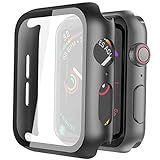
- Compatible model: Compatible with apple watch series 6/5/4/SE 44mm (Also compatible with new apple watch SE2 44mm)
- Overall protection: This case with glass screen protector is designed to offer external surface protection to your watch without compromising usability.
- Easy to install: Super easy to install for its snap-on design to avoid taking the straps off first.
- Kindly tip: These covers don't support while swimming because the water will get trapped underneath the cases. If you forget to take it off, you can wipe it out with a cloth or wipes.
- What you get: 2 x high performance PC hard case + dry and wet wipes.
Apple’s watchOS 26 update page and the security-release list provide the release history.
What changed in watchOS 26.3?
No headline consumer feature
Apple did not list a new watch face, app, health feature, workout type, emoji set, or other major user-facing addition in the 26.3 consumer summary. Features from nearby releases should not be attributed to 26.3: Notes belongs to the broader watchOS 26 generation; Sleep Score controls and Enhanced Safety Alerts to watchOS 26.2; AirTag 2 support to 26.2.1; Pride Luminance and related fixes to 26.5; and new emoji and other additions to 26.4.
Security fixes
Apple’s watchOS 26.3 security bulletin lists fixes in several components:
- AppleKeyStore: an app could cause an unexpected system termination.
- Bluetooth: crafted Bluetooth packets could cause denial of service for an attacker in a privileged network position.
- CoreServices: environment-variable handling could expose sensitive user data.
- dyld: an attacker with memory-write capability could potentially execute arbitrary code. Apple also reported a related sophisticated targeted attack against older iOS versions; that does not mean watchOS users were broadly attacked.
- Game Center: fixes addressed sensitive-information exposure and discovering app installations.
- WebKit: malicious web content could crash a process.
These are Apple’s vulnerability descriptions, not evidence that every watch owner was affected or exploited. Security pages can receive additional recognition and CVE details after the initial release.
What’s actually slowing this PC down?
Pick the symptom - the matching free tool is one click away.
Rank #2

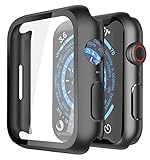
- 【High Definition Experience】 After the case for Apple Watch Series 11 Series 10 is applied, all functions and buttons retain their full responsiveness. The smooth, sensitive touch paired with HD transparency ensures a comfortable and distinctive experience
- 【Screen Touch Sensitivity】 The sensitivity of the screen protector for Apple Watch 11/10 provides a precise touch response, delivering a bare-metal feel and preserving the authentic color quality of your iWatch
- 【Enhanced Scratch Defense】 Constructed from robust PC material and featuring built-in tempered glass, this Apple Watch 11/10 case offers full front and edge coverage, providing your iWatch with complete protection from daily wear, including scratches, drops, and impacts
- 【Applicable Model】 This hard PC case with screen protector is ONLY applied for iWatch Series 11 Series 10 46mm. Make sure your iWatch series is correct before purchasing
- 【Warm Reminder】 Each package includes 2 satin black covers for Apple Watch Series 11 Series 10 46mm. The case is not waterproof, reminding that you can take it off before swimming or sports to prevent moisture and remove the case and wipe it dry if moisture gets inside
Developer-facing StoreKit correction
Apple’s developer release notes record a fix where Product.products(for:) could fail silently instead of throwing an error. The watchOS 26.2 SDK supported apps running on watchOS 26.3; that is a development detail, not a consumer feature.
Is watchOS 26.3 still available?
It may not appear in Software Update because Apple can offer a later compatible watchOS 26 release. If a later version is offered, install that version. Apple does not provide a normal user-accessible downgrade process after an update, so do not install 26.3 expecting to roll back easily.
Compatibility and prerequisites
Apple’s compatibility guidance for watchOS 26 covers:
- Apple Watch SE (2nd generation) and later
- Apple Watch Series 6 and later
- Apple Watch Ultra and later
The paired iPhone must be an iPhone 11 or later, or an iPhone SE (3rd generation or later), running iOS 26. Not every watchOS 26 feature works on every supported model. Apple’s 26.3 security bulletin specifically lists Series 6 and later for those fixes. See Apple’s update requirements.
Do these 3 things before closing this tab:
1Repair Windows errors before they cause bigger problems2Fix the driver behind crashes, sound loss and screen glitches3Clear out junk files and repair common Windows errorsRank #3
- Application: Compatible with Apple Watch Series 9/Series 8/Series 7 - 45mm only. [IMPORTANT: This product is NOT compatible with 41mm or 44mm. Please double-check the Series and size on the back of your watch before purchasing to avoid selecting the wrong size]
- Anti-shock and Anti-fall: Made of PC material and built-in tempered glass, this case covers the full front and curved edges of the watch and gives your iwatch full protection
- Easy to Install: The snap-on design of the case makes installation quick and simple, with no need to remove the watch strap. You can also find an installation guide by checking the images on this page
- Touch Sensitivity: The screen protector is highly responsive, providing a bare-metal touch experience. Important: To ensure proper functionality,DO NOT use any additional film protectors on your watch before applying this product
- Kindly Tip: These covers are not waterproof, so water may enter during swimming or hand washing. If water gets inside or causes fogging, simply remove the case and wipe it clean.【Please note that water entering the case may affect touch sensitivity and other functions. It's best to avoid wearing the case in water-exposed situations, such as swimming】
How to update Apple Watch safely
- Put the watch on its charger and charge it to at least 50 percent.
- Connect the iPhone to Wi-Fi.
- Keep the iPhone and watch close together.
- Open the iPhone’s Watch app.
- Tap My Watch → General → Software Update.
- Tap Download and Install when a compatible update appears.
- Leave the watch on its charger until installation finishes; do not restart it during the update.
Use Apple’s Watch app or the watch’s own Software Update screen only. Do not download watchOS firmware from third-party sites.
Fix watchOS update problems in the safest order
1. The update does not appear
- Confirm the watch model is supported.
- Update the paired iPhone to the required iOS version.
- Check Wi-Fi, charging, battery level, and proximity.
- Look for a later watchOS 26 release being offered instead of 26.3.
- Check whether beta updates are enabled; beta behavior is not evidence of a production 26.3 defect.
2. “Unable to Verify Update”
Apple recommends checking the connection, restarting, and trying again before erasing the watch:
- Verify internet access through the iPhone, Wi-Fi, or cellular service.
- Restart the Apple Watch and iPhone.
- Retry the update.
- Free storage by removing downloaded music, synced photos, and unused apps.
- If verification still fails, unpair and update the watch.
See Apple’s verification troubleshooting and storage guidance.
3. Unpair only as a last resort
- In the iPhone’s Watch app, tap My Watch → All Watches.
- Tap the information button beside the watch, then Unpair Apple Watch.
- For a GPS + Cellular model, choose to keep the cellular plan if you will pair this watch again.
- Enter the Apple Account password if requested.
- Pair the watch again and set it up as new to perform the update, then restore the backup if appropriate.
Unpairing erases the watch, requires setup again, and can trigger Activation Lock verification. Apple says the iPhone creates a backup before erasing it. Restoring a problematic backup immediately can also bring back an app or setting that caused trouble.
Recommended Free Tools
Rank #4

- Compatible Model: QCKANLJ Case Compatible with apple watch series 6/5/4/SE/SE 2 40mm & fit for new apple watch SE 3nd generation(2025) 40 mm
- Overall Protector: Designed for apple watch series 6 5 4 SE screen protector is made with hard pc and tempered glass, offering full protection for your watch against scratches, drops, and bumps
- Easy to install: Easy to install for the snap-on design to avoid taking the apple watch bands off first
- High Sensitive Touch: High transparency tempered glass screen protector,present a original clear image quality and high-speed response. Ultra-thin design cover for iphone watch, high quality touch feel, nothing different but with more protect
- What you get: 6 x high performance PC hard case + iwatch screen cleaning tools
Specific symptoms after or during the update
Stuck on the Apple logo
- Press and hold the side button and Digital Crown together.
- Keep holding until the screen turns black and the Apple logo reappears.
- Release the buttons and wait several minutes.
If the logo remains, unpair and pair again. If the watch stays unusable, contact Apple service. Follow Apple’s Apple-logo guidance.
Cannot connect or pair with the iPhone
- Turn off Airplane Mode on both devices.
- Ensure Wi-Fi and Bluetooth are on, on the iPhone.
- Bring the devices close together.
- Restart both devices.
- Check for the red iPhone or red “X” icon on the watch.
- Unpair and pair again only after these checks fail.
See Apple’s connection and pairing steps.
Battery drain or sluggishness
Apple did not promise improved battery life in 26.3, and its documentation does not establish a widespread 26.3 battery or performance defect. User reports of drain or lag are anecdotal. Restart the watch, update both devices to the newest compatible versions, review battery usage, and remove a recently updated third-party app if it is implicated. Allow reasonable settling time after installation. Persistent overheating, extreme loss, repeated crashes, or charging failure warrants service rather than repeated resets.
Missing notifications or cellular service
First resolve pairing and connectivity, then verify notification permissions, Bluetooth, Wi-Fi, and—on GPS + Cellular models—carrier activation. Cellular service cannot fix an update-verification error or boot loop.
Independent reader supportYour contribution helps us test, update, and keep practical guides available for everyone.Should you install watchOS 26.3?
Do not seek out 26.3 over a later compatible release. Install the newest version Apple offers for the watch and iPhone. If an older device offers only 26.3, the security and stability fixes generally favor updating once compatibility, charging, storage, and backup conditions are met.
The Tool Desk
Outbyte PC Repair FREERepair Windows errors before they cause bigger problemsFix Now →Outbyte Driver Updater FREEFix the driver behind crashes, sound loss and screen glitchesFind Drivers →Best Value
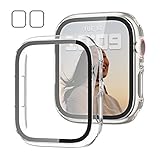
- 【Compatible Models】: Only compatible for Apple Watch SE3(2025),SE2 (2023 & 2022), SE(2020) Series 6/5/4/SE 40mm.Please choose the correct size as you need.
- 【2 In 1 Design】: Durable PC case built in slim HD clear tempered glass screen protector,all Around protects your Apple Watch 40mm Smartwatch from scratch, bumps and accidental drops.Super easy to install for its snap-on design,and charge directly.
- 【High Sensitive Touch】: High transparency tempered glass screen protector,present a original clear image quality and high-speed response. Ultra-thin design cover, high quality touch feel, nothing different but with more protection.
- 【Easy to Take On & Off】: With Precise Cutouts for functional buttons and ports, you can easy snap on and take off the case,Do not affected the band insertion or watch charging.It can be reused and is more durable than simple Tempered Glass film.
- 【Package Include】: Clear + Clear Screen Protector Case for Apple watch series 6/5/4/SE(1/2/3) 40mm.
When Apple service is the right next step
Use Apple or an Apple Authorized Service Provider when the watch cannot charge, overheats, remains in an Apple-logo loop, has physical damage, or still fails after unpairing and restoration. Check coverage at Apple’s coverage page; warranty and AppleCare outcomes depend on country, purchase date, plan, and damage. If the watch is unsupported or has a major hardware fault, compare current models at Apple Watch rather than buying accessories or cellular service as a workaround.
Frequently Asked Questions
Is watchOS 26.3 safe to install?
Apple recommended it for all users and documented bug and security fixes. If a later compatible watchOS release is offered, install the later release instead.
Can I downgrade from watchOS 26.3?
There is no normal user-accessible downgrade process. Apple’s standard update path does not provide rollback.
Why can’t I see watchOS 26.3?
Your watch or iPhone may be incompatible, the prerequisites may not be met, or Apple may already be offering a later watchOS 26 version.
Will unpairing delete my Health data?
Unpairing erases the watch, but the iPhone creates a backup first. Confirm the backup and choose carefully when restoring; Apple Account and cellular-plan steps may also apply.
When should I contact Apple?
Contact Apple if the watch cannot charge, overheats, remains stuck on the Apple logo, has physical damage, or still fails after the documented restart, storage, pairing, and unpairing steps.
Quick Recap
Product prices and availability are accurate as of the date/time indicated and are subject to change. Any price and availability information displayed on Amazon at the time of purchase will apply.




