Do these 3 things before closing this tab:
1Fix the driver behind crashes, sound loss and screen glitches2Clear out junk files and repair common Windows errors3Scan for outdated or missing drivers - takes under a minuteVerdict: The Garmin Venu 4 is a useful fitness smartwatch for tracking trends, recording workouts and guiding everyday training—but it does not perform one standalone medical or laboratory “fitness test.” In practice, the term usually refers to its estimated VO2 max, benchmark workouts, heart-rate data and longer-term metrics such as Training Status and Training Readiness.
Its wrist heart-rate sensor is most useful for resting trends, steady exercise and broad heart-rate zones. Its step counter is suitable for daily goals and comparisons over time, but neither measurement should be treated as exact. Runners and cyclists who need dependable data during intervals should add a compatible chest strap.
Garmin announced the Venu 4 on September 17, 2025, with sales beginning September 22 and a US launch MSRP starting at $549.99. That is the launch price, not necessarily the current price; check Garmin’s official shop for current regional pricing.
What is the Garmin Venu 4 “fitness test”?
There is no single universal Venu 4 feature that should be understood as a clinical fitness test. The watch builds a fitness picture from several measurements:
#1 Best Overall
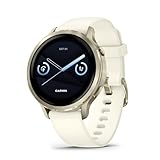
- Smaller-sized smartwatch with a bright, colorful display, stainless steel design, and built-in flashlight; up to 10 days of battery life gives a more complete picture of your health
- Make improvements to promote a healthier lifestyle and know your body better with extensive health monitoring features, including wrist-based heart rate, Body Battery energy monitoring, fitness age, stress tracking, meditation and more (device data presented is intended to be a close estimation of metrics tracked)
- Get a sleep score and personalized sleep coaching, including recommendations for how much sleep you need, tips on how to improve, alignment on your inner sleep cycle by using circadian rhythm and more; breathing variations feature uses Pulse Ox to check your level of variations while sleeping (this is not a medical device, and device data presented is intended to be a close estimation of metrics tracked; Pulse Ox is required and not available in all countries)
- The health status feature looks for changes in your health data that could indicate added stress to your body for key metrics such as heart rate, HRV, skin temperature and more, which could be related to factors such as physical activity, potential illness or other health changes (device data presented is intended to be a close estimation of metrics tracked)
- Log custom or preset daily behaviors — such as caffeine and alcohol intake — and view reports in the Garmin Connect smartphone app on how lifestyle choices may impact your sleep, stress and HRV to help you make more health-conscious decisions (device data presented is intended to be a close estimation of metrics tracked)
- VO2 max estimate: an estimate of aerobic capacity based on activity and heart-rate data.
- Benchmark workouts: prompts that can help the watch obtain a VO2 max estimate when it does not yet have one.
- Daily Suggested Workouts: adaptive workout recommendations based on training history, recovery and VO2 max.
- Training Status and Training Readiness: longer-term interpretations of training load, recovery and recent performance.
- Heart-rate zones, Intensity Minutes and activity tracking: practical measures for judging everyday effort.
The useful sequence is therefore: record suitable activities, allow the watch to collect enough data, obtain a VO2 max estimate, and then use the resulting training metrics as trends rather than isolated verdicts.
Garmin says Training Status requires roughly two weeks of activities recorded with wrist-based heart rate or a compatible chest strap. The watch can begin displaying useful information sooner, but its longer-term assessments may be limited while it learns your baseline.
How to get a VO2 max estimate
VO2 max represents the maximum amount of oxygen your body can use during exercise, expressed relative to body weight. On the Venu 4, it is an estimate—not a laboratory measurement and not a diagnosis of cardiovascular health.
You need suitable recorded activity and reliable heart-rate data. Garmin’s Training Status guidance recommends at least one outdoor run or ride per week that reaches more than 70% of maximum heart rate for at least 10 minutes. Indoor runs may not generate a VO2 max estimate under Garmin’s stated guidance.
If you have no estimate, Garmin says selecting a Walk or Run activity profile can prompt a benchmark workout. Wear the watch consistently, check that your age and weight are correct, and keep wrist heart rate enabled. An external chest strap can help if wrist readings are unstable.
Do not overinterpret one unusually high or low result. Pace, terrain, temperature, fatigue, sensor contact and inaccurate maximum-heart-rate settings can all affect the estimate. Repeated readings under broadly similar conditions are more useful.
Daily Suggested Workouts and Garmin Fitness Coach
Daily Suggested Workouts are automatic recommendations that adapt to your training habits, recovery time and VO2 max. They are separate from Garmin Fitness Coach plans, which provide a more structured coaching approach.
To find a Daily Suggested Workout:
- From the watch face, swipe left.
- Select Activities.
- Choose a compatible heart-rate-based fitness activity.
- Scroll down to the suggested workout.
- Scroll further to see its steps, estimated benefit and settings.
- Select Do Workout, Dismiss, More Suggestions or Settings.
A suggestion may not appear if the activity profile is unsupported, you are on a rest day, you are following another training plan, you have no VO2 max estimate or the feature has been disabled. These are prerequisites, not evidence that the watch is malfunctioning.
Heart-rate tracking: what the Venu 4 measures
The Venu 4 can track wrist heart rate throughout the day and during recorded activities. Its practical uses include:
- Resting-heart-rate trends.
- Live heart rate during walking, running, cycling, gym workouts and other activities.
- Time spent in heart-rate zones.
- Intensity Minutes.
- Configurable high- and low-heart-rate alerts after at least 10 minutes of inactivity.
- Heart-rate broadcasting to compatible devices.
- Automatic detection of maximum heart rate and lactate threshold.
- Recovery time, workout benefit and related training metrics.
You can broadcast heart rate from Settings > Health & Wellness > Wrist Heart Rate > Broadcast Heart Rate. The Venu 4 also supports compatible Garmin monitors including the HRM 200, HRM 600, HRM-Fit and HRM-Pro series. Garmin’s guidance on compatible sensors is available in the owner’s manual.
How accurate is Venu 4 heart-rate data?
There is no responsible universal accuracy percentage without a controlled test protocol. A wrist optical sensor can be useful without matching a chest strap beat for beat.
Expect the best results during rest and steady-state exercise when the watch is snug and stable. Readings can be less dependable during rapid intervals, strength training, cycling vibration, cold weather, poor skin contact, tattoos, gripping movements and activities with abrupt changes in intensity. Wrist readings may also lag during short intervals.
The Tool Desk
Outbyte PC Repair FREEClear out junk files and repair common Windows errorsFree Scan →Outbyte Driver Updater FREEFix the driver behind crashes, sound loss and screen glitchesFind Drivers →Rank #2
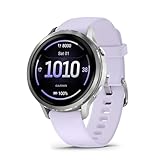
- Smaller-sized smartwatch with a bright, colorful display, stainless steel design, and built-in flashlight; up to 10 days of battery life gives a more complete picture of your health
- Make improvements to promote a healthier lifestyle and know your body better with extensive health monitoring features, including wrist-based heart rate, Body Battery energy monitoring, fitness age, stress tracking, meditation and more (device data presented is intended to be a close estimation of metrics tracked)
- Get a sleep score and personalized sleep coaching, including recommendations for how much sleep you need, tips on how to improve, alignment on your inner sleep cycle by using circadian rhythm and more; breathing variations feature uses Pulse Ox to check your level of variations while sleeping (this is not a medical device, and device data presented is intended to be a close estimation of metrics tracked; Pulse Ox is required and not available in all countries)
- The health status feature looks for changes in your health data that could indicate added stress to your body for key metrics such as heart rate, HRV, skin temperature and more, which could be related to factors such as physical activity, potential illness or other health changes (device data presented is intended to be a close estimation of metrics tracked)
- Log custom or preset daily behaviors — such as caffeine and alcohol intake — and view reports in the Garmin Connect smartphone app on how lifestyle choices may impact your sleep, stress and HRV to help you make more health-conscious decisions (device data presented is intended to be a close estimation of metrics tracked)
For serious interval running, cycling, strength training or zone-based performance work, a chest strap is the better choice. It can provide cleaner live data while the Venu 4 remains useful for recording the session and combining it with Garmin’s training metrics.
Garmin describes performance measurements as estimates. Its abnormal-heart-rate alert is not intended to identify or diagnose a heart condition. If a reading is accompanied by worrying symptoms, do not simply assume the watch is wrong; seek appropriate medical advice.
Setting heart-rate zones
The Venu 4 can calculate zones using beats per minute, percentage of maximum heart rate, heart-rate reserve or percentage of lactate-threshold heart rate. It also supports separate sport-specific zones, such as running, cycling and swimming.
To adjust them, open:
Settings > User Profile > Heart Rate & Power Zones > Heart Rate
Quick wins for a faster PC:
Fix the driver behind crashes, sound loss and screen glitchesFind Drivers →Clear out junk files and repair common Windows errorsFree Scan →From there you can change maximum heart rate, lactate-threshold heart rate, resting heart rate, the zone basis and sport-specific zones. Garmin’s default maximum-heart-rate calculation is 220 minus your age, but you can enter a value manually or allow supported measurements to detect it automatically. If that default is far from your actual maximum, your zones—and therefore your training feedback—may be misleading.
Intensity Minutes: where heart rate and steps meet
With heart rate enabled, the Venu 4 calculates Intensity Minutes by comparing heart-rate data with your average resting heart rate. If heart rate is turned off, it uses steps per minute to estimate moderate-intensity minutes.
Garmin recommends recording a timed activity for the most accurate calculation. Wearing the watch consistently, including overnight, also helps it establish a better resting-heart-rate baseline. Intensity Minutes are therefore not simply a second step counter: the underlying calculation changes depending on whether heart-rate data is available.
What the Venu 4 step counter records
The Venu 4 tracks daily steps, distance, Intensity Minutes, floors climbed, calories burned and sleep statistics. Your current total appears in the Steps glance. Garmin notes that the number is updated periodically, so it may not change with every individual step.
Like other wrist wearables, it estimates steps from movement patterns. A secure, consistent fit generally improves results, but real-world situations can cause differences:
- Pushing a shopping cart, stroller or lawnmower can reduce detection because the wrist is stationary.
- Carrying bags, holding a rail or using trekking poles can change the arm movement the algorithm expects.
- Repetitive household or workplace movements can create false steps.
- A loose fit can produce poorer sensor contact and inconsistent movement data.
- A phone, another wrist and another wearable may show different totals because they use different sensors, update intervals and algorithms.
Wheelchair Mode changes the tracked metric from steps to pushes. That is an accessibility feature, not a failed step count.
Is the Venu 4 step counter accurate?
It should be adequate for daily activity trends, goal-setting and comparing your own routine over several days. It should not be presented as a guaranteed exact pedometer.
To establish a numerical accuracy claim, a proper test would need manually counted steps across repeated trials, different walking speeds, arm positions, stairs, treadmill walking, cart pushing and other common edge cases. Without that controlled protocol, the most useful conclusion is that the Venu 4 is a practical trend tracker whose total can diverge from a manual count or another device.
Free tools Windows power users keep installed
One-click scans. No signup required.
Rank #3

- Smartwatch with a bright, colorful display, stainless steel design, and built-in flashlight; up to 12 days of battery life gives a more complete picture of your health
- Make improvements to promote a healthier lifestyle and know your body better with extensive health monitoring features, including wrist-based heart rate, Body Battery energy monitoring, fitness age, stress tracking, meditation and more (device data presented is intended to be a close estimation of metrics tracked)
- Get a sleep score and personalized sleep coaching, including recommendations for how much sleep you need, tips on how to improve, alignment on your inner sleep cycle by using circadian rhythm and more; breathing variations feature uses Pulse Ox to check your level of variations while sleeping (this is not a medical device, and device data presented is intended to be a close estimation of metrics tracked; Pulse Ox is required and not available in all countries)
- The health status feature looks for changes in your health data that could indicate added stress to your body for key metrics — such as heart rate, HRV, skin temperature and more — which could be related to factors such as physical activity, potential illness or other health changes (device data presented is intended to be a close estimation of metrics tracked)
- Log custom or preset daily behaviors — such as caffeine and alcohol intake — and view reports in the Garmin Connect smartphone app on how lifestyle choices may impact your sleep, stress and HRV to help you make more health-conscious decisions (device data presented is intended to be a close estimation of metrics tracked)
If your count seems low, check whether you were pushing something, carrying an object, using poles, wearing the watch loosely or starting partway through the day. If it seems high, consider repetitive arm movement, vibration or household activity. Compare several days rather than treating one total as a scientific measurement.
Independent reader supportYour contribution helps us test, update, and keep practical guides available for everyone.Other useful Venu 4 fitness features
The Venu 4’s appeal is the combination of basic tracking and more advanced guidance. Depending on your goals, useful features include:
- Training Readiness and Training Status: context for deciding how hard to train, once enough data has accumulated.
- HRV Status: a longer-term view of heart-rate variability trends.
- Body Battery: an estimate intended to help interpret energy and recovery.
- Sleep tracking and sleep coaching: useful for relating sleep patterns to daytime training.
- Workout benefit and recovery time: post-workout feedback.
- Wrist-based running dynamics: additional running information without requiring a separate foot pod in every case.
- Health Status, respiration and skin temperature: broader wellness trends.
- Pulse Ox and ECG: availability and limitations vary by country, software, hardware and regulatory approval.
- Smartwatch features: Garmin Pay, music, notifications, safety and tracking functions, a speaker, microphone and LED flashlight.
Garmin claims up to 12 days of smartwatch-mode battery life. That is a manufacturer maximum under stated conditions, not a guarantee for every configuration or usage pattern.
Who should buy the Garmin Venu 4?
Buy it if you want a broad Garmin health and fitness experience with guided workouts, sleep, recovery, activity trends, smartwatch functions and long battery life. It is particularly well suited to walkers, general gym users, recreational runners and people who want the option of adding a chest strap later.
Do these 3 things before closing this tab:
1Fix the driver behind crashes, sound loss and screen glitches2Clear out junk files and repair common Windows errors3Scan for outdated or missing drivers - takes under a minuteChoose another Garmin if your priority is advanced running, triathlon, cycling, navigation, mapping or highly specialized endurance training. A Forerunner or another performance-focused Garmin may be a better fit, while a simpler tracker may make more sense if you only need steps and basic sleep data.
Consider an Apple Watch or Samsung Galaxy Watch if messaging, apps, voice assistants and tight phone integration matter more than battery life and Garmin’s training ecosystem. Apple Watch is the natural ecosystem choice for iPhone users; Galaxy Watch is particularly relevant to Samsung and Android users.
Consider Fitbit or a basic tracker if your goals are mainly steps, sleep and simple activity trends and Garmin’s training metrics would add complexity without changing your behavior.
Common problems and fixes
No VO2 max or Training Status
- Confirm wrist heart rate is enabled.
- Check your age, weight, maximum heart rate and resting heart rate.
- Record suitable outdoor walks, runs or rides.
- Wear the watch consistently, including overnight.
- Allow roughly one to two weeks for longer-term metrics to develop.
- Use a compatible chest strap if wrist readings are unstable.
Indoor-only activity, insufficient qualifying data, disabled heart-rate recording and inaccurate profile information can all delay an estimate.
What’s actually slowing this PC down?
Pick the symptom - the matching free tool is one click away.
Heart rate looks wrong
Wear the watch snugly and securely above the wrist bone. Check for cold skin, poor contact, motion artifacts, weights, gripping, cycling vibration and rapid intervals. Compare with a compatible chest strap when the data matters for performance. Do not use a watch reading to diagnose a symptom or condition.
Daily Suggested Workouts are missing
Check for a VO2 max estimate, a compatible activity profile, an active training plan and whether the watch is treating the day as rest. Garmin also allows the workout prompt to be disabled.
Bottom line
The Garmin Venu 4 is a strong general-purpose fitness smartwatch, not a medical monitor or laboratory testing device. Its VO2 max, training, recovery and heart-rate tools become more useful after consistent wear and repeated recorded activities. Its step counter is good for direction and routine, not perfect enumeration.
For most users, the best reason to buy it is the combination of everyday health tracking, guided workouts, recovery context, Garmin Connect history and long battery life. For serious interval or cycling training, budget for a compatible chest strap; for specialized endurance training, compare it with Garmin’s Forerunner and other performance-focused lines.
Quick Recap
Product prices and availability are accurate as of the date/time indicated and are subject to change. Any price and availability information displayed on Amazon at the time of purchase will apply.