Quick wins for a faster PC:
Scan for outdated or missing drivers - takes under a minuteDriver Scan →Clear out junk files and repair common Windows errorsFree Scan →Some links on this page are affiliate links: if you buy through them we may earn a commission, at no extra cost to you.
Apple Watch cannot take a conventional blood-pressure reading on its own. It does not display the two numbers you get from a cuff—systolic and diastolic pressure. On supported models, Apple’s Hypertension Notifications feature looks for patterns in optical heart-sensor data over time. If it detects a pattern associated with possible hypertension, it tells you to confirm it with a third-party blood-pressure cuff.
That makes the Apple Watch useful for screening and reminders, but not a replacement for a validated upper-arm monitor or medical advice.
As an Amazon Associate I earn from qualifying purchases.
What you need
To use Hypertension Notifications, you need all of the following:
- Apple Watch Series 9 or later, or Apple Watch Ultra 2 or later
- An iPhone 11 or later
- The latest compatible versions of watchOS and iOS
- Wrist Detection enabled
- A country or region where the feature is available
The feature is not available on Apple Watch SE models. Apple also limits it to people aged 22 or older who have not previously been diagnosed with hypertension and are not pregnant. An active pregnancy recorded in the Health app prevents the feature from being enabled.
Popular on Amazon
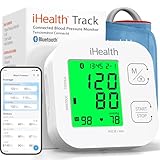
- Clinically Accurate: Easy Operation by two buttons, Advanced Accuracy, No Calibration required.
- Large Multi-Color Backlit Display: The large, oversized numbers make reading the results from this upper arm blood pressure monitoring device a breeze. Coded (GREEN/YELLOW/RED) display tells if your blood pressure readings are optimal or not.
- Easy Management: Manage and track up to 99 readings on your blood pressure monitor and unlimited readings on your smartphone with iHealth's free iOS and Android applications ( iOS 12.0 or later. Android 9.0 or later.Requires Bluetooth 4.0.and up).
- Heart Rhythm Disturbances: This unit automatically identifies and alerts you to any heart rhythm disturbances. If detected, a warning symbol will be displayed after the measurement is taken.
- What You Get: 1 x blood pressure monitor that meets ESH 2010 performance standards, 4 AAA batteries, 1 wide range cuff that fits upper arms with Circumference of 8.7"-16.5" (22-42cm),1 Instruction manual, our worry-free 12-month warranty and friendly California-based customer service.
As with other Apple features, the exact supported software versions can change. Update the iPhone and Apple Watch before troubleshooting setup. Apple currently lists watchOS 26 and iOS 26 for the latest supported release.
Turn on Hypertension Notifications
Setup takes place in the Health app on your iPhone, not in the Heart Rate app on the watch.
- Open Health on your iPhone.
- Tap your picture or initials in the upper-right corner.
- Tap Health Checklist.
- Tap Hypertension Notifications, or tap Set Up beneath it.
- Confirm your age and answer whether you have ever been diagnosed with hypertension.
- Tap Continue, review the information, tap Next, and then tap Done.
There is no Measure Blood Pressure button on Apple Watch. Once enabled, the feature works passively while you wear the watch. It evaluates data across 30-day periods rather than producing an instant reading.
How to take an actual blood-pressure reading
Use a validated third-party arm cuff when you need a blood-pressure value. The cuff—not the Apple Watch—produces the systolic and diastolic numbers.
Also popular on Amazon

- One-Button Design: This Oklar blood pressure monitor features a one-button operation, making measurement easy and convenient; with just a touch, you can quickly take a measurement and get an accurate reading
- Large LED Display: The backlit LED screen with clear digits makes it easy for anyone to read quickly; you can get readings within 1 minute, and it's user-friendly for the elderly
- Stores Up to 240 Readings: Supports two users, storing 120 readings per user; this feature makes it easy to track and monitor blood pressure trends for you and your family over time
- Convenient Dual Power Supply: Allows to operate by using either 3AA batteries or a Type-C interface (Notice: Use the provided Type-C cable if no batteries are installed; This product is not rechargeable) ; its compact size and dual supply capabilities ensure it's ready for use at home or on the go
- Adjustable Arm Cuff: The arm cuff range from 8.7 - 15.7 inches (22-40 cm) fits your size, ensuring a comfortable and secure fit for most adults
For a more reliable home reading, avoid exercise, caffeine, smoking, and other activities that can temporarily raise blood pressure beforehand. Sit quietly for several minutes, keep your back supported and feet flat on the floor, rest your arm at heart level, and follow the cuff manufacturer’s instructions. Take repeated readings if your clinician or the device instructions recommend it.
If Apple Watch sends a possible-hypertension notification, Apple instructs you to measure twice a day for seven days. Optional reminders can be scheduled for after waking and before bedtime. Record every reading accurately rather than relying on the watch notification as a measurement.
Free tools Windows power users keep installed
One-click scans. No signup required.
Log a cuff reading in Apple Health
After measuring with the cuff, enter the result on your iPhone:
- Open Health.
- Tap Search.
- Tap Heart.
- Tap Blood Pressure.
- Tap Blood Pressure again.
- Under Blood Pressure Log, tap Add a Measurement.
- Enter the Systolic and Diastolic values.
- Tap the displayed date and time if you need to change the timestamp.
- Tap Done.
After a new notification, the screen may show Get Started under Blood Pressure Log instead of Add a Measurement. Tap that option to reach the same logging process.
Also popular on Amazon

- CONFIDENCE IN EVERY READING: Advanced Accuracy Technology helps you monitor your heart health with the OMRON Iron Upper Arm Blood Pressure Monitor
- SAFEGUARD YOUR HEART: The Irregular Heart Beat Indicator identifies heartbeat irregularities during routine blood pressure measurements, helping you and your doctor determine if treatment or further evaluation is needed
- START YOUR DAY WITH CONFIDENCE: Count on quick and accurate readings with simple one-touch operation; Just press one button; Regular monitoring can reveal irregular fluctuations before they lead to serious complications
- MORE ACCURATE RESULTS: Body Movement Detection alerts help enhance the accuracy of your blood pressure readings
- READY OUT OF THE BOX: Includes OMRON monitor, wide-range D-ring blood pressure cuff (fits arms 9"-17"), instruction manual, and quick start guide; Everything you need for your blood pressure kit
Health can store the readings for review, but entering a number manually does not make the Apple Watch measure it. The source remains the cuff.
What an Apple Watch notification means
A notification means the watch has identified a pattern that may be associated with hypertension. It is not a diagnosis, and it is not a direct blood-pressure reading. Take the requested cuff measurements and discuss both the notification and the results with a healthcare professional.
Outdated Drivers Are Slowing You Down
One free scan finds every outdated or missing driver and matches the right update for your exact hardware.Free scan · exact hardware matchWindows Errors? Fix Them Before They Spread
Repair common Windows errors and clear accumulated junk for a smoother, more stable PC - no reinstall needed.Free scan · no reinstallA lack of notification does not prove that your blood pressure is normal. Apple says the feature cannot identify every instance of hypertension, and insufficient qualifying data may also mean that no notification appears.
The feature is not designed to monitor whether treatment is working, replace traditional blood-pressure measurement, or manage an existing hypertension diagnosis. If you already have hypertension, continue following your clinician’s monitoring plan.
Also popular on Amazon

- ✅ Easy to Use – One-button operation makes checking your blood pressure simple and hassle-free—no setup or calibration required. All your readings are clearly displayed on a large 3.6-inch screen.
- ✅ High Accuracy – Trusted, clinically comparable results. The cuff pressure accuracy is ±3 mmHg (±0.4 kPa), and the pulse rate accuracy is within ±5%, ensuring reliable and precise measurements every time.
- ✅ Two Power Options – Powered by 4 AAA batteries or via a convenient Type-C charging port (no include cable), giving you flexible power choices at home or on the go.
- ✅ Personalized Features – The adjustable cuff fits arm sizes from 8.6" to 16.5". The monitor detects incorrect posture during measurement, uses color-coded indicators to classify blood pressure levels, alerts you to irregular heartbeats, and more.
- ✅ Dual-User Mode – Perfect for family use. The monitor supports two user profiles, with each capable of storing up to 99 readings, making it easy to track and compare historical data.
Why you may not see the feature
| Problem | Likely explanation | What to check |
|---|---|---|
| No Hypertension Notifications option | Unsupported watch, old software, unavailable region, or Wrist Detection is off | Confirm the model, update iOS and watchOS, check regional availability, and enable Wrist Detection |
| Setup will not continue | You may be under 22, have a recorded hypertension diagnosis, or have an active pregnancy recorded in Health | Review the Health information used during setup; the feature is intentionally restricted in these cases |
| No alert after setup | The 30-day evaluation may not be complete, or there may not be enough qualifying data | Wear the watch consistently and do not treat the absence of an alert as proof of normal pressure |
| Watch shows no blood-pressure numbers | This is expected | Use an arm cuff and enter its reading in Health |
Turn Hypertension Notifications off
- Open Health on your iPhone.
- Tap your picture or initials.
- Tap Health Checklist.
- Tap Hypertension Notifications.
- Turn off Hypertension Notifications.
Do not rely on unauthorized blood-pressure apps
Some apps and wearables claim to estimate blood pressure without an inflatable cuff. They are not equivalent to a validated blood-pressure monitor. The FDA warns consumers not to use unauthorized devices or features that claim to measure or estimate blood pressure. Treat an Apple Watch notification as a prompt to confirm with an appropriate cuff, not as permission to substitute an unverified app.
When to seek urgent help
Apple Watch cannot detect a heart attack. Chest pain, pressure, tightness, severe shortness of breath, fainting, or other suspected heart-attack symptoms require emergency medical help rather than an Apple Watch check. Likewise, an unusually high cuff reading accompanied by concerning symptoms should be handled as a medical issue, not diagnosed through the watch.
FAQ
Can Apple Watch measure blood pressure by itself?
No. Apple Watch does not produce systolic and diastolic readings. Supported models can use Hypertension Notifications to identify patterns that may suggest possible hypertension, but you need a third-party arm cuff for an actual measurement.
Which Apple Watch models support Hypertension Notifications?
Apple lists Apple Watch Series 9 or later and Apple Watch Ultra 2 or later. The feature is not available on Apple Watch SE models. You also need a compatible iPhone, current software, Wrist Detection, and regional availability.
Also popular on Amazon

- CONFIDENCE IN EVERY READING: Advanced Accuracy Technology helps you monitor your heart health with the OMRON Bronze Upper Arm Blood Pressure Monitor; Store up to 14 readings to track your progress
- SAFEGUARD YOUR HEART: OMRON's Irregular Heart Beat Indicator identifies heartbeat irregularities during routine blood pressure measurements, helping you and your doctor determine if treatment or further evaluation is needed
- START YOUR DAY WITH CONFIDENCE: Know when your blood pressure is elevated with Hypertension Indicator alerts; Regular monitoring can reveal irregular fluctuations before they lead to serious complications
- TURN NUMBERS INTO INSIGHTS: Save unlimited blood pressure readings, track trends, and share reports with your doctor by connecting to the free OMRON Connect app via Bluetooth; Compatible with Apple Health and Google Fit
- READY OUT OF THE BOX: Includes OMRON monitor, wide-range D-ring blood pressure cuff (fits arms 9"– 17"), storage case, instruction manual, quick start guide, and four AA batteries; Everything you need to start monitoring your heart health
Where do I enter a blood-pressure reading from my cuff?
On iPhone, open Health and go to Search > Heart > Blood Pressure > Blood Pressure. Under Blood Pressure Log, tap Add a Measurement, enter the systolic and diastolic values, adjust the time if necessary, and tap Done.
Does no Apple Watch notification mean my blood pressure is normal?
No. Apple says the feature cannot detect every case of hypertension, and an alert may not appear if there is insufficient qualifying data. Use a cuff and consult a healthcare professional for reliable assessment.
What’s actually slowing this PC down?
Pick the symptom - the matching free tool is one click away.
The Bottom Line
Apple Watch does not directly check blood pressure. On Series 9 and later and Ultra 2 and later, Hypertension Notifications can look for possible hypertension patterns over time, but any real blood-pressure value must come from a suitable arm cuff. If the watch alerts you, complete the recommended seven-day cuff log and share the results with a healthcare professional.




