If your Samsung Gear S3 Frontier seems dead, start by checking the charging dock and letting the watch charge for several minutes before pressing the power button. Then try a model-specific restart, adjust settings for battery drain, or troubleshoot Bluetooth. Save a factory reset and opening the watch for later: a reset erases data, and hardware replacement is not a guaranteed fix.
Check charging before assuming the watch is dead
The Gear S3 Frontier belongs to Samsung’s SM-R760 model family. Check the model details on your watch before buying a replacement dock or parts; Samsung’s Gear S3 Frontier support page lists the product family and manual.
- Make sure the wireless charger dock is connected to a working power source, then seat the watch correctly.
- Leave a possibly depleted watch on the dock for several minutes before trying to turn it on. Samsung’s manual says a completely discharged Gear may not start immediately after connection.
- Check the dock’s indicator: the manual describes red as charging, green as fully charged, orange as connected to a low-power charger head, and flashing red as a dock error.
- If the dock shows an error, disconnect and reconnect the watch. If the flashing red light returns, Samsung’s manual says to contact a Samsung Service Center.
A charging indicator shows that the dock is responding; it does not establish that the battery or watch is healthy. If the screen remains blank after a period of charging, try the restart procedure for the Gear S3 rather than going straight to a reset.
If charging is slow or intermittent
Reseat the watch and check that the dock and power source remain stable. Samsung’s manual notes that a lower-current source, such as a computer, can charge more slowly, and that charging from a multi-device charger may take longer. An unstable supply can also affect touchscreen response while charging; disconnect the watch and use a stable power connection if that occurs.
#1 Best Overall

- ▶Compatibility: This charger compatible with Gear S3 Frontier / Gear S3 Classic smart watch. 【NOT compatible with Galaxy Watch 3】
- ▶Premium & Speedy: The Gear S3 charger cable is made of high quality wire and plastic, provides a fast charging speed, takes about 2.5 hour a full charge, and won't overheat the watch, works like the original charger. 【NOT compatible with Galaxy Watch 3】
- ▶Safe Protection: The gear s3 charging dock build-in smart chips providing a stable charging performance and protecting your watch from over-voltage, over-current or short-circuit.Keep your Gear S3 safe from over-voltage, over-current or short-circuit.
- ▶Convenient and Easy to Use: To get a charge just plug the USB-A of charging cable into the USB port on your PC, laptop, notebook, Wall charger or car charger. We suggest you to use the recommended adapter (5V 1A).
- ▶Package includes: 1 x charger for Gear S3 Classic/Frontier, 1 x micro usb charging cable (smart watch is not included). with sincerely after-sales service, if have any question we will deal with it for you within 24 hours.
Samsung specifies the Gear wireless charger dock. Do not assume a generic wireless charging pad will work. If replacing the dock, choose one explicitly listed as compatible with the Gear S3 or SM-R760.
If the watch is frozen or won’t respond
Try a Gear S3 restart or soft reset first. Verizon’s Gear S3 frontier support index separates restart instructions from factory-reset procedures, including different reset paths for a watch that is powered on and one that is powered off. Follow the restart procedure matching your watch’s state.
Rank #2

- Perfect Compatibility for Samsung Gear S3:Specifically engineered for the Samsung Gear S3 Classic (SM - R770) and Gear S3 Frontier (SM - R760) smartwatches, this charger stand ensures a seamless charging experience. Bid farewell to charging compatibility issues as it's designed to work flawlessly with your Gear S3, delivering a reliable power source every time you need to juice up your watch.
- Reliable Charging Performance:Tailored to Gear S3’s needs, this stand delivers consistent, efficient charging at optimal levels (input: DC 5V; use a compatible adapter). For safety and best results, avoid fast chargers—input current must not exceed 1A, voltage 5V—to keep your watch ready daily.
- Secure and Convenient Charging Design:Featuring a cradle - style design, it offers a stable and secure way to charge your watch. The built - in magnets within the stand hold the Gear S3 firmly in place, preventing accidental slips or misalignments during charging. Simply place your watch in the stand, and it starts charging right away, providing a hands - free and hassle - free charging solution. Whether you're at home, in the office, or traveling, this stand is a convenient addition to keep your watch powered.
- Durable and Compact Build:Constructed with high - quality materials like sturdy plastic (PC & ABS), this charger stand is built to last. It can withstand the rigors of daily use, whether it's being moved around your workspace or carried during travels.
- What You Get in the Package:When you purchase this Samsung Gear S3 Watch Charger Stand, you'll receive the charger stand itself and a micro USB cable. The cable is included for your convenience, allowing you to connect the stand to a power, a computer's USB port, or a power bank.
A restart is not the same as a factory reset. A factory reset erases user data and settings, so back up what you can and use the procedure for the watch’s current state only if less disruptive steps have failed.
If the battery drains too quickly
Reduce software and settings load
Start with reversible changes. The practical steps in iFixit’s Gear S3 Frontier troubleshooting guide include closing apps you are not using—especially Music and GPS—reducing screen brightness, and considering power-saving mode if its feature tradeoffs suit you.
Do these 3 things before closing this tab:
1Repair Windows errors before they cause bigger problems2Scan for outdated or missing drivers - takes under a minute3Clear out junk files and repair common Windows errorsRank #3

- 【Fast and Safe】: This samsung gear s3 charger equipped with a built-in smart chip charger, provides stable charging performance, free from being over-current, overcharging, and short circuits. It takes about 2.5 hours to fully charge.
- 【High Quality and Cradle Design】: This smart watch charger is made of PTC (Power Protection Inside), which could keep your Samsung Galaxy Gear S3 Classic / Frontier watch safe.Protect the samsung watch from over-current or over-charging when connected it to the power source and feel more comfortable and asured with humanization design for use.
- 【Compatible with Samsung Watch】: No assembly required. This samusng gear s2 watch charger is built-in strong magnetic wireless charger. Simply dock your watch on the magnet and all set. It is compatible with Samsung Galaxy Watch/Gear S2/ S3/S4, 5/5Pro/4/4Classic/3, Active 2/1.
- 【Strong Magic】: Built-in magnet secures your samsung gear s2 watch charger Samsung Galaxy Gear S2/S3/S4 Classic / Frontier while charging. Meanwhile ensure the charging speed same as the OEM charger.
- 【NOTE】: The standard current of Samsung Gear S3 is 380ma, so using a plug with 5V/500ma(computer or PC USB connector) for the charger’s working life. Or use a 5V/1A plug to charge. Please don’t worry that the charger may get warm while charging, it’s a normal phenomenon. And please unplug the charger after charging to avoid unnecessary warming.
Consider battery wear only after software checks
If unusually fast drain continues after software-oriented steps, an aged or faulty battery is one possibility, not a confirmed diagnosis. iFixit’s battery replacement guide cautions that replacing the battery may not cure a high-drain issue affecting some devices. It recommends trying software remedies first, including updates, removing apps, and full-charge tests. A replacement battery therefore cannot be treated as a promise of a particular runtime.
If Bluetooth pairing fails or keeps dropping
For initial setup, iFixit’s troubleshooting guidance says to turn on both devices, install the Samsung Gear app, enable Bluetooth, and confirm the passkey on both devices. If a connection repeatedly drops, toggle Bluetooth on the watch and restart it. If that does not help, review the phone’s Bluetooth pairing and app setup. Compatibility with current phones and app services can vary, so support for one phone or feature should not be assumed for every current device.
Rank #4
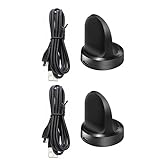
- Replacement Charger for Gear S3 Classic / Frontier Smartwatch
- This is the a new version third party Gear S3 charger. It can charge watch full 100%. and it won't overheat your watch.
- Power protection: Protect your Galaxy Gear S3 Classic / Frontier from over chargerd
- Compact and lightweight Design: Convenient for travelers and business users
- Package includes: 1 x Charger (Compatible with Gear S3 Classic / Frontier Only, Not Fit any other model)
When repair makes more sense than further troubleshooting
Stop DIY troubleshooting and consider service if the dock repeatedly reports an error, the screen is visibly damaged, or charging, restart, and software steps do not change the symptom. Battery, screen, or motherboard faults are possible explanations in iFixit’s troubleshooting tree, but a symptom alone does not identify which component has failed. Samsung repair and parts availability depend on your region; the regional Samsung Australia Gear S3 support page provides local support context rather than establishing availability everywhere.
Opening the watch is a more invasive option than restarting or resetting it. iFixit’s battery-replacement guide specifies a Y00 screwdriver for four 4.2 mm screws. Attempt this only if you are comfortable with small-device repair; otherwise, contact a repair provider. Confirm that any battery or dock is explicitly compatible with SM-R760, and choose a replacement based on the suspected failure point: a dock and a battery address different possibilities.
Free tools Windows power users keep installed
One-click scans. No signup required.
Quick Recap
Best Value

- Compatibility: This charger compatible with Gear S3 Classic / Gear S3 Frontier smartwatch. 【NOT compatible with Galaxy Watch Active 2, Galaxy Watch 3, Galaxy Watch 4】
- Speedy & Full Charge: The Gear S3 charger can full charge your smart watch, and it won't overheat your watch. A full charge take about 2.5 hours.
- Safe & Protection: The charger build in smart chips, provides a stable charging performance. Protecting your Gear S3 Classic / Frontier from over-voltage, over-current, over-chargerd and short-circuit.
- Compact & Convenience: The charging dock with a lightweight and compact design. keep a replacement charger will make your smart watch charged more convenient when you are at home, in office or on travel.
- Package includes: 1 x charging dock, 1 x charging cable. If any problem, please contact us online (Note: the smart watch is not included)
Product prices and availability are accurate as of the date/time indicated and are subject to change. Any price and availability information displayed on Amazon at the time of purchase will apply.




