Do these 3 things before closing this tab:
1Scan for outdated or missing drivers - takes under a minute2Repair Windows errors before they cause bigger problems3Fix the driver behind crashes, sound loss and screen glitchesSome links on this page are affiliate links: if you buy through them we may earn a commission, at no extra cost to you.
If an Apple Watch is asking for the previous owner’s Apple Account during setup, it is protected by Activation Lock. There is no legitimate reset, passcode trick, button combination, or third-party tool that removes it without authorization.
You have only three workable routes: the previous owner enters their Apple Account credentials, the previous owner removes the watch remotely through Find My, or Apple approves an Activation Lock support request backed by valid proof of purchase.
As an Amazon Associate I earn from qualifying purchases.
Quick wins for a faster PC:
Repair Windows errors before they cause bigger problemsFix Now →Scan for outdated or missing drivers - takes under a minuteDriver Scan →What Activation Lock means
Activation Lock links an Apple Watch to the Apple Account used to set up Find My. Erasing the watch removes its data and settings, but it does not remove that account association. During setup, Apple checks the lock before allowing the watch to pair with a new iPhone.
If setup asks for someone else’s Apple Account email address or password, the watch is still linked to that account. The watch’s device passcode cannot substitute for the previous owner’s Apple Account password in a normal secondhand setup.
Popular on Amazon

- EASY TO USE: SwapBandIt️ makes changing your watch band fast and easy. No more frustrating attempts to get your watch band on or off. Just Press…. Slide….and Change! No more fumbling with tiny band-release buttons.
- QUALITY MATERIALS: Our Compatible with Apple Watch Straps Removers are made from high-quality, durable ABS plastic, in the color white. The color and sheen will mimic other Compatible with Apple White products.
- ERGONOMIC DESIGN: SwapBandIt️ is ergonomically designed to fit around the Watch. The spring-loaded arms provide a secure grip on your watch, allowing you to easily change bands for safe.
- COMPATIBLE WITH APPLE WATCH: SwapBandIt️ watch strap changer is designed to fit smartwatches of different sizes. Now in stock, 41mm, 42mm, 44mm, 45mm and Ultra 1, 2 , 3 & 4.
- HOW TO FIND YOUR WATCH SIZE: Flip your Watch bottom up and take a picture with your iPhone. Open the picture and zoom in by pinching and spreading your fingers on the screen. The size, listed as 4xMM, will be visible. Alternatively, take a picture and zoom in to find your watch size.
The quickest solution: ask the previous owner to remove it remotely
The owner does not need to have the physical Apple Watch. They can remove the lock from any browser:
- Go to icloud.com/find.
- Sign in with the Apple Account associated with the watch.
- Open the device list and select the Apple Watch.
- Choose Erase Apple Watch, if it has not already been erased.
- After the erase completes, select Remove This Device.
Apple’s iCloud interface may present the same controls through Quick Access Menu > Find My > All Devices. The important part is the final Remove This Device action after erasure. Simply erasing the watch is not enough.
If the previous owner still has the paired iPhone
Unpairing from the iPhone that was paired with the watch is usually the cleanest method. The owner should:
- Keep the iPhone and Apple Watch close together.
- Open the Apple Watch app.
- Tap My Watch, then All Watches.
- Tap the information button next to the watch.
- Tap Unpair Apple Watch.
- Tap Unpair [watch name].
- For a cellular model, choose whether to keep or remove the cellular plan.
- Enter the Apple Account password when prompted.
- Tap Unpair.
This process erases the watch, returns it to factory settings, and removes Activation Lock. The password step matters: deleting or hiding the watch in an app without authenticating the Apple Account does not complete the removal.
What you can do if you only have the watch
You can erase it locally, but that will not bypass Activation Lock:
Also popular on Amazon

- 【Liftable platform】The liftable platform is designed for better alignment of the punch pin and the watch link pin hole, helping you to complete the adjustment of the strap more efficiently.
- 【Multifunction】We have combined the watch link remover and strap holder into one tool, you only need this one tool to remove and install the watch link pin.Screw-on watch straps are not applicable.
- 【9PCS replacement punch needles】There are two different lengths of replacement needles in the kit. For most of the straps, you can remove the watch link pin by just using the short punch needle pin. For some very wide straps, you can use the long needle to push the watch link pin out a little further for easy removal.
- 【3PCS punch pins of different diameter】Three different diameter punches for different strap pin diameters, compatible with a wider range of watch straps.
- 【Instruction manual】The instruction manual(in English) combines pictures and text to explain to you in detail the right way to use the tool, avoiding wrong operation to damage your watch, and helping you to solve watch problems at home.
- Open Settings on the watch.
- Tap General > Reset.
- Tap Erase All Content and Settings.
- Enter the watch passcode if requested.
- Choose whether to keep or remove the cellular plan.
- Tap Erase All.
After this reset, the watch may look like a new device, but setup can still stop at the Activation Lock screen. That is expected. A reset protects the former owner’s data; it does not transfer ownership.
Recommended Free Tools
If the previous owner forgot the password
The previous owner should recover or reset the Apple Account password first, then use the recovered account to unpair or remove the watch from Find My. They can begin at Apple’s account recovery page.
If the Apple Account is locked or disabled, recovery must be attempted before requesting lock removal. Apple may consider an Activation Lock support request when the legitimate owner cannot regain account access and has acceptable proof of purchase.
Apple’s proof-of-purchase route
If you are the genuine owner, submit an Activation Lock request through Apple’s Activation Lock Support. Approval is not automatic. Apple reviews the documentation and decides whether it establishes ownership.
A useful receipt generally includes:
- A legible sales receipt or invoice;
- The purchase date;
- The device description;
- The receipt or invoice number;
- The price paid;
- The reseller’s contact details; and
- The watch’s serial number, if the reseller normally prints it.
A marketplace message, a photo of the watch, or a serial number by itself may not be enough. If the watch was bought secondhand, the seller’s original receipt is more useful than informal evidence of the transaction.
The Tool Desk
Outbyte Driver Updater FREEScan for outdated or missing drivers - takes under a minuteDriver Scan →Outbyte PC Repair FREEClear out junk files and repair common Windows errorsFree Scan →Also popular on Amazon

- 【Difference with other products】 -- Compared with other products, we added the leather strap punch, you can punch to adjust the length of your leather strap; we lengthened the length of the pin punch, increased the grip handle of the double-headed hammer, more conducive to operation; shortened the pin of the pin punch pin, and use metal to protect the pin is not easy to bend and can be replaced.
- 【Two strap remover with use】--metal strap remover is more suitable for taking out the strap pin directly; watch bracket and double-headed hammer is convenient to insert the strap pin, two tools with use more convenient.
- 【Precautions】--When you use the metal strap remover and fail to eject the pin, please check whether the following situations occur: 1. The direction of the punching needle is inconsistent with the direction indicated by the arrow on the strap 2. The pin hole of the strap is not aligned The gap at the front end of the metal strap remover; please adjust the strap, otherwise it is easy to cause the punching needle to bend and damage your watch.
- 【Easy to use】 -- Turdy and durable, easy to carry, practical, easy to operate, you can solve the problem of the watch at home, save the expensive expenses, suitable for beginner families, can be used as a gift for friends and fathers.
- 【High quality professional set】-- A set of professional watch repair tools comes with a user manual(in English), detailed pictures to explain the correct use for you, help beginners to use this tool to avoid wrong operation causing injury to your watch, correct operation helps to improve the service life of the tool.
If you bought the watch used
Contact the seller and ask them to remove Activation Lock while you are present, or ask them to complete the remote process above. Do not rely on a seller saying that the watch has been “factory reset.” Start pairing it with your iPhone and confirm that setup does not request the seller’s Apple Account.
For a cellular Apple Watch, also ask the seller to remove or cancel the associated cellular plan. This is separate from Activation Lock, but leaving the plan attached can create billing and activation problems.
If the seller cannot remove the lock, the practical options are to request a refund, use the marketplace’s buyer-protection process, or return the watch. Do not pay for an alleged bypass service before resolving the purchase dispute.
Business- and school-owned watches
If the Apple Watch came from a business, school, hospital, or other organization, contact that organization’s IT department or device administrator. Institution-owned devices may be managed through organizational systems, and the organization—not an ordinary buyer—needs to release or handle the device.
Outdated Drivers Are Slowing You Down
One free scan finds every outdated or missing driver and matches the right update for your exact hardware.Free scan · exact hardware matchWindows Errors? Fix Them Before They Spread
Repair common Windows errors and clear accumulated junk for a smoother, more stable PC - no reinstall needed.Free scan · no reinstallClaims that do not work
| Claim | What actually happens |
|---|---|
| Force-resetting the watch removes the lock | It erases local data but leaves Activation Lock enabled. |
| The watch passcode is enough | The passcode can authorize an erase, but it does not normally replace the linked Apple Account during new setup. |
| Removing the cellular plan unlocks it | Cellular service and Activation Lock are separate. Removing a plan does not unlink the Apple Account. |
| There is a hidden reset button or SIM procedure | Apple Watch has no reset button or removable SIM procedure that disables Activation Lock. |
| An IMEI, serial-number, jailbreak, or paid unlock site can bypass it | These are not Apple-authorized removal methods and may be scams or expose your information. |
If an online watch does not show a normal removal option in iCloud, erase it first. Apple’s Find Devices controls can restrict direct removal while a device is online; after the erase completes, use Remove This Device.
Also popular on Amazon
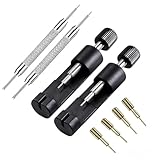
- 【Complete Watch Link Removal Kit】This all-in-one watch link removal kit includes 2 link removal tools, 4 replacement pins, and 2 pin extractors—perfect for precise adjustments by professionals, hobbyists, or DIY watch enthusiasts.
- 【Universal Precision for Any Strap】Effortlessly adjust watch straps of any thickness with the ergonomic design. Simply align the push rod with the link pin, rotate the handle, and remove pins in seconds—no guesswork needed.
- 【Compact & Travel-Ready Design】 Lightweight and portable, this toolkit fits in pockets or travel bags, making it ideal for on-the-go repairs at home, during trips, or in professional workshops.
- 【EFFORTLESS REMOVAL】With its user-friendly manual operation, this watch link remover provides an easy and efficient solution for removing watch strap pins. It's suitable for both home use and professional watch stores.
- 【Package Included】2 * watch link removal tool + 4 * replacement pins+2*watch pin removal tool.Start customizing your watch straps immediately—no extra purchases required.
FAQ
Can Apple remove Activation Lock without the previous owner?
Sometimes, but only after reviewing a support request from the legitimate owner with acceptable proof of purchase. Apple does not remove the lock merely because someone possesses the watch.
Does erasing an Apple Watch remove Activation Lock?
No. Erasing removes personal data and settings, but the watch remains linked to the previous Apple Account until the owner unpairs it, removes it through Find My, or Apple approves an ownership-based support request.
Can I unlock a used Apple Watch with its passcode?
No. The passcode may allow the watch to be erased, but setup can still require the Apple Account that enabled Activation Lock.
Quick wins for a faster PC:
Repair Windows errors before they cause bigger problemsFix Now →Fix the driver behind crashes, sound loss and screen glitchesFind Drivers →Clear out junk files and repair common Windows errorsFree Scan →What should I do if a seller refuses to remove the lock?
Request a refund or return the watch, and use the marketplace’s buyer-protection process if necessary. A locked Apple Watch is not ready for transfer, even if it has been factory-reset.
The Bottom Line
You cannot legitimately remove an Apple Watch Activation Lock without the linked Apple Account, remote action by that account’s owner, or Apple’s approval based on valid proof of purchase. If you bought the watch used and the seller will not release it, return it rather than attempting a reset or paying a third-party bypass service.




