G-Shock time and date setting depends on the watch’s module number, because Casio’s operation guides use different button sequences for different modules. Match your watch to its own guide before pressing anything. The worked example below uses module 3537, the clearest manual-setting procedure in Casio’s official guides, and the comparison table shows where other modules differ.
Setting the time and date on module 3537
Module 3537 uses a long press of A to enter the setting screens, then C to move between fields and B or D to change values. The sequence below applies to module 3537 only.
- Enter Timekeeping Mode, the current-time screen of the watch.
- Set the Home City first. Casio’s module 3537 guide says: “Configure the Home City setting before changing the current time and date settings.”
- Hold A for at least two seconds and release it when the city code flashes.
- Press C until the setting you want to change begins to flash.
- Press B or D to change the flashing value. While the seconds are flashing, D resets them to 00. If the seconds are between 30 and 59 when you reset them, the minutes advance by one.
- Repeat steps 4 and 5 for each time and date setting you need to change.
- Press A to finish.
If you leave the settings idle, the guide says the watch exits setting mode after about two or three minutes. If that happens, restart from step 3 rather than continuing from a partly changed value.
Home City and time-signal adjustment
On module 3537, the Home City comes before the clock and calendar because it is the first setting the guide asks you to configure. Casio also recommends adjusting the time through the time signal when the watch is in a place where signal reception is possible. Whether the watch receives signals, and how Home City interacts with that behavior, depends on both the module and your location, so do not assume a particular watch will synchronize automatically wherever you are.
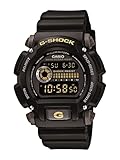
#1 Best Overall

- Rugged & Sporty Design – Matte black finish with bold digital display, built for tactical, military, and extreme sports enthusiasts.
- High-Brightness LED Backlight – Features Super Illuminator LED with a light guide plate, ensuring exceptional visibility in low-light conditions.
- 200M Water Resistance – Engineered for swimming, snorkeling, and outdoor adventures, this shock-resistant watch is ready for action.
- Extended 7-Year Battery Life – Powered by a CR2025 battery, offering years of reliable performance without frequent replacements.
- Shock-Resistant Structure – Built to withstand extreme conditions, making it ideal for sports, military, and rugged outdoor use.
How the other modules differ
The table lists the setting details stated in each official guide. Where a guide does not state a particular step in the material available, the cell reads “not stated” rather than being inferred from another module.
| Module | How setting starts | Button sequence stated | 12/24-hour format | Notes |
|---|---|---|---|---|
| 3537 | Timekeeping Mode; hold A for at least two seconds until the city code flashes | C moves between fields; B or D changes values; A completes | Press C twice to reach it, then D to toggle | Set Home City first; idle exit after about two or three minutes |
| 3545 | Hold A until the city code flashes | Full sequence not stated | Press C twice, then D to select | The 12/24-hour sequence is documented; other fields are not stated |
| 3529 | Timekeeping Mode; press A to make the seconds flash | Press L to toggle 12/24-hour format; press A to complete | L toggles the format | P marks p.m. in 12-hour mode |
| 3554 | Menu-based procedure | Button sequence not stated; the guide describes a menu route | Not stated | Manual adjustment is described for use when the watch cannot communicate with a phone or receive GPS signals; do not use the 3529 or 3537 button sequences |
| 5641 | Manual date and time adjustment when phone connection is unavailable | Uses its own A, D and E button sequence; step-by-step detail not stated | Not stated | Follow the 5641 guide only |
| 2228 | Not stated | The guide distinguishes major date and time changes from a minor zero-reset operation | Not stated | Weekday follows the date; see the note below |
Module 2228: weekday and calendar
The module 2228 guide, which is older, says the weekday is set according to the date, and that the full automatic calendar handles differing month lengths and leap years. Those calendar statements are documented for module 2228 specifically. If you own a different module, check its own guide before assuming the same calendar behavior.
Rank #2

- Shock-Resistant Durability: Built to withstand the toughest conditions, this G-Shock watch features a rugged resin case and bezel, perfect for outdoor adventures and extreme sports.
- 200M Water Resistance: Designed for water enthusiasts, it’s suitable for scuba diving, swimming, and snorkeling, providing reliable protection up to 200 meters.
- Electro-Luminescent Backlight: The blue-green EL backlight with afterglow ensures clear visibility of the time, day, and date, even in complete darkness.
- Precision Stopwatch & Countdown Timer: Measure elapsed and split times with the 1/100-second stopwatch, or set up a countdown timer with up to a 24-hour range, ideal for timing workouts or daily tasks.
- Multi-Alarm with Flash Alert: Stay on schedule with a customizable alarm, hourly chime, and flash alert that combines light and sound for added convenience.
Menu-based and phone-linked models
Module 3554 and module 5641 are documented with manual adjustment routes for situations where the watch cannot use a phone connection, with 3554 also referring to GPS. Their menus and button labels are not interchangeable with the module 3537 steps, so start from the Casio guide for your exact module and not from the sequence above.
Quick Recap
Best Value
- Sport Type: Scuba Diving
Rank #4

- Band Size: Mens-Standard
- Shock Resistant
- Auto LED Light with Afterglow
- Magnetic Resistant
Rank #3

- Super Matte Finish, Shock Resistant, 200M water resistance, LED light (Super illuminator), World time, Stopwatch, Countdown timer, 5 daily alarms, Hourly time signal, Hand shift feature
- Full auto-calendar, 12/24-hour format, Analog: 2 hands (hour, minute (hand moves every 20 seconds)), Digital: Hour, minute, second, pm, month, date, day, Approx. battery life: 5 years on CR2016
- Quartz Movement
- Case Diameter: 52.8mm
- Water resistant 200m (660ft): in general, suitable for professional marine activity and serious surface water sports, but not diving
Product prices and availability are accurate as of the date/time indicated and are subject to change. Any price and availability information displayed on Amazon at the time of purchase will apply.




