Some links on this page are affiliate links: if you buy through them we may earn a commission, at no extra cost to you.
To set a Longines automatic watch safely, identify its calibre first, release the crown if it screws down, keep quick-date correction outside the 20:00–03:00 danger window, and use the direction specified in that movement’s manual. Most Longines three-hand date models use crown position 1 for normal running or winding, position 2 for the date, and position 3 for the time, but the date direction and winding procedure can differ by calibre.
If the watch has stopped, give it an initial wind according to its calibre instructions before setting it. Afterward, push the crown fully home—and screw it down when fitted—to preserve water resistance. The date normally changes as the hour hand passes midnight and must be corrected after months with fewer than 31 days.
As an Amazon Associate I earn from qualifying purchases.
What should I check before setting a Longines automatic watch?
Start with the watch’s exact reference or movement calibre rather than relying on a generic Longines procedure. Longines uses more than one automatic movement, and the instructions can differ in important ways, especially the direction used for quick date correction and the way the movement is manually started.
Find the reference or calibre
Look for the model reference in the paperwork, warranty documents or other watch records. The calibre may also be identified in the model documentation. Enter that information in Longines’ official care and manual service to retrieve the booklet for the exact watch. The model-specific booklet takes precedence over a general three-hand guide whenever the instructions differ.
Popular on Amazon

- Complete 6-Piece Tool Set: This non-slip watch tool kit includes a support cushion, three hand removers, and two 3.7-inch precision setting tools, assisting you with the installation, adjustment, and removal of watch hands.
- Precision Specifications: This repair kit comprehensively meets various needs: the three removers accommodate hand sizes ranging from 0.6mm to 3.0mm, while the 3.7-inch setting tools ensure stable operation without leaving scratches.
- Scratch-Resistant Design: Featuring smooth, rounded edges, these tools effectively prevent slipping or scratching of delicate watch dials, movements, crystals, and cases during use.
- Compact and Portable: Compact in size, this set is easy to store in toolboxes or travel kits, making it ideal for home watch enthusiasts, jewelry repair shops, and mobile repair technicians.
- Versatile Application: Whether you are restoring vintage timepieces or assembling and modifying watches, this tool set delivers a reliable, professional experience for users of all skill levels.
Prepare a stable work area
Set the watch on a clean, padded surface before pulling the crown. A watch-setting cushion is useful, but any stable, soft surface that prevents the case and crystal from being scratched is appropriate. Keep the watch face-up so you can see the hands and date window while operating the crown.
Determine whether the crown screws down
A push-in crown pulls straight out once it is in its normal position. A screw-down crown is held by threads and must first be turned anti-clockwise until it releases. Never pull hard against a threaded crown; forcing it can damage the crown or tube. If you are unsure which type is fitted, consult the model booklet rather than testing it with force.
Recommended Free Tools
What do the three crown positions do?
On the usual Longines three-hand automatic with a date, the crown has three operating positions. Position 1 is fully pushed in and is used for normal operation or winding, position 2 is the intermediate setting for quick date correction, and position 3 is the fully pulled-out position for setting the time.
| Crown position | Typical function | Safety point |
|---|---|---|
| Position 1 | Normal running; manual winding on movements that support it | Push the crown fully home after adjustment |
| Position 2 | Quick correction of the date | Use only outside the movement’s restricted date-setting hours |
| Position 3 | Setting the hour and minute hands | Use this position to establish the correct AM/PM cycle |
The feel of each detent can be subtle. Pull the crown gently and stop at the first click for the date; pull farther, to the second click, for the hands. A model with GMT, moon-phase or another complication may have additional positions or functions, so its own booklet is decisive.
How do I restart a Longines automatic watch that has stopped?
A stopped automatic watch can generally be started by manually winding it through the normal crown position before you set the date or time. Longines states that winding requirements vary by movement, so follow the calibre-specific instructions instead of assuming a universal number of turns or a universal winding direction.
Also popular on Amazon

- Precision Watch Hand Removal Tool: Our 6-piece kit includes 3 hand pressure tools, 2 watch hands removers and 1 watch cushion to safely lift and install watch hands. The watch hand removal tool is crafted from durable metal, ensuring precise control without slipping, making it ideal for both beginners and seasoned watchmakers.
- Protective Design for Your Dial: Each watch hand removal tool features a non-marring tip that shields the watch face from scratches and damage. Whether you're replacing hour, minute, or second hands, this tool ensures a clean, professional result every time, preserving the integrity of your timepiece.
- Versatile and Easy to Use: With multiple sizes and configurations, this watch hand removal tool kit accommodates a wide range of watch models. The ergonomic handles provide a comfortable grip, allowing for effortless operation—perfect for DIY enthusiasts, hobbyists, or professional repair shops.
- Built to Last: Constructed from high-grade metal alloy, this watch hand removal tool set offers exceptional durability and resistance to wear. Each component is precision-machined for long-lasting performance, ensuring you have a reliable tool for countless repair jobs.
- Compact and Portable: The entire watch hand removal tool kit comes in a convenient, lightweight package (20 x 15 x 1.8 cm, net weight 60g) with a resealable bag for easy storage and transport. Take it anywhere for on-the-go repairs, whether at home or in the field.
- Confirm that the crown is released from any screw-down threads.
- Leave the crown in position 1 unless the model booklet specifies a different starting procedure.
- Wind the movement as described for that calibre. Stop if the crown feels abnormal, binds or refuses to turn normally.
- Once the seconds hand is running, continue with the date and time procedure below.
Do not use the quick-set date to “wake up” a stopped movement. The date mechanism is an adjustment function, not a substitute for starting the gear train. If the watch will not begin running after the calibre’s prescribed winding procedure, stop manipulating the crown and arrange inspection through an authorised Longines service centre.
When is it safe to use the quick date correction?
Keep the displayed time outside 20:00–03:00 before using the intermediate crown position. Longines’ official instruction states: “Avoid any quick date correction between 20:00 and 03:00.” During this period, the movement may already be engaging the date-change mechanism, and forcing a quick correction can damage the date parts.
Move the hands out of the restricted window first
If the watch shows a time between 8 p.m. and 3 a.m., pull the crown to the time-setting position and move the hands to a clearly safe time, such as 6:00. Only then return the crown to the intermediate position for the date correction. The displayed time—not the time you believe the watch should show—determines whether quick correction is safe.
Why the window is wider than midnight
The date mechanism can begin engaging before midnight and finish after it. The 20:00–03:00 interval is therefore a protective operating window, not a statement that every movement changes the date at exactly midnight. Keep the hands outside the entire interval whenever you use the quick-set feature.
Which way should I turn the crown to change the date?
Date-correction direction is calibre-specific. The general Longines three-hand/date instruction says to turn the crown forward, while the L888 movement manual specifies turning it backward. Neither direction should be treated as universal: use the instruction for your exact reference or calibre.
The Tool Desk
Outbyte PC Repair FREERepair Windows errors before they cause bigger problemsFix Now →Outbyte Driver Updater FREEFix the driver behind crashes, sound loss and screen glitchesFind Drivers →Also popular on Amazon

- 【Product Introduction】: This product has a size of 7.5*7.5*1.5cm/0.75*0.75*0.15inch. The case liner is transparent and gel-like. It provides support and is a protective tool used to replace the case
- 【Quality material construction】: This watch repair mat is made of high quality polypropylene case and soft rubber lining, soft and wear-resistant, can be used repeatedly for a long time, and has strong durability
- 【Scratch-resistant】: Prevents the watch from being scratched and damaged during maintenance. The watch case maintenance kit box is an ideal tool for performing case work when dismantling watches
- 【Ideal Watch Repair Tool】: Watch Case Pad is an ideal tool for watch case processing, providing a safe working space. Watch case pad is used for watch repair, fine metal items, watch movement pad, watch case outer pad, movement pad
- 【Features】: A very compact repair tool, specifically designed for watchmakers, it is portable and can be used for repairs anywhere. The watch movement repair pad is made of soft rubber and plastic, featuring durability and longevity
How to identify the correct direction
- Retrieve the matching Longines manual using the watch reference or calibre.
- Read the section covering the date or calendar adjustment, not just the general crown diagram.
- With the hands outside 20:00–03:00, pull the crown to position 2.
- Turn only in the direction stated for that movement and stop when the correct date appears.
If the date does not change in the expected direction, do not keep applying force or assume that the mechanism is defective. Return to the booklet and verify that you have selected the correct calibre. A model-specific instruction always overrides a generic explanation.
How do I set the correct time and AM/PM?
Use the fully extended crown position for the hands. Longines’ instruction recommends pulling the crown to that position when the seconds hand is at 60, then turning the hands to the desired time before returning the crown to position 1.
- Wait until the seconds hand reaches the 60-second marker, if the movement is running.
- Pull the crown fully out to position 3.
- Turn the hands to the desired time. If you are uncertain whether the watch is in the morning or evening cycle, advance the hands through 12 o’clock and watch the date window.
- Confirm that the date changes at the intended midnight. If it changes at noon instead, advance the hands through another 12-hour cycle before setting the final time.
- Push the crown back to position 1 to restart normal operation.
Advancing the hands through midnight is also a useful way to verify the date cycle after a long period without use. Do not use the quick-set date to correct an AM/PM mistake; establish the cycle with the hands instead.
How do I secure a screw-down crown after setting?
After the date and time are correct, push the crown fully inward. On a screw-down model, turn the crown clockwise while applying only the gentle pressure needed for the threads to engage, then tighten it firmly without forcing it.
Windows Errors? Fix Them Before They Spread
Repair common Windows errors and clear accumulated junk for a smoother, more stable PC - no reinstall needed.Free scan · no reinstallOutdated Drivers Are Slowing You Down
One free scan finds every outdated or missing driver and matches the right update for your exact hardware.Free scan · exact hardware matchLongines links this final step to water resistance. Its instruction says: “After making the settings, return the crown to position 1, then push it in and screw it firmly in order to ensure the watch’s water-resistance.” A crown left partly unscrewed or not fully seated can compromise the case seal even if the watch was originally rated for water resistance.
Also popular on Amazon

- ⌚Non-Slip Watch Case Pad---Watch Case Casing Cushion. The bottom of this watch case pedestal is made of non-slip material, which has good during maintenance. When removing batteries, pins and other watch work, the case pad is the ideal tool for the work surface of the case.
- ⌚Non Scratching And Secure---Watch Case Movement Cushion. This watch case cushion holder ensures that your watch remains safe from scratches and damage while replacing batteries, glass, or performing maintenance on the watch. Put a watch pillows under the watch when repairing the watch to avoid scratching the watch. Use this tool to prevent scratching your expensive watch when changing batteries, glass or servicing your watch.
- ⌚Durable Material---Watch Case Casing Pad. Made from soft rubber and plastic, this watch movement repair pad offers durability and longevity for all your watch repair needs. Whether you are a professional or a hobbyist in the field of watches, you can use this tool to easily perform watch repair work.
- ⌚Perfect For Watch Case Work---Watch Case Casing Holder. The watch cushion is for keeping the watch in place on a suitable surface while working on the bracelet, case, or glass. The watch case cushion is the ideal tool for working on the surface of watch cases, providing a safe and secure workspace.
- ⌚After Sale Service---Watch Movement Holder Cushion. We offer 24-hour customer service, any problems (whether it’s before or after buying the product) please feel to contact us, we assure you a satisfied solution.
Push-in versus screw-down crowns
| Crown style | Before adjustment | After adjustment |
|---|---|---|
| Push-in | Pull gently from the normal position to the required setting position | Push completely into position 1 |
| Screw-down | Turn anti-clockwise until the crown releases, then pull | Push in and screw clockwise until firmly seated, without forcing |
How often does the date need manual correction?
A standard date display advances as the hour hand passes midnight, but it cannot show the different lengths of every calendar month. Longines states: “The date needs to be corrected after every month shorter than 31 days.” That means a correction is normally required after February, April, June, September and November; a 31-day month normally advances the display correctly into the next month.
At the end of a short month, wait until the watch is outside the 20:00–03:00 restricted period, then use the movement’s approved quick-set direction. If the watch has stopped, restart it first so you can determine whether the displayed time is in the correct AM/PM cycle.
Independent reader supportYour contribution helps us test, update, and keep practical guides available for everyone.What changes on Longines models with extra complications?
GMT, moon-phase, day-date and other complications can add crown positions, pushers or separate adjustment rules. The three-position layout described above applies to the usual three-hand/date arrangement, not automatically to every Longines automatic watch.
Recommended Free Tools
GMT and dual-time displays
A GMT hand may be adjusted independently or share a setting position with another indication. Do not assume that the first intermediate click controls the calendar on a GMT model; use the diagram in the matching booklet.
Moon-phase and calendar displays
Moon-phase and multi-calendar mechanisms can have their own restricted hours and correction sequences. Longines advises consulting the model-specific booklet when complications or calibre differences apply. If the booklet gives a different safe window or crown sequence, follow it rather than the general three-hand procedure.
Also popular on Amazon
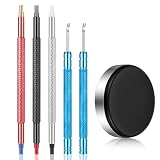
- 【Complete 6-Piece Watch Hand Tool Kit】Includes 1 Pcs multi-tip Watch Cushion (11 cm / 4.33 in) with 3 watch hand removal tool (silver: 0.6–1.0 mm, black: 0.8–1.5 mm, red: 2.0–3.0 mm) plus 2 fine blue watch hand tool (9.5 cm long)—ideal for installing, adjusting, or removing watch hands with pinpoint accuracy.
- 【Precision Tools for Delicate Work】Round Leather Watch Movement Holder engineered for horology enthusiasts and professionals. The slim, color-coded tips allow quick identification of sizes, while the smooth-action mechanism prevents slipping or scratching delicate watch dials and movements.
- 【Non-Slip Leather Watch Cushion Included】The soft round watch pad (5.1 × 5.1 × 1.6 cm / 2.01" cube) keeps your timepiece stable during servicing. Its non-slip base and cushioned surface protect the case and crystal from scratches and movement.
- 【Organized & Portable Setup】All tools are compact and neatly organized—watch repair mats perfect for home watchmakers, jewelry repair shops, or on-the-go technicians. The small profile (tools under 11 cm) fits easily into toolboxes or travel kits.
- 【Trusted by Hobbyists & Pros Alike】Whether you’re restoring vintage watches, assembling modded timepieces, or learning horology, this Guduling watch hand removal tool delivers reliability, control, and professional-grade results at an accessible price.
What should I do if the crown or date does not behave normally?
Stop and diagnose before applying more pressure. A normal adjustment should have clear crown positions and a predictable response described in the movement manual.
- The crown will not release: if it is screw-down, turn it anti-clockwise gently until the threads disengage. Persistent resistance or grinding warrants service rather than force.
- The date will not change: verify that the crown is in position 2, the hands are outside 20:00–03:00 and the turning direction matches the calibre manual.
- The date changes at noon: the hands are probably 12 hours out of phase. Use position 3 to pass through midnight and confirm the date change before setting the final time.
- The watch stops again: repeat the calibre’s prescribed initial-winding procedure. If it still will not run normally, have it assessed by an authorised Longines service centre.
- The crown feels loose or rough: stop using it. A damaged crown, tube or seal can affect water resistance and should be examined professionally.
Longines says proper servicing preserves performance and durability. Use an authorised service centre when the crown, date mechanism or running condition remains abnormal, rather than continuing to experiment with a generic setting sequence.
Which details matter when comparing two Longines automatic watches?
When two models look similar, compare their operating details rather than assuming that one instruction fits both. The most useful comparison points are the reference or calibre, crown construction, number and purpose of crown positions, date-correction direction, restricted date-setting hours and any additional complications.
- Reference and calibre: establish which manual governs the watch.
- Crown construction: determine whether the crown must be unscrewed and re-secured.
- Positions: count the detents and identify what each one controls.
- Date direction: confirm whether that movement uses forward or backward correction.
- Safety window: follow the movement’s stated restriction; the general guidance is to avoid 20:00–03:00.
- Complications: check for GMT, moon phase, day-date or other indications that may change the sequence.
Writing these details down with the watch reference can prevent a future mistake when the watch needs a calendar correction months later.
Frequently Asked Questions
Does every Longines automatic watch have the same crown positions?
No. The three-position arrangement is typical of a three-hand/date model, but complications and different calibres can add positions or assign them different functions. Use the booklet for the exact reference whenever the crown detents do not match the usual layout.
Why does my watch date change at noon instead of midnight?
The hands are 12 hours out of phase, so the movement interprets noon as midnight. Pull to the time-setting position, advance the hands through the next midnight and set the correct morning or evening time after confirming the date change.
How often should a Longines automatic watch be serviced?
The setting instructions do not establish one universal service interval for every calibre. For a schedule and condition assessment, contact an authorised Longines service centre and provide the watch reference.
Can I force the crown if it feels tight while changing the date?
No. Resistance can indicate that the crown is still threaded, the watch is in the wrong setting position or the mechanism needs service. Stop, check the model manual and seek authorised service if normal movement does not return.




