Crashes, No Sound, or Screen Glitches?
Random freezes, missing sound and display glitches usually trace back to one bad driver. Find and replace yours safely.Free scan · under a minuteWindows Errors? Fix Them Before They Spread
Repair common Windows errors and clear accumulated junk for a smoother, more stable PC - no reinstall needed.Free scan · no reinstallSome links on this page are affiliate links: if you buy through them we may earn a commission, at no extra cost to you.
To set a Citizen Tsuno correctly, first identify the movement on the caseback. The quartz Tsuno covered by the AN3700-62A instructions uses crown positions 0, 1 and 2, a quick-set date, and pushers A and B for its chronograph. Set the time with the crown in position 2, set the date in position 1 only outside the late-evening changeover period, and reset chronograph hands with the crown in position 2 if they miss zero. The Promaster Tsuno Chronograph Racer is a different solar model with different timing units and an alarm, so its controls must be set from its own guide.
Which Citizen Tsuno movement do you have?
Read the first four digits of the number engraved on the caseback before pressing any pusher. The AN3700-62A instructions apply to calibers beginning 051, 051C, 0540 and 0560. Button functions and hand-correction procedures are movement-specific, so a caseback photograph is useful if the engraving is difficult to read.
As an Amazon Associate I earn from qualifying purchases.
The Tool Desk
Outbyte Driver Updater FREEFix the driver behind crashes, sound loss and screen glitchesFind Drivers →Outbyte PC Repair FREEClear out junk files and repair common Windows errorsFree Scan →| Tsuno version | Movement or caliber information | Chronograph specification | Other identifying detail |
|---|---|---|---|
| Citizen Tsuno covered by AN3700-62A instructions | Calibers 051*, 051C, 0540 and 0560 | Up to 12 hours, measured in 1-second increments | SR920SW battery |
| Promaster Tsuno Chronograph Racer | Separate solar-powered movement and guide | 12-hour chronograph in 1/5-second units | Includes an alarm and different displays and controls |
If your watch is the Promaster solar variant, do not apply the quartz Tsuno sequence below by assumption. Confirm the movement and use the instructions for that model.
What do the Tsuno crown positions mean?
The crown has three working positions. Position 0 is fully pushed in and is the normal running position. Position 1 is the date-setting position. Position 2 stops the small seconds hand and is used to set the hour and minute hands or correct chronograph-hand alignment. Push the crown fully back to position 0 after every adjustment.
Popular on Amazon

- Men's luxury timepieces with technical advancements and a sporty style
- 1 Second Chronograph Measures up to 60 Minutes, 12/24 Hour Time, Date
- Silver-Tone Stainless Steel Case
- Mineral Crystal
- 100 Meters Water Resistant and 5 Year Limited Warranty
When the crown is in position 2, the regular seconds hand stops. That allows the minute hand to be synchronized with a reliable time signal when the crown is returned to position 0.
How do you set the time on an AN3700-62A Citizen Tsuno?
Use this sequence for a Tsuno whose caseback identifies one of the AN3700-62A-family calibers.
Free tools Windows power users keep installed
One-click scans. No signup required.
- Stop at the reference second. Watch the small seconds hand and wait until it reaches the 0-second position.
- Pull the crown to position 2. The small seconds hand should stop.
- Turn the crown. Rotate it until the hour and minute hands show the desired time.
- Check the 12-hour cycle. Use the 24-hour indication, if present, or watch when the date changes while advancing the hands. The calendar changes at midnight, not at noon, so a 12-hour error is possible if AM and PM are confused.
- Restart the watch. Push the crown completely into position 0, ideally at the same instant as a dependable time signal.
How can you synchronize the minute hand more precisely?
A general Citizen reference procedure is to move the minute hand four or five minutes beyond the target time, then turn it back to the exact minute before pushing the crown in. This can reduce apparent play in the hand train, but confirm that the procedure is appropriate for your specific Tsuno caliber before relying on it.
How do you tell whether the time is AM or PM?
Advance the hands through 12 o’clock while observing the date. If the date changes, the hands have crossed midnight. If the date does not change, they have crossed noon. This check is more reliable than judging AM or PM from the hour hand alone.
How do you set the date without damaging the calendar?
The date is quick-set from crown position 1, but the timing of the adjustment matters.
Also popular on Amazon

- Modern, pilot-inspired Promaster timepieces equipped for professional use to discover the world from high above.
- Synchronized to Atomic Time Clock for Superior Accuracy, Atomic Timekeeping Technology with Synchronized Time Adjustment Available in 24 Time Zones, 1 Second Chronograph Measures up to 60 Minutes, Perpetual Calendar, 12/24 Hour Time, Alarm, Power Reserve Indicator, Day / Date
- Black Stainless Steel
- Sapphire Crystal
- 200 Meters Water Resistant and 5 Year Limited Warranty
- Pull the crown out to position 1.
- Turn the crown until the desired date appears.
- Push the crown back to position 0 and check that it is fully seated.
What time should you avoid?
Do not use the quick-set date between approximately 9:00 PM and 1:00 AM. During this period the watch’s calendar mechanism may already be engaging, and the date may fail to change properly. If you do not know what time the watch currently indicates, move the hands to a safe daytime hour before using position 1.
What’s actually slowing this PC down?
Pick the symptom - the matching free tool is one click away.
Why must some months be corrected manually?
The calendar follows a 31-day cycle. After a month with fewer than 31 days, advance the date manually on the first day of the new month. February, April, June, September and November therefore require a correction whenever the displayed date does not match the calendar.
How do you start, stop and reset the Tsuno chronograph?
On the common Tsuno layout, pusher A starts and stops timing, while pusher B resets the chronograph after timing has stopped. Follow the pusher diagram for the caliber engraved on your caseback rather than relying only on the position of the buttons.
- Press button A once to start the chronograph.
- Press button A again to stop it and read the elapsed time.
- With timing stopped, press button B to return the chronograph hands to zero.
You can repeat the start-and-stop operation to pause and resume a timing session. The AN3700-62A family records up to 12 hours in 1-second increments. That capacity is a specification of the movement, not a recommendation to leave the chronograph running when it is not needed.
What happens if you press reset while the chronograph is running?
Reset is intended to be used after the timing operation has stopped. Stop the chronograph with button A first, then use button B. If a pusher does not respond normally, do not force it; verify the movement instructions and seek service if the problem remains.
Also popular on Amazon

- The "Tsuyosa" Automatic, from the NJ015 series, brings ultramodern sports styling right to your wrist. Executed in a versatile 40mm footprint, the sophisticated design of the watch makes a strong impression via a silver-tone stainless steel case and a seamlessly integrated, matching bracelet.
- . Underneath an anti-reflective sapphire crystal, the sporty timepiece makes use of a sunray green dial, with a 3 o’clock date window and contrasting silver-tone details adding to its classic aesthetic. Powered by an automatic movement and offering up to 50 meters of water resistance, the refined timepiece is a daily wearing choice ready for work, play, and everything in between. Caliber 8210.
- 3 Hand with Date, Automatic, 42 Hour Power Reserve
- Sapphire Crystal
- 50M Water Resistant and 5 Year Limited Warranty
How do you reset chronograph hands that do not return to zero?
A chronograph hand can be displaced from zero after a shock, battery service or an interrupted reset. The correction sequence for the AN3700-62A family uses the crown and pushers as follows.
- Pull the crown to position 2. This stops the regular seconds hand and places the watch in the hand-correction mode.
- Correct the chronograph-seconds hand with button B. Press B repeatedly until that hand reaches the zero position. Holding the button can move it rapidly when a large correction is needed.
- Correct the chronograph minute and hour hands if necessary. Use button A to bring those hands to zero as required by the movement’s pusher diagram.
- Set the current time. With the chronograph hands aligned, adjust the hour and minute hands in the same way as a normal time setting.
- Push the crown to position 0. The regular timekeeping hands and chronograph should now run from their reference positions.
Zero alignment is a calibration step, not a way to erase elapsed time while timing is active. Always stop the chronograph before performing the reset procedure.
Why did the date not change after you set the Tsuno?
The most common explanation is that the quick-set operation was performed during the approximately 9:00 PM to 1:00 AM changeover window. Move the hands to a safe daytime hour, use position 1 to select the date, and then set the correct time while checking which passage through 12 o’clock changes the calendar.
What if the date changes at noon?
A date that changes at noon indicates that the displayed time is 12 hours out of phase. Pull the crown to position 2, advance the hands through a full 12-hour cycle so that midnight rather than noon triggers the date change, and then set the correct hour and minute.
Outdated Drivers Are Slowing You Down
One free scan finds every outdated or missing driver and matches the right update for your exact hardware.Free scan · exact hardware matchPC Slower Than It Used to Be?
A free scan shows the junk files, broken settings and background clutter dragging Windows down - then fixes them in one click.Free scan · Windows 10 & 11What if the date is wrong after a short month?
The Tsuno calendar is not programmed for the different lengths of every month. Correct the date manually after any month with fewer than 31 days, using the safe-hour procedure rather than quick-setting during the late-evening changeover period.
Also popular on Amazon
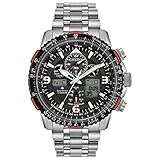
- Modern, pilot-inspired Promaster timepieces equipped for professional use to discover the world from high above.
- An Eco-Friendly Evolution: Citizen launches first Titanium Watch in 1970. More than 50-year-old evolution of innovative timepieces crafted from proprietary space-age material.
- Benefits of Super Titanium: Lightweight for Better Comfort, Scratch Resistant, Gentle on Skin, and Rust Resistant. Five times harder and 40% lighter than stainless steel.
- Atomic Timekeeping Technology with Synchronized Time Adjustment Available in 43 World Cities, 1/100 Second Chronograph Measures up to 24 Hours, Perpetual Calendar, Dual Time (Second Time Zone), 2 Alarms, 99-Minute Countdown Timer
- Sustainably powered by any light, with our Eco-Drive technology this watch never needs a battery. 200 Meters Water Resistant and 5 Year Limited Warranty
Is the Promaster Tsuno set the same way?
No. The Promaster Tsuno Chronograph Racer is a solar-powered variant with its own guide. Its chronograph measures in 1/5-second units and it includes an alarm, so the displays, pusher assignments and adjustment sequence differ from the AN3700-62A quartz family.
Check the caseback and model documentation before making any adjustment. The quartz instructions in this article are appropriate only when the movement identification matches the AN3700-62A family.
Independent reader supportYour contribution helps us test, update, and keep practical guides available for everyone.What battery and service does the quartz Tsuno require?
The AN3700-62A specification lists an SR920SW battery. Battery replacement should be handled by an authorized Citizen service center or a qualified watchmaker, particularly if the watch’s water resistance must be checked after the case is opened.
Citizen’s guide directs that repairs other than band work be performed by Citizen. A service professional can also investigate a chronograph that will not start, stop or return to zero after the correct adjustment sequence, or a crown that will not seat fully.
What should you check before wearing the watch again?
- Confirm the caseback movement before using button-specific instructions.
- Make sure the crown is fully pushed into position 0 after setting.
- Verify that the date changes at midnight rather than noon.
- Set the date only outside the approximately 9:00 PM–1:00 AM restricted period.
- Stop the chronograph before pressing reset.
- Use the zero-correction sequence only with the crown in position 2.
- Arrange battery work, repairs and water-resistance checks through Citizen or a qualified service provider.
What are the safest settings in a typical adjustment session?
Start by identifying the movement, then move the crown to the position needed for only one task. Set the date first at a safe daytime indication, return the crown to position 0, and set the time from position 2. Finish by checking the AM/PM relationship and ensuring every crown position is fully engaged. If the chronograph needs calibration, stop timing and correct the hands before returning the crown to its normal position.
Also popular on Amazon

- 3 Hand, Day / Date
- Silver-Tone Stainless Steel Case
- Mineral Crystal
- 30MM Water Resistant
Frequently Asked Questions
Why does my Citizen Tsuno date change at noon instead of midnight?
The hour hand is 12 hours out of phase. Advance the hands through another 12-hour cycle in crown position 2, then confirm that the date changes at midnight before setting the final time.
Can I set the Tsuno date for February in the same way as July?
The watch uses a 31-day calendar, so it cannot know that February ended earlier. On the first day after a short month, correct the displayed date manually during a safe daytime setting period.
Quick wins for a faster PC:
Clear out junk files and repair common Windows errorsFree Scan →Scan for outdated or missing drivers - takes under a minuteDriver Scan →What should I do if a chronograph pusher will not move?
Do not force the button or continue pressing it against resistance. Check that timing is stopped, confirm the movement on the caseback, and have the watch inspected by an authorized Citizen service center or qualified watchmaker.
How can I tell whether my Tsuno is the solar Promaster version?
Use the model and movement information on the caseback and compare the displays with the Promaster documentation. A solar movement, 1/5-second chronograph and alarm identify a different control system from the AN3700-62A quartz family.