Some links on this page are affiliate links: if you buy through them we may earn a commission, at no extra cost to you.
A missing Garmin map is usually a display setting, an unsupported or outdated TopoActive region, an interrupted map transfer, or poor satellite reception—not a permanently broken watch. Start by adding the Map data screen and checking Map Layers and Map Type. If the map is installed but old or absent, update it with Map Manager over Wi‑Fi or Garmin Express. Reinstall after an unlock or authentication error, and improve GPS reception before treating a drifting track as bad map data. Only after updating should you report a consistently wrong trail or feature to Garmin’s TopoActive Map Error Report.
What does “missing map” mean on a Garmin watch?
There are several different failures that look alike on the wrist or in Garmin Connect. Identifying which one you have prevents an unnecessary reinstall.
As an Amazon Associate I earn from qualifying purchases.
Do these 3 things before closing this tab:
1Repair Windows errors before they cause bigger problems2Scan for outdated or missing drivers - takes under a minute3Clear out junk files and repair common Windows errors- The map is installed but hidden: The activity does not include a Map data screen, or its Map Layers or Map Type settings hide the intended product.
- The watch cannot provide a map for that activity: Indoor and other non-GPS activity profiles do not create a GPS map for the recorded activity.
- The map product or region is missing or stale: The watch needs a TopoActive update, or the region you need is not installed or not supported by that model.
- The map transfer or unlock data is damaged: An interrupted computer transfer can produce “Can’t Unlock Maps” or “Can’t Authenticate Maps.”
- The underlying track is wrong: The watch has poor satellite reception, outdated software or satellite data, or a hardware fault. A map update cannot correct a GPS track recorded in the wrong place.
Menu names and available regions vary by model, firmware and country. If a menu in the instructions below is absent, consult the owner’s manual for that exact watch; Garmin says Map Manager is available only on compatible watches.
How do I make the map appear on an activity screen?
If the map is absent only while you are viewing an activity, add the Map data screen before changing maps or connecting a computer.
Popular on Amazon

- Connect this cable to your USB-C AC adapter (sold separately) to recharge your compatible Garmin device.
- Item Package Dimension: 6.649999993217L x 2.6799999972664W x 0.749999999235H inches
- Item Package Weight - 0.09038952742 Pounds
- Item Package Quantity - 1
- Product Type - ELECTRONIC CABLE
- Open the activity profile you use for navigation.
- Open its settings and choose Data Screens.
- Choose Add New, then select Map.
- Save the screen and return to the activity. Swipe or use the navigation buttons to reach the new map page.
- From the map page or the activity’s map settings, open Map Layers and Map Type. Turn on the installed map product you intend to view and select the appropriate type.
This display fix is appropriate when other map functions work and the map is merely missing from the data-screen rotation. Do not reinstall a map solely because the screen was never added.
How can I tell whether my watch supports the map and region I need?
Garmin’s Map Manager is not present on every model, and coverage differs by device. A region listed in Garmin documentation is not automatically available on every watch.
Check the watch itself
Look under Settings > Map or Settings > Map & Navigation. A compatible watch normally shows Map Manager. Open it and review the map categories and regions offered for that device. If Map Manager is not listed, use the model’s manual to confirm whether maps are supported and whether a computer update is required.
Check the activity and geography
Confirm that you are using a GPS-capable outdoor profile, such as a walking, hiking, cycling or running activity, rather than an indoor profile. Also verify that the installed region covers the location where you are navigating. Garmin may provide different TopoActive coverage by model and geography, so an unavailable region is a compatibility limitation, not an installation error.
“The Garmin® watches with the Map Manager feature allow you to add, update, or remove maps directly from the watch.” — Garmin Support, “Using Map Manager on Garmin Watches.”
Also popular on Amazon
 AGVEE 2 Pack 3.3ft Charger for Garmin Watch, L-Shape Charging Cable | For Approach, BarkLimiter, D2, Enduro, Epix, Fenix, Forerunner, Instinct, Quatix, Tactix, Venu, Vivoactive, Vivomove
- ⭕[Lay Flat to Charge] The watch is placed flat on the table to charge now, and it does not need to "Tilt Neck" to charge. Replacement for original charger cable: 010-12491-01. Compatible with all Garmin watches featuring a 4-PIN OVAL connector
- ⭕[Exquisite Workmanship] Aluminum alloy shell by micro-arc oxidation process makes the shell surface harder and more wearable. Strict quality inspection standards, fine appearance details, refuse to be shoddy. All components are made of environmentally friendly materials. Nylon braided cable, pets won't bite
- ⭕[Durable] 15000+ Bend Tested. Premium TPE ensure extreme temperatures (-50℃) without cracking. These cables are designed for the harshest routines. Premium TPE and nylon braided, surviving high pressure & extreme temperatures without cracking
- ⭕[Safe Charging & Stable Data Sync] Built-in intelligent protection module, double-sided plug, rigorous manufacturing process + EMI shielding ensures 100% safe charging & stable data sync. If you are not sure of the watch model, just compare with the shape of your watch charging socket, if the shape is the same, you can use it with confidence
How do I update or add a map with Map Manager over Wi‑Fi?
On a compatible watch, Map Manager is the simplest route because it avoids a computer. The download requires Wi‑Fi and can consume substantial battery power, so Garmin queues the transfer and asks you to connect external power.
Outdated Drivers Are Slowing You Down
One free scan finds every outdated or missing driver and matches the right update for your exact hardware.Free scan · exact hardware matchWindows Errors? Fix Them Before They Spread
Repair common Windows errors and clear accumulated junk for a smoother, more stable PC - no reinstall needed.Free scan · no reinstall- Connect the watch to a reliable Wi‑Fi network and place it on its charger or connect its charging cable.
- Open Settings > Map or Settings > Map & Navigation > Map Manager.
- Select the map category. If an Update option appears, choose it. If the required region is not installed and is offered for the watch, choose Add Map and select that region.
- Accept the prompts and leave the watch connected to Wi‑Fi and power while the download and installation finish. Avoid starting an activity or disconnecting during the transfer.
- Return to Map Manager and verify that the region is shown as installed and current. Then check Map Layers and Map Type in the activity profile.
If the region is not offered, do not force an unrelated file onto the watch. Garmin’s model and regional restrictions determine which products can be installed.
How do I update maps with Garmin Express?
Garmin Express is preferable when the watch has no Map Manager, when you need to manage several regions, or when you need clearer controls for removing, adding or reinstalling map files.
Prepare the computer and cable
- Use the Garmin-branded USB charging/data cable made for your exact watch model. A cable that charges but does not carry data will not let Garmin Express update the device.
- Install or update Garmin Express before beginning. The computer needs enough free disk space for the downloaded update and temporary installation files.
- Keep the watch charged and close other applications that might interfere with a USB connection.
Install the update
- Connect the watch to the computer with the Garmin-branded cable.
- Open Garmin Express and select the watch, or choose the option to add the device if it is not listed.
- Install any available software and map updates.
- Open Manage Maps to add an offered region or remove one you no longer need. Follow the on-screen prompts until Garmin Express reports completion.
- Use the operating system’s Eject or Safely Remove command before unplugging the watch. Garmin says this allows pending write-cache operations to finish and helps prevent map authentication errors.
If Garmin Express cannot see the watch, first verify that the cable is the model-specific Garmin data cable, try another USB port, and confirm that the operating system detects a connected device. Do not disconnect while an update is still being written.
How do I fix “Can’t Unlock Maps” or “Can’t Authenticate Maps”?
Those messages indicate that Garmin detected a problem validating a map file or its unlock information. They commonly follow an incomplete transfer or an unsafe disconnect, so reinstalling is more useful than changing the map display.
Do these 3 things before closing this tab:
1Repair Windows errors before they cause bigger problems2Scan for outdated or missing drivers - takes under a minute3Clear out junk files and repair common Windows errorsAlso popular on Amazon

- 【 Wide Compatibility 】 -USB C Charger Charging Cable Compatible with Garmin Fenix 7 7S 7X, Fenix 6 6S 6X, Fenix 5 5S 5X Plus, Forerunner 45 45S 55 245 255 745 935 945 955 965, Approach G12 S10 S12 S40 S42 S60 X10, Vivoactive 3 Music 4 4S,Vivomove 3 3S Style Luxe Sport, Vivosport, Venu 2 plus 2S Sq Music Edition, Instinct Tactical Esports Edition, Instinct Tactical Impact Edition, Instinct Solar Camo Edition...
- 【 Durable and Premium 】 -Made of high-quality TPE material and copper wire, it is resistant to high temperature and has good elasticity, ensuring the quality of the Garmin watch charger charging cable
- 【 Safe Charging 】 -with multiple protections for over-voltage, over-current, short-circuit, and temperature, it provides a safe charging environment and gives you a pleasant charging experience
- 【 Compact and Portable 】 -Its design is lightweight and compact, making it convenient for you to carry around
- 【 What You Get 】 -1 Pack USB C Garmin watch charger cable. If you have any questions, please feel free to contact us
- Update Garmin Express to its current version.
- Connect the watch with the Garmin-branded USB charging/data cable.
- In Garmin Express, select the device and open Map Details.
- Open Options for the affected map and choose Reinstall.
- Accept the prompts and wait for Garmin Express to finish completely.
- Use the computer’s safe-eject command, then disconnect. Restart the watch if Garmin Express or the watch requests it.
If the error returns, check free disk space, repeat the transfer with a direct USB connection rather than a hub, and make sure the watch remains connected until the software confirms completion. Repeating a damaged transfer without safe ejection can reproduce the same authentication failure.
Why does my Garmin map show the wrong trail or a drifting track?
A map can be perfectly current while the recorded line is inaccurate because the watch did not obtain a clean GPS fix. Improve reception and satellite data before reporting a map-data error.
Acquire satellites in an open area
- Start a GPS activity outdoors where the sky is visible.
- Hold the watch face or front of the watch toward the sky and remain still while it searches.
- A Garmin Tactix 8 owner’s manual (2025) says locating satellite signals may take 30–60 seconds. Dense trees, tall buildings and moving before the fix can extend the process.
- Wait a few additional minutes in the open if the position is unstable, then begin recording.
Refresh satellite data and software
Sync the watch through Garmin Connect, Garmin Express or Wi‑Fi. Garmin says synchronization downloads several days of satellite data, which helps the watch locate signals faster. Keep the watch software current as well; Garmin support lists outdated watch or GPS software among possible causes of a missing map in Garmin Connect.
Separate GPS error from map-data error
If the line wanders only in a canyon, forest, urban street canyon or other obstructed area, reception is the likely cause. If the same road, trail or feature is consistently drawn incorrectly after the watch has a strong outdoor fix and the latest TopoActive version, it may be a map-data omission or error. A failed GPS chip is a hardware problem and requires Garmin service rather than another map download.
Windows Errors? Fix Them Before They Spread
Repair common Windows errors and clear accumulated junk for a smoother, more stable PC - no reinstall needed.Free scan · no reinstallCrashes, No Sound, or Screen Glitches?
Random freezes, missing sound and display glitches usually trace back to one bad driver. Find and replace yours safely.Free scan · under a minuteWhy is there no map in Garmin Connect after an activity?
Garmin support identifies the activity type as a primary explanation: indoor and non-GPS activities do not produce a GPS map for the activity record. A map can also be absent when satellite reception was blocked, the watch or GPS software is outdated, or the recording contains no usable location data.
Also popular on Amazon
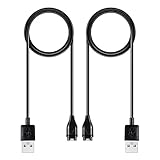
- 【Wide Compatibility】Compatible for Garmin Fenix 8 7 7S 7X Pro 6 6S 6X Pro 5 5S 5X Plus, Forerunner 965 955 945 935 745 265 255 245 165 55 45 45S Music, Approach S70 S62 S60 S50 S44 S42 S40 S12 S10 G12, X10, Instinct 3 2 2S 2X, Venu 3 2 plus 2S Sq, Vivoactive 6 5 4 4S 3, Quatix 7 6 6X 5, Vivosmart 5, Vivomove 3 3S Style Sport, Vivosport, D2 Charlie, D2 Delta PX, D2 Delta S, Impact Bat Swing Sensor, Tactix 8, Tactix 7, Tactix Charlie, BarkLimiter 2 2VT, Striker Cast, Rey, Swim 2, First Avenger, Darth Vader, Epix (gen 2), Enduro 3 2, Striker Cast GPS,Rey,First Avenger,Darth Vader,Enduro Smartwatch
- 【Durable & Premium Quality】Made of high quality wire; ensure the excellent charging experience for your Device. Durable High-quality ABS + TPE Material and Copper Wire ensures Stable Current Transmission, which assures the quality of the charge
- 【Fast Charge, Stable Performance】You can connect it to power source on PC, laptop, notebook, because this charging method can provide high efficiency and high stability charging experience for you. Also, Data Sync is available. Provides fast and stable charging speed
- 【Safe Charging】AWINNER Charging Cable has Voltage Regulator and PTC Inside to protect your Device being damaged by overcurrent when connected to power source. Made of over- voltage and over- current protection, they will protect your watch from being damaged when charging
- What You Get: Free Lifetime Replacement Warranty-As our fans
- Check that the activity profile was an outdoor GPS profile before recording.
- For the next attempt, acquire satellites outdoors and remain still until the watch reports a fix.
- Sync through Garmin Connect, Garmin Express or Wi‑Fi after the activity.
- If several outdoor recordings still have no map, update the watch and GPS software. Persistent failure after those steps points toward a hardware diagnosis.
A map cannot be reconstructed for an indoor activity that never captured location points. Changing the map layer afterward does not add GPS data to that record.
When should I report a TopoActive map error?
Use Garmin’s TopoActive Map Error Report only after installing the latest available map and confirming that the problem is not a hidden layer or poor GPS reception. Reporting is appropriate for a consistently misplaced or missing road, trail, contour, water feature or other map object that remains wrong when viewed with reliable positioning.
Prepare the report
- Watch model
- Watch serial number
- Map product and version
- A precise description of what is wrong and where it occurs
- Any useful context, such as the correct trail name, road alignment or feature location
Garmin states: “Self reported edits or errors do not automatically trigger that update to appear in Garmin TopoActive maps.” A report gives Garmin information for evaluation; it is not an immediate correction or a guarantee that the next map release will change the feature.
Which troubleshooting method should I use?
| Symptom | Best first action | Why |
|---|---|---|
| Map is absent from an activity screen, but the watch otherwise navigates | Add Data Screens > Add New > Map; inspect Map Layers and Map Type | The installed map may simply be hidden from the activity layout. |
| Map Manager is available and an update is offered | Update or add the region over Wi‑Fi while connected to power | On-watch management is convenient and supported directly by compatible models. |
| Map Manager is missing, or you need region and storage controls | Use Garmin Express and Manage Maps | The computer provides broader installation, removal and update controls. |
| “Can’t Unlock Maps” or “Can’t Authenticate Maps” appears | Update Garmin Express and reinstall from Map Details > Options > Reinstall; safely eject | The message indicates map-file or unlock validation trouble. |
| Track drifts or the activity has no GPS line | Acquire satellites outdoors, stay still, sync, and update software | Reception and satellite data affect the recorded track independently of map files. |
| Same trail or feature remains wrong after the latest map update | Submit a TopoActive Map Error Report | This is a map-data issue rather than a display or reception problem. |
What should I check before contacting Garmin service?
Work through this short sequence so support receives useful information and you do not erase a functioning map unnecessarily:
- Record the exact watch model, firmware version, map product and region.
- Confirm whether the problem is only a missing activity screen, an unavailable map region, an unlock error, a missing Garmin Connect map or an inaccurate GPS track.
- Verify that the activity was a GPS-capable outdoor profile.
- Check Map Layers and Map Type before reinstalling.
- Update through Map Manager or Garmin Express, keeping the watch on power throughout the transfer.
- When using Garmin Express, confirm adequate computer disk space and safely eject the watch.
- Test GPS outdoors with a clear sky view, remaining still for the initial fix.
- If outdoor GPS recordings still fail after current software and satellite-data synchronization, ask Garmin about service for a possible GPS hardware fault.
Keeping the exact error wording, the activity profile and the map region in your notes makes it easier to distinguish a transfer problem from a coverage limitation or hardware failure.
Also popular on Amazon

- ✅【Multi-Directional Charging】: Our USB C to Garmin cable adapter features both right-angled and straight connectors, providing versatile charging options to suit your needs.
- ✅【Strong and Easy Storage】: USB C to Garmin Adapter combines compact design with a portable lanyard featuring a small keychain attachment, ensuring you'll never misplace it. Crafted from durable aluminum alloy, it enhances both usability and experience.
- ⌚【Widely Compatibility】Compatible with a wide range of Garmin devices including Garmin Fenix 9 8 7 7S 7X 6 5; Forerunner 165 965 955 265 255 45 45S 55 245 Music 745 935 945 LTE; Vivoactive 6 5 4 4S 3 Music; Vivomove 3 3S Style; Venu SQ 2 2S 3S; Epix Pro 2; Instinct; Vivosport, Approach S72 S60 S42 S40 S12 S10 G12 and more.
- ⚡【Plug and Play】: Our adapter supports both data transfer and charging, ensuring you're always backed up with both information and power.
- ♥️【What You Get】: Type-C to Garmin Adapter 4-Pack + Keychain 4-Pack. Our worry-free lifetime warranty, Please feel free to contact us if you have any question.
How do I avoid the problem on future trips?
- Update maps before leaving reliable Wi‑Fi coverage, not after arriving at a remote trailhead.
- Leave enough computer storage for Garmin Express’s temporary files when updating from a computer.
- Use the Garmin-branded cable designed for the watch and always eject it through the operating system.
- Sync the watch regularly so current satellite data is available before an activity.
- Open the intended activity profile and verify its Map screen, Map Layers and Map Type before navigating.
- Allow the watch to acquire satellites outdoors before moving into tree cover, between buildings or into a canyon.
Frequently Asked Questions
Can I install any Garmin TopoActive region on any watch?
No. Garmin makes map availability dependent on the watch model and region. If Map Manager or Garmin Express does not offer a region for your device, the limitation is compatibility rather than a missing download.
Will changing Map Type repair a trail that is recorded in the wrong place?
No. Map Type changes what cartographic layer is displayed; it does not repair GPS coordinates captured during the activity. Improve satellite reception and update satellite data before deciding that the underlying map is wrong.
Recommended Free Tools
Can a map error report force Garmin to correct the next map release?
No. Garmin says self-reported edits or errors do not automatically trigger an update in TopoActive maps. Submit precise model, serial, product and location details, but treat the report as feedback rather than an immediate fix.
Why does Garmin Express need a specific charging cable?
Express must exchange data with the watch, not merely provide power. Use the Garmin-branded USB charging/data cable for your exact model and verify that the computer recognizes the watch before starting a map transfer.
What if the map is still missing after a successful reinstall?
Recheck the activity’s Map Layers and Map Type, then confirm that the activity profile used GPS. If outdoor GPS activities still lack location data after current software and synchronization, contact Garmin about a possible hardware fault.

