Free tools Windows power users keep installed
One-click scans. No signup required.
Redmi Watch 4 gained Amazon Alexa support in a firmware update reported as version 2.2.80 in March–April 2024. The feature is still listed in Xiaomi’s support documentation, but receiving the update does not guarantee Alexa will be available in every country or account region.
What the update adds
Contemporary reports dated March 30 and April 5, 2024, identified firmware version 2.2.80 as the update that brought Alexa to the Redmi Watch 4. Xiaomi’s support pages also list Alexa among the watch’s features and apps. The public Xiaomi pages confirm the capability, but do not provide a detailed changelog for version 2.2.80.
Reported uses include setting timers and alarms, creating reminders, asking for information, and controlling compatible smart-home devices. These are examples, not a complete Xiaomi-published command list. Gizmochina’s update report and Xiaomi4Mi’s April 5 report describe the addition; Xiaomi’s app list includes Alexa.
Some users have reported that responses appear as text and that music playback commands may not work. Those are user observations, not behavior documented in Xiaomi’s support pages, so do not assume the watch offers a full spoken, hands-free Alexa conversation. The watch has a speaker and microphone, but Xiaomi describes them in connection with phone-linked calling rather than promising spoken Alexa replies. See user reports and Xiaomi’s feature FAQ.
PC Slower Than It Used to Be?
A free scan shows the junk files, broken settings and background clutter dragging Windows down - then fixes them in one click.Free scan · Windows 10 & 11Crashes, No Sound, or Screen Glitches?
Random freezes, missing sound and display glitches usually trace back to one bad driver. Find and replace yours safely.Free scan · under a minute#1 Best Overall

- Compatibility: only supports smartphones with Android 8.0 and above, iOS 12.0 and above
- 1.96" AMOLED ultra-clear large display with rich, natural colours. Boasts a 75.80% screen-to-body ratio with a larger interface on a similar watch size. Also supports AOD to provide a comprehensive and elevated user experience.
- A receiver-independent built-in five-system GNSS chip supports satellite positioning, for more convenient workouts without the need to bring your smartphone along.
- With the Bluetooth calling function*, dual-mic noise cancellation and 80cm* directional audio pickup, it supports an extended call range with wider coverage for clearer and more flexible communication.
- 150+ workout modes for a healthy training Experience sports modes like running, walking, and cycling. Follow the instructions to warm up* and get into the workout zone faster. Plus, join our pro running courses!
How to check for the update and Alexa
The Redmi Watch 4 is paired and managed through Mi Fitness on Android or iOS. Xiaomi’s public material does not establish one universal menu path for installing version 2.2.80, and labels can vary by app version and region.
- Open Mi Fitness on the phone paired with the watch and confirm the watch is connected.
- Open the watch’s device page and look for its system or firmware update control.
- If an update is offered, follow the in-app prompts. Keep Bluetooth on, the phone near the watch, and the watch charged while it transfers.
- When the update finishes, check the watch’s app list for Alexa. The feature may not appear on the main watch face.
Xiaomi confirms Mi Fitness pairing for Android and iOS in its pairing FAQ. Its guidance also covers connection troubleshooting, recovery steps, and allowing Mi Fitness to run in the background.
Rank #2

- Two year warranty against factory defects.
Alexa availability depends on region
An update alone does not establish that Alexa will activate. Reports include users who received the firmware but saw a message that Alexa was unavailable in their region, alongside users reporting success under other regional configurations. Xiaomi confirms the feature at product level but does not publish a complete supported-country list. Xiaomi’s regional FAQ lists Alexa, while Gizmochina’s report and owner reports illustrate that availability can vary.
Region settings for the watch, Xiaomi account, phone, Amazon account, and language may all affect what is offered, but Xiaomi’s public documentation does not specify a definitive combination. If Alexa does not appear or reports an availability problem, check your account and device regions and try a supported language; changing settings cannot guarantee access where the service is not supported.
What’s actually slowing this PC down?
Pick the symptom - the matching free tool is one click away.
Rank #3

- 1.97'' ultra-wide AMOLED display
- 20 days battery life
- Built-in GPS New and more accurate sensors
- 150+ Sports Modes
- Built-in GPS and rotating crown
Alexa is not Google Assistant, Gemini, or workout coaching
The verified addition is Amazon Alexa. The inspected sources do not establish Google Assistant or Gemini support for the Redmi Watch 4. Google documents Assistant for selected Wear OS watches and has described Gemini availability on selected Wear OS devices; that does not establish eligibility for this watch. See Google’s watch-assistant guidance and its Gemini announcement.
Alexa also should not be confused with spoken workout updates. Xiaomi explicitly says voice announcements during exercise are not supported; Alexa support is not evidence of spoken pace, split, or heart-rate coaching.
Quick Recap
Rank #4
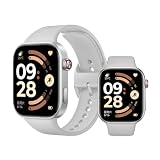
- Refined 2mm narrow bezels with an 82% screen-to-body ratio. Boasts a 2.07" AMOLED display (432x514 resolution, 60Hz) with 2000-nit peak brightness for a clear view under direct sunlight.
- Ultra-slim and lightweight design. Approximately 9.9mm thin and only 31g (without band). The high-strength aluminum frame offers a durable yet premium feel for comfortable all-day wear.
- Long-lasting battery life. Equipped with a large 550mAh battery, it supports up to 24 days of typical use. A reliable companion for busy professionals and travelers, eliminating the need for daily charging.
- Built for sports and fitness. Features dual-band L1 GNSS for accurate offline route tracking and 150+ workout modes. Rated 5ATM (50m), it's perfect for swimming and various water activities.
- Smart experience with HyperOS. Enjoy Bluetooth calling, message notifications, and remote camera control. The stainless steel rotating crown ensures smooth navigation, compatible with Android 8.0+ and iOS 14.0+.
If Alexa does not appear or the update is missing
- Confirm the watch is connected to Mi Fitness, not merely listed as paired, then reopen the app and restart the watch.
- Check the watch’s full app list after updating. Also update Mi Fitness and the phone’s Amazon Alexa app.
- Keep Bluetooth enabled and the devices close. Check that Mi Fitness can run in the background; Xiaomi provides guidance for connection problems and background permissions.
- If Alexa displays a region message, check Xiaomi and Amazon account regions and language. A regional restriction may persist even when the firmware is installed.
- If no firmware is offered, a staged rollout, regional firmware, an already newer version, battery level, or connectivity may explain it. Keep using the official Mi Fitness update route rather than flashing unofficial or cross-region firmware; community notices describe possible losses of features such as NFC or Mi Home integration and region complications with unofficial procedures: community firmware notice.
Product prices and availability are accurate as of the date/time indicated and are subject to change. Any price and availability information displayed on Amazon at the time of purchase will apply.




