An Apple Watch battery does not need replacing simply because its Maximum Capacity has dropped below a number found online. Check Battery Health for a Battery Needs Service warning, then judge whether real-world runtime and reliability still meet your needs.
On the watch, open Settings → Battery → Battery Health. Unexpected shutdowns, very short runtime or persistent charging problems can also indicate that service is worthwhile.
Check Battery Health first
- Open Settings on the Apple Watch.
- Tap Battery.
- Tap Battery Health.
- Read Maximum Capacity and check for a Battery Needs Service message.
Maximum Capacity is an estimate of how much charge the battery can hold compared with when it was new. A lower figure generally means less time between charges, but it does not tell the whole story. Cellular use, GPS workouts, screen brightness, Always-On display, signal strength, temperature, apps and notifications can all affect battery life.
A reading slightly below 100% is not automatically a problem. Apple notes that capacity can show less than 100% depending on how much time passed between manufacture and activation.
Free tools Windows power users keep installed
One-click scans. No signup required.
#1 Best Overall

- [SAFETY TESTED BATTERY CELLS]--- Our battery uses Grade A rated battery cells ensure longer battery life (500 cycles) and high-speed, efficient charging. Every 42mm watch series 1 battery is manufactured and tested under strict quality control standards. Build-in microchip to prevent over-charging, over-discharging, short-circuit and over-heating. Voltage protection and current protection for safer operation for both user and devices.
- [FOR COMPATIBLE MODEL]--- ★REAL 246mAh, SAME AS ORIGINAL CAPACITY.★ Compatible with Watch Series 1 42mm A1554 A1579 A1803. Please verify your old battery part number and model before purchasing this replacement battery. The repair kit contains the instruction to guide you step by step installation, and we have professional engineers to answer all your questions about the repair process.
- [HIGH CAPACITY BATTERY]--- ASDAWN for 42mm series 1 battery replacement is made of high quality Li-Polymer battery cell, the advanced technology makes this replacement battery capacity up to 246mAh and provides you a high-speed and efficient charging. Up to 48 hours of long lasting time, bring your battery's life back to glory and save the money. Choose ASDAWN battery restore your watch to like new performance!
- [FOR BEST PERFORMANCE]--- Please use your original charger and cable which came with your watch to charge this battery. Using up all the power of watch series 1 battery 42mm for the first three times before charging, and then take a full charge, thus the battery can be reached the optimum effect of using. Please remember that its full performance and longevity is only achieved after 3 to 5 complete charge and discharge cycles.
- [STRICT DUAL QUALITY CONTROL]--- We take care of all quality-related issues with a REPLACEMENT or REFUND. Our items are all produced in fully automated workshops, and the finished products are controlled and inspected by professional technical personnel to ensure that they are delivered to customers with superior performance and do not disappoint their trust in us. Only with excellent product quality can we go further!
When an Apple Watch battery should be serviced
Battery service is sensible when one or more of these conditions apply:
- Battery Needs Service appears in Battery Health.
- The watch repeatedly dies well before its expected daily runtime despite normal use.
- It shuts down unexpectedly, particularly while the charge is low or during demanding tasks.
- Battery problems continue after checking settings and charging equipment, and allowing several days after a watchOS update.
- Battery performance materially affects activities you rely on, such as workouts, sleep tracking, notifications or safety features.
There is no universal Apple rule saying every Apple Watch must receive a new battery at a particular Maximum Capacity percentage. A watch at 79% may be acceptable to one person and unusable to another. Runtime and reliability matter more than a percentage viewed in isolation.
Do not treat 80% as an automatic replacement trigger
The frequently quoted 80% rule is easy to misunderstand.
- AppleCare+ for Apple Watch covers battery service when capacity is less than 80% of its original specification, subject to the applicable plan terms.
- Apple says Apple Watch batteries are designed to retain up to 80% of their original capacity at 1,000 complete charge cycles.
- That is a design expectation and an AppleCare+ service threshold—not a command to replace every watch at exactly 80%.
Use the number as evidence, not as the sole decision. Real runtime and reliability are more important than a percentage displayed in isolation.
Compare actual runtime with the right model
Apple’s published battery-life figures are maximum “up to” estimates, not guaranteed real-world runtimes. Current published normal-use figures include:
Rank #2

- 【Watch repair tool kit】- JOREST watch repair tool kit contains common tools required for repairing watches, suitable for adjusting and replacing watch straps, opening watch covers, replacing watch batteries, gaskets, etc., and has detailed operations Manual to help you solve watch problems at home and save expensive repair costs.
- 【Adjust the strap】- Metal watch band link remover, watch band holder, pin punches, double-headed hammer and spring bar tool with scale are used to replace various watch straps, adjust the length of the strap to fit your wrist.We are equipped with 15PCS spare needle to improve the service life of the tool, suitable for pin punch and metal watch band link remover.
- 【Suitable for different watch covers】- Watch back case opener is used for watch cases with grooves;watch case opening pry is used for the watch case with a pry opening;Screwdriver is used for watch case fixed by screws;tweezer is used to remove the battery.The use range of the watch back case opener is 15-55mm, and the drill bit spacing is set by rolling the adjusting wheel to fit the groove of your watch back.
- 【Five-in-one watch screwdriver】- Five types of screwdriver bits are suitable for many situations: watch battery fixing screws, watch case screws, watchband screws, and can also be used for glasses screws. The cover at the end of the screwdriver can be opened, and the inside is hollow for storing other screwdriver bits.
- 【The purpose of the watch case holder】 - The watch case holder can be used with other tools in the kit to help fix the watch and reduce the risk of sliding and scratching the watch. It is suitable for watches of various sizes, and can be used for watches with a diameter of up to 50mm.
| Model | Rated normal-use battery life | Low Power Mode |
|---|---|---|
| Apple Watch SE 3 | Up to 18 hours | Up to 32 hours |
| Apple Watch Series 11 | Up to 24 hours | Up to 38 hours |
| Apple Watch Ultra 3 | Up to 42 hours | Up to 72 hours |
Older Apple Watch models have different original specifications. Comparing an older Series model with an Ultra’s runtime can make a healthy battery look defective. Instead, compare the watch with its own original expectations and your previous experience using it.
Check whether something else is draining the battery
- Check recent usage and charging history. Open Settings → Battery to see the current percentage, recent battery graph and information about the last charge.
- Wait several days after a watchOS update. Post-update tasks can continue in the background and temporarily reduce battery life. If short runtime persists, investigate further.
- Check the iPhone connection. Apple Watch is most efficient when connected to its paired iPhone over Bluetooth. A watch away from the iPhone may use cellular or Wi-Fi more heavily, especially with weak cellular reception.
- Inspect the charger and its position. Use the included magnetic charger or a compatible Apple charger. Ensure the watch sits correctly and shows the charging symbol.
- Review demanding features and use. Always-On display, cellular connectivity, weak signal, long GPS workouts, audio playback through the built-in speaker and frequent app use can reduce runtime without proving that the battery has failed.
A charge stopping at 80% may be intentional
If the watch stops charging around 75–80%, that may be Optimized Battery Charging or Optimized Charge Limit, rather than a defective battery.
Check Settings → Battery → Battery Health for these features. While the watch is on its charger, tap the charging screen’s green or yellow charging icon and choose Charge to Full Now when you need a full charge immediately.
Apple says Optimized Battery Charging is always enabled on Apple Watch Series 9 or later and all Apple Watch Ultra models. On Apple Watch SE, Series 6, Series 7 and Series 8, turning off Optimized Battery Charging also turns off Optimized Charge Limit. These features are designed to reduce time spent fully charged and slow long-term battery aging.
A battery-health percentage can change after recalibration
Apple identifies recalibration behavior for these model and software combinations:
Rank #3

- 【Watch battery replacement kit】-- This watch battery removal kit consists of a watch back case opener, a watch case opening pry, a caseback holder, a five-in-one watch screwdriver handle, and five screwdriver bits (-1.0/ -1.2/ -1.5 /+1.5 /+1.8), a spring bar tool, tweezers, 20PCS 1.5ΦSpring bar (4* 16/18/20/22/24mm) and a cleaning cloth.
- 【Suitable for different watch covers】-- Watch back wrench is used for watch cases with grooves;watch case opening pry is used for the watch case with a pry opening;Screwdriver is used for watch case fixed by screws;tweezers are used to remove the battery.The use range of the watch back case opener is 15-55mm, and the drill bit spacing is set by rolling the adjusting wheel to fit the groove of your watch back.
- 【Five-in-one watch screwdriver】-- Five types of screwdriver bits are suitable for many situations: watch battery fixing screws, watch case screws, watchband screws, and can also be used for glasses screws. The cover at the end of the screwdriver can be opened, and the inside is hollow for storing other screwdriver bits.
- 【The purpose of the watch case holder】-- The watch case holder can be used with other tools in the kit to help fix the watch. Moreover, it is more effective in avoiding the risk of sliding and scratching the watch after reducing the diameter of the spring. It is suitable for watches of various sizes, and can be used for watches with a diameter of up to 50mm.
- 【Picture Operation Manual】-- The kit comes with a user manual(in English). The detailed pictures explain the correct usage method to you, avoid damaging your watch by wrong operation, and help you solve the watch problem at home.
| Apple Watch | Relevant software |
|---|---|
| Series 4 and Series 5 | watchOS 9.0 or later |
| Series 6, 44mm | watchOS 9.4 or later |
| Series 7 and Apple Watch SE 2 | watchOS 26 or later |
| Series 8 and Apple Watch Ultra | watchOS 26.6 or later |
If the Maximum Capacity figure changed after one of these updates, the battery may not have suddenly deteriorated. The estimate may simply have become more accurate. Judge it alongside actual runtime and any service warning.
What Apple battery service usually involves
Apple Watch battery service is not generally presented as a simple, user-accessible battery swap. Depending on model, inspection, location and parts availability, Apple or an authorized service provider may provide a replacement Apple Watch rather than opening the original watch and returning it with a new cell.
Apple’s out-of-warranty fees are estimates until the watch is inspected. The final cost can vary by model, location, parts availability and tax. Authorized service providers can set their own fees. In-person and mail-in options may be available through Apple’s repair process.
Apple says service or replacement parts are guaranteed for 90 days or the remainder of the applicable warranty, whichever is longer. Normal battery wear is not covered by Apple’s standard warranty, although a defective battery may be covered. AppleCare+ battery coverage depends on the plan’s terms and the battery’s reported capacity.
Independent reader supportYour contribution helps us test, update, and keep practical guides available for everyone.When buying a new Apple Watch is the better choice
Battery service makes less financial sense when the watch has several other limitations. Consider replacing the entire watch if:
Rank #4
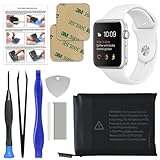
- 【Model Compatibility】: Compatible with Apple Watch Series 1 42mm. Not compatible with 38mm models. Please verify your device model before installation.
- 【Complete Repair Kit Included】: Package includes precision tools, screen adhesive, and a step-by-step illustrated manual for efficient battery replacement without professional help.
- 【Reliable Battery Cell】: Fit For Watch Series 1 42mm OEM-grade 0-cycle Li-ion battery supports stable charging and extended performance. Built-in IC protects against overcharge, overheating, and short circuits.
- 【Adhesive and Seal Ready】: Pre-installed battery adhesive and included screen frame tapes ensure a secure, dust-resistant seal during reassembly—no extra materials needed.
- 【Secure and Precise Fit】: Engineered to match the original battery size for a perfect fit inside the watch. Ensures smooth installation and reliable performance after replacement.
- The service estimate approaches the cost of a newer model.
- The watch is several generations old and no longer supports the watchOS features you need.
- The display, case, Digital Crown, sensors or water resistance also have problems.
- You need substantially more battery life than the model was designed to deliver.
- The watch is old enough that service or parts availability is limited.
Apple says Apple Watch service and parts are generally available for at least five years after Apple last distributed a product for sale, subject to availability and exceptions. An older watch with a weak battery and worn hardware may be a poor candidate for paid service even if the battery is the original fault.
What’s actually slowing this PC down?
Pick the symptom - the matching free tool is one click away.
A practical decision checklist
- Check Settings → Battery → Battery Health.
- Arrange service if Battery Needs Service is displayed.
- Measure whether the watch survives your normal day, including the activities you actually use.
- Review the Battery graph, recent watchOS updates and power-hungry features.
- Confirm the charger makes a reliable connection and the watch reaches a full charge when required.
- Compare Apple’s service estimate with the price and benefits of a replacement watch.
FAQ
What percentage means an Apple Watch battery needs replacing?
Apple does not set one universal replacement percentage for every Apple Watch. The strongest triggers are a Battery Needs Service message, repeated unexpected shutdowns or runtime that no longer meets your needs. The 80% figure is relevant to AppleCare+ battery coverage, not an automatic replacement order for all owners.
How do I check my Apple Watch battery health?
On the watch, open Settings, tap Battery, then Battery Health. You will see Maximum Capacity and, if Apple has identified a service issue, a Battery Needs Service message.
Why does my Apple Watch stop charging at 80%?
Optimized Battery Charging or Optimized Charge Limit may be limiting the charge to reduce battery aging. On the charging screen, tap the green or yellow charging icon and choose Charge to Full Now when you need a full charge immediately.
Is it better to replace an old Apple Watch or its battery?
Compare the service estimate with the price of a newer model and consider the watch’s age, software support, display and sensor condition, and required battery life. If several parts are worn or the watch no longer supports the features you need, replacement may be better value.
Quick wins for a faster PC:
Scan for outdated or missing drivers - takes under a minuteDriver Scan →Repair Windows errors before they cause bigger problemsFix Now →Fix the driver behind crashes, sound loss and screen glitchesFind Drivers →The Bottom Line
Replace or seek service when Settings → Battery → Battery Health reports Battery Needs Service, or when the watch’s real-world runtime and reliability no longer fit your routine. Do not replace it solely because Maximum Capacity has fallen below 80%—particularly if it still lasts through the day and has no service warning.
Quick Recap
Product prices and availability are accurate as of the date/time indicated and are subject to change. Any price and availability information displayed on Amazon at the time of purchase will apply.




