Outdated Drivers Are Slowing You Down
One free scan finds every outdated or missing driver and matches the right update for your exact hardware.Free scan · exact hardware matchPC Slower Than It Used to Be?
A free scan shows the junk files, broken settings and background clutter dragging Windows down - then fixes them in one click.Free scan · Windows 10 & 11Some links on this page are affiliate links: if you buy through them we may earn a commission, at no extra cost to you.
The best smartwatch for a senior depends first on the phone already in use and then on the kind of safety help required. For an iPhone household, Apple Watch Series 12 is the most capable mainstream choice, while Apple Watch SE (2nd generation) covers core safety features at a lower tier. Android users should start with Samsung Galaxy Watch. Garmin Venu is better for active seniors who want several days of battery life, and Withings ScanWatch suits anyone who prefers a traditional analog appearance and roughly a month between charges. If a staffed emergency-response center is essential, choose a dedicated medical-alert watch such as Medical Guardian MGMove rather than assuming every consumer smartwatch provides the same service.
What is the best smartwatch for seniors with fall detection?
There is no single best model for every senior. The practical starting point is the phone ecosystem, followed by whether the wearer needs automatic fall detection, independent cellular service, long battery life, or a staffed monitoring center.
As an Amazon Associate I earn from qualifying purchases.
The Tool Desk
Outbyte PC Repair FREEClear out junk files and repair common Windows errorsFree Scan →Outbyte Driver Updater FREEScan for outdated or missing drivers - takes under a minuteDriver Scan →| Watch | Best fit | Phone compatibility | Safety and health highlights | Battery expectation | Main trade-off |
|---|---|---|---|---|---|
| Apple Watch Series 12 | iPhone users wanting the newest Apple health and safety features | iPhone required | Fall Detection, Emergency SOS, Medical ID sharing, higher-frequency heart-rate and HRV sensing, readiness score | Roughly a daily-charge routine in the cited comparison | Frequent charging and iPhone dependence |
| Apple Watch SE (2nd generation) | iPhone households seeking core safety features at a lower tier | iPhone required | Automatic Fall Detection, Crash Detection, Emergency SOS, adjustable text; GPS + Cellular option | Daily charging is typical | No on-wrist ECG app described for higher Apple tiers |
| Samsung Galaxy Watch | Android users, especially Samsung Galaxy phone owners | Android; some health features require a Samsung Galaxy phone | Configurable Emergency SOS, hard-fall detection, emergency contacts and medical information | Varies by model and use | Setup and some features depend on Galaxy Wearable and compatible phones |
| Garmin Venu | Active seniors who dislike daily charging | iPhone and Android | Incident Detection and Assistance can send a location to emergency contacts | About 5 to 11 days, depending on model and use | Its incident workflow is not the same as automatic emergency-service calling |
| Withings ScanWatch | Readers wanting an analog look and very long battery life | iPhone and Android | ECG, irregular-rhythm detection and SpO2 reporting through the app | About 30 days | No fall detection or SOS listed |
Battery figures are rated or reported values and change with model, settings, cellular use and activity tracking. A watch left charging cannot detect a fall during that interval, so charging habits are part of the safety decision.
Why does the phone ecosystem matter?
Compatibility determines whether a watch can be set up, which health features work and whether calls or alerts can leave the house without the phone nearby.
Popular on Amazon
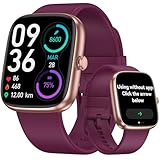
- 【Versatile Use: Paired or Standalone Simplicity】 Designed as the ultimate simple watch for modern life, this device works flawlessly paired with your phone for calls and notifications, or completely standalone. Whether you are a busy mom needing to track steps without carrying a phone, or a fitness enthusiast focusing on the workout, core features like the pedometer watch for women functions, timers, and sports tracking operate independently—no phone needed.
- 【Easy-to-Use for All Ages】 This smartwatch Features a bright, large LCD screen and intuitive touch controls. Navigate menus and check stats effortlessly—perfect for older adults or tech beginners.
- 【Accurate Activity Tracking】This fitness tracker counts steps, distance, calories burned, and active minutes with precision. Get reliable insights to help you stay motivated and reach your daily goals.
- 【24/7 Health Monitoring】Our smart watch automatically tracks real-time heart rate and lets you manually check blood oxygen . Stay informed about your daily wellness without reaching for your phone.
- 【Care for your Sleep Quality】This smart watch tracks your relevant sleep data after you fall asleep, assisting you in cultivating a healthier lifestyle.
iPhone households
Apple Watch models in this comparison are iPhone-only. Series 12 is the current Apple flagship described in Apple’s September 9, 2026 announcement. The SE (2nd generation) is the value route when automatic fall detection, Crash Detection and Emergency SOS matter more than the newest health sensors. Before buying, check the required iPhone generation and operating-system version for the exact watch model.
Android households
Samsung Galaxy Watch is the mainstream Android choice. Samsung’s support documentation notes that some health features require a Samsung Galaxy phone, so an Android phone from another manufacturer may not provide the full feature set. Confirm compatibility in the Galaxy Wearable app before purchase.
What’s actually slowing this PC down?
Pick the symptom - the matching free tool is one click away.
Mixed or changing households
Garmin Venu and Withings ScanWatch support both iPhone and Android, which can simplify a household in which the caregiver and wearer use different platforms. Their emergency workflows still depend on the phone, network connection and the specific model, so cross-platform compatibility does not automatically mean independent emergency calling.
How do fall detection and SOS actually work?
Fall detection is a sensor-based backup, not a guarantee that every fall will be recognized or that help will arrive. The wearer still needs a configured emergency contact, a working connection and a way to cancel a false alarm.
Apple Watch workflow
Apple Support explains that after a hard fall followed by roughly a minute of immobility, the watch starts a 30-second countdown. If the wearer does not cancel, it attempts to contact emergency services and can share the wearer’s location and Medical ID. Fall Detection must be enabled, Wrist Detection should remain on, and the watch or paired iPhone needs cellular service or Wi-Fi calling for the call path to work.
Samsung Galaxy Watch workflow
Samsung’s setup allows a warning sound, countdown, emergency number and contact list to be selected. Hard-fall detection and Emergency SOS are configured through Galaxy Wearable, along with medical information. LTE activation may be needed for an SOS message or call without a connected phone on supported models.
Windows Errors? Fix Them Before They Spread
Repair common Windows errors and clear accumulated junk for a smoother, more stable PC - no reinstall needed.Free scan · no reinstallOutdated Drivers Are Slowing You Down
One free scan finds every outdated or missing driver and matches the right update for your exact hardware.Free scan · exact hardware matchGarmin workflow
Garmin Venu models in the cited comparison use Incident Detection and Assistance to send a location to chosen emergency contacts. That is an alert-to-contacts workflow; it should not be described as identical to a watch that automatically calls emergency services or to a staffed monitoring center.
Why false negatives and false positives matter
Apple explicitly states that Apple Watch cannot detect all falls. A wearer may also trigger an alert during vigorous movement, stumble without a hard impact, remove the watch or fail to respond to the countdown. Practice the cancellation action and tell contacts what an alert means so they know whether to call the wearer, check the location or contact emergency services.
Why is Apple Watch Series 12 the leading iPhone choice?
Series 12 is the strongest fit for an iPhone user who wants the current Apple safety platform and does not mind charging about every day. Apple’s September 9, 2026 newsroom announcement describes a Health Sensing System, higher-frequency heart-rate and heart-rate-variability sensing, a readiness score, Fall Detection and Emergency SOS. Apple vice president Kaiann Drance called it the company’s most advanced health and fitness companion.
The safety value is the integration: Medical ID and emergency contacts can be prepared in advance, Fall Detection can start the countdown after a hard fall, and Emergency SOS can use the watch’s connection when configured. Choose the GPS + Cellular version if the wearer regularly walks, gardens or exercises away from the iPhone and needs calling or alerts at those times.
Check the exact case size, cellular carrier support and regional availability of health features. A larger, high-contrast display may be more useful than a smaller case with additional sensors if the wearer struggles to read notifications or press controls.
Is Apple Watch SE (2nd generation) a good value for seniors?
For an iPhone household, the SE (2nd generation) provides the core safety workflow without requiring the highest Apple tier. The cited buying guide lists automatic Fall Detection, Crash Detection, Emergency SOS, adjustable text and an optional GPS + Cellular configuration. It does not include the on-wrist ECG app described for higher Apple Watch tiers.
Also popular on Amazon

- STYLISH DESIGN, VIBRANT DISPLAY: The lightweight aluminum build blends effortless style with workout durability, while the vivid 1.97" AMOLED display keeps your data easy to read, even under bright sunlight.
- ALL-IN-ONE ACTIVITY TRACKING: The Amazfit Bip 6 fitness tracker watch offers 140+ workout modes including HYROX Race and Strength Training, plus personalized AI coaching and 50m water resistance.
- UP TO 14 DAYS BATTERY LIFE: The Amazfit Bip 6 smart watch powers through your training and recovery for up to two weeks at a time - no nightly charging needed.
- ACCURATE GPS TRACKING & NAVIGATION: Stay on course with free downloadable maps and turn-by-turn directions. Support from 5 satellite systems ensures precise tracking of every move and fast GPS connection.
- 24/7 HEALTH MONITORING: The Amazfit Bip 6 smartwatch provides precise, real-time monitoring of heart rate, sleep, blood-oxygen and stress, empowering you with actionable insights to optimize your health and fitness.
It is a sensible choice when the priority is contacting help and sharing location rather than obtaining every newer health metric. Search for the GPS + Cellular configuration when independent connectivity is important, and compare the current SE generation, iPhone requirements, carrier support, stock and price before ordering because Apple’s lineup can change.
Is Samsung Galaxy Watch the easiest Android option?
Galaxy Watch is the default mainstream recommendation for Android users, particularly when the senior already has a Samsung Galaxy phone. Samsung provides a single setup area for medical information, emergency contacts, Emergency SOS and hard-fall detection, but those settings must be completed before an emergency occurs.
Recommended Free Tools
Set up Galaxy Watch safety features
- Pair the watch in the Galaxy Wearable app and install required updates.
- Open the safety or emergency settings, enter the wearer’s medical information and add contacts who will answer alerts.
- Enable hard-fall detection, select the warning sound and choose the countdown behavior.
- Set the emergency number appropriate to the wearer’s country and confirm whether the model supports LTE without the phone nearby.
- Perform a supervised practice of the SOS screen and cancellation action; do not create a false emergency call.
Some health features require a Samsung Galaxy phone, and LTE service requires a compatible carrier plan. If the senior uses another Android brand, verify which functions remain available before treating Galaxy Watch as a complete health or safety solution.
What if charging every day is too much trouble?
Longer battery life can improve real-world wear time, but it often involves a different emergency workflow or fewer safety features.
Garmin Venu for active seniors
Garmin Venu models in the cited comparison work with iPhone and Android and are rated for roughly 5 to 11 days depending on model and use. Incident Detection and Assistance can send a location to emergency contacts. That combination suits a senior who walks, cycles or exercises and wants activity tracking without a phone-like daily charging routine.
Confirm how the chosen Venu model initiates an incident alert, which phone permissions are required and whether the wearer can reach a contact when the phone is out of range. Garmin’s longer battery rating does not add a staffed response center or guarantee that a fall will be identified.
Do these 3 things before closing this tab:
1Clear out junk files and repair common Windows errors2Fix the driver behind crashes, sound loss and screen glitches3Repair Windows errors before they cause bigger problemsWithings ScanWatch for a traditional appearance
ScanWatch combines analog-style hands with a small connected display and is rated at about 30 days of battery life in the cited comparison. It supports ECG, irregular-rhythm detection and SpO2 reporting through its app on iPhone or Android. The same comparison lists no fall detection or SOS, making it unsuitable when automatic emergency response is the primary requirement.
It is a better fit for a wearer who values a familiar watch face, basic health trends and minimal charging, while family members remain responsible for a separate check-in or alert plan.
Do seniors need the cellular or LTE version?
LTE is worthwhile when a senior may need calls or alerts away from the phone. A compatible cellular plan allows supported Apple or Samsung watches to communicate independently; GPS-only or Wi-Fi models generally depend on a nearby phone or Wi-Fi calling.
- Choose LTE when: the wearer walks alone, drives, exercises outdoors or may leave the phone at home.
- GPS-only can be enough when: the phone is reliably carried and the watch is mainly for notifications, activity tracking and in-home safety.
- Check before purchase: carrier support, activation fees, number sharing, regional emergency-calling rules and whether the exact watch case includes cellular hardware.
LTE does not remove the need for charging, coverage or configuration. A dead battery, an unsupported carrier or a blocked signal can still interrupt the emergency path.
Is a smartwatch a replacement for a medical-alert system?
Usually not. Consumer watches generally call emergency services or notify family directly. A dedicated medical-alert watch may add a staffed monitoring center, a documented response protocol and specialized support, usually in exchange for a recurring fee and service-area requirements.
SafeWise’s 2026 comparison includes LifeFone Safe Watch Active, Lifeline Smartwatch, Apple Watch and Tranquil Watch. SafeHome lists Medical Guardian MGMove, Bay Alarm Medical SOS Smartwatch, Apple Watch and Samsung Galaxy Watch 7, while The Senior List names MGMove and Bay Alarm among senior smartwatch picks. These lists illustrate that monitored products are a separate category, not proof that any one service is available in every region or at a particular price.
Also popular on Amazon
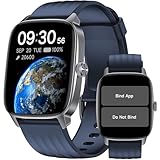
- No APP & Phone Required Pedometer Watch: The pedometer watch can be used seperately without APP or smartphone connections! It's easy to enjoy features like pedometer, stop watch and so on. Perfect for anyone looking for an easy fitness tracker without the hassle of smartphone setups.
- Fitness & Activity Tracker: The smart watch monitors your heart rate, stress levels, steps, calories and distance in real time. You can monitor blood oxygen manually on watch. Also, it tracks your sleep data after you fall asleep, assisting you impove sleep habits.
- IP68 Waterproof & Battery Life: This fitness tracker meets IP68 waterproof standard, ensuring no worry wear during swimming, allowing you to fully enjoy aquatic activities. It only takes 1.5 hours to fully charge and can last up to 7 days on a single charge.
- More to Explore with APP: When connected APP, the watch will unlock more features like bluetooth calls, message reminder, music control, cycle tracking, weather display and more. Just turn on smartphone bluetooth, simple download VeryFit App and scan OR code to connect, there are more suiprises on the go.
- Multiple Sports Modes: Enjoy your fitness journey with multi-workout modes. It is easier and effective with detailed data recorded. Note: there are 20 sports modes without APP. When connected APP, it offers 100+ sports modes.
When a monitored watch is the better choice
- The wearer lives alone and may be unable to speak after a fall.
- Family members cannot reliably answer alerts at all hours.
- A caregiver wants a trained operator to assess the event and follow a response plan.
- The household accepts a recurring fee and has confirmed coverage, cancellation terms and contact procedures.
Ask each provider how the center verifies an alert, which emergency services it contacts, whether two-way voice works on the wrist, what happens when the watch is outside cellular coverage and whether fall detection is included or optional. Do not assume a consumer smartwatch and a monitored medical-alert service provide equivalent response.
Independent reader supportYour contribution helps us test, update, and keep practical guides available for everyone.Which smartwatch is easiest for an older adult to read and use?
Readability can matter as much as sensor count. Favor a large, high-contrast display, adjustable text, a simple watch face and controls the wearer can operate with limited dexterity or vision.
Quick wins for a faster PC:
Fix the driver behind crashes, sound loss and screen glitchesFind Drivers →Clear out junk files and repair common Windows errorsFree Scan →Scan for outdated or missing drivers - takes under a minuteDriver Scan →Display checklist
- Increase text size and notification scaling during setup.
- Select a high-contrast face with uncluttered complications.
- Use a strong vibration and an audible alert when hearing allows.
- Choose a band clasp the wearer can secure independently.
- Keep emergency contacts near the top of the relevant menu.
Practice common tasks: checking the time, answering a call, dismissing a notification, viewing the battery level and starting the SOS sequence. A technically advanced watch that remains in a drawer is less protective than a simpler model worn consistently.
How should you set up a senior smartwatch for safety?
Complete configuration with the wearer present, then repeat the exercise periodically so the process remains familiar.
- Confirm the ecosystem. Verify the iPhone or Android model, operating-system version, carrier and regional feature support.
- Prepare health information. Enter allergies, medications, conditions and other details the wearer wants emergency responders to see. Keep the information current.
- Add contacts. List people who will answer promptly, and tell them what an alert looks like and how to respond.
- Enable the emergency features. Turn on Fall Detection or hard-fall detection, Emergency SOS and Wrist Detection where supported.
- Choose the connection. Decide whether GPS + Cellular or LTE is needed, then activate the compatible plan. Otherwise keep the phone nearby and confirm Wi-Fi calling behavior.
- Improve readability. Increase text size, select a high-contrast face and simplify complications.
- Set a charging routine. Use a predictable time, such as while bathing or eating breakfast, and check the battery before leaving home.
- Rehearse safely. Demonstrate how to cancel a false countdown and how to call for help. Never stage a fall to test the sensor.
- Review quarterly. Recheck contacts, medical details, carrier service, software updates and whether the band still fits securely.
What are the important limits of smartwatch health and safety features?
Fall detection can miss events, and no consumer watch guarantees detection, diagnosis or a response time. Apple says its watch cannot detect all falls. ECG, irregular-rhythm, SpO2 and blood-pressure features should be treated as wellness aids unless a clinician interprets them in context; they are not a substitute for diagnosis or treatment.
Sensor readings can be affected by fit, motion, skin contact, tattoos, cold hands and other conditions. A watch also cannot prevent a fall, unlock a door for responders unless a separate system is installed, or replace a personal emergency plan. Keep regular medical appointments and follow the wearer’s clinician’s advice.
Free tools Windows power users keep installed
One-click scans. No signup required.
Which choice fits each senior?
| Situation | Most suitable starting point | Why | What to verify |
|---|---|---|---|
| Uses an iPhone and wants the newest safety features | Apple Watch Series 12 | Current Apple health-sensing platform with Fall Detection and Emergency SOS | iPhone compatibility, case size, LTE carrier and regional health features |
| Uses an iPhone and wants lower cost | Apple Watch SE (2nd generation) | Core fall, crash and SOS features with adjustable text | Current SE generation, cellular option and lack of on-wrist ECG |
| Uses a Samsung Galaxy phone | Samsung Galaxy Watch | Integrated Galaxy Wearable setup for contacts, medical data and hard-fall detection | Model-specific LTE and Samsung-phone requirements |
| Exercises often and dislikes daily charging | Garmin Venu | About 5 to 11 days of rated battery life and contact alerts | Incident Detection workflow, phone permissions and coverage |
| Wants an analog appearance and month-long battery | Withings ScanWatch | About 30 days of rated battery and app-based health trends | Accept that no fall detection or SOS is listed |
| Needs a staffed response center | A dedicated monitored-alert watch such as Medical Guardian MGMove | Designed around professional response rather than family-only alerts | Current fee, coverage, contract, response process and cellular service |
What should you check before buying?
- Confirm the senior’s phone ecosystem and the exact model requirements.
- Decide whether alerts must work when the phone is left behind; if so, price the LTE plan as part of ownership.
- Compare the charging routine with the wearer’s habits, not just the advertised battery rating.
- Read the emergency workflow: who is called, whether the wearer can cancel, and whether location and Medical ID are shared.
- Inspect the display in the lighting where it will be used and set text size before handing it over.
- For monitored services, verify coverage, recurring fees, response-center hours and cancellation terms directly with the provider.
- Keep expectations realistic: a smartwatch is one layer in a broader fall-prevention and emergency plan.
Frequently Asked Questions
Can a senior use an Apple Watch without an iPhone?
The Apple Watch models covered here require an iPhone for setup and core management. An LTE model can make calls or send alerts without the phone nearby after activation, but it still depends on the compatible iPhone ecosystem and cellular service.
What happens if fall detection calls emergency services by mistake?
The wearer can cancel during the countdown by following the on-screen control or responding to the alert. Tell emergency contacts about the feature so they can distinguish an accidental alert from an unanswered emergency.
How often should emergency contacts and medical information be updated?
Review them whenever medications, addresses, caregivers or phone numbers change, and include a routine quarterly check. An accurate Medical ID is more useful to responders than a long list of outdated details.
Can a smartwatch detect a heart attack or stroke?
No consumer smartwatch in this comparison can promise detection of every heart attack or stroke. Heart-rate, ECG and oxygen readings may provide information to discuss with a clinician, but sudden symptoms require emergency services rather than waiting for a watch alert.
What accessories make a senior smartwatch easier to live with?
A stable charging dock, a comfortable replacement band and a high-contrast protective case can support consistent wear. Choose accessories that preserve access to the sensors, buttons and charging contacts instead of covering them.




