Verdict: The Apple Watch Series 3 can still handle basic notifications, timekeeping, workouts, GPS, heart-rate tracking, Apple Pay, and—on GPS + Cellular models—selected calls and messages away from an iPhone. But it is a discontinued 2017 smartwatch capped at watchOS 8-era software. In the United States, as of August 9, 2026, it is worth considering only when very cheap and only after checking pairing, Activation Lock, battery condition, and cellular compatibility.
Apple Watch Series 3: Features, Specs, Prices, and 2026 Buying Advice
Apple Watch Series 3 at a glance
The Apple Watch Series 3 was Apple’s third-generation smartwatch. Apple announced it on September 12, 2017, and retail availability began on September 22, 2017. It introduced built-in LTE connectivity on selected models, along with the S3 dual-core processor, W2 wireless chip, barometric altimeter, improved Siri voice responses, and 50-meter water resistance. Apple’s launch announcement lists the original features and pricing.
- Connectivity: GPS or GPS + Cellular
- Case sizes: 38mm and 42mm
- Launch date: September 22, 2017
- Original U.S. starting price: $329 for GPS, $399 for GPS + Cellular
- Discontinued: September 7, 2022
- Apple service classification: Vintage worldwide as of August 9, 2026, rather than obsolete
- Software: Its last major generation is watchOS 8; Apple separately lists a watchOS 8.8.2 maintenance release for Series 3
- Best use today: Basic notifications, exercise recording, GPS, heart rate, and Apple Pay
- Main reason to skip it: Old hardware, limited software support, aging batteries, and the absence of modern health and safety features
The Series 3 product family included standard Apple Watch models as well as Nike+, Hermès, and Edition variants. The case materials and prices differed by edition, so the name alone does not identify the exact hardware.
What the Apple Watch Series 3 can do
Cellular calls, messages, and notifications
The GPS + Cellular version contains LTE and UMTS radios. With a compatible carrier plan, it can perform selected tasks away from the paired iPhone, including calls, messages, notifications, and some music or streaming functions. Apple designed the watch to share the iPhone’s phone number through a supported carrier.
That does not make it an Android-compatible watch or a complete phone replacement. Every Series 3 must initially be paired with an iPhone, and cellular service depends on the watch’s regional model, the carrier’s Apple Watch support, an eligible wearable plan, and network provisioning. Apple says the iPhone and Apple Watch normally need to use the same service provider, that not all carriers support Apple Watch, and that roaming is limited. Check the exact model number with the intended carrier before buying.
#1 Best Overall

- Compatible with all Apple Watch: Our wireless charger is compatible with iWatch series 12 11 10 9 8 7 6 SE3 SE2 SE 5 4 3 2 1 Ultra4 Ultra3 Ultra2 including 38 mm 40 mm 41 mm 42 mm 44 mm 45 mm 49mm Version. Also compatible with Airpods 4 AirPods Pro 3 AirPods Pro 2
- Efficient Smart Charging: Our watch charger provides safe charging mode, it takes 2 hours to fully charge your S12-S4. Please note: Charging Ultra 4 3 2 1 will take less than 4 hours. We suggest that you purchase our store's 5W fast charging version for your Ultra series
- Multiple Protection: Built-in advanced chip with over-current, over-voltage, short-circuit, over-charge and over-temperature protection and other safety features. Protect your watch battery against damage
- Strong Magnetic Adsorption: The Watch Charger with built-in magnet has strong adsorption perfectly snaps and centers to the charging coil on the back of your watch, stable and will not fall off, resulting in a wonderful charging experience
- Travel Essentials: This 3.3FT 1M Watch charging cable is portable to carry around, especially for traveling and is suitable as a backup charger for your watch
GPS and workouts
Both connectivity versions include built-in GPS and support workout recording for activities such as running, cycling, swimming, and general activity. The watch supports GPS, GLONASS, Galileo, and QZSS satellite systems. Its accelerometer and gyroscope help track movement, while the barometric altimeter measures relative elevation, flights climbed, and elevation gain during workouts.
It remains usable as a basic fitness tracker, but that is different from being a current health-monitoring watch. It can record workouts and heart rate, yet it lacks ECG, Fall Detection, blood-oxygen sensing, temperature sensing, modern sleep-health features, and other newer capabilities. Heart-rate and workout measurements should not be treated as medical diagnosis.
Heart-rate monitoring
The Series 3 has an optical heart sensor for tracking heart rate during workouts and everyday use. Launch software also brought improved heart-rate measurements. The sensor does not turn the watch into an ECG device: Apple’s comparison and technical-specification pages do not list an ECG app for Series 3.
Swimming and water resistance
Apple rates the Series 3 as water resistant to 50 meters under ISO 22810:2010. That means it was designed for shallow-water activities such as swimming in a pool or ocean. Apple specifically excludes scuba diving, waterskiing, activities involving high-velocity water, and submersion below shallow depth. Do not call the watch waterproof.
On a used watch, the original rating is not a guarantee of remaining protection. Years of wear, impacts, a cracked screen, failed adhesive, or a previous repair can reduce water resistance. Treat a damaged or repaired Series 3 as unsuitable for swimming, regardless of its original specification. Stainless-steel and leather bands can also have separate water-related limitations.
Siri, Apple Pay, Emergency SOS, and GymKit
The S3 processor enabled faster performance than earlier Apple Watch generations and allowed Siri to provide voice responses through the built-in speaker. The watch also supports Apple Pay, Emergency SOS, and GymKit-compatible equipment. The exact availability of Emergency SOS, Apple Pay, and carrier-dependent functions varies by country, account, network, and service provider.
watchOS 4 added a High-Intensity Interval Training workout type, pool-swim auto-sets, and other fitness improvements. Music and radio features are more conditional: availability can depend on Apple Music, the watchOS version, an iPhone, Wi-Fi, cellular service, and the relevant subscription.
Do these 3 things before closing this tab:
1Scan for outdated or missing drivers - takes under a minute2Clear out junk files and repair common Windows errors3Fix the driver behind crashes, sound loss and screen glitchesApple Watch Series 3 technical specifications
The following specifications apply to the Series 3 family; not every case material or connectivity combination was sold in every market. The 38mm and 42mm labels describe the case size rather than a modern diagonal-screen measurement.
| Specification | Apple Watch Series 3 detail |
|---|---|
| Case sizes | 38mm and 42mm |
| 38mm display | 272 × 340 pixels; 563 sq. mm display area |
| 42mm display | 312 × 390 pixels; 740 sq. mm display area |
| Display type | Retina OLED, up to 1,000 nits |
| Processor | S3 SiP, dual-core |
| Wireless chip | W2 |
| Storage | 8GB on GPS models; 16GB on GPS + Cellular models |
| Wi-Fi | 802.11b/g/n, 2.4GHz |
| Bluetooth | Bluetooth 4.2 |
| Cellular | LTE and UMTS on GPS + Cellular models |
| Sensors | Optical heart sensor, accelerometer, gyroscope, ambient-light sensor, and altimeter |
| Water rating | Water resistant to 50 meters under ISO 22810:2010 |
| Original battery claim | Up to 18 hours; this is Apple’s original rating, not an expectation for an aging used battery |
| Charging | USB-A magnetic charging cable |
| 38mm aluminum dimensions | 38.6 × 33.3 × 11.4mm |
| 42mm aluminum dimensions | 42.5 × 36.4 × 11.4mm |
| 38mm aluminum weight | 26.7g GPS; 28.7g GPS + Cellular |
| 42mm aluminum weight | 32.3g GPS; 34.9g GPS + Cellular |
| 38mm stainless-steel weight | 42.4g |
| 42mm stainless-steel weight | 52.8g |
| 38mm ceramic weight | 39.8g |
| 42mm ceramic weight | 46.4g |
| Case materials | Aluminum, stainless steel, or ceramic, depending on the edition and market |
Apple’s official Series 3 technical specifications provide the dimensions, weights, display details, storage, connectivity, sensors, and battery estimate. The aluminum GPS and GPS + Cellular weights differ because the cellular models include additional hardware.
GPS versus GPS + Cellular
| Capability | GPS | GPS + Cellular |
|---|---|---|
| Built-in GPS | Yes | Yes |
| Cellular radio | No | LTE and UMTS |
| Calls away from iPhone | Requires the iPhone or a supported Wi-Fi connection | Can use cellular service with an eligible plan |
| Texts and notifications away from iPhone | More dependent on the iPhone or Wi-Fi | Can work over cellular, subject to carrier and plan support |
| Storage | 8GB | 16GB |
| Back material | Composite | Ceramic and sapphire-crystal center |
| Digital Crown | No red cellular cap | Red cap identifying the cellular model |
The GPS model can still track outdoor workouts without carrying the iPhone, because GPS is built into both versions. What it cannot do is connect directly to a mobile network. The cellular model provides more freedom for calls, messages, notifications, and selected online services, but only after activation with a compatible carrier.
A red Digital Crown is a useful visual clue, but it does not prove that the watch will activate on your network. A foreign cellular model can have different regional support, and a carrier may have changed its policies since 2017.
Quick wins for a faster PC:
Fix the driver behind crashes, sound loss and screen glitchesFind Drivers →Clear out junk files and repair common Windows errorsFree Scan →Rank #2

- 【Wide Compatible】- Our wireless charger is compatible with iWatch series Ultra/10/9/8/7/6/SE2/SE/5/4/3/2/1 (including the 38 mm/40 mm/41 mm/42 mm/44 mm/45 mm Version)
- 【Portable design】-This 1.0M iWatch charging cable is convenient to carry around, especially for traveling,and is suitable as a backup charger for your watch.
- 【Advanced Safe & Rapid Charging】– Experience enhanced safety and speed with our wireless watch charger, delivering a 0% to 100% charge in under 3 hours.
- 【Smart Protection】 - Equipped with advanced safety mechanisms including over-current, over-voltage, short-circuit, and over-temperature protection. Automatically adjusts charging power to prevent overheating and overcharging, ensuring your premium watch battery remains healthy and extends its lifespan. Certified for safe, worry-free wireless charging day and night.
- 【12-Month Quality Assurance 】- As a responsible brand seller, you will receive xiwxi's 12-month Quality assurance and lifetime friendly customer service.
Series 3 model numbers and regional versions
For a watch already paired to an iPhone, Apple provides this identification path:
- Open the Apple Watch app on the iPhone.
- Tap My Watch.
- Tap General, then About.
- Find Model Number.
- Tap the part number beginning with M to reveal the five-digit model number beginning with A.
- Compare that A-number with Apple’s identification list.
| Version | Apple model number |
|---|---|
| GPS 38mm | A1858 |
| GPS 42mm | A1859 |
| GPS + Cellular 38mm, Americas | A1860 |
| GPS + Cellular 38mm, Europe and Asia Pacific | A1889 |
| GPS + Cellular 38mm, China mainland | A1890 |
| GPS + Cellular 42mm, Americas | A1861 |
| GPS + Cellular 42mm, Europe and Asia Pacific | A1891 |
| GPS + Cellular 42mm, China mainland | A1892 |
When buying online, ask the seller for a photograph of the model number or the About screen. Apple’s model-identification page also explains the physical differences between GPS and cellular versions, including their back materials.
What the Series 3 does not have
The Series 3 does not have the following features established by Apple’s current comparison and support material:
- ECG app
- Fall Detection
- Crash Detection
- Always-On display
- Blood Oxygen app
- Wrist-temperature sensing
- Sleep apnea notifications
- Modern sleep-score and Vitals features
- Compass
- Current-generation fast charging
- Current-generation on-device Siri and newer gesture features
- Current watchOS 26 support
Fall Detection, for example, begins with Apple Watch Series 4 and later numbered models, along with supported SE models, according to Apple’s Fall Detection requirements. If the watch is intended for an older adult, a child, or anyone who depends on current safety features, the Series 3 is a poor choice.
Software support and iPhone compatibility
watchOS ceiling
The Series 3 launched with watchOS 4 and received watchOS 5, watchOS 6, watchOS 7, and watchOS 8. It did not receive watchOS 9 or later major operating-system generations.
There is an important discrepancy in Apple’s current documentation:
The Series 3’s last major operating-system generation is watchOS 8. Apple released watchOS 8.8.2 security/compatibility maintenance for Series 3 in March 2026, although Apple’s general compatibility table still displays 8.8.1.
Free tools Windows power users keep installed
One-click scans. No signup required.
Special offer. See more information about Outbyte and uninstall instructions. Please review EULA and Privacy policy.
Apple’s security-release page lists watchOS 8.8.2 for Series 3 with a release date of March 24, 2026. Apple’s watchOS 8 notes describe that release as extending certificates used by iMessage, FaceTime, and device activation beyond January 2027. That is maintenance and compatibility work, not a return to current watchOS feature support. The security-release list, watchOS 8 release notes, and general compatibility table should be read together rather than treating 8.8.1 as the unquestionable final version.
Current watchOS 26 support begins with Apple Watch Series 6 and later for numbered models, Apple Watch SE 2 and later, and Ultra models. Series 3 is not eligible.
Which iPhone does it require?
Apple’s compatibility table lists Series 3 with an iPhone 6s or later running iOS 11 or later. It lists the watchOS range as watchOS 4 through watchOS 8.8.1, although that table has not incorporated the separately listed 8.8.2 maintenance release.
That table should not be read as a guarantee that every Series 3 will pair smoothly with every iPhone running the newest iOS. Apple’s setup guidance notes that older Apple Watches may require an iPhone using an earlier operating system. Pairing an erased used Series 3 with a modern iPhone can therefore be more complicated than the simple iPhone 6s-or-later requirement suggests.
Buying rule: If you have a newer iPhone, test pairing before the return period expires. Do not buy an erased Series 3 from a seller with no returns unless you have verified the exact watch and phone combination.
Rank #3

- Compatible: iPhone Watch Charger supports for all Apple Watch Series 9,8,7,6,5,4,3,2,1, Series SE. Also compatible with all watch sizes, including all 38mm, 40mm, 41mm, 42mm, 44mm and 45mm versions. Apple Watch Ultra, Apple Watch Sports.
- iWatch Charger Fast Charging: Our iWatch Charger uses the original adapter, which provides a safer and faster charging mode. It takes less than 3 hours to fully charge. For a more perfect charging experience, please take off the watch case.
- Safe and Reliabl: The Apple Watch Charger Cable made of high quality ABS+PC and pure copper wire, after more than 10,000 tests, it can automatically detect your equipment and provide a stable, fast and safe charging experience.
- Perfect Length and Lightweight: Small, light, portable, easy to travel. The perfect charging cable is suitable for your travel bag or pocket, which can be carried around or used at home, office, hotel, car to charge your watch anytime and anywhere.
- Packing: 1Pack 20W USB C Origina Charger with 6FT Apple Watch Magnetic Fast USB C Cable. If you have any questions welcome to find us!
Will cellular still work?
The radio hardware remains present in GPS + Cellular models, but service in 2026 depends on several factors:
- The watch’s regional A-number
- Whether the carrier still supports that Series 3 model and its LTE/UMTS bands
- Whether the carrier offers Apple Watch service in the buyer’s market
- Whether the iPhone and watch use the same carrier
- Whether an eligible wearable plan can be activated
- Whether the watch has been removed from the prior owner’s Apple Account and carrier account
Verify the exact model with the carrier before paying a premium for cellular. A cellular label or red Crown is not enough.
Apple Watch Series 3 price history
2017 U.S. launch prices
At launch, Apple priced the Series 3 in the United States as follows:
The Tool Desk
Outbyte Driver Updater FREEScan for outdated or missing drivers - takes under a minuteDriver Scan →Outbyte PC Repair FREERepair Windows errors before they cause bigger problemsFix Now →| Variant | Starting price at launch |
|---|---|
| Apple Watch Series 3 GPS | $329 |
| Apple Watch Series 3 GPS + Cellular | $399 |
| Apple Watch Nike+ | From $329 |
| Apple Watch Hermès | From $1,149 |
| Apple Watch Edition | From $1,299 |
These were U.S. launch prices from September 2017. The final price depended on case size, material, band, connectivity, and edition.
2019 official price reduction
Apple reduced the entry-level Series 3 GPS price to $199 in September 2019. Contemporary reports listed the remaining lineup at approximately:
- 38mm GPS: $199
- 42mm GPS: $229
- 38mm GPS + Cellular: $299
- 42mm GPS + Cellular: $329
Those are historical U.S. prices, not what a Series 3 should cost today. See the 2019 price-reduction report and the contemporary model-by-model report for the period pricing.
2026 used and refurbished prices
In a U.S. marketplace spot check on August 9, 2026, Back Market displayed:
- $74.51 for a 38mm GPS aluminum Series 3 in Good condition
- $107.99 for a 42mm GPS + Cellular aluminum model in Good condition
The same marketplace showed variation by seller, condition, case size, connectivity, warranty, and included accessories. These figures are snapshots, not an authoritative average. A fair comparison must identify the date checked, country, seller, condition, connectivity, return policy, warranty, and whether a charger is included.
As an editorial buying guide rather than a formal valuation, a Series 3 generally needs to land around $75–$100 to be compelling in 2026, with a small premium potentially justified for a verified cellular model or unusually good condition. At higher prices, compare it with a newer used Series 6, SE 2, or a new Apple Watch SE 3 before buying.
How to buy a used Apple Watch Series 3 safely
- Confirm that it is really Series 3. Listings can confuse Series 1, Series 2, Series 3, Series 4, and Apple Watch SE models. Request the A-number, case size, and a photograph of the About screen or model engraving.
- Identify GPS or GPS + Cellular. Check the red Digital Crown, back material, storage, and model number. Do not pay a cellular premium for a GPS-only watch.
- Check the cellular region. For a cellular model, compare the A-number with the regional list and ask the carrier whether it can be activated on the buyer’s account.
- Make sure Activation Lock is removed. The seller must unpair and erase the watch properly and remove it from their Apple Account. If setup asks for someone else’s Apple Account credentials, stop: the watch remains unusable to you unless the previous owner removes the lock.
- Test pairing. Pair it with the actual iPhone that will be used. An erased older watch may encounter update or setup friction with newer iPhones, so use the return window rather than assuming compatibility.
- Inspect the battery. The original up-to-18-hour claim does not predict the runtime of a nine-year-old battery. If accessible, check Settings > Battery > Battery Health, and ask how long the watch lasts in normal use. Unexpected shutdowns, rapid drain, or a battery that cannot complete a day are reasons to return it.
- Test the display and controls. Look for cracks, dead pixels, bright spots, touch failures, and edge damage. Turn the Digital Crown, press the side button, and check that menus respond normally.
- Test the charging system. Confirm that the USB-A magnetic charger is included if promised. The watch should charge consistently without excessive heat, repeated disconnects, or an intermittent connection.
- Test core hardware. Check the microphone, speaker, GPS workout recording, heart-rate readings, Wi-Fi or Bluetooth connection, notifications, and—if relevant—cellular calling.
- Inspect for water or repair damage. A cracked, opened, or heavily dented watch should not be trusted for swimming. The original water-resistance rating does not guarantee protection after years of wear or repair.
- Read the return and warranty terms. Pairing, battery, carrier activation, and Activation Lock problems may not become obvious from a listing photograph. A meaningful return period is more valuable than a vague condition grade.
Apple’s security documentation explains the relationship between Apple Watch security and Activation Lock. The seller—not the buyer—must resolve an account lock.
Common Series 3 buying and ownership problems
Activation Lock
A watch can power on, show a normal clock face, and still be unusable because it is tied to the previous owner’s Apple Account. Factory-resetting it without the owner’s credentials does not bypass the protection. Ask the seller to unpair it, erase it, and remove it from their account before shipment.
Free tools Windows power users keep installed
One-click scans. No signup required.
Pairing or update loop
During setup, an erased Series 3 may need to update. Its old watchOS ceiling and the newer iPhone’s software can create an update loop or prevent completion. This is why a return policy and a real pairing test matter more than a seller’s statement that the watch powered on.
Rank #4

- 【Safe and Fast Wireless Watch Charging】- Our wireless charger provides a safer and faster charging mode,for a more convenient charging experience,Please take off the watch case and use a 5V/1A adapter or original adapter(ETL/UL Certified).
- 【Wide Compatible】- Our wireless batteries charger is compatible with iWatch series Ultra2/Ultra/12/11/10/9/8/7/6/SE2/SE/5/4/3/2 (including the 38 mm/40 mm/41 mm/42 mm/44 mm/45 mm Version).Please take off the watch case and use a 5V/1A adapter or original adapter(ETL/UL Certified).
- 【Portable design】- This 3.3Ft charging cable for apple watch is convenient to carry around, especially for traveling,and is suitable as a backup charger for your watch.Please take off the watch case and use a 5V/1A adapter or original adapter(ETL/UL Certified).
- 【Advanced Safety】- Built-in protection device with safety functions such as overcurrent,overvoltage,short circuit and overtemperature protection. Protect your watch battery from overcharging damage.pls note:this is support usb c port,so pls use a usb c PD adapter,and 20w-30w is the best to use.Please take off the watch case and use a 5V/1A adapter or original adapter(ETL/UL Certified).
- 【12-Month Quality Assurance 】- As a responsible brand seller, you will receive xiwxi's 12-month Quality assurance and friendly customer service.Please take off the watch case and use a 5V/1A adapter or original adapter(ETL/UL Certified).
Battery misrepresentation
Apple’s original battery statement was up to 18 hours under its testing conditions. It was never a guarantee for used hardware, and it says nothing about the capacity of a battery that has been used since 2017. Refurbished listings may also include a generic charger and may not provide a reliable Apple battery-health figure.
Cellular mismatch
A GPS + Cellular Series 3 may be the wrong regional version or unsupported by the current carrier. The red Crown identifies cellular hardware; it does not confirm network compatibility, plan eligibility, or successful activation.
Limited app availability
Because the watch is limited to watchOS 8-era software, some current third-party apps may no longer install or may offer reduced functionality. Check the app developer’s current requirements if a particular app is essential.
Is the Apple Watch Series 3 still good for fitness?
For basic fitness, yes. It has the necessary core hardware for:
- GPS workout routes and distance
- Running, cycling, swimming, and other workout types
- Heart-rate monitoring
- Elevation gain and flights climbed
- Accelerometer- and gyroscope-based activity tracking
- Emergency SOS
The limitations are more important for buyers seeking a current fitness or health watch. The Series 3 cannot provide ECG, Fall Detection, Crash Detection, blood oxygen, wrist temperature, sleep apnea notifications, or modern Vitals and sleep-score features. Its old battery may also be less dependable during long workouts or full days away from a charger.
Should you buy an Apple Watch Series 3 in 2026?
Buy it only when these conditions are met
- The price is roughly $75–$100, adjusted for condition and connectivity.
- You need basic timekeeping, notifications, workouts, GPS, heart rate, and Apple Pay—not modern health features.
- You already have a compatible iPhone and can test pairing.
- The battery lasts long enough for your actual day.
- Activation Lock has been removed.
- Cellular service is optional, or the carrier has confirmed support for the exact model.
- You accept that no new major watchOS generation is coming.
Skip it when any of these apply
- You need ECG, Fall Detection, Crash Detection, sleep-health features, temperature sensing, or current safety monitoring.
- You want several years of major software updates.
- You need dependable cellular operation but cannot verify carrier and regional compatibility.
- You want Apple Watch For Your Kids or Family Setup support that you can rely on.
- You have a newer iPhone but no practical way to test pairing.
- The seller is charging close to the price of a newer used Series 6, SE 2, or a new SE 3.
- You need reliable all-day battery life from an aging device.
- The watch will be used for a child, older adult, or safety-critical purpose where newer emergency features matter.
Apple lists all Series 3 variants as vintage worldwide. Apple’s definition of vintage means service or parts may still be available, subject to availability; it does not promise that every repair will be accepted or economical. Vintage is therefore not the same as obsolete, but it is also not equivalent to current support.
Alternatives worth considering
Apple Watch SE 3
The most straightforward new replacement is the Apple Watch SE 3, which starts at $249 in the United States. It uses the newer S10 chip, comes in 40mm and 44mm cases, includes an Always-On display and newer safety and health capabilities, and supports current watchOS 26. Apple lists an iPhone 11 or later running iOS 26 or later as the requirement.
It costs substantially more than a used Series 3, but the difference buys current software support, a new battery, a warranty path, and much lower pairing risk. See Apple’s current SE 3 store listing and its SE 3 announcement.
Used Apple Watch Series 6 or newer
For a used purchase, Series 6 or later is a more defensible long-term option than Series 3. Apple’s current watchOS 26 compatibility information begins with Series 6 for the numbered models. Used prices change quickly, so compare the actual listing price, battery condition, cellular model, and return policy rather than relying on a fixed price guide.
Used Series 4 or Series 5
Series 4 and Series 5 offer important hardware improvements over Series 3, including ECG support on compatible models and Fall Detection beginning with Series 4. They are still older watches with limited future support, however, and make sense only when substantially cheaper than a Series 6 or SE 2.
Apple Watch Series 11 or Ultra 3
Buyers who want the current Apple Watch experience can move to the Series 11, which starts at $399 in the United States, or the Ultra 3, which starts at $799. These are not direct budget substitutes, but they illustrate how far the Series 3 sits from Apple’s current product line in software, hardware, battery technology, and health features.
Quick wins for a faster PC:
Fix the driver behind crashes, sound loss and screen glitchesFind Drivers →Clear out junk files and repair common Windows errorsFree Scan →Scan for outdated or missing drivers - takes under a minuteDriver Scan →Best Value
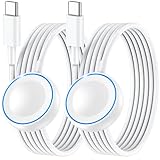
- ⚡𝟓𝐖 𝐅𝐀𝐒𝐓 𝐂𝐇𝐀𝐑𝐆𝐈𝐍𝐆 𝐒𝐔𝐏𝐏𝐎𝐑𝐓 – 𝟓𝟎% 𝐅𝐀𝐒𝐓𝐄𝐑 𝐂𝐇𝐀𝐑𝐆𝐈𝐍𝐆: Featuring the usb c fast charger technology, our iwatch charger fast charging delivers up to 50% faster charging speed compared to standard chargers. It only takes about 1 hour to fully charge the Apple Watch Series 11, reducing your wait time and ensuring your watch is always ready to go in a shorter time. (Tips: For faster and more efficient charging, please use a 20W or higher USB C charger and remove your watch case before charging.) Please Note: Fast charging requires Series 7 or later, Ultra series and New SE 3; earlier series 6 models and series SE 1-2 receive standard 2.5W charging.
- ⌚𝐓𝐑𝐀𝐕𝐄𝐋 𝐄𝐒𝐒𝐄𝐍𝐓𝐈𝐀𝐋𝐒(𝟒𝐅𝐓)– 𝐏𝐄𝐑𝐅𝐄𝐂𝐓 𝐅𝐎𝐑 𝐀𝐍𝐘 𝐒𝐂𝐄𝐍𝐀𝐑𝐈𝐎: With its sleek and lightweight design, this for Apple Watch fast charging cable features a 1.2m (4ft) long cord for extra reach and flexibility. Easily charge from a wall outlet behind the nightstand, under your desk, or in the car without being stuck close to the power source. It’s long enough for flexible charging setups in hotels, airports, or at your desk, yet still easy to pack and organize—ideal for travel, home, and office.
- ⌚𝐂𝐎𝐌𝐏𝐀𝐓𝐈𝐁𝐋𝐄 𝐖𝐈𝐓𝐇 𝐀𝐋𝐋 𝐀𝐏𝐏𝐋𝐄 𝐖𝐀𝐓𝐂𝐇 𝐌𝐎𝐃𝐄𝐋𝐒: This fast charger for Apple Watch is fully compatible with all Apple Watch models, 5W fast charging for Series Ultra 4/Ultra 3/ Ultra 2/Ultra 1, Series 12/11/10/9/8/7 (41/42/45/46/49mm)/SE3, 2.5W charging for Series 6/5/4/3/2 and SE/SE2 models (38/40/42/44mm). No matter the model, you can count on stable and efficient charging. Please note that our charger is slightly bulkier than the original. As a result, it is not compatible with standard market accessories or holders.
- 🧲𝐌𝐀𝐆𝐍𝐄𝐓𝐈𝐂 𝐃𝐄𝐒𝐈𝐆𝐍 𝐅𝐎𝐑 𝐄𝐀𝐒𝐘 𝐂𝐎𝐍𝐍𝐄𝐂𝐓𝐈𝐎𝐍: The strong magnetic design of Apple watch charger fast charging ensures precise alignment and connection with your watch. Simply place your watch on the charger, and it will automatically snap into place, offering a smooth, hassle-free charging experience.
- 🔋𝐒𝐀𝐅𝐄𝐓𝐘 𝐅𝐄𝐀𝐓𝐔𝐑𝐄𝐒 – 𝐎𝐕𝐄𝐑𝐂𝐇𝐀𝐑𝐆𝐄 𝐀𝐍𝐃 𝐎𝐕𝐄𝐑𝐇𝐄𝐀𝐓 𝐏𝐑𝐎𝐓𝐄𝐂𝐓𝐈𝐎𝐍: Equipped with multiple built-in safety mechanisms, including overcharge, overheat, and short-circuit protection, this for iphone watch charger ensures your device is charged safely and efficiently, helping to extend the lifespan of your watch.
Frequently asked questions
Can the Apple Watch Series 3 work with a new iPhone?
Apple officially lists Series 3 with iPhone 6s or later and iOS 11 or later, but the watch is capped at watchOS 8-era software. Pairing with a current iPhone can be less straightforward than the table suggests, especially after erasing a used watch. Test the exact combination and buy only with a return option.
Can an Apple Watch Series 3 be used without an iPhone?
No. GPS + Cellular models can operate away from the iPhone for selected tasks after setup and carrier activation, but Series 3 still requires an iPhone for initial pairing and remains part of Apple’s iPhone ecosystem.
Is the Apple Watch Series 3 waterproof?
No watch should be described as waterproof. Apple rates Series 3 as water resistant to 50 meters under ISO 22810:2010 for suitable shallow-water activities. A used or damaged unit should not automatically be taken swimming.
Does the Series 3 have Fall Detection or ECG?
No. Series 3 has an optical heart sensor and workout tracking, but it does not have the ECG app or Fall Detection. Those features require later supported Apple Watch models.
What is the latest Series 3 software?
Apple’s general compatibility page lists watchOS 8.8.1, while Apple’s security-release page separately lists watchOS 8.8.2 for Series 3 on March 24, 2026. The safest description is that Series 3 ends with the watchOS 8 generation and received an 8.8.2 maintenance release, rather than saying it supports current watchOS.
Frequently Asked Questions
Is the Apple Watch Series 3 worth buying in 2026?
Only at a very low used price—roughly $75–$100 depending on condition and connectivity—and only for basic notifications, workouts, GPS, heart rate, and Apple Pay. Verify pairing, Activation Lock, battery condition, and carrier support first.
What is the difference between Apple Watch Series 3 GPS and GPS + Cellular?
Both have GPS, but GPS + Cellular adds LTE/UMTS, 16GB rather than 8GB storage, a ceramic and sapphire-crystal back, and the ability to use selected services away from the iPhone with a compatible carrier plan. The cellular model still requires iPhone pairing.
How do I avoid buying an Activation-Locked Series 3?
Have the seller unpair and erase the watch and remove it from their Apple Account before shipment. During setup, if the watch requests another person’s Apple Account credentials, return it; the seller must remove the lock.
What is the best alternative to Series 3?
The new Apple Watch SE 3 is the clearest replacement because it starts at $249 in the U.S. and supports current watchOS. A used Series 6 or newer is generally a better long-term used purchase than Series 3.
The Bottom Line
Bottom line: The Apple Watch Series 3 is still functional, but it is no longer a sensible default Apple Watch purchase. Its 2017 hardware, watchOS 8 ceiling, vintage service status, aging battery, and missing health and safety features make it a bargain-only option. Buy one only when the price is low, the watch is not Activation Locked, pairing works with your iPhone, and cellular support is confirmed if you need it. Otherwise, a used Series 6 or newer—or the $249 Apple Watch SE 3—is the safer investment.
Quick Recap
Product prices and availability are accurate as of the date/time indicated and are subject to change. Any price and availability information displayed on Amazon at the time of purchase will apply.




