Apple Watch Water Lock disables touch input while it is on, helping prevent accidental taps when you wear the watch in water. Turn it on from Control Center; to turn it off, press and hold the Digital Crown until the display says “Unlocked,” and the watch plays tones to clear water from the speaker. Water Lock does not make the watch waterproof or change its water-resistance rating.
What does Apple Watch Water Lock do?
Water Lock prevents unintended touches on the display while the feature is active. The display does not respond to touch normally, and tap and wrist-flick gestures are unavailable. A Water Lock icon appears on the watch face.
When you turn Water Lock off, the watch plays a series of tones that Apple says clears water remaining in the speaker. This is not a complete drying system: Water Lock does not seal the case, remove water from the whole device, or change the watch’s water-resistance rating.
How to turn on Water Lock
- Press the side button to open Control Center.
- Tap the Water Lock button.
The Water Lock icon appears on the watch face, and the display stops responding to touch input. Apple documents these steps in its Water Lock instructions.
Do these 3 things before closing this tab:
1Fix the driver behind crashes, sound loss and screen glitches2Repair Windows errors before they cause bigger problems3Scan for outdated or missing drivers - takes under a minute#1 Best Overall
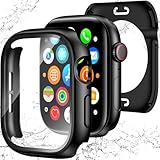
- 【Perfect Fit 40mm】This precision-engineered face cover is custom-designed for Apple Watch 40mm models, including Series SE 3, SE 2(2nd Gen), SE, and Series 6, 5, 4. Please verify the "40mm" marking on the back of your watch to ensure a perfect fit before purchasing.
- 【Daily Waterproof】Features an upgraded built-in seal ring for reliable IP67-rated water resistance. It effectively guards your screen against daily moisture, sweat, and fog—perfect for hand washing, intense workouts, and rainy days.(Note: Designed for daily surface protection; not intended for deep-sea diving or prolonged underwater submersion. Please ensure the screen area is dry after exposure to water.)
- 【360° All-around Protection】This 3-in-1 integrated design features a premium PC bumper with edge-to-edge coverage and a built-in 9H tempered glass screen protector. It provides comprehensive defense against scratches, impacts, and daily wear, safeguarding your iWatch from every angle without obstructing the display.(Note: To ensure optimal touch sensitivity, please do not use this case with any other screen protectors already on your watch.)
- 【Easy Snap-On Installation】Precision cutouts and a user-friendly snap-on design allow for quick installation and removal (removal tool included). It fits snugly over all watch buttons and features, ensuring highly responsive touch sensitivity and full access to the digital crown. You can charge your watch directly and access sensors without ever removing the case.
- 【YIJDACASE 24-Month Reliable Support】We stand behind our products with a long-term quality commitment. Suitable gifts for Men, Women, Fathers day, Mothers Day, Birthday and Christmas. Our professional service team is available 24/7 to ensure your satisfaction. Please feel free to reach out to us via Amazon Message for any product concerns or technical assistance.
How to turn off Water Lock and clear water from the speaker
- Press and hold the Digital Crown until the display says Unlocked.
- Let the watch play its series of tones to clear water remaining in the speaker.
On watchOS 8 or earlier, rotate the Digital Crown instead of pressing and holding it. Apple notes that the sounds may be audible and you may feel some water on your wrist.
Using Water Lock during a swim workout
- Open the Workout app and choose Pool Swim or Open Water Swim.
- Start the workout. Water Lock turns on automatically.
- After swimming, press the side button to open Control Center.
- Tap Water Lock, then press and hold the Digital Crown until the watch unlocks and plays the speaker-clearing tones.
See Apple’s swimming workout guide for the watchOS 26 procedure.
Rank #2

- [IP67] Waterproof Certified: [IP67] Certified to ensure excellent water resistance. The integrated waterproof sealing ring safeguards the gap between the case and the screen of Apple Watch 11/10. It effectively prevents moisture from entering the interior of the iwatch screen protector during washing hands or swimming. Tips: Immerse the apple watch in water for a long time is NOT recommended, as this will affect the waterproof performance of the apple watch screen protector
- Perfect Fit: The screen protector of Apple Watch Series 11 Series 10 fully covers both the watch screen and sides without affecting the apple watch's on-screen touch sensitivity, buttons, heart rate monitor, fingerprint recognition, speaker, microphone and wireless charger, while further to maintain the full functionality
- Excellent Protection: This case with screen protector is crafted to provide robust external protection for your Apple Watch Series 11 Series 10. The tough HD tempered glass screen protects your iWatch from dust, fingerprints and scratches, ensuring long-lasting clarity and defense
- Effortless to Install: The installation steps of the case for iWatch Series 11 Series 10 are very simple. You can install the screen protector of iwatch 10 or remove the case wherever and whenever without the need for tools
- Model: Compatible with Apple Watch Series 11 Series 10 46mm. Please confirm your iWatch model before you purchase
When does Water Lock turn on automatically?
Apple says Water Lock turns on automatically for water-based workouts such as swimming or surfing, and when beginning a scuba dive with Apple Watch Ultra. Apple’s water-resistance guidance also says Ultra and later models can be set to activate Water Lock automatically when submerged to 10 cm or lower. Check Apple’s guidance for your exact model and activity.
Does Water Lock make Apple Watch waterproof?
No. Apple’s wording is: “Your Apple Watch is water resistant, but not waterproof.” Water Lock is a software feature for preventing unintended touches and clearing water from the speaker; it does not improve water resistance. Apple says water resistance can diminish over time, and the watch cannot be rechecked or resealed for water resistance.
Rank #3

- Waterproof [IP67 Rating]: This screen protector has a built-in waterproof sealing ring. It can prevent moisture from penetrating between the case and the watch (The waterproof area is to the screen, not the sides of the watch). It effectively prevents moisture in daily life from entering the screen and affecting the touch screen effect of the watch(Such as washing hands/exercise, etc.). Please do not soak in water for a long time, it will reduce the waterproof performance of the case.
- Easy to install: Super easy to install and remove the protective case from the watch. It doesn't add much bulk to the watch.
- Touch-sensitive: It is sensitive to touch and quick to launch an application when installed the case. You feel like there is no case on your watch.
- Smart design: The button design of this tempered glass protective cover is to provide comprehensive protection for the case, and does not affect the sensitivity at all.
- Compatible model: Compatible with Apple Watch SE 3 / SE 2/ SE / Series 6 /Series 5 /Series 4 44mm
Which Apple Watch models can be used in water?
Water Lock and water-use eligibility are separate. Apple’s model guidance distinguishes splash resistance, shallow-water swimming, and activities such as diving. These ratings are technical specifications, not permission to use a watch at any depth or in any water activity.
| Model category | Apple’s stated guidance |
|---|---|
| First-generation Apple Watch and Series 1 | Rated IPX7 under IEC standard 60529. Apple does not recommend submerging these models. |
| Series 2 and later | Rated to 50 metres under ISO standard 22810:2010 and suitable for shallow-water activities such as pool or ocean swimming. |
| Apple Watch Ultra and later | Rated to 100 metres under ISO standard 22810:2010, compliant with EN13319, and intended for recreational scuba diving to 40 metres, subject to Apple’s model and activity guidance. |
These ratings and activity descriptions come from Apple’s water-resistance guidance. Check that guidance for your exact watch and planned activity rather than treating a rating as an unrestricted depth recommendation.
Rank #4

- 【For 40mm】This waterproof apple watch case with back cover is designed for Apple Watch SE3 SE2 SE Series 6/5/4 40mm. (Please confirm the size by checking the size mark on the back of the watch.)
- 【2 in 1 Full Coverage Case】 New Protective Concept - 2 in 1 Full Coverage Protective Case! Made with premium Hard PC material, featuring a built-in 9H screen protector combined with sturdy back cover, offering 360-degree solid protection to effectively guard your Apple Watch against scratches, drops, and daily wear and tear.
- 【Daily waterproof 】The built-in seal ring keeps water away from screen, the water will not seeps through the screen protector, which means you no longer need to remove case repeatedly and wipe water. (The old design case of others may cause the touch sensitivity to decrease disk when you wash your hands or take a bath etc.)
- 【Easy to Install and Charging】 Charge directly, don't need to take off the appe watch case and band. The back cover case is easy to install and remove.Note: Because our apple watch case with tempered glass screen protector, it cannot be used simultaneously with other screen protectors.
- 【Zumyzu Quality Service】We offer a two-year Quality Service with unconditionally refund or replace if defective or any quality problems. Via "Login Amazon" → "Your Account" → "Your orders" → "Ask Product Question".
What to do after swimming
- Turn off Water Lock to play the speaker-clearing tones.
- After swimming, gently rinse Series 2 and later under lightly running, warm, fresh water, as Apple recommends.
- Dry the watch and band thoroughly with a nonabrasive, lint-free cloth.
- If water remains, allow it to dry; do not shake the watch or use heat, compressed air, or sprays.
- Do not insert objects into the speaker or microphone openings.
Apple also advises checking whether your specific band is water resistant; not every band is suitable for swimming. See Apple’s water-resistance and care guidance.
Frequently Asked Questions
How do I turn off Water Lock?
Press and hold the Digital Crown until the display says “Unlocked.” On watchOS 8 or earlier, rotate the Digital Crown instead.
Best Value
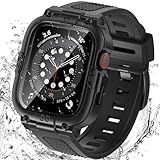
- Compatible Models: Designed for Apple Watch 40mm, 41mm, 42mm, 44mm, 45mm, 46mm and 49mm; Select the correct size and check the case size printed on the back of your watch before purchasing
- 360° Full Protection: The integrated band and double-layer case combine a built-in 9H tempered glass screen protector with a sturdy back cover to help protect the screen, edges and back from scratches, bumps and everyday drops
- IP67 Daily Water Resistance: Built-in sealing ring helps keep splashes, sweat, rain, moisture and fog away from the screen during hand washing, workouts and daily wear; Not intended for swimming, bathing or prolonged submersion
- Easy Installation & Full Access: Snap-in design allows quick installation and removal; Precise cutouts maintain access to the Digital Crown, side button, speaker, sensors and charging area
- Comfortable Integrated Band: The adjustable band provides a secure and comfortable fit for work, workouts, travel and everyday wear while keeping the protective case firmly in place
How do I eject water from my Apple Watch?
Turn off Water Lock. The watch plays a series of tones that Apple says clears water remaining in the speaker. It does not dry the entire watch.
Does Water Lock turn on automatically when I swim?
Yes. Apple says Water Lock turns on automatically when you start a swimming workout in the Workout app. Apple also documents automatic activation for certain other water-based workouts and Ultra scuba diving.
Can I swim without Water Lock?
Water Lock does not determine whether a model is suitable for swimming; it prevents unintended touches. Apple says it turns on automatically when a swimming workout starts. Check Apple’s water-resistance guidance for your model before swimming.
Can I submerge Apple Watch Series 1?
Apple does not recommend submerging the first-generation Apple Watch or Series 1. Water Lock does not change that guidance.
Quick Recap
Product prices and availability are accurate as of the date/time indicated and are subject to change. Any price and availability information displayed on Amazon at the time of purchase will apply.




