There is no single calibration command for a Garmin vívoactive 4. Compass direction, barometric elevation, GPS tracks, indoor distance and heart-rate readings each need a different response. Use the symptom table to find the right one: the compass can be calibrated manually, the altimeter calibrates through GPS, and GPS itself has no normal user-entered calibration setting.
Identify what is inaccurate
| Symptom | Likely system | What to do |
|---|---|---|
| Heading is wrong while you are standing still | Electronic compass | Calibrate the compass outdoors, away from magnetic interference. |
| Elevation or floors climbed looks wrong | Barometric altimeter and barometer | Use GPS-based calibration and check that the pressure ports are clear. |
| Outdoor run distance or track is poor | GPS reception, recording conditions or activity setup | Improve satellite acquisition and test in a more open area; there is no standard GPS calibration command. |
| Treadmill or indoor distance is inaccurate | Learned stride distance or lack of an external sensor | Record outdoor GPS activities to improve indoor estimates, or consider a compatible foot pod for timed-activity distance and pace. |
| Daily step total seems wrong | Internal accelerometer and how the watch is worn | Check fit and wearing position. A foot pod does not change daily step totals. |
| Heart-rate readings jump or seem low | Optical sensor contact and fit | Wear the watch snugly and correctly; for demanding workouts, consider a compatible chest strap. |
The vívoactive 4 and 4S use model-specific menus. Do not assume a path published for a Venu, Forerunner, fēnix or newer vívoactive applies to these watches.
Calibrate the compass
The vívoactive 4/4S compass is factory calibrated and uses automatic calibration by default. If the heading behaves irregularly—such as after substantial travel or extreme temperature changes—calibrate it manually outdoors.
- Go outdoors and move away from vehicles, buildings, metal objects and overhead power lines. Avoid calibrating beside a phone, laptop, speaker or magnet.
- Hold the watch’s action button.
- Select Settings > Sensors > Compass > Start Calibration.
- Follow the on-screen prompts, moving your wrist in a small figure-eight motion until the watch indicates calibration is complete.
To check the result, open the compass or a navigation screen outdoors. Hold the watch level, rotate slowly and compare its heading with a known direction or reliable physical compass. If the reading remains erratic, test in another open location rather than repeating the procedure beside the same source of magnetic interference. A tilted watch or nearby metal can make a heading look wrong; compass calibration will not repair a poor GPS track or change a map’s magnetic-declination assumptions.
#1 Best Overall

- Compatible Models -- Vancle Silicone Bands Designed for Garmin Vivoactive 4, Garmin Venu 3 / Venu 2, Garmin Forerunner 265/255/255 Music, Garmin First Avenger, Garmin Darth Vader, Garmin Polar Vantage M / Polar Vantage M2. (Note: Please Check Your Watch Model Before Buy It. And No SmartWatch Included)
- Premium Material --- This Garmin Vivoactive 4 watch band made of soft, flexible, and durable silicone material, comfortable to wear and eco-friendly for the human skin. prevents skin from irritation, Sweat & water resistant.
- Secure Design --- with strong precision spring pins and Metal buckle can double hold your Garmin Venu 2 Watch Band in place and locked precisely & securely. No longer to worry about falling off your smart watch.
- Multiple Colors --- Various bright colors personalize your smartwatch to fit your mood and outfit in daily life, elevates your style for every occasion. Size fits for 5.5" -8.3" (140mm-211mm), freely adjustable stainless buckle to fit your size wrist.
- Friendly Customer Service --- If you are not absolutely thrilled with our premium Garmin Venu 3/Venu 2/Vivoactive 4 watch bands, just contact us and we will reply you ASAP.
Source: Garmin vívoactive 4/4S owner’s manual.
Calibrate the barometric altimeter
The barometric altimeter contributes to elevation data during outdoor GPS activities and to Floors Climbed. Garmin’s documented vívoactive 4 method is GPS-based; it does not require a separate calibration-complete message.
GPS-based calibration
- Go outdoors and open an outdoor activity profile.
- Wait until the watch acquires GPS and shows the green ring and GPS Ready.
- Wait an additional 30 seconds before starting or exiting the activity. Garmin says this wait automatically calibrates the altimeter.
Garmin Connect-assisted elevation update
For vívoactive 4 devices running software version 5.60 or higher, Garmin Connect can update the current elevation using Garmin’s digital elevation mapping. Enable cellular data and location services for Garmin Connect on the phone, and confirm that the watch is connected. Go outdoors, select an outdoor activity on the watch, wait for the green-ring GPS Ready indication, then start the activity. Garmin says the barometer takes over after the initial elevation update; no calibration-complete message appears.
Do not apply the newer-model path Settings > System > Altimeter & Barometer > Calibrate to the vívoactive 4: that menu is documented for newer Garmin models, not as the standard procedure for this watch. See Garmin’s vívoactive 4 altimeter guidance and, for contrast, the newer-model manual.
Rank #2

- Compatible with Garmin Vivoactive 4 45mm,Garmin Venu 2, Garmin Forerunner 255;Galaxy Watch 3 45mm/Galaxy Watch 46mm,Gear S3 Frontier / Classic;Fossil Men's Gen 6/5E 44mm, Fossil Men's Gen 5 Carlyle,Fossil Women's Gen 5 Julianna,Fossil Gen 5 Garrett,Gen 4 Explorist HR,Founder Gen 2 /Explorist Gen 3/ Q Founder 2.0 / Marshal / Wander| 22mm;Smart watch device DO NOT included.
- Easily Install & Remove: This 22mm silicone band is easy to be installed on your Vivoactive 4 etc., will stay firmly and convenient to remove from it as well.
- Premium Material: This 22mm watch band made in premium soft silicone, fits for 5.51"-8.46" (140mm-215mm)wrist. All bands are very comfortable for day to day wearing.
- For Different Occasions: This 22mm qiuck release solft silicone bands can satisfy the request of work, sport and entertainment.
- If you are not 100% satisfied, please let us know, we will make it right.
Check elevation results
If you are testing a persistent error, go to a location with a known elevation, run the GPS-based calibration steps, record a short activity, and compare the result with that elevation. Garmin’s general guidance says supported devices can report elevation to approximately ±10 feet with proper calibration, but GPS calibration alone cannot guarantee that accuracy. Weather and air-pressure changes can cause barometric elevation to drift after calibration. Keep the pressure-sensor ports free of dirt and debris; inspect them carefully and do not insert objects into the openings.
Recommended Free Tools
Sources: Garmin vívoactive 4 altimeter guidance; Garmin elevation-accuracy guidance.
Improve GPS accuracy without looking for a calibration setting
There is no documented vívoactive 4 setting for entering a GPS calibration factor. GPS performance depends on satellite reception and recording conditions, not on the compass calibration. For a cleaner start:
Rank #3

- 【22MM Watch Band Compatible Model】22mm quick release watch band compatible with Garmin Venu 4 45mm/Venu 3 watch band 45mm/Venu 2 watch band 45mm/Garmin Vivoactive 4 45mm/Forerunner 265/Forerunner 255. 22mm Watch Band also compatible Samsung Galaxy Watch 3 45mm/Galaxy Watch 46mm/Gear S3 Frontier/Gear S3 Classic Smartwatch.Please double check your original watch bands model before purchasing (Watch is NOT included)
- 【Skin-Friendly Silicone Material】GEAK replacement watch band compatible for Garmin Venu 3 4/ Venu 2 replacement band are made of premium silicone materials, which can prevent skin from irritation rash, it is soft, flexible, breathable, washable, drying fast and comfortable to wear. A great alternative to original bands for Sports. Soft and comfortable feeling brings good time all day
- 【Same Color Buckle as Band Design】GEAk 22mm watch band compatible for Garmin Venu 4 band/ Venu 2 3 watch band for men women is designed with Sturdy Buckle, the same color buckle macth with the band. comes with a sturdy fastener, double-reinforced to prevent smartwatch from falling, fit your mood and outfit when running, camping or shopping, dress up your watch and highlight your unique taste
- 【Easy Installation】GEAK silicone watch band for vivoactive 4 watch band 45mm is adopt customized 22mm quick release spring bars on both sides with seamless connection technology which are easy to change watch bands without tool. slide the pin into the notch of the watch and keep two sides of the connector locked to the Watch, push the pin inward, slide the other end inside.Remember to close the pin after completing the replacement to prevent the dial from falling off
- 【Size Adjustable Muti-Color available】The Venu 3 watch band fit wrist for 5.51"-8.46" (140mm-215mm), Max adjustable length provide you the most comfortable size for wrist, available in a variety of colors, different colors bring you different moods. It is suitable works or daily, for weddings, birthdays, Valentine's Day, Christmas, Thanksgiving and other holidays
- Go outdoors with as open a view of the sky as practical.
- Select the outdoor activity before recording and wait for GPS Ready.
- Use the additional 30-second wait after GPS Ready as a pre-start practice; Garmin documents it for altimeter calibration, not as a separate GPS recalibration.
- Avoid beginning beside tall buildings, dense tree cover, cliffs or other obstructions when possible.
Tracks can still be affected by tunnels, switchbacks, urban canyons and satellite geometry. A measured course, treadmill, foot pod or another device may also report a different distance. If the track remains poor in open conditions, restart and synchronize the watch, check for available software updates through Garmin Connect, and test again before assuming the receiver has failed.
Improve treadmill and indoor distance
Indoor distance estimation is separate from compass, altimeter and GPS calibration. Garmin says outdoor GPS activities help the watch improve its learned step distance for indoor activities.
Try custom stride length where available
Garmin documents this Garmin Connect path: More > Settings > User Settings > Custom Stride Length, then enable Walking or Running if those options are offered. Menus can vary by app version, device and activity type. Garmin specifically limits the Running custom-stride option on selected devices without built-in GPS, so a vívoactive 4 owner may not see every option shown in generic instructions.
Rank #4

- Universal 22mm Compatibility: Designed for watches with 22mm lugs,GEAK quick-release bands are verified to compatible with Garmin Venu 4/3/2 45mm/Vivoactive 4 (45mm)Forerunner 255/255 Music/265/745/965//for Galaxy Watch 46mm/Galaxy Watch 3 45mm. Not sure about fit? Double-check your watch model is 22mm width or check our full compatibility list on page
- Two-color Scheme: Featuring a stylish two-tone design, the bold contrast of colors creates an eye-catching pop, delivering a striking visual impact. These bicolor watch straps offer versatile styling—wear them for a chic, sophisticated look or switch to a sporty, casual vibe
- Breathable for All-Day Comfort: Our Venu 3 watch band crafted from soft, skin-friendly silicone, this lightweight band offers superior breathability and lasting durability. Hypoallergenic and odor-free, it’s gentle on your skin while providing effortless style. Choose from multiple colors to match your mood or outfit
- Quick-Release System (22mm): Equipped with tool-free quick-release spring bars, these bands can be effortlessly installed or removed in seconds—no tools required. For perfect fitment, measure your watch's original strap width is 22mm before purchasing
- Adjustable Fit (160-225mm Wrists): Featuring an adjustable buckle for effortless sizing fits 6.3"-9.1" wrists. Crafted from temperature-resistant silicone, it withstands extreme conditions during diving, rock climbing, or daily adventures, while the reinforced clasp ensures your watch stays firmly in place, and it will be a good companion on your journey
Use a foot pod for timed-activity pace and distance
A compatible foot pod or compatible chest strap with running dynamics can provide more precise distance and pace during a timed activity. If an ANT+ foot pod is paired, Garmin documents this calibration path in its relevant vívoactive manual family: Action key > Settings > Sensors > Foot Pod > Calibration Factor. Increase the factor if the recorded distance is too low; decrease it if the distance is too high. Pair the foot pod before changing its factor.
This adjusts the accessory’s distance estimate, not the watch’s built-in GPS, compass or daily step counter. Garmin says a foot pod does not change daily step totals. Treadmill-console distance is another estimate, and belt calibration or incline can affect comparisons.
Sources: Garmin guidance on stride length and step counting; Garmin foot-pod calibration instructions.
The Tool Desk
Outbyte Driver Updater FREEScan for outdated or missing drivers - takes under a minuteDriver Scan →Outbyte PC Repair FREEClear out junk files and repair common Windows errorsFree Scan →Best Value
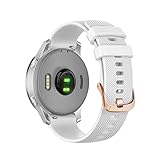
- 【Compatibility】the watch band ONLY fit for smart watch of original watch band mark ‘18’,Please double check your original watch bands. Customized 18mm Quick Release Silicone Watch Band Perfect fit for Garmin Venu 3S,Vivoactive 4S(NOT include Vivoactive 4 45mm), Vivomove 3S(NOT include Vivomove 3 44mm), Venu 2S (NOT include Venu / Venu Sq / Venu 2 Plus), Forerunner 255s / 255s Music (NOT include Forerunner 255 / 255 Music), Only watch band, NOT included smartwatch.
- 【Premium Silicone】Soft hypoallergenic silicone with smooth finish for a sporty look. Comfortable and durable. especially for sport,running,yoga,hiking,swimming,surfing etc.
- 【Fit Wrist Size】 Come with Rose Gold stainless steel clasp,perfect rose face watch bezel. holds securely and easy adjustable length to fit your wrist, fits wrist size 5.31-7.87inch(135mm-200mm).
- 【Easy Installation】 Both ends come with customized 18mm quick release, no tools, easy installation and removal.
- ▲ One Year Warranty and friendly customer service. We are happy to send out a replacement band if your band has any quality issues, please kindly let us know.
Troubleshoot persistent errors
If compass calibration fails
- Move outdoors and away from cars, metal railings, reinforced structures, magnetic clasps and power lines.
- Use a small, controlled figure eight rather than a large or abrupt wrist movement.
- Restart the watch and try once more in a different open location.
- If the compass remains erratic across multiple open locations, note when it happens and contact Garmin support.
If elevation remains wrong
- Check whether GPS had fully acquired before the activity and whether you waited the additional 30 seconds.
- Inspect the pressure ports for dirt, sweat or debris without putting anything into them.
- Test at a known elevation. A map, trail sign or phone may use a different reference datum, so comparisons may not match exactly.
- If the reading changes after weather shifts, barometric drift may be the cause rather than a permanent loss of calibration.
If outdoor GPS distance remains poor
Repeat the test in an open area after GPS Ready, then compare the track rather than expecting every distance source to match exactly. If errors persist across suitable conditions and after restarting and synchronizing, use Garmin’s model-specific support resources.
If the menu or feature is missing
Confirm whether the watch is a vívoactive 4 or 4S and check the manual for that model. A missing manual altimeter-calibration menu is not by itself evidence of a fault: the vívoactive 4 procedure is GPS-based. Garmin’s vívoactive 4 support page lists its manuals and software resources.
Heart-rate readings: troubleshoot fit, not calibration
The vívoactive 4 does not have a user-accessible optical-heart-rate calibration procedure documented here. Wear it snugly above the wrist bone, with the sensor and skin clean and dry. Loose contact can disrupt readings. Intervals, strength training, cold weather and substantial wrist movement can also make wrist-based readings less dependable. A compatible chest strap is an alternative when workout heart-rate consistency matters more than convenience; it does not calibrate the watch’s other sensors.
Quick Recap
Product prices and availability are accurate as of the date/time indicated and are subject to change. Any price and availability information displayed on Amazon at the time of purchase will apply.
Do these 3 things before closing this tab:
1Repair Windows errors before they cause bigger problems2Scan for outdated or missing drivers - takes under a minute3Clear out junk files and repair common Windows errors



