Recommended Free Tools
ZEISS Optical Inserts are Apple’s official magnetic vision-correction lenses for Vision Pro. Choose Prescription if you wear prescription eyeglasses and have an eligible distance prescription; choose Readers if you use over-the-counter reading glasses in one of ZEISS’s three strength bands. If single-vision soft contact lenses already give you clear distance vision, you may not need inserts. In the U.S., Apple’s product page listed the pair at $99 when checked August 18, 2026; confirm the price and selected model at checkout. If you buy inserts after your headset, Apple says a different Light Seal may be needed.
Do you need ZEISS Optical Inserts?
Vision Pro’s displays are not the same as reading a book or looking at a monitor, so needing reading glasses in daily life does not automatically mean you need inserts. Use the correction that lets you see comfortably through the headset, and consult an eye-care professional if you are unsure.
| Vision correction | What to consider |
|---|---|
| No prescription or correction | You usually do not need inserts. |
| Prescription eyeglasses | Ordinary glasses cannot be worn inside Vision Pro; eligible ZEISS Prescription inserts may be appropriate. |
| Over-the-counter readers | ZEISS Readers may suit you if your reading-glass strength falls within one of the listed bands. Some people may still need a comprehensive prescription if vision is blurry or uncomfortable. |
| Single-vision soft contact lenses for distance | Apple says you can generally use Vision Pro without prescription inserts. Readers may still be used over contacts for near correction. |
| Hard contact lenses | They may affect eye tracking. Ask an eye-care professional if tracking is unreliable. |
| Cosmetic contact lenses | Apple says these are not compatible; remove them before using Vision Pro. |
| Monovision contacts | A comprehensive eyeglass prescription may be needed rather than relying on monovision contacts alone. |
| Prism, strabismus, nystagmus, or eyelid conditions | These can affect eligibility, comfort, or eye tracking; see the section on complex prescriptions and prism. |
Apple’s guidance on vision correction and contact lenses is in its Vision Pro vision-prescription support.
Choose Prescription or Readers
ZEISS Optical Inserts – Prescription
These are custom-made separately for the left and right eyes using an eligible distance eyeglass prescription. They support many common sphere, cylinder, axis, and addition values, including many progressive and bifocal prescriptions, but not every prescription is accepted. ZEISS does not accept prism values in its insert order. Check your prescription with the ZEISS prescription guide before purchasing.
Outdated Drivers Are Slowing You Down
One free scan finds every outdated or missing driver and matches the right update for your exact hardware.Free scan · exact hardware matchPC Slower Than It Used to Be?
A free scan shows the junk files, broken settings and background clutter dragging Windows down - then fixes them in one click.Free scan · Windows 10 & 11#1 Best Overall

- Attention: Used for Apple Vision Pro only ( Magnetic compatible with official light seal. Not for use while wearing glasses. Note: Only the light‑blocking cover is included; light seal is NOT included. For optical inserts, it is recommended to pair with W+ light seal.)
- Lightweight & Pressure-Relief: Reduces weight and facial pressure while expanding the field of view (FOV)
- Wearing experience notes: This product only partially improves facial pressure (it cannot eliminate it entirely). Facial pressure comes from two main points: cheeks and the nasal bridge, with cheek pressure being significantly greater. No obvious pressure marks were observed after 1 hour of continuous wear.
- Magnetic compatibility: Supports magnetic attachment for the official Apple Vision Pro light seal.
- Optical lens friendly: Works seamlessly with official Zeiss optical inserts; not compatible with direct eyeglass wear
ZEISS Optical Inserts – Readers
Readers are fixed-strength inserts for people who use over-the-counter reading glasses, not custom prescription lenses. Match the strength printed on your ordinary readers to one of these ranges:
- +0.75D to +1.25D
- +1.50D to +1.75D
- +2.00D to +2.75D
After pairing, Vision Pro may show a translated optical value of +0.25D, +0.50D, or +0.75D in Settings. That display is the value Vision Pro uses after pairing, not an indication that the inserts are mislabeled. For readers stronger than +2.75D, Apple suggests trying the highest Readers range or asking an eye-care professional about a supported comprehensive prescription; neither route guarantees a comfortable result.
Rank #2
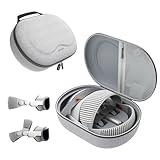
- Sufficient Room: The mesh pocket accommodates accessories such as power adapter, AirTag, Zeiss Optical Inserts, Dual Loop Band, Solo Knit Band, and more. The travel case for the Vision Pro M5/M2 features a precisely designed inner tray, providing organized storage for your Apple Vision Pro cover, headset, battery, and charge cable. Elastic straps secure your device, preventing movement and protecting your VR headset during travel.
- Style Meets Function: The Syntech Hard Case is specifically designed for the Apple Vision Pro 2025/2024. The upgraded case now offers enhanced functionality and durability while maintaining excellent protection and a sleek appearance.
- Comprehensive Protection: The case for Vision Pro is constructed from three layers of composite materials, making it waterproof, shockproof, and scratch-resistant. This design ensures ultimate durability and security for your Apple Vision Pro.
- Easy to Carry: With dimensions of 12.39 x 9.06 x 4.93 inches, this carrying case is ideal for travel or daily use. You can carry it by hand or conveniently place it in a backpack.
- What's Included: Not only does the package include a durable hard case, but it also comes with an extra lens cover. The lens cover protects the VR lens from scratches, dust and direct sunlight.
Check the prescription before you order
For U.S. Prescription inserts, ZEISS requires a valid, unexpired distance eyeglass prescription from a U.S. eye-care professional. Contact-lens, computer, office, occupational, and near-only prescriptions do not qualify. Make sure the submitted document is clear and legible and includes:
- The patient’s name.
- Sphere values for each eye.
- Cylinder and axis when astigmatism correction is present.
- Addition (ADD) value where applicable.
- The prescriber’s name and U.S. address.
- The prescriber’s signature; electronic signatures are accepted.
- An expiration date and/or examination date.
Common prescription abbreviations are SPH (main nearsightedness or farsightedness correction), CYL (astigmatism correction), AXIS (the astigmatism angle from 1 to 180 degrees), and ADD (extra near magnification, often used in bifocal or progressive prescriptions). Axis must accompany a cylinder value, and cylinder must have an axis. PD means pupillary distance; third-party sellers may ask for it, while ZEISS’s official workflow determines what it needs. The ZEISS guide checks order eligibility and documentation; it is not an eye exam.
What’s actually slowing this PC down?
Pick the symptom - the matching free tool is one click away.
Rank #3

- Compact and pretty appearance design
- Compact and pretty appearance design No vision difference on the display screen No deformation and accurate lens layout abtained Bifocal lens can be positioned quickly and accurately The small lens can also be put in clear projectile
- Large observation window directly observed through the mirror in the projection lens on the dial More intuitive More accurate with lights So that a clearer image Rotation rotary fixation sucker The suction cup will be fixed at the lens center is more accurate.
Order from Apple
Buying Vision Pro and inserts together
- Start a Vision Pro purchase through Apple’s buying page and answer the vision questions accurately.
- Follow Apple’s recommendation and select ZEISS Prescription or Readers when prompted.
- For Prescription inserts, submit the required prescription to ZEISS during checkout or through the follow-up email. In the U.S., Apple says the valid prescription must be uploaded within 30 days of placing the order.
- Complete the headset and insert order. Ordering them together helps Apple select a compatible Light Seal.
Adding inserts to a headset you already own
- Open Apple’s ZEISS Optical Inserts product page.
- Choose Prescription or Readers and complete the matching prescription or strength-selection process.
- Check the current Light Seal fit and account for the possibility that a different Light Seal will be required.
- Keep the pairing card included with the inserts when they arrive.
Apple’s current product page lists Vision Pro M5 and M2 compatibility. The U.S. page showed $99 for the displayed product selection when checked August 18, 2026; price, availability, and selection can vary, so verify the final transaction at checkout. Apple says official inserts are sold and shipped only within the country where they are purchased, and the prescription must be written by an eye-care professional in that country. Do not assume a U.S. prescription can be used to order in another market.
Install and pair the inserts
- Remove the inserts from their case and identify the left and right lenses.
- Place each insert over the matching Vision Pro display. The magnets should seat it in position.
- If Vision Pro prompts you, scan the personal pairing code on the card in the box.
- Complete the optical-insert setup shown on screen, then store the inserts in their case whenever they are not installed.
- Redo Eye Setup if you change lenses, contacts, or prescription.
If you lose the card, ZEISS says you can access the pairing code under registered products in MyZEISS Vision, provided you registered the inserts. ZEISS also says registering within 90 days can activate a free one-year warranty extension.
Rank #4

- HEAVY DUTY DESIGN – Stainless steel hardware and nylon construction protects your lens from rain, snow, dirt, dust, mud, and anything else you might encounter. Made in USA; the ZEISS Pro Lens Covers are lightweight and durable.
- FLIP-UP AND FOLD-FLAT – Pro Lens Covers will remain flat, under recoil, while in the fold-flat shooter-ready position. The lens covers also feature snap-to closure. With flip-open tabs on both sides for right- or left-handed operation.
- SECURE – Installs securely with dual fasten points to your ZEISS riflescope and will stay put even in extreme temperature shifts.
- SOLID FIT – Ocular lens covers helps to retain and secure your preferred diopter setting so the scope is ready as soon as the lens covers are opened.
- OEM FITMENT - Ocular lens cover fits ZEISS LRP S3 riflescopes
Troubleshoot blur, discomfort, or unreliable eye tracking
- Check that the left and right inserts are on the correct sides.
- Clean the lenses using the manufacturer-recommended method, and make sure each insert is fully seated magnetically.
- Confirm that you submitted a distance eyeglass prescription, not a contact-lens, computer, office, or near-only prescription.
- Redo Eye Setup.
- Check the Light Seal fit and your eye position.
- Open Settings → Eyes & Hands → Displays & Optical Inserts.
- Try the Near, Default, or Far display preset. Apple advises trying a preset for a day or more before judging the result.
- If needed, choose Adjust Displays Manually.
- If eye tracking remains unreliable, consider whether hard contacts, prism, strabismus, nystagmus, or eyelid position could be a factor, and consult an eye-care professional.
Do not try to alter the inserts yourself. Contact Apple or ZEISS about a pairing, order, or manufacturing problem. Apple’s support guidance covers display adjustments and vision-related limitations.
Independent reader supportYour contribution helps us test, update, and keep practical guides available for everyone.Prism and other complex prescriptions
ZEISS does not currently accept prism values in its prescription insert order. Separately, Apple lists Digital Prism Correction in visionOS 26 and later, supporting up to 7.75 prism diopters horizontally and/or vertically per eye, subject to Apple’s stated limitations. Software correction is not the same as ordering prism-ground ZEISS inserts, and it should not be assumed to make every prescription or eye-tracking issue suitable for Vision Pro. Discuss complex correction needs with an eye-care professional and check Apple’s current vision support information.
Free tools Windows power users keep installed
One-click scans. No signup required.
Best Value

- 3x+6x=9x
- Aplanatic Achromatic
ZEISS versus third-party inserts
ZEISS is the official Apple accessory and offers Apple’s magnetic and pairing workflow. A third-party option may cost less or handle a prescription ZEISS cannot accept, but buyers should verify fit, prescription handling, support, and return terms rather than assume equivalence.
| Option | Price evidence | Pairing and fit considerations | Best suited to |
|---|---|---|---|
| ZEISS Prescription or Readers through Apple | $99 shown on Apple’s U.S. product page for the displayed selection, checked August 18, 2026; confirm at checkout. | Official magnetic inserts with the included pairing workflow. Apple notes a new Light Seal may be needed when inserts are purchased after the headset. | Users with an eligible prescription or supported reader strength who want the first-party setup. |
| HonsVR custom Apple Vision Pro lenses | $79.95 listed on HonsVR’s product page, checked August 18, 2026; confirm current price with the seller. | HonsVR says its current product has no compatible Apple pairing QR code, so users must choose “use without optical inserts” each time. It lists prism by custom quote; verify generation fit, measurements, case, coatings, and remake/return policies directly with the seller. | Potentially relevant when price or a prescription limitation matters enough to accept a less integrated setup. It is not an Apple-certified or established optical equivalent to ZEISS. |
HonsVR’s stated product details are on its product page. ZEISS says its inserts are designed exclusively for Vision Pro and are not substitutes for ordinary corrective lenses; see its product overview.
Quick Recap
Which option should you buy?
- Choose ZEISS Prescription if your distance eyeglass prescription passes ZEISS’s check and you want Apple’s official pairing workflow.
- Choose ZEISS Readers if your need is limited to over-the-counter reader strengths within the listed bands.
- Skip inserts if single-vision soft distance contacts already give you adequate vision in Vision Pro.
- Consider third-party lenses only after checking your exact prescription and Vision Pro generation, and weighing the seller’s fit, pairing, support, and return trade-offs.
Product prices and availability are accurate as of the date/time indicated and are subject to change. Any price and availability information displayed on Amazon at the time of purchase will apply.




