Free tools Windows power users keep installed
One-click scans. No signup required.
If a Pixel Watch face will not appear, first check whether Google Play still offers it as compatible with your watch. Some older faces are no longer available or compatible, and faces do not automatically transfer from a phone or backup to a watch. If the face is available, install it specifically to the watch, then check updates and connectivity before restarting. Save a factory reset for persistent watch or pairing problems: it erases apps, settings, and data.
First, find out whether the face is still available
Search for the face in Google Play’s watch-face collection, using either the watch or phone. Play shows faces available for the selected device. Google says some faces may no longer be compatible with Wear OS or available to download or update; faces that do not meet its quality standards are not offered in the Play Store. Google’s Wear OS guidance explains why certain faces may be unavailable. (Use the watch or phone’s Play Store listing to check the actual face and device.)
As an Amazon Associate I earn from qualifying purchases.
If the face disappeared after setting up a new watch or restoring a backup, it may not be transferable. A face missing from the compatible Play Store listing is not necessarily a sync problem you can fix by repeatedly retrying installation.
Quick wins for a faster PC:
Fix the driver behind crashes, sound loss and screen glitchesFind Drivers →Clear out junk files and repair common Windows errorsFree Scan →Install the face to the watch, not just the phone
Wear OS apps on a phone do not automatically sync to the watch. Install the face as a watch app, or use the Pixel Watch app’s watch-face control.
#1 Best Overall
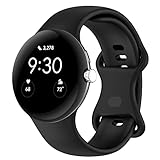
- Compatible Models: This replacement band is compatible with Google Pixel Watch 5 4 3 2 1 41mm [Note: Not suitable for 45mm.Watch NOT included]
- High-quality silicone material: This Google Pixel Watch band is made of high quality soft silicone material, soft and light, the strap is beautiful and ergonomic, light and simple, very comfortable to wear
- Easy to Intall and Uninstall: Simple and quick installation to get your Google Pixel watch safely in place. You can switch the wristband, which only takes a few seconds, adjust your wrist size directly without any tools, and the strap has multiple holes to adjust the size
- Multiple colors: Personalize your Google Pixel Watch Band to match your mood and daily wear style. It is very suitable for running, swimming, cycling, fitness, gathering, climbing, hiking and more outdoor activities
- Best Service: We provide a 24-month guarantee and 24/7 online customer service, prioritizing your satisfaction above all else. We believe our products are worthy of your trying
- On the watch: Open Play Store, find the face, and tap Install.
- From the phone’s Play Store: Open Watch faces, choose the face, and install it with the watch selected as the target device.
- In the Pixel Watch app: Open Watch faces, choose an available face, and tap Use on watch.
- Apply a face already on the watch: Touch and hold the current face, browse left or right, then tap the face you want.
Google’s instructions for getting apps on a Wear OS watch and managing Pixel Watch faces describe these routes.
If an available face still will not install, update first
Bring the watch and phone software and apps up to date, then retry the installation. For a watch system update, Google recommends putting the watch on its charger, ensuring it has at least 50% battery, and connecting it to Wi-Fi. To update watch apps, open Play Store > Manage apps > Update All. Google says system and app updates typically finish in under an hour; if an update takes longer, follow its Pixel Watch update troubleshooting.
Rank #2

- 【Compatible Models】The soft watch bands only compatible with Google Pixel 1 41mm,Google Pixel 2 41mm,Google Pixel 3 41mm,Google Pixel 4 41mm,Google Pixel 5 41mm watch band. It doesn't fit other models, please check your watch model before order.
- 【Premium Material】The pixel watch 3 41mm bands are made of high quality silicone material,flexible,lightweight,waterproof and very comfortable to wear.Don't worry about skin irritation.It will be a good partner for sports.
- 【Adjustable Size】Small size for 5.5" - 7.4" wrist, Large Size for 7.08" -8.6" wrist.
- 【Easy to install】Freely adjust to fit your wrist size,without any additional tools. Secure enough to avoid the falling off. Easy and simple installation or removal.
- 【Multicolors】Select a variety of color combinations to add unique hues to your daily life.
Also check for updates to the Pixel Watch app and the phone’s system software. Update guidance is a sensible step when installation is failing, but it cannot make a face available if Google Play no longer offers it for the device.
Check the watch’s internet and phone connection
- Make sure the phone is online, Bluetooth is on, and Airplane Mode is off.
- Confirm the watch can access the internet. If you use watch Wi-Fi, turn it on and try a supported network.
- Pixel Watch cannot connect to Wi-Fi networks that require a captive-portal sign-in page, or to 5 GHz networks.
For connection checks, follow Google’s Pixel Watch connectivity guidance. A connection issue is more likely when the phone and watch are also failing to communicate, rather than when only one face is unavailable.
Rank #3
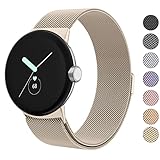
- ✅【Compatible Models】Amzpas Stainless Steel replacement Bands Specially Designed for Google Pixel Watch 2022 & Google Pixel Watch 2 2023 & Google Pixel Watch 3 (41mm) 2024.
- ✅【Comfortable Material】This Google Pixel Watch / Pixel Watch 2 / Pixel Watch 3 41mm band is made of fashionable & durable woven mesh stainless steel. Mesh Design makes this band more breathable and lightweight. It bring you a elegant and comfortable wearing experience, personalize your Pixel Watch / Pixel Watch 2 / Pixel Watch 3 41mm. Very soft and comfortable to wear.
- ✅【Unique Magnet Clasp Design】The Size for 5.9" -8.6" (150mm-220mm) wrist. The clasp are made of stylish, elegant magnetic metal loop. No buckle needed,easy to stick and lock your bands. Band size can be freely adjusted according to the circumstance of individual wrist. Strong Magnetic buckle keeps band secure.
- ✅【Easy Installation】This Google Pixel Watch / Pixel Watch 2 / Pixel Watch 3 41mm replacement band is easy to install or remove, be installed in the Pixel Watch only for a few seconds without any tools. The connectors of the stainless steel band at both ends lock into the watch interface precisely and securely, which is safe and firm, will not fall apart.
- ✅【Enjoy A 100% RISK-FREE SHOPPING EXPERIENCE】If you are not absolutely thrilled with our premium Google Pixel Watch / Pixel Watch 2 metal bands, just contact us and we will issue a fast replacement!
Restart and retry before considering a reset
If setup or connection appears frozen, Google recommends restarting the watch: hold the crown for three seconds, choose Restart, and wait for the watch to start. Bring the phone and watch close together and retry. For an unresponsive screen or face, try a normal restart first; use a hard reset only if restarting does not work. See Google’s pairing and connection steps and screen troubleshooting.
Independent reader supportYour contribution helps us test, update, and keep practical guides available for everyone.When a factory reset is appropriate
A factory reset is an escalation for a watch that continues to have device or pairing problems, not a first response to one unavailable face. It removes apps, settings, and data. If the watch itself remains unable to pair or recover after the checks above, use Google’s documented reset and recovery guidance, then pair it again.
Quick Recap
Best Value

- Durable Build: Crafted from high-quality silicone for total comfort on your wrist
- Secure Fit: Aluminum buckle ensures a solid hold to your watch
- Easy Adjustment: Pin-and-tuck buckle secures a perfect, customizable fit
- Elevate Your Style: Add a pop of color to your wrist with our color contrasting bands in 2 unique colorways
- One Size Fits Most: Fits wrist sizes of 5.7" (145mm) - 7.8" (200mm). Only compatible with Pixel Watch 5 45mm (2026) / Pixel Watch 4 45mm (2025) / Pixel Watch 3 45mm (2024). Not compatible with Pixel Watch 5/4/3/2/1 41mm.
Rank #4

- Compatible Models: Zeeflufun magnetic elastic braided replacement band features an upgraded connector for a gap-free fit. Specially designed for: Google Pixel Watch 5 41mm (2026), Pixel Watch 4 41mm (2025), Pixel Watch 3 41mm (2024), Pixel Watch 2 (2023), and Pixel Watch 1 (2022). Note: This Pixel Watch band does NOT fit 45mm models, including Pixel Watch 5 45mm, Pixel Watch 4 45mm and Pixel Watch 3 45mm.
- High-Quality Material: Made of premium elastic nylon, this Pixel Watch 41mm band offers a skin-friendly, breathable, and easy-to-clean surface for a comfortable wearing experience.
- Easy Adjustment: This Pixel Watch 5 band features a magnetic buckle for quick and secure fastening, allowing easy adjustment. Fits wrist sizes from 5.9 to 9.5 inches (150mm–240mm), suitable for most women and men.
- Stylish Design: Available in multiple colors, this Google Pixel 4 watch band features a sleek and fashionable design suitable for any occasion, from casual outings to professional settings. Whether you're dressing up for work or enjoying a leisurely stroll, this Pixel Watch band combines practicality with style, making it a versatile accessory for everyday wear.
- Friendly Service: If you have any questions about our product, please feel free to contact us anytime. We will respond to you promptly.
Product prices and availability are accurate as of the date/time indicated and are subject to change. Any price and availability information displayed on Amazon at the time of purchase will apply.
What’s actually slowing this PC down?
Pick the symptom - the matching free tool is one click away.




