To set up a new G-Shock Mudmaster or Frogman, first identify the watch’s exact model and module number, then follow the matching Casio operation guide. The two families—and even different generations within them—do not share one control layout. Choose the supported time-setting method, set the Home City or time zone, and adjust the date and time using that model’s instructions.
1. Find your watch’s model and module number
Before pressing buttons or turning a crown, look for the model reference and module number on the caseback, hang tag, box, or paperwork. Use the number to find the watch’s operation guide through Casio Support. Casio’s G-SHOCK Quick Guide lists guides for both Frogman and Mudmaster watches and identifies CASIO WATCHES as its smartphone app.
As an Amazon Associate I earn from qualifying purchases.
The module number matters because the controls and menus vary. For example, module 5502 uses a crown to select a Home Time City, module 3515 uses menus, and module 5725 has button-specific functions. Those are examples, not instructions for every Mudmaster or Frogman.
PC Slower Than It Used to Be?
A free scan shows the junk files, broken settings and background clutter dragging Windows down - then fixes them in one click.Free scan · Windows 10 & 11Crashes, No Sound, or Screen Glitches?
Random freezes, missing sound and display glitches usually trace back to one bad driver. Find and replace yours safely.Free scan · under a minute2. Choose a time-setting method your watch supports
| Method | Use it when | What to check |
|---|---|---|
| Phone and app | Your exact operation guide supports phone communication or app setup. | Follow the guide’s pairing steps in CASIO WATCHES. App features depend on the watch model. |
| On-watch setting | You want to set the watch directly, or the model’s guide describes manual controls. | Use the exact guide for its buttons, crown, menus, and setting sequence. |
Use the app only if the model guide calls for it
Casio’s guide index includes family-specific entries, but that does not mean every Mudmaster or Frogman generation pairs with a phone. For module 5501, the guide documents pairing and connection through CASIO WATCHES, as well as checking charge in the app and configuring certain settings. Confirm that your own module’s guide supports the feature before trying to pair.
#1 Best Overall
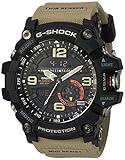
- MUDMASTER Built for Extreme Environments – Rugged construction is engineered to resist mud, dust, shock, dirt, and debris, making the GG1000-1A5 ready for demanding outdoor conditions.
- Twin Sensor Compass & Thermometer – Built-in digital compass measures direction across 16 points and 0° to 359°, while the thermometer measures temperatures from 14°F to 140°F (-10°C to 60°C).
- Shock Resistant & 200M Water Resistant – Legendary G-SHOCK toughness combines shock-resistant construction with 200-meter water resistance for dependable performance during outdoor adventures and demanding work.
- Super Illuminator LED Backlight – High-brightness white LED backlight features an auto light switch, selectable 1.5- or 3-second illumination, and afterglow for improved visibility in low-light environments.
- World Time & Advanced Timekeeping – Includes world time across 31 time zones and 48 cities, a 1/100-second stopwatch, 60-minute countdown timer, 5 daily alarms, snooze alarm, and full auto-calendar through 2099.
Use the watch controls described for your module
On-watch setting can look very different from one module to another. In the module 3515 guide, time adjustment uses Control Mode and settings menus. Module 5502 uses a crown for Home Time City selection. Find the matching guide rather than borrowing a button sequence from another G-Shock.
3. Set the Home City or time zone before adjusting the display
Home City or time zone is a separate setting from simply changing the displayed hour. Set the location that represents your local time first, then check the watch’s summer-time or daylight-saving setting. If you change only the hour, the watch may still use the wrong time-zone rules.
Rank #2

- Featuring a Black Band, Black Case, Scratch Resistant Mineral Crystal
- International products have separate terms, are sold from abroad and may differ from local products, including fit, age ratings, and language of product, labeling or instructions
- Original box and packaging: Watch back, but it might be different in the printed image
- Scratch resistant mineral
Labels differ by module. The module 5502 procedure offers “AT (AUTO),” “STD,” and “DST”; module 3515 documents “[AUTO],” “[OFF],” and “[ON].” Treat these as examples only. Use the exact terms and behavior shown in your guide, then set the date and time as directed there.
Free tools Windows power users keep installed
One-click scans. No signup required.
4. Set the time manually if automatic methods are unavailable
Some supported models offer a manual fallback when GPS, time-signal reception, or phone communication is unavailable. Casio’s module 5501 guide documents manual time and day adjustment; the 3515 guide covers manual Home City, date, time, and 12- or 24-hour settings. These procedures are module-specific, so follow your own guide’s controls and sequence.
Rank #3

- Shock-Resistant Durability: Built to withstand the toughest conditions, this G-Shock watch features a rugged resin case and bezel, perfect for outdoor adventures and extreme sports.
- 200M Water Resistance: Designed for water enthusiasts, it’s suitable for scuba diving, swimming, and snorkeling, providing reliable protection up to 200 meters.
- Electro-Luminescent Backlight: The blue-green EL backlight with afterglow ensures clear visibility of the time, day, and date, even in complete darkness.
- Precision Stopwatch & Countdown Timer: Measure elapsed and split times with the 1/100-second stopwatch, or set up a countdown timer with up to a 24-hour range, ideal for timing workouts or daily tasks.
- Multi-Alarm with Flash Alert: Stay on schedule with a customizable alarm, hourly chime, and flash alert that combines light and sound for added convenience.
5. Troubleshoot the symptom you see
The phone will not connect
Check that you are following the pairing procedure for the exact module and that the required app is open. For module 5501, Casio’s guide directs users to open CASIO WATCHES and retry the connection procedure. Do not assume that procedure applies to a different module.
The hands or day indicator look misaligned
Use the hand- or indicator-alignment procedure in your model’s operation guide. Casio’s module 5501 manual describes correcting hand and day-indicator alignment through CASIO WATCHES, while the 5725 guide includes a hand-alignment topic.
Rank #4
![CASIO GWG-2000-1A1JF [G-Shock Carbon MUDMASTER Radio Solar Triple Sensor]Shipped from Japan](https://m.media-amazon.com/images/I/51QajkabT4L._SL160_.jpg)
- Item Trademark: Casio
- Item Category: Watch
- Manufacturer: CASIO
- Manufacturer: CASIO
You think the watch needs charging
Consult the power instructions for your exact model. The module 5501 guide explains how to check charge in the app, but that does not establish a shared charging routine for all Mudmaster and Frogman watches.
The Tool Desk
Outbyte PC Repair FREEClear out junk files and repair common Windows errorsFree Scan →Outbyte Driver Updater FREEScan for outdated or missing drivers - takes under a minuteDriver Scan →Quick Recap
Best Value

- Auto LED Super Illuminator
- Digital Compass
- Shock Resistant
Casio guides referenced
- G-SHOCK Quick Guide — app and family-guide index.
- Casio Support — find the guide for the exact model or module.
Product prices and availability are accurate as of the date/time indicated and are subject to change. Any price and availability information displayed on Amazon at the time of purchase will apply.




