Pair the Approach S72 through the Garmin Golf app, configure your round settings from the watch, and allow time to build the round history Virtual Caddie needs. To choose between it and other Garmin golf watches, compare golf tools, membership-dependent features, size, health functions, and battery claims—but Garmin’s current comparison table does not yet list the S72, so its missing side-by-side specifications remain unconfirmed.
Pair your Garmin golf watch with your phone
Garmin directs users to pair through Garmin Golf rather than the phone’s Bluetooth settings. During first-run setup, accept the pairing prompt in the app. If you skipped it on the Approach S72:
As an Amazon Associate I earn from qualifying purchases.
- From the watch face, press the top button and open Settings > Connectivity > Pair Phone.
- Scan the QR code displayed by the watch with your phone.
- Follow the Garmin Golf app’s on-screen instructions to finish setup.
Garmin says connected features require pairing directly through Garmin Golf. See Garmin’s S72 phone-pairing instructions.
Recommended Free Tools
Set up golf settings before a round
On the S72, press the top button during a round and choose Settings to find golf options. Garmin lists scoring, average driver distance, PlaysLike preferences, map type, green contour shading, Virtual Caddie, Big Numbers, Tournament Mode, golf distance and wind units, club tracking, and rangefinder pairing.
#1 Best Overall
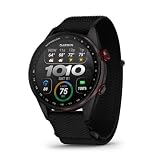
- Premium golf smartwatch features a lightweight titanium bezel, durable sapphire lens, ComfortFit fabric band, built-in flashlight, speaker and microphone
- Preloaded with 43,000+ full-color CourseView maps; option to get an enhanced view of the shot ahead with aerial imagery (requires a Garmin Golf membership)
- Up to 16 days in smartwatch mode and 20 hours of battery life in golf activity mode, so you can play round after round
- Look back on your round to see how heart rate affected your performance and start to see trends in how your biometric data and score relate (data presented is intended to be a close estimation of metrics tracked)
- Gain a better understanding of your swing during your range session and after your round with swing metrics, which include hand speed, backswing length, wrist rotation and more
Set your scoring preferences and units before you start. Then enable only the optional tools you expect to use. Availability can depend on membership, course data, compatible hardware, and tournament rules; contour information is not established for every course. Garmin identifies aerial imagery and green contour shading as Garmin Golf subscription features. See the S72 owner’s manual for its settings.
Tournament Mode and round rules
Tournament Mode disables PinPointer and PlaysLike. Garmin says those features are not allowed in sanctioned tournaments or rounds used for handicap calculation. Check the applicable rules for your event before using golf aids.
Rank #2

- Stunning 1.4” AMOLED display brings more than 43,000 preloaded full-color CourseView maps to life on your wrist
- Look good on and off the course with a lightweight, stylish design and ceramic bezel
- Battery life: up to 16 days of battery life in smartwatch mode and up to 20 hours in GPS mode
- Enhanced golf course maps allow you to see intricate details with the ability to pan and zoom for narrowing in on your target distance
- Improved virtual caddie feature shows your shot dispersion data and suggests a club based on a variety of factors, including your historical swing data, elevation, wind speed, wind direction and more
Start a round and use the golf menu
Garmin’s S70 manual describes a general round flow: charge the watch, press the action button, select Play Golf, wait for location and course selection, choose a course if prompted, confirm scoring, and select a tee box. This is S70-specific menu wording, not a confirmed set of exact S72 steps. The S70 hole view shows front, middle, and back distances; those figures are not a live distance to the pin because pin locations change. See the S70 owner’s manual.
Quick wins for a faster PC:
Clear out junk files and repair common Windows errorsFree Scan →Scan for outdated or missing drivers - takes under a minuteDriver Scan →For the S72, Garmin lists these options in the round menu:
Rank #3

- Stunning 1.2” color AMOLED display brings 43,000+ preloaded courses to life on your wrist
- Be comfortable on and off the course with the lightweight ComfortFit nylon strap
- Battery life: up to 10 days in smartwatch mode and up to 15 hours in GPS mode
- Get distance to the front, middle and back of the green and navigate bunkers, water hazards and layups with hazard view
- Playslike Distance feature tells you how far each shot truly is, with adjusted yardage for elevation changes
- View Green and View Map
- Virtual Caddie, Change Hole, and Change Green
- Search Timer and Scorecard
- PinPointer, Round Info, and Measure Shot
- Club Stats and Custom Targets
- Add Back Nine, Settings, and End Round
Garmin warns that using PinPointer from a golf cart can cause compass interference and affect accuracy. Menu details are in the S72 owner’s manual.
Turn on Virtual Caddie—and know what it needs
Virtual Caddie recommendations draw on hole layout, wind information, and club performance history. Garmin’s support guidance says the feature requires a compatible watch connected to Garmin Golf and either five rounds played with Club Prompt enabled or Approach CT10 sensors paired. Garmin also says five previously uploaded full scorecards with AutoShot data assigned to clubs can activate the feature on a new watch. The S72 manual likewise associates availability with five rounds, club tracking, and scorecard uploads.
Rank #4

- New round watch design with a high-resolution sunlight-readable display
- Battery life: up to 30 hours in GPS Mode
- More than 42,000 courses preloaded from around the world
- Keep score right on the watch and upload directly to the Garmin Golf app (when paired with a compatible smartphone) to participate in weekly leaderboards
- Automatically keep track of your score and how far you hit with each club with compatible Approach CT10 club tracking sensors (sold separately)
Virtual Caddie is unavailable while Big Numbers or Tournament Mode is enabled. If it does not appear, check the Garmin Golf connection, Club Prompt or sensor setup, your round and scorecard history, and those two settings. Do not expect recommendations immediately on a new watch. See Garmin’s Virtual Caddie support guidance.
What’s actually slowing this PC down?
Pick the symptom - the matching free tool is one click away.
What Garmin announced for the Approach S72
Garmin announced the Approach S72 on October 6, 2026, describing it as a flagship golf smartwatch. The announcement lists 43 mm and 47 mm sizes with AMOLED displays, on-wrist swing metrics, golf biometric data, green reading on select courses, driving-range activity, and putting analytics in the Garmin Golf app. Garmin says green reading on select courses requires an active Garmin Golf Membership. These are announced capabilities, not independent test findings, and they do not establish that every feature works on every course. See Garmin’s S72 announcement.
Best Value

- Slim design with a stunning 1.2” color AMOLED display that brings 43,000+ preloaded courses to life on your wrist
- Get distance to the front, middle and back of the green and navigate bunkers, water hazards and layups with hazard view
- Pair with optional Approach CT1 or CT10 club trackers (sold separately) for shot-tracking capabilities, so you have a clearer picture of which parts of your game to focus on
- Easily keep score as you play, and upload to the Garmin Golf smartphone app for advanced stat tracking and handicap calculation
- Leave your phone in the cart and get smart notifications sent to your wrist — including emails, texts and alerts when paired with your iPhone or Android smartphone
How to compare the S72 with other Garmin golf watches
Start with the golf features you will actually use, then weigh everyday smartwatch needs and fit. Garmin’s current displayed comparison lists the Approach S44, S50, S70, Venu X1, and fēnix 8—but not the S72. The figures below are Garmin’s stated values for the models and configurations shown on that page; they are not independent battery measurements.
| Feature | Approach S44 and S50 | Approach S70 | Approach S72 |
|---|---|---|---|
| Full course mapping, PlaysLike, and Touch Targeting | Listed with Garmin Golf membership | Listed as included | Not stated on Garmin’s displayed comparison; consult the S72 announcement for announced features |
| Green contours | Listed with membership | Listed with membership | Not stated on Garmin’s displayed comparison; the announcement mentions green reading on select courses with an active membership |
| Battery life | Up to 10 days in smartwatch mode; up to 15 hours in golf GPS mode | 47 mm: up to 16 days in smartwatch mode; up to 15 hours in golf GPS mode | Not stated on Garmin’s displayed comparison |
For these battery figures, Garmin states maximums for the named models and modes; they are not guarantees of typical use. Do not apply the S70 estimates to the S72. The feature and battery entries come from Garmin’s current comparison page.
Choose by golf tools first
Decide whether you need course maps, PlaysLike, Touch Targeting, green contours, or Virtual Caddie. Then check which of those features require membership on the exact model you are considering.
Do these 3 things before closing this tab:
1Clear out junk files and repair common Windows errors2Fix the driver behind crashes, sound loss and screen glitches3Repair Windows errors before they cause bigger problemsFactor in fit and everyday use
Compare available case sizes with your wrist and preferences, and consider whether you want health and smartwatch functions beyond golf. For the S72, Garmin has announced 43 mm and 47 mm options and golf-related biometric features; the current comparison page does not supply its full side-by-side specification set.
Verify the exact model and course coverage
Before buying, confirm the exact SKU, region, membership terms, course coverage, and current feature availability. Garmin’s comparison page currently omits the S72, so it cannot establish every difference between that watch and the listed models.
Quick Recap
Product prices and availability are accurate as of the date/time indicated and are subject to change. Any price and availability information displayed on Amazon at the time of purchase will apply.




