To check for a One UI 8 Watch beta, open Samsung Members on your paired Galaxy phone and look for a notice that applies to your exact watch model and country; the reviewed sources do not establish whether enrollment is open today. For an ordinary software update, use the watch’s update controls instead. Keep the watch powered and connected to Wi-Fi while checking.
Beta enrollment or stable update?
These are different routes. Beta enrollment depends on a current offer in Samsung Members for your model and market. A stable update, if available, can be checked through the watch’s system-update screen. Historical eligibility announcements do not confirm that a beta is currently open.
| What you want | Where to check | What to keep in mind |
|---|---|---|
| Beta enrollment | Samsung Members on the paired Galaxy phone | Look for a current notice for your exact model and country; review the current terms and known issues. |
| Ordinary system update | On the watch: Settings > System > About > System updates | Menu labels may vary by model. Availability can depend on the watch and market. |
How to check for a stable update
Google’s Wear OS guidance gives this on-watch route for checking for a system update:
- Open the app list on the watch.
- Choose Settings.
- Tap System, then About.
- Tap System updates and follow the prompts if an update is available.
Google says updates often install overnight while the watch charges. Keep it powered on and connected to Wi-Fi. If an update check has a problem, confirm Wi-Fi, temporarily disable Bluetooth, and retry. Menu wording can vary; consult Samsung’s manual for your model if the steps do not match.
The Tool Desk
Outbyte PC Repair FREERepair Windows errors before they cause bigger problemsFix Now →Outbyte Driver Updater FREEScan for outdated or missing drivers - takes under a minuteDriver Scan →#1 Best Overall
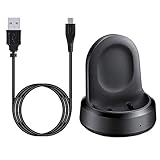
- ▶Compatibility: The charging dock compatible with Galaxy Watch 1 (42mm/46mm, SM-R800, SM-R810 SM-R815). [❌Not compatible with Galaxy Watch 4 Classic/ 4/ 3/ Active 2/ Active 1]
- ▶Magnetic & Speedy: the charger with strong magnetic, securely hold and keep Galaxy Watch in place for charging. It works like the original, a full charge takes about 2.5 hours.
- ▶Safety Protection: the Galaxy Watch charger build-in smart chips protecting watch from over-current or over-charging.
- ▶Convenience & Easy to Use: To get a boost charging, just plug the USB- A into USB port on your PC, laptop, notebook, wall charger or car charger. very convenient to charge Sense & Versa 3 at home, in office, in car or on travel.
- ▶Package includes: 1 x charging cradle for Galaxy Watch (smart watch is not included). with sincerely after-sales service, if have any question we will deal with it for you within 24 hours.
How to check for a One UI 8 Watch beta
The sources reviewed do not confirm that One UI 8 Watch beta enrollment remains open as of October 7, 2026. Historical coverage describes enrollment through a Samsung Members beta banner, but it is not a current eligibility list. If Samsung offers a banner for your watch and market, follow the on-screen instructions and review the current program terms before proceeding.
- Open Samsung Members on the paired Galaxy phone and sign in.
- Look for a One UI 8 Watch beta notice that applies to your exact watch model and country.
- If Samsung offers enrollment, follow its on-screen instructions and review the current terms and known issues.
- After enrollment, check for the update using the watch’s software-update controls or the Samsung-supported route shown for your device.
- Keep the watch powered and connected to Wi-Fi while checking or downloading.
If there is no banner or no update is offered, do not sideload firmware or change region or account details to force enrollment. Check Samsung support for your model and market, and use the stable update route if an update is available.
What happened with the beta and rollout
The following dates describe historical announcements and reporting, not current beta availability or a guarantee that an update is available for every watch today.
| Date | Historical announcement or report |
|---|---|
| July 22, 2025 | Samsung announced One UI 8 Watch availability for Galaxy Watch Ultra and said the update would progressively roll out to previous Galaxy Watch models. |
| August 5, 2025 | Samsung announced that One UI 8 Watch was planned to expand beyond the Galaxy Watch8 series later that year. |
| November 11, 2025 | Android Central reported a beta expansion to Galaxy Watch 5 and Watch 5 Pro, initially in South Korea, and reported Watch 6 and Watch 6 Classic beta testing. The report described enrollment through a Samsung Members banner. |
| 2026 first-quarter report | Samsung’s interim report identifies Galaxy Watch8 and Galaxy Watch8 Classic as running Wear OS 6 with One UI 8 Watch. |
These historical reports do not establish a current supported-model list. Samsung says feature availability can vary by market, model, and paired phone.
Quick wins for a faster PC:
Scan for outdated or missing drivers - takes under a minuteDriver Scan →Clear out junk files and repair common Windows errorsFree Scan →Fix the driver behind crashes, sound loss and screen glitchesFind Drivers →What One UI 8 Watch adds
Samsung describes Multi-Info Tiles as customizable views that can combine information such as health metrics and weather. Samsung also describes Running Coach, Vascular Load, and Antioxidant Index for Galaxy Watch Ultra. Availability and requirements differ by feature, watch, market, and paired phone; check Samsung’s current information for your device rather than assuming every feature is available on every model.
Rank #2
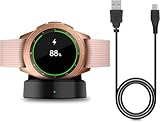
- Perfect Compatibility: This charger dock is designed for Samsung Galaxy Watch 42mm/46mm SM-R800/R810/R815 only. (Note: Not compatible with Galaxy Watch 7/6/5/4/3/Active 2/Active.)
- Charging Instructions: Could not be used with fast charger adapter and make sure that the charging current is below 5V/1A. We Suggest to charge the dock through Computer USB Port.
- Power Protection Inside (PTC): Keep safe from over-current or over-charging for Samsung Galaxy Watch when connected the power source. If you plug the charger after blue and green light flashed, there is no smartwatch the light isn't on.
- Portable Design: Compact and lightweight design, convenient for travelers and business users. Make your smart watch charging become more convenient.
- Easy to Use: Easy to know the charging status with LED Indicator and the charger came with a USB Cable only for Galaxy Watch Smart Watch.
Samsung says these named health features are not intended to detect, diagnose, treat, cure, mitigate, or prevent disease. They are not a substitute for medical advice. Consult a medical professional about health concerns.
What to do if no update appears
- Check which route you are using. Look in Samsung Members for a beta notice; use the watch’s system-update screen for an ordinary update.
- Confirm your model and market. Historical reporting is not proof of current eligibility, and availability can vary.
- Check the paired phone and connection. Samsung identifies the paired phone as a factor in feature availability; Google advises keeping the watch powered and connected to Wi-Fi for updates.
- Retry basic troubleshooting. If the update check fails, confirm Wi-Fi, temporarily disable Bluetooth, and retry.
- Use official support routes. Do not sideload firmware or alter region or account details to force an update. Consult Samsung support or the manual for your watch if menu steps differ.
Do you need to buy a new Galaxy Watch?
No. The research does not show that buying a watch is necessary to install an update. Beta access depends on a current offer for the exact model and market, and the reviewed sources do not establish current eligibility for any model. Choose a watch for its overall features, not solely to obtain beta software.
Health and safety limitations
Samsung’s named One UI 8 Watch health features are for wellness and personal reference, not medical diagnosis or treatment. Samsung recommends consulting a medical professional for advice. Do not rely on watch features as a substitute for professional care.
Rank #3

- 【COMPATIBILITY】The Galaxy Watch Charger is widely compatible with Samsung Galaxy Watch 7 40mm 44mm/ 6 40mm 44m/Galaxy Watch 6 Classic 43mm 47mm/5 40 44mm/5 Pro 44mm/4 40mm 44mm/4 Classic 42mm 46mm,Galaxy Watch 3 41mm/45mm(Not for gear S3),Active 2 40mm 44mm,Active 40mm
- 【Safe and Fast Charging】Built-in magnet,when placed on the wireless charger,Galaxy Watch 7/6/5/4 begins charging,it's that simple.The watch snaps in magnetically for a perfect fit every time.Voltage Regulator and Power protection circuit included ensures steady and faster charging.
- 【DURABILITY】This Galaxy watch 7/6/5/4 charger made of high-quality TPE material,6,000+ Bending Test ensure durability,long lasting and avoid scratching,the smooth polished surface and non-slip base protects your watch from rubbing with added fashion.
- 【Compact Design】Not only for charging cable,but also as charging stand and Sync data connector.All in one charging dock.Simple to charge,just plugs into USB port like laptop,power bank,outlet,wall charger.Compact design for easy storage.
- 【What You Get】1 x Charger dock cable for Samsung Galaxy Watch 7/6/5/4.Be full of confidence to get your backups as there is replacement or fully refund.If received this item in any deffective way,please feel free to contact us.Note: Power is 5V/1.0A
FAQ
Is the One UI 8 Watch beta still available?
The reviewed sources do not confirm its current status. Check Samsung Members for a current beta notice for your exact model and country.
How do I check for a regular Galaxy Watch update?
On the watch, open the app list and go to Settings > System > About > System updates. Menu labels can vary by model; keep the watch powered and connected to Wi-Fi.
Which watches are currently eligible for the beta?
The sources reviewed do not establish a current eligibility list. Historical reports mention some Watch 5 and Watch 6 models, but check Samsung Members for an offer that applies to your exact watch and market.
Rank #4
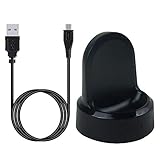
- ▶Compatibility: This charger compatible with Samsung Gear S2 & Gear S2 Classic (with 3.3 feet USB charging cable)
- ▶Durable & Premium: The Gear S2 charging dock is made of high quality and durable plastic, it works like the official charger. It is a good choice to replace lost or damaged charging cable.
- ▶Safe Protection: The Gear S2 charger build-in smart chips, provides a stable charging performance, protecting watch from over-current, over-voltage or short-circuit.
- ▶Convenience: To get a charge, just plug into USB port with power. very convenient to charge Gear S2 watch at home, in office, in car or on travel.
- ▶Package includes: 1 x Gear S2 charger dock, 1 x Micro-usb charging cable (smart watch is not included); with sincerely after-sales service, if have any question we will deal with it for you within 24 hours. Thank You!
Can I install One UI 8 Watch by sideloading firmware?
Use Samsung’s official enrollment and update routes instead. The reviewed guidance does not recommend sideloading firmware or changing region or account details to force enrollment.
Are One UI 8 Watch health features medical tools?
No. Samsung says the named health features are not intended to diagnose, treat, cure, mitigate, or prevent disease. Consult a medical professional for health advice.
Quick Recap
Product prices and availability are accurate as of the date/time indicated and are subject to change. Any price and availability information displayed on Amazon at the time of purchase will apply.




